display MAZDA MODEL 3 4-DOOR 2017 Owners Manual
[x] Cancel search | Manufacturer: MAZDA, Model Year: 2017, Model line: MODEL 3 4-DOOR, Model: MAZDA MODEL 3 4-DOOR 2017Pages: 612
Page 378 of 612
5–86
Interior Features
Bluetooth®
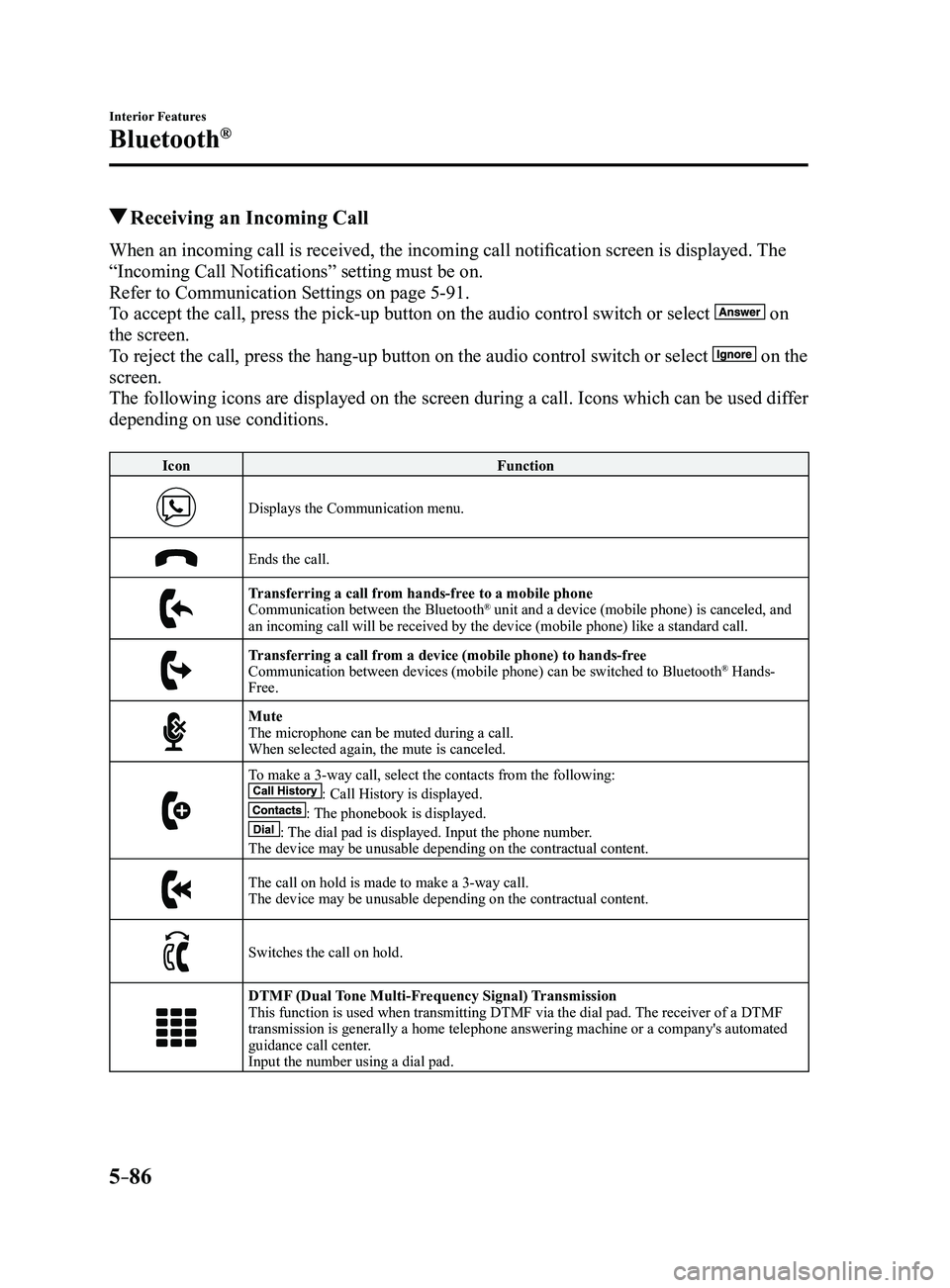
Receiving an Incoming Call
When an incoming call is received, the incoming call notification screen is displayed. The
“Incoming Call Notifications” setting must be on.
Refer to Communication Settings on page
5-91.
To accept the call, press the pick-up button on the audio control switch \
or select
on
the screen.
To reject the call, press the hang-up button on the audio control switch \
or select
on the
screen.
The following icons are displayed on the screen during a call. Icons whi\
ch can be used differ
depending on use conditions.
Icon Function
Displays the Communication menu.
Ends the call.
Transferring a call from hands-free to a mobile phoneCommunication between the Bluetooth® unit and a device (mobile phone) is canceled, and
an incoming call will be received by the device (mobile phone) like a \
standard call.
Transferring a call from a device (mobile phone) to hands-freeCommunication between devices (mobile phone) can be switched to Bluetooth® Hands-
Free.
MuteThe microphone can be muted during a call.
When selected again, the mute is canceled.
To make a 3-way call, select the contacts from the following:: Call History is displayed.: The phonebook is displayed.: The dial pad is displayed. Input the phone number.The device may be unusable depending on the contractual content.
The call on hold is made to make a 3-way call.The device may be unusable depending on the contractual content.
Switches the call on hold.
DTMF (Dual Tone Multi-Frequency Signal) TransmissionThis function is used when transmitting DTMF via the dial pad. The receiver of a DTMF
transmission is generally a home telephone answering machine or a compan\
y's automated
guidance call center.
Input the number using a dial pad.
Mazda3_8FL6-EA-16F_Edition2.indb 862016/08/10 17:38:08
Page 379 of 612
5–87
Interior Features
Bluetooth®
NOTE
If the ignition is switched off during a
hands-free call, the line is transferred
to the device (Mobile phone)
automatically.
If the DTMF code has two or more
digits or symbols, each one must be
transmitted individually.
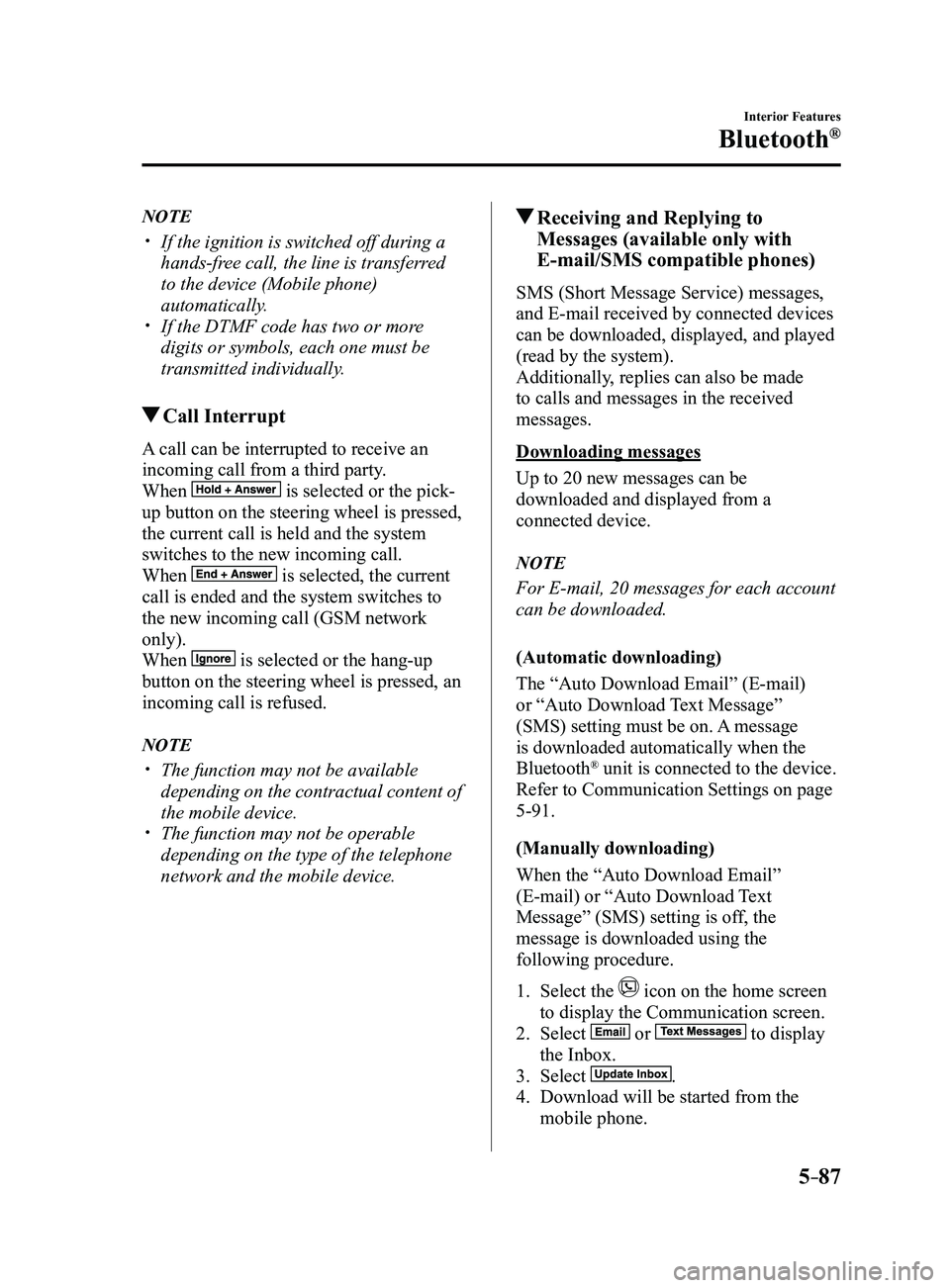
Call Interrupt
A call can be interrupted to receive an
incoming call from a third party.
When
is selected or the pick-
up button on the steering wheel is pressed,
the current call is held and the system
switches to the new incoming call.
When
is selected, the current
call is ended and the system switches to
the new incoming call (GSM network
only).
When
is selected or the hang-up
button on the steering wheel is pressed, an
incoming call is refused.
NOTE
The function may not be available
depending on the contractual content of
the mobile device.
The function may not be operable
depending on the type of the telephone
network and the mobile device.
Receiving and Replying to
Messages (available only with
E-mail/SMS compatible phones)
SMS (Short Message Service) messages,
and E-mail received by connected devices
can be downloaded, displayed, and played
(read by the system).
Additionally, replies can also be made
to calls and messages in the received
messages.
Downloading messages
Up to 20 new messages can be
downloaded and displayed from a
connected device.
NOTE
For E-mail, 20 messages for each account
can be downloaded.
(Automatic downloading)
The “Auto Download Email” (E-mail)
or “Auto Download Text Message”
(SMS) setting must be on. A message
is downloaded automatically when the
Bluetooth
® unit is connected to the device.
Refer to Communication Settings on page
5-91.
(Manually downloading)
When the “Auto Download Email”
(E-mail) or “Auto Download Text
Message” (SMS) setting is off, the
message is downloaded using the
following procedure.
1. Select the icon on the home screen
to display the Communication screen.
2. Select or to display
the Inbox.
3. Select .
4. Download will be started from the
mobile phone.
Mazda3_8FL6-EA-16F_Edition2.indb 872016/08/10 17:38:09
Page 380 of 612
5–88
Interior Features
Bluetooth®
NOTE
Attached data is not downloaded. Messages up to 1 kilobyte (E-mail)/140-
bytes (SMS) can be downloaded. A message list is created for each
device. If the connected device does not
correspond to MAP 1.0, the AT
command is used to download. The
downloaded message indicates that it is
already read.
Downloading using the AT command
may not function depending on the
connected device.
Receiving messages
(Method 1)
When a device receives a message, a
message received notification is displayed.
The “Email Notifications” (E-mail) or
“Text Notifications” (SMS) setting must
be on.
Refer to Communication Settings on page
5-91.
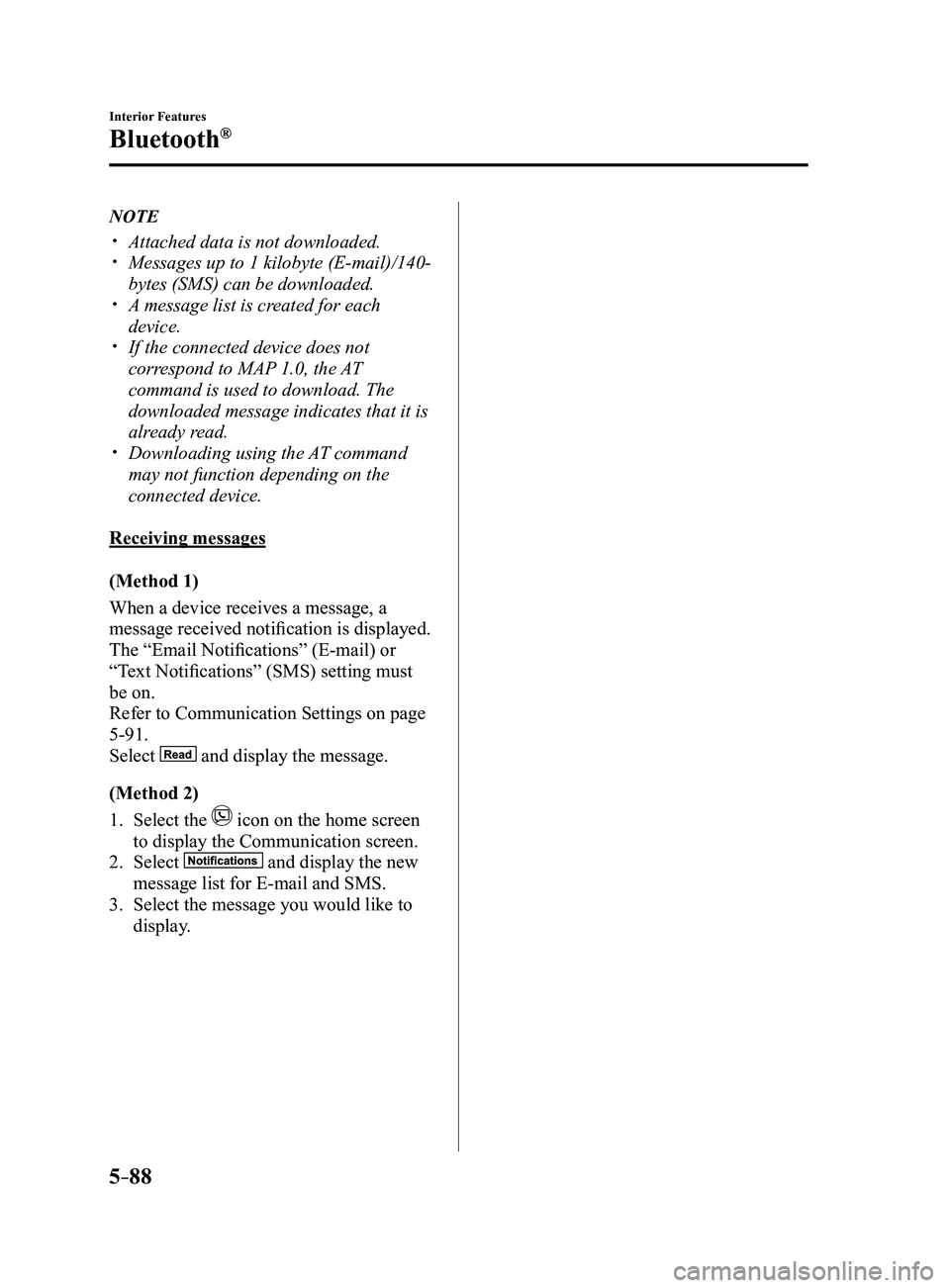
Select
and display the message.
(Method 2)
1. Select the icon on the home screen
to display the Communication screen.
2. Select and display the new
message list for E-mail and SMS.
3. Select the message you would like to
display.
Mazda3_8FL6-EA-16F_Edition2.indb 882016/08/10 17:38:09
Page 381 of 612

5–89
Interior Features
Bluetooth®
The following icons are displayed in the lower part of the details on th\
e message. Icons
which can be used differ depending on use conditions.
IconFunction
Displays the Communication menu.
Displays the inbox.
Plays back a message.
When selected again, playback is temporarily stopped.
Displays the previous message.
Displays the next message.
Only replies to the sender of the currently displayed message.Select the sentence on the displayed reply screen and select the sentenc\
e for sending from
the preset message.
Select
.
(Only E-mail)Replies to all members including CC.
Select the sentence on the displayed reply screen and select the sentenc\
e for sending from
the preset message.
Select
.
Makes a call to a person who sent a message.For E-mail, this function may not work depending on the device.
Deletes a message.The messages stored in a device is also deleted.
NOTE
Up to three preset messages can be selected.
Mazda3_8FL6-EA-16F_Edition2.indb 892016/08/10 17:38:10
Page 382 of 612
5–90
Interior Features
Bluetooth®
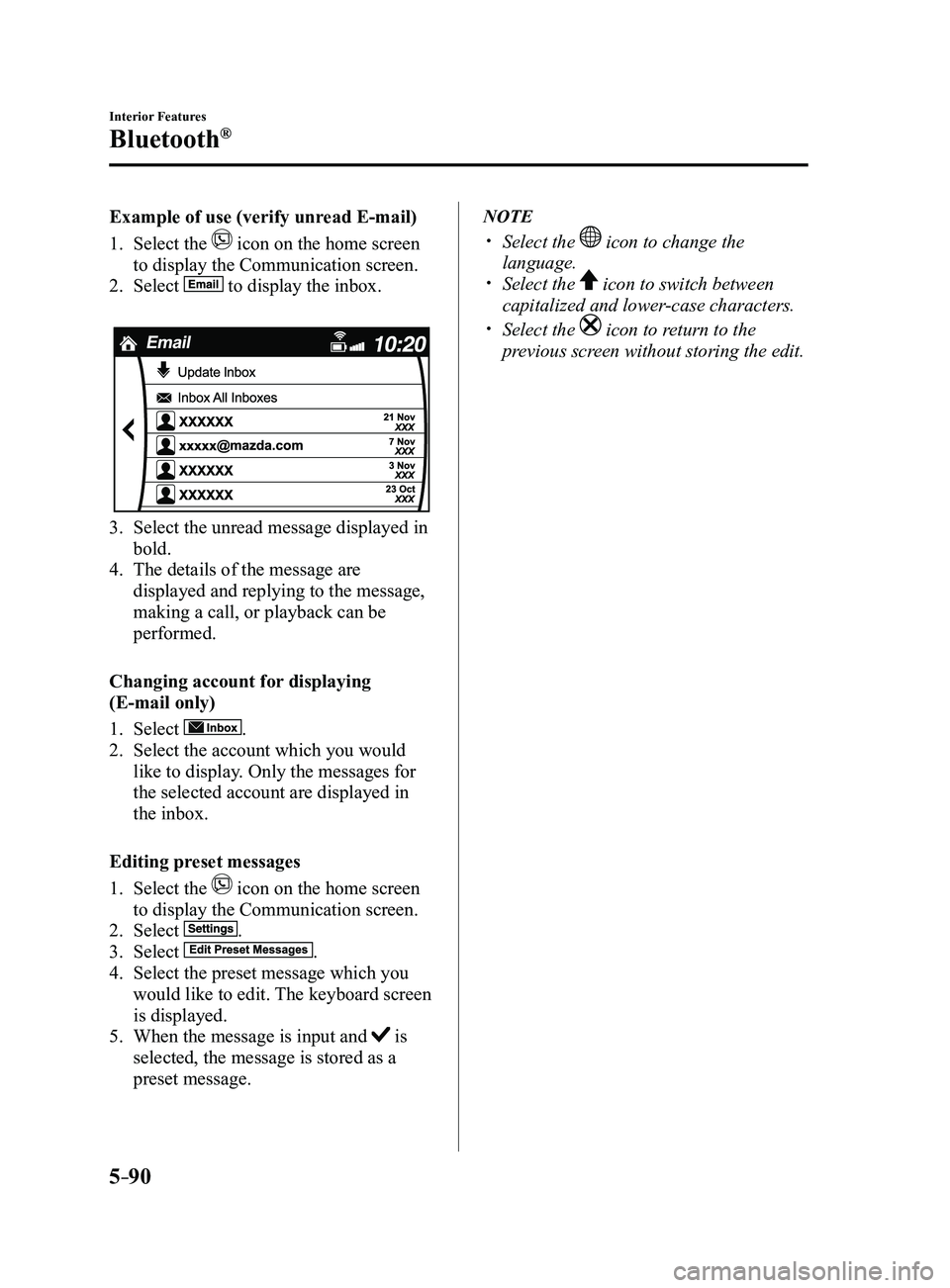
Example of use (verify unread E-mail)
1. Select the icon on the home screen
to display the Communication screen.
2. Select to display the inbox.
3. Select the unread message displayed in
bold.
4. The details of the message are
displayed and replying to the message,
making a call, or playback can be
performed.
Changing account for displaying
(E-mail only)
1. Select .
2. Select the account which you would
like to display. Only the messages for
the selected account are displayed in
the inbox.
Editing preset messages
1. Select the icon on the home screen
to display the Communication screen.
2. Select .
3. Select .
4. Select the preset message which you
would like to edit. The keyboard screen
is displayed.
5. When the message is input and is
selected, the message is stored as a
preset message.
NOTE
Select the icon to change the
language. Select the icon to switch between
capitalized and lower-case characters.
Select the icon to return to the
previous screen without storing the edit.
Mazda3_8FL6-EA-16F_Edition2.indb 902016/08/10 17:38:12
Page 383 of 612
5–91
Interior Features
Bluetooth®
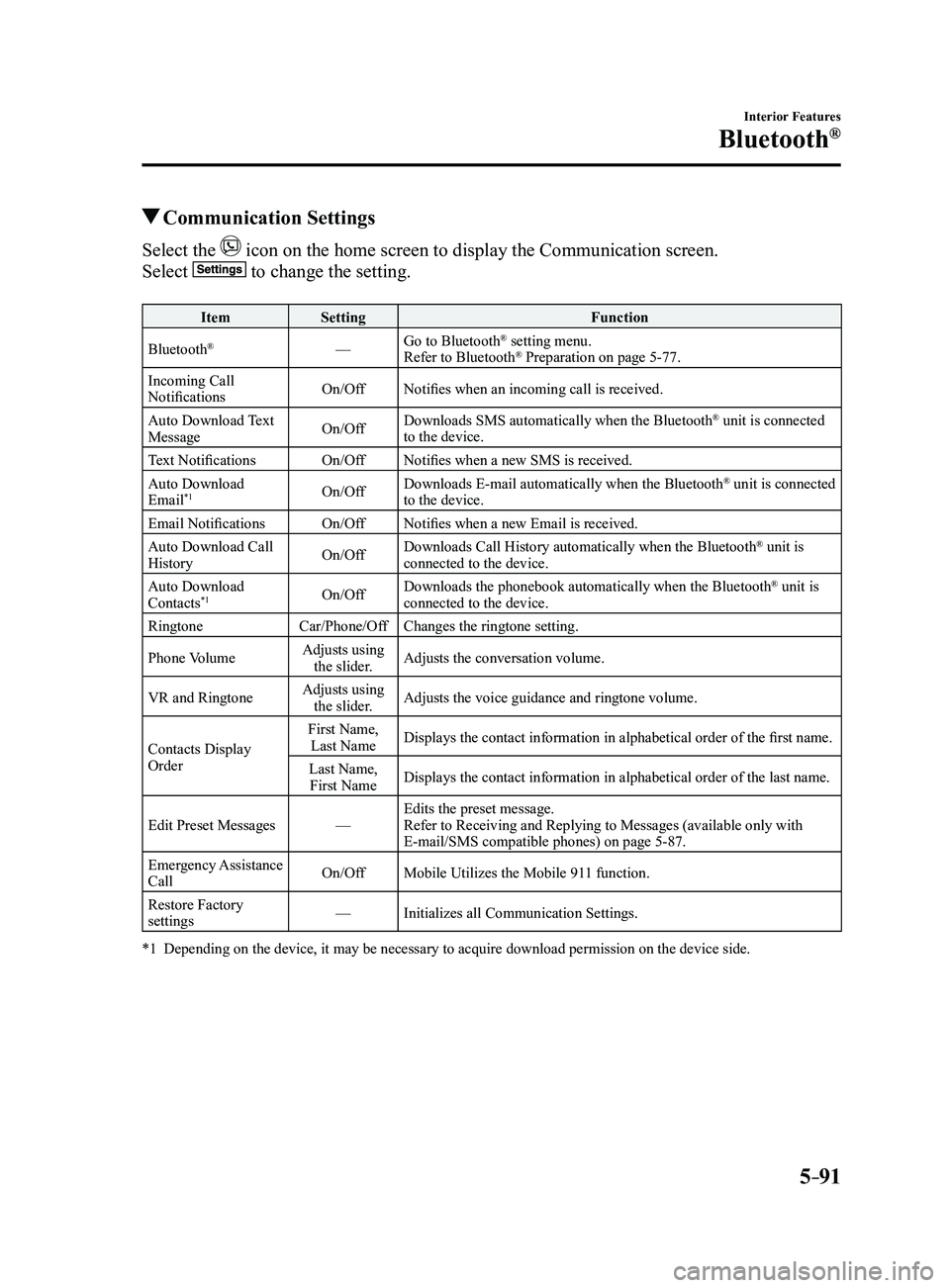
Communication Settings
Select the icon on the home screen to display the Communication screen.
Select to change the setting.
ItemSetting Function
Bluetooth
®— Go to Bluetooth® setting menu.
Refer to Bluetooth® Preparation on page 5-77.
Incoming Call
Notifications On/Off
Notifies when an incoming call is received.
Auto Download Text
Message On/OffDownloads SMS automatically when the Bluetooth
® unit is connected
to the device.
Text Notifications On/OffNotifies when a new SMS is received.
Auto Download
Email
*1On/Off Downloads E-mail automatically when the Bluetooth® unit is connected
to the device.
Email Notifications On/OffNotifies when a new Email is received.
Auto Download Call
History On/OffDownloads Call History automatically when the Bluetooth
® unit is
connected to the device.
Auto Download
Contacts
*1On/Off Downloads the phonebook automatically when the Bluetooth® unit is
connected to the device.
Ringtone Car/Phone/OffChanges the ringtone setting.
Phone Volume Adjusts using
the slider. Adjusts the conversation volume.
VR and Ringtone Adjusts using
the slider. Adjusts the voice guidance and ringtone volume.
Contacts Display
Order First Name,
Last Name Displays the contact information in alphabetical order of the first name.
Last Name, First Name Displays the contact information in alphabetical order of the last name.\
Edit Preset Messages —Edits the preset message.
Refer to Receiving and Replying to Messages (available only with
E-mail/SMS compatible phones) on page
5-87.
Emergency Assistance
Call On/Off
Mobile Utilizes the Mobile 911 function.
Restore Factory
settings —
Initializes all Communication Settings.
*1 Depending on the device, it may be necessary to acquire downloa d permission on the device side.
Mazda3_8FL6-EA-16F_Edition2.indb 912016/08/10 17:38:12
Page 384 of 612
5–92
Interior Features
Bluetooth®
*Some models.
Bluetooth® Audio*
Applicable Bluetooth® specification
(Recommended)
Ver. 1.1/1.2/2.0
EDR/2.1 EDR/3.0
(conformity)
Response profile
A2DP (Advanced Audio Distribution
Profile) Ver. 1.0/1.2 AVRCP (Audio/Video Remote Control
Profile) Ver. 1.0/1.3/1.4
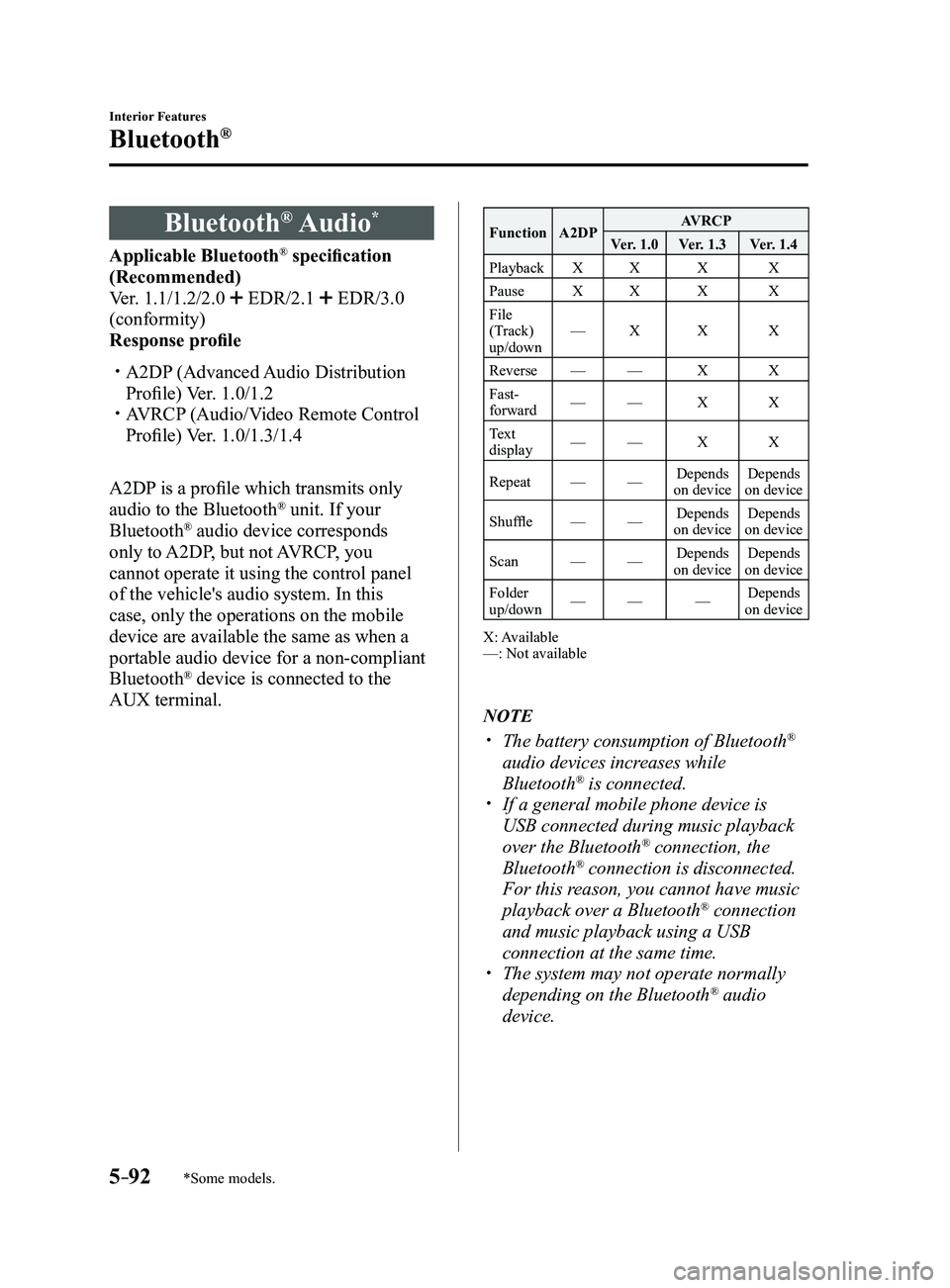
A2DP is a profile which transmits only
audio to the Bluetooth
® unit. If your
Bluetooth® audio device corresponds
only to A2DP, but not AVRCP, you
cannot operate it using the control panel
of the vehicle's audio system. In this
case, only the operations on the mobile
device are available the same as when a
portable audio device for a non-compliant
Bluetooth
® device is connected to the
AUX terminal.
Function A2DP AVRCP
Ver. 1.0 Ver. 1.3 Ver. 1.4
Playback XX X X
Pause XX X X
File
(Track)
up/down —
X X X
Reverse —— X X
Fast-
forward —
— X X
Text
display —
— X X
Repeat ——Depends
on device Depends
on device
Shuffle ——Depends
on device Depends
on device
Scan ——Depends
on device Depends
on device
Folder
up/down —
— —Depends
on device
X: Available
—: Not available
NOTE
The battery consumption of Bluetooth®
audio devices increases while
Bluetooth
® is connected. If a general mobile phone device is
USB connected during music playback
over the Bluetooth® connection, the
Bluetooth® connection is disconnected.
For this reason, you cannot have music
playback over a Bluetooth
® connection
and music playback using a USB
connection at the same time.
The system may not operate normally
depending on the Bluetooth® audio
device.
Mazda3_8FL6-EA-16F_Edition2.indb 922016/08/10 17:38:12
Page 385 of 612
5–93
Interior Features
Bluetooth®
How to Use the Bluetooth® Audio System
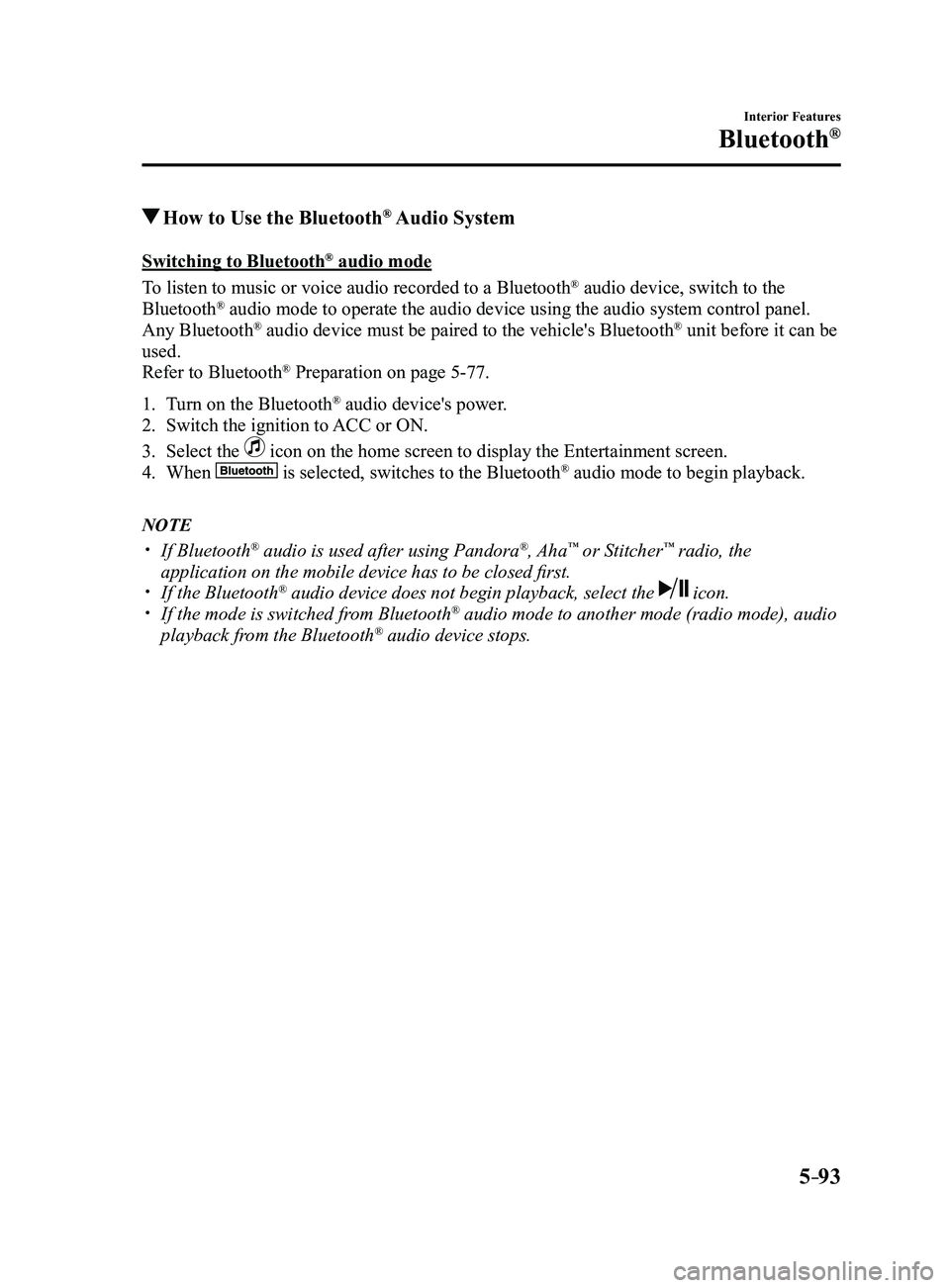
Switching to Bluetooth® audio mode
To listen to music or voice audio recorded to a Bluetooth
® audio device, switch to the
Bluetooth® audio mode to operate the audio device using the audio system control p\
anel.
Any Bluetooth® audio device must be paired to the vehicle's Bluetooth® unit before it can be
used.
Refer to Bluetooth
® Preparation on page 5-77.
1. Turn on the Bluetooth® audio device's power.
2. Switch the ignition to ACC or ON.
3. Select the icon on the home screen to display the Entertainment screen.
4. When is selected, switches to the Bluetooth® audio mode to begin playback.
NOTE
If Bluetooth® audio is used after using Pandora®, Aha™ or Stitcher™ radio, the
application on the mobile device has to be closed first.
If the Bluetooth® audio device does not begin playback, select the icon. If the mode is switched fr om Bluetooth® audio mode to another mode (radio mode), audio
playback from the Bluetooth® audio device stops.
Mazda3_8FL6-EA-16F_Edition2.indb 932016/08/10 17:38:13
Page 386 of 612
5–94
Interior Features
Bluetooth®
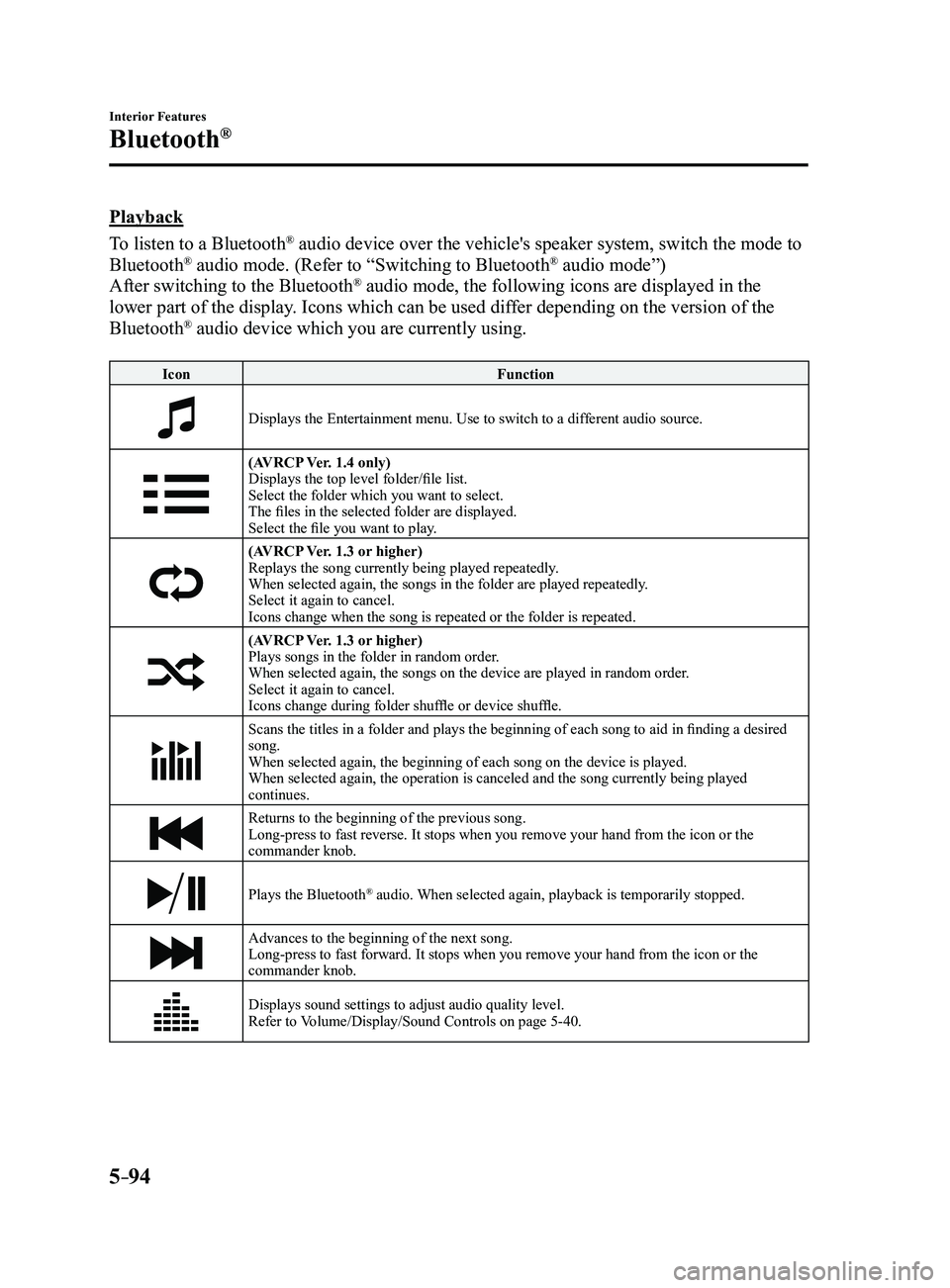
Playback
To listen to a Bluetooth
® audio device over the vehicle's speaker system, switch the mode to
Bluetooth® audio mode. (Refer to “Switching to Bluetooth® audio mode”)
After switching to the Bluetooth® audio mode, the following icons are displayed in the
lower part of the display. Icons which can be used differ depending on the version of the
Bluetooth
® audio device which you are currently using.
Icon Function
Displays the Entertainment menu. Use to switch to a different audio source.
(AVRCP Ver. 1.4 only)
Displays the top level folder/file list.
Select the folder which you want to select.
The files in the selected folder are displayed.
Select the file you want to play.
(AVRCP Ver. 1.3 or higher)Replays the song currently being played repeatedly.
When selected again, the songs in the folder are played repeatedly.
Select it again to cancel.
Icons change when the song is repeated or the folder is repeated.
(AVRCP Ver. 1.3 or higher)Plays songs in the folder in random order.
When selected again, the songs on the device are played in random order.
Select it again to cancel.
Icons change during folder shuffle or device shuffle.
Scans the titles in a folder and plays the beginning of each song to aid in finding a desired
song.
When selected again, the beginning of each song on the device is played.\
When selected again, the operation is canceled and the song currently be\
ing played
continues.
Returns to the beginning of the previous song.
Long-press to fast reverse. It stops when you remove your hand from the \
icon or the
commander knob.
Plays the Bluetooth® audio. When selected again, playback is temporarily stopped.
Advances to the beginning of the next song.
Long-press to fast forward. It stops when you remove your hand from the \
icon or the
commander knob.
Displays sound settings to adjust audio quality level.
Refer to Volume/Display/Sound Controls on page 5-40.
Mazda3_8FL6-EA-16F_Edition2.indb 942016/08/10 17:38:13
Page 387 of 612
5–95
Interior Features
Bluetooth®
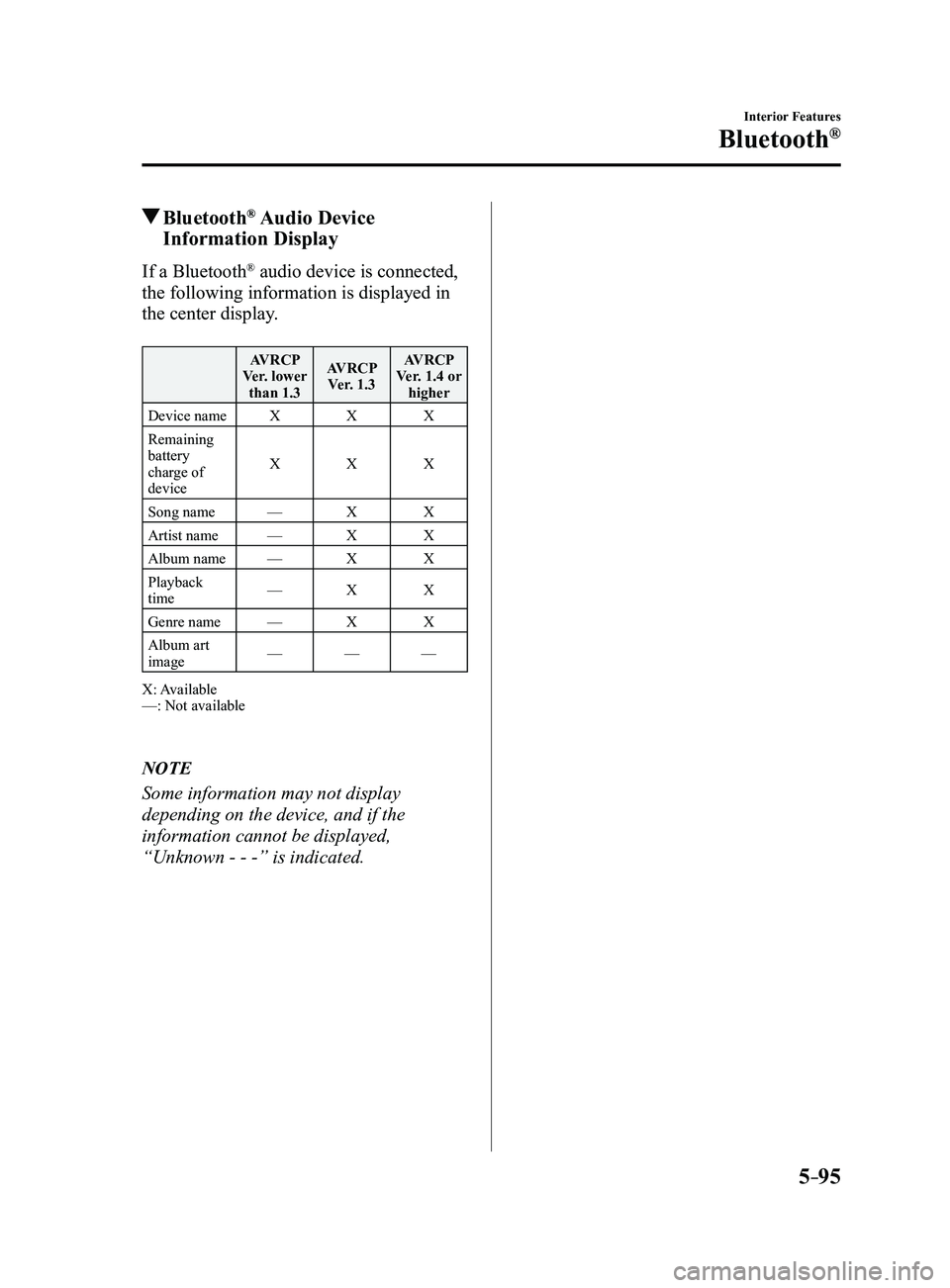
Bluetooth® Audio Device
Information Display
If a Bluetooth® audio device is connected,
the following information is displayed in
the center display.
AVRCP
Ver. lower than 1.3 AVRCP
Ver. 1.3 AVRCP
Ver. 1.4 or higher
Device name XXX
Remaining
battery
charge of
device X
XX
Song name —XX
Artist name —XX
Album name —XX
Playback
time —
XX
Genre name —XX
Album art
image —
——
X: Available
—: Not available
NOTE
Some information may not display
depending on the device, and if the
information cannot be displayed,
“Unknown - - -” is indicated.
Mazda3_8FL6-EA-16F_Edition2.indb 952016/08/10 17:38:13