ESP MAZDA MODEL 3 4-DOOR 2017 User Guide
[x] Cancel search | Manufacturer: MAZDA, Model Year: 2017, Model line: MODEL 3 4-DOOR, Model: MAZDA MODEL 3 4-DOOR 2017Pages: 612
Page 181 of 612
4–51
When Driving
Switches and Controls
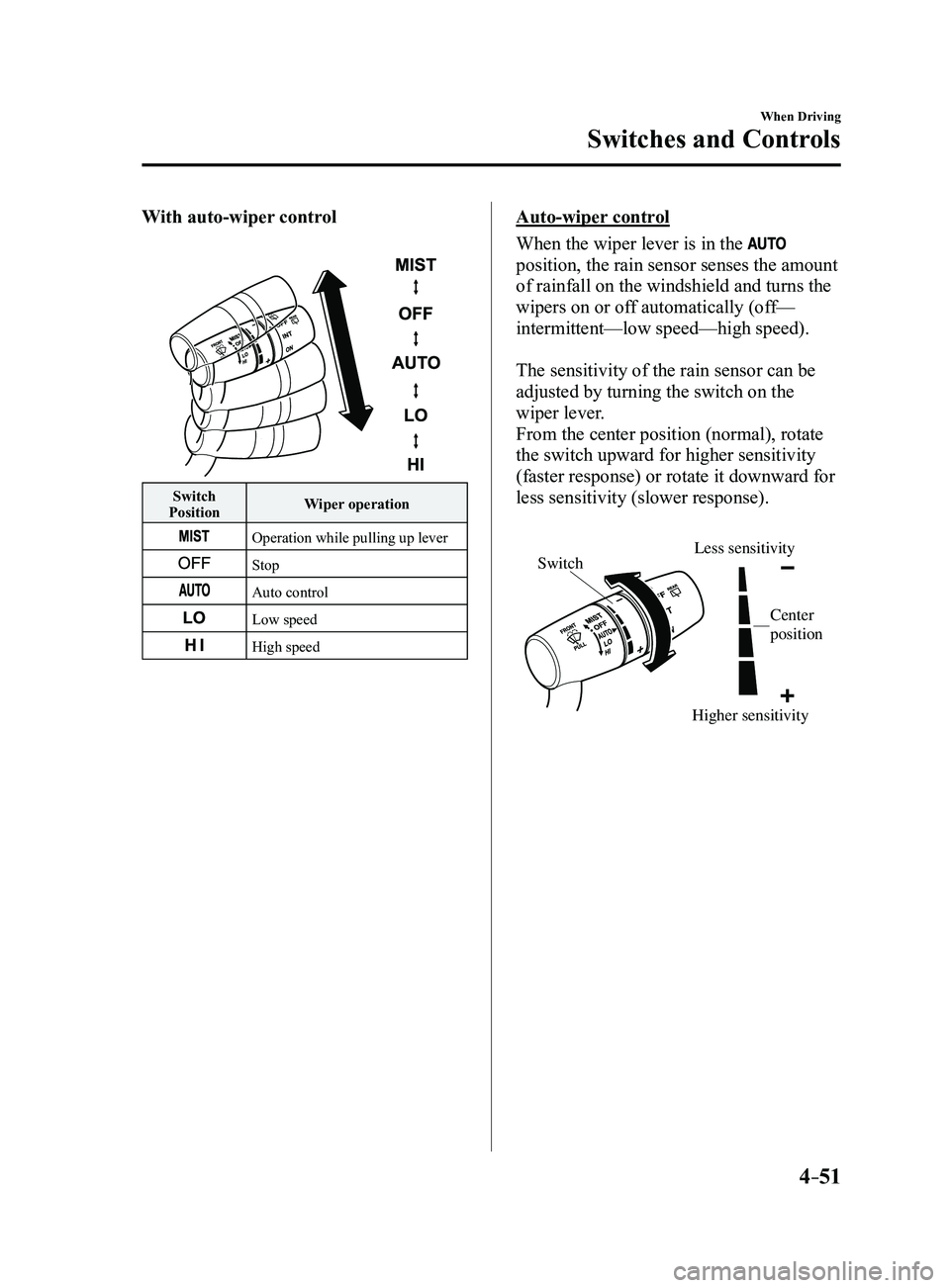
With auto-wiper control
Switch
Position Wiper operation
Operation while pulling up lever
Stop
Auto control
Low speed
High speed
Auto-wiper control
When the wiper lever is in the
position, the rain sensor senses the amount
of rainfall on the windshield and turns the
wipers on or off automatically (off—
intermittent—low speed—high speed).
The sensitivity of the rain sensor can be
adjusted by turning the switch on the
wiper lever.
From the center position (normal), rotate
the switch upward for higher sensitivity
(faster response) or rotate it downward for
less sensitivity (slower response).
Higher sensitivity
Less sensitivitySwitch
Center
position
Mazda3_8FL6-EA-16F_Edition2.indb 512016/08/10 17:36:20
Page 198 of 612
4–68
When Driving
ABS/TCS/DSC
Antilock Brake System
(ABS)
The ABS control unit continuously
monitors the speed of each wheel. If
one wheel is about to lock up, the ABS
responds by automatically releasing and
reapplying that wheel's brake.
The driver will feel a slight vibration in
the brake pedal and may hear a chattering
noise from the brake system. This is
normal ABS system operation. Continue to
depress the brake pedal without pumping
the brakes.
The warning light turns on when the
system has a malfunction.
Refer to Warning Lights on page
4-24.
WARNING
Do not rely on ABS as a substitute for
safe driving:The ABS cannot compensate for unsafe
and reckless driving, excessive speed,
tailgating (following another vehicle
too closely), driving on ice and snow,
and hydroplaning (reduced tire friction
and road contact because of water on
the road surface). You can still have an
accident.
NOTE
Braking distances may be longer on
loose surfaces (snow or gravel, for
example) which usually have a hard
foundation. A vehicle with a normal
braking system may require less
distance to stop under these conditions
because the tires will build up a wedge
of surface layer when the wheels skid.
The sound of the ABS operating may
be heard when starting the engine
or immediately after starting the
vehicle, however, it does not indicate a
malfunction.
Mazda3_8FL6-EA-16F_Edition2.indb 682016/08/10 17:36:28
Page 208 of 612
4–78
When Driving
Drive Selection
*Some models.
Drive Selection*
Drive selection is a system to switch the vehicle's drive mode. When the sport mode
is selected, vehicle's response against accelerator operation is enhance\
d. This provides
additional quick acceleration which may be needed to safely make maneuvers such as lane
changes, merging onto freeways, or passing other vehicles.
CAUTION
Do not use the sport mode when driving on slippery roads such as wet or snow-covered
roads. It may cause tire slipping.
NOTE
When the sport mode is selected, driving at higher engine speeds increases and it may
increase fuel consumption. Mazda recommends that you cancel the sport mode on normal
driving.
Drive mode cannot be switched in the following conditions:
ABS/TCS/DSC is operating The Mazda Radar Cruise Control (MRCC) system/cruise control is operating. Steering wheel is being operated abruptly
Mazda3_8FL6-EA-16F_Edition2.indb 782016/08/10 17:36:34
Page 218 of 612
4–88
When Driving
i-ACTIVSENSE
*Some models.
Blind Spot Monitoring (BSM)*
The Blind Spot Monitoring (BSM) is designed to assist the driver in checking the area to the
rear of the vehicle on both sides during lane changes by notifying the d\
river of the presence
of vehicles approaching from the rear in an adjacent lane.
The Blind Spot Monitoring (BSM) detects vehicles approaching from the rear while
traveling in the forward direction at a speed of 10 km/h (6.3 mph) or faster and notifies
the driver by turning on the Blind Spot Monitoring (BSM) warning indicator light and
displaying the vehicle detection screen (vehicles with active driving d\
isplay).
If the turn signal lever is operated to signal a turn in the direction in which the Blind Spot
Monitoring (BSM) warning indicator light is illuminated while the approaching vehicle is
detected, the Blind Spot Monitoring (BSM) notifies the driver of possible danger by turning
on the Blind Spot Monitoring (BSM) warning indicator light, and by activating the warning
sound and the warning screen indicator display (vehicles with active dr\
iving display).
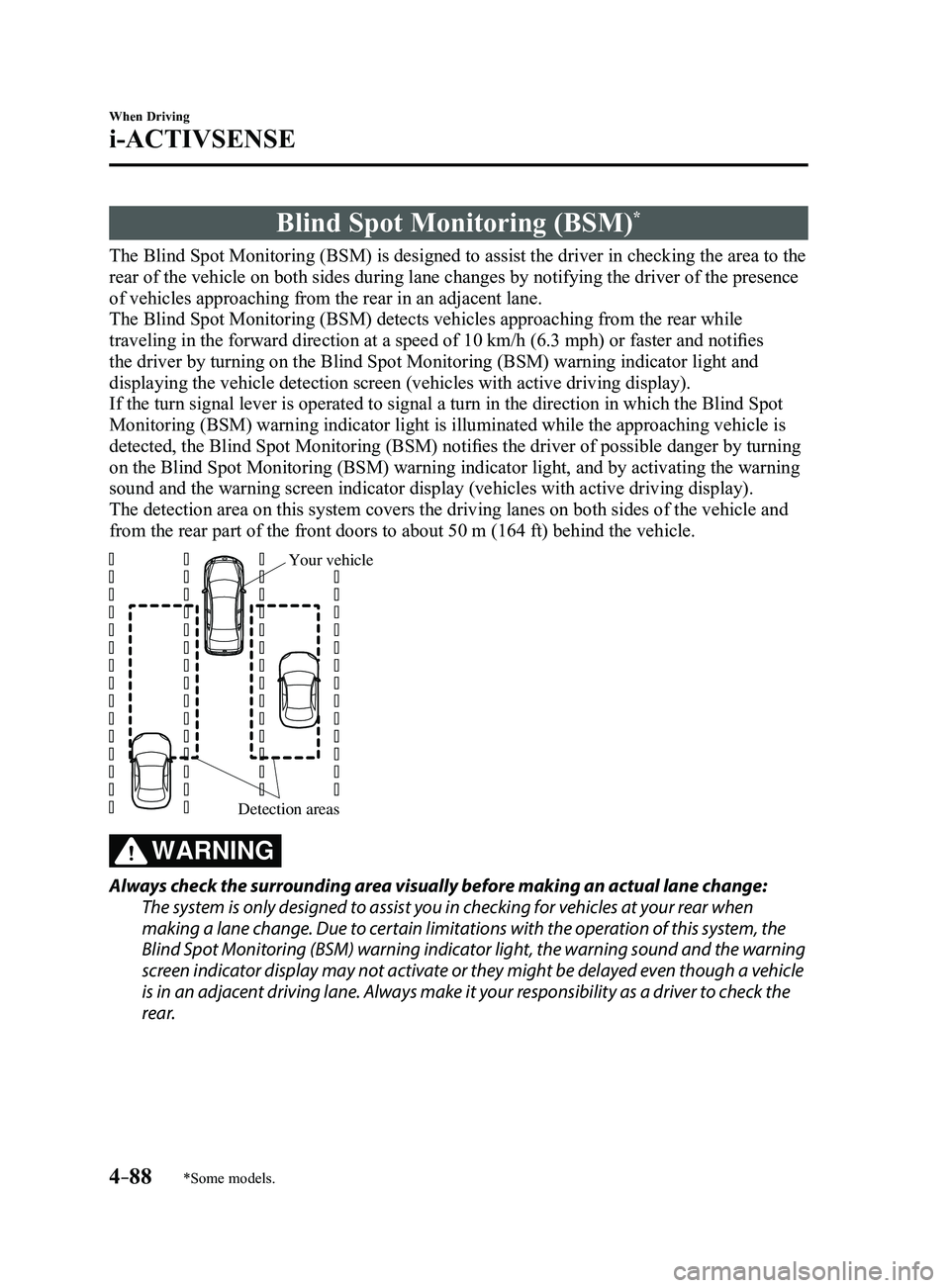
The detection area on this system covers the driving lanes on both sides\
of the vehicle and
from the rear part of the front doors to about 50 m (164 ft) behind th\
e vehicle.
Detection areas
Your vehicle
WARNING
Always check the surrounding area visually before making an actual lane change:
The system is only designed to assist you in checking for vehicles at your rear when
making a lane change. Due to certain limitations with the operation of this system, the
Blind Spot Monitoring (BSM) warning indicator light, the warning sound and the warning
screen indicator display may not activate or they might be delayed even though a vehicle
is in an adjacent driving lane. Always make it your responsibility as a driver to check the
rear.
Mazda3_8FL6-EA-16F_Edition2.indb 882016/08/10 17:36:37
Page 225 of 612
4–95
When Driving
i-ACTIVSENSE
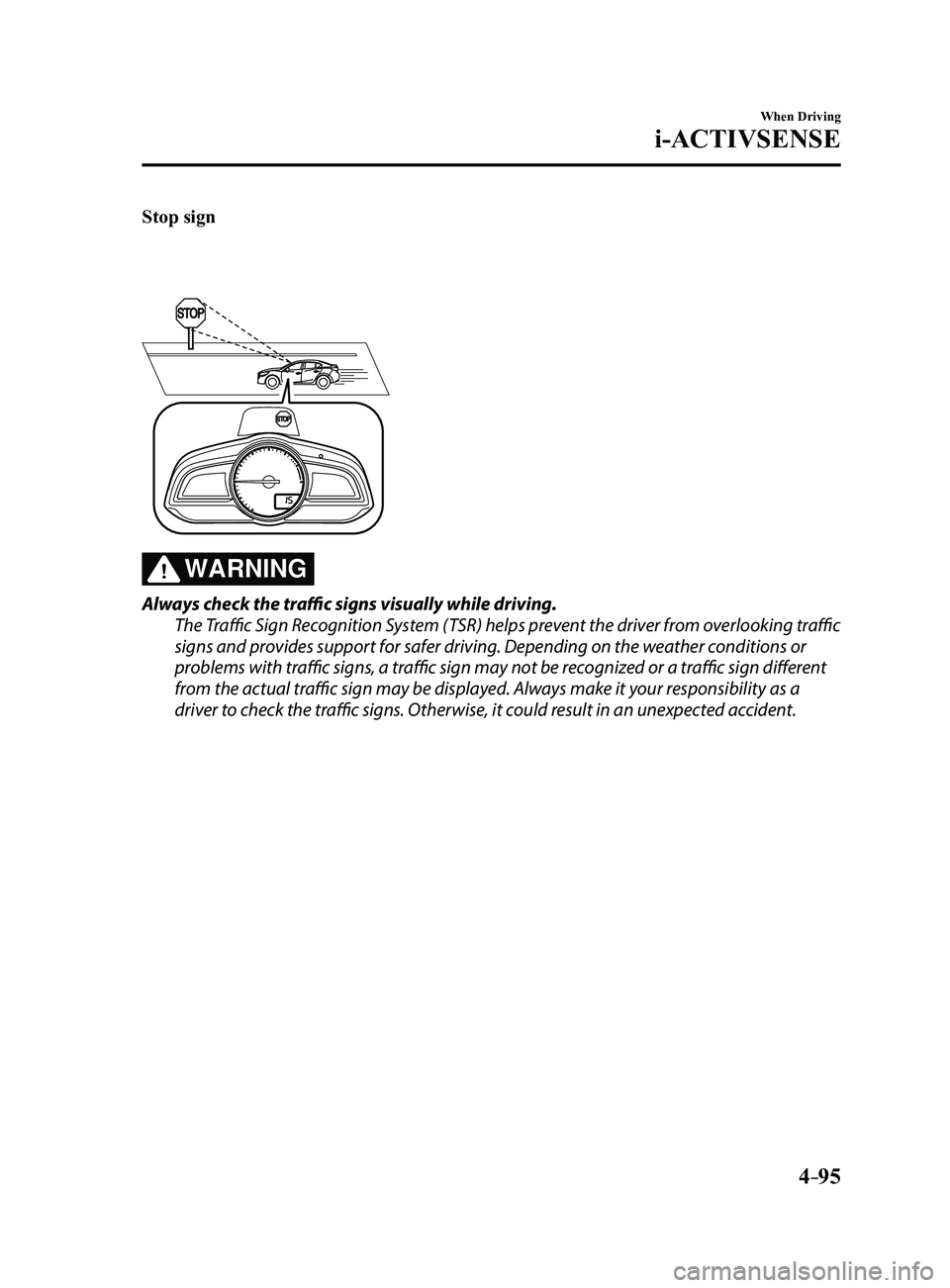
Stop sign
WARNING
Always check the traffic signs visually while driving.
The Traffic Sign Recognition System (TSR) helps prevent the driver from overlooking traffic
signs and provides support for safer driving. Depending on the weather conditions or
problems with traffic signs, a traffic sign may not be recognized or a traffic sign different
from the actual traffic sign may be displayed. Always make it your responsibility as a
driver to check the traffic signs. Otherwise, it could result in an unexpected accident.
Mazda3_8FL6-EA-16F_Edition2.indb 952016/08/10 17:36:41
Page 235 of 612
4–105
When Driving
i-ACTIVSENSE
WARNING
Always check the surrounding area visually before actually putting the vehicle in
reverse:The system is only designed to assist you in checking for vehicles at the rear when putting
the vehicle in reverse. Due to certain limitations with the operation of this system, the
Blind Spot Monitoring (BSM) warning indicator lights may not flash or it might be delayed
even though a vehicle is behind your vehicle. Always make it your responsibility as a
driver to check the rear.
NOTE
In the following cases, the Blind Spot Monitoring (BSM) warning indica\
tion/warning
light turns on and operation of the system is stopped. If the Blind Spot\
Monitoring (BSM)
warning indication/warning light remains illuminated, have the vehicle inspected at an
Authorized Mazda Dealer as soon as possible.
Some problem with the system including the Blind Spot Monitoring (BSM) warnin\
g
indicator lights has occurred. A large deviation in the installation position of a radar sensor (rear) on the vehicle has
occurred. There is a large accumulation of snow or ice on the rear bumper near a radar sensor
(rear). Driving on snow-cover ed roads for long periods. The temperature near the radar sensors becomes extremely hot due to driving for long
periods on slopes during the summer. The battery voltage has decr eased.
Mazda3_8FL6-EA-16F_Edition2.indb 1052016/08/10 17:36:45
Page 259 of 612
4–129
When Driving
i-ACTIVSENSE
WARNING
Do not rely completely on the Smart City Brake Support (SCBS) system:
The Smart City Brake Support (SCBS) system is only designed to reduce damage in the
event of a collision. Over reliance on the system leading to the accelerator pedal or
brake pedal being mistakenly operated could result in an accident.
The Smart City Brake Support (SCBS) is a system which operates in response to a
vehicle ahead. The system may not be able to detect or react to 2-wheeled vehicles or
pedestrians.
CAUTION
When driving off-road in areas where there is dense grass, it is recommended that the
Smart City Brake Support (SCBS) system be turned off.
In the following cases, turn the system off to prevent a mis-operation:
The vehicle is being towed or when towing another vehicle. The vehicle is on a chassis roller. When driving on rough roads such as in areas of dense grass or off-road.
Refer to Stopping the Smart City Brake Support (SCBS) system Operation on page 4-131
on how to turn off the Smart City Brake Support (SCBS) system.
Mazda3_8FL6-EA-16F_Edition2.indb 1292016/08/10 17:36:56
Page 282 of 612
4–152
When Driving
Tire Pressure Monitoring System
CAUTION
Each tire, including the spare (if provided), should be checked monthly when cold and
inflated to the inflation pressure recommended by the vehicle manufacturer on the vehicle
placard or tire inflation pressure label. (If your vehicle has tires of a different size than the
size indicated on the vehicle placard or tire inflation pressure label, you should determine
the proper tire inflation pressure for those tires.)
As an added safety feature, your vehicle has been equipped with a tire pressure monitoring
system (TPMS) that illuminates a low tire pressure telltale when one or more of your tires
is significantly under-inflated. Accordingly, when the low tire pressure telltale illuminates,
you should stop and check your tires as soon as possible, and inflate them to the proper
pressure. Driving on a significantly under-inflated tire causes the tire to overheat and can
lead to tire failure. Under-inflation also reduces fuel efficiency and tire tread life, and may
affect the vehicle's handling and stopping ability.
Please note that the TPMS is not a substitute for proper tire maintenance, and it is the
driver's responsibility to maintain correct tire pressure, even if under-inflation has not
reached the level to trigger illumination of the TPMS low tire pressure telltale.
Your vehicle has also been equipped with a TPMS malfunction indicator to indicate when
the system is not operating properly.
The TPMS malfunction indicator is combined with the low tire pressure telltale. When the
system detects a malfunction, the telltale will flash for approximately one minute and then
remain continuously illuminated. This sequence will continue upon subsequent vehicle
start-ups as long as the malfunction exists. When the malfunction indicator is illuminated,
the system may not be able to detect or signal low tire pressure as intended. TPMS
malfunctions may occur for a variety of reasons, including the installation of replacement
or alternate tires or wheels on the vehicle that prevent the TPMS from functioning properly.
Always check the TPMS malfunction telltale after replacing one or more tires or wheels on
your vehicle to ensure that the replacement or alternate tires and wheels allow the TPMS to
continue to function properly.
To avoid false readings, the system samples for a little while before indicating a problem. As
a result it will not instantaneously register a rapid tire deflation or blow out.
Mazda3_8FL6-EA-16F_Edition2.indb 1522016/08/10 17:37:04
Page 325 of 612
5–33
Interior Features
Audio System
Preset channel tuning
The 6 preset channels can be used to store
6 AM and 12 FM stations.
1. To set a channel first select AM, FM1,
or FM2. Tune to the desired station.
2. Press a channel preset button for
about 2 seconds until a beep is heard.
The preset channel number or station
frequency will be displayed. The
station is now held in the memory.
3. Repeat this operation for the other
stations and bands you want to store.
To tune one in the memory, select AM,
FM1, or FM2 and then press its channel
preset button. The station frequency or
the channel number will be displayed.
Auto memory tuning
This is especially useful when driving in
an area where the local stations are not
known.
Press and hold the auto memory button
(
) for about 2 seconds until a beep
is heard; the system will automatically
scan and temporarily store up to 6 stations
with the strongest frequencies in each
selected band in that area.
After scanning is completed, the station
with the strongest frequency will be tuned
and its frequency displayed. Press and
release the auto memory button (
)
to recall stations from the auto-stored
stations. One stored station will be
selected each time and its frequency and
channel number will be displayed.
NOTE
If no stations can be tuned after scanning
operations, “A” will be displayed.
How to use Auxiliary jack/USB
port
Audio can be heard from the vehicle's
speakers by connecting a commercially-
available portable audio unit to the
auxiliary jack.
Use a commercially-available, non-
impedance (3.5
) stereo mini plug cable.
Contact an Authorized Mazda Dealer for
details.
In addition, audio can be played from the
vehicle audio device by connecting a USB
device to the USB port.
Refer to AUX/USB mode on page
5-57.
Mazda3_8FL6-EA-16F_Edition2.indb 332016/08/10 17:37:28
Page 374 of 612
5–82
Interior Features
Bluetooth®
*Some models.
Entertainment (audio) related command
Voice commandFunctionCorresponding audio
source
(Go to/Play) AM (Radio) Switches the audio source to AM radio. All
(Go to/Play) FM (Radio) Switches the audio source to FM radio. All
(Go to/Play) Bluetooth (Audio) Switches the audio source to BT audio. All
(Go to/Play) Pandora Switches the audio source to Pandora
®All
(Go to/Play) Aha (Radio) Switches the audio source to Aha™ Radio. All
(Go to/Play) Stitcher Switches the audio source to Stitcher™ Radio. All
(Go to/Play) USB 1 Switches the audio source to USB 1. All
(Go to/Play) USB 2 Switches the audio source to USB 2. All
Play Playlist {Playlist name} Plays the selected playlist. USB
Play Artist {Artist name} Plays the selected artist. USB
Play Album {Album name} Plays the selected album. USB
Play Genre {Genre name} Plays the selected genre. USB
Play Folder {Folder name} Plays the selected folder. USB
Navigation related command*
For the navigation screen voice commands, refer to the separate navigati\
on system manual.
NOTE
Some commands cannot be used depending on the grade and specific ation. Some commands cannot be used depending on the device connection conditio\
ns and the
use conditions. The commands are examples of the available commands.
Mazda3_8FL6-EA-16F_Edition2.indb 822016/08/10 17:38:02