change time MAZDA MODEL 3 4-DOOR 2017 Owners Manual
[x] Cancel search | Manufacturer: MAZDA, Model Year: 2017, Model line: MODEL 3 4-DOOR, Model: MAZDA MODEL 3 4-DOOR 2017Pages: 612
Page 3 of 612
A Word to Mazda Owners
Thank you for choosing a Mazda. We at Mazda design and build vehicles with complete
customer satisfaction in mind.
To help ensure enjoyable and trouble-free operation of your Mazda, read t\
his manual
carefully and follow its recommendations.
An Authorized Mazda Dealer knows your vehicle best. So when maintenance or \
service is
necessary, that's the place to go.
Our nationwide network of Mazda professionals is dedicated to providing \
you with the best
possible service.
We assure you that all of us at Mazda have an ongoing interest in your mo\
toring pleasure
and in your full satisfaction with your Mazda product.Mazda Motor CorporationHIROSHIMA, JAPAN
Important Notes About This Manual
Keep this manual in the glove compartment as a handy reference for the s\
afe and enjoyable use of your Mazda.
Should you resell the vehicle, leave this manual with it for the next ow\
ner.
All specifications and descriptions are accurate at the time of printing. Because improvement is a constant goal at
Mazda, we reserve the right to make changes in specifications at any time without notice and without obligation.
Air-Conditioning and the Environment
Your Mazda's genuine air conditioner is filled with a refrigerant that has been found not to damage the earth's
ozone layer. If the air conditioner does not operate properly, consult an Authorized Mazda Dealer.
Perchlorate
Certain components of this vehicle such as [air bag modules, seat belt p\
retensioners, lithium batteries,…] may
contain Perchlorate Material-- Special handling may apply for service or\
vehicle end of life disposal. See
www.dtsc.ca.gov/hazardouswaste/perchlorate.
Please be aware that this manual applies to all models, equipment and options. As a result, you may find
some explanations for equipment not installed on your vehicle.
©2016 Mazda Motor Corporation Sep. 2016 (Print2)
Mazda3_8FL6-EA-16F_Edition2.indb 32016/08/10 17:34:43
Page 21 of 612
2–7
Essential Safety Equipment
Seats
*Some models.
Seat Warmer*
The front seats are electrically heated. The
ignition must be switched ON.
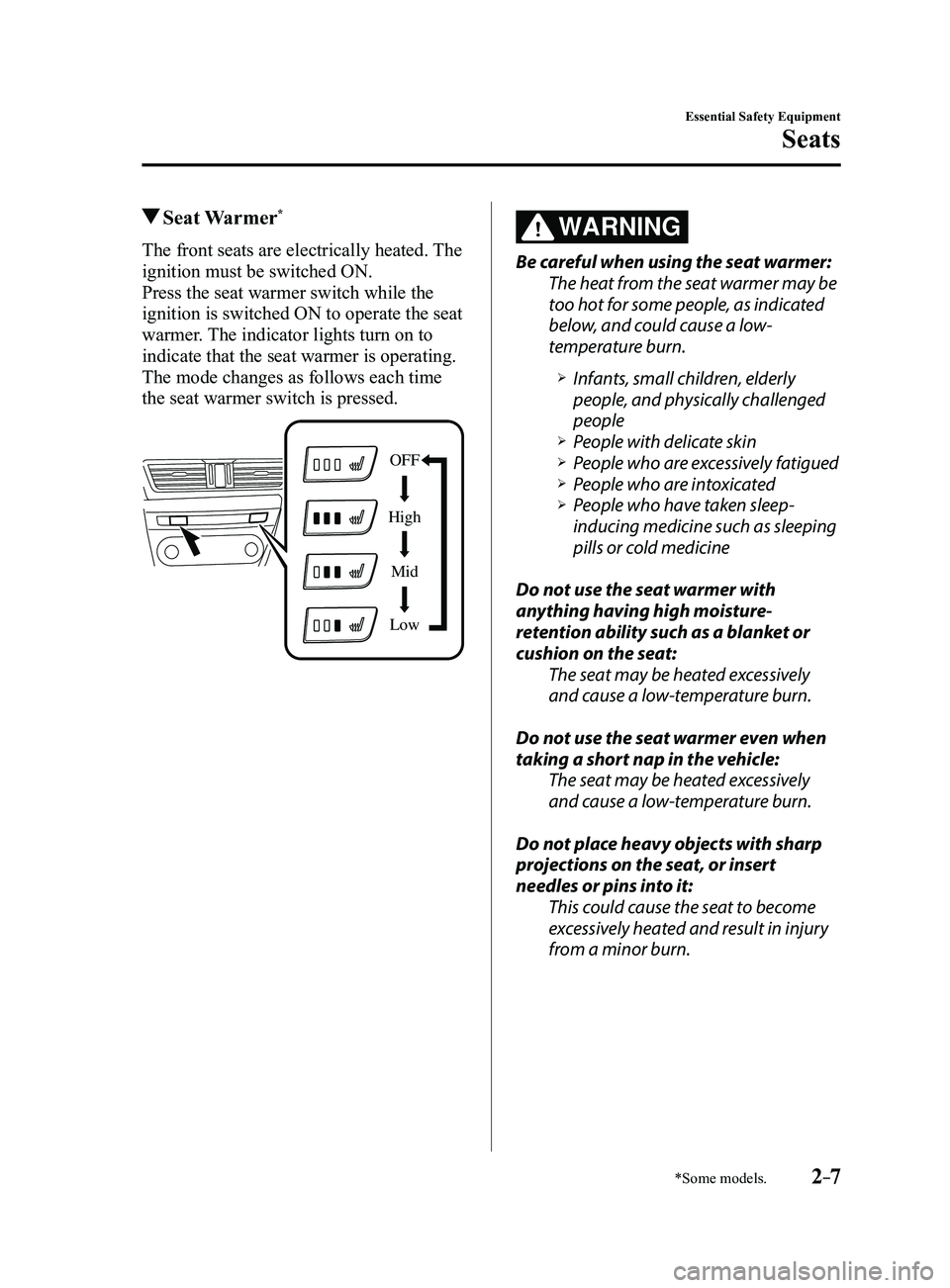
Press the seat warmer switch while the
ignition is switched ON to operate the seat
warmer. The indicator lights turn on to
indicate that the seat warmer is operating.
The mode changes as follows each time
the seat warmer switch is pressed.
OFF
High Mid
Low
WARNING
Be careful when using the seat warmer:
The heat from the seat warmer may be
too hot for some people, as indicated
below, and could cause a low-
temperature burn.
Infants, small children, elderly
people, and physically challenged
people
People with delicate skin People who are excessively fatigued People who are intoxicated People who have taken sleep-
inducing medicine such as sleeping
pills or cold medicine
Do not use the seat warmer with
anything having high moisture-
retention ability such as a blanket or
cushion on the seat: The seat may be heated excessively
and cause a low-temperature burn.
Do not use the seat warmer even when
taking a short nap in the vehicle: The seat may be heated excessively
and cause a low-temperature burn.
Do not place heavy objects with sharp
projections on the seat, or insert
needles or pins into it: This could cause the seat to become
excessively heated and result in injury
from a minor burn.
Mazda3_8FL6-EA-16F_Edition2.indb 72016/08/10 17:34:52
Page 81 of 612
3–5
Before Driving
Keys
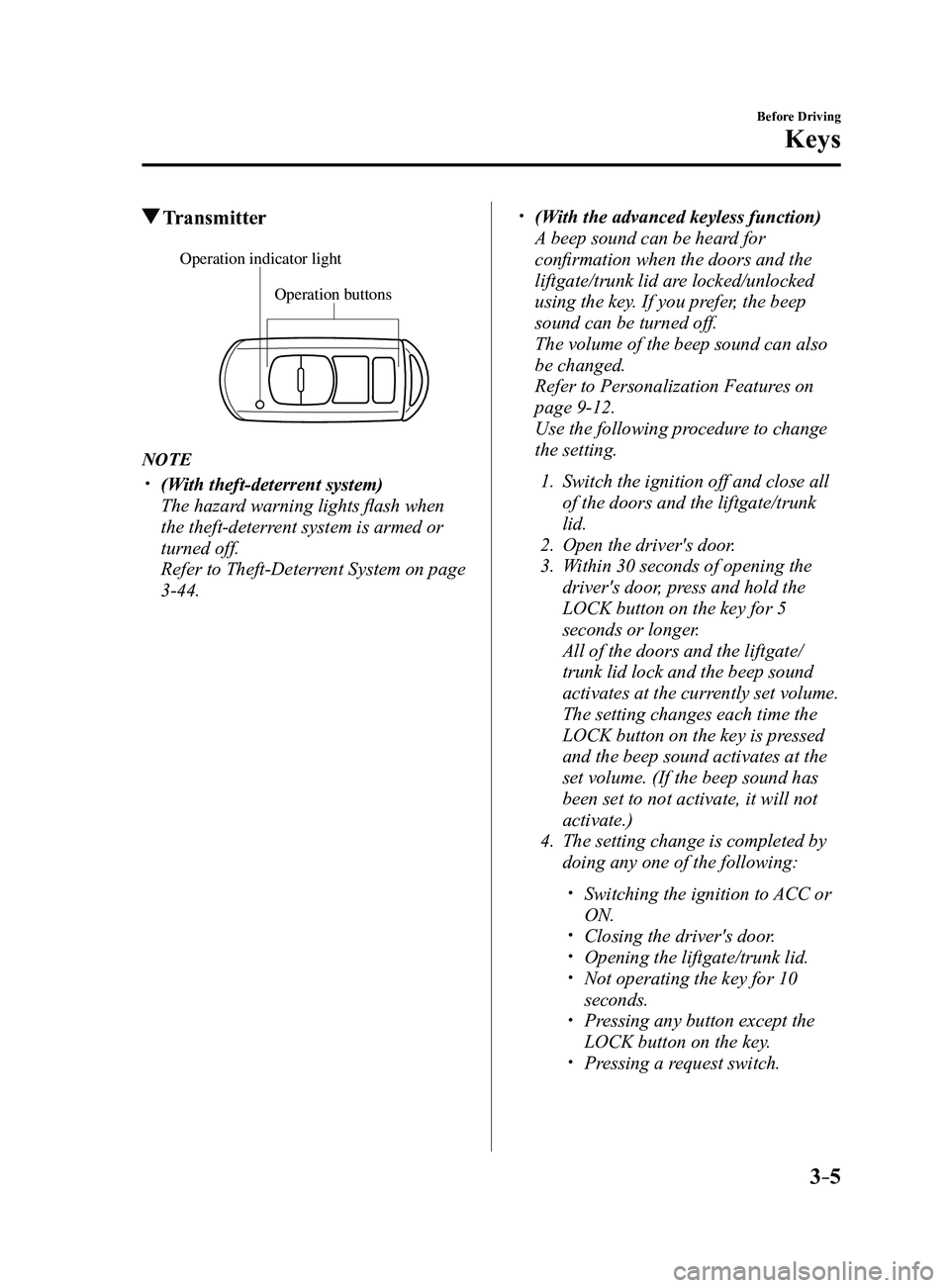
Transmitter
Operation buttons
Operation indicator light
NOTE
(With theft-deterrent system)
The hazard warning lights flash when
the theft-deterrent system is armed or
turned off.
Refer to Theft-Deterrent System on page
3-44.
(With the advanced keyless function)
A beep sound can be heard for
confirmation when the doors and the
liftgate/trunk lid are locked/unlocked
using the key. If you prefer, the beep
sound can be turned off.
The volume of the beep sound can also
be changed.
Refer to Personalization Featur es on
page 9-12.
Use the following procedure to change
the setting.
1. Switch the ignition off and close all
of the doors and the liftgate/trunk
lid.
2. Open the driver's door .
3. Within 30 seconds of opening the
driver's door, press and hold the
LOCK button on the key for 5
seconds or longer.
All of the doors and the liftgate/
trunk lid lock and the beep sound
activates at the currently set volume.
The setting changes each time the
LOCK button on the key is pressed
and the beep sound activates at the
set volume. (If the beep sound has
been set to not activate, it will not
activate.)
4. The setting change is completed by
doing any one of the following:
Switching the ignition to ACC or
ON. Closing the driver's door. Opening the liftgate/trunk lid. Not operating the key for 10
seconds. Pressing any button except the
LOCK button on the key. Pressing a request switch.
Mazda3_8FL6-EA-16F_Edition2.indb 52016/08/10 17:35:17
Page 83 of 612
3–7
Before Driving
Keys
NOTE
The system can be set to unlock all
doors by performing a single operation.
Refer to Personalization Features on
page 9-12.
Use the following procedure to change
the setting.
1. Switch the ignition off and close all
of the doors and the liftgate/trunk
lid.
2. Open the driver's door .
3. Within 30 seconds of opening the
driver's door, press and hold the
UNLOCK button on the key for 5
seconds or longer (the sound of
the doors locking/unlocking can be
heard).
After this, the system switches the
setting each time the UNLOCK
button is pressed (the sound of the
doors locking/unlocking can be
heard).
4. The setting change is completed by
doing any one of the following:
Switching the ignition to ACC or
ON. Closing the driver's door. Opening the liftgate/trunk lid. Not operating the key for 10
seconds. Pressing any button except the
UNLOCK button on the key. Pressing a request switch.
(Auto re-lock function)
After unlocking with the key , all
doors and the liftgate/trunk lid will
automatically lock if any of the
following operations are not performed
within about 60 seconds. If your
vehicle has a theft-deterrent system,
the hazard warning lights will flash for
confirmation.
The time required for the doors to lock
automatically can be changed.
Refer to Personalization Featur es on
page 9-12.
A door or the liftgate/trunk lid is
opened. The ignition is switched to any
position other than off.
(With theft-deterrent system)
When the doors are unlocked by
pressing the unlock button on the key
while the theft-deterrent system is
turned off, the hazard warning lights
will flash twice to indicate that the
system is turned off.
Mazda3_8FL6-EA-16F_Edition2.indb 72016/08/10 17:35:17
Page 91 of 612
3–15
Before Driving
Doors and Locks
To unlock
Driver's door request switch
To unlock the driver's door, press the
request switch. A beep sound will be heard
twice and the hazard warning lights will
flash twice.
To unlock all doors and the liftgate/trunk
lid, press the request switch again within
3 seconds and two more beep sounds will
be heard.
Front passenger door request switch
To unlock all doors and the liftgate/trunk
lid, press the request switch. A beep sound
will be heard twice and the hazard warning
lights will flash twice.NOTE
The system can be set to unlock all
doors by performing a single operation.
Refer to Personalization Features on
page 9-12.
Use the following procedure to change
the setting.
1. Switch the ignition off and close all
of the doors and the liftgate/trunk
lid.
2. Open the driver's door .
3. Within 30 seconds of opening the
driver's door, press and hold the
UNLOCK button on the key for 5
seconds or longer (the sound of
the doors locking/unlocking can be
heard).
After this, the system switches the
setting of pressing the driver's
request switch once or twice to
unlock all doors and the liftgate/
trunk lid each time the UNLOCK
button is pressed (the sound of the
doors locking/unlocking can be
heard).
4. The setting change is completed by
doing any one of the following:
Switching the ignition to ACC or
ON. Closing the driver's door. Opening the liftgate/trunk lid. Not operating the key for 10
seconds. Pressing any button except the
UNLOCK button on the key. Pressing a request switch.
Confirm that all doors and the liftgate/
trunk lid are securely locked.
For the liftgate/trunk lid, move it
without pressing the electric liftgate/
trunk lid opener to verify that the
liftgate/trunk lid has not been left ajar.
Mazda3_8FL6-EA-16F_Edition2.indb 152016/08/10 17:35:20
Page 92 of 612
3–16
Before Driving
Doors and Locks
All doors and the liftgate/trunk lid
cannot be locked when any door or the
liftgate is open.
It may require a few seconds for the
doors to unlock after the request switch
is pressed.
A beep sound is heard for confirmation
when the doors and the liftgate/trunk lid
are locked/unlocked using the request
switch. If you prefer, the beep sound can
be turned off.
The volume of the beep sound can also
be changed. Refer to Personalization
Features on page
9-12.
Use the following procedure to change
the setting.
1. Switch the ignition off and close all
of the doors and the liftgate/trunk lid.
2. Open the driver's door .
3. Within 30 seconds of opening the
driver's door, press and hold the
LOCK button on the key for 5
seconds or longer.
All of the doors and the liftgate/
trunk lid lock and the beep sound
activates at the currently set volume.
The setting changes each time the
LOCK button on the key is pressed
and the beep sound activates at the
set volume. (If the beep sound has
been set to not activate, it will not
activate.)
4. The setting change is completed by
doing any one of the following:
Switching the ignition to ACC or
ON. Closing the driver's door. Opening the liftgate/trunk lid. Not operating the key for 10
seconds. Pressing any button except the
LOCK button on the key. Pressing a request switch.
(With theft-deterrent system)
The hazard warning lights flash when
the theft-deterrent system is armed or
turned off.
Refer to Theft-Deterrent System on page
3-44. The setting can be changed so that
the doors and the liftgate/trunk lid are
locked automatically without pressing
the request switch.
Refer to Personalization Featur es on
page 9-12.
(Auto-lock function)
A beep sound is heard when all doors
and the liftgate are closed while the
advanced key is being carried. All
doors and the liftgate/trunk lid are
locked automatically after about three
seconds when the advanced key is
out of the operational range. Also,
the hazard warning lights flash once.
(Even if the driver is in the operational
range, all doors and the liftgate/trunk
lid are locked automatically after
about 30 seconds.) If you are out of
the operational range before the doors
and the liftgate/trunk lid are completely
closed or another key is left in the
vehicle, the auto-lock function will not
work. Always make sure that all doors
and the liftgate/trunk lid are closed and
locked before leaving the vehicle. The
auto-lock function does not close the
power windows.
Mazda3_8FL6-EA-16F_Edition2.indb 162016/08/10 17:35:21
Page 93 of 612
3–17
Before Driving
Doors and Locks
Auto re-lock function
After unlocking with the request switch,
all doors and the liftgate/trunk lid
will automatically lock if any of the
following operations are not performed
within about 60 seconds. If your
vehicle has a theft-deterrent system,
the hazard warning lights will flash for
confirmation.
The time required for the doors to lock
automatically can be changed.
Refer to Personalization Featur es on
page 9-12.
Opening a door or the liftgate/trunk
lid. Switching the ignition to any position
other than off.
Locking, Unlocking with
Transmitter
All doors and the liftgate/trunk lid can be
locked/unlocked by operating the keyless
entry system transmitter, refer to Keyless
Entry System (page
3-3).
Locking, Unlocking with Door-
Lock Switch
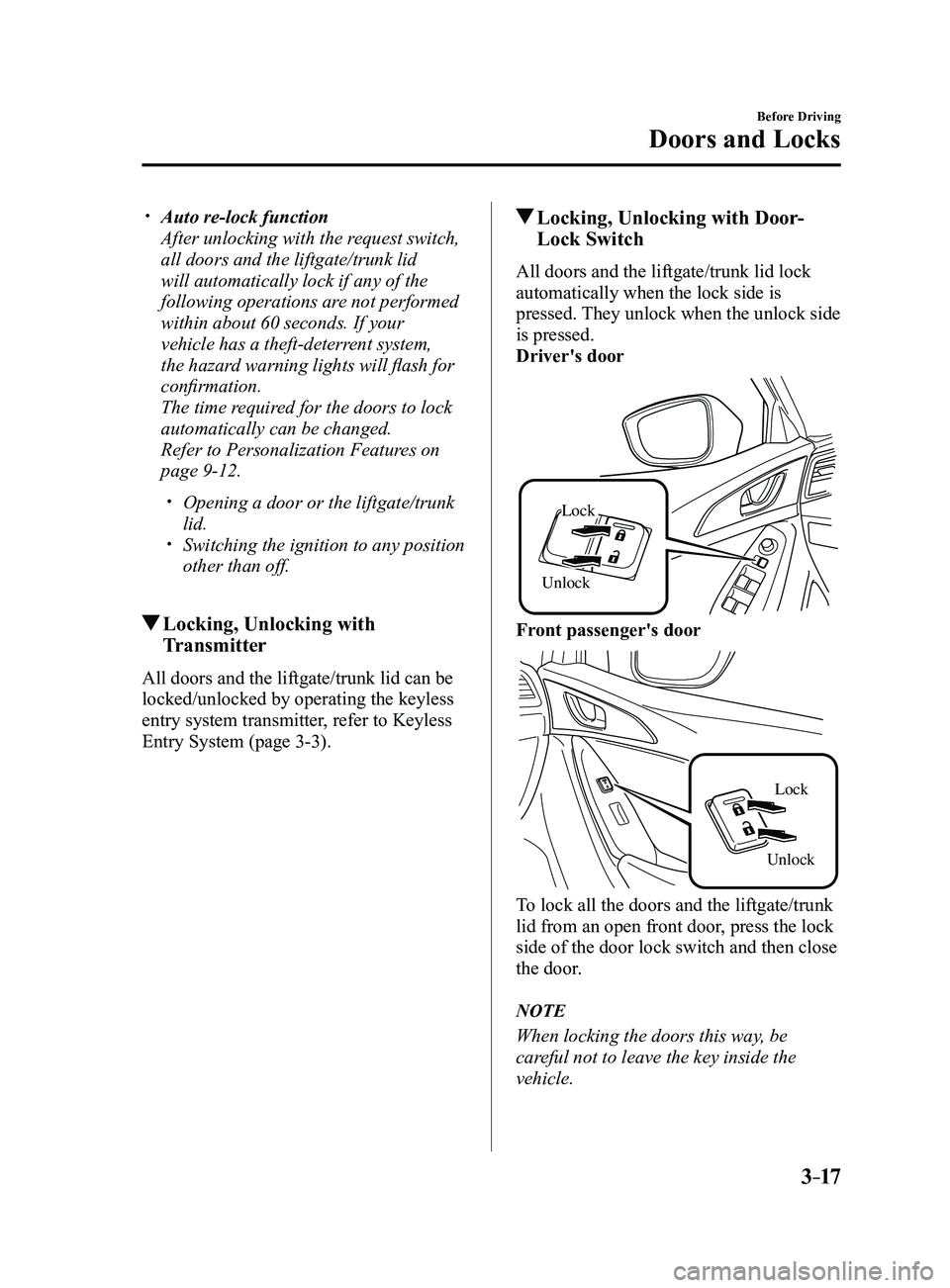
All doors and the liftgate/trunk lid lock
automatically when the lock side is
pressed. They unlock when the unlock side
is pressed.
Driver's door
Unlock
Lock
Front passenger's door
UnlockLock
To lock all the doors and the liftgate/trunk
lid from an open front door, press the lock
side of the door lock switch and then close
the door.
NOTE
When locking the doors this way, be
careful not to leave the key inside the
vehicle.
Mazda3_8FL6-EA-16F_Edition2.indb 172016/08/10 17:35:21
Page 94 of 612
3–18
Before Driving
Doors and Locks
Auto Lock/Unlock Function
WARNING
Do not pull the inner handle on a front
door:Pulling the inner handle on a front
door while the vehicle is moving
is dangerous. Passengers can fall
out of the vehicle if the door opens
accidentally , which could result in
death or serious injury.
When the vehicle speed exceeds 20
km/h (12 mph), all doors and the
liftgate/trunk lid lock automatically.
When the ignition is switched of f, all
doors and the liftgate/trunk lid unlock
automatically.
These functions can also be disabled so
that they do not operate.
Auto lock/unlock function setting
change using door-lock switch
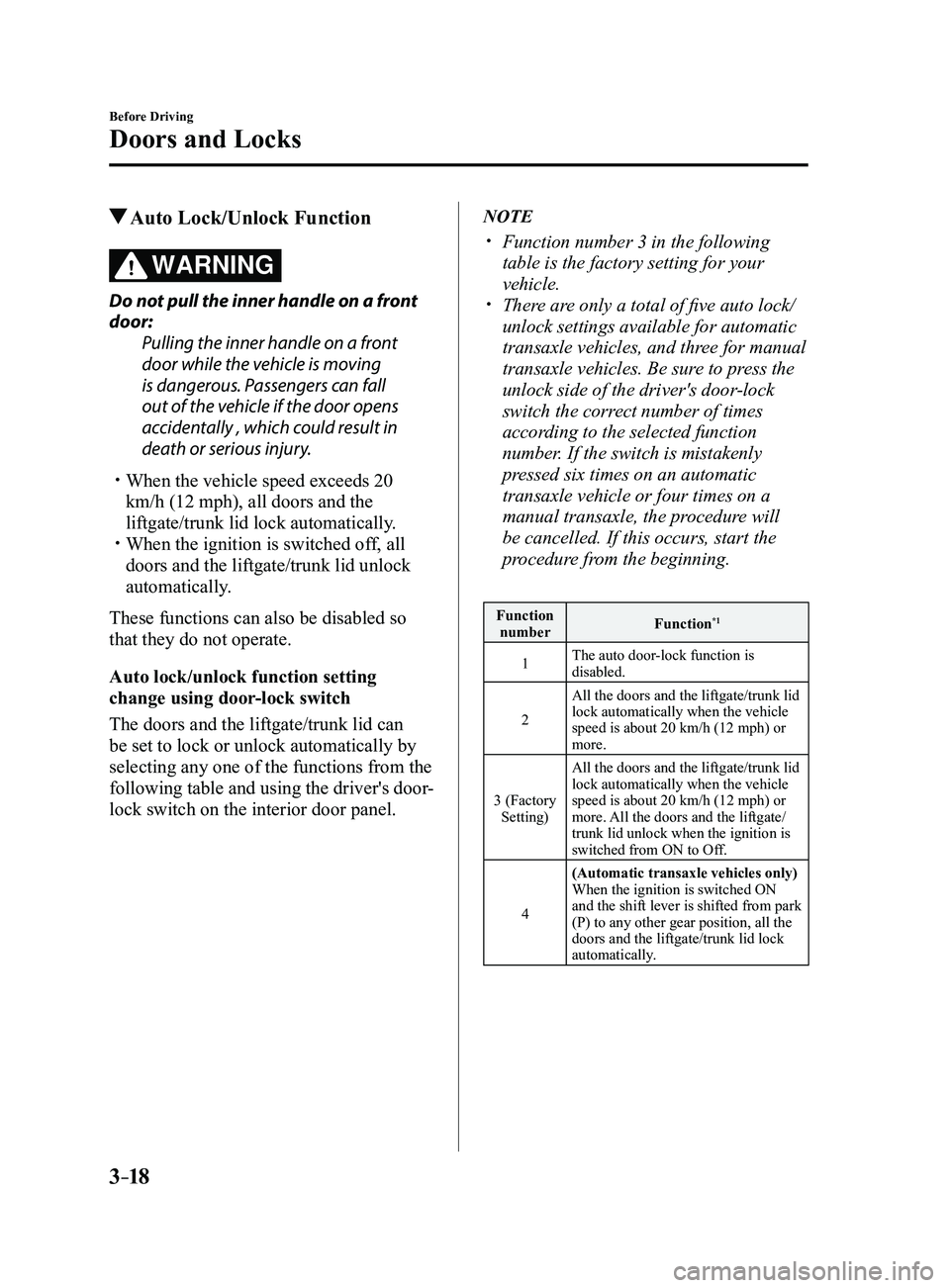
The doors and the liftgate/trunk lid can
be set to lock or unlock automatically by
selecting any one of the functions from the
following table and using the driver's door-
lock switch on the interior door panel.
NOTE
Function number 3 in the following
table is the factory setting for your
vehicle.
There are only a total of five auto lock/
unlock settings available for automatic
transaxle vehicles, and three for manual
transaxle vehicles. Be sure to press the
unlock side of the driver's door-lock
switch the correct number of times
according to the selected function
number. If the switch is mistakenly
pressed six times on an automatic
transaxle vehicle or four times on a
manual transaxle, the procedure will
be cancelled. If this occurs, start the
procedure from the beginning.
Function number Function*1
1The auto door-lock function is
disabled.
2 All the doors and the liftgate/trunk lid
lock automatically when the vehicle
speed is about 20 km/h (12 mph) or
more.
3 (Factory Setting) All the doors and the liftgate/trunk lid
lock automatically when the vehicle
speed is about 20 km/h (12 mph) or
more. All the doors and the liftgate/
trunk lid unlock when the ignition is
switched from ON to Off.
4 (Automatic transaxle vehicles only)
When the ignition is switched ON
and the shift lever is shifted from park
(P) to any other gear position, all the
doors and the liftgate/trunk lid lock
automatically.
Mazda3_8FL6-EA-16F_Edition2.indb 182016/08/10 17:35:22
Page 95 of 612
3–19
Before Driving
Doors and Locks
Function number Function*1
5(Automatic transaxle vehicles only)
When the ignition is switched ON
and the shift lever is shifted from park
(P) to any other gear position, all the
doors and the liftgate/trunk lid lock
automatically.
When the shift lever is shifted to park
(P) while the ignition is switched ON,
all the doors and the liftgate/trunk lid
unlock automatically.
*1 Other settings for the auto door lock function are available at an Authorized Mazda Dealer. For
details consult an Authorized Mazda Dealer. Refer
to Personalization Features on page
9-12.
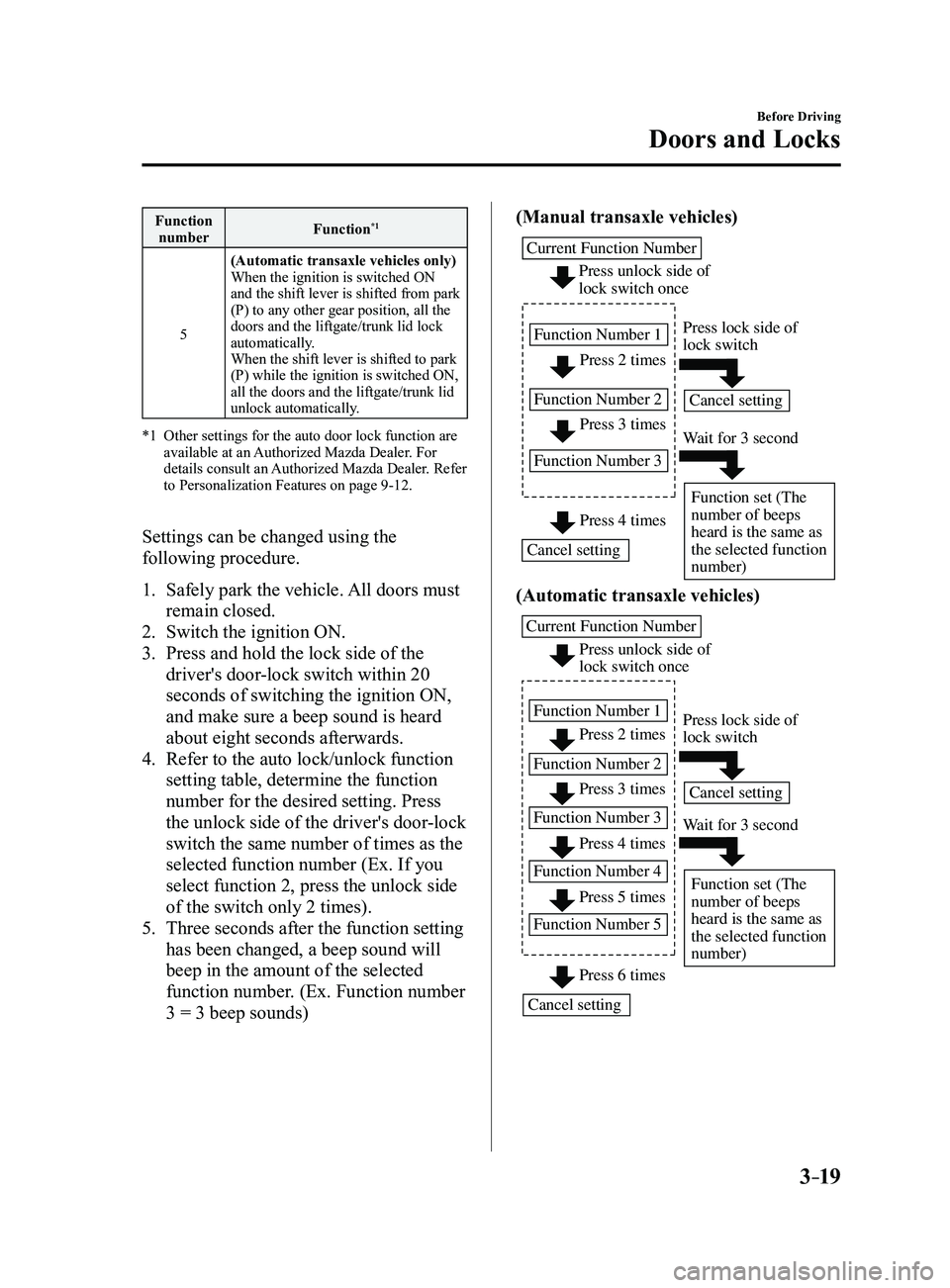
Settings can be changed using the
following procedure.
1. Safely park the vehicle.
All doors must
remain closed.
2. Switch the ignition ON.
3. Press and hold the lock side of the
driver's door-lock switch within 20
seconds of switching the ignition ON,
and make sure a beep sound is heard
about eight seconds afterwards.
4. Refer to the auto lock/unlock function
setting table, determine the function
number for the desired setting. Press
the unlock side of the driver's door-lock
switch the same number of times as the
selected function number (Ex. If you
select function 2, press the unlock side
of the switch only 2 times).
5. Three seconds after the function setting
has been changed, a beep sound will
beep in the amount of the selected
function number. (Ex. Function number
3 = 3 beep sounds) (Manual transaxle vehicles)
Press 2 times
Press 3 times
Current Function Number
Function Number 1
Function Number 2
Function Number 3
Press 4 times
Press unlock side of
lock switch once
Cancel setting Cancel setting
Function set (The
number of beeps
heard is the same as
the selected function
number)
Press lock side of
lock switch
Wait for 3 second
(Automatic transaxle vehicles)
Press unlock side of
lock switch once
Press 2 times
Press 3 times
Current Function Number
Function Number 1
Function Number 2 Press 4 times
Function Number 3
Press 5 times
Function Number 4
Press 6 times
Function Number 5
Cancel setting Cancel setting
Function set (The
number of beeps
heard is the same as
the selected function
number)
Press lock side of
lock switch
Wait for 3 second
Mazda3_8FL6-EA-16F_Edition2.indb 192016/08/10 17:35:22
Page 150 of 612
4–20
When Driving
Instrument Cluster and Display
NOTE
Even though the distance-to-empty
display may indicate a sufficient amount
of remaining driving distance before
refueling is required, refuel as soon as
possible if the fuel level is very low or
the low fuel warning light illuminates.
The display may not change unless you
add more than approximately 9 L
(2.3 US gal, 1.9 Imp gal) of fuel.
The distance-to-empty is the
approximate remaining distance the
vehicle can be driven until all the
graduation marks in the fuel gauge
(indicating the remaining fuel supply)
disappear.
If there is no past fuel economy
information such as after first
purchasing your vehicle or the
information is deleted when the battery
cables are disconnected, the actual
distance-to empty/range may differ from
the amount indicated.
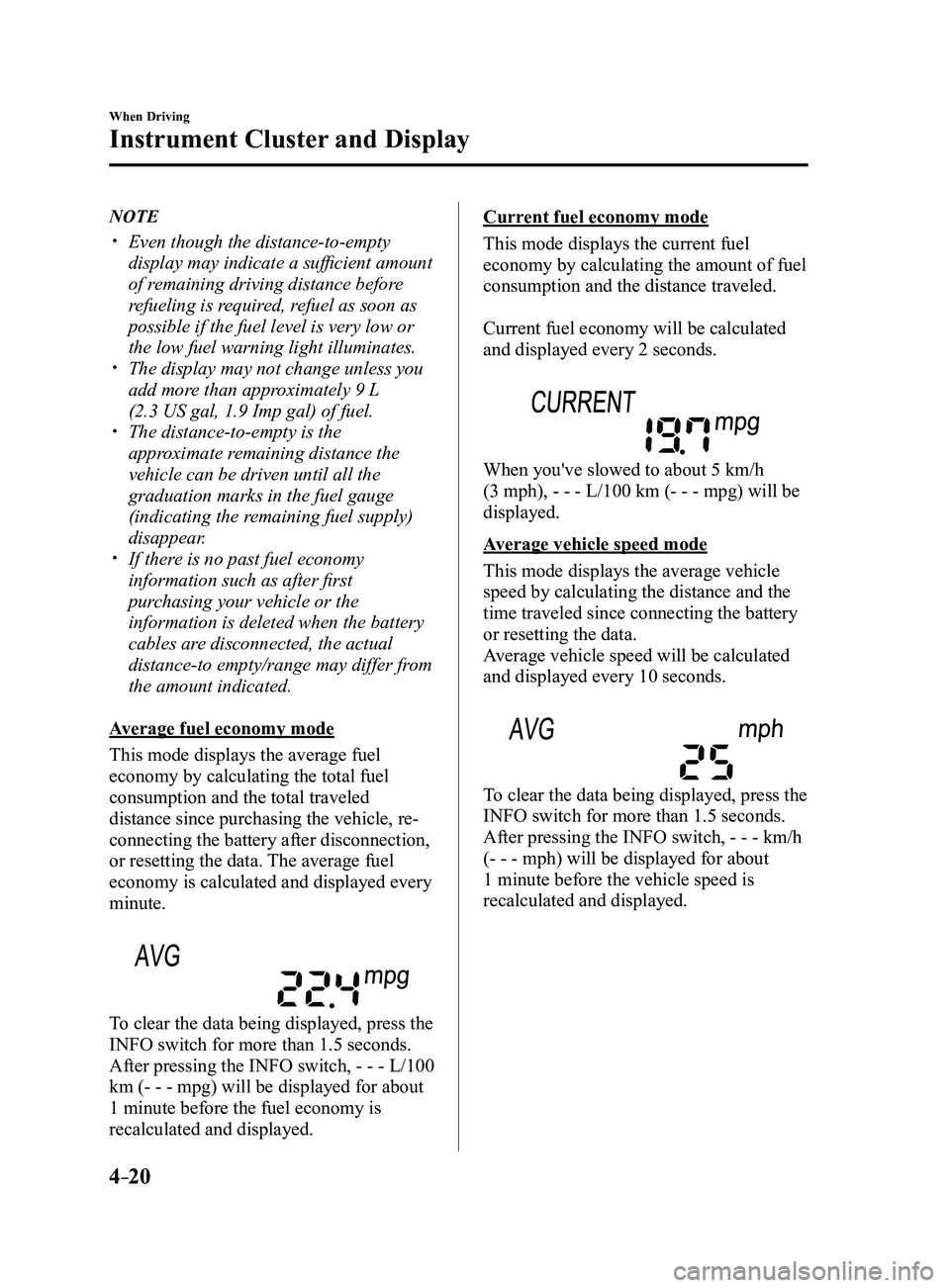
Average fuel economy mode
This mode displays the average fuel
economy by calculating the total fuel
consumption and the total traveled
distance since purchasing the vehicle, re-
connecting the battery after disconnection,
or resetting the data. The average fuel
economy is calculated and displayed every
minute.
To clear the data being displayed, press the
INFO switch for more than 1.5 seconds.
After pressing the INFO switch, - - - L/100
km (- - - mpg) will be displayed for about
1 minute before the fuel economy is
recalculated and displayed.
Current fuel economy mode
This mode displays the current fuel
economy by calculating the amount of fuel
consumption and the distance traveled.
Current fuel economy will be calculated
and displayed every 2 seconds.
When you've slowed to about 5 km/h
(3 mph), - - - L/100 km (- - - mpg) will be
displayed.
Average vehicle speed mode
This mode displays the average vehicle
speed by calculating the distance and the
time traveled since connecting the battery
or resetting the data.
Average vehicle speed will be calculated
and displayed every 10 seconds.
To clear the data being displayed, press the
INFO switch for more than 1.5 seconds.
After pressing the INFO switch, - - - km/h
(- - - mph) will be displayed for about
1 minute before the vehicle speed is
recalculated and displayed.
Mazda3_8FL6-EA-16F_Edition2.indb 202016/08/10 17:35:51