change time MAZDA MODEL 3 4-DOOR 2017 User Guide
[x] Cancel search | Manufacturer: MAZDA, Model Year: 2017, Model line: MODEL 3 4-DOOR, Model: MAZDA MODEL 3 4-DOOR 2017Pages: 612
Page 173 of 612

4–43
When Driving
Switches and Controls
Lighting Control
Headlights
Turn the headlight switch to turn the headlights and other exterior light\
s on or off.
When the lights are turned on, the lights-on indicator light in the inst\
rument cluster turns on.
NOTE
If the light switch is left on, the lights will automatically switch off\
approximately 30
seconds after switching the ignition off.
The time setting can be changed.
Refer to Personalization Features on page 9-12. To prevent discharging the battery, do not leave the lights on while the engine is off unless
safety requires them.
Without auto-light control
Switch Position
Ignition PositionON ACC or
OFF ONACC or
OFF ONACC or
OFF
Headlights OffOffOffOff OnOn
*2
Daytime running lights On*1OffOn*1Off OffOff
Taillights
Parking lights
License lights
Side-marker lights Off
Off OnOn
*2OnOn*2
*1 The lights are turned on while the vehicle is driven.*2 The lights are turned on for the specified period by the auto he adlight off function.
Mazda3_8FL6-EA-16F_Edition2.indb 432016/08/10 17:36:14
Page 175 of 612
4–45
When Driving
Switches and Controls
*Some models.
Auto-light control*
When the headlight switch is in the position and the ignition is switched ON, the light
sensor senses the surrounding lightness or darkness and automatically tu\
rns the headlights
and other exterior lights on or off.
CAUTION
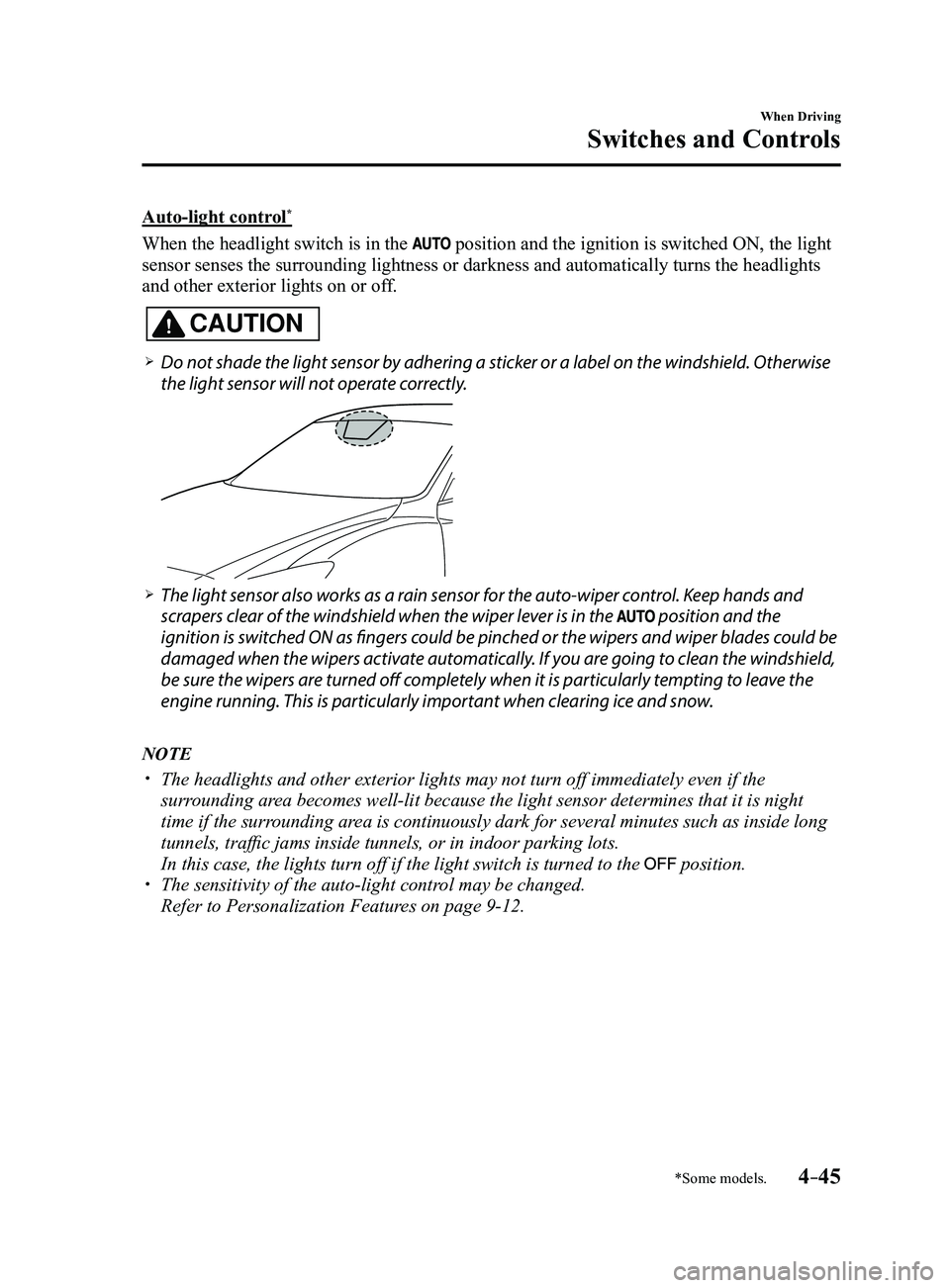
Do not shade the light sensor by adhering a sticker or a label on the windshield. Otherwise
the light sensor will not operate correctly.
The light sensor also works as a rain sensor for the auto-wiper control. Keep hands and
scrapers clear of the windshield when the wiper lever is in the position and the
ignition is switched ON as fingers could be pinched or the wipers and wiper blades could be
damaged when the wipers activate automatically. If you are going to clean the windshield,
be sure the wipers are turned off completely when it is particularly tempting to leave the
engine running. This is particularly important when clearing ice and snow.
NOTE
The headlights and other exterior lights may not turn off immediately ev\
en if the
surrounding area becomes well-lit because the light sensor determines that it is night\
time if the surrounding area is continuously dark for several minutes such as inside long
tunnels, traffic jams inside tunnels, or in indoor parking lots.
In this case, the lights turn off if the light switch is turned to the position. The sensitivity of the auto-light control may be changed.
Refer to Personalization Features on page 9-12.
Mazda3_8FL6-EA-16F_Edition2.indb 452016/08/10 17:36:15
Page 177 of 612
4–47
When Driving
Switches and Controls
Coming Home Light
The coming home light turns on the
headlights (low beams) when the lever is
operated.
To turn on the lights
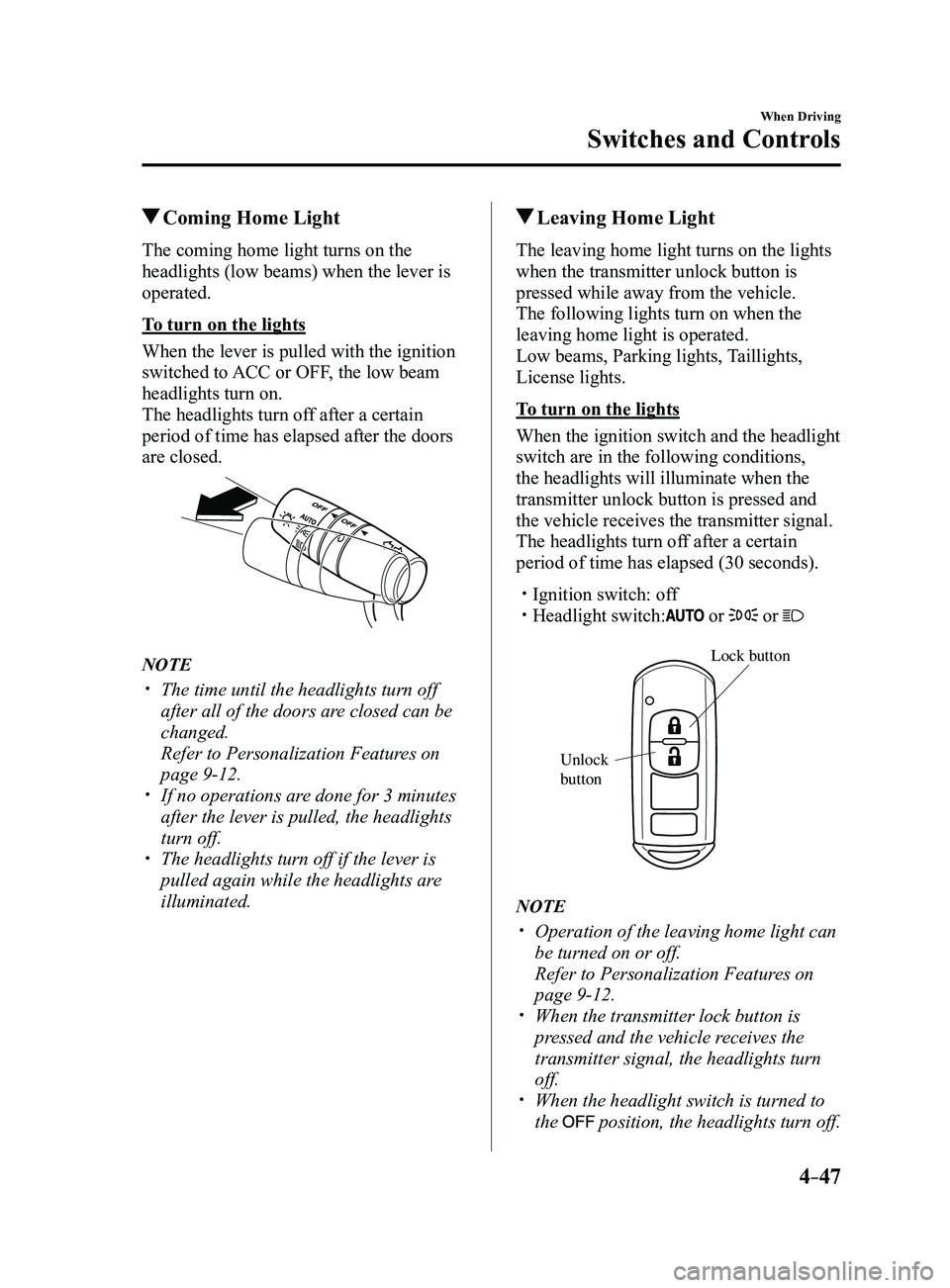
When the lever is pulled with the ignition
switched to ACC or OFF, the low beam
headlights turn on.
The headlights turn off after a certain
period of time has elapsed after the doors
are closed.
NOTE
The time until the headlights turn off
after all of the doors are closed can be
changed.
Refer to Personalization Features on
page 9-12. If no operations are done for 3 minutes
after the lever is pulled, the headlights
turn off.
The headlights turn off if the lever is
pulled again while the headlights are
illuminated.
Leaving Home Light
The leaving home light turns on the lights
when the transmitter unlock button is
pressed while away from the vehicle.
The following lights turn on when the
leaving home light is operated.
Low beams, Parking lights, Taillights,
License lights.
To turn on the lights
When the ignition switch and the headlight
switch are in the following conditions,
the headlights will illuminate when the
transmitter unlock button is pressed and
the vehicle receives the transmitter signal.
The headlights turn off after a certain
period of time has elapsed (30 seconds).
Ignition switch: off Headlight switch: or or
Lock button
Unlock
b
utton
NOTE
Operation of the leaving home light can
be turned on or off.
Refer to Personalization Featur es on
page 9-12. When the transmitter lock button is
pressed and the vehicle receives the
transmitter signal, the headlights turn
off.
When the headlight switch is turned to
the position, the headlights turn off.
Mazda3_8FL6-EA-16F_Edition2.indb 472016/08/10 17:36:17
Page 178 of 612
4–48
When Driving
Switches and Controls
*Some models.
Headlight Leveling*
The number of passengers and weight of
cargo in the luggage compartment change
the angle of the headlights.
The angle of the headlights will be
automatically adjusted when turning on
the headlights.
Daytime Running Lights
Some countries require moving vehicles
to have their lights on (daytime running
lights) during the daytime.
The daytime running lights turn on
automatically when the vehicle starts
moving.
They turn off when the parking brake is
operated or the shift lever is shifted to the
P position (automatic transaxle vehicle).
NOTE
(Except Canada)
The daytime running lights can be
deactivated.
Refer to Personalization Features on page
9-12.
Fog Lights*
The fog lights can be used when the
ignition is switched ON.
Use this switch to turn on the fog lights.
The fog lights will improve visibility at
night and during foggy conditions.
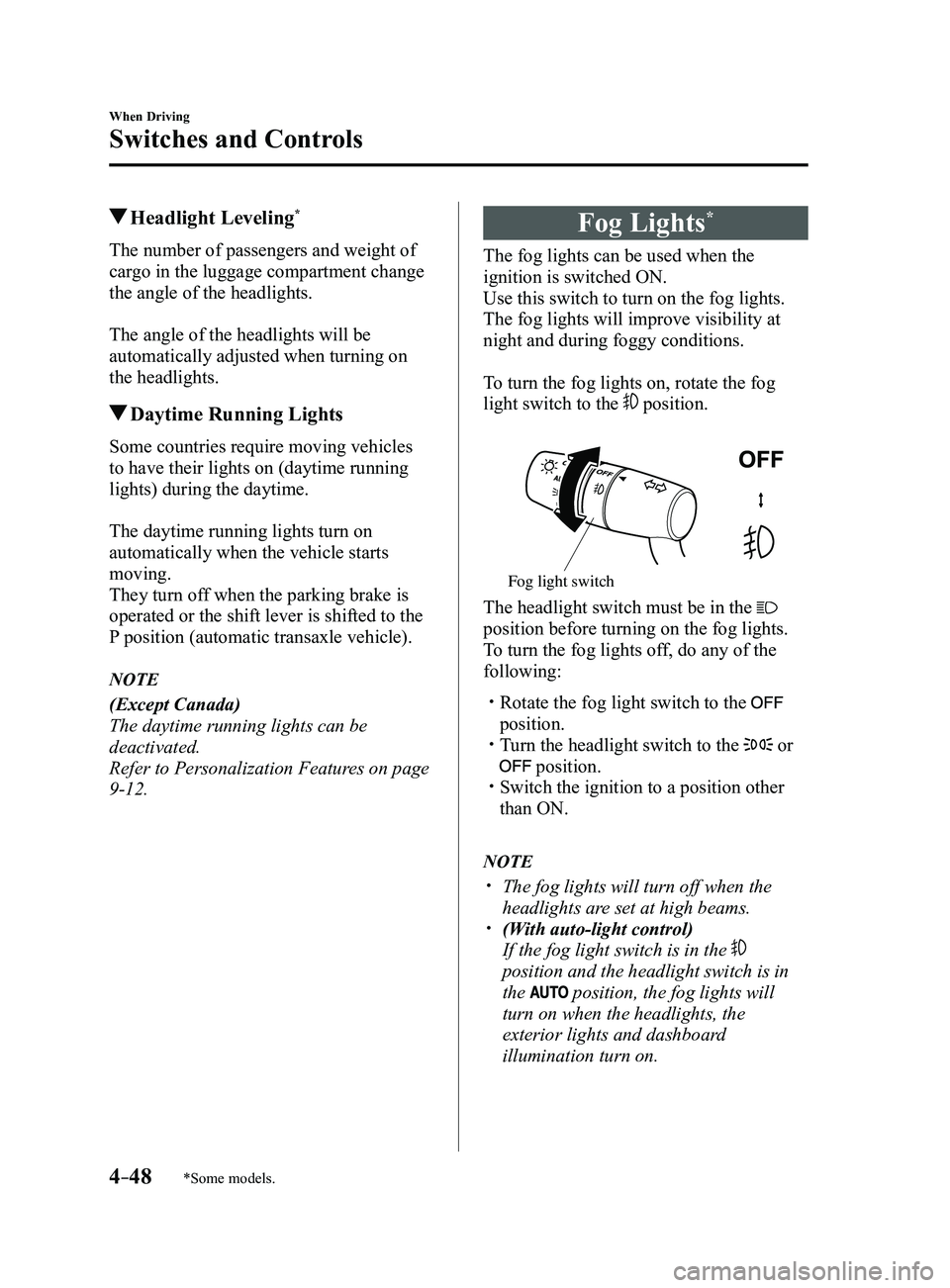
To turn the fog lights on, rotate the fog
light switch to the
position.
Fog light switch
The headlight switch must be in the
position before turning on the fog lights.
To turn the fog lights off, do any of the
following:
Rotate the fog light switch to the
position. Turn the headlight switch to the or
position. Switch the ignition to a position other
than ON.
NOTE
The fog lights will turn off when the
headlights are set at high beams. (With auto-light control)
If the fog light switch is in the
position and the headlight switch is in
the
position, the fog lights will
turn on when the headlights, the
exterior lights and dashboard
illumination turn on.
Mazda3_8FL6-EA-16F_Edition2.indb 482016/08/10 17:36:18
Page 179 of 612
4–49
When Driving
Switches and Controls
Turn and Lane-Change
Signals
The ignition must be switched ON to use
the turn and lane-change signals.
Turn Signals
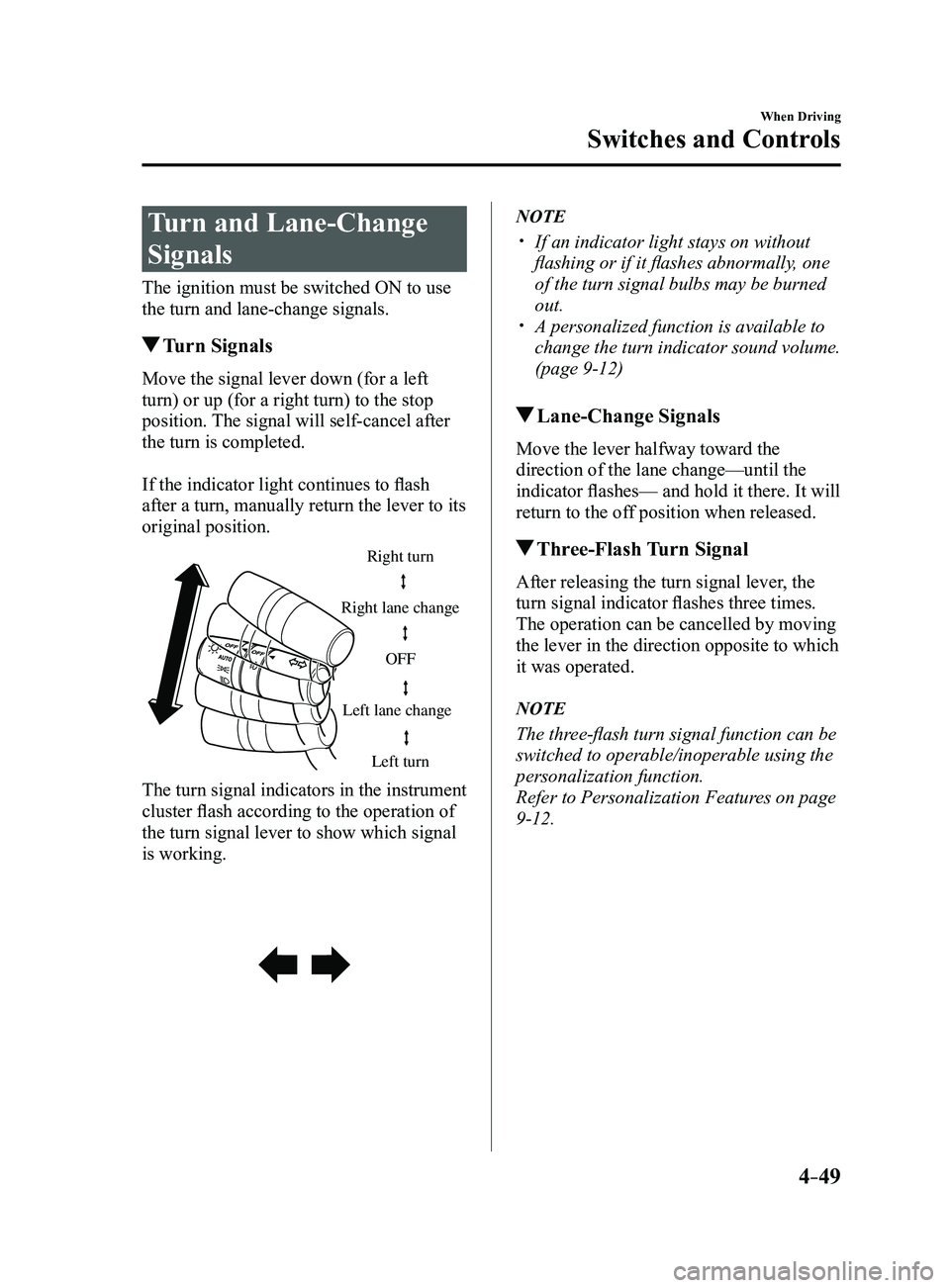
Move the signal lever down (for a left
turn) or up (for a right turn) to the stop
position. The signal will self-cancel after
the turn is completed.
If the indicator light continues to flash
after a turn, manually return the lever to its
original position.
Right turn
Left turn
Right lane change
Left lane change OFF
The turn signal indicators in the instrument
cluster flash according to the operation of
the turn signal lever to show which signal
is working.
NOTE
If an indicator light stays on without
flashing or if it flashes abnormally, one
of the turn signal bulbs may be burned
out.
A personalized function is available to
change the turn indicator sound volume.
(page
9-12)
Lane-Change Signals
Move the lever halfway toward the
direction of the lane change—until the
indicator flashes— and hold it there. It will
return to the off position when released.
Three-Flash Turn Signal
After releasing the turn signal lever, the
turn signal indicator flashes three times.
The operation can be cancelled by moving
the lever in the direction opposite to which
it was operated.
NOTE
The three-flash turn signal function can be
switched to operable/inoperable using the
personalization function.
Refer to Personalization Features on page
9-12.
Mazda3_8FL6-EA-16F_Edition2.indb 492016/08/10 17:36:18
Page 188 of 612
4–58
When Driving
Switches and Controls
Pre-programming the HomeLink
System
NOTE
It is recommended that a new battery be
placed in the hand-held transmitter of the
device being programmed to HomeLink
for quicker training and accurate
transmission of the radio-frequency signal.
Verify that there is a remote control
transmitter available for the device you
would like to program.
Disconnect the power to the device.
Programming the HomeLink
System
CAUTION
When programming a garage door
opener or a gate, disconnect the power
to these devices before performing
programming. Continuous operation
of the devices could damage the
motor.
The HomeLink system provides 3 buttons
which can be individually selected and
programmed using the transmitters for
current, on-market devices as follows:
1. Disconnect the power to the garage
door opener or gate programmed to the
hand-held transmitter.
2. Position the end of your hand-held
transmitter 2.5—7.5 cm (1—3 inches)
away from the HomeLink button you
wish to program while keeping the
indicator light in view.
3. Simultaneously press and hold both
the chosen HomeLink and hand-held
transmitter buttons. Do not release
the buttons until step 3 has been
completed.
NOTE
Some gate operators and garage door
openers may require you to replace this
Programming Step 2 with procedures
noted in the “Gate Operator/Canadian
Programming” section.
4. After the HomeLink indicator light
changes from a slow to a rapidly
blinking light, release both the
HomeLink and hand-held transmitter
buttons.
NOTE
If the HomeLink indicator light does not
change to a rapidly blinking light, contact
HomeLink at www.homelink.com or call
1-800-355-3515 for assistance.
5. Connect the power to the garage door
opener or gate programmed to the
hand-held transmitter.
6. Firmly press and hold the programmed
HomeLink button for five seconds,
and then release it. Perform this
operation two times to activate the door
or gate. If the door or gate does not
activate, press and hold the just-trained
HomeLink button and observe the
indicator light.
If the indicator light stays on
constantly, programming is complete
and your device should activate when
the HomeLink button is pressed and
released.
Mazda3_8FL6-EA-16F_Edition2.indb 582016/08/10 17:36:24
Page 220 of 612
4–90
When Driving
i-ACTIVSENSE
In the following case, the flashing of the Blind Spot Monitoring (BSM) warning indicator
light, and the activation of the warning sound and the warning screen indicator display
may not occur or they may be delayed.
A vehicle makes a lane change from a driving lane two lanes over to an adjacent lane. Driving on steep slopes. Crossing the summit of a hill or mountain pass. The turning radius is small (making a sharp turn, turning at intersecti\
ons). When there is a difference in the height between your driving lane and the adjacent
lane. Directly after pressing the Blind Spot Monitoring (BSM) OFF switch and the system
becomes operable.
If the road width is extremely narrow, vehicles two lanes over may be detected.
The detection area of the radar sensors (rear) is set according to the road width of
expressways.
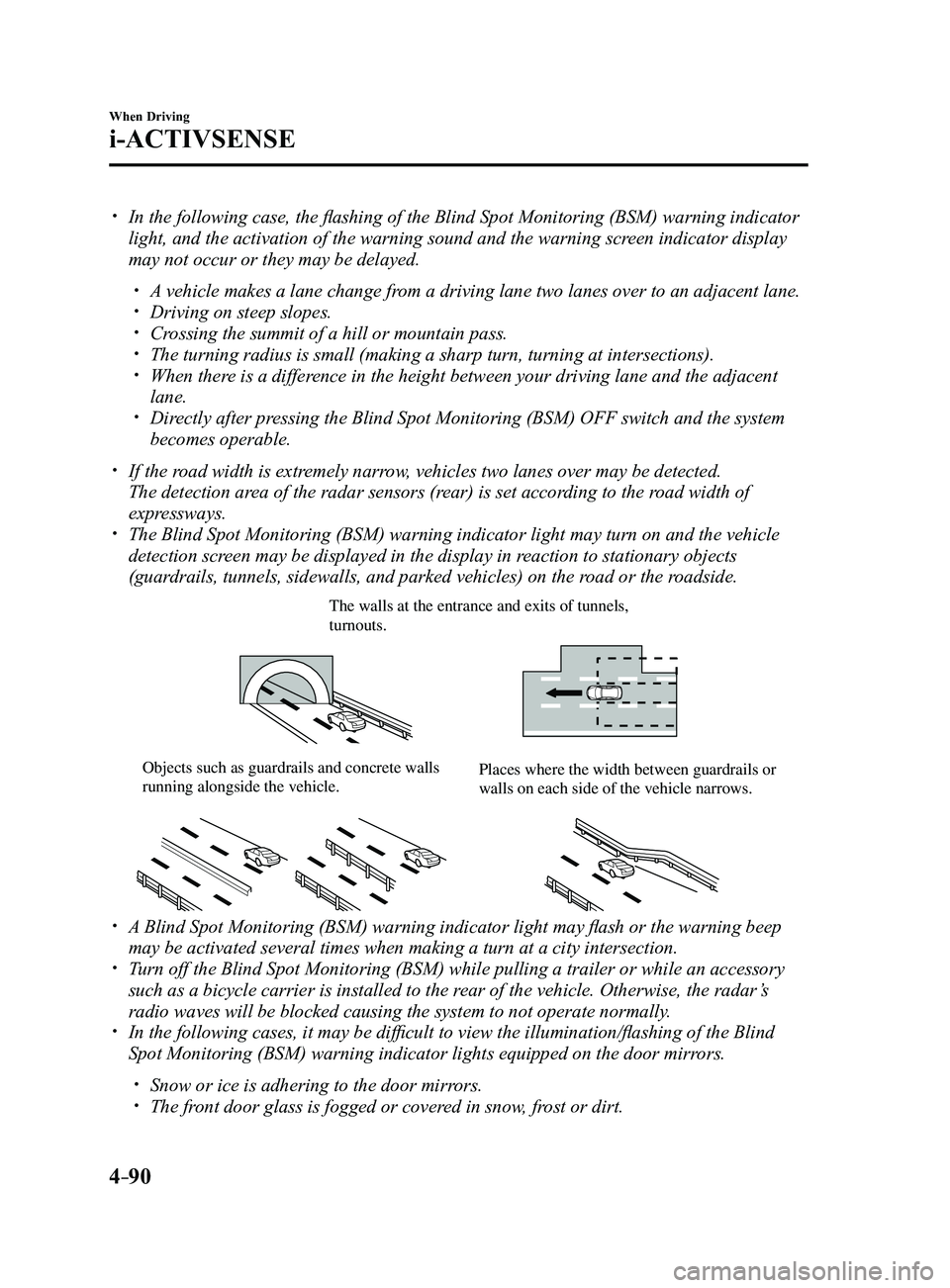
The Blind Spot Monitoring (BSM) warning indicator light may turn on an\
d the vehicle
detection screen may be displayed in the display in reaction to stationary objects
(guardrails, tunnels, sidewalls, and parked vehicles) on the road or the roadside.
The walls at the entrance and exits of tunnels, turnouts.
Objects such as guardrails and concrete walls running alongside the vehicle.Places where the width between guardrails or walls on each side of the vehicle narrows.
A Blind Spot Monitoring (BSM) warning indicator light may flash or the warning beep
may be activated several times when making a turn at a city intersection\
. Turn off the Blind Spot Monitoring (BSM) while pulling a trailer or whi\
le an accessory
such as a bicycle carrier is installed to the rear of the vehicle. Otherwise, the radar’s
radio waves will be blocked causing the system to not operate normally.
In the following cases, it may be difficult to view the illumination/flashing of the Blind
Spot Monitoring (BSM) warning indicator lights equipped on the door mi\
rrors.
Snow or ice is adhering to the door mirrors. The front door glass is fogged or covered in snow, frost or dirt.
Mazda3_8FL6-EA-16F_Edition2.indb 902016/08/10 17:36:38
Page 228 of 612
4–98
When Driving
i-ACTIVSENSE
NOTE
Speed limit signs
When the vehicle speed is about 1 km/h (0.6 mph) or faster, the speed limit sign is
displayed when any one of the following conditions are met.
The Forward Sensing Camera (FSC) recognizes a speed limit sign as a sign targeted
for your vehicle and the vehicle passes it. The speed limit sign stor ed in the navigation system is read (if the Forward Sensing
Camera (FSC) does not recognize a speed limit sign).
In the following cases, display of the speed limit sign stops.
The Forward Sensing Camera (FSC) recognizes the speed limit sign and the vehicle is
driven for a certain distance after passing the sign. Each sensor determines that the vehicle has changed dir ection of travel. The Forward Sensing Camera (FSC) recognizes a new speed limit sign which differs
from the previous one (displays the new speed limit sign). The speed limit sign stor ed in the navigation system is not read within a certain period
of time (if the Forward Sensing Camera (FSC) does not recognize a speed limit sign,
the speed limit sign stored in the navigation system is displayed).
The vehicle speed exceeds the displayed speed limit sign by 30 km/h (19\
mph) or mor e
after a certain period of time has elapsed since the speed limit sign wa\
s displayed.
(Except when there is information for the speed limit sign in the navigation system)
Do not enter signs
A do not enter sign is displayed when all of the following conditions are met.
The vehicle speed is about 60 km/h (37 mph) or slower . The Forward Sensing Camera (FSC) recognizes a do not enter sign as a sign targeted
for your vehicle and the vehicle passes it.
In the following case, the display of the do not enter sign stops.
The Forward Sensing Camera (FSC) recognizes the do not enter sign and a certain
period of time has elapsed since the vehicle passed the sign.
Mazda3_8FL6-EA-16F_Edition2.indb 982016/08/10 17:36:42
Page 230 of 612

4–10 0
When Driving
i-ACTIVSENSE
NOTE
The excessive speed warning is initially set to inoperable. If you want \
to activate the
excessive speed warning, change the setting in the personalization featu\
res.
Off: The excessive speed warning is not activated. Warning display only: The area around the speed limit sign flashes 3 times in amber,
and if the vehicle speed continues to exceed the displayed speed limit s\
ign, the
indication stops flashing and remains on.
Warning display warning sound: The area around the speed limit sign flashes 3
times in amber, and if the vehicle speed continues to exceed the displayed speed limit\
sign, the indication stops flashing and remains on and the warning sound is activated.
In the following cases, the excessive speed warning stops operating.
The vehicle speed is less than the speed of the displayed speed limit si\
gn. (If the
activation timing for the excessive speed warning is changed in the pers\
onalization
features, the excessive speed warning stops operating when the vehicle speed i\
s less
than the changed vehicle speed.
A speed limit sign indication has been updated and the conditions for act\
ivating the
excessive speed warning are not met. Display of the speed limit sign stops.
The warning indication is displayed at the same time the excessive speed\
warning sound
is activated if the vehicle speed exceeds the speed indicated on the spe\
ed limit sign.
Refer to W arning Sound is Activated on page 7-39. If the Forwar d Sensing Camera (FSC) displays a speed limit sign which was recognized
incorrectly, the excessive speed alarm is activated even if the vehicle is driven a\
t the legal
speed.
The following settings can be changed for the excessive speed warning.
Warning sound and indication pattern Timing at which the warning is activated
Refer to Personalization Featur es on page 9-12.
Mazda3_8FL6-EA-16F_Edition2.indb 1002016/08/10 17:36:43
Page 232 of 612
4–102
When Driving
i-ACTIVSENSE
Indication on Display
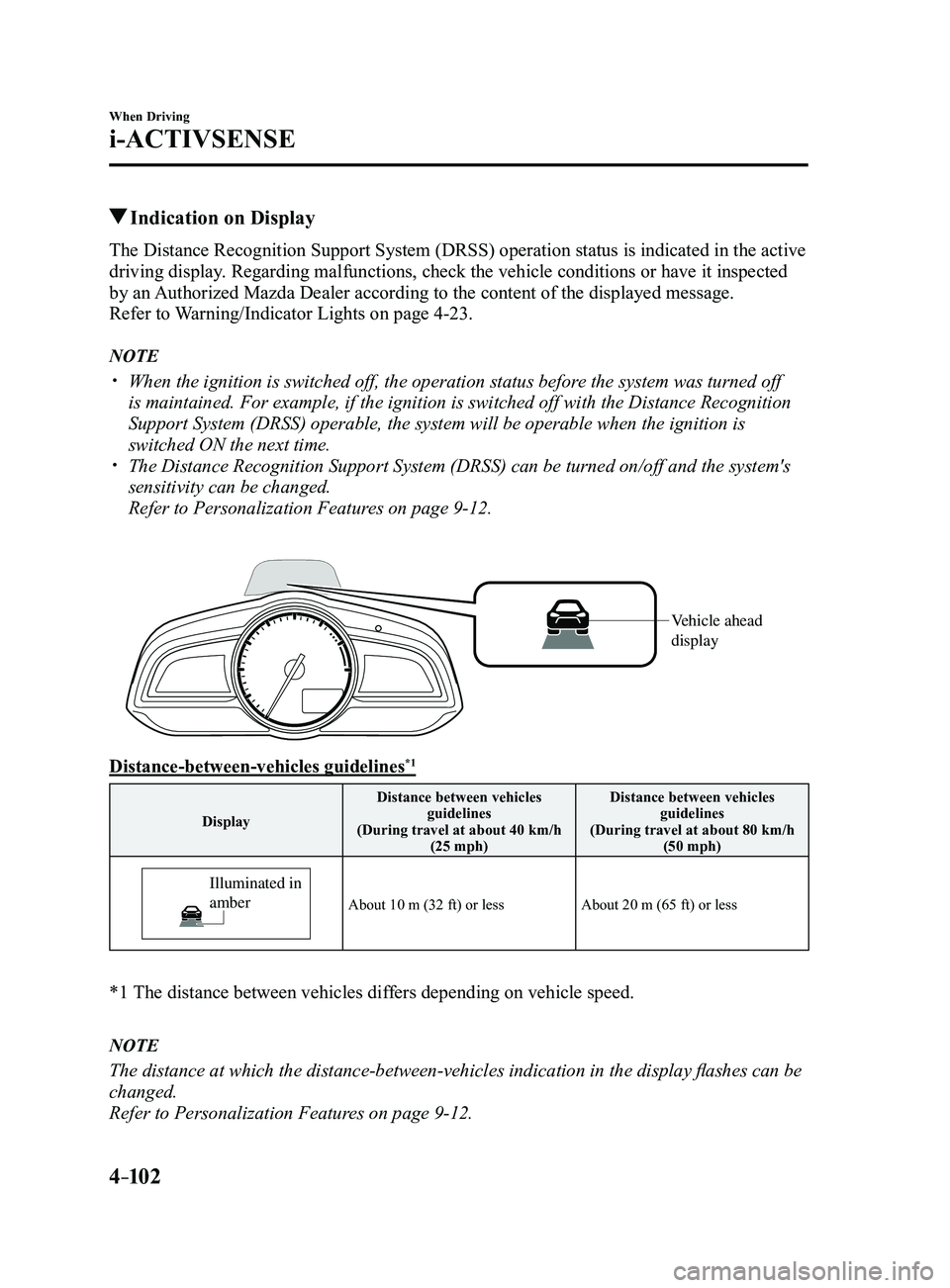
The Distance Recognition Support System (DRSS) operation status is indicated in the active
driving display. Regarding malfunctions, check the vehicle conditions or have it inspected
by an Authorized Mazda Dealer according to the content of the displayed messag\
e.
Refer to Warning/Indicator Lights on page
4-23.
NOTE
When the ignition is switched off, the operation status before the system was turned off
is maintained. For example, if the ignition is switched off with the Dis\
tance Recognition
Support System (DRSS) operable, the system will be operable when the i\
gnition is
switched ON the next time.
The Distance Recognition Support System (DRSS) can be turned on/off an\
d the system's
sensitivity can be changed.
Refer to Personalization Features on page 9-12.
Vehicle ahead
display
Distance-between-vehicles guidelines*1
DisplayDistance between vehicles
guidelines
(During travel at about 40 km/h (25 mph) Distance between vehicles
guidelines
(During travel at about 80 km/h (50 mph)
Illuminated in
amber
About 10 m (32 ft) or lessAbout 20 m (65 ft) or less
*1 The distance between vehicles dif fers depending on vehicle speed.
NOTE
The distance at which the distance-between-vehicles indication in the display flashes can be
changed.
Refer to Personalization Features on page
9-12.
Mazda3_8FL6-EA-16F_Edition2.indb 1022016/08/10 17:36:44