MAZDA MODEL 3 4-DOOR 2017 Owners Manual
Manufacturer: MAZDA, Model Year: 2017, Model line: MODEL 3 4-DOOR, Model: MAZDA MODEL 3 4-DOOR 2017Pages: 612
Page 271 of 612
4–141
When Driving
i-ACTIVSENSE
Radar Sensor (Front)
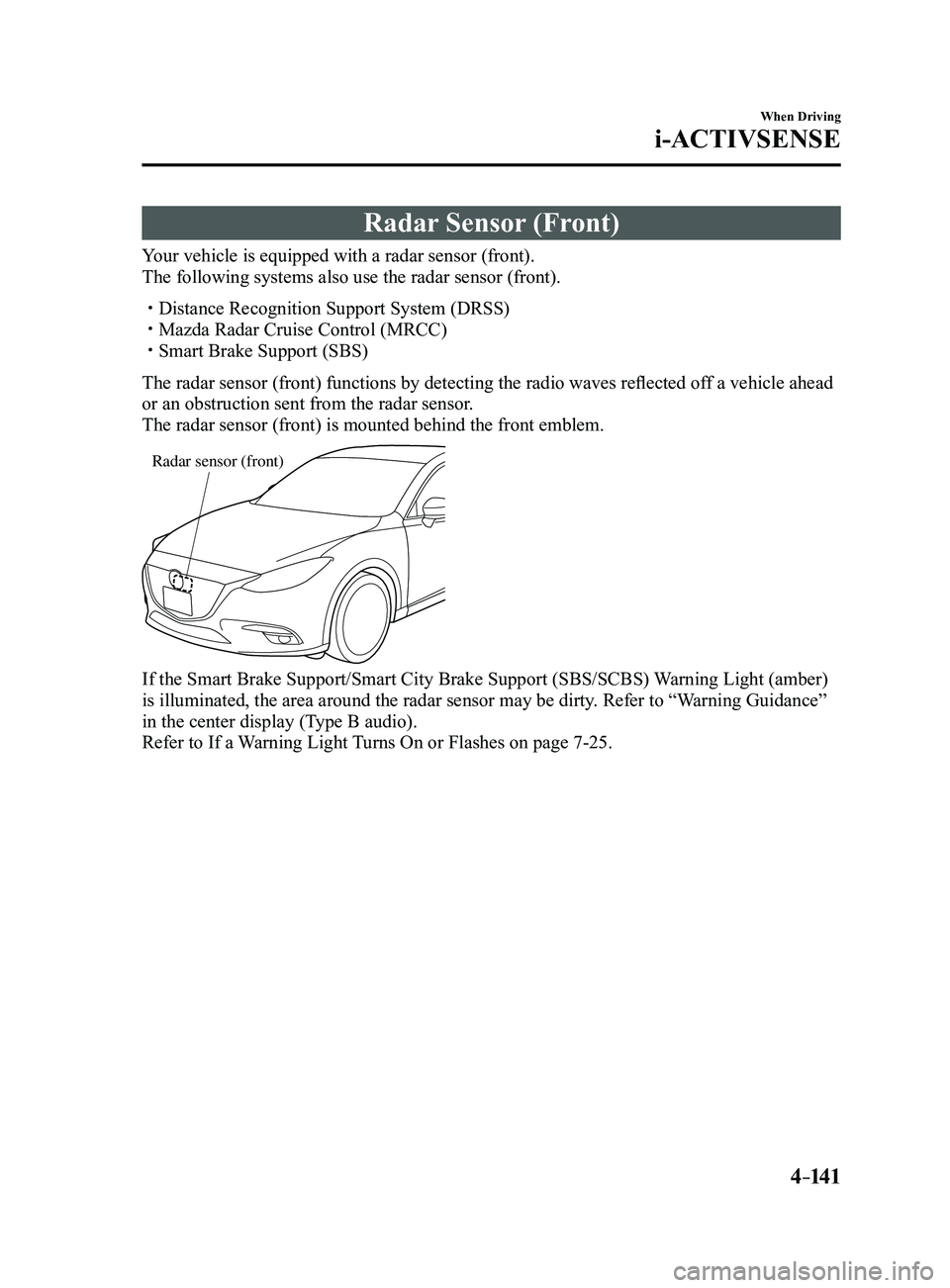
Your vehicle is equipped with a radar sensor (front).
The following systems also use the radar sensor (front).
Distance Recognition Support System (DRSS) Mazda Radar Cruise Control (MRCC) Smart Brake Support (SBS)
The radar sensor (front) functions by detecting the radio waves reflected off a vehicle ahead
or an obstruction sent from the radar sensor.
The radar sensor (front) is mounted behind the front emblem.
Radar sensor (front)
If the Smart Brake Support/Smart City Brake Support (SBS/SCBS) Warning Light (amber)
is illuminated, the area around the radar sensor may be dirty. Refer to “Warning Guidance”
in the center display (Type B audio).
Refer to If a Warning Light Turns On or Flashes on page
7-25.
Mazda3_8FL6-EA-16F_Edition2.indb 1412016/08/10 17:37:00
Page 272 of 612
4–142
When Driving
i-ACTIVSENSE
CAUTION
Heed the following precautions to assure correct operation of each system.
Do not adhere stickers (including transparent stickers) to the surface of the radiator
grille and front emblem in and around the radar sensor (front), and do not replace
the radiator grille and front emblem with any product that is not a genuine product
designed for use with the radar sensor (front).
The radar sensor (front) includes a function for detecting soiling of the radar sensor's
front surface and informing the driver, however, depending on the conditions, it may
require time to detect or it may not detect plastic shopping bags, ice or snow. If this
occurs, the system may not operate correctly, therefore always keep the radar sensor
(front) clean.
Do not install a grille guard. If the front part of the vehicle has been damaged in a vehicle accident, the position of
the radar sensor (front) may have moved. Stop the system immediately and always
have the vehicle inspected at an Authorized Mazda Dealer.
Do not use the front bumper to push other vehicles or obstructions such as when
pulling out of a parking space. Otherwise, the radar sensor (front) could be hit and its
position deviated.
Do not remove, disassemble, or modify the radar sensor (front). For repairs, replacement or paint work around the radar sensor (front), consult an
Authorized Mazda Dealer. Do not modify the suspension. If the suspension are modified, the vehicle's posture
could change and the radar sensor (front) may not be able to correctly detect a vehicle
ahead or an obstruction.
Mazda3_8FL6-EA-16F_Edition2.indb 1422016/08/10 17:37:00
Page 273 of 612
4–14 3
When Driving
i-ACTIVSENSE
NOTE
Under the following conditions, the radar sensor (front) may not be able to detect
vehicles ahead or obstructions correctly and each system may not operate normally.
The rear surface of a vehicle ahead does not reflect radio waves effectively, such as
an unloaded trailer or an automobile with a loading platform covered by a soft top,
vehicles with a hard plastic tailgate, and round-shaped vehicles.
Vehicles ahead with low vehicle height and thus less area for reflecting radio waves. Visibility is reduced due to a vehicle ahead casting off water, snow, or sand from its
tires and onto your windshield. The trunk/luggage compartment is loaded with heavy objects or the r ear passenger
seats are occupied. Ice, snow, or soiling is on the front surface of the front emblem. During inclement weather such as rain, snow, or sand storms. When driving near facilities or objects emitting str ong radio waves.
Under the following conditions, the radar sensor (fr ont) may not be able to detect
vehicles ahead or obstructions.
The beginning and end of a curve. Roads with continuous curves. Narrow lane roads due to road construction or lane closures. The vehicle ahead enters the radar sensor's blind spot. The vehicle ahead is running abnormally due to accident or vehicle damag\
e. Roads with repeated up and down slopes Driving on poor r oads or unpaved roads. The distance between your vehicle and the vehicle ahead is extr emely short. A vehicle suddenly comes close such as by cutting into the lane.
To prevent incorrect operation of the system, use tires of the same specified size,
manufacturer, brand, and tread pattern on all four wheels. In addition, do not use tires
with significantly different wear patterns or tire pressures on the same vehicle (Including
the temporary spare tire).
If the battery power is weak, the system may not operate correctly. If the vehicle is driven on a road with little traffic and few vehicles ahead or obstructions
for the radar sensor (front) to detect, the sensor detects that the radar sensor (front) is
dirty and the Smart Brake Support/Smart City Brake Support (SBS/SCBS) \
Warning Light
(amber) may be temporarily turned on. However, it does not indicate a malfunction.
Mazda3_8FL6-EA-16F_Edition2.indb 1432016/08/10 17:37:00
Page 274 of 612
4–14 4
When Driving
i-ACTIVSENSE
Radar Sensors (Rear)
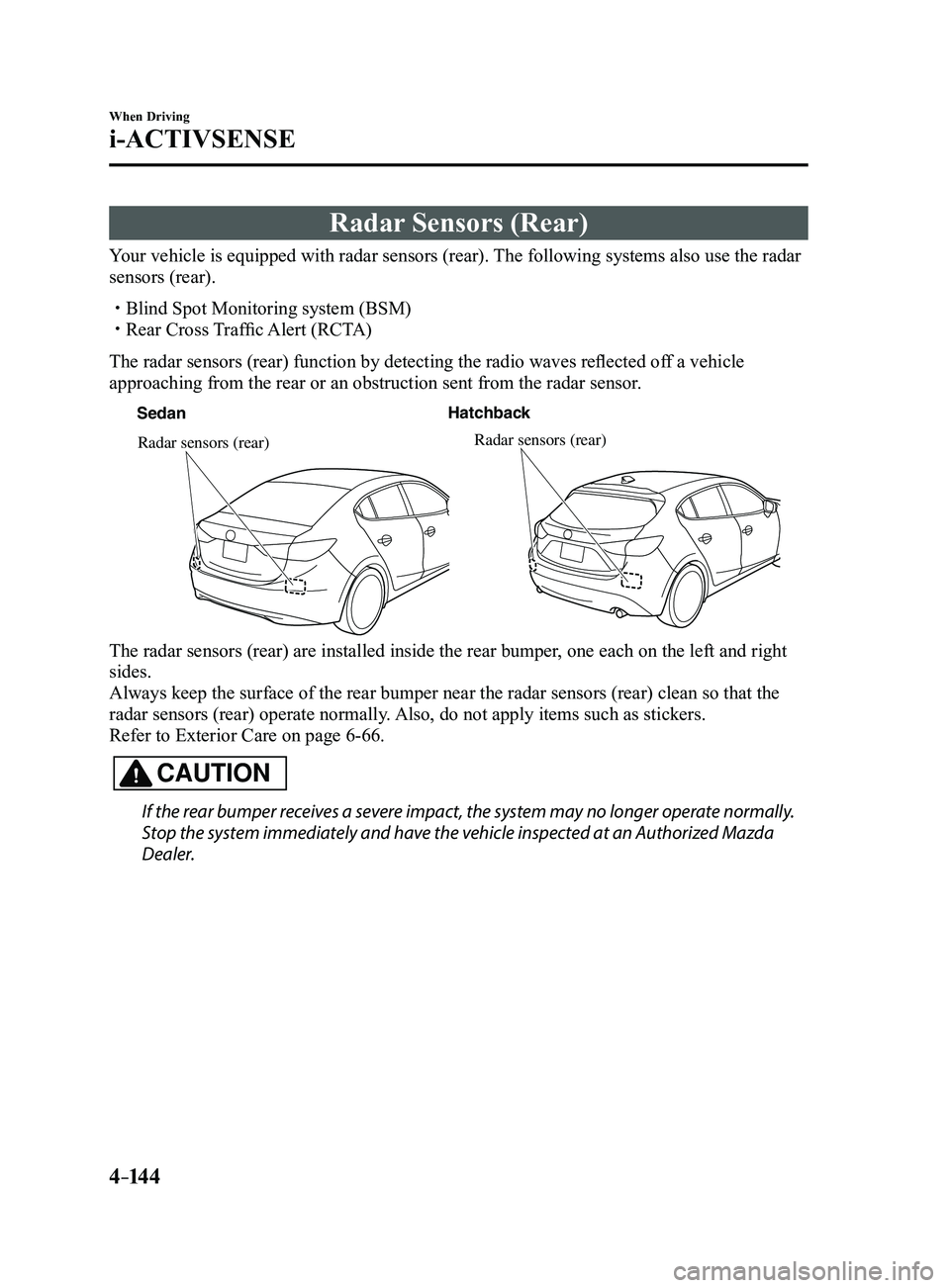
Your vehicle is equipped with radar sensors (rear). The following systems also use the radar
sensors (rear).
Blind Spot Monitoring system (BSM) Rear Cross Traffic Alert (RCTA)
The radar sensors (rear) function by detecting the radio waves reflected off a vehicle
approaching from the rear or an obstruction sent from the radar sensor.
SedanHatchback
Radar sensors (rear)Radar sensors (rear)
The radar sensors (rear) are installed inside the rear bumper, one each on the left and right
sides.
Always keep the surface of the rear bumper near the radar sensors (rear\
) clean so that the
radar sensors (rear) operate normally. Also, do not apply items such as stickers.
Refer to Exterior Care on page
6-66.
CAUTION
If the rear bumper receives a severe impact, the system may no longer operate normally.
Stop the system immediately and have the vehicle inspected at an Authorized Mazda
Dealer.
Mazda3_8FL6-EA-16F_Edition2.indb 1442016/08/10 17:37:00
Page 275 of 612
4–14 5
When Driving
i-ACTIVSENSE
NOTE
The detection ability of the radar sensors (rear) has limitations. In the following cases,
the detection ability may lower and the system may not operate normally.
The rear bumper near the radar sensors (rear) has become deformed. Snow, ice or mud adheres to the radar sensors (rear) on the rear bumper. Under bad weather conditions such as rain, snow and fog.
Under the following conditions, the radar sensors (r ear) cannot detect target objects or it
may be difficult to detect them.
Stationary objects on a road or a road side such as small, two-wheeled vehicles,
bicycles, pedestrians, animals, and shopping carts. Vehicle shapes which do not reflect radar waves well such as empty trailers with a low
vehicle height and sports cars.
Vehicles are shipped with the direction of the radar sensors (rear) adjusted for each
vehicle to a loaded vehicle condition so that the radar sensors (rear) detect approaching
vehicles correctly. If the direction of the radar sensors (rear) has deviated for some
reason, have the vehicle inspected at an Authorized Mazda Dealer.
For repairs or replacement of the radar sensors (rear), or bumper repairs, paintwork,
and replacement near the radar sensors, consult an Authorized Mazda Dealer. Turn off the system while pulling a trailer or while an accessory such as\
a bicycle carrier
is installed to the rear of the vehicle. Otherwise, the radio waves emitted by the radar will\
be blocked causing the system to not operate normally.
The radar sensors are regulated by the relevant radio wave laws of the country in which
the vehicle is driven. If the vehicle is driven abroad, authorization from the country in
which the vehicle is driven may be required.
Mazda3_8FL6-EA-16F_Edition2.indb 1452016/08/10 17:37:01
Page 276 of 612
.
WARNING
Do not use the")
4–14 6
When Driving
Cruise Control
*Some models.
Cruise Control*
With cruise control, you can set and automatically maintain any speed of \
more than about
25 km/h (16 mph).
WARNING
Do not use the cruise control under the following conditions:
Using the cruise control under the following conditions is dangerous and could result in
loss of vehicle control.
Hilly terrain Steep inclines Heavy or unsteady traffic Slippery or winding roads Similar restrictions that require inconsistent speed
Cruise Control Switch
ON switch RES/+ switch
SET- switch
OFF/CAN
switch
Mazda3_8FL6-EA-16F_Edition2.indb 1462016/08/10 17:37:01
Page 277 of 612
4–147
When Driving
Cruise Control
Cruise Main Indication (White),
Cruise Set Indication (white)/
Indicator Light (Green)
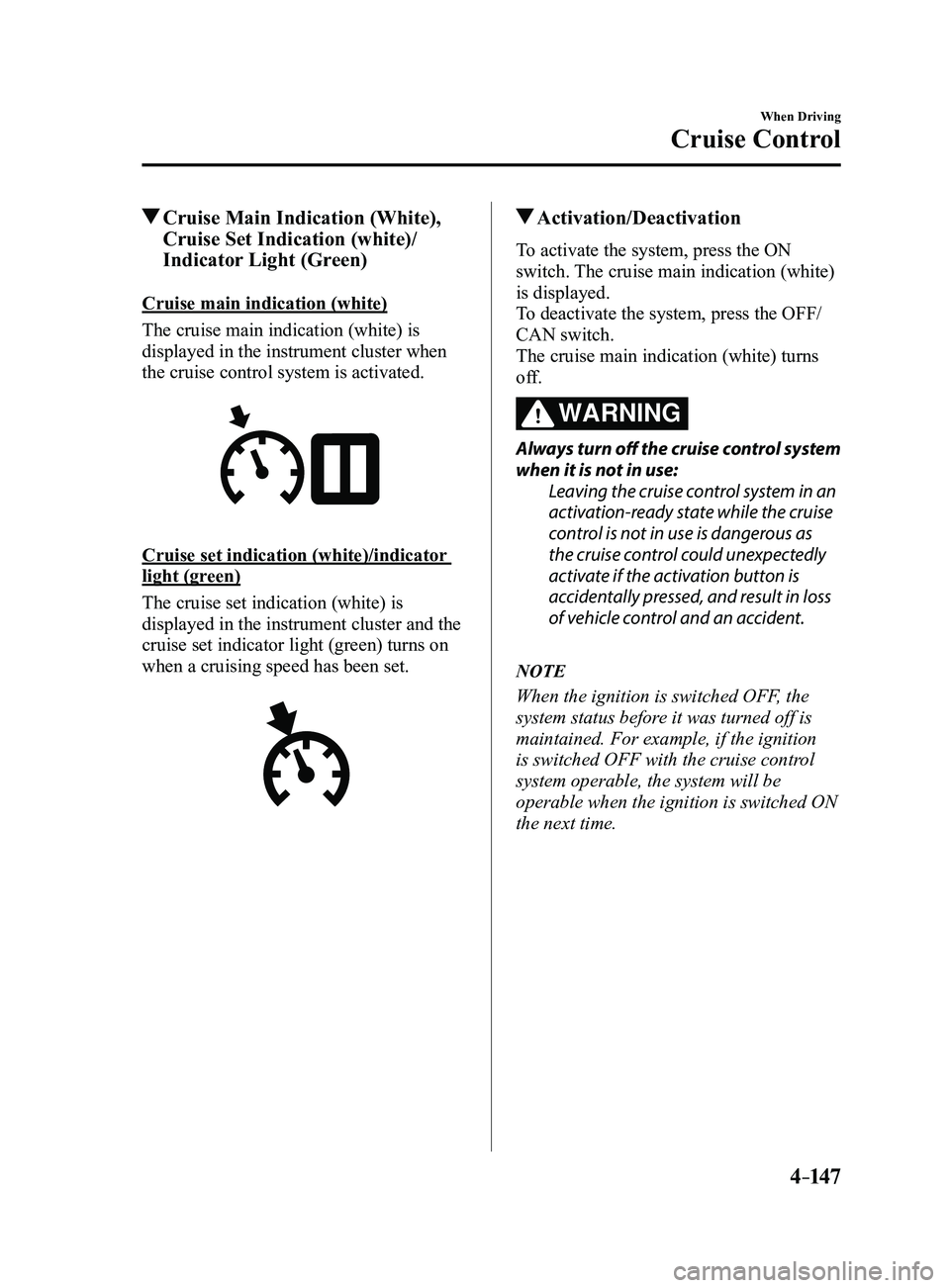
Cruise main indication (white)
The cruise main indication (white) is
displayed in the instrument cluster when
the cruise control system is activated.
Cruise set indication (white)/indicator
light (green)
The cruise set indication (white) is
displayed in the instrument cluster and the
cruise set indicator light (green) turns on
when a cruising speed has been set.
Activation/Deactivation
To activate the system, press the ON
switch. The cruise main indication (white)
is displayed.
To deactivate the system, press the OFF/
CAN switch.
The cruise main indication (white) turns
off.
WARNING
Always turn off the cruise control system
when it is not in use:Leaving the cruise control system in an
activation-ready state while the cruise
control is not in use is dangerous as
the cruise control could unexpectedly
activate if the activation button is
accidentally pressed, and result in loss
of vehicle control and an accident.
NOTE
When the ignition is switched OFF, the
system status before it was turned off is
maintained. For example, if the ignition
is switched OFF with the cruise control
system operable, the system will be
operable when the ignition is switched ON
the next time.
Mazda3_8FL6-EA-16F_Edition2.indb 1472016/08/10 17:37:02
Page 278 of 612
4–14 8
When Driving
Cruise Control
To Set Speed
1. Activate the cruise control system by
pressing the ON switch. The cruise
main indication (white) is displayed.
2. Accelerate to the desired speed, which
must be more than 25 km/h (16 mph).
3. Set the cruise control by pressing the
SET switch at the desired speed. The
cruise control is set at the moment the
SET
switch is pressed. Release the
accelerator pedal simultaneously. The
cruise set indication (white) is
displayed and the cruise set indicator
light (green) turns on.
NOTE
The cruise contr ol speed setting cannot
be performed under the following
conditions:
(Automatic transaxle)
The selector lever is in the P or N
position. (Manual transaxle)
The shift lever is in the neutral
position. The parking brake is applied.
Release the SET or RES/ switch at
the desired speed, otherwise the speed
will continue increasing while the
RES/
switch is pressed and held, and
continue decreasing while the SET
switch is pressed and held (except when
the accelerator pedal is depressed).
On a steep grade, the vehicle may
momentarily slow down while
ascending, or speed up while
descending.
The cruise contr ol will cancel if the
vehicle speed decreases below 21 km/h
(13 mph) when climbing a steep grade.
The cruise control may cancel at about
15 km/h (9 mph) below the preset speed
such as when climbing a long, steep
grade.
Mazda3_8FL6-EA-16F_Edition2.indb 1482016/08/10 17:37:02
Page 279 of 612
4–149
When Driving
Cruise Control
To Increase Cruising Speed
Follow either of these procedures.
To increase speed using cruise control
switch
Press the RES/
switch and hold it. Your
vehicle will accelerate. Release the switch
at the desired speed.
Press the RES/
switch and release it
immediately to adjust the preset speed.
Multiple operations will increase the
preset speed according to the number of
times it is operated.
Increasing speed with a single RES/
switch operation
Instrument cluster display for vehicle
speed indicated in km/h: 1 km/h (0.6 mph)
Instrument cluster display for vehicle
speed indicated in mph: 1 mph (1.6 km/h)
To increase speed using accelerator
pedal
Depress the accelerator pedal to accelerate
to the desired speed. Press the SET
switch and release it immediately.
NOTE
Accelerate if you want to speed up
temporarily when the cruise control is on.
Greater speed will not interfere with or
change the set speed. Take your foot off the
accelerator to return to the set speed.
To Decrease Cruising Speed
Press the SET switch and hold it. The
vehicle will gradually slow.
Release the switch at the desired speed.
Press the SET
switch and release it
immediately to adjust the preset speed.
Multiple operations will decrease the
preset speed according to the number of
times it is operated.
Decreasing speed with a single SET
switch operation
Instrument cluster display for vehicle
speed indicated in km/h: 1 km/h (0.6 mph)
Instrument cluster display for vehicle
speed indicated in mph: 1 mph (1.6 km/h)
To Resume Cruising Speed at
More Than 25 km/h (16 mph)
If some other method besides the OFF/
CAN switch was used to cancel cruising
speed (such as applying the brake pedal)
and the system is still activated, the most
recent set speed will automatically resume
when the RES/
switch is pressed.
If vehicle speed is below 25 km/h (16
mph), increase the vehicle speed up to 25
km/h (16 mph) or more and press the
RES/
switch.
To Temporarily Cancel
To temporarily cancel the system, use one
of these methods:
Slightly depress the brake pedal. (Manual transaxle)
Depress the clutch pedal. Press the OFF/CAN switch.
If the RES/ switch is pressed when the
vehicle speed is 25 km/h (16 mph) or
higher, the system reverts to the previously
set speed.
Mazda3_8FL6-EA-16F_Edition2.indb 1492016/08/10 17:37:03
Page 280 of 612
4–150
When Driving
Cruise Control
NOTE
If any of the following conditions occur,
the cruise control system is temporarily
canceled.
The parking brake is applied. (Automatic transaxle)
The selector lever is in the P or N
position. (Manual transaxle)
The shift lever is in the neutral
position.
When the cruise control system is
temporarily canceled by even one of the
applicable cancel conditions, the speed
cannot be re-set.
(Automatic transaxle)
The cruise control cannot be cancelled
while driving in manual mode (selector
lever shifted from D to M position).
Therefore, engine braking will not be
applied even if the transaxle is shifted
down to a lower gear. If deceleration is
required, lower the set speed or depress
the brake pedal.
To Deactivate
When a cruising speed has been
set (cruise set indication (white) is
displayed/cruise set indicator light
(green) turns on)
Long-press the OFF/CAN switch or press
the OFF/CAN switch 2 times.
When a cruising speed has not been
set (cruise main indication (white) is
displayed)
Press the OFF/CAN switch.
Mazda3_8FL6-EA-16F_Edition2.indb 1502016/08/10 17:37:03