lights MAZDA MODEL 3 4-DOOR 2017 Owner's Manual
[x] Cancel search | Manufacturer: MAZDA, Model Year: 2017, Model line: MODEL 3 4-DOOR, Model: MAZDA MODEL 3 4-DOOR 2017Pages: 612
Page 147 of 612
4–17
When Driving
Instrument Cluster and Display
Fuel Gauge
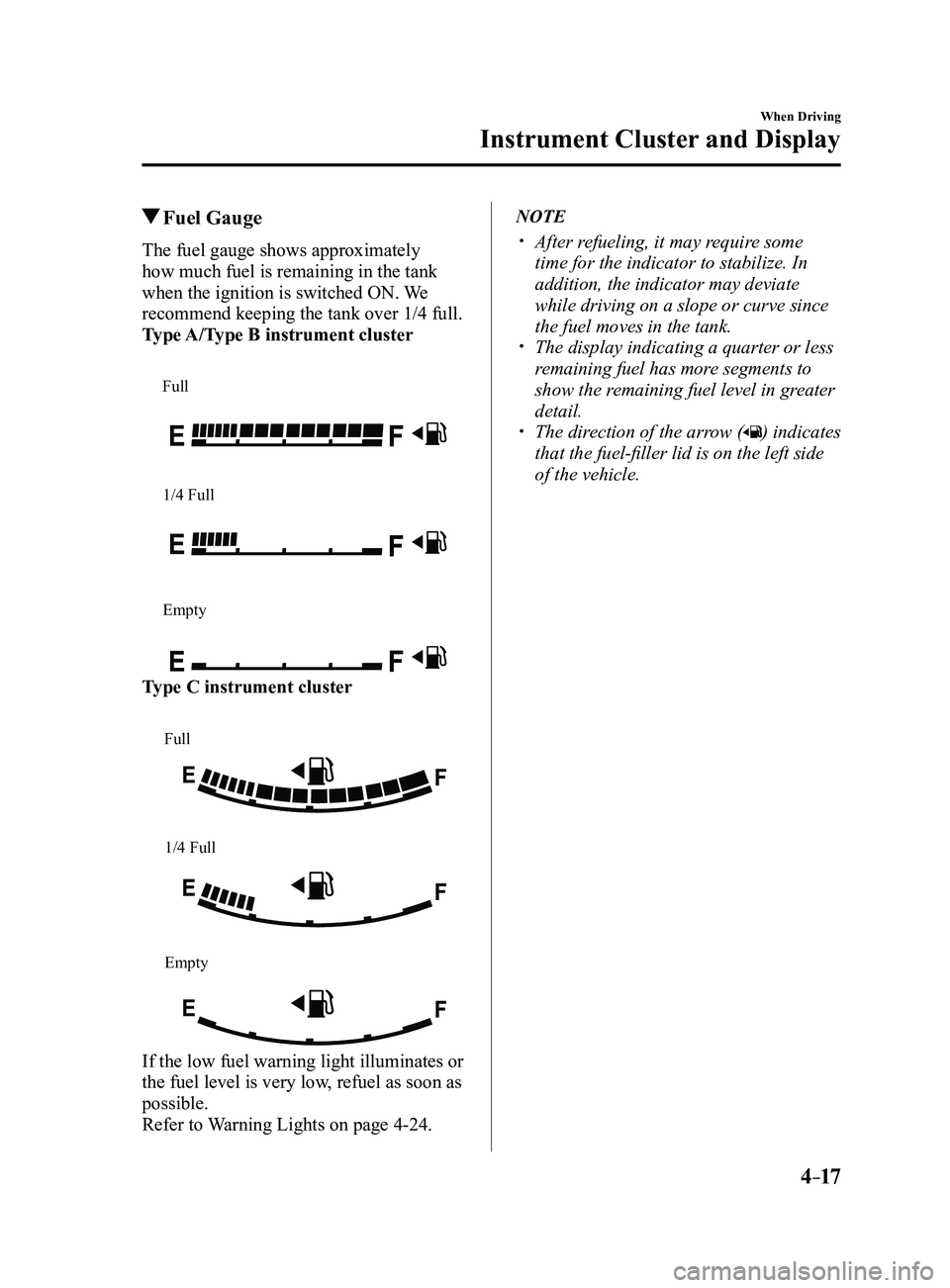
The fuel gauge shows approximately
how much fuel is remaining in the tank
when the ignition is switched ON. We
recommend keeping the tank over 1/4 full.
Type A/Type B instrument cluster
Full
1/4 Full
Empty
Type C instrument cluster
Full
1/4 Full
Empty
If the low fuel warning light illuminates or
the fuel level is very low, refuel as soon as
possible.
Refer to Warning Lights on page
4-24.
NOTE
After refueling, it may require some
time for the indicator to stabilize. In
addition, the indicator may deviate
while driving on a slope or curve since
the fuel moves in the tank.
The display indicating a quarter or less
remaining fuel has more segments to
show the remaining fuel level in greater
detail.
The direction of the arrow () indicates
that the fuel-filler lid is on the left side
of the vehicle.
Mazda3_8FL6-EA-16F_Edition2.indb 172016/08/10 17:35:49
Page 148 of 612
4–18
When Driving
Instrument Cluster and Display
Dashboard Illumination
When the position lights are turned
on with the ignition switched ON,
the brightness of the instrument panel
illumination is dimmed.
NOTE
When the position lights are turned on,
the position lights indicator light in the
instrument cluster turns on.
Refer to Headlights on page
4-43.
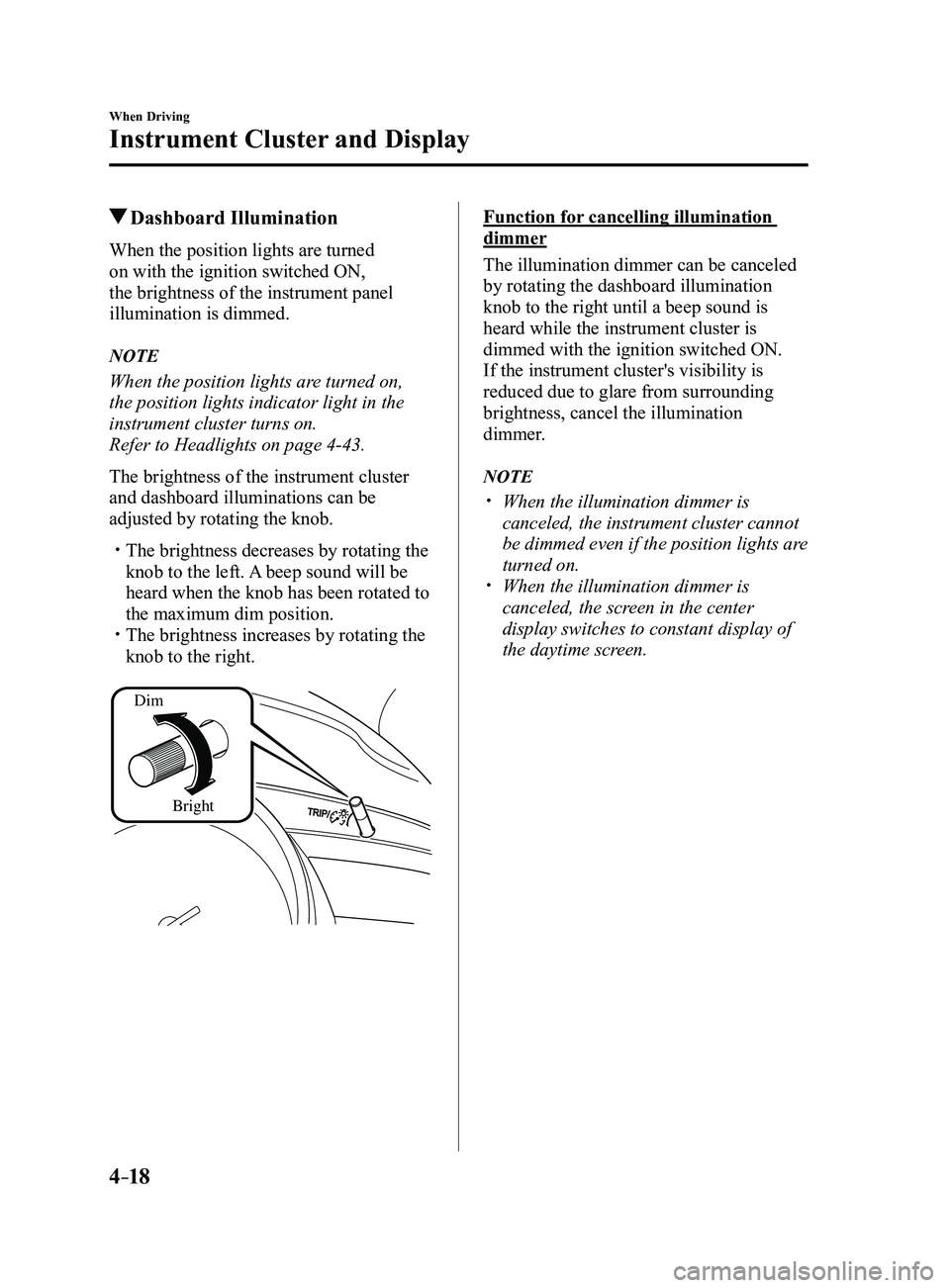
The brightness of the instrument cluster
and dashboard illuminations can be
adjusted by rotating the knob.
The brightness decreases by rotating the
knob to the left. A beep sound will be
heard when the knob has been rotated to
the maximum dim position.
The brightness increases by rotating the
knob to the right.
Dim
Bright
Function for cancelling illumination
dimmer
The illumination dimmer can be canceled
by rotating the dashboard illumination
knob to the right until a beep sound is
heard while the instrument cluster is
dimmed with the ignition switched ON.
If the instrument cluster's visibility is
reduced due to glare from surrounding
brightness, cancel the illumination
dimmer.
NOTE
When the illumination dimmer is
canceled, the instrument cluster cannot
be dimmed even if the position lights are
turned on.
When the illumination dimmer is
canceled, the screen in the center
display switches to constant display of
the daytime screen.
Mazda3_8FL6-EA-16F_Edition2.indb 182016/08/10 17:35:49
Page 153 of 612
4–23
When Driving
Instrument Cluster and Display
Warning/Indicator Lights
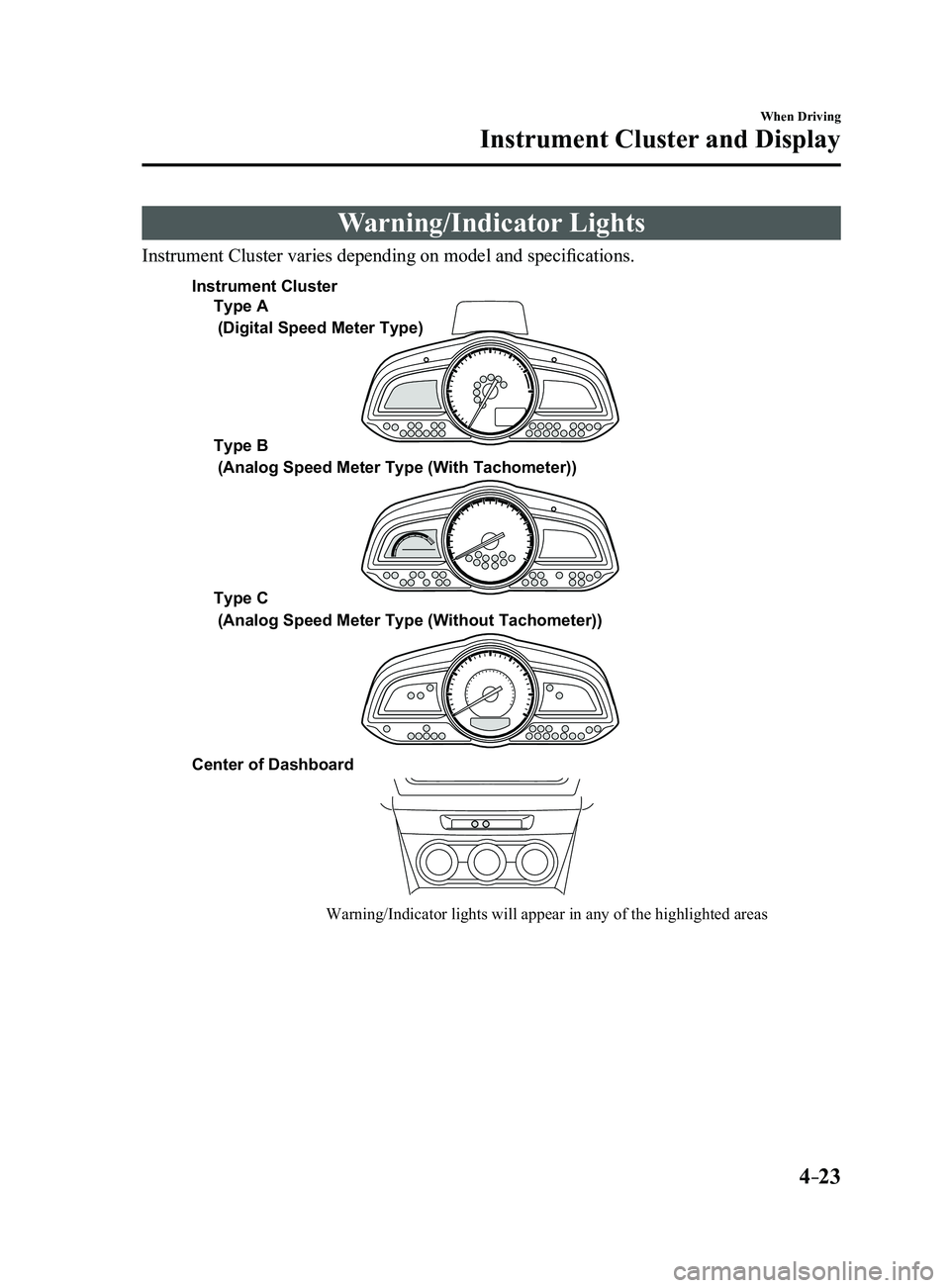
Instrument Cluster varies depending on model and specifications.
Warning/Indicator lights will appear in any of the highlighted areas
Type A
Type B
Type C
Center of Dashboard
(Digital Speed Meter Type)
(Analog Speed Meter Type (With Tachometer))
(Analog Speed Meter Type (Without Tachometer))
Instrument Cluster
Mazda3_8FL6-EA-16F_Edition2.indb 232016/08/10 17:35:52
Page 154 of 612
4–24
When Driving
Instrument Cluster and Display
*Some models.
Warning Lights
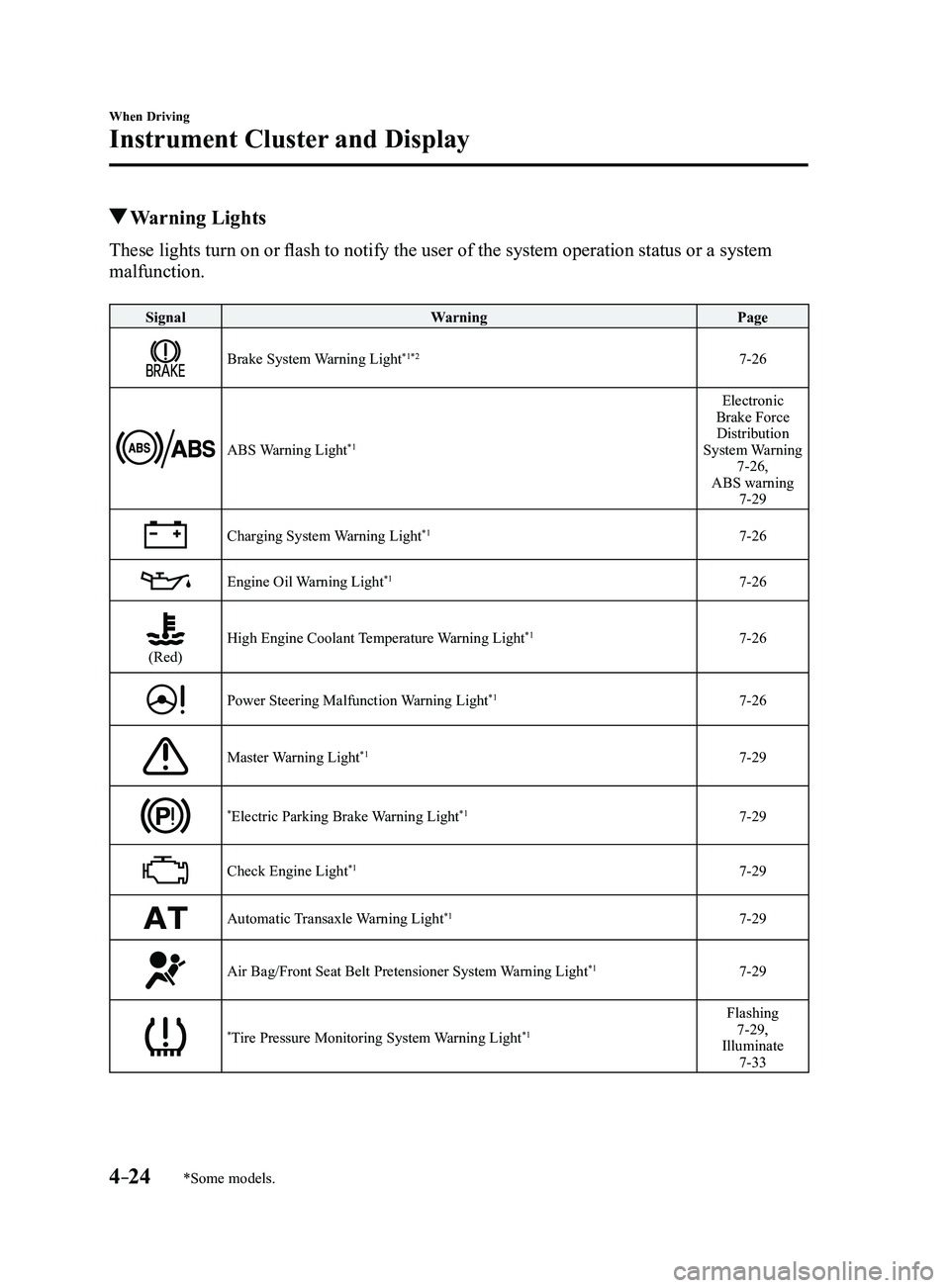
These lights turn on or flash to notify the user of the system operation status or a system
malfunction.
SignalWarning Page
Brake System Warning Light*1*27-26
ABS Warning Light*1
Electronic
Brake Force Distribution
System Warning
7-26,
ABS warning
7-29
Charging System Warning Light*17-26
Engine Oil Warning Light*17-26
(Red)High Engine Coolant Temperature Warning Light*17-26
Power Steering Malfunction Warning Light*17-26
Master Warning Light*17-29
*Electric Parking Brake Warning Light*17-29
Check Engine Light*17-29
Automatic Transaxle Warning Light*17-29
Air Bag/Front Seat Belt Pretensioner System Warning Light*17-29
*Tire Pressure Monitoring System Warning Light*1
Flashing 7-29,
Illuminate
7-33
Mazda3_8FL6-EA-16F_Edition2.indb 242016/08/10 17:35:55
Page 156 of 612
4–26
When Driving
Instrument Cluster and Display
*Some models.
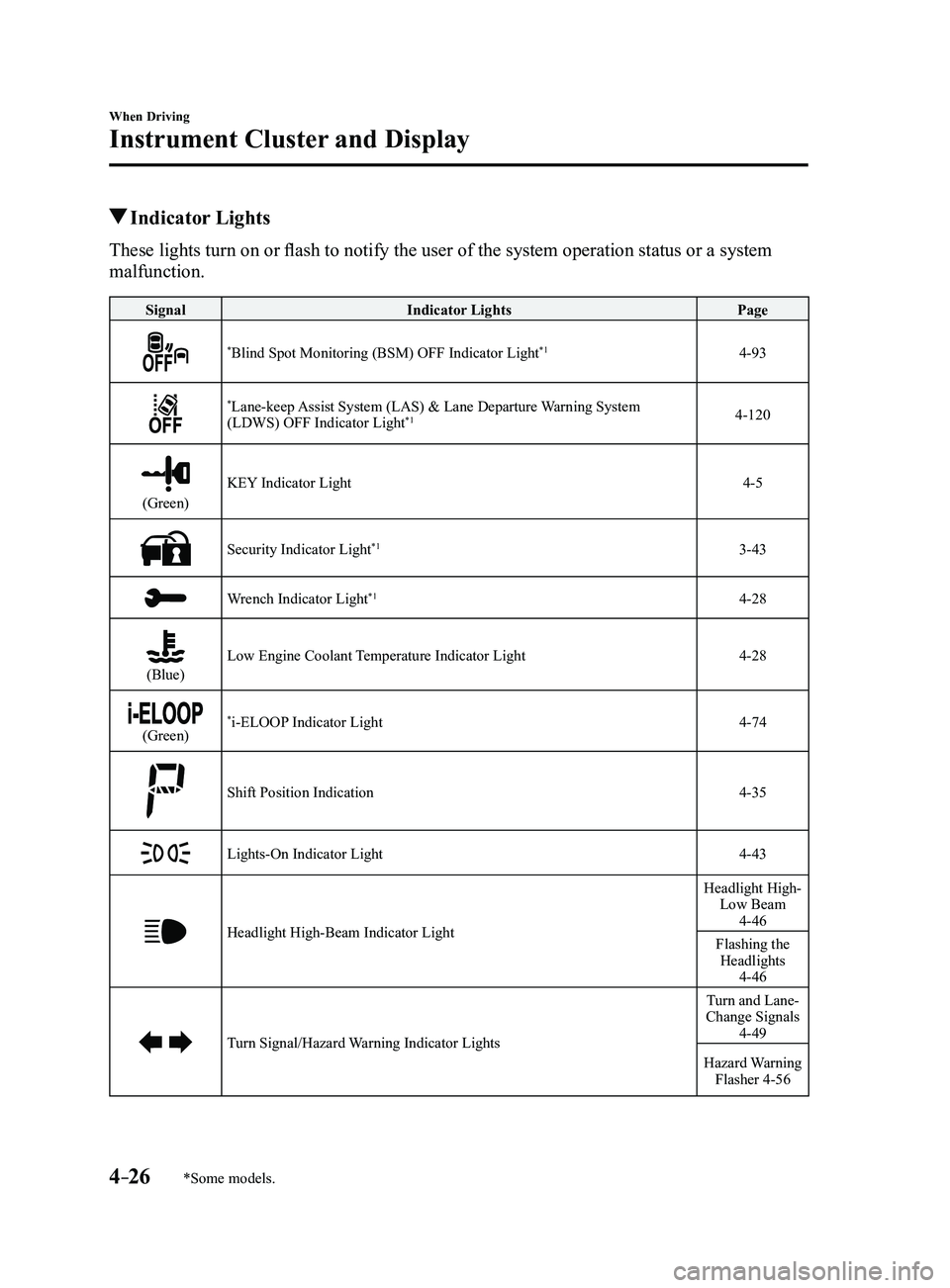
Indicator Lights
These lights turn on or flash to notify the user of the system operation status or a system
malfunction.
SignalIndicator Lights Page
*Blind Spot Monitoring (BSM) OFF Indicator Light*14-93
*Lane-keep Assist System (LAS) & Lane Departure Warning System
(LDWS) OFF Indicator Light*14-120
(Green)
KEY Indicator Light4-5
Security Indicator Light*13-43
Wrench Indicator Light*14-28
(Blue)Low Engine Coolant Temperature Indicator Light4-28
(Green)*i-ELOOP Indicator Light4-74
Shift Position Indication4-35
Lights-On Indicator Light4-43
Headlight High-Beam Indicator Light
Headlight High- Low Beam
4-46
Flashing the Headlights
4-46
Turn Signal/Hazard Warning Indicator Lights
Turn and Lane-
Change Signals
4-49
Hazard Warning Flasher 4-56
Mazda3_8FL6-EA-16F_Edition2.indb 262016/08/10 17:36:01
Page 157 of 612
4–27
When Driving
Instrument Cluster and Display
*Some models.
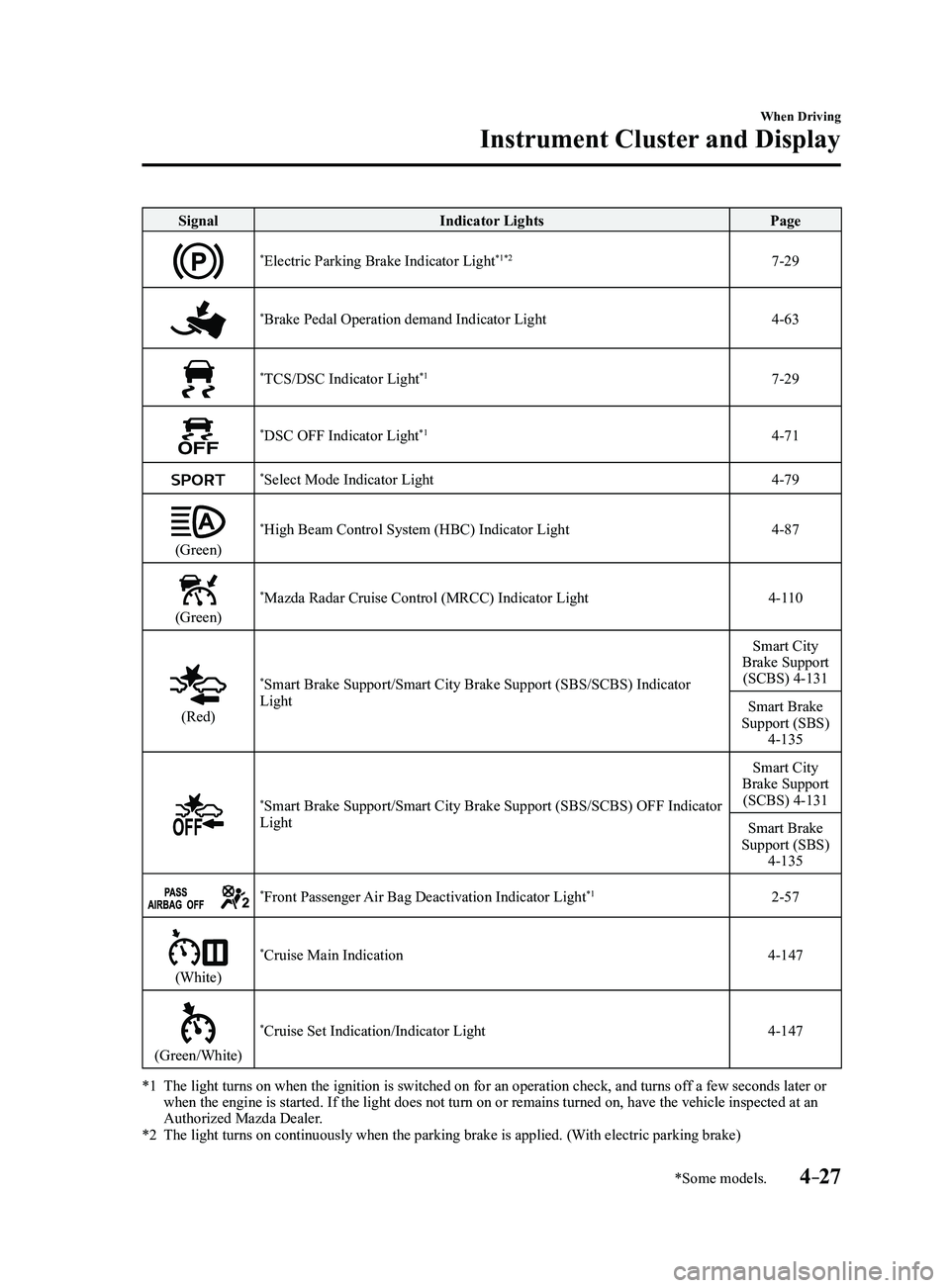
SignalIndicator Lights Page
*Electric Parking Brake Indicator Light*1*27-29
*Brake Pedal Operation demand Indicator Light4-63
*TCS/DSC Indicator Light*17-29
*DSC OFF Indicator Light*14-71
*Select Mode Indicator Light4-79
(Green)
*High Beam Control System (HBC) Indicator Light4-87
(Green)
*Mazda Radar Cruise Control (MRCC) Indicator Light4-110
(Red)
*Smart Brake Support/Smart City Brake Support (SBS/SCBS) Indicator
Light Smart City
Brake Support (SCBS) 4-131
Smart Brake
Support (SBS)
4-135
*Smart Brake Support/Smart City Brake Support (SBS/SCBS) OFF Indicator
Light Smart City
Brake Support (SCBS) 4-131
Smart Brake
Support (SBS)
4-135
*Front Passenger Air Bag Deactivation Indicator Light*12-57
(White)
*Cruise Main Indication4-147
(Green/White)
*Cruise Set Indication/Indicator Light4-147
*1 The light turns on when the ignition is switched on for an operation che\
ck, and turns of f a few seconds later or when the engine is started. If the light does not turn on or remains tur\
ned on, have the vehicle inspected at an
Authorized Mazda Dealer.
*2 The light turns on continuously when the parking brake is applied. (With electric parking brake)
Mazda3_8FL6-EA-16F_Edition2.indb 272016/08/10 17:36:04
Page 164 of 612
4–34
When Driving
Automatic Transaxle
Transaxle Ranges
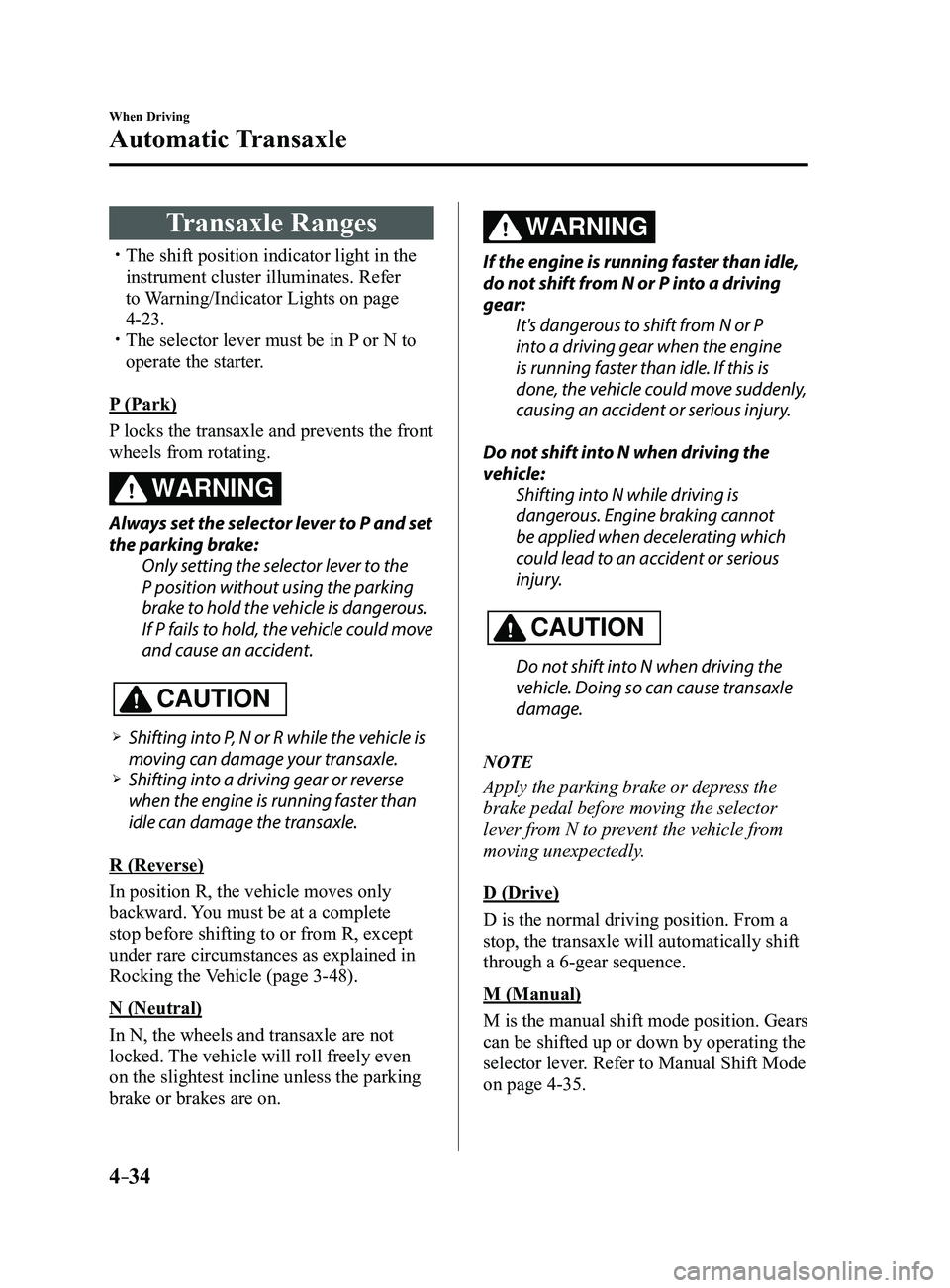
The shift position indicator light in the
instrument cluster illuminates. Refer
to Warning/Indicator Lights on page
4-23. The selector lever must be in P or N to
operate the starter.
P (Park)
P locks the transaxle and prevents the front
wheels from rotating.
WARNING
Always set the selector lever to P and set
the parking brake: Only setting the selector lever to the
P position without using the parking
brake to hold the vehicle is dangerous.
If P fails to hold, the vehicle could move
and cause an accident.
CAUTION
Shifting into P, N or R while the vehicle is
moving can damage your transaxle. Shifting into a driving gear or reverse
when the engine is running faster than
idle can damage the transaxle.
R (Reverse)
In position R, the vehicle moves only
backward. You must be at a complete
stop before shifting to or from R, except
under rare circumstances as explained in
Rocking the Vehicle (page
3-48).
N (Neutral)
In N, the wheels and transaxle are not
locked. The vehicle will roll freely even
on the slightest incline unless the parking
brake or brakes are on.
WARNING
If the engine is running faster than idle,
do not shift from N or P into a driving
gear: It's dangerous to shift from N or P
into a driving gear when the engine
is running faster than idle. If this is
done, the vehicle could move suddenly,
causing an accident or serious injury.
Do not shift into N when driving the
vehicle: Shifting into N while driving is
dangerous. Engine braking cannot
be applied when decelerating which
could lead to an accident or serious
injury.
CAUTION
Do not shift into N when driving the
vehicle. Doing so can cause transaxle
damage.
NOTE
Apply the parking brake or depress the
brake pedal before moving the selector
lever from N to prevent the vehicle from
moving unexpectedly.
D (Drive)
D is the normal driving position. From a
stop, the transaxle will automatically shift
through a 6-gear sequence.
M (Manual)
M is the manual shift mode position. Gears
can be shifted up or down by operating the
selector lever. Refer to Manual Shift Mode
on page
4-35.
Mazda3_8FL6-EA-16F_Edition2.indb 342016/08/10 17:36:08
Page 173 of 612

4–43
When Driving
Switches and Controls
Lighting Control
Headlights
Turn the headlight switch to turn the headlights and other exterior light\
s on or off.
When the lights are turned on, the lights-on indicator light in the inst\
rument cluster turns on.
NOTE
If the light switch is left on, the lights will automatically switch off\
approximately 30
seconds after switching the ignition off.
The time setting can be changed.
Refer to Personalization Features on page 9-12. To prevent discharging the battery, do not leave the lights on while the engine is off unless
safety requires them.
Without auto-light control
Switch Position
Ignition PositionON ACC or
OFF ONACC or
OFF ONACC or
OFF
Headlights OffOffOffOff OnOn
*2
Daytime running lights On*1OffOn*1Off OffOff
Taillights
Parking lights
License lights
Side-marker lights Off
Off OnOn
*2OnOn*2
*1 The lights are turned on while the vehicle is driven.*2 The lights are turned on for the specified period by the auto he adlight off function.
Mazda3_8FL6-EA-16F_Edition2.indb 432016/08/10 17:36:14
Page 174 of 612
4–44
When Driving
Switches and Controls
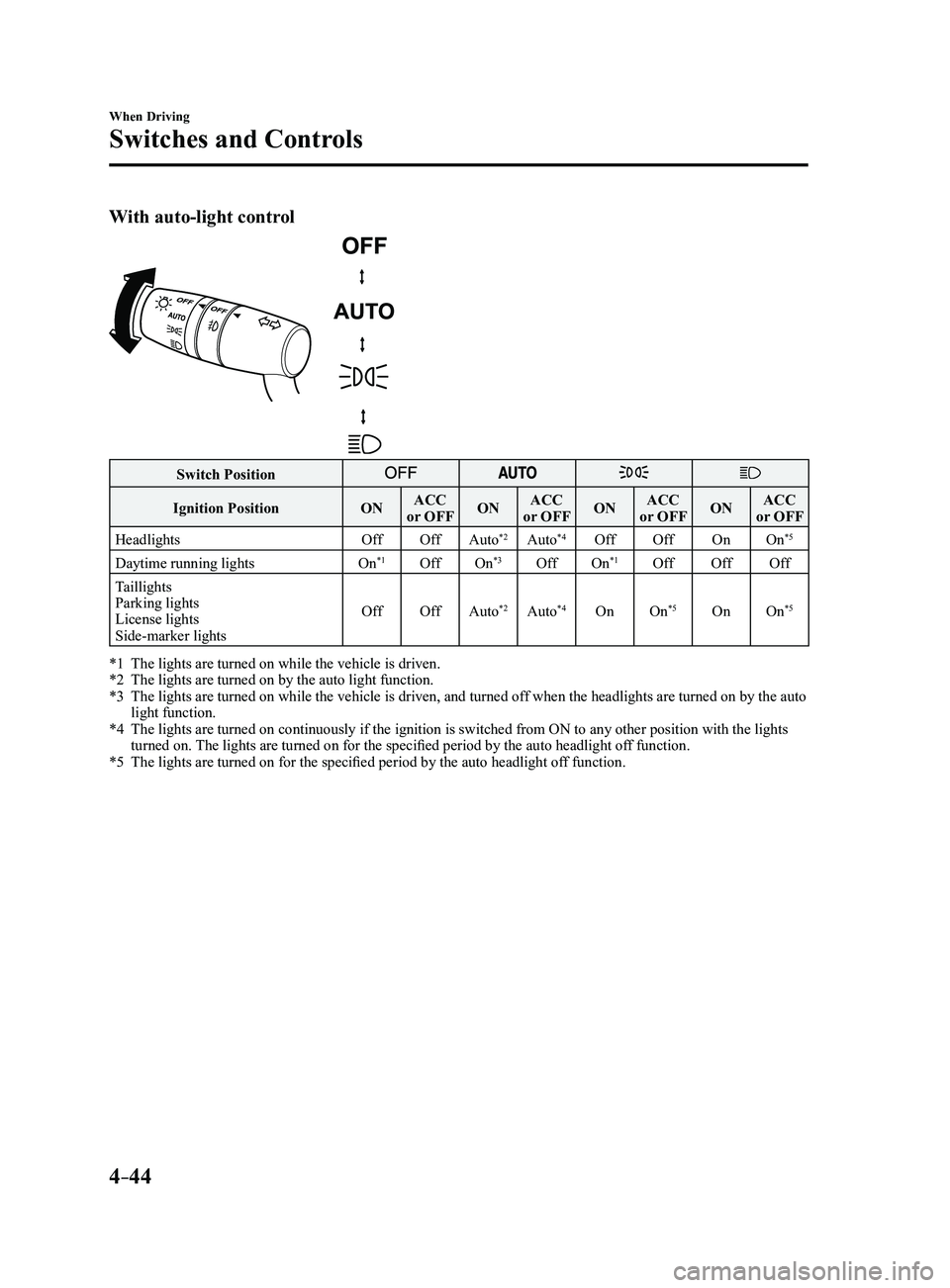
With auto-light control
Switch Position
Ignition PositionONACC
or OFF ONACC
or OFF ONACC
or OFF ONACC
or OFF
Headlights OffOffAuto
*2Auto*4Off Off OnOn*5
Daytime running lights On*1OffOn*3OffOn*1Off OffOff
Taillights
Parking lights
License lights
Side-marker lights Off
OffAuto
*2Auto*4On On*5OnOn*5
*1 The lights are turned on while the vehicle is driven.*2 The lights are turned on by the auto light function.*3 The lights are turned on while the vehicle is driven, and turned of f when the headlights are turned on by the auto light function.*4 The lights are turned on continuously if the ignition is switched from ON to any other position with the lights turned on. The lights are turned on for the specified period by the auto headlight off function.*5 The lights are turned on for the specified period by the auto he adlight off function.
Mazda3_8FL6-EA-16F_Edition2.indb 442016/08/10 17:36:15
Page 175 of 612
4–45
When Driving
Switches and Controls
*Some models.
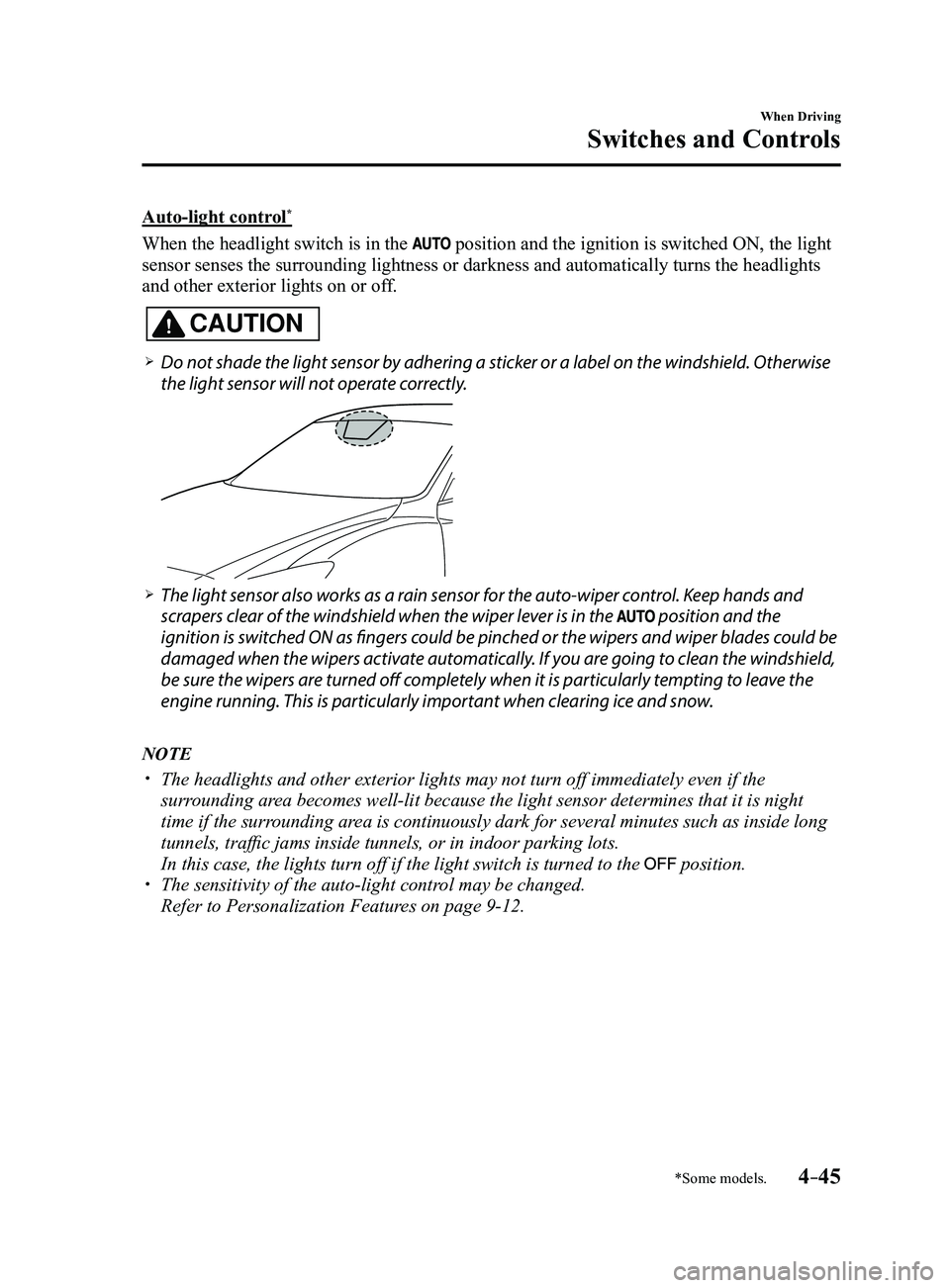
Auto-light control*
When the headlight switch is in the position and the ignition is switched ON, the light
sensor senses the surrounding lightness or darkness and automatically tu\
rns the headlights
and other exterior lights on or off.
CAUTION
Do not shade the light sensor by adhering a sticker or a label on the windshield. Otherwise
the light sensor will not operate correctly.
The light sensor also works as a rain sensor for the auto-wiper control. Keep hands and
scrapers clear of the windshield when the wiper lever is in the position and the
ignition is switched ON as fingers could be pinched or the wipers and wiper blades could be
damaged when the wipers activate automatically. If you are going to clean the windshield,
be sure the wipers are turned off completely when it is particularly tempting to leave the
engine running. This is particularly important when clearing ice and snow.
NOTE
The headlights and other exterior lights may not turn off immediately ev\
en if the
surrounding area becomes well-lit because the light sensor determines that it is night\
time if the surrounding area is continuously dark for several minutes such as inside long
tunnels, traffic jams inside tunnels, or in indoor parking lots.
In this case, the lights turn off if the light switch is turned to the position. The sensitivity of the auto-light control may be changed.
Refer to Personalization Features on page 9-12.
Mazda3_8FL6-EA-16F_Edition2.indb 452016/08/10 17:36:15