mirror MAZDA MODEL 3 4-DOOR 2017 Owner's Manual
[x] Cancel search | Manufacturer: MAZDA, Model Year: 2017, Model line: MODEL 3 4-DOOR, Model: MAZDA MODEL 3 4-DOOR 2017Pages: 612
Page 267 of 612
4–137
When Driving
i-ACTIVSENSE
Heed the following cautions to assure the correct operation of the Forward Sensing Camera
(FSC).
Be careful not to scratch the Forward Sensing Camera (FSC) lens or allow it to get dirty. Do not remove the Forward Sensing Camera (FSC) cover. Do not place objects on the dashboard which reflect light. Always keep the windshield glass around the camera clean by removing dirt or fogging.
Use the windshield defroster to remove fogging on the windshield. Consult an Authorized Mazda Dealer regarding cleaning the interior side of the
windshield around the Forward Sensing Camera (FSC). Consult an Authorized Mazda Dealer before performing repairs around the Forward
Sensing Camera (FSC). The Forward Sensing Camera (FSC) is installed to the windshield. Consult an Authorized
Mazda Dealer for windshield repair and replacement. When cleaning the windshield, do not allow glass cleaners or similar cleaning fluids to
get on the Forward Sensing Camera (FSC) lens. In addition, do not touch the Forward
Sensing Camera (FSC) lens.
When performing repairs around the rearview mirror, consult an Authorized Mazda Dealer. Consult an Authorized Mazda Dealer regarding cleaning of the camera lens. Do not hit or apply strong force to the Forward Sensing Camera (FSC) or the area around
it. If the Forward Sensing Camera (FSC) is severely hit or if there are cracks or damage
caused by flying gravel or debris in the area around it, stop using the following systems
and consult an Authorized Mazda Dealer.
High Beam Control System (HBC) Lane-keep Assist System (LAS) & Lane Departure Warning System (LDWS) Traffic Sign Recognition System (TSR) Smart City Brake Support (SCBS) Smart Brake Support (SBS)
The direction in which the Forward Sensing Camera (FSC) is pointed has been finely
adjusted. Do not change the installation position of the Forward Sensing Camera (FSC)
or remove it. Otherwise, it could result in damage or malfunction.
Always use tires for all wheels that are of the specified size, and the same manufacturer,
brand, and tread pattern. In addition, do not use tires with significantly different wear
patterns on the same vehicle as the system may not operate normally.
The Forward Sensing Camera (FSC) includes a function for detecting a soiled windshield
and informing the driver, however, depending on the conditions, it may not detect plastic
shopping bags, ice or snow on the windshield. In such cases, the system cannot accurately
determine a vehicle ahead and may not be able to operate normally. Always drive carefully
and pay attention to the road ahead.
Mazda3_8FL6-EA-16F_Edition2.indb 1372016/08/10 17:36:59
Page 288 of 612
4–158
When Driving
Rear View Monitor
Viewing the Display
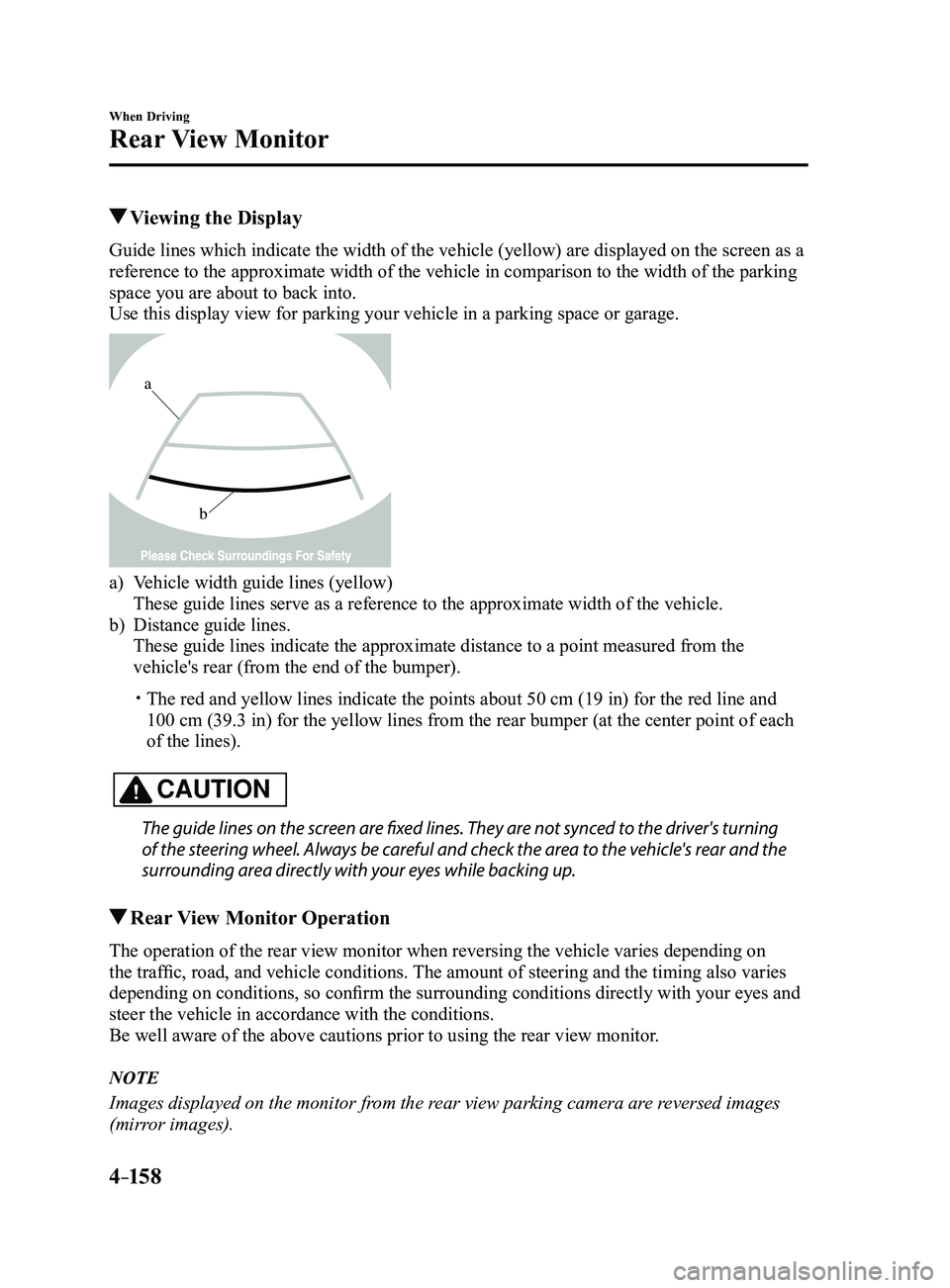
Guide lines which indicate the width of the vehicle (yellow) are displayed on the screen as a
reference to the approximate width of the vehicle in comparison to the w\
idth of the parking
space you are about to back into.
Use this display view for parking your vehicle in a parking space or gar\
age.
b
a
a) Vehicle width guide lines (yellow)
These guide lines serve as a reference to the approximate width of the v\
ehicle.
b) Distance guide lines.
These guide lines indicate the approximate distance to a point measured \
from the
vehicle's rear (from the end of the bumper).
The red and yellow lines indicate the points about 50 cm (19 in) for t\
he red line and
100 cm (39.3 in) for the yellow lines from the rear bumper (at the ce\
nter point of each
of the lines).
CAUTION
The guide lines on the screen are fixed lines. They are not synced to the driver's turning
of the steering wheel. Always be careful and check the area to the vehicle's rear and the
surrounding area directly with your eyes while backing up.
Rear View Monitor Operation
The operation of the rear view monitor when reversing the vehicle varies\
depending on
the traffic, road, and vehicle conditions. The amount of steering and the timing also varies
depending on conditions, so confirm the surrounding conditions directly with your eyes and
steer the vehicle in accordance with the conditions.
Be well aware of the above cautions prior to using the rear view monitor.
NOTE
Images displayed on the monitor from the rear view parking camera are reversed images
(mirror images).
Mazda3_8FL6-EA-16F_Edition2.indb 1582016/08/10 17:37:06
Page 402 of 612
5–110
Interior Features
Interior Equipment
*Some models.
Sunvisors
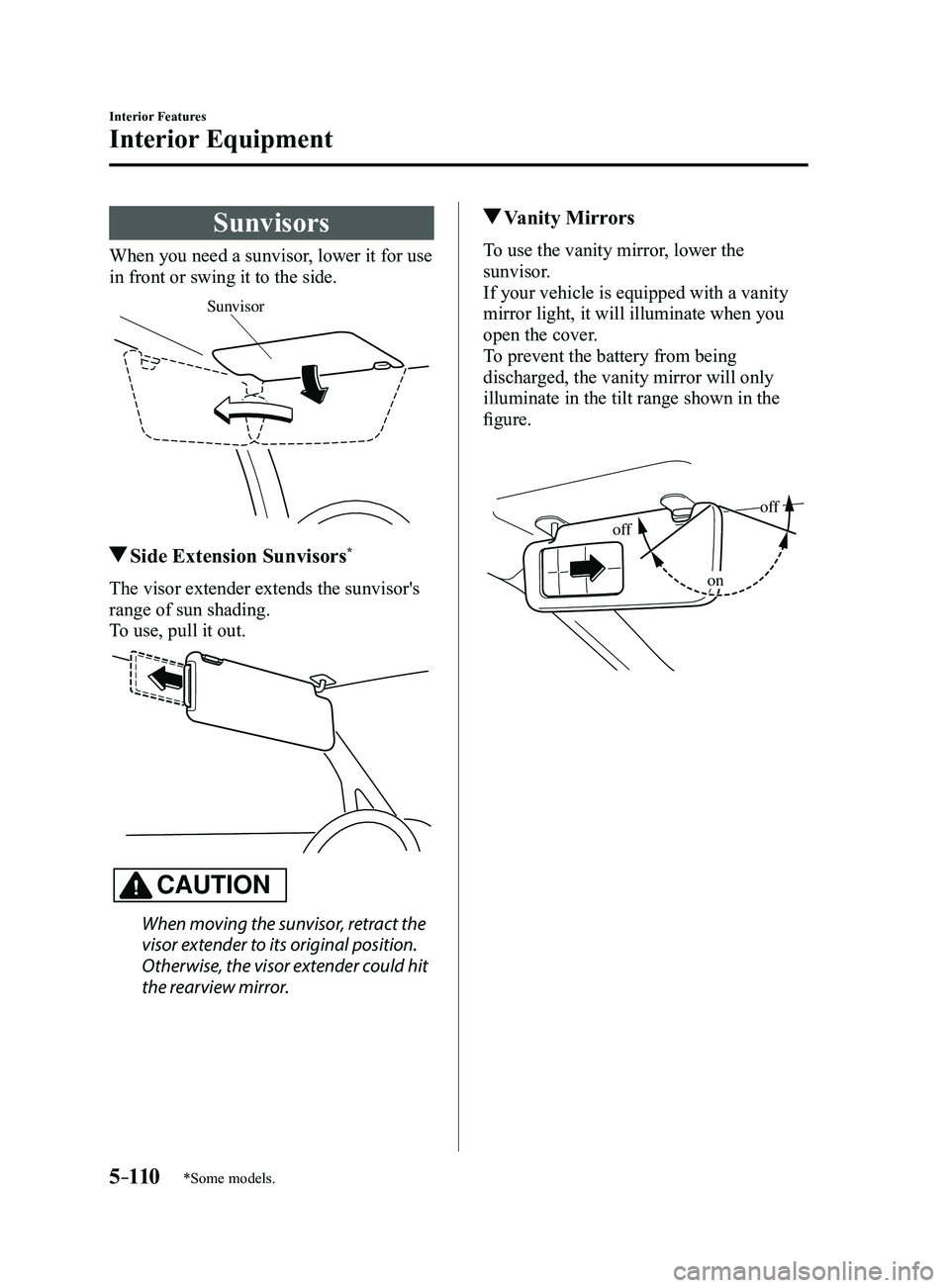
When you need a sunvisor, lower it for use
in front or swing it to the side.
Sunvisor
Side Extension Sunvisors*
The visor extender extends the sunvisor's
range of sun shading.
To use, pull it out.
CAUTION
When moving the sunvisor, retract the
visor extender to its original position.
Otherwise, the visor extender could hit
the rearview mirror.
Vanity Mirrors
To use the vanity mirror, lower the
sunvisor.
If your vehicle is equipped with a vanity
mirror light, it will illuminate when you
open the cover.
To prevent the battery from being
discharged, the vanity mirror will only
illuminate in the tilt range shown in the
figure.
off
off
on
Mazda3_8FL6-EA-16F_Edition2.indb 1102016/08/10 17:38:21
Page 457 of 612
6–45
Maintenance and Care
Owner Maintenance
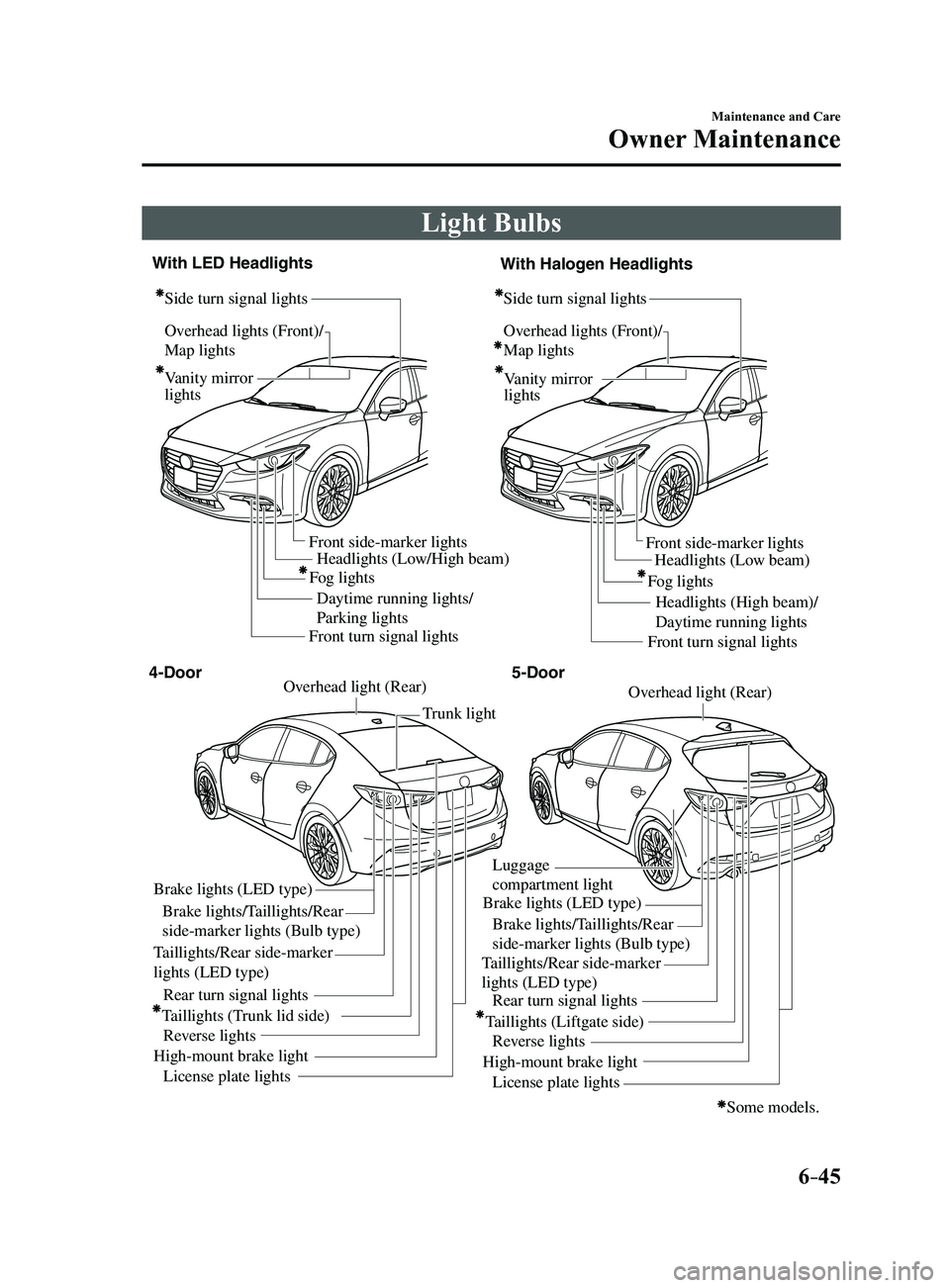
Light Bulbs
Overhead lights (Front)/
Map lights
Vanity mirror
lightsHeadlights (Low/High beam)
Daytime running lights/
Parking lights Headlights (Low beam)
Headlights (High beam)/
Daytime running lights
Fog lights
Front side-marker lights
Front side-marker lights
Side turn signal lights
Side turn signal lightsOverhead lights (Front)/
Map lights
Vanity mirror
lights
Some models.
Front turn signal lights Front turn signal lights
Brake lights (LED type)
Brake lights/Taillights/Rear
side-marker lights (Bulb type)
Taillights/Rear side-marker
lights (LED type) Taillights/Rear side-marker
lights (LED type)
Rear turn signal lights
Taillights (Trunk lid side) Reverse lights
High-mount brake light License plate lights Trunk light
Overhead light (Rear)Overhead light (Rear)
Brake lights (LED type)
Luggage
compartment light
Brake lights/Taillights/Rear
side-marker lights (Bulb type)
Rear turn signal lights
Taillights (Liftgate side) Reverse lights
High-mount brake light License plate lights
4-Door 5-Door
With LED Headlights
With Halogen Headlights
Fog lights
Mazda3_8FL6-EA-16F_Edition2.indb 452016/08/10 17:38:49
Page 470 of 612
6–58
Maintenance and Care
Owner Maintenance
*Some models.
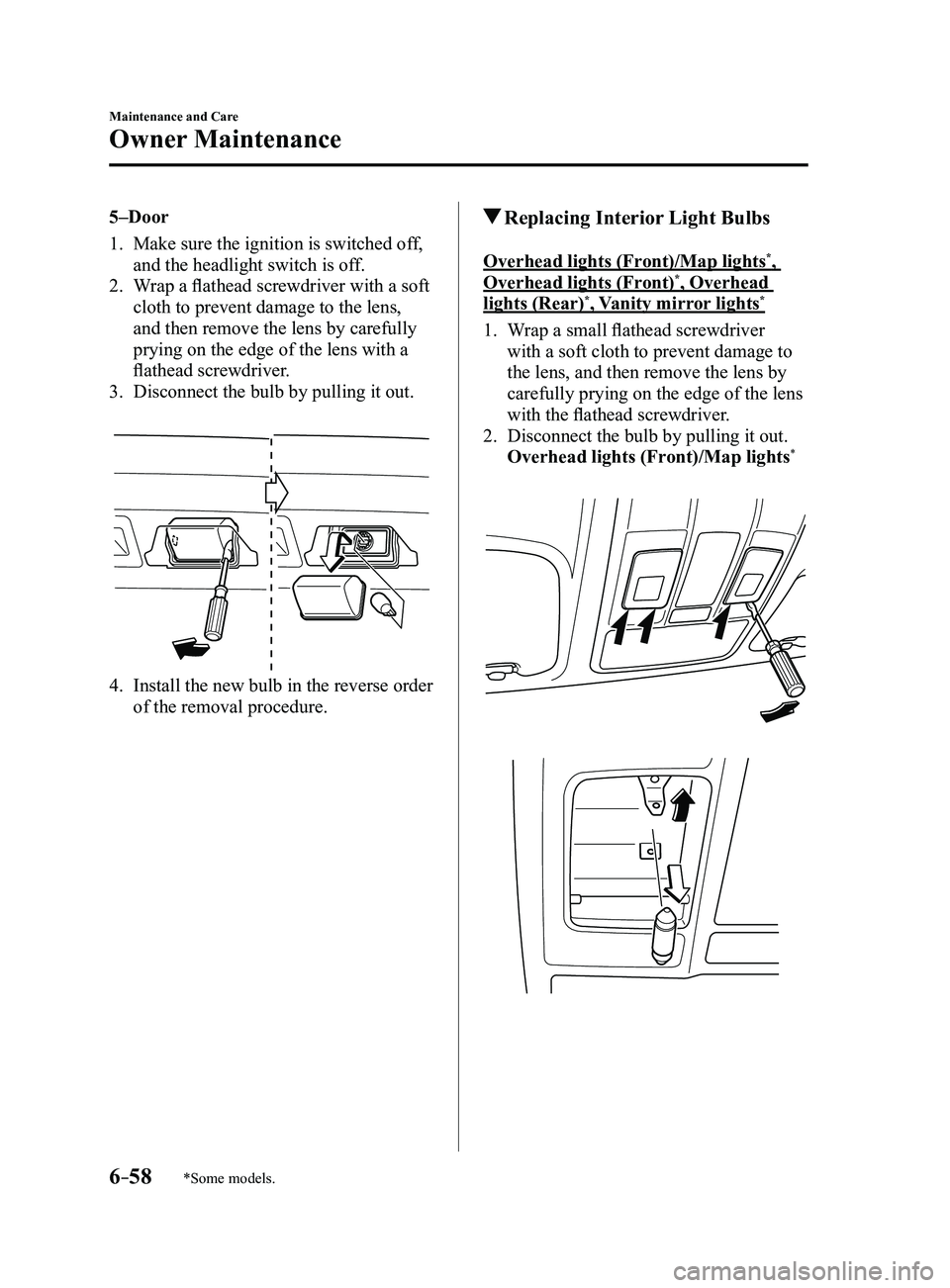
5–Door
1. Make sure the ignition is switched off,
and the headlight switch is off.
2. Wrap a flathead screwdriver with a soft
cloth to prevent damage to the lens,
and then remove the lens by carefully
prying on the edge of the lens with a
flathead screwdriver.
3. Disconnect the bulb by pulling it out.
4. Install the new bulb in the reverse order
of the removal procedure.
Replacing Interior Light Bulbs
Overhead lights (Front)/Map lights*,
Overhead lights (Front)*, Overhead
lights (Rear)*, Vanity mirror lights*
1. Wrap a small flathead screwdriver
with a soft cloth to prevent damage to
the lens, and then remove the lens by
carefully prying on the edge of the lens
with the flathead screwdriver.
2. Disconnect the bulb by pulling it out.
Overhead lights (Front)/Map lights*
Mazda3_8FL6-EA-16F_Edition2.indb 582016/08/10 17:38:59
Page 471 of 612
6–59
Maintenance and Care
Owner Maintenance
*Some models.
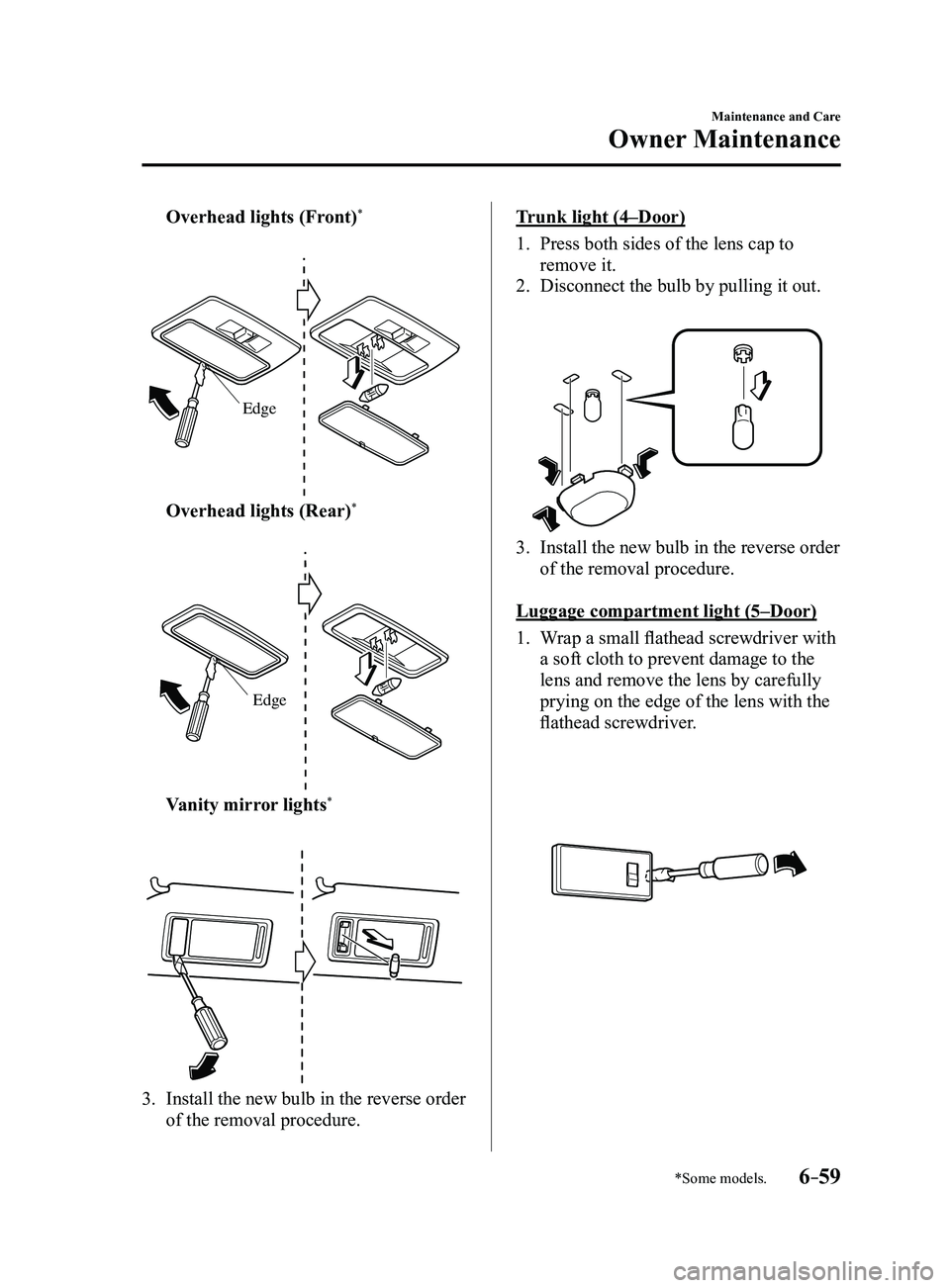
Overhead lights (Front)*
Edge
Overhead lights (Rear)*
Edge
Vanity mirror lights*
3. Install the new bulb in the reverse order
of the removal procedure.
Trunk light (4–Door)
1. Press both sides of the lens cap to
remove it.
2. Disconnect the bulb by pulling it out.
3. Install the new bulb in the reverse order
of the removal procedure.
Luggage compartment light (5–Door)
1. Wrap a small flathead screwdriver with
a soft cloth to prevent damage to the
lens and remove the lens by carefully
prying on the edge of the lens with the
flathead screwdriver.
Mazda3_8FL6-EA-16F_Edition2.indb 592016/08/10 17:39:00
Page 477 of 612
6–65
Maintenance and Care
Owner Maintenance
*Some models.
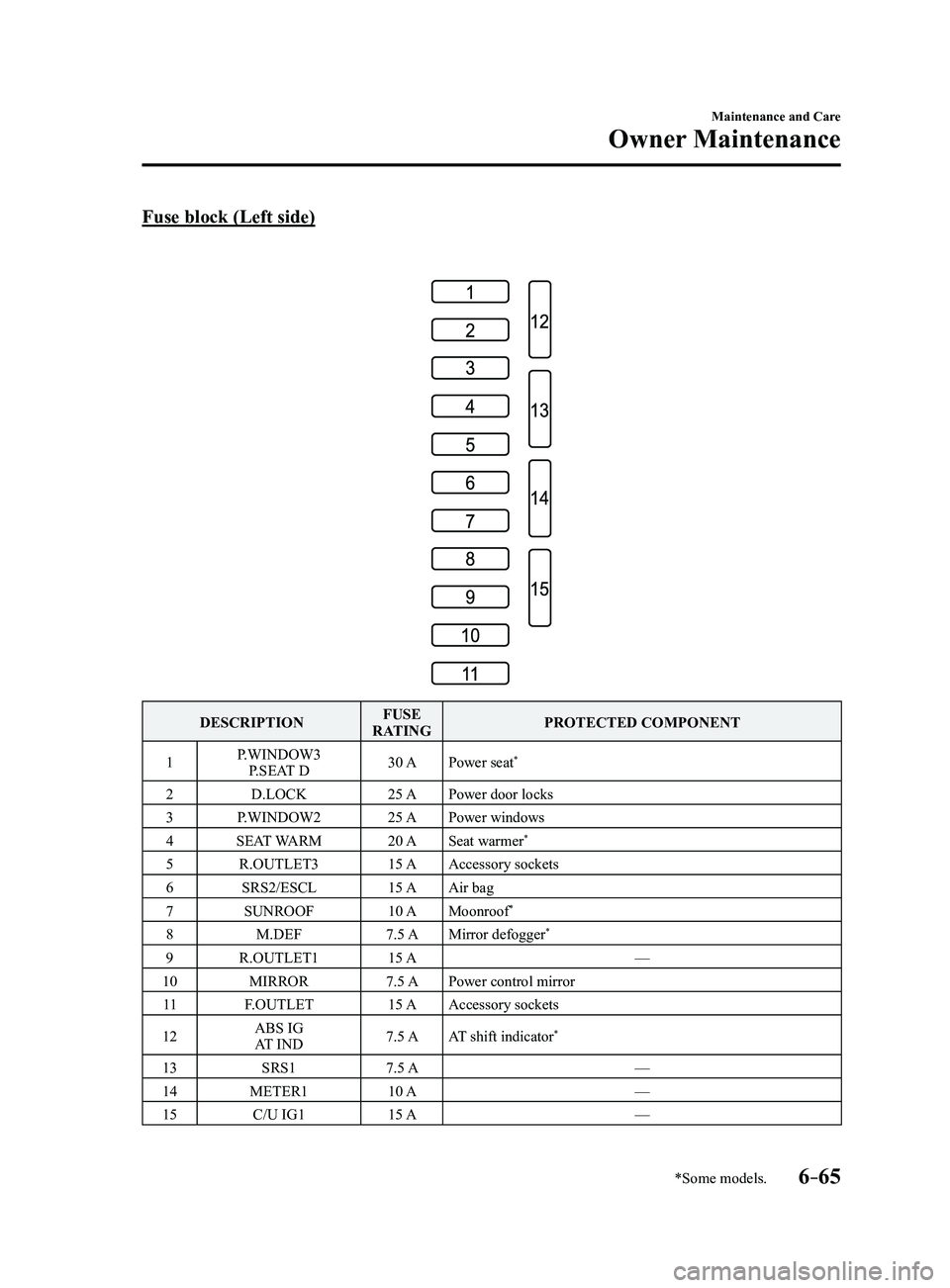
Fuse block (Left side)
DESCRIPTIONFUSE
RATING PROTECTED COMPONENT
1 P.WINDOW3
P.SEAT D 30 A
Power seat
*
2 D.LOCK 25 APower door locks
3 P.WINDOW2 25 APower windows
4 SEAT WARM 20 ASeat warmer
*
5 R.OUTLET3 15 AAccessory sockets
6 SRS2/ESCL 15 AAir bag
7 SUNROOF 10 AMoonroof
*
8 M.DEF 7.5 AMirror defogger*
9 R.OUTLET1 15 A —
10 MIRROR 7.5 APower control mirror
11 F.OUTLET 15 AAccessory sockets
12 ABS IG
AT IND 7.5 A
AT shift indicator
*
13 SRS1 7.5 A —
14 METER1 10 A —
15 C/U IG1 15 A —
Mazda3_8FL6-EA-16F_Edition2.indb 652016/08/10 17:39:03
Page 481 of 612
6–69
Maintenance and Care
Appearance Care
CAUTION
Do not use steel wool, abrasive
cleaners, or strong detergents
containing highly alkaline or caustic
agents on chrome-plated or anodized
aluminum parts. This may damage the
protective coating; also, cleaners and
detergents may discolor or deteriorate
the paint.
Pay special attention to removing salt, dirt,
mud, and other foreign material from the
underside of the fenders, and make sure
the drain holes in the lower edges of the
doors and rocker panels are clean.
Insects, tar, tree sap, bird droppings,
industrial fallout, and similar deposits
can damage the finish if not removed
immediately. When prompt washing with
plain water is ineffective, use a mild soap
made for use on vehicles.
Thoroughly rinse off all soap with
lukewarm or cold water. Do not allow
soap to dry on the finish.
After washing the vehicle, dry it with a
clean chamois to prevent water spots from
forming.
WARNING
Dry off brakes that have become
wet by driving slowly, releasing the
accelerator pedal and lightly applying
the brakes several times until the brake
performance returns to normal: Driving with wet brakes is dangerous.
Increased stopping distance or the
vehicle pulling to one side when
braking could result in a serious
accident. Light braking will indicate
whether the brakes have been affected.
When using an automatic car wash
Retract the door mirrors. The automatic car wash brushes could
reduce the paint lustre or hasten paint
deterioration.
When using a high water pressure car
wash
High water temperature and high water
pressure car washers are available
depending on the type of car wash
machine. If the car washer nozzle is
put too close to the vehicle, the force of
the spray could damage or deform the
molding, affect the sealability of parts,
and allow water to penetrate the interior.
Keep a sufficient space (30 cm (12 in) or
more) between the nozzle and the vehicle.
In addition, do not spend too much time
spraying the same area of the vehicle, and
be very careful when spraying between
gaps in doors and around windows.
Mazda3_8FL6-EA-16F_Edition2.indb 692016/08/10 17:39:04
Page 486 of 612
6–74
Maintenance and Care
Appearance Care
*Some models.
NOTE
Because genuine leather is a natural
material, its surface is not uniform and
it may have natural scars, scratches,
and wrinkles.
To maintain the quality for as long as
possible, periodical maintenance, about
twice a year, is recommended.
If the leather upholstery comes into
contact with any of the following, clean
it immediately.
Leaving it uncleaned could cause
premature wear, mold, or stains.
Sand or dirt Grease or oil, such as hand cream Alcohol, such as in cosmetic or hair
dressing items
If the leather upholstery gets wet,
promptly remove moisture with a dry
cloth. Remaining moisture on the
surface may cause deterioration such as
hardening and shrinkage.
Exposure to direct sunlight for long
periods may cause deterioration and
shrinkage. When parking the car under
direct sunlight for long periods, shade
the interior using sunshades.
Do not leave vinyl products on the
leather upholstery for long periods.
They may affect the leather quality
and coloring. If the cabin temperature
becomes hot, the vinyl may deteriorate
and adhere to the genuine leather.
Plastic Part Maintenance
CAUTION
Do not use polishing agents.
Depending on the product ingredients,
they could cause discoloration, stains,
cracks or peeling of the coating.
Instrument Panel Top (Soft pad)
Maintenance
Extremely soft material is used for the
soft pad surface. If the soft pad surface is
rubbed harshly with a dry cloth, it could
result in the surface being damaged and
leaving white scratch marks.
1. Wipe the soiled area with a soft cloth
soaked in a mild detergent (approx.
5%) diluted with water.
2. Wipe off the remaining detergent using
a cloth soaked in clean water and
wrung out well.
Active Driving Display
Maintenance*
The combiner and mirror surface have
a special coating. When cleaning it, do
not use a hard cloth, a cloth with a rough
surface, or cleaning detergent. Use a fine-
textured, soft cloth.
If a chemical solvent gets on the combiner
or mirror surface, wipe it off immediately.
Otherwise, they could be damaged and the
surface coating could be scratched.
Mazda3_8FL6-EA-16F_Edition2.indb 742016/08/10 17:39:06
Page 594 of 612
9–10
Specifications
Specifications
*Some models.
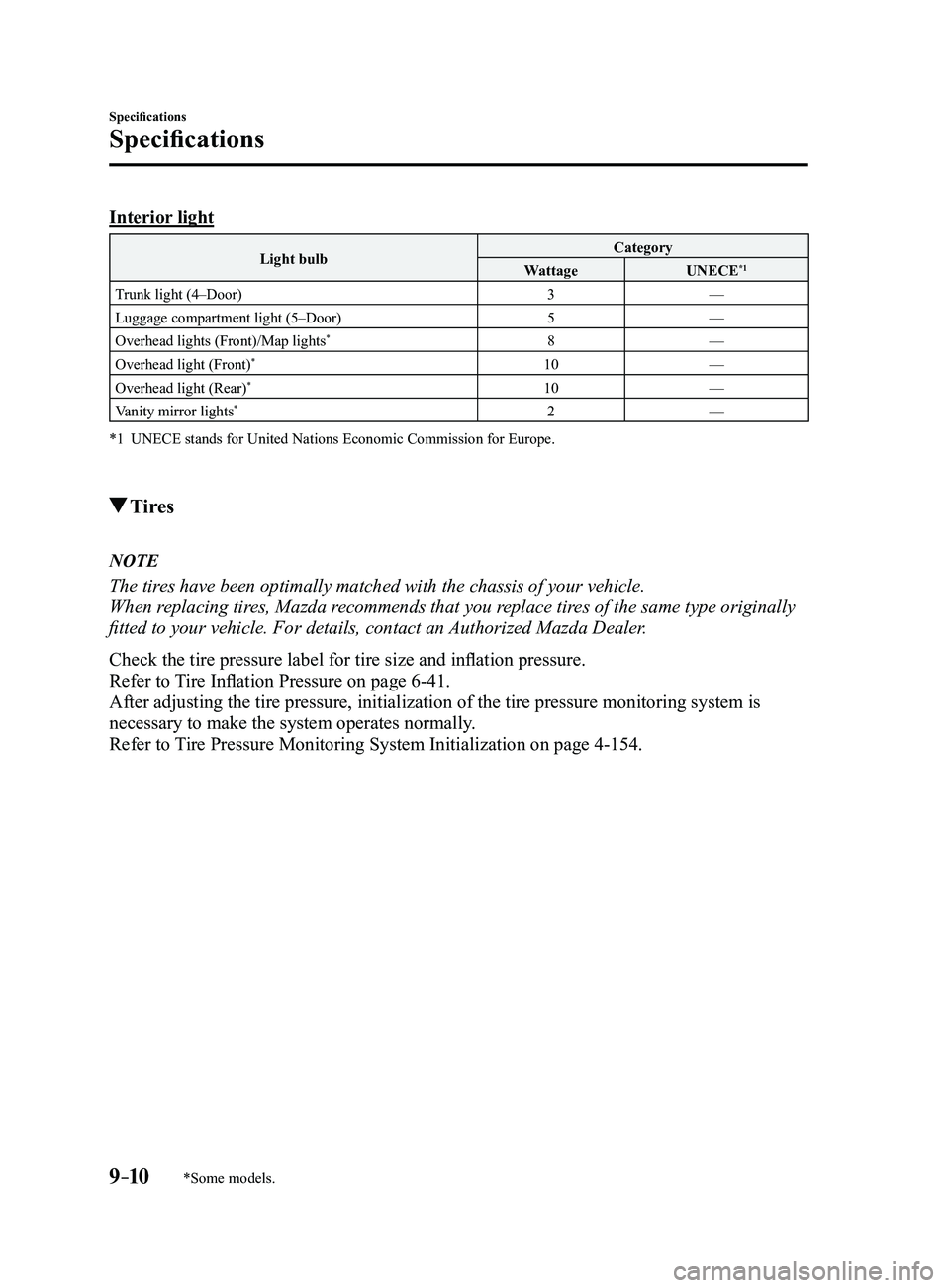
Interior light
Light bulbCategory
Wattage UNECE*1
Trunk light (4–Door) 3—
Luggage compartment light (5–Door) 5—
Overhead lights (Front)/Map lights
*8 —
Overhead light (Front)*10 —
Overhead light (Rear)*10 —
Vanity mirror lights*2 —
*1 UNECE stands for United Nations Economic Commission for Europe.
Tires
NOTE
The tires have been optimally matched with the chassis of your vehicle.
When replacing tires, Mazda recommends that you replace tires of the same type originally
fitted to your vehicle. For details, contact an Authorized Mazda Dealer.
Check the tire pressure label for tire size and inflation pressure.
Refer to Tire Inflation Pressure on page
6-41.
After adjusting the tire pressure, initialization of the tire pressure m\
onitoring system is
necessary to make the system operates normally.
Refer to Tire Pressure Monitoring System Initialization on page
4-154.
Mazda3_8FL6-EA-16F_Edition2.indb 102016/08/10 17:39:54