lock MAZDA MODEL 3 4-DOOR 2017 Owner's Guide
[x] Cancel search | Manufacturer: MAZDA, Model Year: 2017, Model line: MODEL 3 4-DOOR, Model: MAZDA MODEL 3 4-DOOR 2017Pages: 612
Page 89 of 612
3–13
Before Driving
Doors and Locks
NOTE
Always stop the engine and lock the
doors. In addition, to prevent theft of
valuables, do not leave them inside the
cabin.
If the key is left in the following areas
and you leave the vehicle, the doors
may be locked depending on the radio
wave conditions even if the key is left in
the vehicle.
Around the dashboard In the storage compartments such as
the glove compartment or the center
console
Next to a communication device such
as a mobile phone
When the ignition is switched to ACC
or ON, the vehicle lock-out prevention
feature prevents you from locking
yourself out of the vehicle.
All doors and the liftgate/trunk lid will
automatically unlock if they are locked
using the power door locks with any
door open.
The vehicle lock-out prevention feature
does not operate while the ignition is
switched off.
When any door is opened fr om the
outside while the key is inside the
vehicle, the closed doors are locked. All
the doors are automatically unlocked by
closing the open door.
(With the advanced keyless function)
The beep sound is heard for about 10
seconds to notify the driver that the key
has been left in the vehicle.
(Without the advanced keyless
function)
The horn sound is hear d twice to notify
the driver that the key has been left in
the vehicle.
(Door unlock (control) system with
collision detection)
This system automatically unlocks
the doors and the liftgate/trunk lid in
the event the vehicle is involved in an
accident to allow passengers to get
out of the vehicle immediately and
prevent being trapped inside. While
the ignition is switched ON and in the
event the vehicle receives an impact
strong enough to inflate the air bags,
all the doors and the liftgate/trunk lid
are automatically unlocked after about
6 seconds have elapsed from the time of
the accident.
The doors and the liftgate/trunk lid may
not unlock depending on how an impact
is applied, the force of the impact, and
other conditions of the accident.
If door-related systems or the battery
is malfunctioning, the doors and the
liftgate/trunk lid will not unlock.
Mazda3_8FL6-EA-16F_Edition2.indb 132016/08/10 17:35:19
Page 90 of 612
3–14
Before Driving
Doors and Locks
Locking, Unlocking with Auxiliary
Key
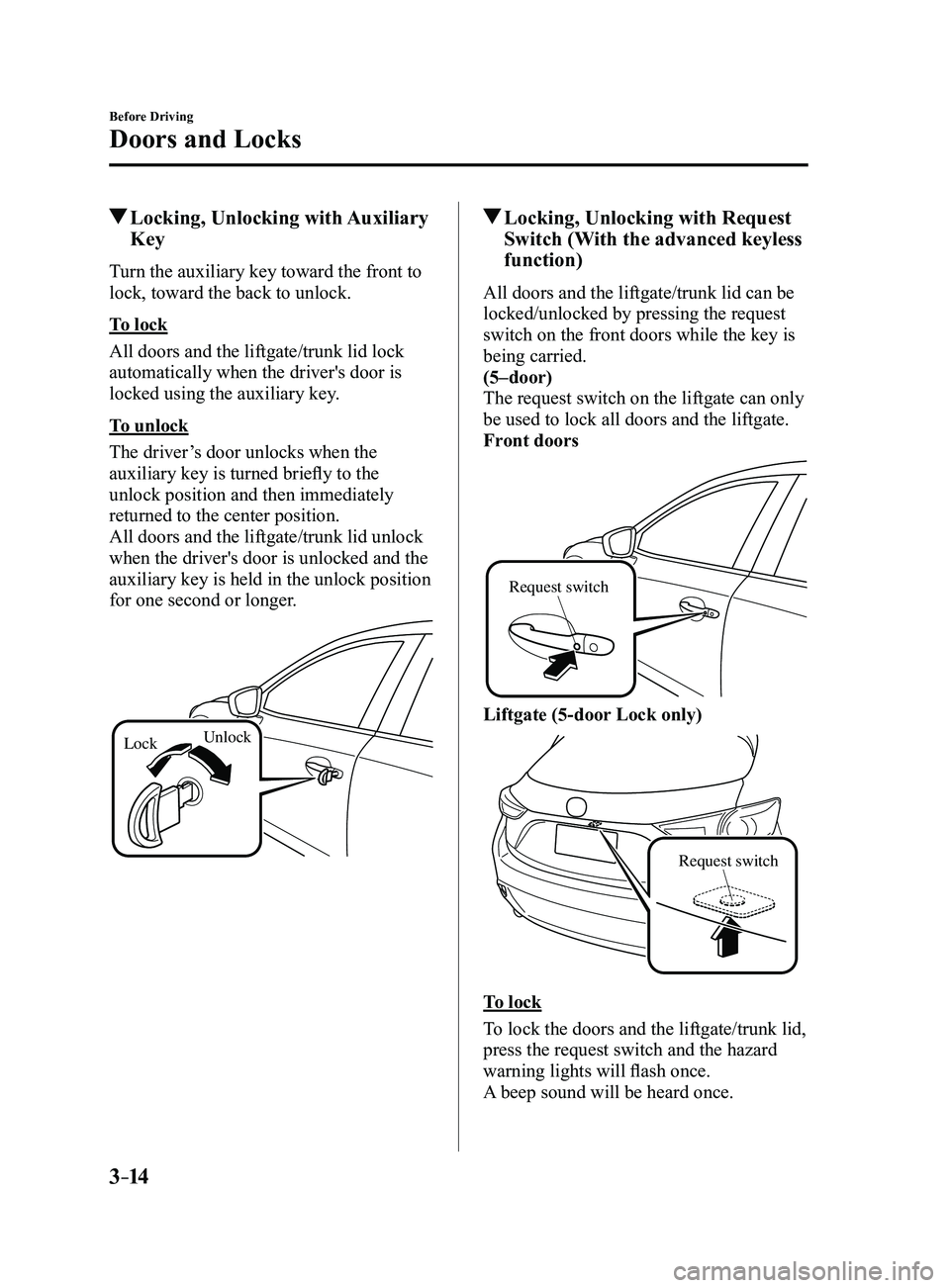
Turn the auxiliary key toward the front to
lock, toward the back to unlock.
To lock
All doors and the liftgate/trunk lid lock
automatically when the driver's door is
locked using the auxiliary key.
To unlock
The driver’s door unlocks when the
auxiliary key is turned briefly to the
unlock position and then immediately
returned to the center position.
All doors and the liftgate/trunk lid unlock
when the driver's door is unlocked and the
auxiliary key is held in the unlock position
for one second or longer.
LockUnlock
Locking, Unlocking with Request
Switch (With the advanced keyless
function)
All doors and the liftgate/trunk lid can be
locked/unlocked by pressing the request
switch on the front doors while the key is
being carried.
(5–door)
The request switch on the liftgate can only
be used to lock all doors and the liftgate.
Front doors
Request switch
Liftgate (5-door Lock only)
Request switch
To lock
To lock the doors and the liftgate/trunk lid,
press the request switch and the hazard
warning lights will flash once.
A beep sound will be heard once.
Mazda3_8FL6-EA-16F_Edition2.indb 142016/08/10 17:35:20
Page 91 of 612
3–15
Before Driving
Doors and Locks
To unlock
Driver's door request switch
To unlock the driver's door, press the
request switch. A beep sound will be heard
twice and the hazard warning lights will
flash twice.
To unlock all doors and the liftgate/trunk
lid, press the request switch again within
3 seconds and two more beep sounds will
be heard.
Front passenger door request switch
To unlock all doors and the liftgate/trunk
lid, press the request switch. A beep sound
will be heard twice and the hazard warning
lights will flash twice.NOTE
The system can be set to unlock all
doors by performing a single operation.
Refer to Personalization Features on
page 9-12.
Use the following procedure to change
the setting.
1. Switch the ignition off and close all
of the doors and the liftgate/trunk
lid.
2. Open the driver's door .
3. Within 30 seconds of opening the
driver's door, press and hold the
UNLOCK button on the key for 5
seconds or longer (the sound of
the doors locking/unlocking can be
heard).
After this, the system switches the
setting of pressing the driver's
request switch once or twice to
unlock all doors and the liftgate/
trunk lid each time the UNLOCK
button is pressed (the sound of the
doors locking/unlocking can be
heard).
4. The setting change is completed by
doing any one of the following:
Switching the ignition to ACC or
ON. Closing the driver's door. Opening the liftgate/trunk lid. Not operating the key for 10
seconds. Pressing any button except the
UNLOCK button on the key. Pressing a request switch.
Confirm that all doors and the liftgate/
trunk lid are securely locked.
For the liftgate/trunk lid, move it
without pressing the electric liftgate/
trunk lid opener to verify that the
liftgate/trunk lid has not been left ajar.
Mazda3_8FL6-EA-16F_Edition2.indb 152016/08/10 17:35:20
Page 92 of 612
3–16
Before Driving
Doors and Locks
All doors and the liftgate/trunk lid
cannot be locked when any door or the
liftgate is open.
It may require a few seconds for the
doors to unlock after the request switch
is pressed.
A beep sound is heard for confirmation
when the doors and the liftgate/trunk lid
are locked/unlocked using the request
switch. If you prefer, the beep sound can
be turned off.
The volume of the beep sound can also
be changed. Refer to Personalization
Features on page
9-12.
Use the following procedure to change
the setting.
1. Switch the ignition off and close all
of the doors and the liftgate/trunk lid.
2. Open the driver's door .
3. Within 30 seconds of opening the
driver's door, press and hold the
LOCK button on the key for 5
seconds or longer.
All of the doors and the liftgate/
trunk lid lock and the beep sound
activates at the currently set volume.
The setting changes each time the
LOCK button on the key is pressed
and the beep sound activates at the
set volume. (If the beep sound has
been set to not activate, it will not
activate.)
4. The setting change is completed by
doing any one of the following:
Switching the ignition to ACC or
ON. Closing the driver's door. Opening the liftgate/trunk lid. Not operating the key for 10
seconds. Pressing any button except the
LOCK button on the key. Pressing a request switch.
(With theft-deterrent system)
The hazard warning lights flash when
the theft-deterrent system is armed or
turned off.
Refer to Theft-Deterrent System on page
3-44. The setting can be changed so that
the doors and the liftgate/trunk lid are
locked automatically without pressing
the request switch.
Refer to Personalization Featur es on
page 9-12.
(Auto-lock function)
A beep sound is heard when all doors
and the liftgate are closed while the
advanced key is being carried. All
doors and the liftgate/trunk lid are
locked automatically after about three
seconds when the advanced key is
out of the operational range. Also,
the hazard warning lights flash once.
(Even if the driver is in the operational
range, all doors and the liftgate/trunk
lid are locked automatically after
about 30 seconds.) If you are out of
the operational range before the doors
and the liftgate/trunk lid are completely
closed or another key is left in the
vehicle, the auto-lock function will not
work. Always make sure that all doors
and the liftgate/trunk lid are closed and
locked before leaving the vehicle. The
auto-lock function does not close the
power windows.
Mazda3_8FL6-EA-16F_Edition2.indb 162016/08/10 17:35:21
Page 93 of 612
3–17
Before Driving
Doors and Locks
Auto re-lock function
After unlocking with the request switch,
all doors and the liftgate/trunk lid
will automatically lock if any of the
following operations are not performed
within about 60 seconds. If your
vehicle has a theft-deterrent system,
the hazard warning lights will flash for
confirmation.
The time required for the doors to lock
automatically can be changed.
Refer to Personalization Featur es on
page 9-12.
Opening a door or the liftgate/trunk
lid. Switching the ignition to any position
other than off.
Locking, Unlocking with
Transmitter
All doors and the liftgate/trunk lid can be
locked/unlocked by operating the keyless
entry system transmitter, refer to Keyless
Entry System (page
3-3).
Locking, Unlocking with Door-
Lock Switch
All doors and the liftgate/trunk lid lock
automatically when the lock side is
pressed. They unlock when the unlock side
is pressed.
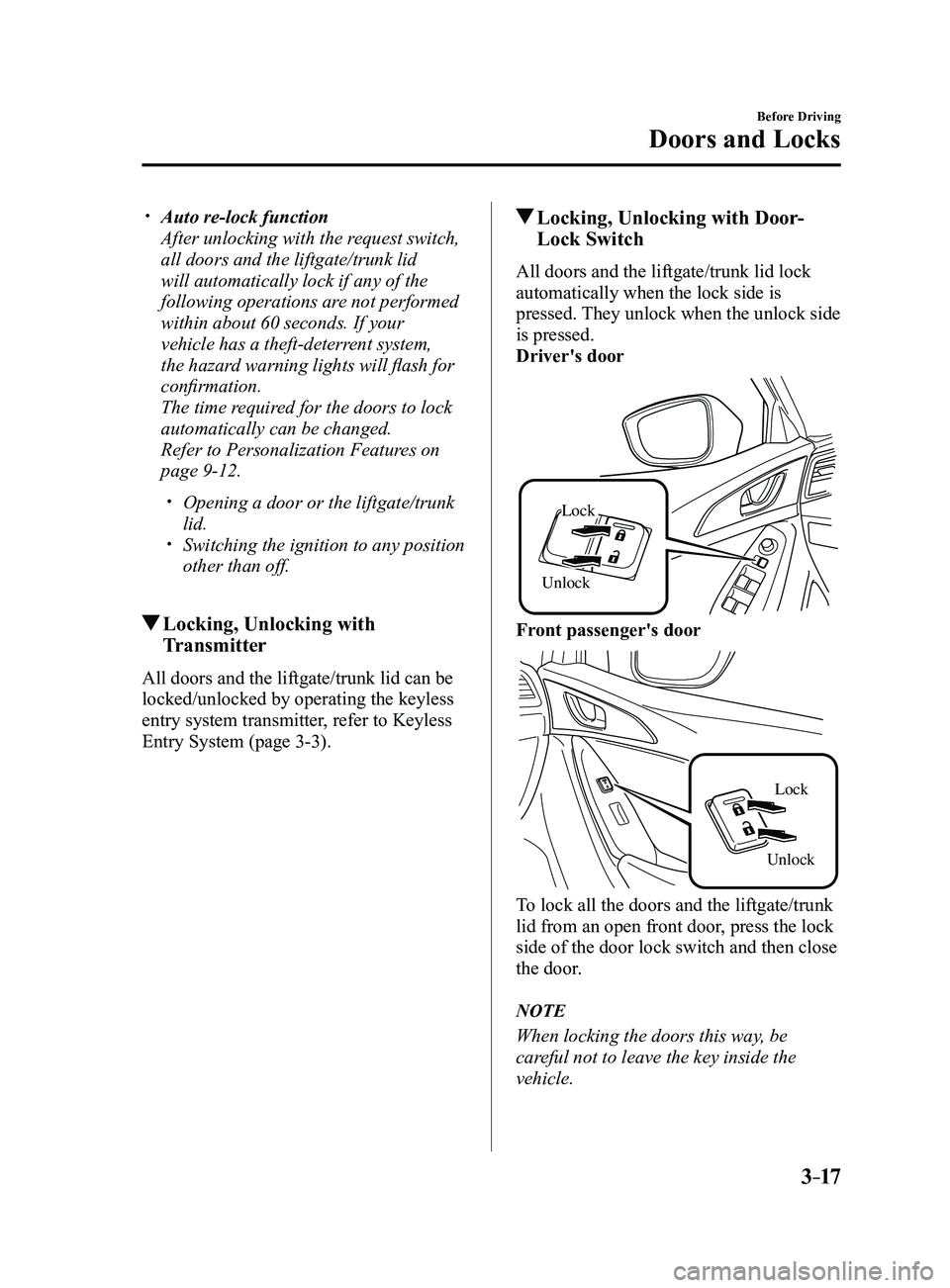
Driver's door
Unlock
Lock
Front passenger's door
UnlockLock
To lock all the doors and the liftgate/trunk
lid from an open front door, press the lock
side of the door lock switch and then close
the door.
NOTE
When locking the doors this way, be
careful not to leave the key inside the
vehicle.
Mazda3_8FL6-EA-16F_Edition2.indb 172016/08/10 17:35:21
Page 94 of 612
3–18
Before Driving
Doors and Locks
Auto Lock/Unlock Function
WARNING
Do not pull the inner handle on a front
door:Pulling the inner handle on a front
door while the vehicle is moving
is dangerous. Passengers can fall
out of the vehicle if the door opens
accidentally , which could result in
death or serious injury.
When the vehicle speed exceeds 20
km/h (12 mph), all doors and the
liftgate/trunk lid lock automatically.
When the ignition is switched of f, all
doors and the liftgate/trunk lid unlock
automatically.
These functions can also be disabled so
that they do not operate.
Auto lock/unlock function setting
change using door-lock switch
The doors and the liftgate/trunk lid can
be set to lock or unlock automatically by
selecting any one of the functions from the
following table and using the driver's door-
lock switch on the interior door panel.
NOTE
Function number 3 in the following
table is the factory setting for your
vehicle.
There are only a total of five auto lock/
unlock settings available for automatic
transaxle vehicles, and three for manual
transaxle vehicles. Be sure to press the
unlock side of the driver's door-lock
switch the correct number of times
according to the selected function
number. If the switch is mistakenly
pressed six times on an automatic
transaxle vehicle or four times on a
manual transaxle, the procedure will
be cancelled. If this occurs, start the
procedure from the beginning.
Function number Function*1
1The auto door-lock function is
disabled.
2 All the doors and the liftgate/trunk lid
lock automatically when the vehicle
speed is about 20 km/h (12 mph) or
more.
3 (Factory Setting) All the doors and the liftgate/trunk lid
lock automatically when the vehicle
speed is about 20 km/h (12 mph) or
more. All the doors and the liftgate/
trunk lid unlock when the ignition is
switched from ON to Off.
4 (Automatic transaxle vehicles only)
When the ignition is switched ON
and the shift lever is shifted from park
(P) to any other gear position, all the
doors and the liftgate/trunk lid lock
automatically.
Mazda3_8FL6-EA-16F_Edition2.indb 182016/08/10 17:35:22
Page 95 of 612
3–19
Before Driving
Doors and Locks
Function number Function*1
5(Automatic transaxle vehicles only)
When the ignition is switched ON
and the shift lever is shifted from park
(P) to any other gear position, all the
doors and the liftgate/trunk lid lock
automatically.
When the shift lever is shifted to park
(P) while the ignition is switched ON,
all the doors and the liftgate/trunk lid
unlock automatically.
*1 Other settings for the auto door lock function are available at an Authorized Mazda Dealer. For
details consult an Authorized Mazda Dealer. Refer
to Personalization Features on page
9-12.
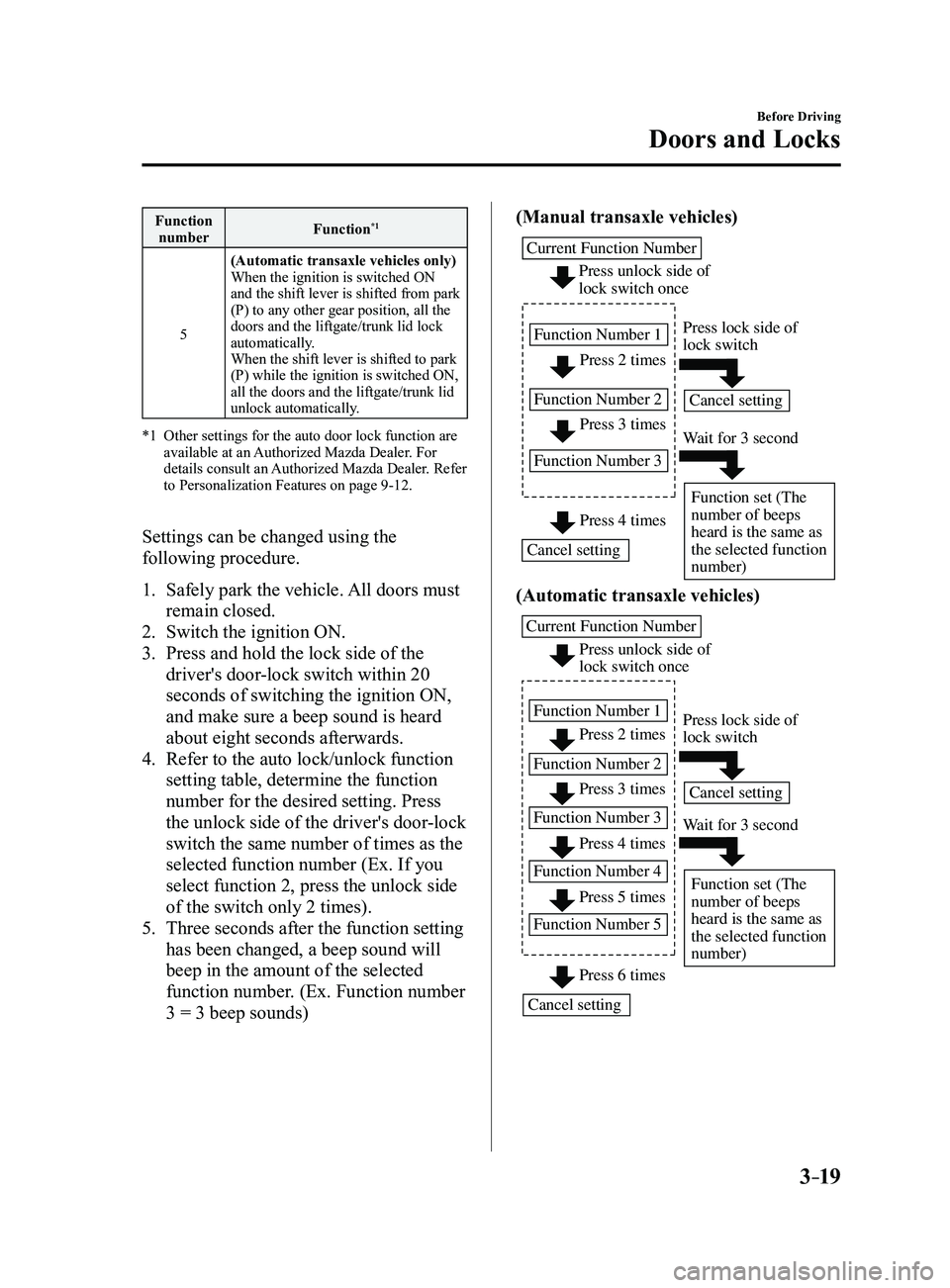
Settings can be changed using the
following procedure.
1. Safely park the vehicle.
All doors must
remain closed.
2. Switch the ignition ON.
3. Press and hold the lock side of the
driver's door-lock switch within 20
seconds of switching the ignition ON,
and make sure a beep sound is heard
about eight seconds afterwards.
4. Refer to the auto lock/unlock function
setting table, determine the function
number for the desired setting. Press
the unlock side of the driver's door-lock
switch the same number of times as the
selected function number (Ex. If you
select function 2, press the unlock side
of the switch only 2 times).
5. Three seconds after the function setting
has been changed, a beep sound will
beep in the amount of the selected
function number. (Ex. Function number
3 = 3 beep sounds) (Manual transaxle vehicles)
Press 2 times
Press 3 times
Current Function Number
Function Number 1
Function Number 2
Function Number 3
Press 4 times
Press unlock side of
lock switch once
Cancel setting Cancel setting
Function set (The
number of beeps
heard is the same as
the selected function
number)
Press lock side of
lock switch
Wait for 3 second
(Automatic transaxle vehicles)
Press unlock side of
lock switch once
Press 2 times
Press 3 times
Current Function Number
Function Number 1
Function Number 2 Press 4 times
Function Number 3
Press 5 times
Function Number 4
Press 6 times
Function Number 5
Cancel setting Cancel setting
Function set (The
number of beeps
heard is the same as
the selected function
number)
Press lock side of
lock switch
Wait for 3 second
Mazda3_8FL6-EA-16F_Edition2.indb 192016/08/10 17:35:22
Page 96 of 612
3–20
Before Driving
Doors and Locks
NOTE
The doors cannot be locked or unlocked
while the setting function is being
performed.
The procedure can be cancelled by
pressing the lock side of the driver's
door-lock switch.
Locking, Unlocking with Door-
Lock Knob
Operation from inside
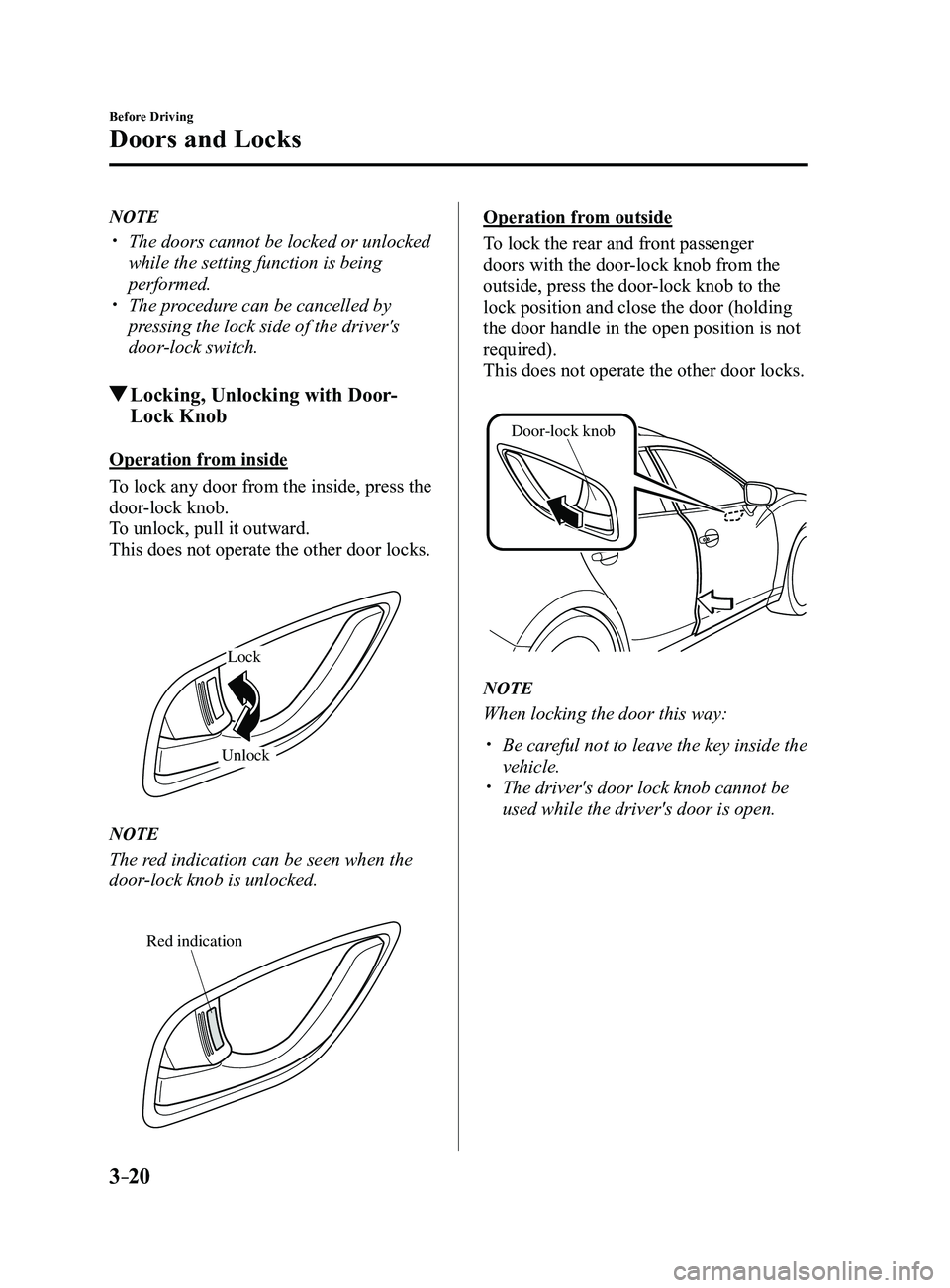
To lock any door from the inside, press the
door-lock knob.
To unlock, pull it outward.
This does not operate the other door locks.
Lock
Unlock
NOTE
The red indication can be seen when the
door-lock knob is unlocked.
Red indication
Operation from outside
To lock the rear and front passenger
doors with the door-lock knob from the
outside, press the door-lock knob to the
lock position and close the door (holding
the door handle in the open position is not
required).
This does not operate the other door locks.
Door-lock knob
NOTE
When locking the door this way:
Be careful not to leave the key inside the
vehicle. The driver's door lock knob cannot be
used while the driver's door is open.
Mazda3_8FL6-EA-16F_Edition2.indb 202016/08/10 17:35:23
Page 97 of 612
3–21
Before Driving
Doors and Locks
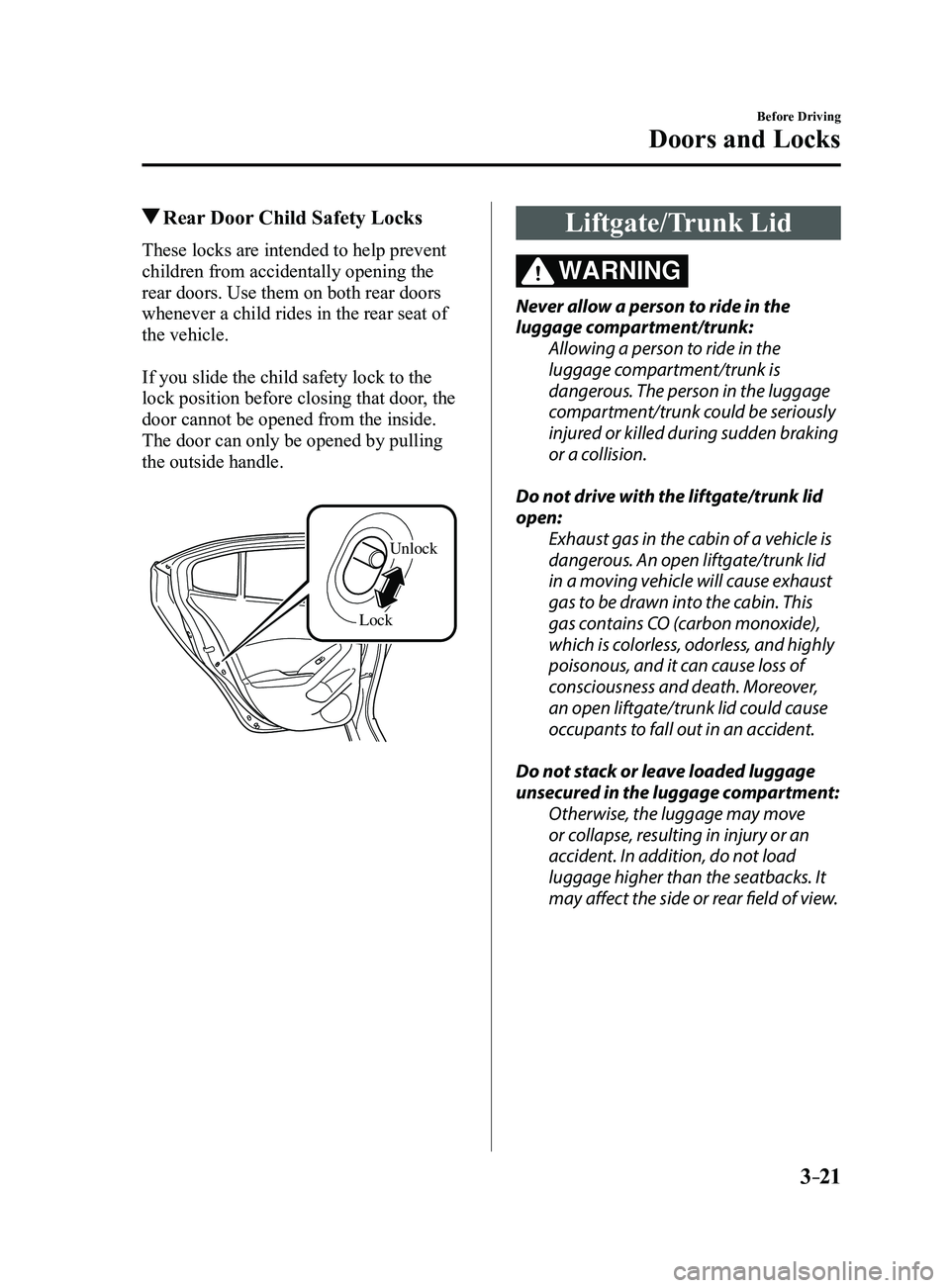
Rear Door Child Safety Locks
These locks are intended to help prevent
children from accidentally opening the
rear doors. Use them on both rear doors
whenever a child rides in the rear seat of
the vehicle.
If you slide the child safety lock to the
lock position before closing that door, the
door cannot be opened from the inside.
The door can only be opened by pulling
the outside handle.
LockUnlock
Liftgate/Trunk Lid
WARNING
Never allow a person to ride in the
luggage compartment/trunk:
Allowing a person to ride in the
luggage compartment/trunk is
dangerous. The person in the luggage
compartment/trunk could be seriously
injured or killed during sudden braking
or a collision.
Do not drive with the liftgate/trunk lid
open: Exhaust gas in the cabin of a vehicle is
dangerous. An open liftgate/trunk lid
in a moving vehicle will cause exhaust
gas to be drawn into the cabin. This
gas contains CO (carbon monoxide),
which is colorless, odorless, and highly
poisonous, and it can cause loss of
consciousness and death. Moreover,
an open liftgate/trunk lid could cause
occupants to fall out in an accident.
Do not stack or leave loaded luggage
unsecured in the luggage compartment: Otherwise, the luggage may move
or collapse, resulting in injury or an
accident. In addition, do not load
luggage higher than the seatbacks. It
may affect the side or rear field of view.
Mazda3_8FL6-EA-16F_Edition2.indb 212016/08/10 17:35:23
Page 98 of 612
3–22
Before Driving
Doors and Locks
CAUTION
Before opening the liftgate/trunk lid,
remove any snow and ice accumulation
on it. Otherwise, the liftgate/trunk lid
could close under the weight of the snow
and ice resulting in injury.
Be careful when opening/closing the
liftgate/trunk lid during strong winds.
If a strong gust blows against the
liftgate/trunk lid, it could close suddenly
resulting in injury.
Fully open the liftgate/trunk lid and
make sure that it stays open. If the
liftgate/trunk lid is only opened partially,
it could slam shut by vibration or wind
gusts resulting in injury.
When loading or unloading luggage in
the luggage compartment/trunk, turn
off the engine. Otherwise, you could get
burned by the heat of the exhaust gas.
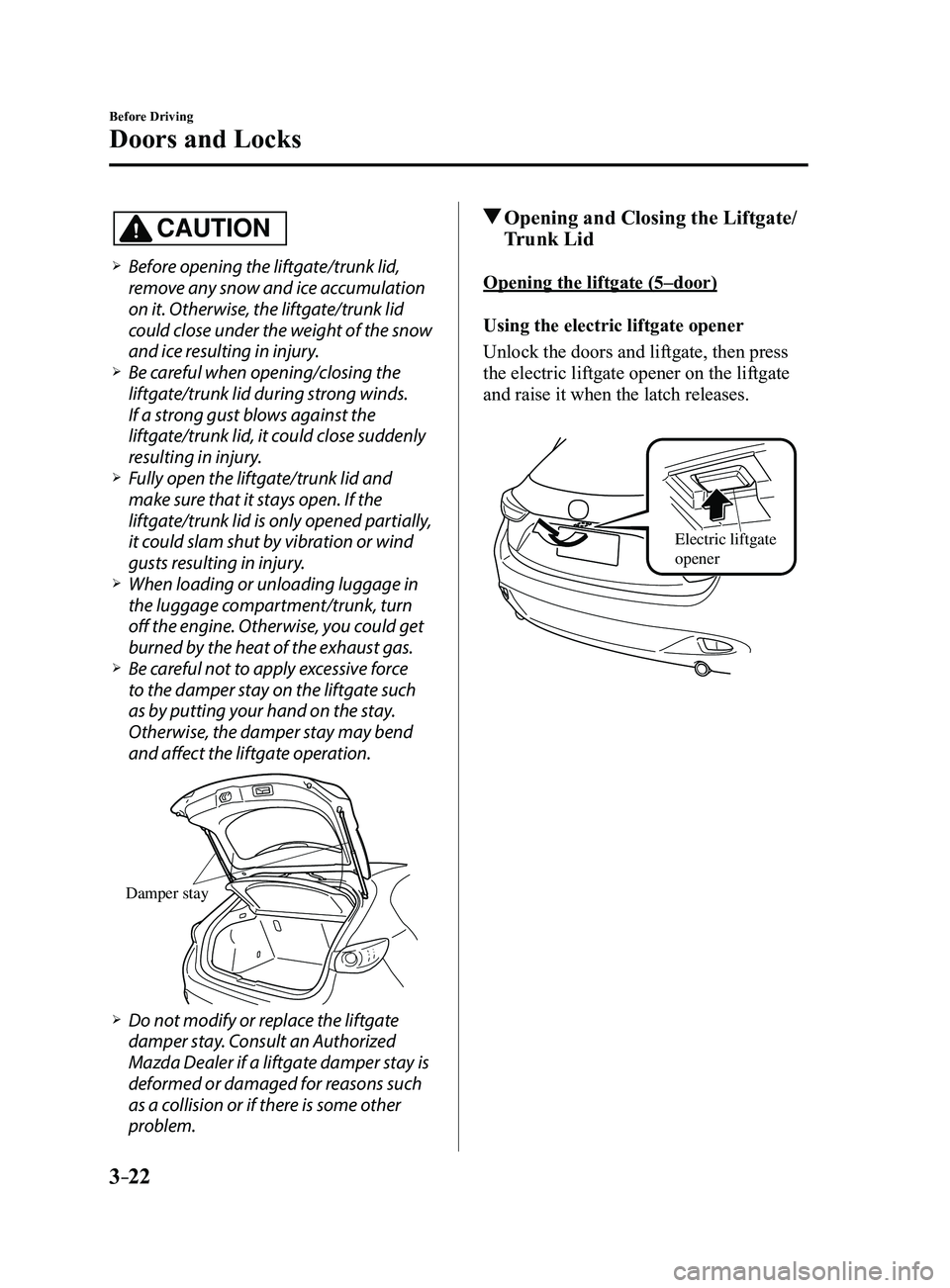
Be careful not to apply excessive force
to the damper stay on the liftgate such
as by putting your hand on the stay.
Otherwise, the damper stay may bend
and affect the liftgate operation.
Damper stay
Do not modify or replace the liftgate
damper stay. Consult an Authorized
Mazda Dealer if a liftgate damper stay is
deformed or damaged for reasons such
as a collision or if there is some other
problem.
Opening and Closing the Liftgate/
Trunk Lid
Opening the liftgate (5–door)
Using the electric liftgate opener
Unlock the doors and liftgate, then press
the electric liftgate opener on the liftgate
and raise it when the latch releases.
Electric liftgate
opener
Mazda3_8FL6-EA-16F_Edition2.indb 222016/08/10 17:35:24