lock MAZDA MODEL 3 4-DOOR 2017 Manual PDF
[x] Cancel search | Manufacturer: MAZDA, Model Year: 2017, Model line: MODEL 3 4-DOOR, Model: MAZDA MODEL 3 4-DOOR 2017Pages: 612
Page 252 of 612
4–122
When Driving
i-ACTIVSENSE
Vehicle lane line display
When the Lane-keep Assist System (LAS) & Lane Departure Warning System (LDWS)
detects white (yellow) lines on both the left and right sides and beco\
mes operational, the
vehicle lane lines are indicated in the active driving display.
Auto cancel
In the following cases, the Lane-keep Assist System (LAS) & Lane Departure Warning
System (LDWS) is automatically canceled and the vehicle lane lines (s\
tand-by) are
indicated in the active driving display. In addition, when the Lane-keep Assist System (LAS)
& Lane Departure Warning System (LDWS) becomes operational, the system turns back
on automatically and the vehicle lane lines (operational) are indicate\
d in the active driving
display.
The temperature inside the camera is high or low. The windshield around the camera is foggy. The windshield around the camera is blocked by an obstruction, causing p\
oor forward
visibility.
Auto cancel of warning/steering assist
When the following operations are performed, the Lane-keep Assist System (LAS) & Lane
Departure Warning System (LDWS) operation is automatically canceled. The Lane-keep
Assist System (LAS) & Lane Departure Warning System (LDWS) is automatically re-
enabled after the operation.
The steering wheel is operated abruptly . The brake pedal is depressed. The accelerator pedal is suddenly depressed.
(To cancel the automatic sensitivity cancel function, deselect “Cancel sensitivity” in the
personalization features setting.) The turn signal lever is operated. The vehicle crosses a lane line.
Mazda3_8FL6-EA-16F_Edition2.indb 1222016/08/10 17:36:54
Page 254 of 612

4–124
When Driving
i-ACTIVSENSE
Drive the vehicle in the center of the vehicle lane while the system is \
on standby. The
system becomes operational when all of the following conditions are met.\
The system detects white (yellow) lane lines on both the right and lef\
t sides, or on either
side. The vehicle speed is about 60 km/h (37 mph) or faster. The vehicle is driven on a straight road or road with gentle curves. The engine is running.
The Lane-keep Assist System (LAS) & Lane Departure Warning System (LDWS) goes on
stand-by status in the following cases:
The system cannot detect white (yellow) lane lines. The vehicle speed is less than about 60 km/h (37 mph). The vehicle is making a sharp curve. The vehicle is making a curve at an inappropriate speed.
NOTE
The Lane-keep Assist System (LAS) & Lane Departure Warning System (LDWS) remains
on stand-by until it detects white (yellow) lines on both the left and\
right sides, or on
either side.
When the system detects a white (yellow) lane line on one side only , the system will not
activate warnings for the lane line on the side that is not being detect\
ed. The distance and warning sensitivity (likelihood of a warning) which t\
he system uses to
determine the possibility of a lane departure can be changed.
Refer to Setting Change (Personalization Features) on page 9-12.
Vehicle lane line display
When the Lane-keep Assist System (LAS) & Lane Departure Warning System (LDWS)
detects white (yellow) lines on both the left and right sides and beco\
mes operational, the
vehicle lane lines are indicated in the active driving display.
Auto cancel
Under the following conditions, the Lane-keep Assist System (LAS) & Lane Departure
Warning System (LDWS) is automatically canceled. The Lane-keep Assist System (LAS)
& Lane Departure Warning System (LDWS) is automatically re-enabled when it becomes
operational.
The temperature inside the camera is high or low . The windshield around the camera is foggy. The windshield around the camera is blocked by an obstruction, causing p\
oor forward
visibility.
Mazda3_8FL6-EA-16F_Edition2.indb 1242016/08/10 17:36:54
Page 275 of 612
4–14 5
When Driving
i-ACTIVSENSE
NOTE
The detection ability of the radar sensors (rear) has limitations. In the following cases,
the detection ability may lower and the system may not operate normally.
The rear bumper near the radar sensors (rear) has become deformed. Snow, ice or mud adheres to the radar sensors (rear) on the rear bumper. Under bad weather conditions such as rain, snow and fog.
Under the following conditions, the radar sensors (r ear) cannot detect target objects or it
may be difficult to detect them.
Stationary objects on a road or a road side such as small, two-wheeled vehicles,
bicycles, pedestrians, animals, and shopping carts. Vehicle shapes which do not reflect radar waves well such as empty trailers with a low
vehicle height and sports cars.
Vehicles are shipped with the direction of the radar sensors (rear) adjusted for each
vehicle to a loaded vehicle condition so that the radar sensors (rear) detect approaching
vehicles correctly. If the direction of the radar sensors (rear) has deviated for some
reason, have the vehicle inspected at an Authorized Mazda Dealer.
For repairs or replacement of the radar sensors (rear), or bumper repairs, paintwork,
and replacement near the radar sensors, consult an Authorized Mazda Dealer. Turn off the system while pulling a trailer or while an accessory such as\
a bicycle carrier
is installed to the rear of the vehicle. Otherwise, the radio waves emitted by the radar will\
be blocked causing the system to not operate normally.
The radar sensors are regulated by the relevant radio wave laws of the country in which
the vehicle is driven. If the vehicle is driven abroad, authorization from the country in
which the vehicle is driven may be required.
Mazda3_8FL6-EA-16F_Edition2.indb 1452016/08/10 17:37:01
Page 297 of 612
5–5
Interior Features
Climate Control System
*Some models.
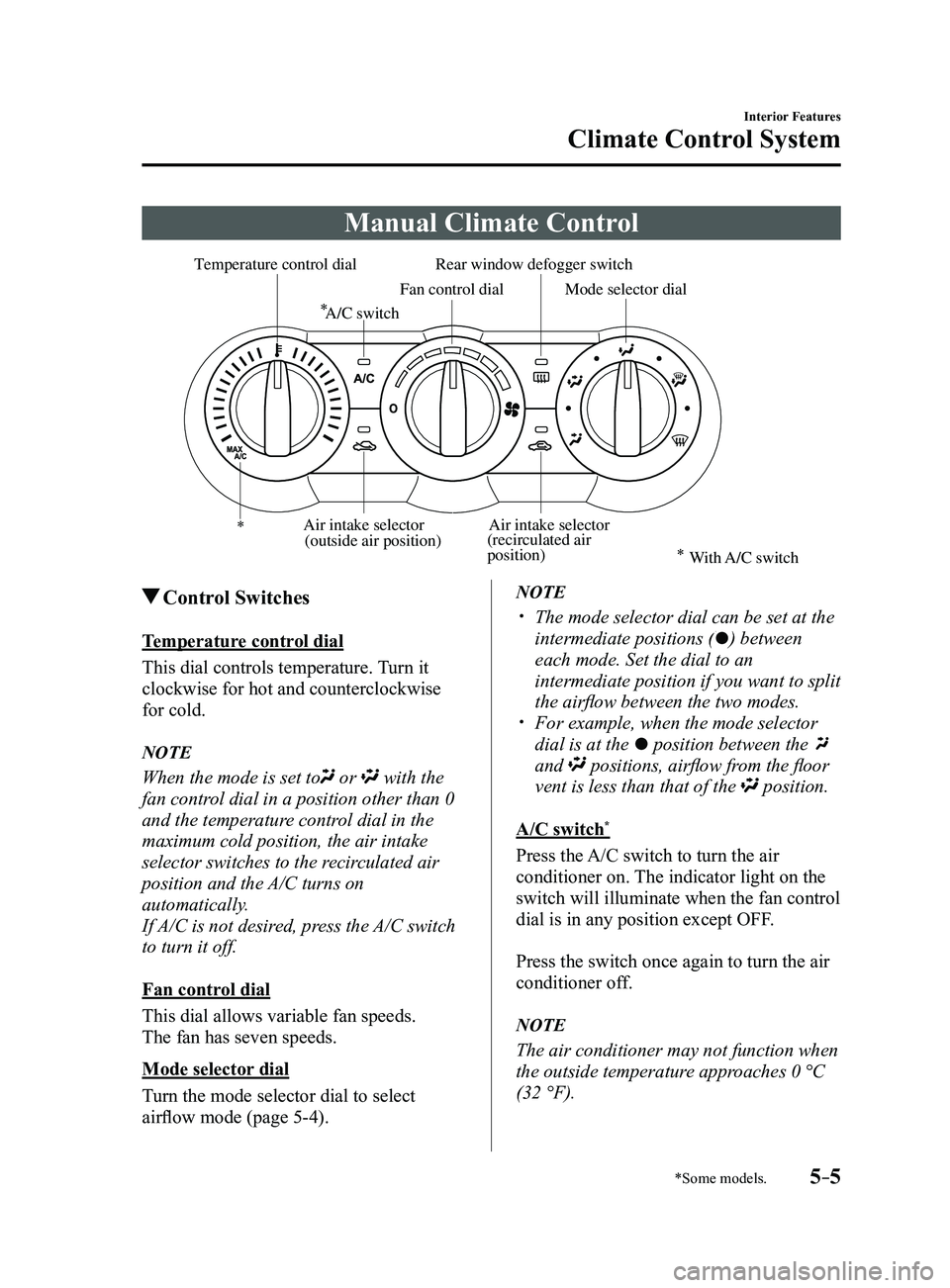
Manual Climate Control
Rear window defogger switch
Temperature control dial
Fan control dialMode selector dial
A/C switch
Air intake selector
(recirculated air
position)Air intake selector
(outside air position)
With A/C switch
Control Switches
Temperature control dial
This dial controls temperature. Turn it
clockwise for hot and counterclockwise
for cold.
NOTE
When the mode is set to or with the
fan control dial in a position other than 0
and the temperature control dial in the
maximum cold position, the air intake
selector switches to the recirculated air
position and the A/C turns on
automatically.
If A/C is not desired, press the A/C switch
to turn it off.
Fan control dial
This dial allows variable fan speeds.
The fan has seven speeds.
Mode selector dial
Turn the mode selector dial to select
airflow mode (page
5-4).
NOTE
The mode selector dial can be set at the
intermediate positions () between
each mode. Set the dial to an
intermediate position if you want to split
the airflow between the two modes.
For example, when the mode selector
dial is at the position between the
and positions, airflow from the floor
vent is less than that of the position.
A/C switch*
Press the A/C switch to turn the air
conditioner on. The indicator light on the
switch will illuminate when the fan control
dial is in any position except OFF.
Press the switch once again to turn the air
conditioner off.
NOTE
The air conditioner may not function when
the outside temperature approaches 0 °C
(32 °F).
Mazda3_8FL6-EA-16F_Edition2.indb 52016/08/10 17:37:12
Page 299 of 612
5–7
Interior Features
Climate Control System
CAUTION
If the air conditioner is used while
driving up long hills or in heavy
traffic, monitor the engine coolant
temperature warning light to see if it is
illuminated or flashing (page
4-23).
The air conditioner may cause engine
overheating. If the warning light is
illuminated or flashing, turn the air-
conditioning off (page
7-20).
NOTE
When maximum cooling is desir ed,
set the temperature control dial to the
extreme cold position and set the air
intake selector to the recirculated air
position, then turn the fan control dial
fully clockwise.
If warmer air is desired at floor level,
set the mode selector dial at the
position and adjust the temperature
control dial to maintain maximum
comfort.
The air to the floor is warmer than air
to the face (except when the temperature
control dial is set at the extreme hot or
cold position).
Ventilation
1. Set the mode selector dial to the
position.
2. Set the air intake selector to the outside
air position.
3. Set the temperature control dial to the
desired position.
4. Set the fan control dial to the desired
speed.
Windshield Defrosting and
Defogging
1. Set the mode selector dial to the
position.
2. Set the temperature control dial to the
desired position.
3. Set the fan control dial to the desired
speed.
4. If dehumidified heating is desired, turn
on the air conditioner.
WARNING
Do not defog the windshield using the
position with the temperature
control set to the cold position:
Using the
position with the
temperature control set to the cold
position is dangerous as it will cause
the outside of the windshield to fog up.
Your vision will be hampered, which
could lead to a serious accident. Set
the temperature control to the hot or
warm position when using the
position.
NOTE
For maximum defr osting, turn on the air
conditioner, set the temperature control
dial to the extreme hot position, and
turn the fan control dial fully clockwise.
If warm air is desired at the floor, set the
mode selector dial to the position. In the or position, the air
conditioner is automatically turned on
and the outside air position is
automatically selected to defrost the
windshield. In the
or position, the
outside air position cannot be changed
to the recirculated air position.
Mazda3_8FL6-EA-16F_Edition2.indb 72016/08/10 17:37:14
Page 301 of 612
5–9
Interior Features
Climate Control System
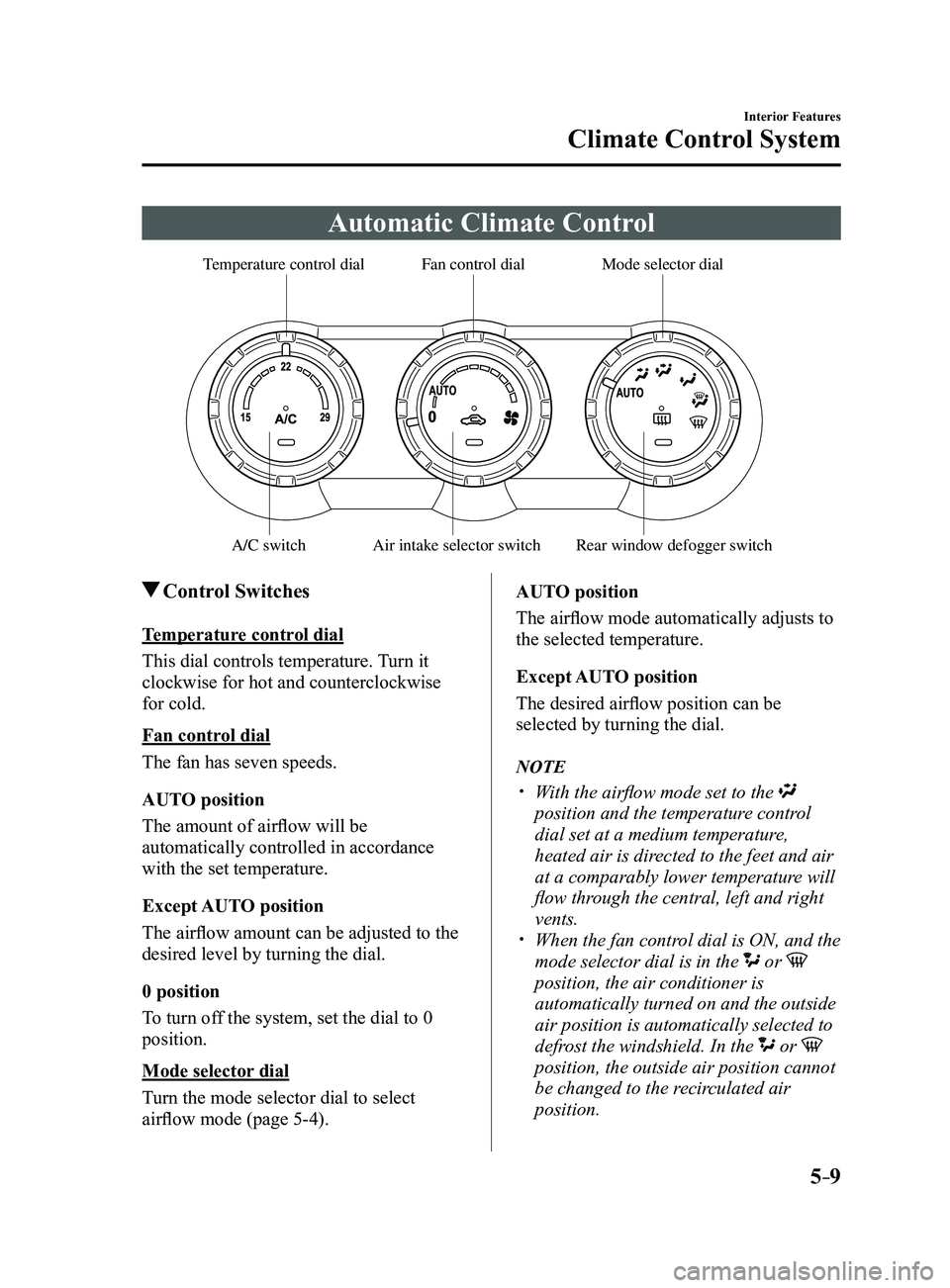
Automatic Climate Control
Rear window defogger switch
Temperature control dialFan control dialMode selector dial
A/C switchAir intake selector switch
Control Switches
Temperature control dial
This dial controls temperature. Turn it
clockwise for hot and counterclockwise
for cold.
Fan control dial
The fan has seven speeds.
AUTO position
The amount of airflow will be
automatically controlled in accordance
with the set temperature.
Except AUTO position
The airflow amount can be adjusted to the
desired level by turning the dial.
0 position
To turn off the system, set the dial to 0
position.
Mode selector dial
Turn the mode selector dial to select
airflow mode (page
5-4).AUTO position
The airflow mode automatically adjusts to
the selected temperature.
Except AUTO position
The desired airflow position can be
selected by turning the dial.
NOTE
With the airflow mode set to the
position and the temperature control
dial set at a medium temperature,
heated air is directed to the feet and air
at a comparably lower temperature will
flow through the central, left and right
vents.
When the fan contr
ol dial is ON, and the
mode selector dial is in the or
position, the air conditioner is
automatically turned on and the outside
air position is automatically selected to
defrost the windshield. In the
or
position, the outside air position cannot
be changed to the recirculated air
position.
Mazda3_8FL6-EA-16F_Edition2.indb 92016/08/10 17:37:15
Page 305 of 612
5–13
Interior Features
Climate Control System
OFF switch
Pressing the OFF switch shuts off the
climate control system.
Temperature control dial
This dial controls temperature. Turn it
clockwise for hot and counterclockwise
for cold.
When the DUAL switch is off:
Turn the driver temperature control dial
to control the temperature throughout
the entire cabin.
When the DUAL switch is on:
Turn the driver or front passenger
temperature control dial to
independently control the temperature
on each side of the cabin.
NOTE
The climate contr ol system changes to
the individual operation mode (DUAL
switch indicator light illuminated) by
turning the front passenger temperature
control dial even when the DUAL switch
is off, which allows individual control
of the set temperature for the driver and
front passenger.
The temperature units for the
temperature setting display can be
changed in conjunction with the
temperature units for the outside
temperature display. Refer to Outside
Temperature Display on page
4-19.
Fan control switch
The fan has seven speeds. The selected
speed will be displayed.
Mode selector switch
The desired airflow mode can be selected
(page
5-4).
NOTE
With the airflow mode set to the
position and the temperature control
dial set at a medium temperature,
heated air is directed to the feet and air
at a comparably lower temperature will
flow through the central, left and right
vents.
To set the air vent to , press the
windshield defroster switch. In the or position, the air
conditioner is automatically turned on
and the outside air position is
automatically selected to defrost the
windshield. In the
or position, the
outside air position cannot be changed
to the recirculated air position.
A/C switch
Pressing the A/C switch while the AUTO
switch is turned on will turn off the air-
conditioning (cooling/dehumidifying
functions).
The air-conditioning can be turned on and
off by pressing the A/C switch while the
fan control switch is on.
NOTE
The air-conditioning operates when the
A/C switch is pressed even if the fan is
off.
The air conditioner may not function
when the outside temperature
approaches 0 °C (32 °F).
Mazda3_8FL6-EA-16F_Edition2.indb 132016/08/10 17:37:17
Page 308 of 612
5–16
Interior Features
Audio System
*Some models.
Antenna
Antenna (4-Door)
AM/FM Radio Antenna
The AM/FM radio antenna receives both
AM and FM signals.
The antenna is embedded into the window
glass.
CAUTION
When washing the inside of the
window which has an antenna, use
a soft cloth dampened in lukewarm
water, gently wiping the antenna lines.
Use of glass cleaning products could
damage the antenna.
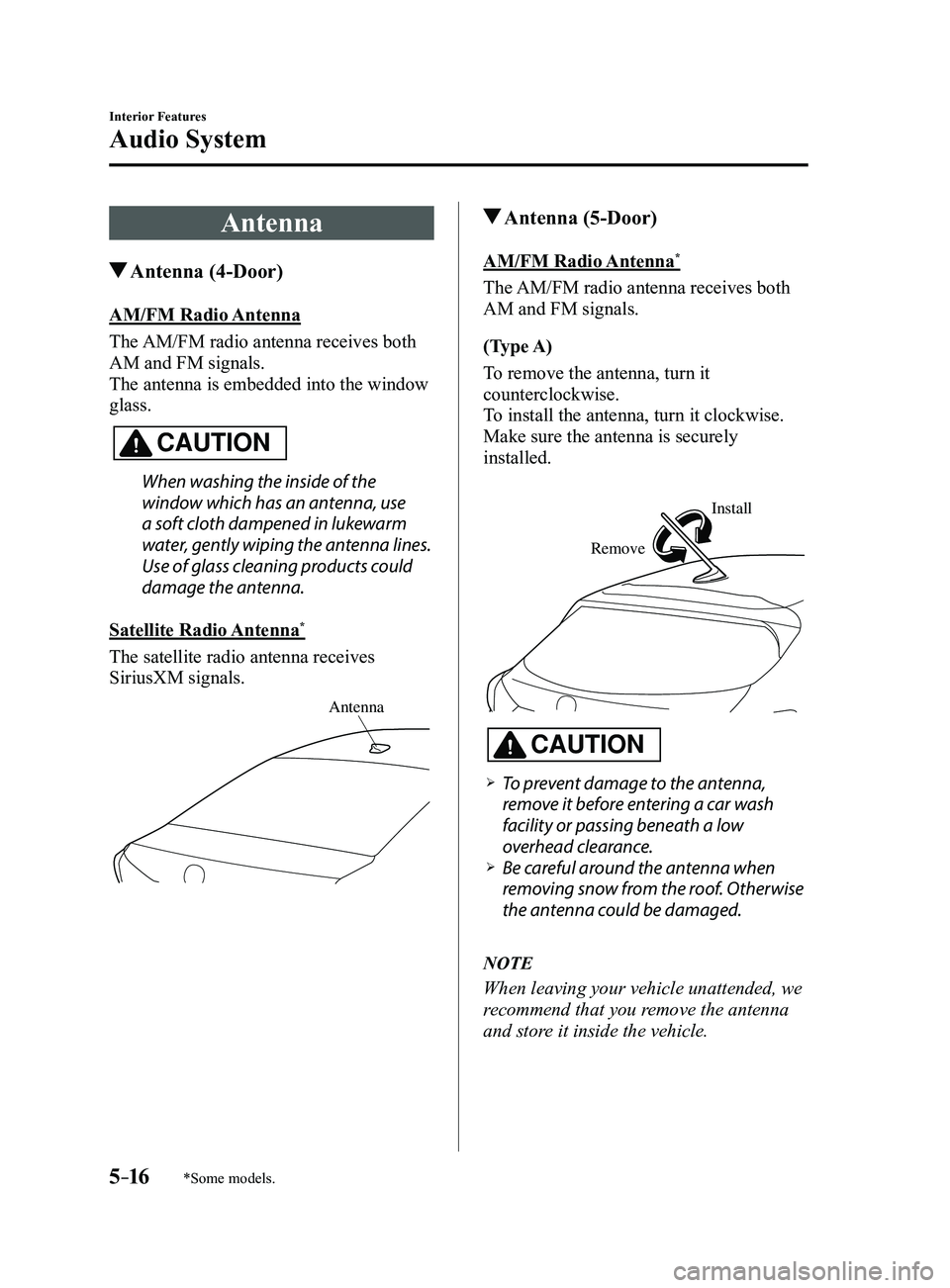
Satellite Radio Antenna
*
The satellite radio antenna receives
SiriusXM signals.
Antenna
Antenna (5-Door)
AM/FM Radio Antenna*
The AM/FM radio antenna receives both
AM and FM signals.
(Type A)
To remove the antenna, turn it
counterclockwise.
To install the antenna, turn it clockwise.
Make sure the antenna is securely
installed.
Remove
Install
CAUTION
To prevent damage to the antenna,
remove it before entering a car wash
facility or passing beneath a low
overhead clearance.
Be careful around the antenna when
removing snow from the roof. Otherwise
the antenna could be damaged.
NOTE
When leaving your vehicle unattended, we
recommend that you remove the antenna
and store it inside the vehicle.
Mazda3_8FL6-EA-16F_Edition2.indb 162016/08/10 17:37:19
Page 318 of 612
![MAZDA MODEL 3 4-DOOR 2017 Manual PDF 5–26
Interior Features
Audio System
Audio set [Type A (non-touchscreen)]
Power/Volume/Sound Controls ........................................................................\
.....page 5-28
Clock](/img/28/40993/w960_40993-317.png "MAZDA MODEL 3 4-DOOR 2017 Manual PDF 5–26
Interior Features
Audio System
Audio set [Type A (non-touchscreen)]
Power/Volume/Sound Controls ........................................................................\
.....page 5-28
Clock")
5–26
Interior Features
Audio System
Audio set [Type A (non-touchscreen)]
Power/Volume/Sound Controls ........................................................................\
.....page 5-28
Clock ........................................................................\
.............................................page 5-30
Operating the Radio ........................................................................\
......................page 5-32
How to use Auxiliary jack/USB port ....................................................................page 5-33
Mazda3_8FL6-EA-16F_Edition2.indb 262016/08/10 17:37:25
Page 320 of 612
5–28
Interior Features
Audio System
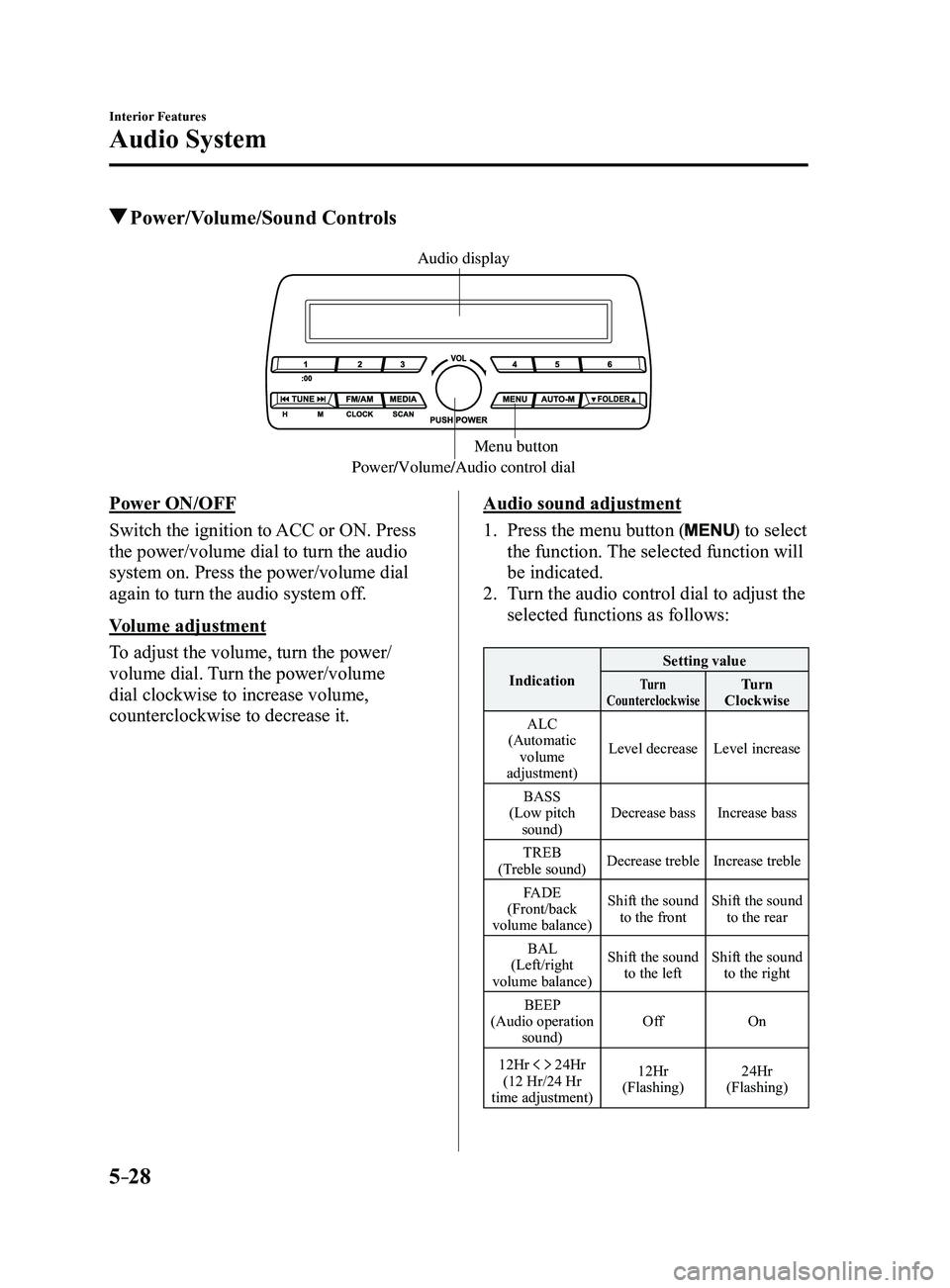
Power/Volume/Sound Controls
Power/Volume/Audio control dialMenu button
Audio display
Power ON/OFF
Switch the ignition to ACC or ON. Press
the power/volume dial to turn the audio
system on. Press the power/volume dial
again to turn the audio system off.
Volume adjustment
To adjust the volume, turn the power/
volume dial. Turn the power/volume
dial clockwise to increase volume,
counterclockwise to decrease it.Audio sound adjustment
1. Press the menu button () to select
the function. The selected function will
be indicated.
2. Turn the audio control dial to adjust the
selected functions as follows:
Indication Setting valueTurn
CounterclockwiseTurn
Clockwise
ALC
(Automatic volume
adjustment) Level decrease
Level increase
BASS
(Low pitch sound) Decrease bass
Increase bass
TREB
(Treble sound) Decrease treble
Increase treble
FADE
(Front/back
volume balance) Shift the sound
to the front Shift the sound
to the rear
BAL
(Left/right
volume balance) Shift the sound
to the left Shift the sound
to the right
BEEP
(Audio operation sound) Off
On
12Hr
24Hr
(12 Hr/24 Hr
time adjustment) 12Hr
(Flashing) 24Hr
(Flashing)
Mazda3_8FL6-EA-16F_Edition2.indb 282016/08/10 17:37:26