sensor MAZDA MODEL 3 4-DOOR 2017 Owner's Guide
[x] Cancel search | Manufacturer: MAZDA, Model Year: 2017, Model line: MODEL 3 4-DOOR, Model: MAZDA MODEL 3 4-DOOR 2017Pages: 612
Page 220 of 612
4–90
When Driving
i-ACTIVSENSE
In the following case, the flashing of the Blind Spot Monitoring (BSM) warning indicator
light, and the activation of the warning sound and the warning screen indicator display
may not occur or they may be delayed.
A vehicle makes a lane change from a driving lane two lanes over to an adjacent lane. Driving on steep slopes. Crossing the summit of a hill or mountain pass. The turning radius is small (making a sharp turn, turning at intersecti\
ons). When there is a difference in the height between your driving lane and the adjacent
lane. Directly after pressing the Blind Spot Monitoring (BSM) OFF switch and the system
becomes operable.
If the road width is extremely narrow, vehicles two lanes over may be detected.
The detection area of the radar sensors (rear) is set according to the road width of
expressways.
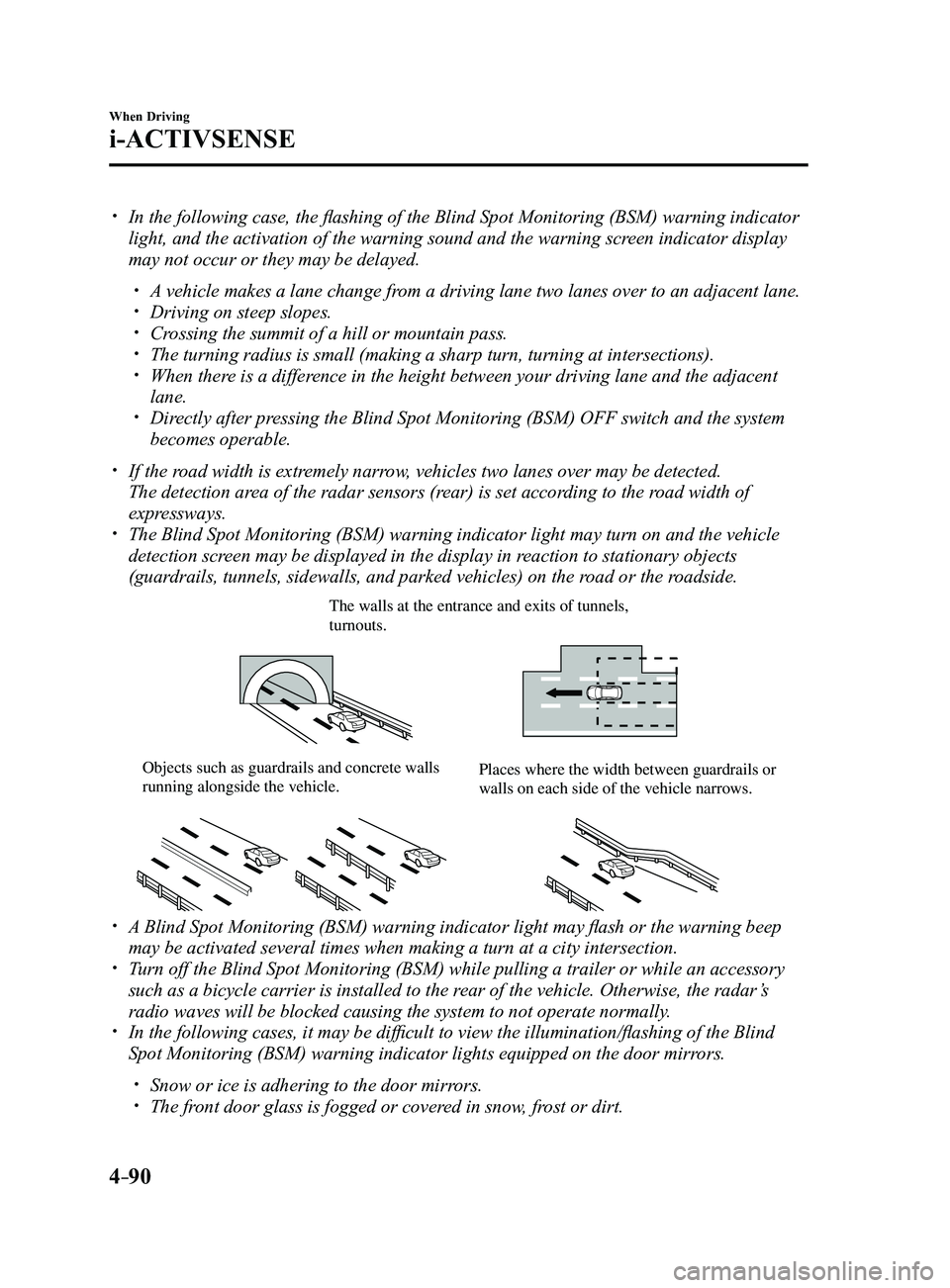
The Blind Spot Monitoring (BSM) warning indicator light may turn on an\
d the vehicle
detection screen may be displayed in the display in reaction to stationary objects
(guardrails, tunnels, sidewalls, and parked vehicles) on the road or the roadside.
The walls at the entrance and exits of tunnels, turnouts.
Objects such as guardrails and concrete walls running alongside the vehicle.Places where the width between guardrails or walls on each side of the vehicle narrows.
A Blind Spot Monitoring (BSM) warning indicator light may flash or the warning beep
may be activated several times when making a turn at a city intersection\
. Turn off the Blind Spot Monitoring (BSM) while pulling a trailer or whi\
le an accessory
such as a bicycle carrier is installed to the rear of the vehicle. Otherwise, the radar’s
radio waves will be blocked causing the system to not operate normally.
In the following cases, it may be difficult to view the illumination/flashing of the Blind
Spot Monitoring (BSM) warning indicator lights equipped on the door mi\
rrors.
Snow or ice is adhering to the door mirrors. The front door glass is fogged or covered in snow, frost or dirt.
Mazda3_8FL6-EA-16F_Edition2.indb 902016/08/10 17:36:38
Page 221 of 612
4–91
When Driving
i-ACTIVSENSE
The radar sensors (rear) of the Blind Spot Monitoring (BSM) may be regulated under
the radio wave related laws of the country where the vehicle is driven. The sensors
in this system are approved for use in the U.S.A. (including territories), Canada, and
Mexico. If a vehicle with a Blind Spot Monitoring (BSM) is driven in a\
country other
than the U.S.A., Canada, or Mexico, the system has to be turned off usin\
g the Blind Spot
Monitoring (BSM) OFF switch.
The system switches to the Rear Cr oss Traffic Alert function when the shift lever (manual
transaxle) or the selector lever (automatic transaxle) is shifted to \
the reverse (R) position.
Refer to Rear Cross Traffic Alert (RCTA) on page 4-103.
Blind Spot Monitoring (BSM) Warning Indicator Lights/Blind Spot
Monitoring (BSM) Warning Beep
The Blind Spot Monitoring (BSM) or Rear Cross Traffic Alert (RCTA) system notifies the
driver of the presence of vehicles in adjacent lanes or at the rear of t\
he vehicle using the
Blind Spot Monitoring (BSM) warning indicator light, the warning sound and the display
indicator (vehicles with active driving display) while the systems are\
operational.
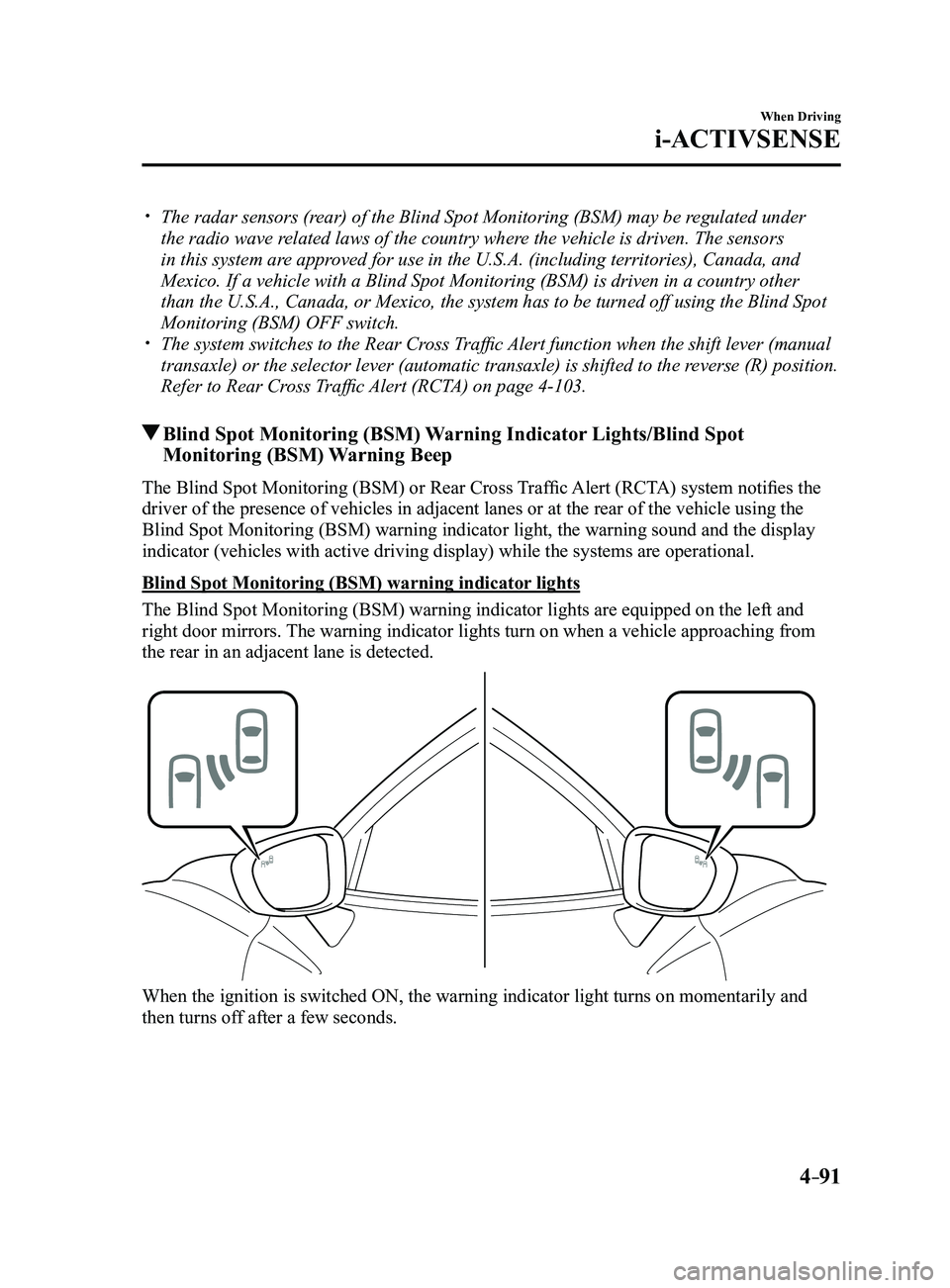
Blind Spot Monitoring (BSM) warning indicator lights
The Blind Spot Monitoring (BSM) warning indicator lights are equipped on the left and
right door mirrors. The warning indicator lights turn on when a vehicle approaching from
the rear in an adjacent lane is detected.
When the ignition is switched ON, the warning indicator light turns on momentarily and
then turns off after a few seconds.
Mazda3_8FL6-EA-16F_Edition2.indb 912016/08/10 17:36:38
Page 228 of 612
4–98
When Driving
i-ACTIVSENSE
NOTE
Speed limit signs
When the vehicle speed is about 1 km/h (0.6 mph) or faster, the speed limit sign is
displayed when any one of the following conditions are met.
The Forward Sensing Camera (FSC) recognizes a speed limit sign as a sign targeted
for your vehicle and the vehicle passes it. The speed limit sign stor ed in the navigation system is read (if the Forward Sensing
Camera (FSC) does not recognize a speed limit sign).
In the following cases, display of the speed limit sign stops.
The Forward Sensing Camera (FSC) recognizes the speed limit sign and the vehicle is
driven for a certain distance after passing the sign. Each sensor determines that the vehicle has changed dir ection of travel. The Forward Sensing Camera (FSC) recognizes a new speed limit sign which differs
from the previous one (displays the new speed limit sign). The speed limit sign stor ed in the navigation system is not read within a certain period
of time (if the Forward Sensing Camera (FSC) does not recognize a speed limit sign,
the speed limit sign stored in the navigation system is displayed).
The vehicle speed exceeds the displayed speed limit sign by 30 km/h (19\
mph) or mor e
after a certain period of time has elapsed since the speed limit sign wa\
s displayed.
(Except when there is information for the speed limit sign in the navigation system)
Do not enter signs
A do not enter sign is displayed when all of the following conditions are met.
The vehicle speed is about 60 km/h (37 mph) or slower . The Forward Sensing Camera (FSC) recognizes a do not enter sign as a sign targeted
for your vehicle and the vehicle passes it.
In the following case, the display of the do not enter sign stops.
The Forward Sensing Camera (FSC) recognizes the do not enter sign and a certain
period of time has elapsed since the vehicle passed the sign.
Mazda3_8FL6-EA-16F_Edition2.indb 982016/08/10 17:36:42
Page 231 of 612
4–101
When Driving
i-ACTIVSENSE
*Some models.
Distance Recognition Support System (DRSS)*
The Distance Recognition Support System (DRSS) measures the distance between your
vehicle and a vehicle ahead using a radar sensor (front) while the veh\
icle speed is about 30
km/h (19 mph) or faster, and if your vehicle approaches a vehicle ahead more closely than
what is appropriate for maintaining distance between the vehicles accord\
ing to the vehicle
speed, a notification in the active driving display is indicated to advise you to keep a safe
distance from the vehicle ahead.
WARNING
Do not rely completely on the Distance Recognition Support System (DRSS) and always
drive carefully:The Distance Recognition Support System (DRSS) provides advice for safer driving and
notifies the driver of a recommended, safer distance to maintain with a vehicle ahead.
The ability to detect a vehicle ahead is limited depending on the type of vehicle ahead,
the weather conditions, and the traffic conditions. Therefore, if the accelerator and brake
pedals are not operated correctly it could lead to an accident. Always verify the safety of
the surrounding area and depress the brake pedal or accelerator pedal while keeping a
safer distance from vehicles ahead or on-coming vehicles.
NOTE
The Distance Recognition Support System (DRSS) operates when all of th\
e following
conditions are met:
The ignition is switched ON. The Distance Recognition Support System (DRSS) is on. The selector lever is in a position other than r everse (R). The vehicle speed is 30 km/h or faster (19 mph or faster).
The objects which activate the system are 4-wheeled vehicles. The Distance Recognition Support System (DRSS) may also operate in the\
pr esence of
motorcycles and bicycles. The Distance Recognition Support System (DRSS) system may not operate \
normally
under the following conditions:
The Dynamic Stability Control (DSC) has a malfunction. The vehicle ahead is traveling at an extr emely slow speed.
The system does not operate with the following objects:
Vehicles approaching in the opposite direction. Stationary objects (stopped vehicles, obstructions)
Mazda3_8FL6-EA-16F_Edition2.indb 1012016/08/10 17:36:43
Page 235 of 612
4–105
When Driving
i-ACTIVSENSE
WARNING
Always check the surrounding area visually before actually putting the vehicle in
reverse:The system is only designed to assist you in checking for vehicles at the rear when putting
the vehicle in reverse. Due to certain limitations with the operation of this system, the
Blind Spot Monitoring (BSM) warning indicator lights may not flash or it might be delayed
even though a vehicle is behind your vehicle. Always make it your responsibility as a
driver to check the rear.
NOTE
In the following cases, the Blind Spot Monitoring (BSM) warning indica\
tion/warning
light turns on and operation of the system is stopped. If the Blind Spot\
Monitoring (BSM)
warning indication/warning light remains illuminated, have the vehicle inspected at an
Authorized Mazda Dealer as soon as possible.
Some problem with the system including the Blind Spot Monitoring (BSM) warnin\
g
indicator lights has occurred. A large deviation in the installation position of a radar sensor (rear) on the vehicle has
occurred. There is a large accumulation of snow or ice on the rear bumper near a radar sensor
(rear). Driving on snow-cover ed roads for long periods. The temperature near the radar sensors becomes extremely hot due to driving for long
periods on slopes during the summer. The battery voltage has decr eased.
Mazda3_8FL6-EA-16F_Edition2.indb 1052016/08/10 17:36:45
Page 236 of 612
4–106
When Driving
i-ACTIVSENSE
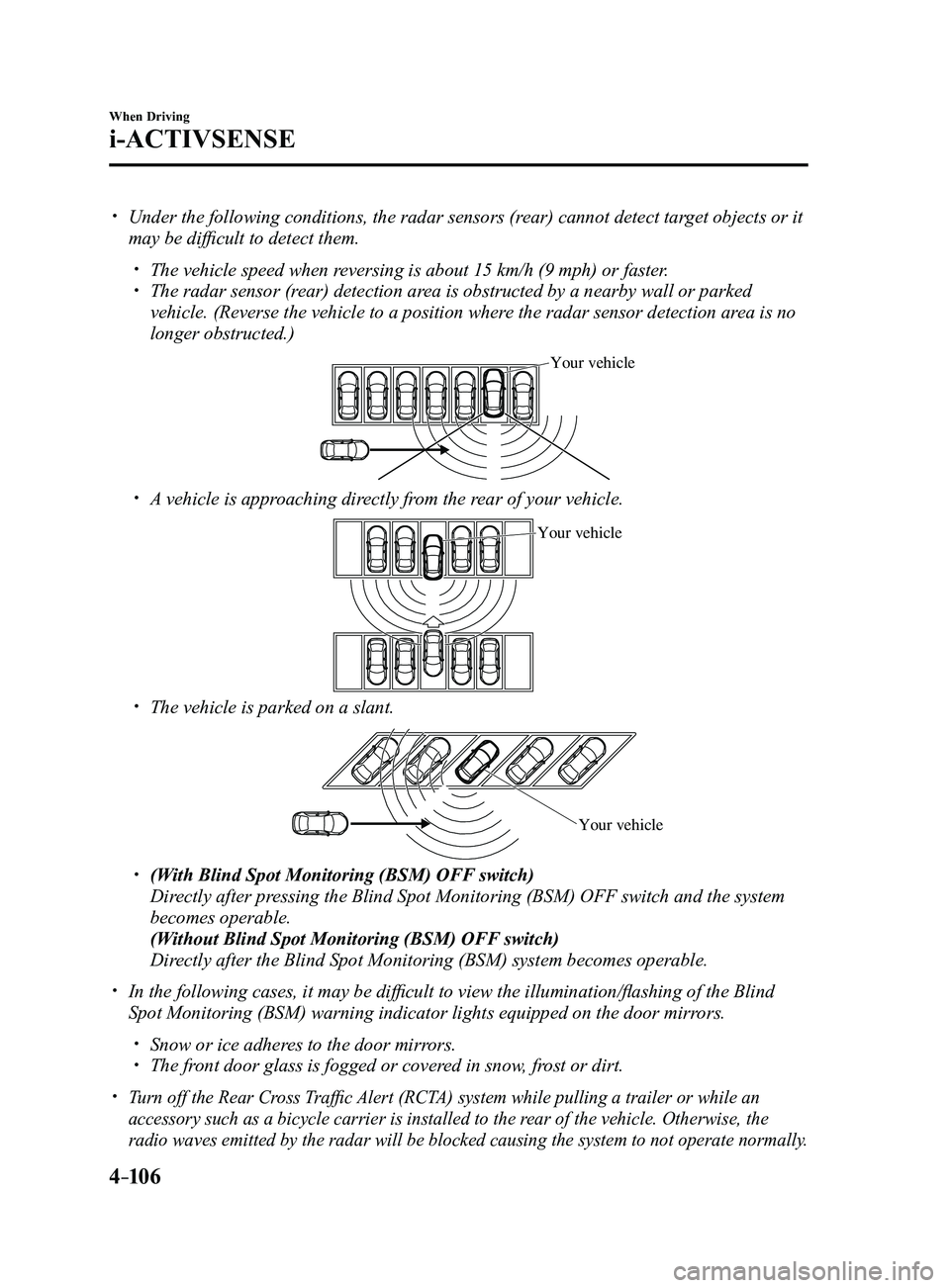
Under the following conditions, the radar sensors (rear) cannot detect target objects or it
may be difficult to detect them.
The vehicle speed when reversing is about 15 km/h (9 mph) or faster. The radar sensor (rear) detection area is obstructed by a nearby wall or parked
vehicle. (Reverse the vehicle to a position where the radar sensor detection area is no
longer obstructed.)
Your vehicle
A vehicle is approaching directly from the rear of your vehicle.
Your vehicle
The vehicle is parked on a slant.
Your vehicle
(With Blind Spot Monitoring (BSM) OFF switch)
Directly after pressing the Blind Spot Monitoring (BSM) OFF switch and the system
becomes operable.
(Without Blind Spot Monitoring (BSM) OFF switch)
Directly after the Blind Spot Monitoring (BSM) system becomes operable.
In the following cases, it may be difficult to view the illumina tion/flashing of the Blind
Spot Monitoring (BSM) warning indicator lights equipped on the door mi\
rrors.
Snow or ice adheres to the door mirrors. The front door glass is fogged or covered in snow, frost or dirt.
Turn off the Rear Cross Traffic Alert (RCTA) system while pulling a trailer or while an
accessory such as a bicycle carrier is installed to the rear of the vehicle. Otherwise, the
radio waves emitted by the radar will be blocked causing the system to n\
ot operate normally.
Mazda3_8FL6-EA-16F_Edition2.indb 1062016/08/10 17:36:45
Page 237 of 612
4–107
When Driving
i-ACTIVSENSE
*Some models.
Mazda Radar Cruise Control (MRCC)*
The Mazda Radar Cruise Control (MRCC) system is designed to maintain headway control*1
according to the vehicle speed using a radar sensor (front) to detect \
the distance to a vehicle
ahead, and by presetting the vehicle speed between 30 km/h (19 mph) an\
d 145 km/h (90 mph),
the driver is freed from having to constantly use the accelerator or bra\
ke pedals.
*1 Headway Control: Control of the distance between your vehicle and the ve\
hicle ahead
detected by the Mazda Radar Cruise Control (MRCC) system.
Additionally, if your vehicle starts closing in on the vehicle ahead because, for ex\
ample, the
vehicle ahead brakes suddenly, a warning sound and a warning indication in the display are
activated simultaneously to alert you to maintain a sufficient distance between the vehicles.
Use the Mazda Radar Cruise Control (MRCC) system on expressways and other highways
which do not require a lot of repeated acceleration and deceleration.
WARNING
Do not rely completely on the Mazda Radar Cruise Control (MRCC) system and always
drive carefully:
The Mazda Radar Cruise Control (MRCC) system is designed to reduce load on the driver,
and although it maintains a constant vehicle speed, or specifically, it maintains a constant
distance between your vehicle and the detected vehicle ahead according to the vehicle
speed, the system has detection limitations depending on the type of vehicle ahead and its
conditions, the weather conditions, and the road conditions. Additionally, the system may
be unable to decelerate sufficiently to avoid hitting the vehicle ahead if the vehicle ahead
applies the brakes suddenly or another vehicle cuts into the driving lane, which could result in
an accident. Always verify the safety of the surrounding area and depress the brake pedal or
accelerator pedal while keeping a safer distance from vehicles ahead or on-coming vehicles.
Do not use the Mazda Radar Cruise Control (MRCC) system in the following locations.
Otherwise, it could lead to an accident:
Roads with sharp cur ves and where vehicle traffic is heavy and there is insufficient
space between vehicles. Roads where frequent and repetitive acceleration and
deceleration occur (Driving under these conditions using the Mazda Radar Cruise
Control (MRCC) system is not possible).
When entering and exiting interchanges, service areas, and parking areas of highways
(If you exit a highway while headway control is in use, the vehicle ahead will no longer
be tracked and your vehicle may accelerate to the set speed).
Slippery roads such as ice or snow-bound roads (The tires could spin causing you to
lose vehicle control). Long descending slopes (to maintain distance between vehicles, the system automatically
and continuously applies the brakes which could result in the loss of brake power).
For the purposes of safety, switch the Mazda Radar Cruise Control (MRCC) system off
when it is not being used.
Mazda3_8FL6-EA-16F_Edition2.indb 1072016/08/10 17:36:46
Page 263 of 612
4–133
When Driving
i-ACTIVSENSE
*Some models.
Smart Brake Support (SBS)*
The Smart Brake Support (SBS) system alerts the driver of a possible collision using a
display and warning sound if the radar sensor (front) and the Forward \
Sensing Camera
(FSC) determine that there is the possibility of a collision with a ve\
hicle ahead while the
vehicle is being driven at about 15 km/h or faster (10 mph or faster).\
Furthermore, if the
radar sensor (front) and the Forward Sensing Camera (FSC) determines\
that a collision is
unavoidable, the automatic brake control is performed to reduce damage i\
n the event of a
collision.
In addition, when the driver depresses the brake pedal, the brakes are applied firmly and
quickly to assist. (Brake Assist (SBS brake assist))
WARNING
Do not rely completely on the Smart Brake Support (SBS) system and always drive
carefully:The Smart Brake Support (SBS) is designed to reduce damage in the event of a collision,
not avoid an accident. The ability to detect an obstruction is limited depending on the
obstruction, weather conditions, or traffic conditions. Therefore, if the accelerator pedal
or brake pedal is mistakenly operated it could result in an accident. Always verify the
safety of the surrounding area and depress the brake pedal or accelerator pedal while
keeping a safer distance from vehicles ahead or on-coming vehicles.
CAUTION
In the following cases, turn the system off to prevent a mis-operation:
The vehicle is being towed or when towing another vehicle. The vehicle is on a chassis roller. When driving on rough roads such as in areas of dense grass or off-road.
Mazda3_8FL6-EA-16F_Edition2.indb 1332016/08/10 17:36:58
Page 264 of 612
 system operates when all of the followin\
g conditions are
met:
The ignition is switched ON. The Smart Brake Support (S")
4–134
When Driving
i-ACTIVSENSE
NOTE
The Smart Brake Support (SBS) system operates when all of the followin\
g conditions are
met:
The ignition is switched ON. The Smart Brake Support (SBS) system is on. The vehicle speed is about 15 km/h or faster (10 mph or faster). The relative speed between your vehicle and the vehicle ahead is about 15 km/\
h or
faster (10 mph or faster). The Dynamic Stability Control (DSC) is not operating.
The Smart Brake Support (SBS) system may not operate under the followi\
ng conditions:
If the vehicle is accelerated rapidly and it comes close to a vehicle ah\
ead. The vehicle is driven at the same speed as the vehicle ahead. The accelerator pedal is depr essed. The brake pedal is depressed. The steering wheel is being operated. The selector lever is being operated. The turn signal is being used. When the vehicle ahead is not equipped with taillights or the taillights\
ar e turned off. When warnings and messages, such as a dirty windshield, related to the Forward
Sensing Camera (FSC) are being displayed in the center display.
Although the objects which activate the system are four-wheeled vehicles, the radar
sensor (front) could detect the following objects, determine them to be an obstru\
ction, and
operate the Smart Brake Support (SBS) system.
Objects on the road at the entrance to a curve (including guardrails and snow banks). A vehicle appears in the opposite lane while cornering or rounding a curve. When crossing a narrow bridge. When passing under a low gate or thr ough a tunnel or narrow gate. When entering an underground parking area. Metal objects, bumps, or pr otruding objects on the road. If you suddenly come close to a vehicle ahead. When driving in areas where there is high grass or forage. Two-wheeled vehicles such as motorbikes or bicycles. Pedestrians or non-metallic objects such as standing tr ees.
The Smart Brake Support (SBS) warning indication (amber) turns on wh\
en the system has
a malfunction.
Refer to Warning Lights on page 4-23.
Mazda3_8FL6-EA-16F_Edition2.indb 1342016/08/10 17:36:58
Page 271 of 612
4–141
When Driving
i-ACTIVSENSE
Radar Sensor (Front)
Your vehicle is equipped with a radar sensor (front).
The following systems also use the radar sensor (front).
Distance Recognition Support System (DRSS) Mazda Radar Cruise Control (MRCC) Smart Brake Support (SBS)
The radar sensor (front) functions by detecting the radio waves reflected off a vehicle ahead
or an obstruction sent from the radar sensor.
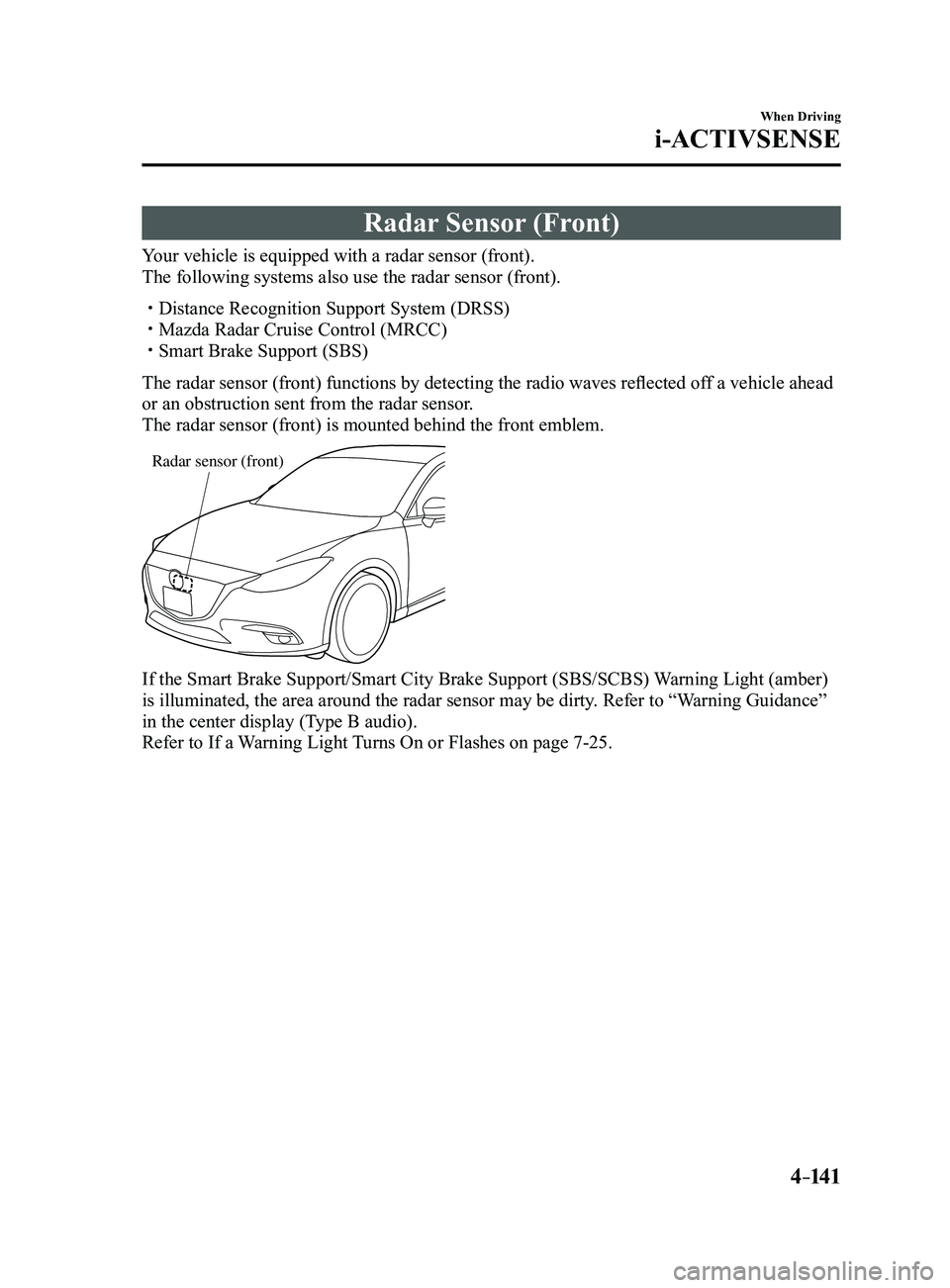
The radar sensor (front) is mounted behind the front emblem.
Radar sensor (front)
If the Smart Brake Support/Smart City Brake Support (SBS/SCBS) Warning Light (amber)
is illuminated, the area around the radar sensor may be dirty. Refer to “Warning Guidance”
in the center display (Type B audio).
Refer to If a Warning Light Turns On or Flashes on page
7-25.
Mazda3_8FL6-EA-16F_Edition2.indb 1412016/08/10 17:37:00