sensor MAZDA MODEL 3 4-DOOR 2017 Service Manual
[x] Cancel search | Manufacturer: MAZDA, Model Year: 2017, Model line: MODEL 3 4-DOOR, Model: MAZDA MODEL 3 4-DOOR 2017Pages: 612
Page 272 of 612
4–142
When Driving
i-ACTIVSENSE
CAUTION
Heed the following precautions to assure correct operation of each system.
Do not adhere stickers (including transparent stickers) to the surface of the radiator
grille and front emblem in and around the radar sensor (front), and do not replace
the radiator grille and front emblem with any product that is not a genuine product
designed for use with the radar sensor (front).
The radar sensor (front) includes a function for detecting soiling of the radar sensor's
front surface and informing the driver, however, depending on the conditions, it may
require time to detect or it may not detect plastic shopping bags, ice or snow. If this
occurs, the system may not operate correctly, therefore always keep the radar sensor
(front) clean.
Do not install a grille guard. If the front part of the vehicle has been damaged in a vehicle accident, the position of
the radar sensor (front) may have moved. Stop the system immediately and always
have the vehicle inspected at an Authorized Mazda Dealer.
Do not use the front bumper to push other vehicles or obstructions such as when
pulling out of a parking space. Otherwise, the radar sensor (front) could be hit and its
position deviated.
Do not remove, disassemble, or modify the radar sensor (front). For repairs, replacement or paint work around the radar sensor (front), consult an
Authorized Mazda Dealer. Do not modify the suspension. If the suspension are modified, the vehicle's posture
could change and the radar sensor (front) may not be able to correctly detect a vehicle
ahead or an obstruction.
Mazda3_8FL6-EA-16F_Edition2.indb 1422016/08/10 17:37:00
Page 273 of 612
4–14 3
When Driving
i-ACTIVSENSE
NOTE
Under the following conditions, the radar sensor (front) may not be able to detect
vehicles ahead or obstructions correctly and each system may not operate normally.
The rear surface of a vehicle ahead does not reflect radio waves effectively, such as
an unloaded trailer or an automobile with a loading platform covered by a soft top,
vehicles with a hard plastic tailgate, and round-shaped vehicles.
Vehicles ahead with low vehicle height and thus less area for reflecting radio waves. Visibility is reduced due to a vehicle ahead casting off water, snow, or sand from its
tires and onto your windshield. The trunk/luggage compartment is loaded with heavy objects or the r ear passenger
seats are occupied. Ice, snow, or soiling is on the front surface of the front emblem. During inclement weather such as rain, snow, or sand storms. When driving near facilities or objects emitting str ong radio waves.
Under the following conditions, the radar sensor (fr ont) may not be able to detect
vehicles ahead or obstructions.
The beginning and end of a curve. Roads with continuous curves. Narrow lane roads due to road construction or lane closures. The vehicle ahead enters the radar sensor's blind spot. The vehicle ahead is running abnormally due to accident or vehicle damag\
e. Roads with repeated up and down slopes Driving on poor r oads or unpaved roads. The distance between your vehicle and the vehicle ahead is extr emely short. A vehicle suddenly comes close such as by cutting into the lane.
To prevent incorrect operation of the system, use tires of the same specified size,
manufacturer, brand, and tread pattern on all four wheels. In addition, do not use tires
with significantly different wear patterns or tire pressures on the same vehicle (Including
the temporary spare tire).
If the battery power is weak, the system may not operate correctly. If the vehicle is driven on a road with little traffic and few vehicles ahead or obstructions
for the radar sensor (front) to detect, the sensor detects that the radar sensor (front) is
dirty and the Smart Brake Support/Smart City Brake Support (SBS/SCBS) \
Warning Light
(amber) may be temporarily turned on. However, it does not indicate a malfunction.
Mazda3_8FL6-EA-16F_Edition2.indb 1432016/08/10 17:37:00
Page 274 of 612
4–14 4
When Driving
i-ACTIVSENSE
Radar Sensors (Rear)
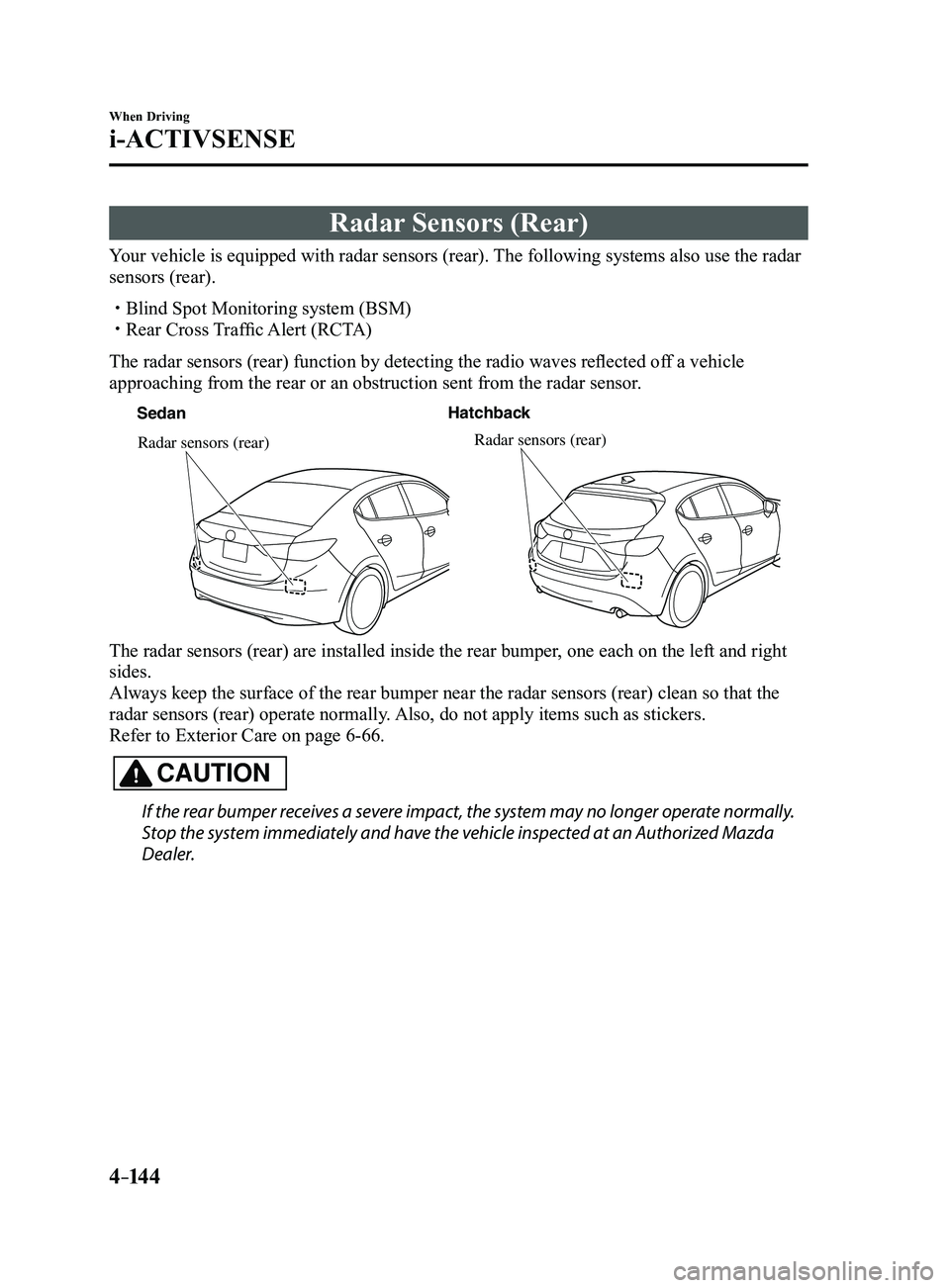
Your vehicle is equipped with radar sensors (rear). The following systems also use the radar
sensors (rear).
Blind Spot Monitoring system (BSM) Rear Cross Traffic Alert (RCTA)
The radar sensors (rear) function by detecting the radio waves reflected off a vehicle
approaching from the rear or an obstruction sent from the radar sensor.
SedanHatchback
Radar sensors (rear)Radar sensors (rear)
The radar sensors (rear) are installed inside the rear bumper, one each on the left and right
sides.
Always keep the surface of the rear bumper near the radar sensors (rear\
) clean so that the
radar sensors (rear) operate normally. Also, do not apply items such as stickers.
Refer to Exterior Care on page
6-66.
CAUTION
If the rear bumper receives a severe impact, the system may no longer operate normally.
Stop the system immediately and have the vehicle inspected at an Authorized Mazda
Dealer.
Mazda3_8FL6-EA-16F_Edition2.indb 1442016/08/10 17:37:00
Page 275 of 612
4–14 5
When Driving
i-ACTIVSENSE
NOTE
The detection ability of the radar sensors (rear) has limitations. In the following cases,
the detection ability may lower and the system may not operate normally.
The rear bumper near the radar sensors (rear) has become deformed. Snow, ice or mud adheres to the radar sensors (rear) on the rear bumper. Under bad weather conditions such as rain, snow and fog.
Under the following conditions, the radar sensors (r ear) cannot detect target objects or it
may be difficult to detect them.
Stationary objects on a road or a road side such as small, two-wheeled vehicles,
bicycles, pedestrians, animals, and shopping carts. Vehicle shapes which do not reflect radar waves well such as empty trailers with a low
vehicle height and sports cars.
Vehicles are shipped with the direction of the radar sensors (rear) adjusted for each
vehicle to a loaded vehicle condition so that the radar sensors (rear) detect approaching
vehicles correctly. If the direction of the radar sensors (rear) has deviated for some
reason, have the vehicle inspected at an Authorized Mazda Dealer.
For repairs or replacement of the radar sensors (rear), or bumper repairs, paintwork,
and replacement near the radar sensors, consult an Authorized Mazda Dealer. Turn off the system while pulling a trailer or while an accessory such as\
a bicycle carrier
is installed to the rear of the vehicle. Otherwise, the radio waves emitted by the radar will\
be blocked causing the system to not operate normally.
The radar sensors are regulated by the relevant radio wave laws of the country in which
the vehicle is driven. If the vehicle is driven abroad, authorization from the country in
which the vehicle is driven may be required.
Mazda3_8FL6-EA-16F_Edition2.indb 1452016/08/10 17:37:01
Page 281 of 612
 monitors the air pressure of all\
four tires. If
the ai")
4–151
When Driving
Tire Pressure Monitoring System
*Some models.
Tire Pressure Monitoring System*
The Tire Pressure Monitoring System (TPMS) monitors the air pressure of all\
four tires. If
the air pressure of one or more tires is too low, the system warns the driver by indicating the
tire pressure monitoring system warning light in the instrument cluster \
and operating a beep
sound. The system monitors the tire pressures indirectly using the data sent from the ABS
wheel speed sensors.
To allow the system to operate correctly, the system needs to be initialized with the specified
tire pressure (value on the tire pressure label). Follow the procedure\
and perform the
initialization.
Refer to Tire Pressure Monitoring System Initialization on page
4-154.
The warning light flashes when the system has a malfunction.
Refer to Warning Lights on page
4-24.
ABS wheel speed sensor
Mazda3_8FL6-EA-16F_Edition2.indb 1512016/08/10 17:37:03
Page 287 of 612
4–157
When Driving
Rear View Monitor
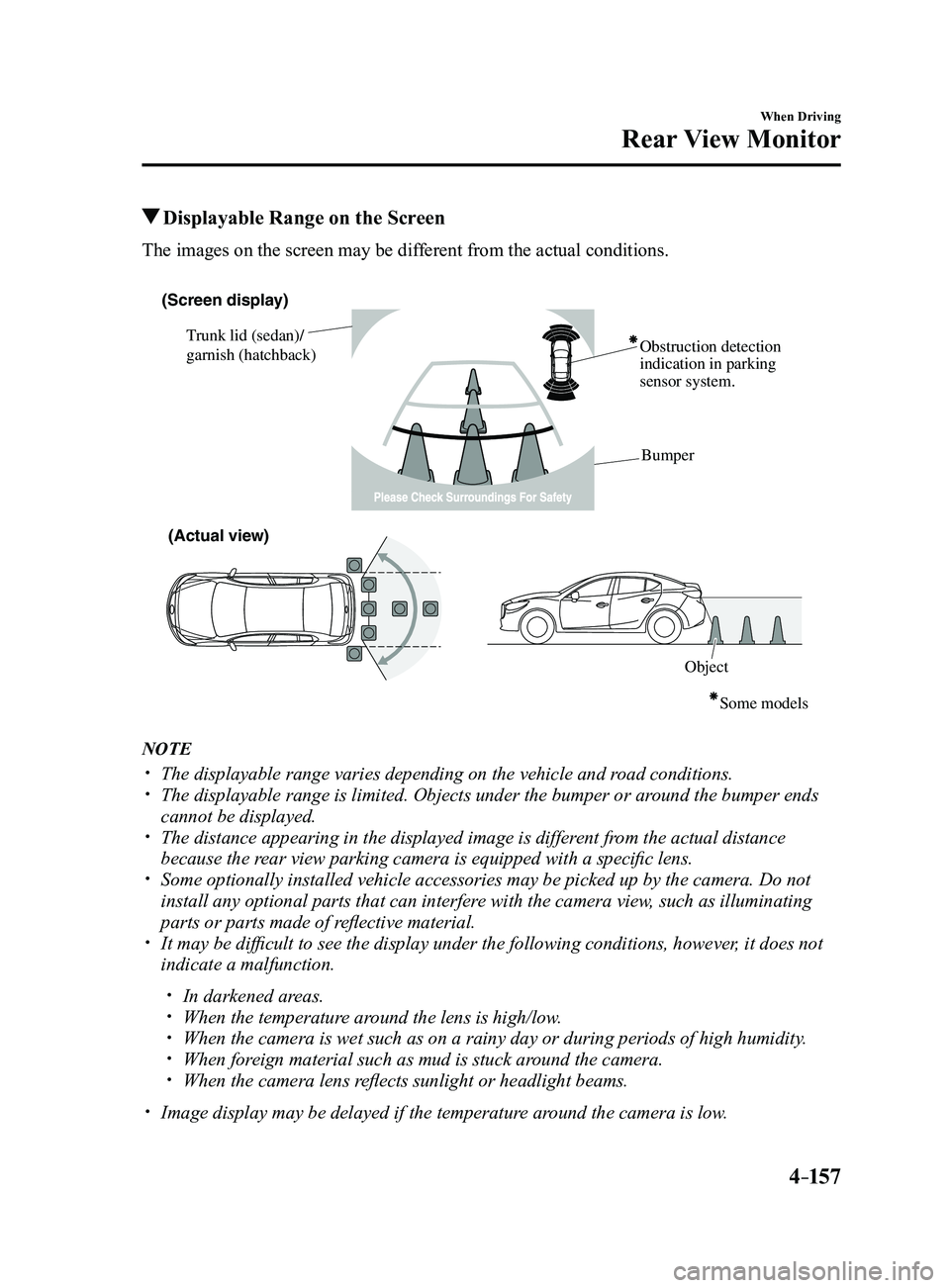
Displayable Range on the Screen
The images on the screen may be different from the actual conditions.
(Screen display)
Trunk lid (sedan)/
garnish (hatchback) Obstruction detection
indication in parking
sensor system.
Bumper
ObjectSome models
(Actual view)
NOTE
The displayable range varies depending on the vehicle and r
oad conditions. The displayable range is limited. Objects under the bumper or ar ound the bumper ends
cannot be displayed. The distance appearing in the displayed image is different from the actual distance
because the rear view parking camera is equipped with a specific lens. Some optionally installed vehicle accessories may be picked up by the ca\
mera. Do not
install any optional parts that can interfere with the camera view, such as illuminating
parts or parts made of reflective material.
It may be difficult to see the display under the following condi tions, however, it does not
indicate a malfunction.
In darkened areas. When the temperatur e around the lens is high/low. When the camera is wet such as on a rainy day or during periods of high \
humidity . When foreign material such as mud is stuck around the camera. When the camera lens reflects sunlight or headlight beams.
Image display may be delayed if the temperatur e around the camera is low.
Mazda3_8FL6-EA-16F_Edition2.indb 1572016/08/10 17:37:06
Page 303 of 612
5–11
Interior Features
Climate Control System
Windshield Defrosting and
Defogging
Set the mode selector dial to the
position and turn the fan control dial to the
desired speed.
In this position, the outside air position
is automatically selected, and when the
fan control dial is ON, the air conditioner
automatically turns on. The air conditioner
will directly dehumidify the air to the
front windshield and side windows (page
5-4). Airflow amount will be increased.
WARNING
Set the temperature control to the hot
or warm position when defogging (
position):Using the
position with the
temperature control set to the cold
position is dangerous as it will cause
the outside of the windshield to fog up.
Your vision will be hampered, which
could lead to a serious accident.
NOTE
Use the temperature control dial to
increase the air flow temperature and
defog the windshield more quickly.
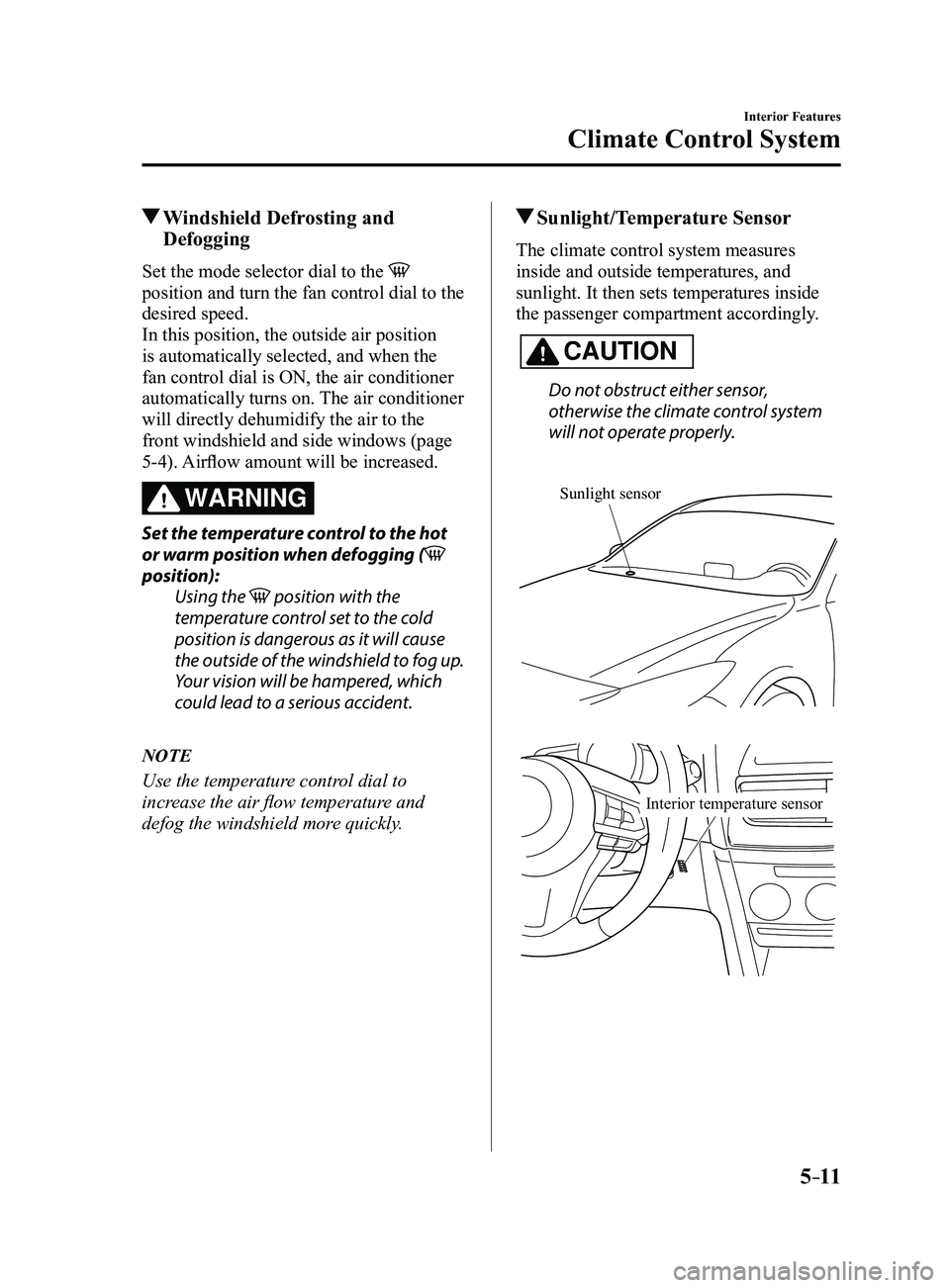
Sunlight/Temperature Sensor
The climate control system measures
inside and outside temperatures, and
sunlight. It then sets temperatures inside
the passenger compartment accordingly.
CAUTION
Do not obstruct either sensor,
otherwise the climate control system
will not operate properly.
Sunlight sensor
Interior temperature sensor
Mazda3_8FL6-EA-16F_Edition2.indb 112016/08/10 17:37:16
Page 307 of 612
5–15
Interior Features
Climate Control System
Windshield Defrosting and
Defogging
Press the windshield defroster switch.
In this position, the outside air position
is automatically selected, and the air
conditioner automatically turns on. The
air conditioner will directly dehumidify
the air to the front windshield and side
windows on page
5-4.
Airflow amount will be increased.
WARNING
Set the temperature control to the hot
or warm position when defogging
(
position):
Using the position with the
temperature control set to the cold
position is dangerous as it will cause
the outside of the windshield to fog up.
Your vision will be hampered, which
could lead to a serious accident.
NOTE
Use the temperature control dial to
increase the air flow temperature and
defog the windshield more quickly.
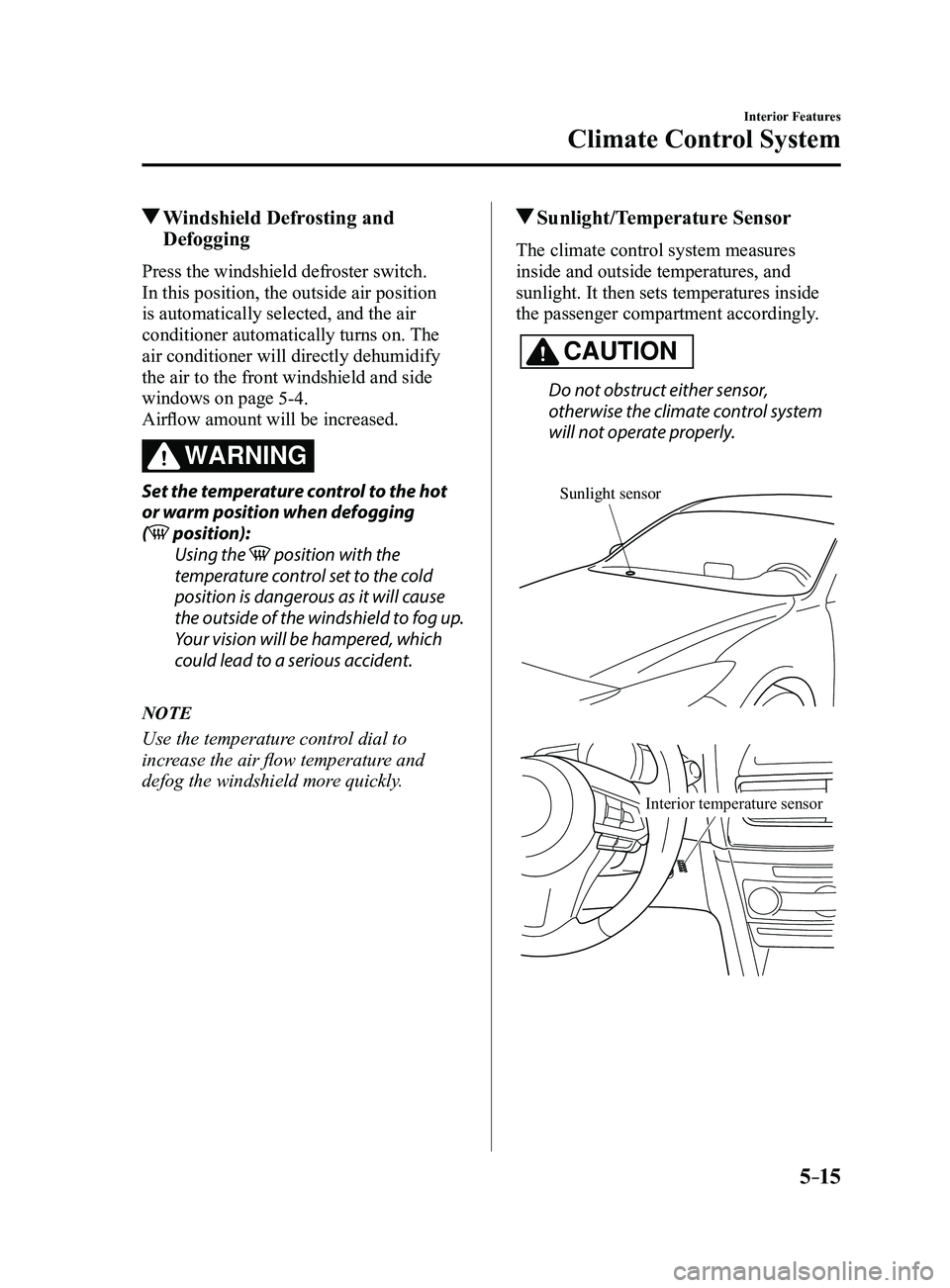
Sunlight/Temperature Sensor
The climate control system measures
inside and outside temperatures, and
sunlight. It then sets temperatures inside
the passenger compartment accordingly.
CAUTION
Do not obstruct either sensor,
otherwise the climate control system
will not operate properly.
Sunlight sensor
Interior temperature sensor
Mazda3_8FL6-EA-16F_Edition2.indb 152016/08/10 17:37:18
Page 444 of 612
6–32
Maintenance and Care
Owner Maintenance
Wiper Blades
CAUTION
Hot waxes applied by automatic car
washers have been known to affect the
wiper's ability to clean windows.
To prevent damage to the wiper blades,
do not use gasoline, kerosene, paint
thinner, or other solvents on or near
them.
When the wiper lever is in the AUTO
position and the ignition is switched ON,
the wipers may move automatically in
the following cases:
If the windshield above the rain
sensor is touched. If the windshield above the rain
sensor is wiped with a cloth. If the windshield is struck with a hand
or other object. If the rain sensor is struck with a hand
or other object from inside the vehicle.
Be careful not to pinch hands or fingers
as it may cause injury, or damage the
wipers. When washing or servicing the
vehicle, make sure the wiper lever is in
the OFF position.
Contamination of either the windshield or
the blades with foreign matter can reduce
wiper effectiveness. Common sources are
insects, tree sap, and hot wax treatments
used by some commercial car washes.
If the blades are not wiping properly,
clean the window and blades with a good
cleaner or mild detergent; then rinse
thoroughly with clean water. Repeat if
necessary.
Replacing W indshield Wiper
Blades
When the wipers no longer clean well, the
blades are probably worn or cracked.
Replace them.
CAUTION
To prevent damage to the wiper arms
and other components, do not try to
sweep the wiper arm by hand.
NOTE
When raising both windshield wiper arms,
raise the driver's side wiper arm first.
When lowering the wiper arms, slowly
lower the wiper arm from the passenger's
side first while supporting it with your
hand. Forcefully lowering the wiper arms
could damage the wiper arm and blade,
and may scratch or crack the windshield.
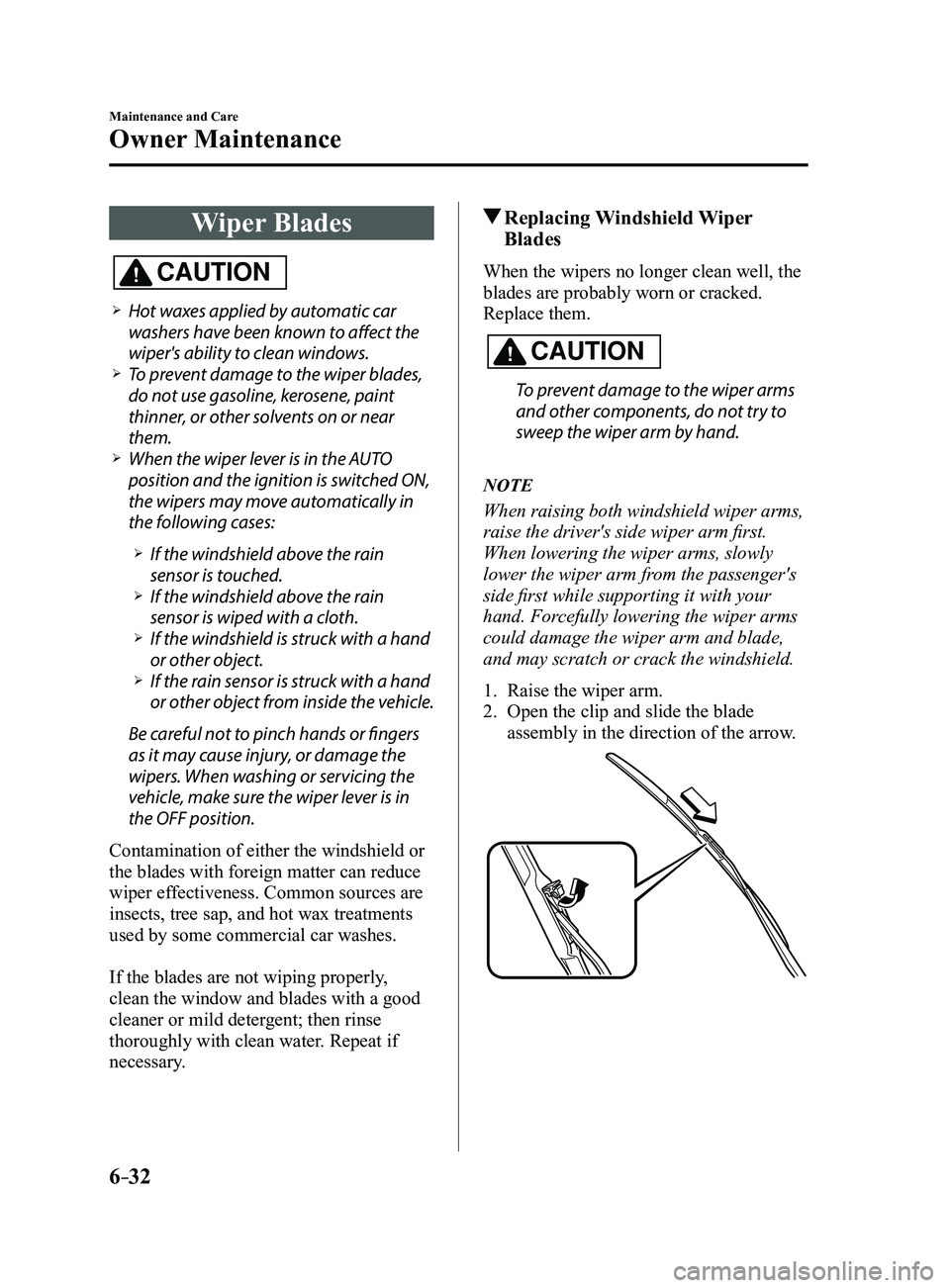
1. Raise the wiper arm.
2. Open the clip and slide the blade
assembly in the direction of the arrow.
Mazda3_8FL6-EA-16F_Edition2.indb 322016/08/10 17:38:41
Page 480 of 612
6–68
Maintenance and Care
Appearance Care
Maintaining the Finish
Washing
CAUTION
When the wiper lever is in the
position and the ignition is switched ON,
the wipers may move automatically in
the following cases:
If the windshield above the rain
sensor is touched or wiped with a
cloth.
If the windshield is struck with a hand
or other object from either outside or
inside the vehicle.
Keep hands and scrapers clear of the
windshield when the wiper lever is in the
position and the ignition is
switched ON as fingers could be pinched
or the wipers and wiper blades damaged
when the wipers activate automatically.
If you are going to clean the windshield,
be sure the wipers are turned off
completely (when it is most likely
that the engine is left running) this is
particularly important when clearing ice
and snow.
Do not spray water in the engine
compartment. Otherwise, it could result
in engine-starting problems or damage
to electrical parts.
When washing and waxing the vehicle,
be careful not to apply excessive force to
any single area of the vehicle roof or the
antenna. Otherwise, you could dent the
vehicle or damage the antenna.To help protect the finish from rust
and deterioration, wash your Mazda
thoroughly and frequently, at least once a
month, with lukewarm or cold water.
If the vehicle is washed improperly, the
paint surface could be scratched. Here are
some examples of how scratching could
occur.
Scratches occur on the paint surface when:
The vehicle is washed without first
rinsing off dirt and other foreign matter. The vehicle is washed with a rough, dry
,
or dirty cloth. The vehicle is washed at a car wash that
uses brushes that are dirty or too stiff. Cleansers or wax containing abrasives
are used.
NOTE
Mazda is not responsible for scratches
caused by automatic car washes or
improper washing.
Scratches are more noticeable on
vehicles with darker paint finishes.
To minimize scratches on the vehicle's
paint finish:
Rinse off any dirt or other foreign matter
using lukewarm or cold water before
washing.
Use plenty of lukewarm or cold water
and a soft cloth when washing the
vehicle. Do not use a nylon cloth.
Rub gently when washing or drying the
vehicle. Take your vehicle only to a car wash
that keeps its brushes well maintained. Do not use abrasive cleansers or wax
that contain abrasives.
Mazda3_8FL6-EA-16F_Edition2.indb 682016/08/10 17:39:04