warning lights MAZDA MODEL 3 4-DOOR 2017 Service Manual
[x] Cancel search | Manufacturer: MAZDA, Model Year: 2017, Model line: MODEL 3 4-DOOR, Model: MAZDA MODEL 3 4-DOOR 2017Pages: 612
Page 236 of 612
4–106
When Driving
i-ACTIVSENSE
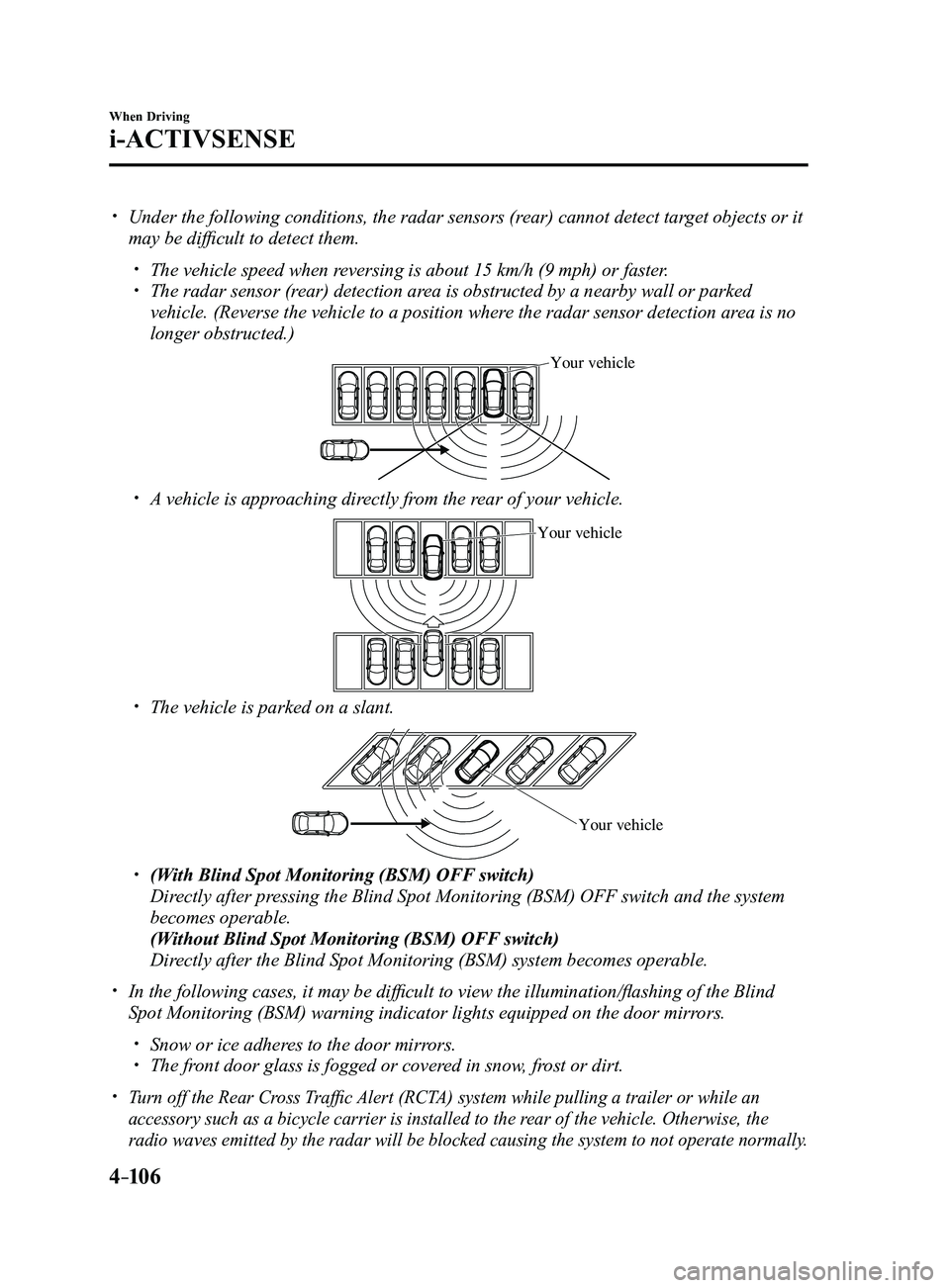
Under the following conditions, the radar sensors (rear) cannot detect target objects or it
may be difficult to detect them.
The vehicle speed when reversing is about 15 km/h (9 mph) or faster. The radar sensor (rear) detection area is obstructed by a nearby wall or parked
vehicle. (Reverse the vehicle to a position where the radar sensor detection area is no
longer obstructed.)
Your vehicle
A vehicle is approaching directly from the rear of your vehicle.
Your vehicle
The vehicle is parked on a slant.
Your vehicle
(With Blind Spot Monitoring (BSM) OFF switch)
Directly after pressing the Blind Spot Monitoring (BSM) OFF switch and the system
becomes operable.
(Without Blind Spot Monitoring (BSM) OFF switch)
Directly after the Blind Spot Monitoring (BSM) system becomes operable.
In the following cases, it may be difficult to view the illumina tion/flashing of the Blind
Spot Monitoring (BSM) warning indicator lights equipped on the door mi\
rrors.
Snow or ice adheres to the door mirrors. The front door glass is fogged or covered in snow, frost or dirt.
Turn off the Rear Cross Traffic Alert (RCTA) system while pulling a trailer or while an
accessory such as a bicycle carrier is installed to the rear of the vehicle. Otherwise, the
radio waves emitted by the radar will be blocked causing the system to n\
ot operate normally.
Mazda3_8FL6-EA-16F_Edition2.indb 1062016/08/10 17:36:45
Page 239 of 612
4–109
When Driving
i-ACTIVSENSE
During headway control travel, the system accelerates and decelerates your vehicle in
conjunction with the speed of the vehicle ahead. However, if it is necessary to accelerate
for a lane change or if the vehicle ahead brakes suddenly causing you to\
close in on the
vehicle rapidly, accelerate using the accelerator pedal or decelerate using the brake
pedal depending on the conditions.
While the Mazda Radar Cruise Contr ol (MRCC) system is in use, it does not cancel even
if the selector lever (automatic transaxle)/shift lever (manual trans\
axle) is operated and
any intended engine braking will not occur. If deceleration is required, lower the vehicle
speed setting or depress the brake pedal.
The brake lights are illuminated while the Mazda Radar Cruise Control (MRCC)
automatic braking is operating. The Mazda Radar Cruise Contr ol (MRCC) warning light (amber) illuminates when the
system has a malfunction.
Refer to Warning Lights on page 4-24. The headway contr ol operation can be canceled and the system can be switched to only
cruise control. Refer to Cruise Control Function on page 4-115.
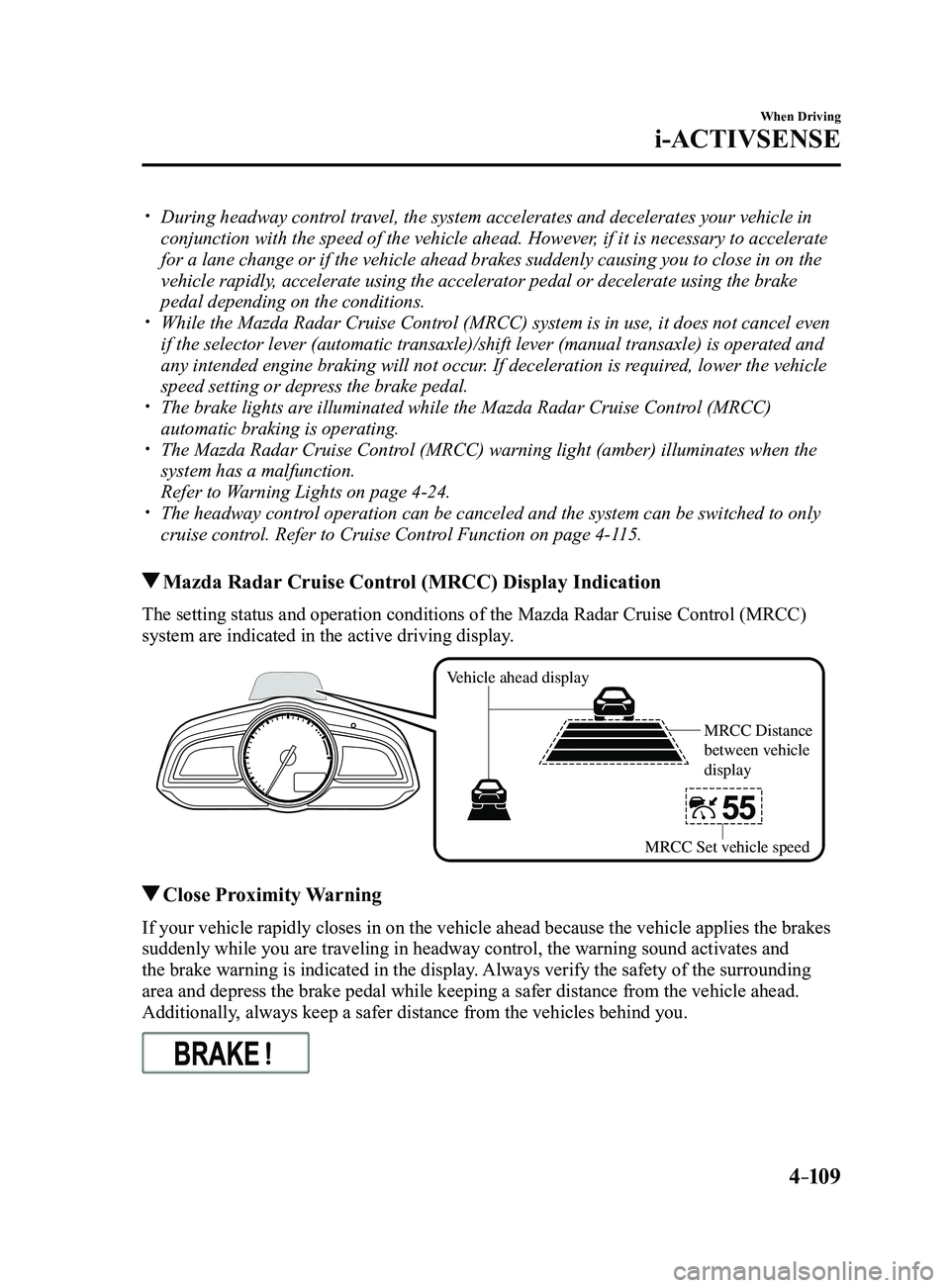
Mazda Radar Cruise Control (MRCC) Display Indication
The setting status and operation conditions of the Mazda Radar Cruise Control (MRCC)
system are indicated in the active driving display.
Vehicle ahead display
MRCC Distance
between vehicle
display
MRCC Set vehicle speed
Close Proximity Warning
If your vehicle rapidly closes in on the vehicle ahead because the vehic\
le applies the brakes
suddenly while you are traveling in headway control, the warning sound a\
ctivates and
the brake warning is indicated in the display. Always verify the safety of the surrounding
area and depress the brake pedal while keeping a safer distance from the\
vehicle ahead.
Additionally, always keep a safer distance from the vehicles behind you.
Mazda3_8FL6-EA-16F_Edition2.indb 1092016/08/10 17:36:47
Page 249 of 612
 line, the system determines that")
4–119
When Driving
i-ACTIVSENSE
If the steering wheel, accelerator pedal, or brake pedal is operated abr\
uptly and the vehicle
moves close to a white (yellow) line, the system determines that the d\
river is making a lane
change and the Lane-keep Assist System (LAS) & Lane Departure Warning System (LDWS)
operation is temporarily canceled. The Lane-keep Assist System (LAS) & Lane Departure
Warning System (LDWS) becomes operational again when the system detects\
white (yellow)
lane lines while the vehicle is being driven normally within its vehicle\
lane.
If the vehicle deviates from its lane repeatedly within a short period of time, the Lane-
keep Assist System (LAS) & Lane Departure Warning System (LDWS) may not operate. When white (yellow) lane lines ar e not detected, the Lane-keep Assist System (LAS) &
Lane Departure Warning System (LDWS) does not operate. Under the following conditions, the Lane-keep Assist System (LAS) & Lane Departure
Warning System (LDWS) may not be able to detect white (yellow) lane l\
ines correctly and
it may not operate normally.
If an object placed on the dashboard is reflected in the windshield and picked up by the
camera. Heavy luggage is loaded in the luggage compartment or on the r ear seat and the
vehicle is tilted. The tire pressures are not adjusted to the specified pressure. Tires other than conventional tires are equipped. When the vehicle is driven on the guiding branch to or from the rest area or tollgate of
a highway. The white (yellow) lane lines are less visible because of dirt or fading/patchiness. A vehicle in front of your vehicle is running near a white (yellow) lane line making \
it
less visible. A white (yellow) lane line is less visible because of bad weather (rai\
n, fog, or snow). The vehicle is driven on a temporary lane or section with a closed lane \
resulting from
construction where there may be multiple white (yellow) lane lines or they are interrupted.
A misleading line is picked up on the road such as a temporary line for construction,
or because of shade, lingering snow, or grooves filled with water. The surrounding brightness suddenly changes such as when entering or exiting a t\
unnel. The illumination of the headlights is weakened because of dirt or the op\
tical axis is
deviated. The windshield is dirty or foggy . The windshield, camera is fogged (water dr oplets). Back-light is reflected off the road surface. The road surface is wet and shiny after rain, or there are puddles on the road. The shade of a guar drail parallel to a white (yellow) lane line is cast on the road. The width of the driving lane is narr ow (less than about 2.5 m (98 in)) or wide (more
than about 4.5 m (178 in)) Driving on roads with tight curves. The road is excessively uneven. The vehicle is shaken after hitting a r oad bump. There are two or more adjacent white (yellow) lane lines. There are various road markings or lane markings of various shapes near an intersection.
Mazda3_8FL6-EA-16F_Edition2.indb 1192016/08/10 17:36:52
Page 264 of 612
 system operates when all of the followin\
g conditions are
met:
The ignition is switched ON. The Smart Brake Support (S")
4–134
When Driving
i-ACTIVSENSE
NOTE
The Smart Brake Support (SBS) system operates when all of the followin\
g conditions are
met:
The ignition is switched ON. The Smart Brake Support (SBS) system is on. The vehicle speed is about 15 km/h or faster (10 mph or faster). The relative speed between your vehicle and the vehicle ahead is about 15 km/\
h or
faster (10 mph or faster). The Dynamic Stability Control (DSC) is not operating.
The Smart Brake Support (SBS) system may not operate under the followi\
ng conditions:
If the vehicle is accelerated rapidly and it comes close to a vehicle ah\
ead. The vehicle is driven at the same speed as the vehicle ahead. The accelerator pedal is depr essed. The brake pedal is depressed. The steering wheel is being operated. The selector lever is being operated. The turn signal is being used. When the vehicle ahead is not equipped with taillights or the taillights\
ar e turned off. When warnings and messages, such as a dirty windshield, related to the Forward
Sensing Camera (FSC) are being displayed in the center display.
Although the objects which activate the system are four-wheeled vehicles, the radar
sensor (front) could detect the following objects, determine them to be an obstru\
ction, and
operate the Smart Brake Support (SBS) system.
Objects on the road at the entrance to a curve (including guardrails and snow banks). A vehicle appears in the opposite lane while cornering or rounding a curve. When crossing a narrow bridge. When passing under a low gate or thr ough a tunnel or narrow gate. When entering an underground parking area. Metal objects, bumps, or pr otruding objects on the road. If you suddenly come close to a vehicle ahead. When driving in areas where there is high grass or forage. Two-wheeled vehicles such as motorbikes or bicycles. Pedestrians or non-metallic objects such as standing tr ees.
The Smart Brake Support (SBS) warning indication (amber) turns on wh\
en the system has
a malfunction.
Refer to Warning Lights on page 4-23.
Mazda3_8FL6-EA-16F_Edition2.indb 1342016/08/10 17:36:58
Page 270 of 612
 cannot operate normally due to backlight or fog\
,
the system functions related to the Forward Sensing Camera (FSC) are temp")
4–14 0
When Driving
i-ACTIVSENSE
If the Forward Sensing Camera (FSC) cannot operate normally due to backlight or fog\
,
the system functions related to the Forward Sensing Camera (FSC) are temporarily
stopped and the following warning lights turn on. However, this does not indicate a
malfunction.
High Beam Contr ol System (HBC) warning light (amber)
Lane-keep Assist System (LAS) & Lane Departure Warning System (LDWS) warning
light Smart Brake Support/Smart City Brake Support (SBS/SCBS) warning light \
(amber)
If the Forward Sensing Camera (FSC) cannot operate normally due to high temperatures,
the system functions related to the Forward Sensing Camera (FSC) are temporarily
stopped and the following warning lights turn on. However, this does not indicate a
malfunction. Cool down the area around the Forward Sensing Camera (FSC) such as by
turning on the air conditioner.
High Beam Contr ol System (HBC) warning light (amber)
Lane-keep Assist System (LAS) & Lane Departure Warning System (LDWS) warning
light
Smart Brake Support/Smart City Brake Support (SBS/SCBS) warning light \
(amber)
If the Forward Sensing Camera (FSC) detects that the windshield is dirty or foggy,
the system functions related to the Forward Sensing Camera (FSC) are temporarily
stopped and the following warning lights turn on. However, this does not indicate a
problem. Remove the dirt from the windshield or press the defroster switch and defog the
windshield.
High Beam Contr ol System (HBC) warning light (amber)
Lane-keep Assist System (LAS) & Lane Departure Warning System (LDWS) warning
light
Smart Brake Support/Smart City Brake Support (SBS/SCBS) warning light \
(amber)
Mazda3_8FL6-EA-16F_Edition2.indb 1402016/08/10 17:36:59
Page 281 of 612
 monitors the air pressure of all\
four tires. If
the ai")
4–151
When Driving
Tire Pressure Monitoring System
*Some models.
Tire Pressure Monitoring System*
The Tire Pressure Monitoring System (TPMS) monitors the air pressure of all\
four tires. If
the air pressure of one or more tires is too low, the system warns the driver by indicating the
tire pressure monitoring system warning light in the instrument cluster \
and operating a beep
sound. The system monitors the tire pressures indirectly using the data sent from the ABS
wheel speed sensors.
To allow the system to operate correctly, the system needs to be initialized with the specified
tire pressure (value on the tire pressure label). Follow the procedure\
and perform the
initialization.
Refer to Tire Pressure Monitoring System Initialization on page
4-154.
The warning light flashes when the system has a malfunction.
Refer to Warning Lights on page
4-24.
ABS wheel speed sensor
Mazda3_8FL6-EA-16F_Edition2.indb 1512016/08/10 17:37:03
Page 458 of 612
6–46
Maintenance and Care
Owner Maintenance
*Some models.
WARNING
Never touch the glass portion of a
halogen bulb with your bare hands
and always wear eye protection when
handling or working around the bulbs:When a halogen bulb breaks, it is
dangerous. These bulbs contain
pressurized gas. If one is broken, it will
explode and serious injuries could be
caused by the flying glass.
If the glass portion is touched with
bare hands, body oil could cause the
bulb to overheat and explode when lit.
Always keep halogen bulbs out of the
reach of children: Playing with a halogen bulb is
dangerous. Serious injuries could be
caused by dropping a halogen bulb or
breaking it some other way.
CAUTION
When removing the lens or lamp unit
using a flathead screwdriver, make
sure that the flathead screwdriver does
not contact the interior terminal. If
the flathead screwdriver contacts the
terminal, a short circuit may occur.
NOTE
To replace the bulb, contact an
Authorized Mazda Dealer. If the halogen bulb is accidentally
touched, it should be cleaned with
rubbing alcohol before being used.
Use the protective cover and carton for
the replacement bulb to dispose of the
old bulb promptly and out of the reach
of children.
Replacing Exterior Light Bulbs
Headlights (With LED headlights),
Daytime running lights/Parking lights
(With LED headlights), Fog lights
*
The LED bulb cannot be replaced as a
single unit because it is an integrated unit.
The LED bulb has to be replaced with the
unit. We recommend an Authorized Mazda
Dealer when the replacement is necessary.
Headlights (With halogen headlights)
Low-beam bulbs
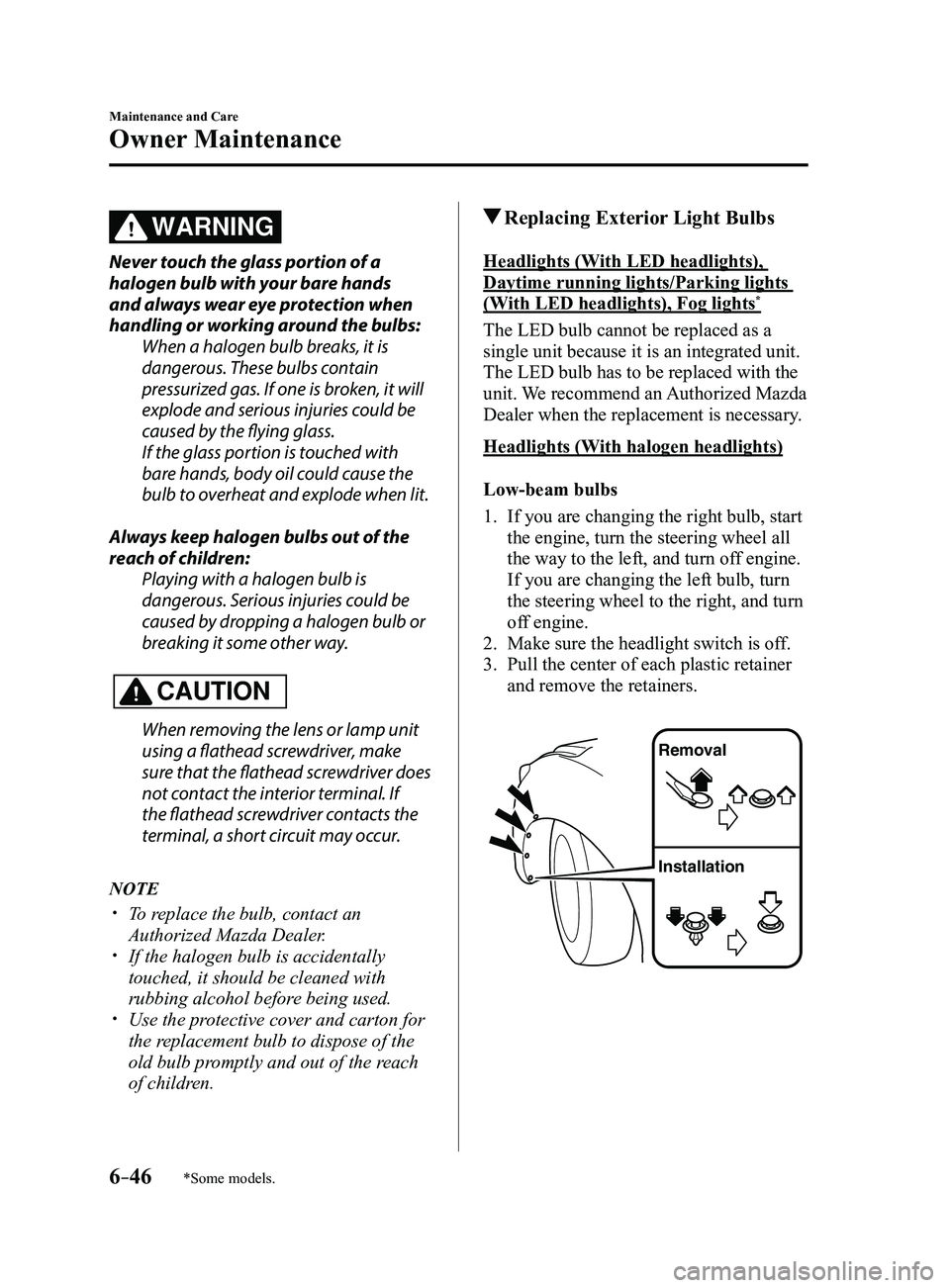
1. If you are changing the right bulb, start
the engine, turn the steering wheel all
the way to the left, and turn off engine.
If you are changing the left bulb, turn
the steering wheel to the right, and turn
off engine.
2. Make sure the headlight switch is of f.
3. Pull the center of each plastic retainer
and remove the retainers.
Removal
Installation
Mazda3_8FL6-EA-16F_Edition2.indb 462016/08/10 17:38:50
Page 475 of 612
6–63
Maintenance and Care
Owner Maintenance
*Some models.
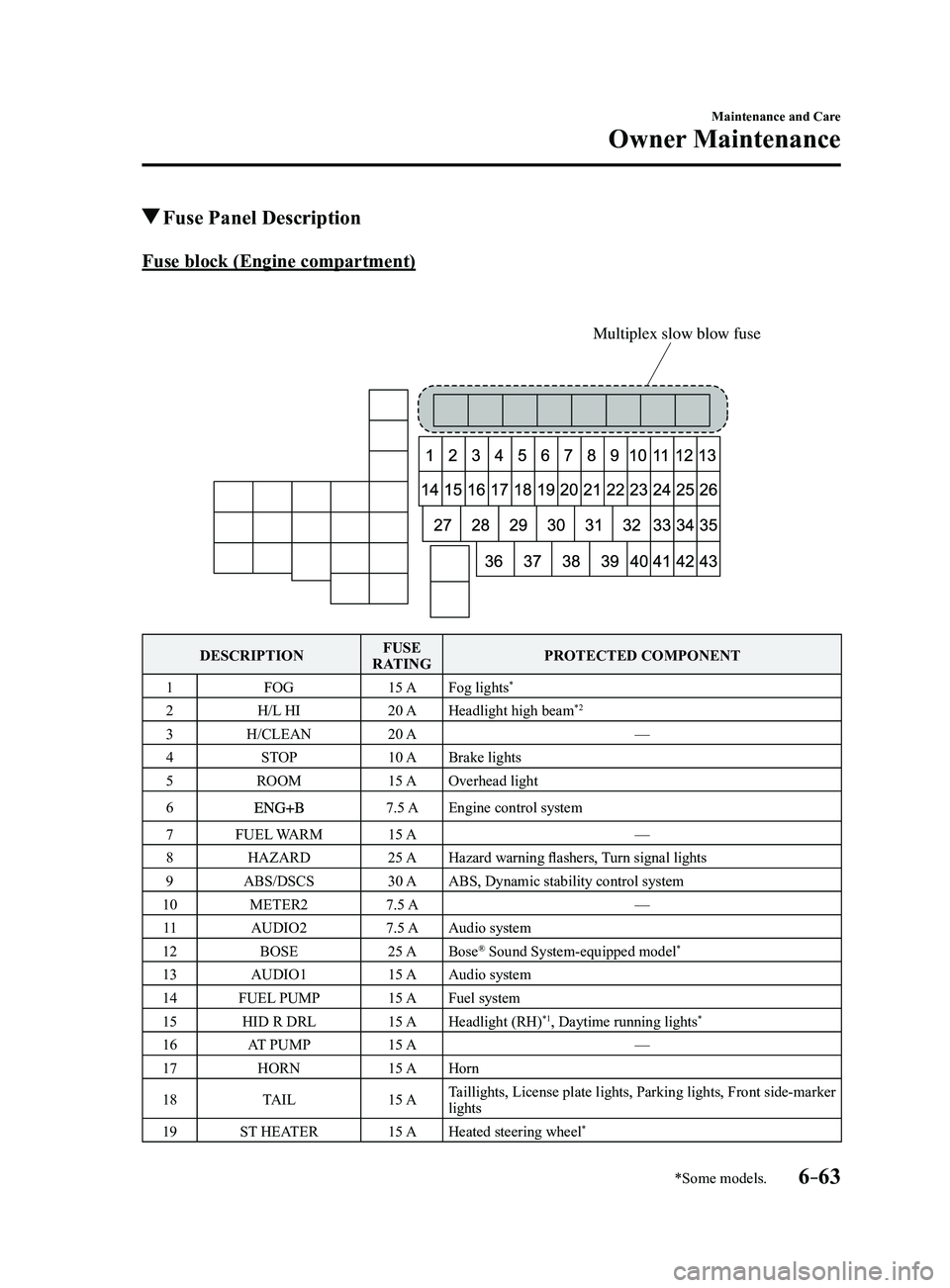
Fuse Panel Description
Fuse block (Engine compartment)
Multiplex slow blow fuse
DESCRIPTIONFUSE
RATING PROTECTED COMPONENT
1 FOG 15 AFog lights
*
2 H/L HI 20 AHeadlight high beam*2
3 H/CLEAN 20 A —
4 STOP 10 ABrake lights
5 ROOM 15 AOverhead light
6
7.5 AEngine control system
7 FUEL WARM 15 A —
8 HAZARD 25 AHazard warning flashers, Turn signal lights
9 ABS/DSCS 30 AABS, Dynamic stability control system
10 METER2 7.5 A —
11 AUDIO2 7.5 AAudio system
12 BOSE 25 ABose
® Sound System-equipped model*
13 AUDIO1 15 AAudio system
14 FUEL PUMP 15 AFuel system
15 HID R DRL 15 AHeadlight (RH)
*1, Daytime running lights*
16 AT PUMP 15 A —
17 HORN 15 AHorn
18 TAIL 15 ATaillights, License plate lights, Parking lights, Front side-marker
lights
19 ST HEATER 15 AHeated steering wheel
*
Mazda3_8FL6-EA-16F_Edition2.indb 632016/08/10 17:39:02
Page 484 of 612
6–72
Maintenance and Care
Appearance Care
Plastic Part Maintenance
When cleaning the plastic lenses of the
lights, do not use gasoline, kerosene,
rectified spirit, paint, thinner, highly
acidic detergents, or strongly alkaline
detergents. Otherwise, these chemical
agents can discolor or damage the
surfaces resulting in a significant loss
in functionality. If plastic parts become
inadvertently exposed to any of these
chemical agents, flush with water
immediately.
If plastic parts such as the bumpers
become inadvertently exposed to
chemical agents or fluids such as
gasoline, oil, engine coolant, or battery
fluid, it could cause discoloration,
staining, or paint peeling. Wipe off any
such chemical agents or fluids using a
soft cloth immediately.
High water temperature and high water
pressure car washers are available
depending on the type of high pressure
car washer device. If the car washer
nozzle is put too close to the vehicle or
aimed at one area for an extended period
of time, it could deform plastic parts or
damage the paint.
Do not use wax containing compounds
(polish). Otherwise, it could result in
paint damage.
In addition, do not use an electrical or
air tool to apply wax. Otherwise, the
frictional heat generated could result
in deformation of plastic parts or paint
damage.
Interior Care
WARNING
Do not spray water into the vehicle
cabin:Spraying water into the vehicle cabin is
dangerous as electrical devices such as
the audio and switches could get wet
resulting in a malfunction or vehicle
fire.
NOTE
Do not wipe the interior using alcohol,
chlorine bleach, or organic solvents
such as thinner, benzene, and gasoline.
Otherwise, it may cause discoloration
or stains.
Rubbing har d with a stiff brush or cloth
may cause damage.
If the vehicle interior becomes soiled
by any of the following, wipe it off
immediately using a soft cloth.
Leaving it uncleaned could cause
discoloration, stains, cracks, or peeling
of the coating, and it will make it hard to
wipe off later.
Beverage or fragrance Grease or oil Soiling
Mazda3_8FL6-EA-16F_Edition2.indb 722016/08/10 17:39:05
Page 489 of 612
7–1
*Some models.
7If Trouble Arises
Helpful information on what to do if a problem arises with the vehicle.
Parking in an Emergency
..................................................................7-2
Parking in an Emergency ..............................................................7-2
Flat Tire........................................................................\
.......................7-3
Spare Tire and Tool Storage ..........................................................7-3
Changing a Flat Tire ......................................................................7-6
Battery Runs Out ........................................................................\
.....7-16
Jump-Starting ........................................................................\
......7-16
Emergency Starting ........................................................................\
.7-19
Starting a Flooded Engine ...........................................................7-19
Push-Starting ........................................................................\
.......7-19
Overheating ........................................................................\
..............7-20
Overheating ........................................................................\
.........7-20
Emergency Towing ........................................................................\
...7-22
Towing Description .....................................................................7-22
Tiedown Hooks* ........................................................................\
..7-23
Warning/Indicator Lights and Warning Sounds ...........................7-25
If a Warning Light Turns On or Flashes ......................................7-25
Message Indicated on Display* ...................................................7-37
Warning Sound is Activated ........................................................7-39
When Liftgate/Trunk Lid Cannot be Opened ...............................7-44
When Liftgate/Trunk Lid Cannot be Opened .............................7-44
Active Driving Display Does Not Operate* ....................................7-46
If the Active Driving Display Does Not Operate ........................7-46
Mazda3_8FL6-EA-16F_Edition2.indb 12016/08/10 17:39:07