CD player MAZDA MODEL 3 4-DOOR 2017 Owners Manual
[x] Cancel search | Manufacturer: MAZDA, Model Year: 2017, Model line: MODEL 3 4-DOOR, Model: MAZDA MODEL 3 4-DOOR 2017Pages: 612
Page 10 of 612
1–4
Pictorial Index
Interior Overview
The equipment and installation position varies by vehicle
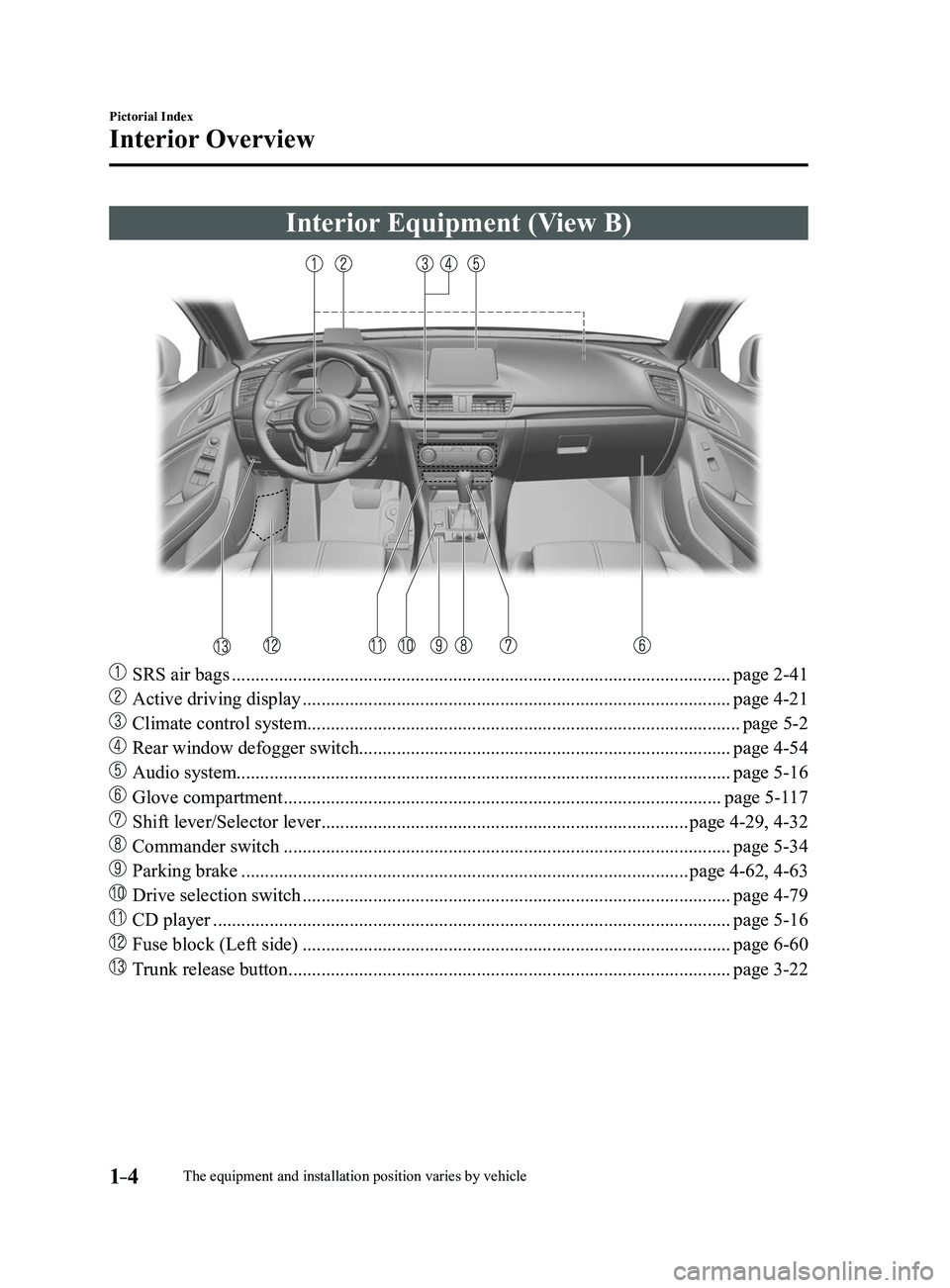
Interior Equipment (View B)
SRS air bags ........................................................................\
..................................page 2-41
Active driving display ........................................................................\
...................page 4-21
Climate control system........................................................................\
....................page 5-2
Rear window defogger switch........................................................................\
.......page 4-54
Audio system........................................................................\
................................. page 5-16
Glove compartment ........................................................................\
.....................page 5-117
Shift lever/Selector lever ........................................................................\
......page 4-29, 4-32
Commander switch ........................................................................\
.......................page 5-34
Parking brake ........................................................................\
.......................page 4-62, 4-63
Drive selection switch ........................................................................\
...................page 4-79
CD player ........................................................................\
......................................page 5-16
Fuse block (Left side) ........................................................................\
...................page 6-60
Trunk release button ........................................................................\
......................page 3-22
Mazda3_8FL6-EA-16F_Edition2.indb 42016/08/10 17:34:48
Page 312 of 612
5–20
Interior Features
Audio System
Operating Tips for CD Player
Condensation phenomenon
Immediately after turning on the heater
when the vehicle is cold, the CD or
optical components (prism and lens) in
the CD player may become clouded with
condensation. At this time, the CD will
eject immediately when placed in the unit.
A clouded CD can be corrected simply by
wiping it with a soft cloth. Clouded optical
components will clear naturally in about
an hour. Wait for normal operation to
return before attempting to use the unit.
Handling the CD player
The following precautions should be
observed.
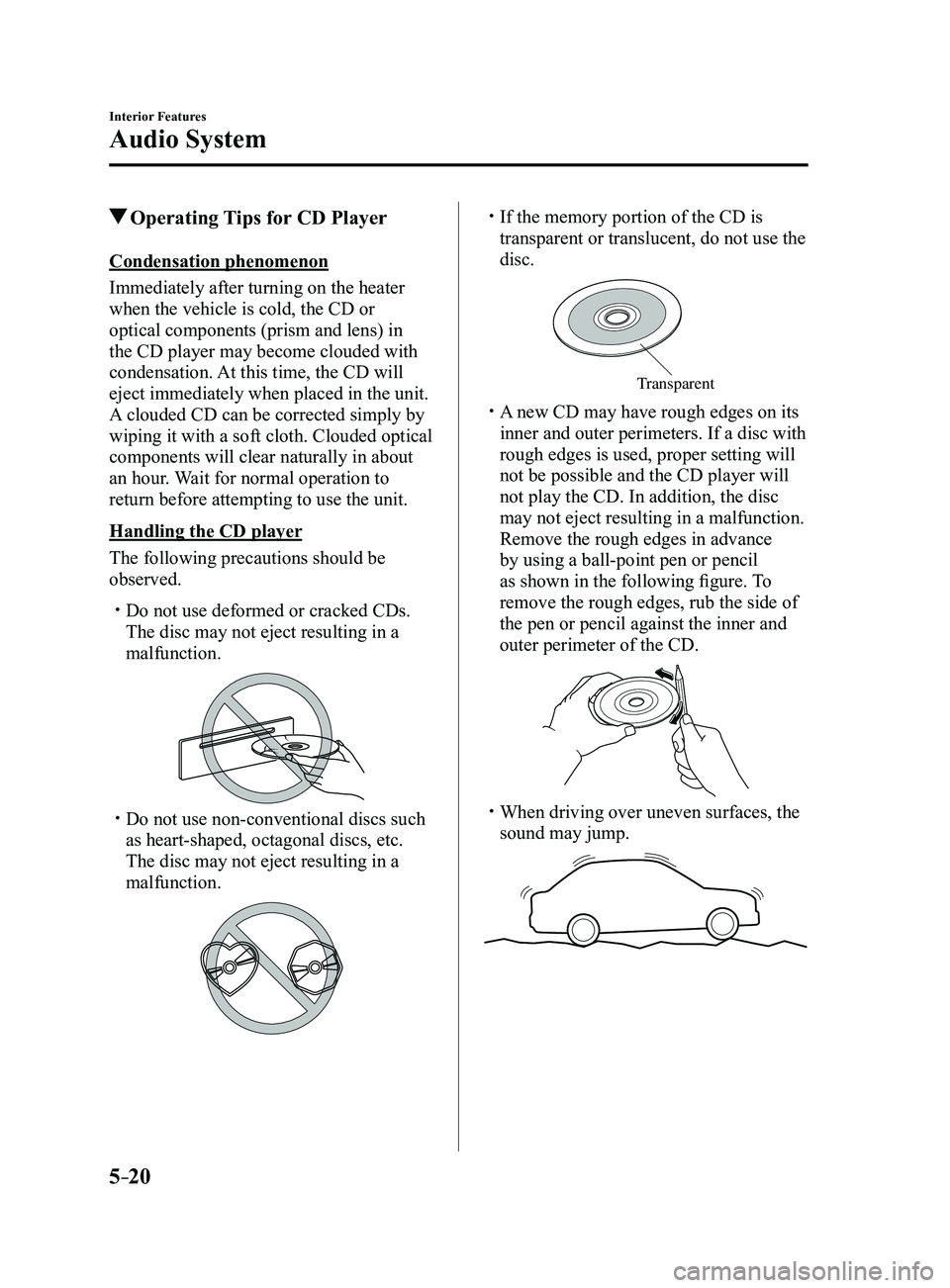
Do not use deformed or cracked CDs.
The disc may not eject resulting in a
malfunction.
Do not use non-conventional discs such
as heart-shaped, octagonal discs, etc.
The disc may not eject resulting in a
malfunction.
If the memory portion of the CD is
transparent or translucent, do not use the
disc.
Transparent
A new CD may have rough edges on its
inner and outer perimeters. If a disc with
rough edges is used, proper setting will
not be possible and the CD player will
not play the CD. In addition, the disc
may not eject resulting in a malfunction.
Remove the rough edges in advance
by using a ball-point pen or pencil
as shown in the following figure. To
remove the rough edges, rub the side of
the pen or pencil against the inner and
outer perimeter of the CD.
When driving over uneven surfaces, the
sound may jump.
Mazda3_8FL6-EA-16F_Edition2.indb 202016/08/10 17:37:22
Page 313 of 612
5–21
Interior Features
Audio System
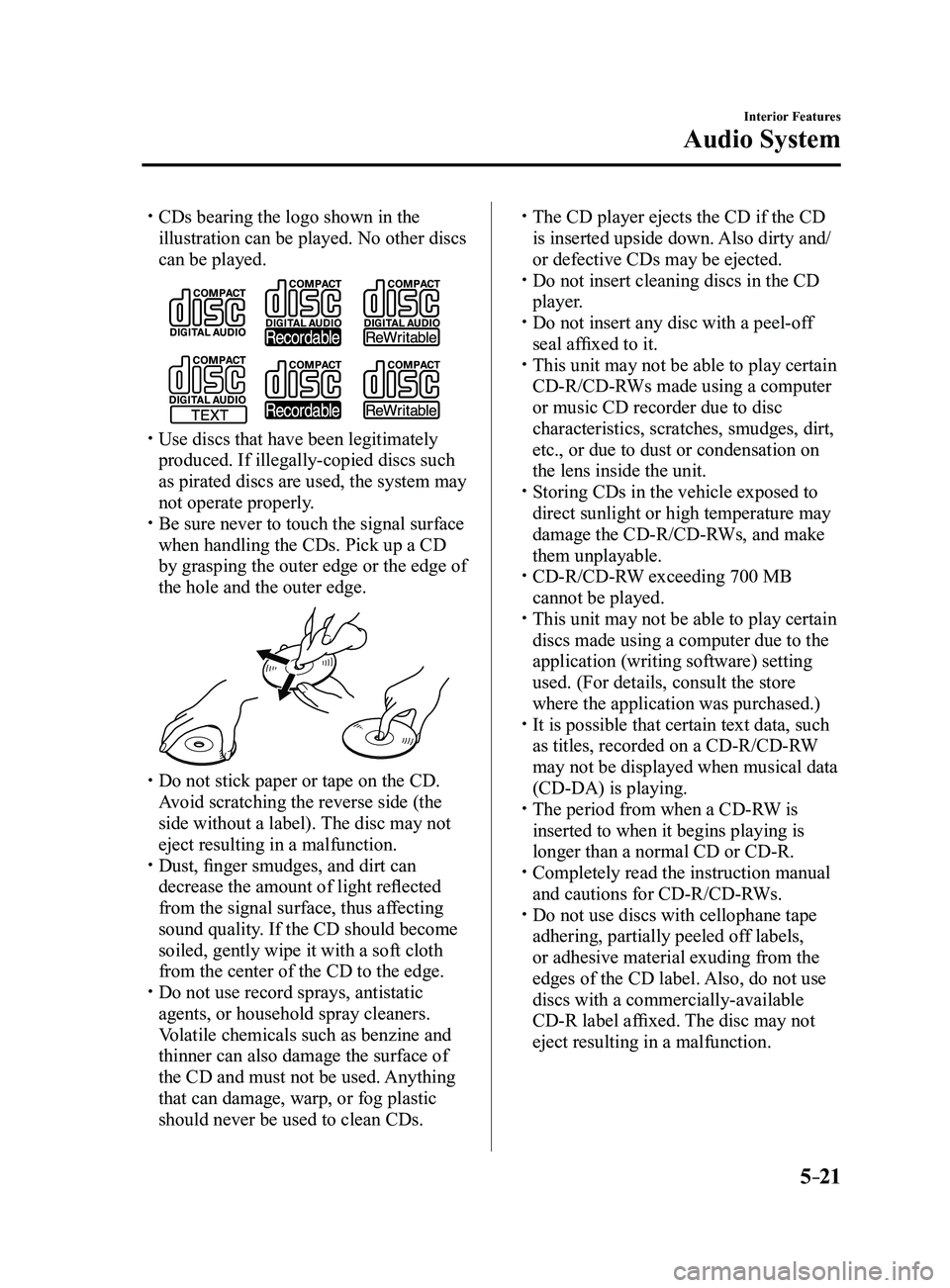
CDs bearing the logo shown in the
illustration can be played. No other discs
can be played.
Use discs that have been legitimately
produced. If illegally-copied discs such
as pirated discs are used, the system may
not operate properly.
Be sure never to touch the signal surface
when handling the CDs. Pick up a CD
by grasping the outer edge or the edge of
the hole and the outer edge.
Do not stick paper or tape on the CD.
Avoid scratching the reverse side (the
side without a label). The disc may not
eject resulting in a malfunction.
Dust, finger smudges, and dirt can
decrease the amount of light reflected
from the signal surface, thus affecting
sound quality. If the CD should become
soiled, gently wipe it with a soft cloth
from the center of the CD to the edge.
Do not use record sprays, antistatic
agents, or household spray cleaners.
Volatile chemicals such as benzine and
thinner can also damage the surface of
the CD and must not be used. Anything
that can damage, warp, or fog plastic
should never be used to clean CDs.
The CD player ejects the CD if the CD
is inserted upside down. Also dirty and/
or defective CDs may be ejected.
Do not insert cleaning discs in the CD
player. Do not insert any disc with a peel-off
seal affixed to it. This unit may not be able to play certain
CD-R/CD-RWs made using a computer
or music CD recorder due to disc
characteristics, scratches, smudges, dirt,
etc., or due to dust or condensation on
the lens inside the unit.
Storing CDs in the vehicle exposed to
direct sunlight or high temperature may
damage the CD-R/CD-RWs, and make
them unplayable.
CD-R/CD-RW exceeding 700 MB
cannot be played. This unit may not be able to play certain
discs made using a computer due to the
application (writing software) setting
used. (For details, consult the store
where the application was purchased.)
It is possible that certain text data, such
as titles, recorded on a CD-R/CD-RW
may not be displayed when musical data
(CD-DA) is playing.
The period from when a CD-R W is
inserted to when it begins playing is
longer than a normal CD or CD-R.
Completely read the instruction manual
and cautions for CD-R/CD-RWs. Do not use discs with cellophane tape
adhering, partially peeled off labels,
or adhesive material exuding from the
edges of the CD label. Also, do not use
discs with a commercially-available
CD-R label affixed. The disc may not
eject resulting in a malfunction.
Mazda3_8FL6-EA-16F_Edition2.indb 212016/08/10 17:37:23
Page 342 of 612
5–50
Interior Features
Audio System
*Some models.
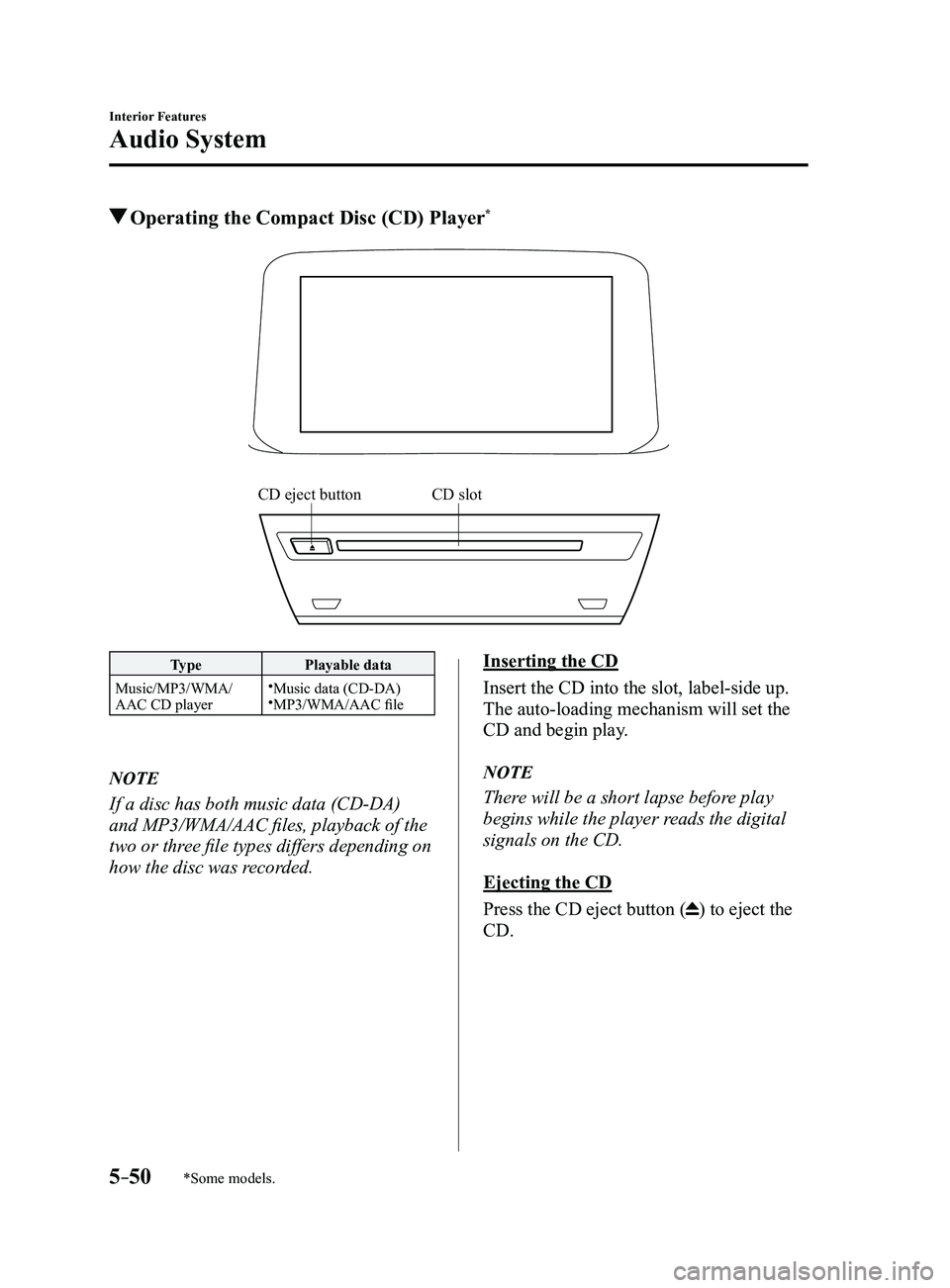
Operating the Compact Disc (CD) Player*
CD slotCD eject button
TypePlayable data
Music/MP3/WMA/
AAC CD player
Music data (CD-DA)MP3/WMA/AAC file
NOTE
If a disc has both music data (CD-DA)
and MP3/WMA/AAC files, playback of the
two or three file types differs depending on
how the disc was recorded.
Inserting the CD
Insert the CD into the slot, label-side up.
The auto-loading mechanism will set the
CD and begin play.
NOTE
There will be a short lapse before play
begins while the player reads the digital
signals on the CD.
Ejecting the CD
Press the CD eject button (
) to eject the
CD.
Mazda3_8FL6-EA-16F_Edition2.indb 502016/08/10 17:37:44
Page 349 of 612
5–57
Interior Features
Audio System
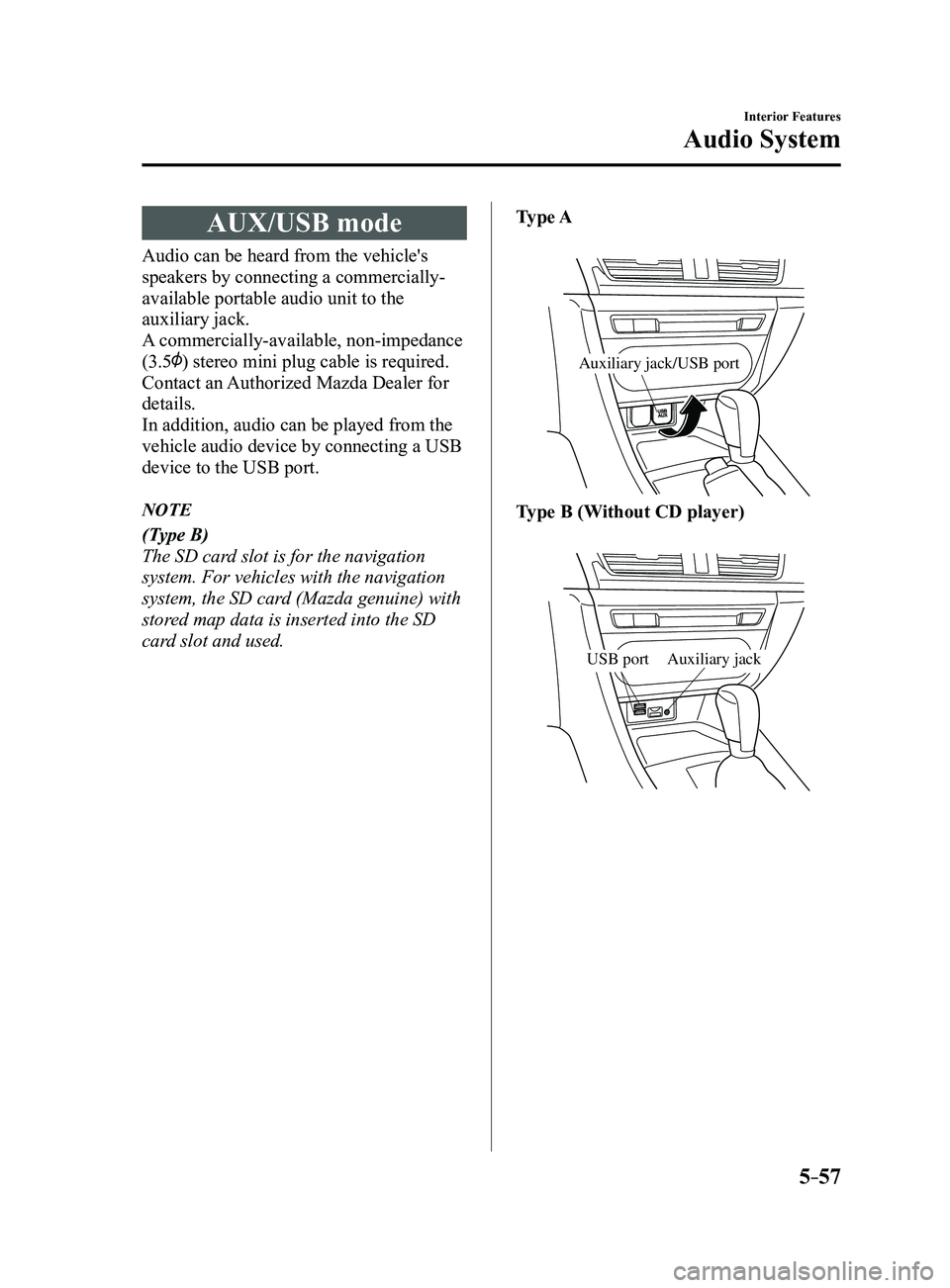
AUX/USB mode
Audio can be heard from the vehicle's
speakers by connecting a commercially-
available portable audio unit to the
auxiliary jack.
A commercially-available, non-impedance
(3.5
) stereo mini plug cable is required.
Contact an Authorized Mazda Dealer for
details.
In addition, audio can be played from the
vehicle audio device by connecting a USB
device to the USB port.
NOTE
(Type B)
The SD card slot is for the navigation
system. For vehicles with the navigation
system, the SD card (Mazda genuine) with
stored map data is inserted into the SD
card slot and used.Type A
Auxiliary jack/USB port
Type B (Without CD player)
Auxiliary jackUSB port
Mazda3_8FL6-EA-16F_Edition2.indb 572016/08/10 17:37:48
Page 350 of 612
5–58
Interior Features
Audio System
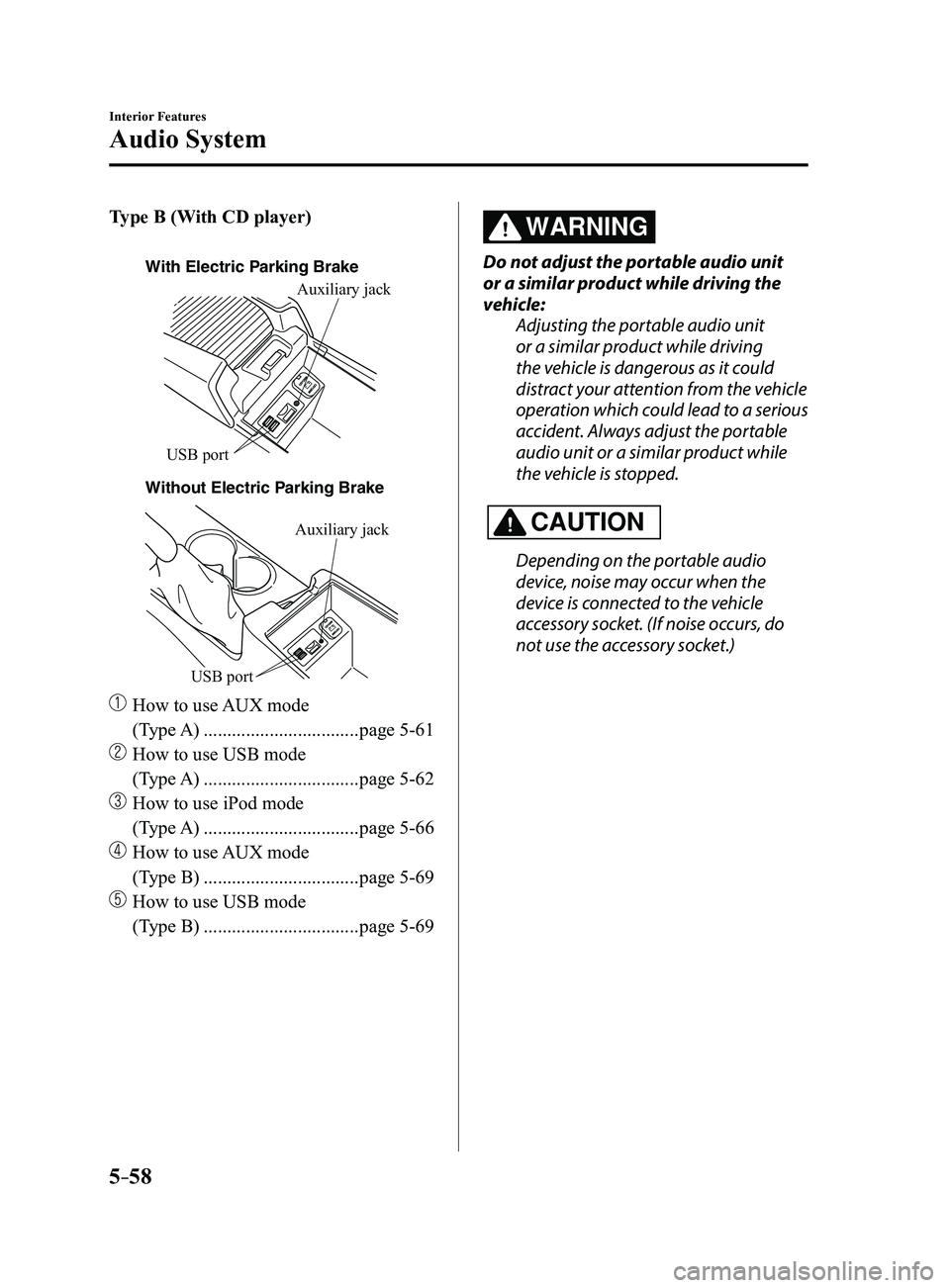
Type B (With CD player)
With Electric Parking Brake
Without Electric P
arking BrakeAuxiliary jack
USB port
Auxiliary jack
USB port
How to use
AUX mode
(Type A)
.................................page 5-61
How to use USB mode
(Type A)
.................................page 5-62
How to use iPod mode
(Type A)
.................................page 5-66
How to use AUX mode
(Type B)
.................................page 5-69
How to use USB mode
(Type B)
.................................page 5-69
WARNING
Do not adjust the portable audio unit
or a similar product while driving the
vehicle: Adjusting the portable audio unit
or a similar product while driving
the vehicle is dangerous as it could
distract your attention from the vehicle
operation which could lead to a serious
accident. Always adjust the portable
audio unit or a similar product while
the vehicle is stopped.
CAUTION
Depending on the portable audio
device, noise may occur when the
device is connected to the vehicle
accessory socket. (If noise occurs, do
not use the accessory socket.)
Mazda3_8FL6-EA-16F_Edition2.indb 582016/08/10 17:37:49
Page 351 of 612
5–59
Interior Features
Audio System
NOTE
This mode may not be usable depending
on the portable audio device to be
connected.
Before using the auxiliary jack/USB
port, refer to the instruction manual for
the portable audio device.
Use a commercially-available, non-
impedance (3.5) stereo mini plug for
connecting the portable audio unit to
the auxiliary jack. Before using the
auxiliary jack, read the manufacturer's
instructions for connecting a portable
audio unit to the auxiliary jack.
To prevent discharging of the battery,
do not use the auxiliary input for long
periods with the engine off or idling.
When connecting a device to the
auxiliary jack or USB port, noise may
occur depending on the connected
device. If the device is connected to the
vehicle's accessory socket, the noise can
be reduced by unplugging it from the
accessory socket.
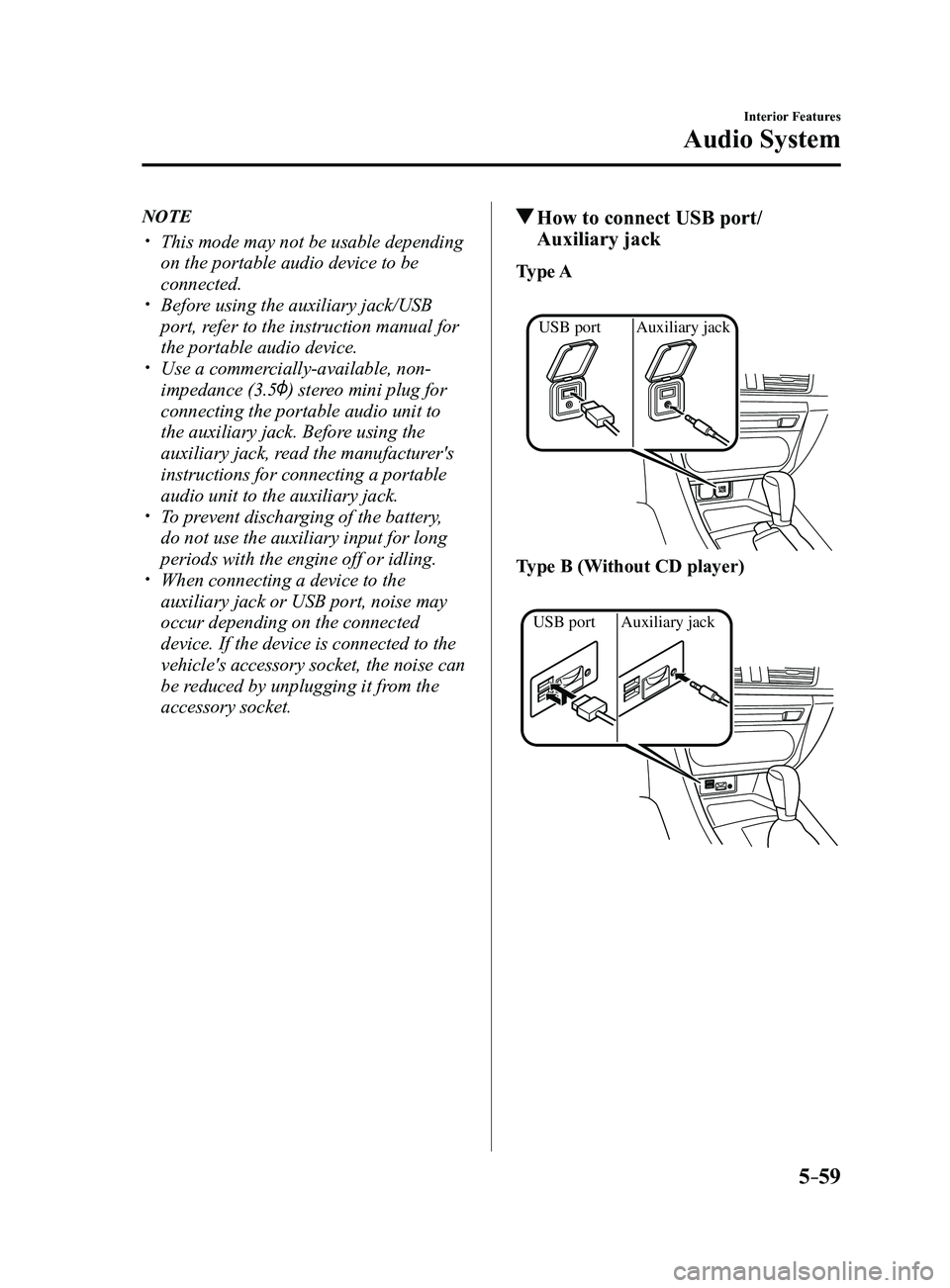
How to connect USB port/
Auxiliary jack
Type A
Auxiliary jack
USB port
Type B (Without CD player)
Auxiliary jack
USB port
Mazda3_8FL6-EA-16F_Edition2.indb 592016/08/10 17:37:50
Page 352 of 612
5–60
Interior Features
Audio System
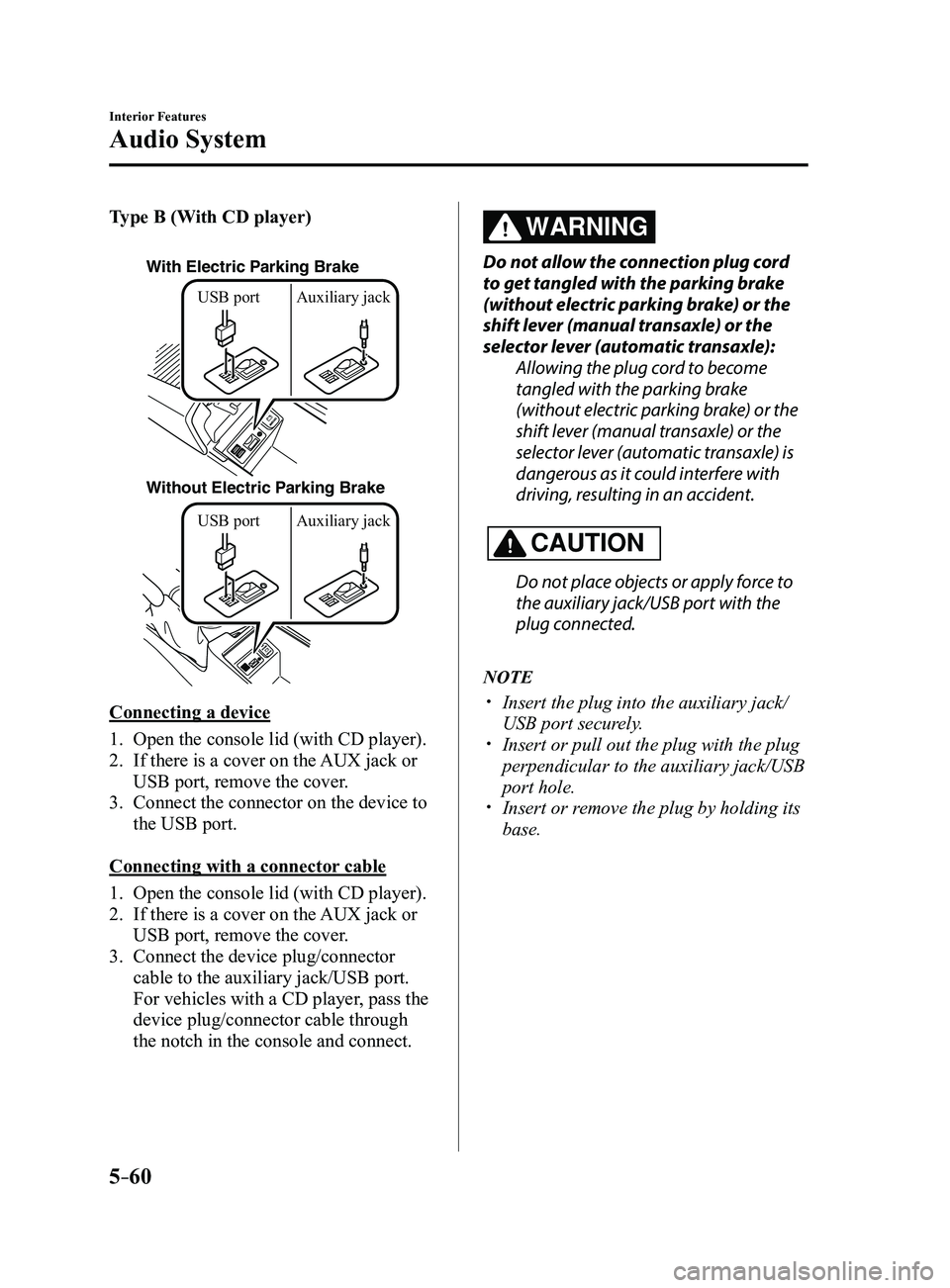
Type B (With CD player)
With Electric Parking Brake
Without Electric Parking BrakeUSB port Auxiliary jack USB port Auxiliary jack
Connecting a device
1. Open the console lid (with CD player).
2. If there is a cover on the AUX jack or
USB port, remove the cover.
3. Connect the connector on the device to
the USB port.
Connecting with a connector cable
1. Open the console lid (with CD player).
2. If there is a cover on the AUX jack or
USB port, remove the cover.
3. Connect the device plug/connector
cable to the auxiliary jack/USB port.
For vehicles with a CD player, pass the
device plug/connector cable through
the notch in the console and connect.
WARNING
Do not allow the connection plug cord
to get tangled with the parking brake
(without electric parking brake) or the
shift lever (manual transaxle) or the
selector lever (automatic transaxle):
Allowing the plug cord to become
tangled with the parking brake
(without electric parking brake) or the
shift lever (manual transaxle) or the
selector lever (automatic transaxle) is
dangerous as it could interfere with
driving, resulting in an accident.
CAUTION
Do not place objects or apply force to
the auxiliary jack/USB port with the
plug connected.
NOTE
Insert the plug into the auxiliary jack/
USB port securely. Insert or pull out the plug with the plug
perpendicular to the auxiliary jack/USB
port hole.
Insert or remove the plug by holding its
base.
Mazda3_8FL6-EA-16F_Edition2.indb 602016/08/10 17:37:50
Page 405 of 612
5–113
Interior Features
Interior Equipment
*Some models.
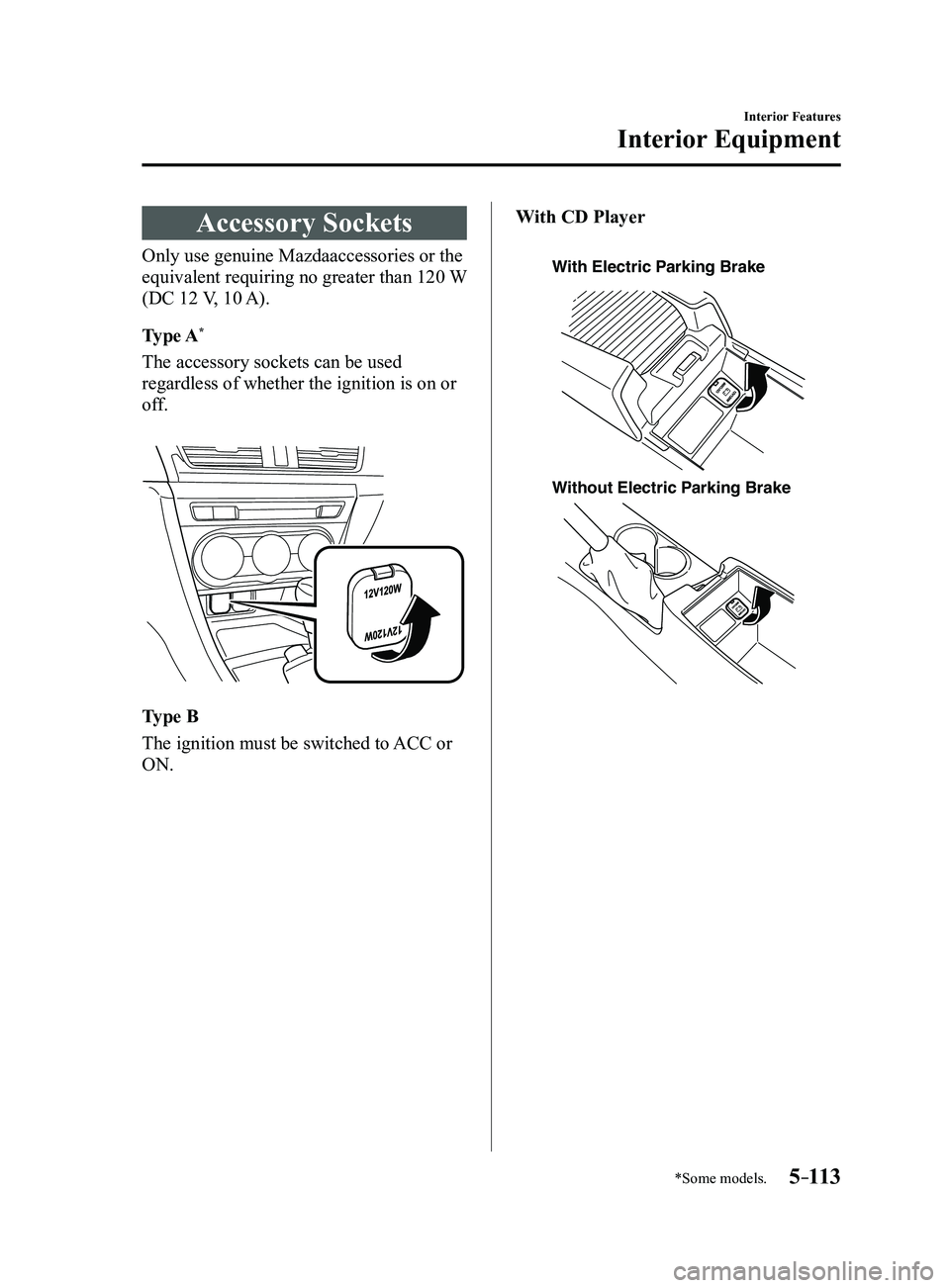
Accessory Sockets
Only use genuine Mazdaaccessories or the
equivalent requiring no greater than 120 W
(DC 12 V, 10 A).
Type A
*
The accessory sockets can be used
regardless of whether the ignition is on or
off.
Type B
The ignition must be switched to ACC or
ON.With CD Player
With Electric Parking Brake
Without Electric P
arking Brake
Mazda3_8FL6-EA-16F_Edition2.indb 1132016/08/10 17:38:24
Page 406 of 612
5–114
Interior Features
Interior Equipment
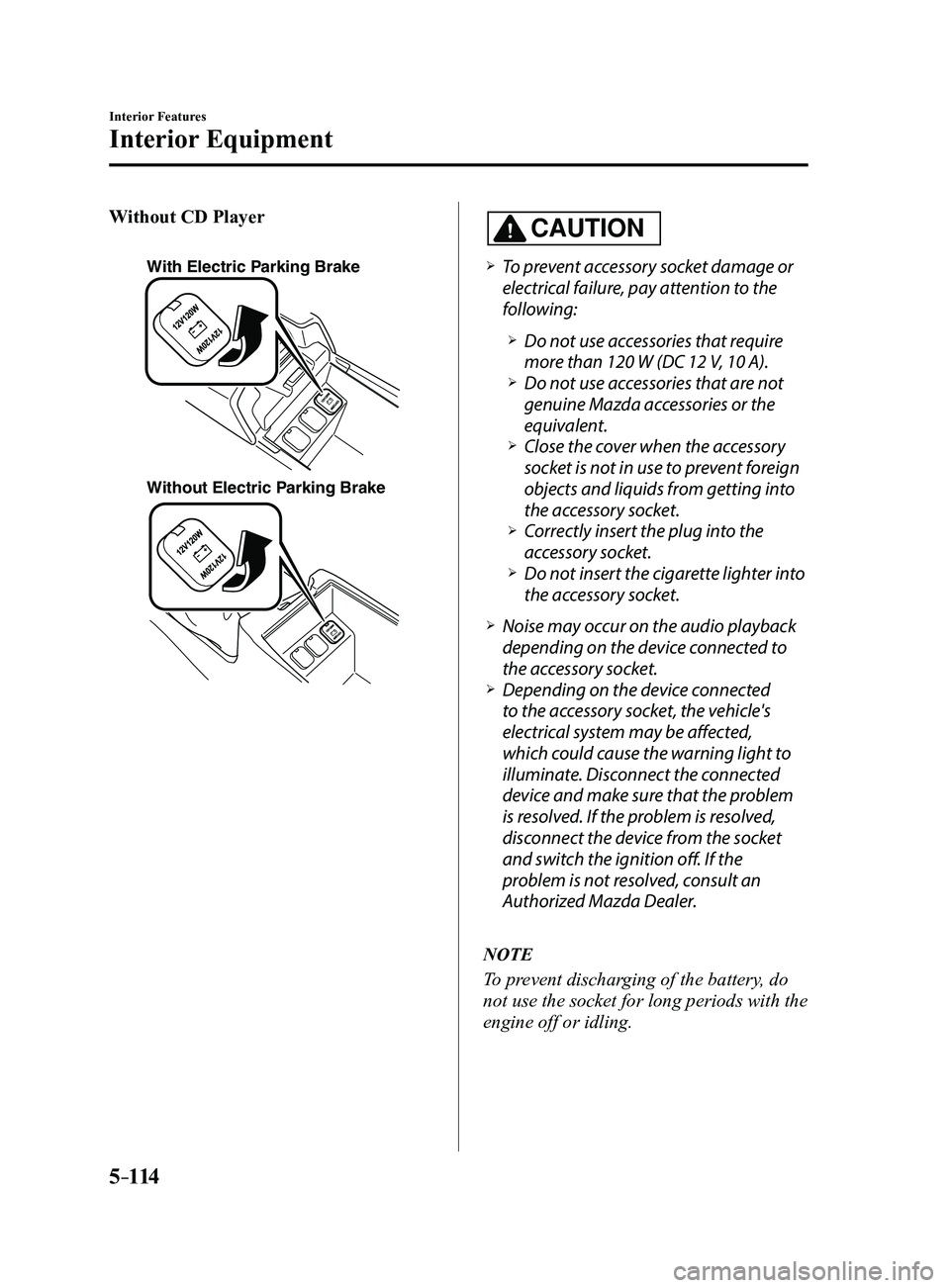
Without CD Player
With Electric Parking Brake
Without Electric Parking Brake
CAUTION
To prevent accessory socket damage or
electrical failure, pay attention to the
following:
Do not use accessories that require
more than 120 W (DC 12 V, 10 A). Do not use accessories that are not
genuine Mazda accessories or the
equivalent.
Close the cover when the accessory
socket is not in use to prevent foreign
objects and liquids from getting into
the accessory socket.
Correctly insert the plug into the
accessory socket. Do not insert the cigarette lighter into
the accessory socket.
Noise may occur on the audio playback
depending on the device connected to
the accessory socket.
Depending on the device connected
to the accessory socket, the vehicle's
electrical system may be affected,
which could cause the warning light to
illuminate. Disconnect the connected
device and make sure that the problem
is resolved. If the problem is resolved,
disconnect the device from the socket
and switch the ignition off. If the
problem is not resolved, consult an
Authorized Mazda Dealer.
NOTE
To prevent discharging of the battery, do
not use the socket for long periods with the
engine off or idling.
Mazda3_8FL6-EA-16F_Edition2.indb 1142016/08/10 17:38:24