audio MAZDA MODEL 3 4-DOOR 2017 Owners Manual
[x] Cancel search | Manufacturer: MAZDA, Model Year: 2017, Model line: MODEL 3 4-DOOR, Model: MAZDA MODEL 3 4-DOOR 2017Pages: 612
Page 5 of 612
Table of Contents
PictorialIndex
Interior,exterio rviewsa nd part identificatio nof your Mazda.1
EssentialSafety Equipment
Importan tinformatio nabout safety equipment, including seats, seatb elt
system, child-restrain tsystems andS RS airbags.2
BeforeDriving
Use of various features, including keys, doors,m irrors andwindows.3
WhenDriving
Informationconcerning safe driving and stopping.4
InteriorFeatures
Use of various feature sfor ridec omfort,i ncluding air-conditioning andaudio
system.5
Maintenancea nd Care
Howt okeep your Mazdai ntop condition.6
IfTrouble Arises
Helpful informatio nonw hatt odoifa problem arises with thev ehicle.7
CustomerInformation andReporting Safety Defects
Importantconsumer informatio nincluding warranties anda dd-on equipment.8
Specifications
Technical informationabout your Mazda.9
Index10
Mazda3_8FL6-EA-16F_Edition2.indb 52016/08/10 17:34:44
Page 9 of 612

1–3
Pictorial Index
Interior Overview
The equipment and installation position varies by vehicle
Audio control switches........................................................................\
..................page 5-55
Instrument cluster ........................................................................\
..........................page 4-12
Dashboard illumination knob ........................................................................\
........page 4-18
Cruise control switches ........................................................................\
....page 4-110, 4-146
Hazard warning flasher switch ........................................................................\
......page 4-56
Seat warmer switches ........................................................................\
......................page 2-7
Heated steering wheel switch ........................................................................\
........page 3-33
Push button start ........................................................................\
..............................page 4-4
Steering shift switches ........................................................................\
..................page 4-37
Lock release lever ........................................................................\
.........................page 3-33
Hood release handle ........................................................................\
......................page 6-22
Remote fuel-filler lid release ........................................................................\
.........page 3-31
Mazda3_8FL6-EA-16F_Edition2.indb 32016/08/10 17:34:47
Page 10 of 612
1–4
Pictorial Index
Interior Overview
The equipment and installation position varies by vehicle
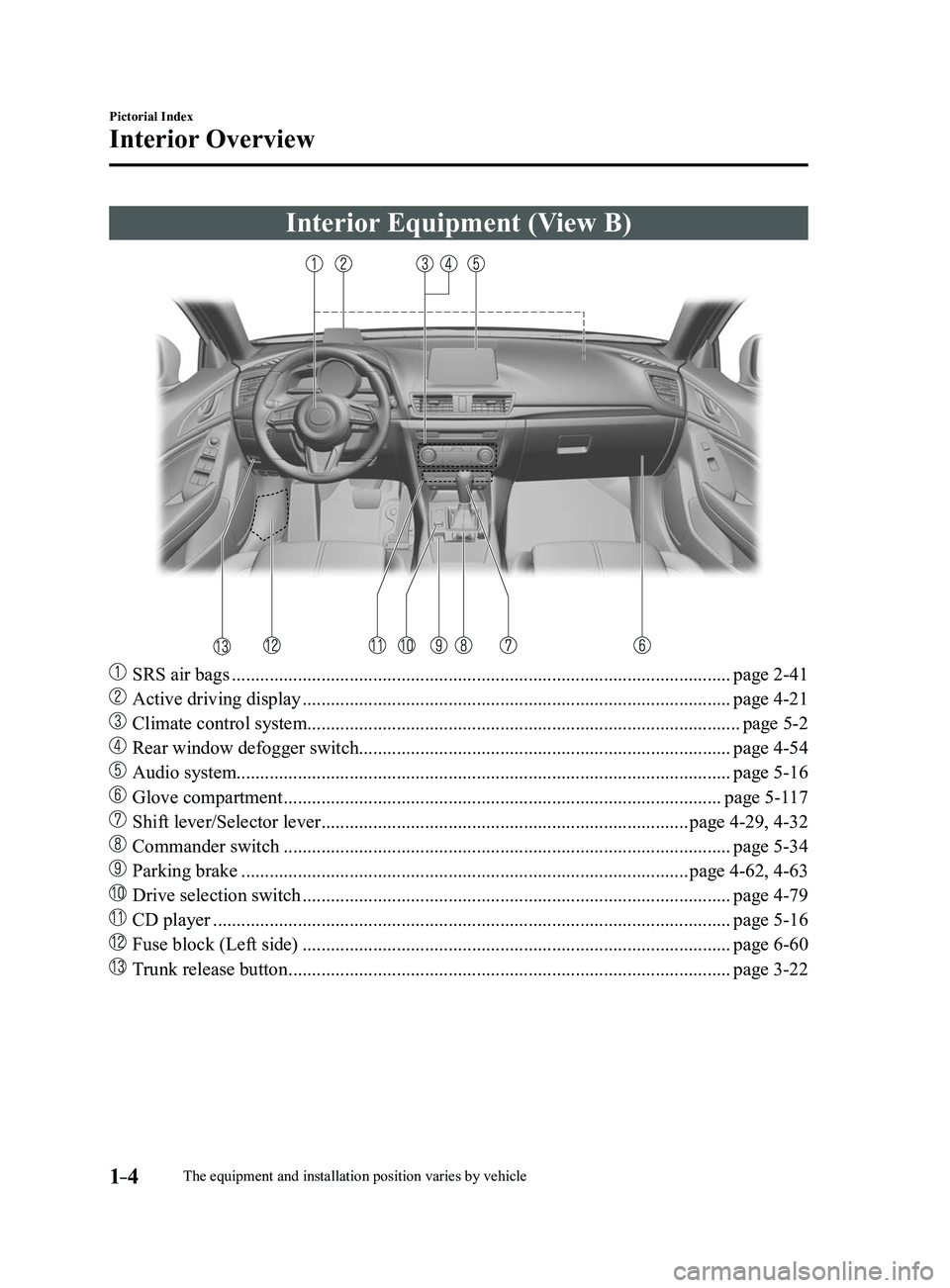
Interior Equipment (View B)
SRS air bags ........................................................................\
..................................page 2-41
Active driving display ........................................................................\
...................page 4-21
Climate control system........................................................................\
....................page 5-2
Rear window defogger switch........................................................................\
.......page 4-54
Audio system........................................................................\
................................. page 5-16
Glove compartment ........................................................................\
.....................page 5-117
Shift lever/Selector lever ........................................................................\
......page 4-29, 4-32
Commander switch ........................................................................\
.......................page 5-34
Parking brake ........................................................................\
.......................page 4-62, 4-63
Drive selection switch ........................................................................\
...................page 4-79
CD player ........................................................................\
......................................page 5-16
Fuse block (Left side) ........................................................................\
...................page 6-60
Trunk release button ........................................................................\
......................page 3-22
Mazda3_8FL6-EA-16F_Edition2.indb 42016/08/10 17:34:48
Page 146 of 612
4–16
When Driving
Instrument Cluster and Display
*Some models.
NOTE
(Vehicles with type B audio)
If the fuel economy data is reset using
the fuel economy monitor, or trip A
is reset using the trip meter when the
function which synchronizes the fuel
economy monitor and the trip meter is
on, the fuel economy data and trip A are
reset simultaneously.
Refer to Fuel Economy Monitor on page
4-75. Only the trip meters record tenths of
kilometers (miles). The trip record will be erased when:
The power supply is interrupted
(blown fuse or the battery is
disconnected).
The vehicle is driven over 9999.9 km
(mile).
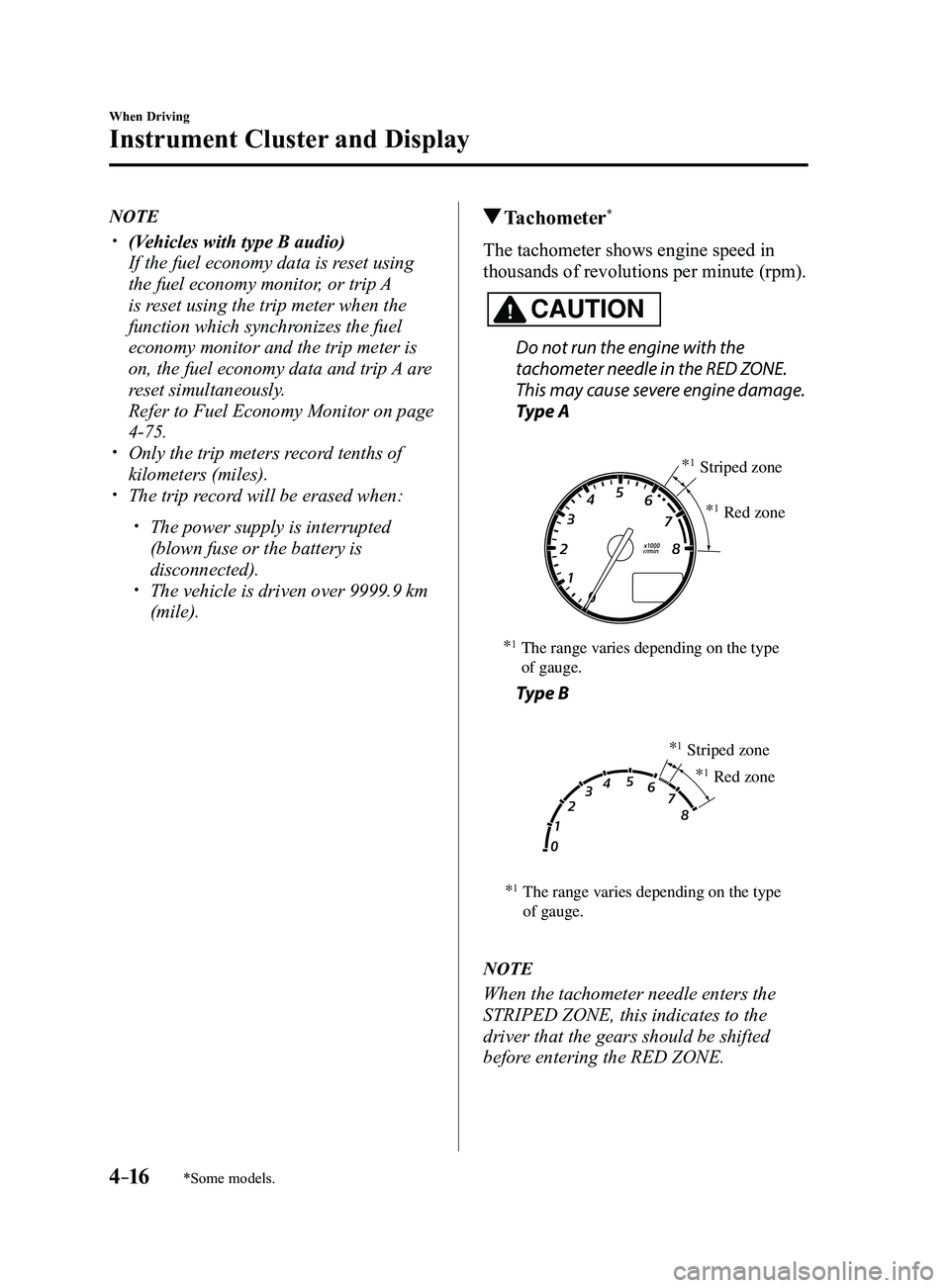
Tachometer*
The tachometer shows engine speed in
thousands of revolutions per minute (rpm).
CAUTION
Do not run the engine with the
tachometer needle in the RED ZONE.
This may cause severe engine damage.
Type A
*1The range varies depending on the type
of gauge. *
1Striped zone
*
1Red zone
Type B
*1The range varies depending on the type
of gauge. *
1Striped zone
*
1Red zone
NOTE
When the tachometer needle enters the
STRIPED ZONE, this indicates to the
driver that the gears should be shifted
before entering the RED ZONE.
Mazda3_8FL6-EA-16F_Edition2.indb 162016/08/10 17:35:48
Page 151 of 612
4–21
When Driving
Instrument Cluster and Display
*Some models.
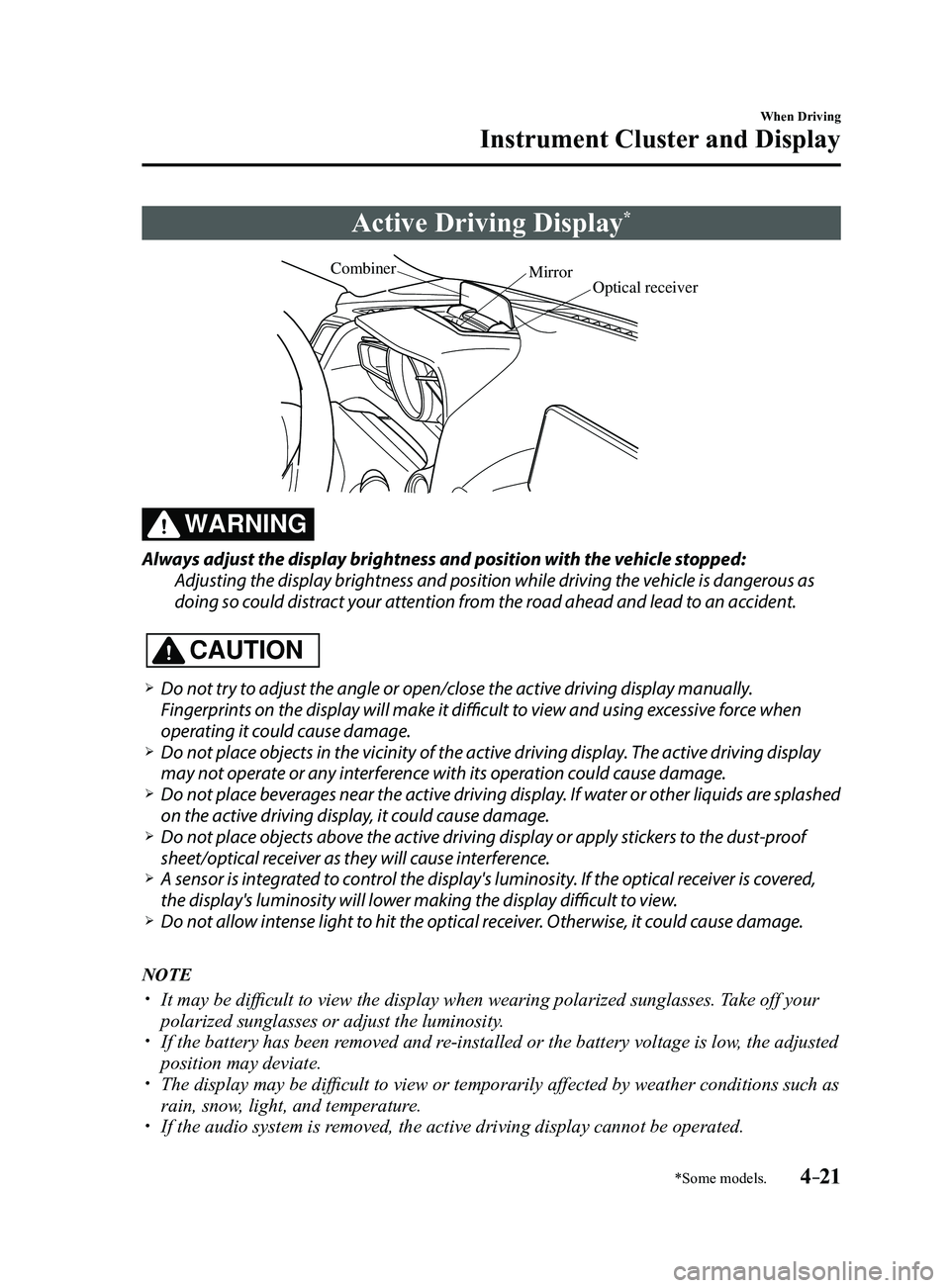
Active Driving Display*
Optical receiver
Mirror
Combiner
WARNING
Always adjust the display brightness and position with the vehicle stopped:
Adjusting the display brightness and position while driving the vehicle is dangerous as
doing so could distract your attention from the road ahead and lead to an accident.
CAUTION
Do not try to adjust the angle or open/close the active driving display manually.
Fingerprints on the display will make it difficult to view and using excessive force when
operating it could cause damage.
Do not place objects in the vicinity of the active driving display. The active driving display
may not operate or any interference with its operation could cause damage. Do not place beverages near the active driving display. If water or other liquids are splashed
on the active driving display, it could cause damage. Do not place objects above the active driving display or apply stickers to the dust-proof
sheet/optical receiver as they will cause interference. A sensor is int
egrated to control the display's luminosity. If the optical receiver is covered,
the display's luminosity will lower making the display difficult to view. Do not allow intense light to hit the optical receiver. Otherwise, it could cause damage.
NOTE
It may be difficult to view the display when wearing polarized s unglasses. Take off your
polarized sunglasses or adjust the luminosity. If the battery has been removed and re-installed or the battery voltage is low, the adjusted
position may deviate. The display may be difficult to view or temporarily affected by weather conditions such as
rain, snow, light, and temperature. If the audio system is removed, the active driving display cannot be operated.
Mazda3_8FL6-EA-16F_Edition2.indb 212016/08/10 17:35:51
Page 202 of 612
4–72
When Driving
i-ELOOP
*Some models.
i-ELOOP*
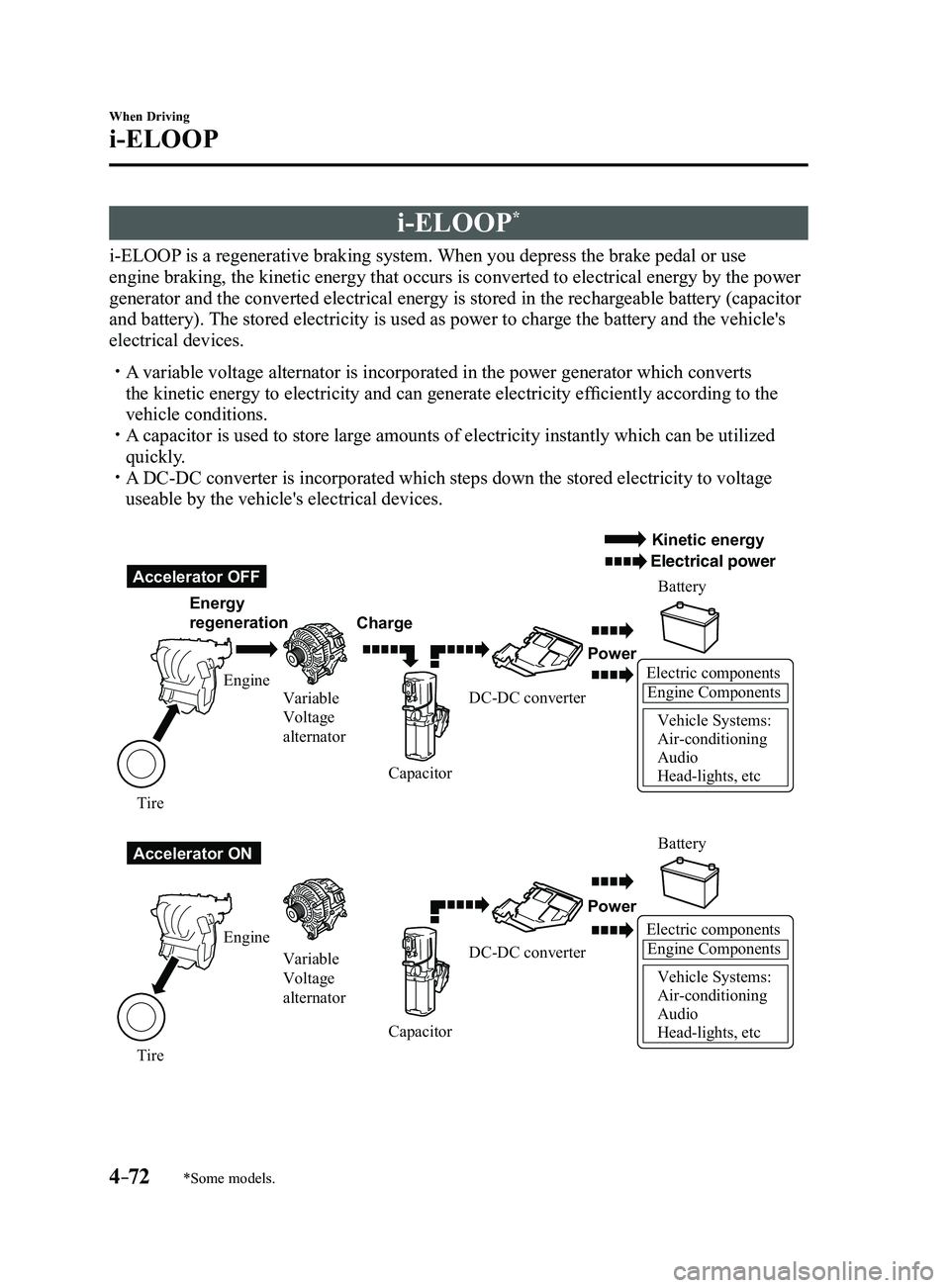
i-ELOOP is a regenerative braking system. When you depress the brake pedal or use
engine braking, the kinetic energy that occurs is converted to electrical energy by the power
generator and the converted electrical energy is stored in the rechargeable battery (capacitor
and battery). The stored electricity is used as power to charge the battery and the vehicle's
electrical devices.
A variable voltage alternator is incorporated in the power generator whic\
h converts
the kinetic energy to electricity and can generate electricity efficiently according to the
vehicle conditions.
A capacitor is used to store large amounts of electricity instantly which can be utilized
quickly. A DC-DC converter is incorporated which steps down the stored electricity\
to voltage
useable by the vehicle's electrical devices.
Electric componentsEngine Components
Vehicle Systems:
Air-conditioning
Audio
Head-lights, etc
Accelerator OFF
Accelerator ON Energy
regeneration
Charge Battery
Battery
Power
Power
Electric componentsEngine Components
Vehicle Systems:
Air-conditioning
Audio
Head-lights, etc
Engine Variable
Voltage
alternator
Variable
Voltage
alternator
Engine
Tire Tire Capacitor
CapacitorDC-DC converter
DC-DC converter
Kinetic energy
Electrical power
Mazda3_8FL6-EA-16F_Edition2.indb 722016/08/10 17:36:30
Page 204 of 612
4–74
When Driving
i-ELOOP
i-ELOOP Indicator Light/Control
Status Display
The driver is notified of the i-ELOOP
power generating status and the vehicle
conditions by the i-ELOOP indicator light
and the control status display.
i-ELOOP Indicator Light
Illuminated (vehicle without type B
audio)
The light turns on during power
generation.
Flashing
If the engine is started after the vehicle has
not been driven for a long period of time,
the i-ELOOP indicator light may flash.
Leave the engine idling and wait until the
indicator light turns off.
NOTE
The beep will sound if the vehicle is
driven while the i-ELOOP indicator
light is flashing. In addition, if you
turn the steering wheel while the light
is flashing, it will feel heavier than
normal, but this does not indicate an
abnormality. Stop the vehicle in a safe
location with the engine running and do
not attempt to turn the steering wheel.
The steering operation will return to
normal after the i-ELOOP indicator
light stops flashing.
(Vehicles with type B audio)
A notification is displayed in the center
display and the i-ELOOP indicator light
flashes at the same time.
Refer to Warning Message Indicated on
Display on page 7-37.
Control status display (vehicles with
type B audio)
The i-ELOOP power generating status is
displayed in the center display.
Refer to Control Status Display on page
4-77.
Mazda3_8FL6-EA-16F_Edition2.indb 742016/08/10 17:36:31
Page 205 of 612
4–75
When Driving
Fuel Economy Monitor
*Some models.
Fuel Economy Monitor*
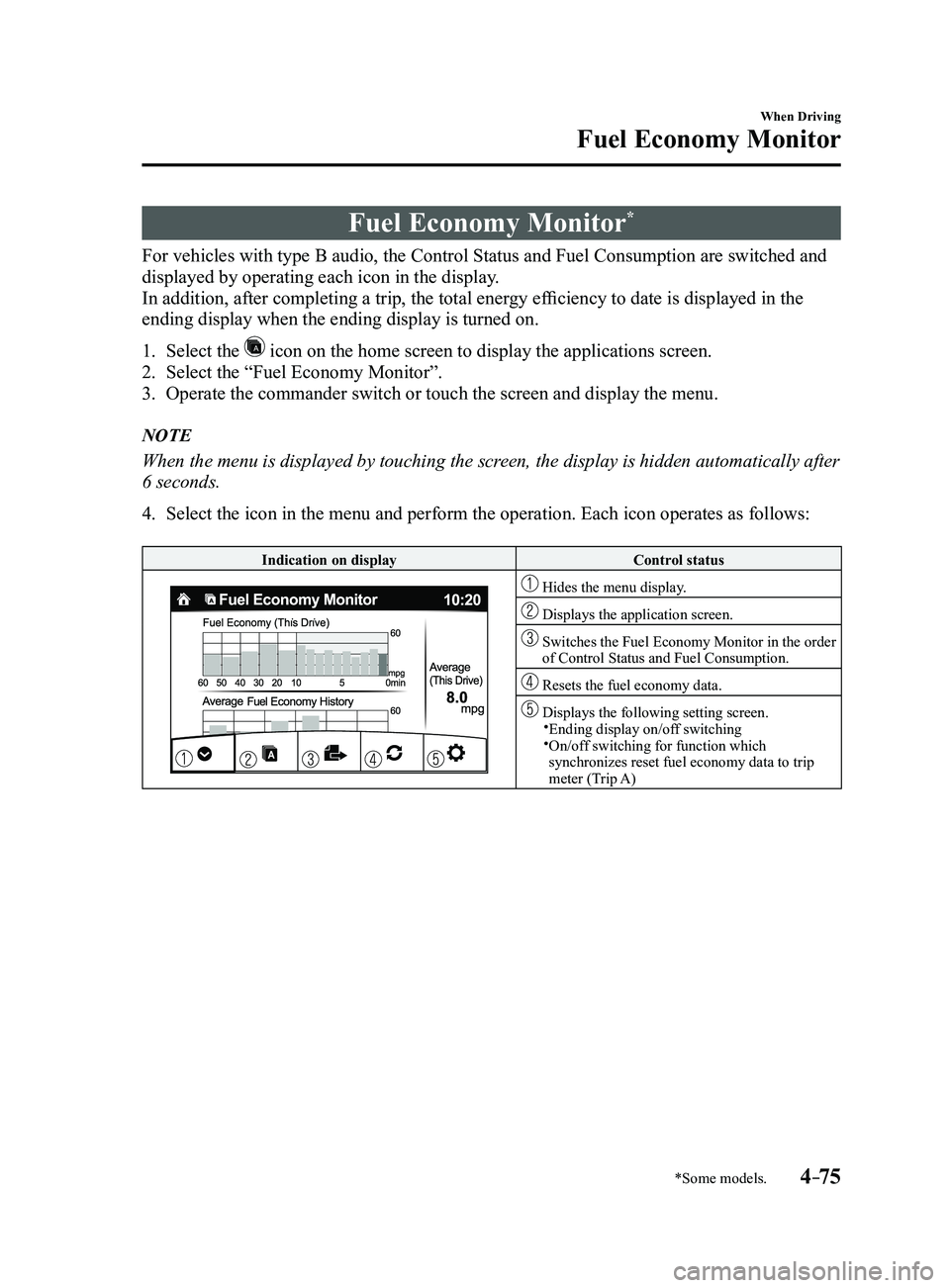
For vehicles with type B audio, the Control Status and Fuel Consumption are switched and
displayed by operating each icon in the display.
In addition, after completing a trip, the total energy efficiency to date is displayed in the
ending display when the ending display is turned on.
1. Select the icon on the home screen to display the applications screen.
2. Select the “Fuel Economy Monitor”.
3. Operate the commander switch or touch the screen and display the menu.
NOTE
When the menu is displayed by touching the screen, the display is hidden automatically after
6 seconds.
4. Select the icon in the menu and perform the operation. Each icon operates as follows:
Indication on displayControl status
Hides the menu display.
Displays the application screen.
Switches the Fuel Economy Monitor in the order of Control Status and Fuel Consumption.
Resets the fuel economy data.
Displays the following setting screen.Ending display on/off switching On/off switching for function which synchronizes reset fuel economy data to trip
meter (Trip A)
Mazda3_8FL6-EA-16F_Edition2.indb 752016/08/10 17:36:32
Page 271 of 612
4–141
When Driving
i-ACTIVSENSE
Radar Sensor (Front)
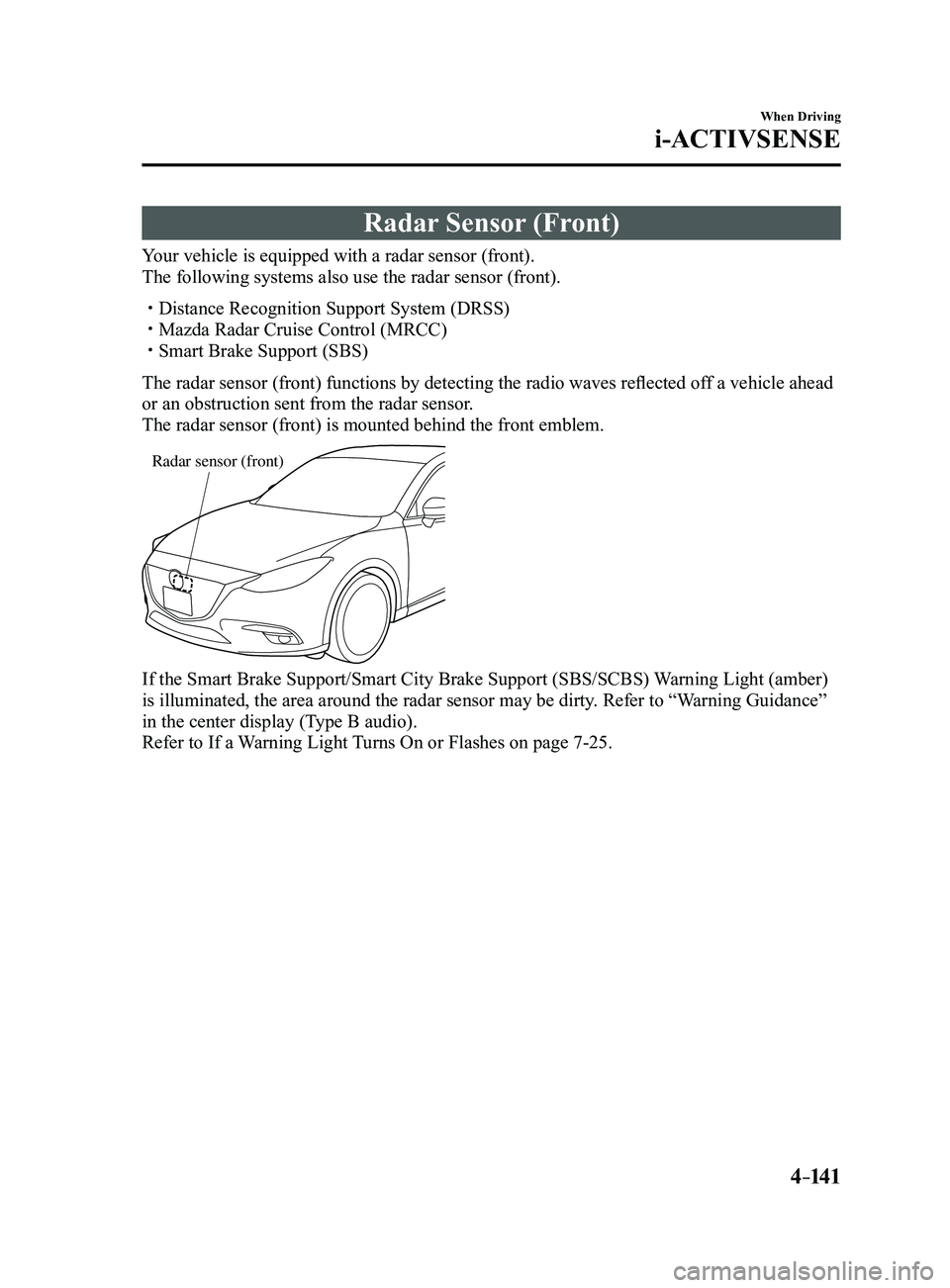
Your vehicle is equipped with a radar sensor (front).
The following systems also use the radar sensor (front).
Distance Recognition Support System (DRSS) Mazda Radar Cruise Control (MRCC) Smart Brake Support (SBS)
The radar sensor (front) functions by detecting the radio waves reflected off a vehicle ahead
or an obstruction sent from the radar sensor.
The radar sensor (front) is mounted behind the front emblem.
Radar sensor (front)
If the Smart Brake Support/Smart City Brake Support (SBS/SCBS) Warning Light (amber)
is illuminated, the area around the radar sensor may be dirty. Refer to “Warning Guidance”
in the center display (Type B audio).
Refer to If a Warning Light Turns On or Flashes on page
7-25.
Mazda3_8FL6-EA-16F_Edition2.indb 1412016/08/10 17:37:00
Page 293 of 612
5–1
*Some models.
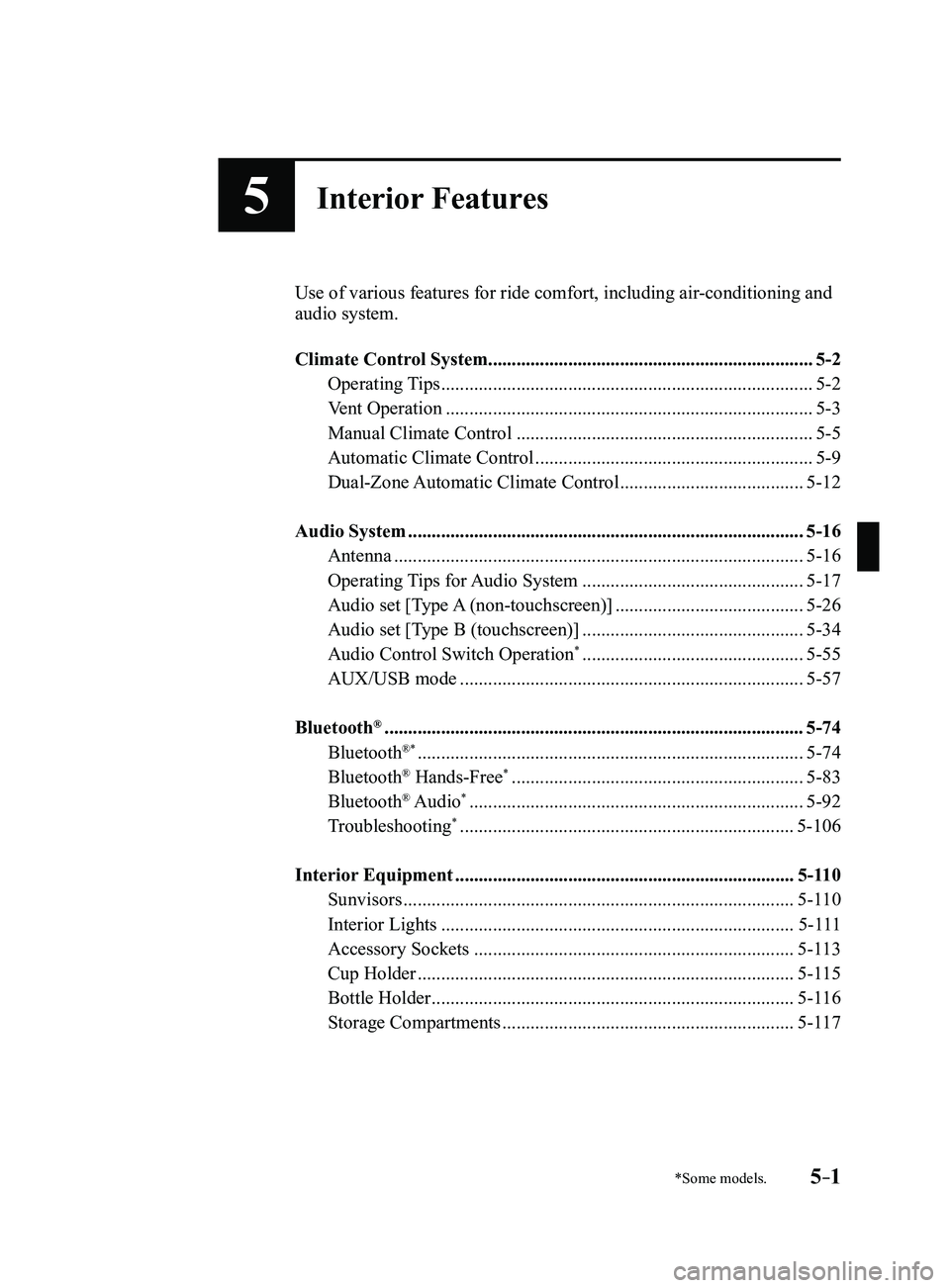
5Interior Features
Use of various features for ride comfort, including air-conditioning and
audio system.
Climate Control System.....................................................................
5-2
Operating Tips ........................................................................\
.......5-2
Vent Operation ........................................................................\
......5-3
Manual Climate Control ...............................................................5-5
Automatic Climate Control ...........................................................5-9
Dual-Zone Automatic Climate Control .......................................5-12
Audio System ........................................................................\
............5-16
Antenna ........................................................................\
...............5-16
Operating Tips for Audio System ...............................................5-17
Audio set [Type A (non-touchscreen)] ........................................5-26
Audio set [Type B (touchscreen)] ...............................................5-34
Audio Control Switch Operation* ...............................................5-55
AUX/USB mode ........................................................................\
.5-57
Bluetooth® ........................................................................\
.................5-74
Bluetooth®* ........................................................................\
..........5-74
Bluetooth® Hands-Free* ..............................................................5-83
Bluetooth® Audio* .......................................................................5-92
Troubleshooting* .......................................................................5-106
Interior Equipment ........................................................................\
5-110
Sunvisors ........................................................................\
...........5-110
Interior Lights ........................................................................\
...5-111
Accessory Sockets ....................................................................5-113
Cup Holder ........................................................................\
........5-115
Bottle Holder ........................................................................\
.....5-116
Storage Compartments ..............................................................5-117
Mazda3_8FL6-EA-16F_Edition2.indb 12016/08/10 17:37:09