ignition MAZDA MODEL 3 5-DOOR 2013 Owners Manual
[x] Cancel search | Manufacturer: MAZDA, Model Year: 2013, Model line: MODEL 3 5-DOOR, Model: MAZDA MODEL 3 5-DOOR 2013Pages: 610, PDF Size: 7.05 MB
Page 297 of 610
Black plate (297,1)
2. Press the channel preset button for thedesired tray number while “WAIT ”is
displayed.
3. When “IN ”is displayed, insert the CD.
NOTE
The CD cannot be inserted to the desired tray
number if the number is already occupied.
Multiple insertion
1. Press and hold the load button (
)
for about 2 seconds until a beep sound
is heard.
2. When “IN ”is displayed, insert the CD.
3. When “IN ”is displayed again, insert
the next CD.
NOTE
The first-inserted CD will be played
automatically when:
lNo other CD is inserted within 15 seconds
after “IN ”is displayed.
lThe CD trays are full.
Displaying the CD-inserted tray
number
When you want to know the number for a
CD-inserted tray, press the display button
(
). The tray number will be displayed
for 5 seconds.
Ejecting the CD
Normal ejection
1. Press the CD eject button (
). The
disc number and “DISC OUT ”will be
displayed.
2. Pull out the CD.
NOTE
When the CD is ejected during play, the next
CD will be played automatically.
Ejecting CDs from desired tray number
1. Press and hold the CD eject button (
)
for about 2 seconds until a beep sound
is heard.
The “DISC OUT ”display flashes.
2. Press the channel preset button for the desired CD number for less than 5
seconds after the beep sound is heard.
3. Pull out the CD.
Multiple ejection
1. Press and hold the CD eject button (
)
for about 2 seconds until a beep sound
is heard.
The “DISC OUT ”display flashes.
2. Press the CD eject button (
) again
for less than 5 seconds after the beep
sound is heard.
NOTE
If the button is not pressed and about 5
seconds have elapsed while “DISC OUT ”is
flashing, CDs are automatically ejected.
3. Pull out the CD, then the next CD will be ejected.
NOTE
lCDs will be ejected starting with the one
with the lowest number.
lAll CDs in the tray will be ejected
continuously.
lCDs can be ejected when the ignition is
switched off. Press and hold the CD eject
button (
) for about 2 seconds and all
CDs will eject.
Playback
Press the CD play button (
) to start
play when a CD is in the unit.
If a CD is not in the unit when the CD
play button (
) is pressed, “NO DISC ”
will flash on and off.
Interior Comfort
Audio System
6-57
Mazda3_8CV6-EA-12H_Edition3 Page297
Thursday, February 28 2013 11:29 AM
Form No.8CV6-EA-12H
Page 304 of 610

Black plate (304,1)
qPower/Volume/Display/Sound Controls
Audio button
Setup button
Audio control dial
Phone button
Navigation button
Power/Volume dial
Power ON/OFF
Switch the ignition to ACC or ON.
Press the power/volume dial to turn the
audio system on. Press the power/volume
dial again to turn the audio system off.
Volume adjustment
To adjust the volume, turn the power/
volume dial.
Turn the power/volume dial to the right to
increase volume, to the left to decrease it.
Display setting
Press the setup button (
) to display
the display setting screen.
Touch the
on-screen tab to select
the item you would like to change.
Brightness adjustment
: Increase brightness
: Decrease brightness Contrast adjustment
: Higher contrast
: Lower contrast
Daytime/nighttime screen setting
The daytime or nighttime screen can be
selected even if the headlights are
illuminated or turned off (when bright
screen is required at night or dark screen
is required at noon).
: Daytime screen setting
: Nighttime screen setting
: Switches screen automatically
according to headlight illumination
condition
6-64
Interior Comfort
Audio System
Mazda3_8CV6-EA-12H_Edition3 Page304
Thursday, February 28 2013 11:29 AM
Form No.8CV6-EA-12H
Page 314 of 610
Black plate (314,1)
NOTE
Do not perform the following operation while
“Updating Channels XXX %” ,
“ Updating Receiver ”is displayed. Otherwise,
the updating procedure will be canceled.
lTurning off the audio powerlSwitching to other modeslSwitching the ignition off
When the SIRIUS mode is switched to
another mode, or when the power is
turned off, the present channel which is
being received is stored as the last
channel.
Channel up
Turn the manual tuning dial to the right or
press the seek up button (
).
Channel down
Turn the manual tuning dial to the left or
press the seek down button (
).
NOTE
The channel is continuously switched to the
next or previous channel while the seek tuning
button (
,) is continuously pressed.
Unsubscribed channel
When a channel which has been preset
becomes unsubscribed or the current
channel being listened to becomes
unsubscribed, the following is displayed:
“ Call 888-539-SIRIUS”
“ to subscribe ”
NOTE
When the subscription contract is canceled, all
of the channels including channel 184 appear
as unsubscribed.
Preset channel programming
1. Select the desired channel to be programmed. 2. Long-press any of the preset on-screen
buttons.
NOTE
Six stations can be stored in each bank,
SIRIUS1, SIRIUS2 and SIRIUS3 for
convenient access to your favorite stations.
Preset channel call-up
Touch the preset on-screen button for the
channel which you want to select.
NOTE
In the initial setting, all channels are preset to
184.
Selection from channel list
Receivable channels can be displayed on
the channel list screen. You can easily
select the channel you want to listen from
the list. Each category can be also
displayed.
1. Touch the
on-screen button.
2. Touch the channel you want to listen from the list.
NOTE
Currently available channels (including
parental locked channels) are all displayed in
the list.
(Select from category list)
1. Touch the
on-screen
button on the channel list screen.
2. Touch the category name which you want to select from the list.
NOTE
A category can be set only when a channel
which belongs to a category is being received.
6-74
Interior Comfort
Audio System
Mazda3_8CV6-EA-12H_Edition3 Page314
Thursday, February 28 2013 11:29 AM
Form No.8CV6-EA-12H
Page 324 of 610
Black plate (324,1)
Sound
Refer to Power/Volume/Display/Sound
Controls on page 6-64.
Language
1. Press the setup button (
).
2. Touch the
on-screen tab to
display the language setting screen.
3. Touch the desired language from the list.
4. Touch the
on-screen button.
NOTE
Only the available languages are displayed.
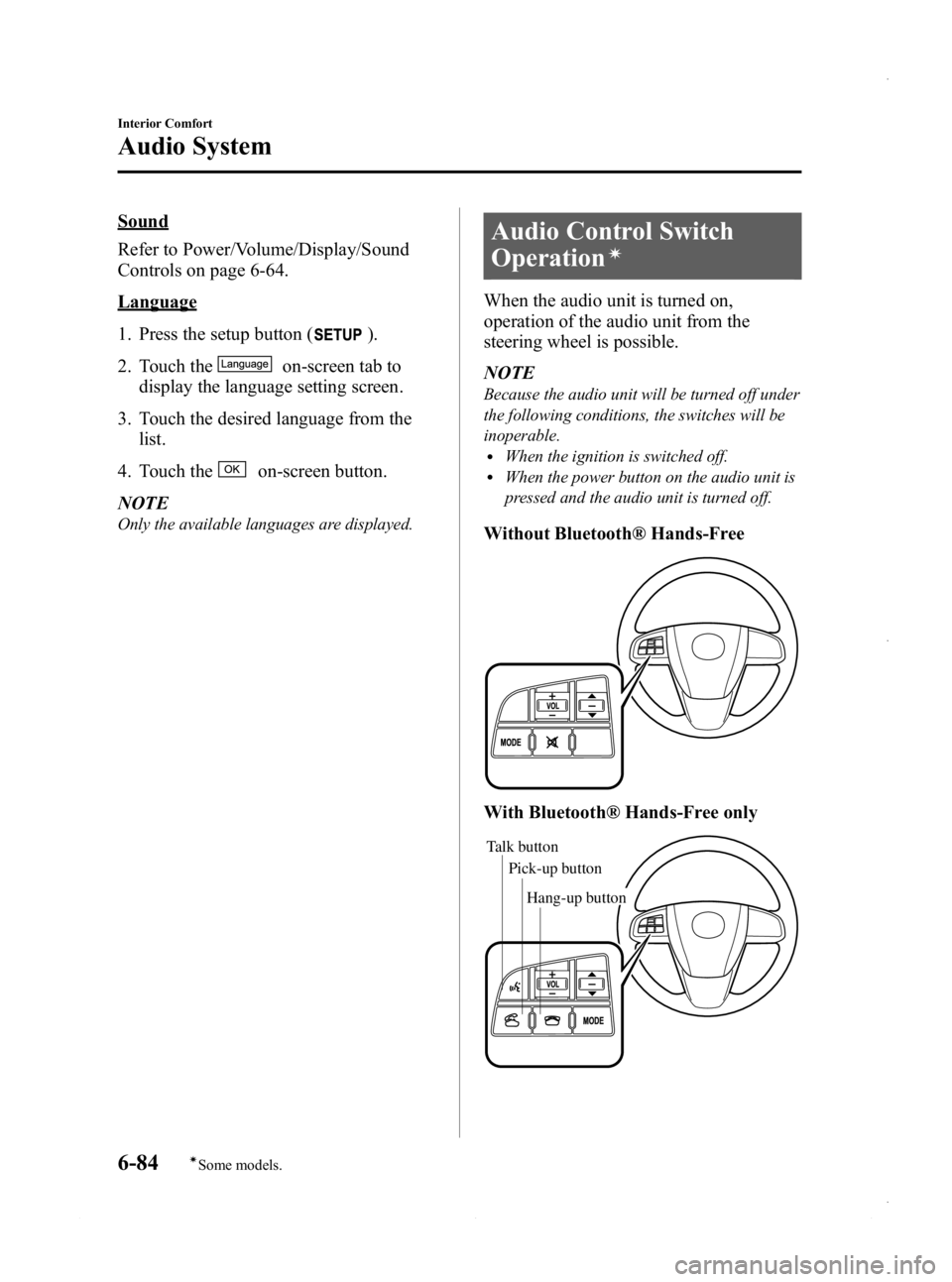
Audio Control Switch
Operation
í
When the audio unit is turned on,
operation of the audio unit from the
steering wheel is possible.
NOTE
Because the audio unit will be turned off under
the following conditions, the switches will be
inoperable.
lWhen the ignition is switched off.lWhen the power button on the audio unit is
pressed and the audio unit is turned off.
Without Bluetooth® Hands-Free
With Bluetooth® Hands-Free only
Talk button Pick-up buttonTalk button
Hang-up button
Pick-up button
6-84
Interior Comfort
íSome models.
Audio System
Mazda3_8CV6-EA-12H_Edition3 Page324
Thursday, February 28 2013 11:29 AM
Form No.8CV6-EA-12H
Page 327 of 610
Black plate (327,1)
(SIRIUS digital satellite radio)
Press and hold the seek switch in the up or
down position to seek all usable stations
at a higher or lower channel whether
programmed or not.
NOTE
During radio reception
Radio stations which have been previously
stored in the auto memory tuning can be called
up by pressing the seek switch up or down
while any radio station stored in the auto
memory tuning is being received. Radio
stations can be called up in the order they
were stored with each press of the switch up or
down.
When playing a CD, USB, iPod or BT
audio
Press the seek switch up to skip to the
next track.
Press the seek switch down to repeat the
current track.
Press and hold the seek switch in the up or
down position to continuously switch the
tracks up or down.
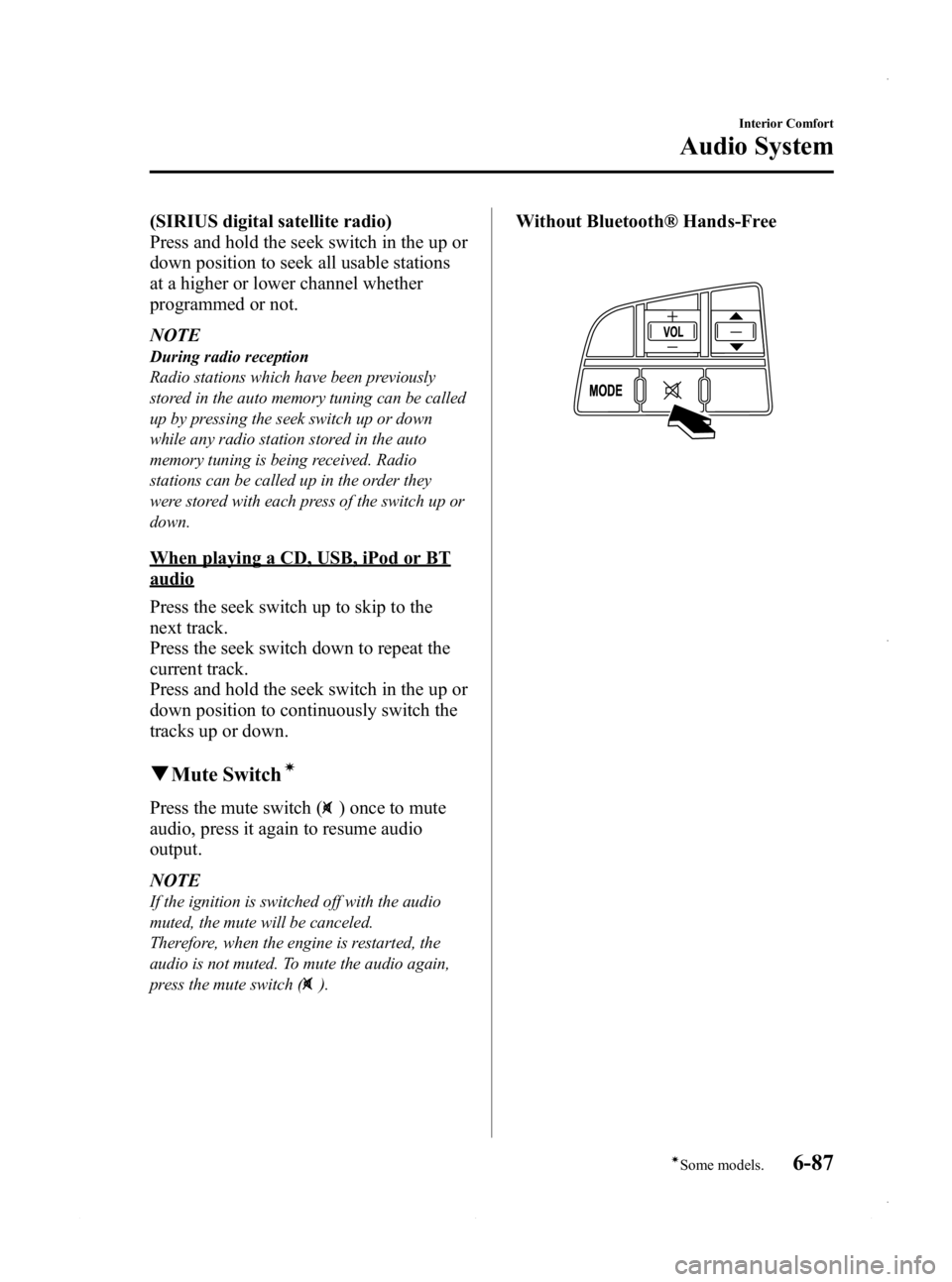
qMute Switchí
Press the mute switch () once to mute
audio, press it again to resume audio
output.
NOTE
If the ignition is switched off with the audio
muted, the mute will be canceled.
Therefore, when the engine is restarted, the
audio is not muted. To mute the audio again,
press the mute switch (
).
Without Bluetooth® Hands-Free
Interior Comfort
Audio System
6-87íSome models.
Mazda3_8CV6-EA-12H_Edition3 Page327
Thursday, February 28 2013 11:29 AM
Form No.8CV6-EA-12H
Page 330 of 610
Black plate (330,1)
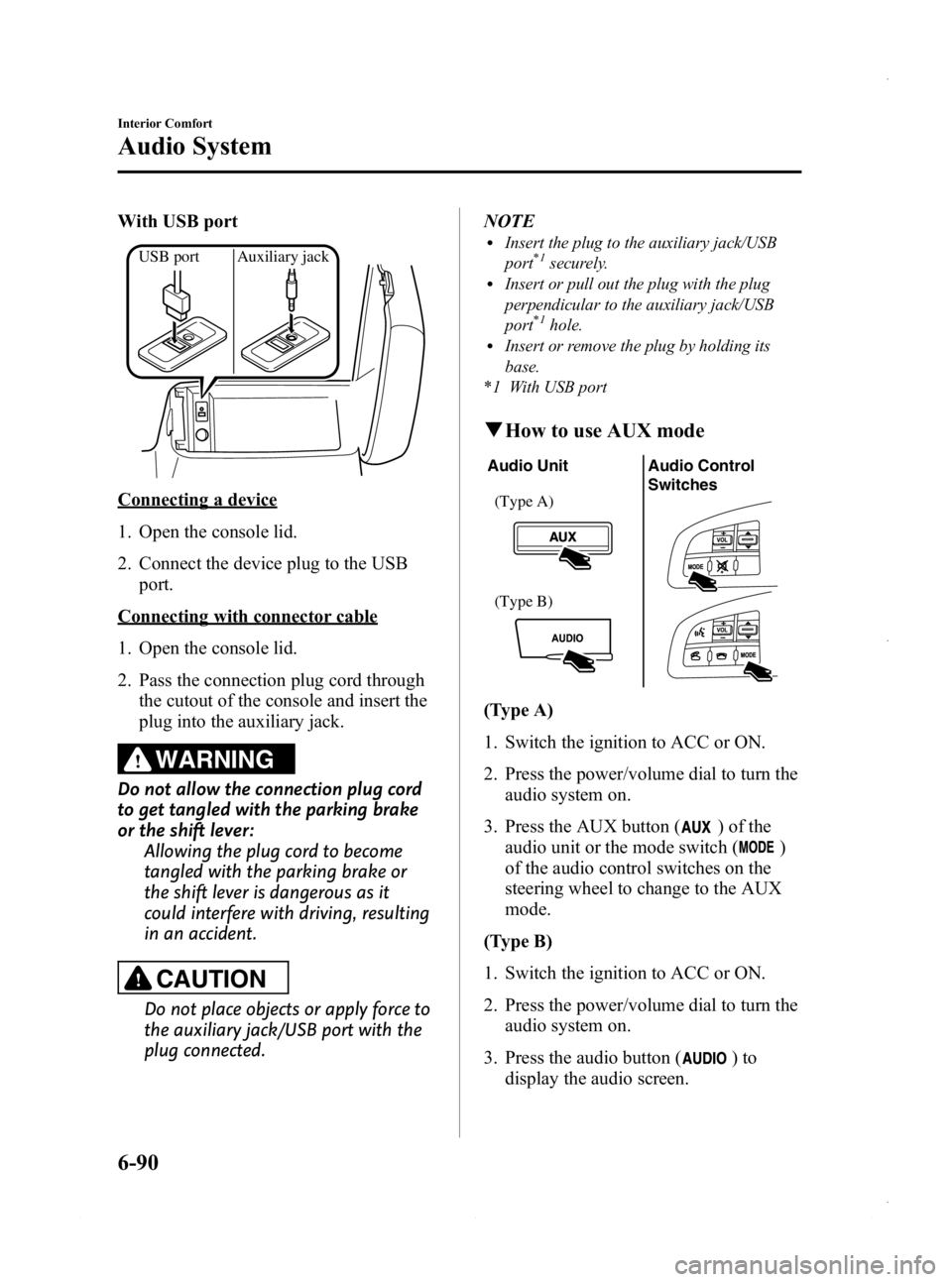
With USB port
USB port Auxiliary jack
Connecting a device
1. Open the console lid.
2. Connect the device plug to the USBport.
Connecting with connector cable
1. Open the console lid.
2. Pass the connection plug cord throughthe cutout of the console and insert the
plug into the auxiliary jack.
WARNING
Do not allow the connection plug cord
to get tangled with the parking brake
or the shift lever: Allowing the plug cord to become
tangled with the parking brake or
the shift lever is dangerous as it
could interfere with driving, resulting
in an accident.
CAUTION
Do not place objects or apply force to
the auxiliary jack/USB port with the
plug connected. NOTE
lInsert the plug to the auxiliary jack/USB
port*1securely.lInsert or pull out the plug with the plug
perpendicular to the auxiliary jack/USB
port
*1hole.lInsert or remove the plug by holding its
base.
*1 With USB port
q How to use AUX mode
Audio Unit Audio Control
Switches
(Type A)
(Type B)
(Type A)
1. Switch the ignition to ACC or ON.
2. Press the power/volume dial to turn the
audio system on.
3. Press the AUX button (
) of the
audio unit or the mode switch (
)
of the audio control switches on the
steering wheel to change to the AUX
mode.
(Type B)
1. Switch the ignition to ACC or ON.
2. Press the power/volume dial to turn the audio system on.
3. Press the audio button (
)to
display the audio screen.
6-90
Interior Comfort
Audio System
Mazda3_8CV6-EA-12H_Edition3 Page330
Thursday, February 28 2013 11:29 AM
Form No.8CV6-EA-12H
Page 332 of 610
Black plate (332,1)
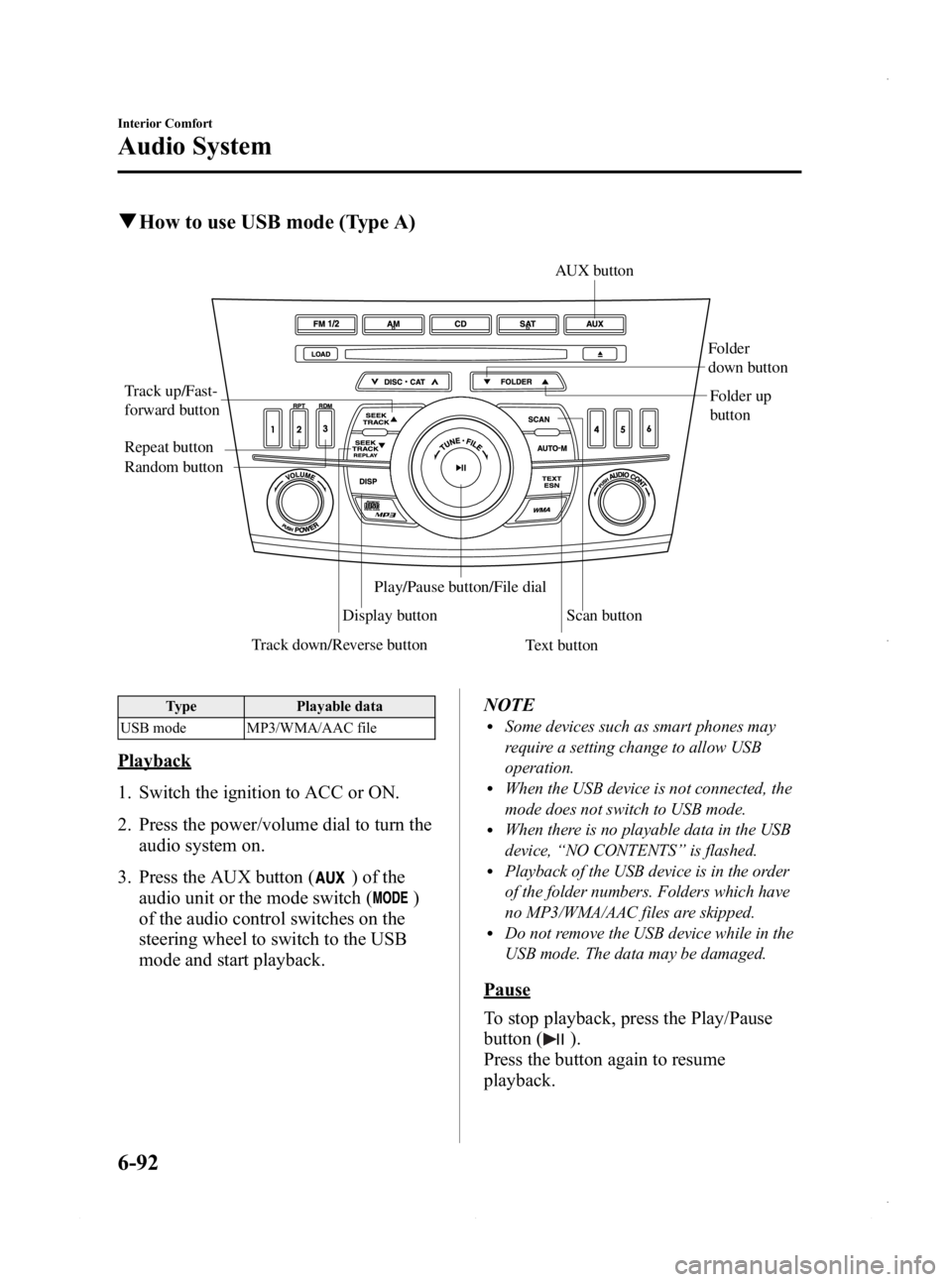
qHow to use USB mode (Type A)
Track down/Reverse button
Track up/Fast-
forward button
Display button Folder
down button
Folder up
button
Random button Repeat button
Text buttonScan button
AUX button
Play/Pause button/File dial
Type
Playable data
USB mode MP3/WMA/AAC file
Playback
1. Switch the ignition to ACC or ON.
2. Press the power/volume dial to turn the audio system on.
3. Press the AUX button (
) of the
audio unit or the mode switch (
)
of the audio control switches on the
steering wheel to switch to the USB
mode and start playback. NOTE
lSome devices such as smart phones may
require a setting change to allow USB
operation.
lWhen the USB device is not connected, the
mode does not switch to USB mode.
lWhen there is no playable data in the USB
device,
“NO CONTENTS ”is flashed.
lPlayback of the USB device is in the order
of the folder numbers. Folders which have
no MP3/WMA/AAC files are skipped.
lDo not remove the USB device while in the
USB mode. The data may be damaged.
Pause
To stop playback, press the Play/Pause
button (
).
Press the button again to resume
playback.
6-92
Interior Comfort
Audio System
Mazda3_8CV6-EA-12H_Edition3 Page332
Thursday, February 28 2013 11:29 AM
Form No.8CV6-EA-12H
Page 336 of 610
Black plate (336,1)
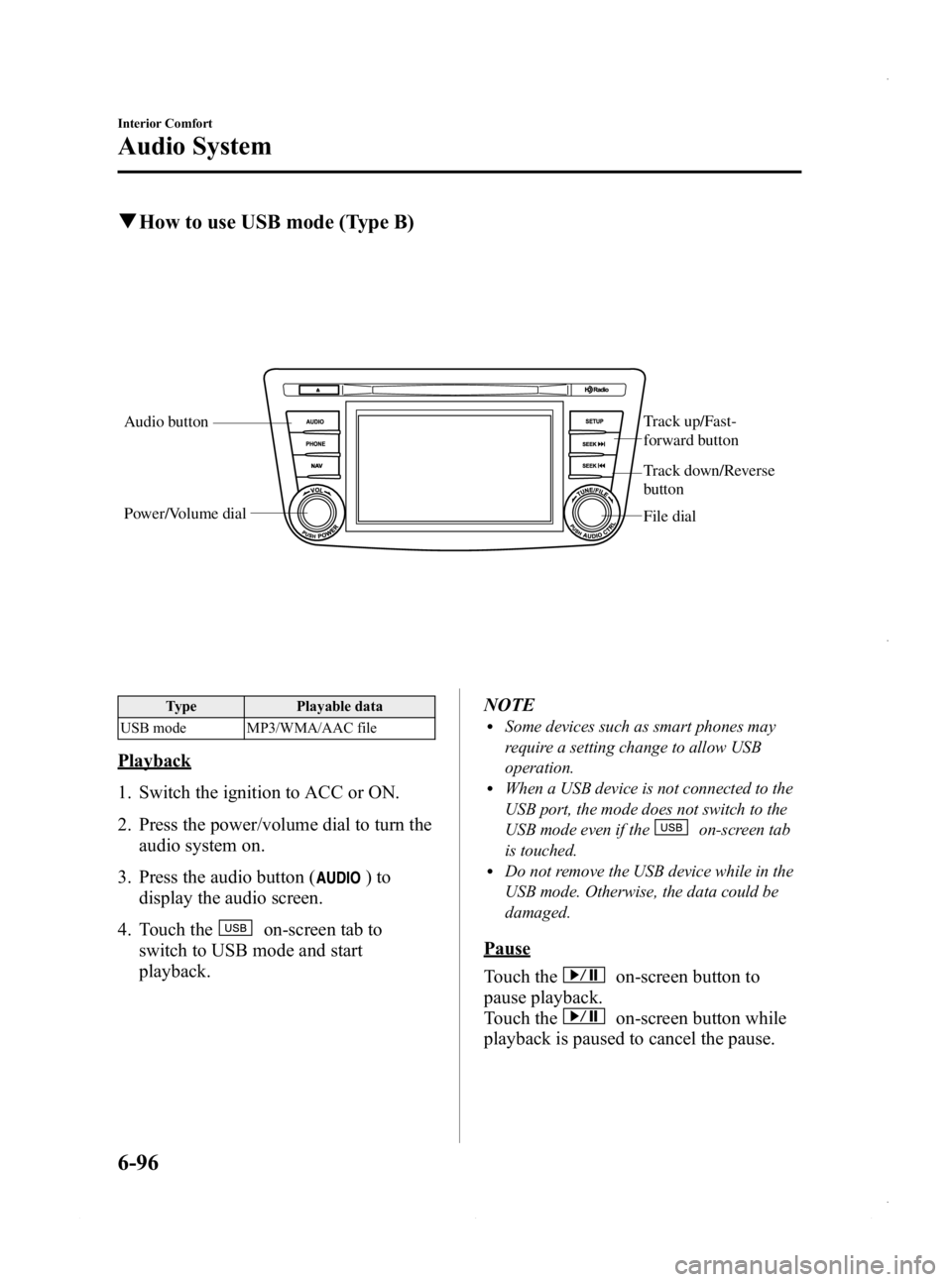
qHow to use USB mode (Type B)
Audio button Track up/Fast-
forward button
File dial
Power/Volume dial
Track down/Reverse
button
Type
Playable data
USB mode MP3/WMA/AAC file
Playback
1. Switch the ignition to ACC or ON.
2. Press the power/volume dial to turn the audio system on.
3. Press the audio button (
)to
display the audio screen.
4. Touch the
on-screen tab to
switch to USB mode and start
playback. NOTE
lSome devices such as smart phones may
require a setting change to allow USB
operation.
lWhen a USB device is not connected to the
USB port, the mode does not switch to the
USB mode even if the
on-screen tab
is touched.
lDo not remove the USB device while in the
USB mode. Otherwise, the data could be
damaged.
Pause
Touch the
on-screen button to
pause playback.
Touch the
on-screen button while
playback is paused to cancel the pause.
6-96
Interior Comfort
Audio System
Mazda3_8CV6-EA-12H_Edition3 Page336
Thursday, February 28 2013 11:29 AM
Form No.8CV6-EA-12H
Page 340 of 610
Black plate (340,1)
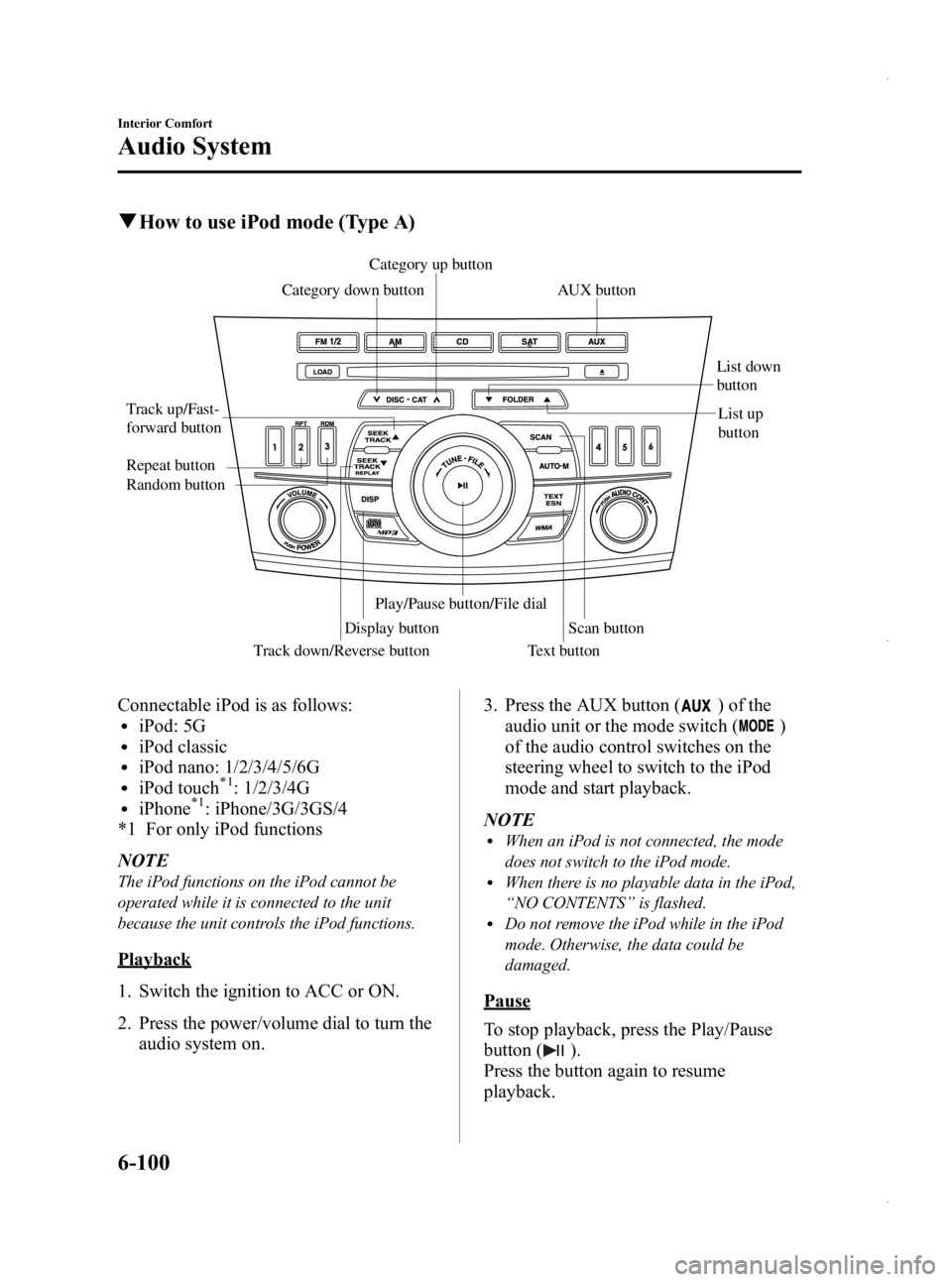
qHow to use iPod mode (Type A)
Track down/Reverse button
Track up/Fast-
forward button
Category up button
Category down button
Display button List down
button
List up
button
Random button Repeat button
Text button
Scan button
Play/Pause button/File dialAUX button
Connectable iPod is as follows:liPod: 5GliPod classicliPod nano: 1/2/3/4/5/6GliPod touch*1: 1/2/3/4GliPhone*1: iPhone/3G/3GS/4
*1 For only iPod functions
NOTE
The iPod functions on the iPod cannot be
operated while it is connected to the unit
because the unit controls the iPod functions.
Playback
1. Switch the ignition to ACC or ON.
2. Press the power/volume dial to turn the audio system on. 3. Press the AUX button (
) of the
audio unit or the mode switch (
)
of the audio control switches on the
steering wheel to switch to the iPod
mode and start playback.
NOTE
lWhen an iPod is not connected, the mode
does not switch to the iPod mode.
lWhen there is no playable data in the iPod,
“ NO CONTENTS ”is flashed.
lDo not remove the iPod while in the iPod
mode. Otherwise, the data could be
damaged.
Pause
To stop playback, press the Play/Pause
button (
).
Press the button again to resume
playback.
6-100
Interior Comfort
Audio System
Mazda3_8CV6-EA-12H_Edition3 Page340
Thursday, February 28 2013 11:29 AM
Form No.8CV6-EA-12H
Page 344 of 610
Black plate (344,1)
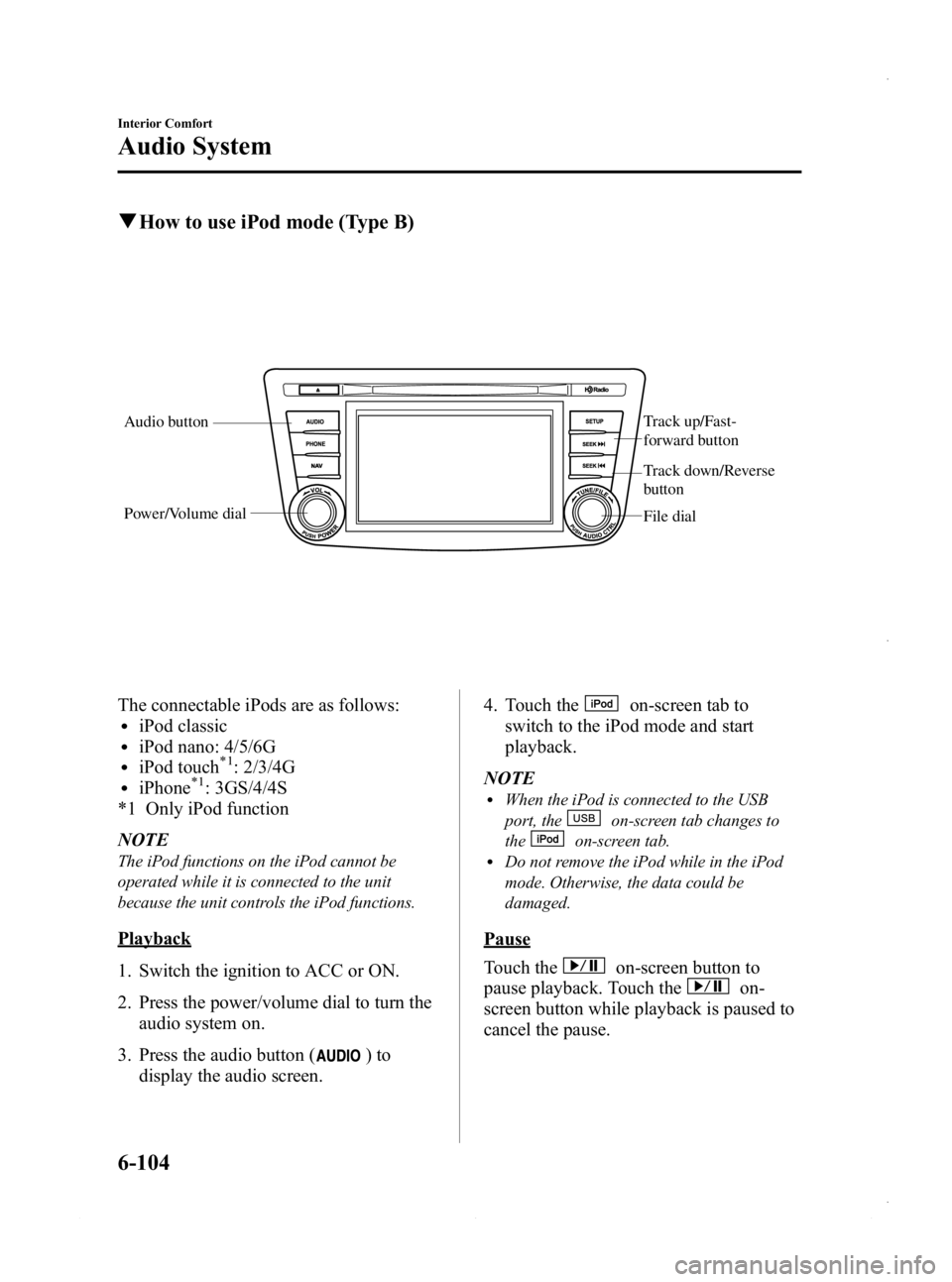
qHow to use iPod mode (Type B)
Audio button Track up/Fast-
forward button
File dial
Power/Volume dial
Track down/Reverse
button
The connectable iPods are as follows:liPod classicliPod nano: 4/5/6GliPod touch*1: 2/3/4GliPhone*1: 3GS/4/4S
*1 Only iPod function
NOTE
The iPod functions on the iPod cannot be
operated while it is connected to the unit
because the unit controls the iPod functions.
Playback
1. Switch the ignition to ACC or ON.
2. Press the power/volume dial to turn the audio system on.
3. Press the audio button (
)to
display the audio screen. 4. Touch the
on-screen tab to
switch to the iPod mode and start
playback.
NOTE
lWhen the iPod is connected to the USB
port, the
on-screen tab changes to
the
on-screen tab.lDo not remove the iPod while in the iPod
mode. Otherwise, the data could be
damaged.
Pause
Touch the
on-screen button to
pause playback. Touch the
on-
screen button while playback is paused to
cancel the pause.
6-104
Interior Comfort
Audio System
Mazda3_8CV6-EA-12H_Edition3 Page344
Thursday, February 28 2013 11:29 AM
Form No.8CV6-EA-12H