ignition MAZDA MODEL 3 5-DOOR 2013 Owners Manual
[x] Cancel search | Manufacturer: MAZDA, Model Year: 2013, Model line: MODEL 3 5-DOOR, Model: MAZDA MODEL 3 5-DOOR 2013Pages: 610, PDF Size: 7.05 MB
Page 353 of 610
Black plate (353,1)
6. When the programming is completed,“
”and “PAIR SUCCESS” are
displayed after about 10-30 seconds,
after which “PAIR SUCCESS”
continues to be displayed for three
seconds, and then the unit returns to the
normal display.
NOTE
lIf pairing cannot be completed, try “1234 ”
instead. Refer to the owner's manual of
your mobile device for the right PIN code.
lSome Bluetooth®audio devices need a
certain amount of time before the “
”
symbol is displayed.
lIf the programming failed, “Err ”flashes
for three seconds.
lProgramming cannot be performed while
the vehicle is moving. If you attempt to
perform programming while the vehicle is
moving, “PAIR DISABLE ”is displayed.
lIf seven Bluetooth®audio devices have
already been programmed to the vehicle,
programming cannot be performed and
“ MEMORY FULL ”is displayed. Delete
one programmed device to program
another one.
Changing the link to a Bluetooth®
audio device
If several devices have been programmed,
the Bluetooth
®unit links the device last
programmed. If you would like to link a
different programmed device, it is
necessary to change the link. The order of
device priority after the link has been
changed is maintained even when the
ignition is switched off.
1. Using the audio control dial, select the link change mode “LINK CHANGE ”
in the “BT SETUP” mode. (Refer to
“ Bluetooth
®audio device set-up ”for
details.) 2. Press the audio control dial to
determine the mode.
3. The name of the currently linked Bluetooth
®audio device is displayed.
If no Bluetooth®audio device is
currently linked, the name of the first
device among the programmed devices
is displayed.
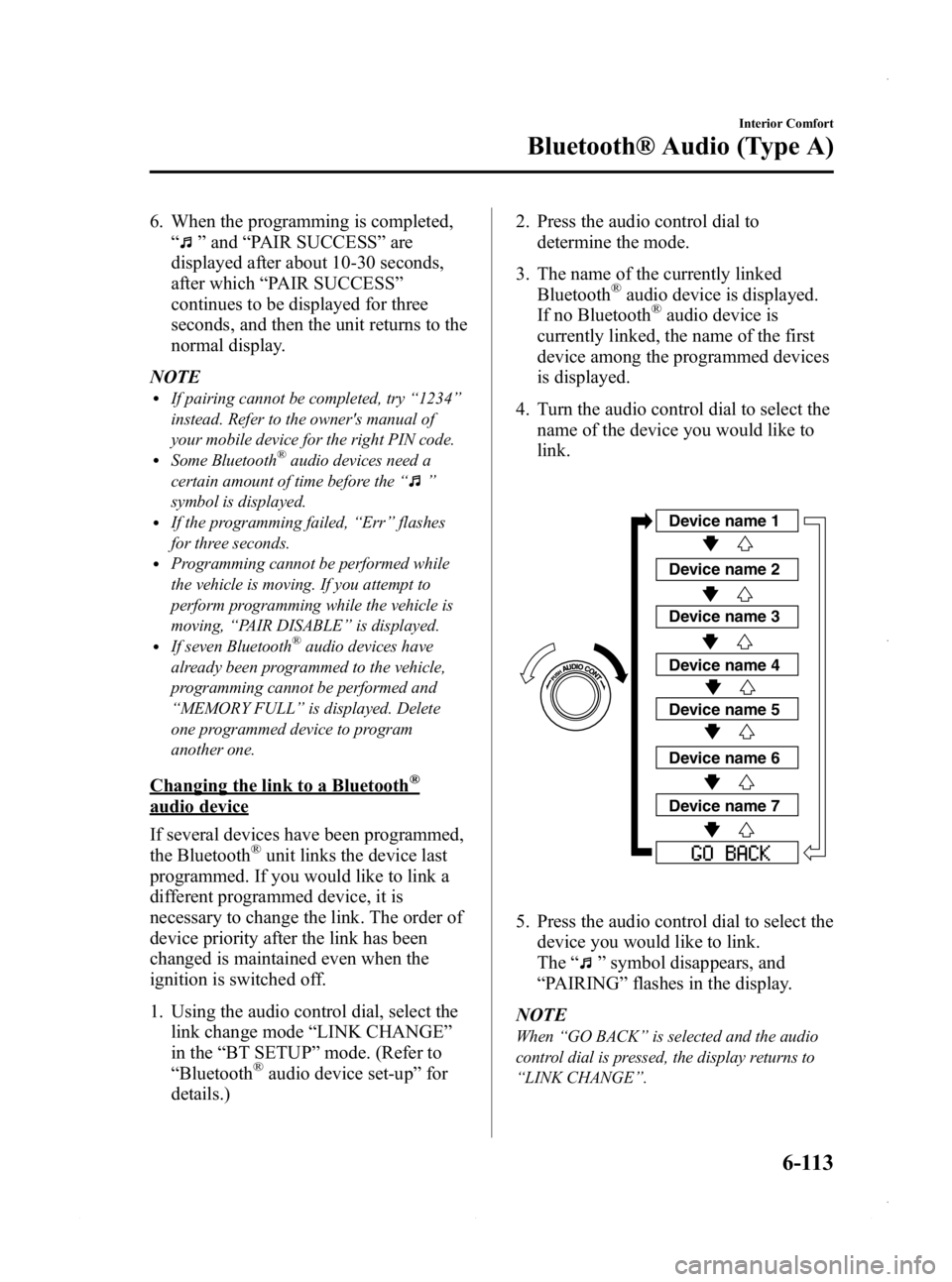
4. Turn the audio control dial to select the name of the device you would like to
link.
Device name 1
Device name 2
Device name 3
Device name 4
Device name 5
Device name 6
Device name 7
5. Press the audio control dial to select thedevice you would like to link.
The “
”symbol disappears, and
“ PAIRING ”flashes in the display.
NOTE
When “GO BACK ”is selected and the audio
control dial is pressed, the display returns to
“ LINK CHANGE ”.
Interior Comfort
Bluetooth® Audio (Type A)
6-113
Mazda3_8CV6-EA-12H_Edition3 Page353
Thursday, February 28 2013 11:29 AM
Form No.8CV6-EA-12H
Page 355 of 610
Black plate (355,1)
5. If a selection other than“GO BACK ”
is made and the audio control dial is
pressed, “SURE ? NO ”is displayed.
6. Rotate the audio control dial clockwise and switch the display to “SURE ?
YES ”.
NOTE
The display changes as follows depending on
whether the audio control dial is rotated
clockwise or counterclockwise.
-Clockwise: “SURE ? YES ”displayed
-Counterclockwise: “SURE ? NO ”displayed
7. Press the audio control dial to delete
the selected device.
NOTE
Select “GO BACK ”and press the audio
control dial to return to the “PAIR DELETE ”
display.
8. “PAIR DELETED ”is displayed for
three seconds after the deletion is
completed, and then it returns to the
normal display.
NOTE
If an error occurs while trying to delete the
programmed device, “Err ”flashes in the
display for three seconds and the display
returns to “LINK DELETE ”.
Bluetooth®audio device information
display
1. Using the audio control dial, select the
pair device information display mode
“DEVICE INFO ”in the “BT SETUP”
mode. (Refer to “Bluetooth
®audio
device set-up ”for details.)
2. Press the audio control dial to determine the mode.
3. The name of the Bluetooth
®unit
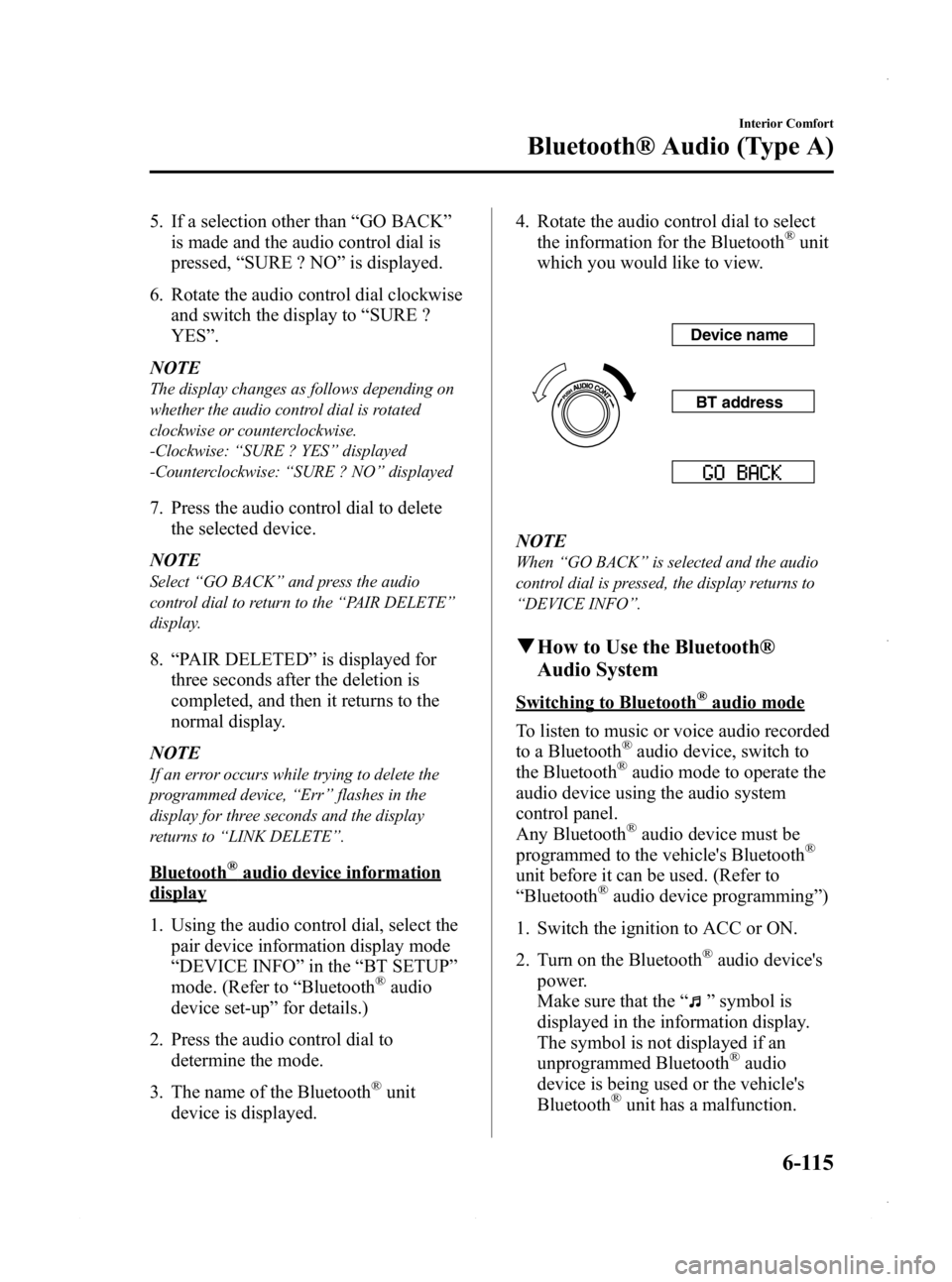
device is displayed. 4. Rotate the audio control dial to select
the information for the Bluetooth
®unit
which you would like to view.
Device name
BT address
NOTE
When “GO BACK ”is selected and the audio
control dial is pressed, the display returns to
“ DEVICE INFO ”.
q How to Use the Bluetooth®
Audio System
Switching to Bluetooth®audio mode
To listen to music or voice audio recorded
to a Bluetooth
®audio device, switch to
the Bluetooth®audio mode to operate the
audio device using the audio system
control panel.
Any Bluetooth
®audio device must be
programmed to the vehicle's Bluetooth®
unit before it can be used. (Refer to
“ Bluetooth®audio device programming ”)
1. Switch the ignition to ACC or ON.
2. Turn on the Bluetooth
®audio device's
power.
Make sure that the “
”symbol is
displayed in the information display.
The symbol is not displayed if an
unprogrammed Bluetooth
®audio
device is being used or the vehicle's
Bluetooth
®unit has a malfunction.
Interior Comfort
Bluetooth® Audio (Type A)
6-115
Mazda3_8CV6-EA-12H_Edition3 Page355
Thursday, February 28 2013 11:29 AM
Form No.8CV6-EA-12H
Page 359 of 610
Black plate (359,1)
lA2DP (Advanced Audio Distribution
Profile) Ver. 1.0
lOPP (Object Push Profile) Ver. 1.1
NOTE
lThe Bluetooth®Hands-Free system is
operable several seconds after the ignition
is switched to ACC or ON (requires less
than 15 seconds).
lIf the ignition is switched off during a
hands-free call, the line is transferred to the
device (Mobile phone) automatically.
lIf the device (Mobile phone) is in a location
where radio reception is difficult such as a
metal container or in the trunk, the call may
not be connected using Bluetooth
®.If
communication is not possible, change the
location of the device (Mobile phone).
q Component Parts
Bluetooth®Hands-Free consists of the
following items:
lTalk buttonlPick-up buttonlHang-up buttonlInformation displaylMicrophonelAudio unit
Talk button, Pick-Up button and Hang-
Up button
Basic functions of Bluetooth
®Hands-Free
can be used for such things as making
calls or hanging up using the talk button,
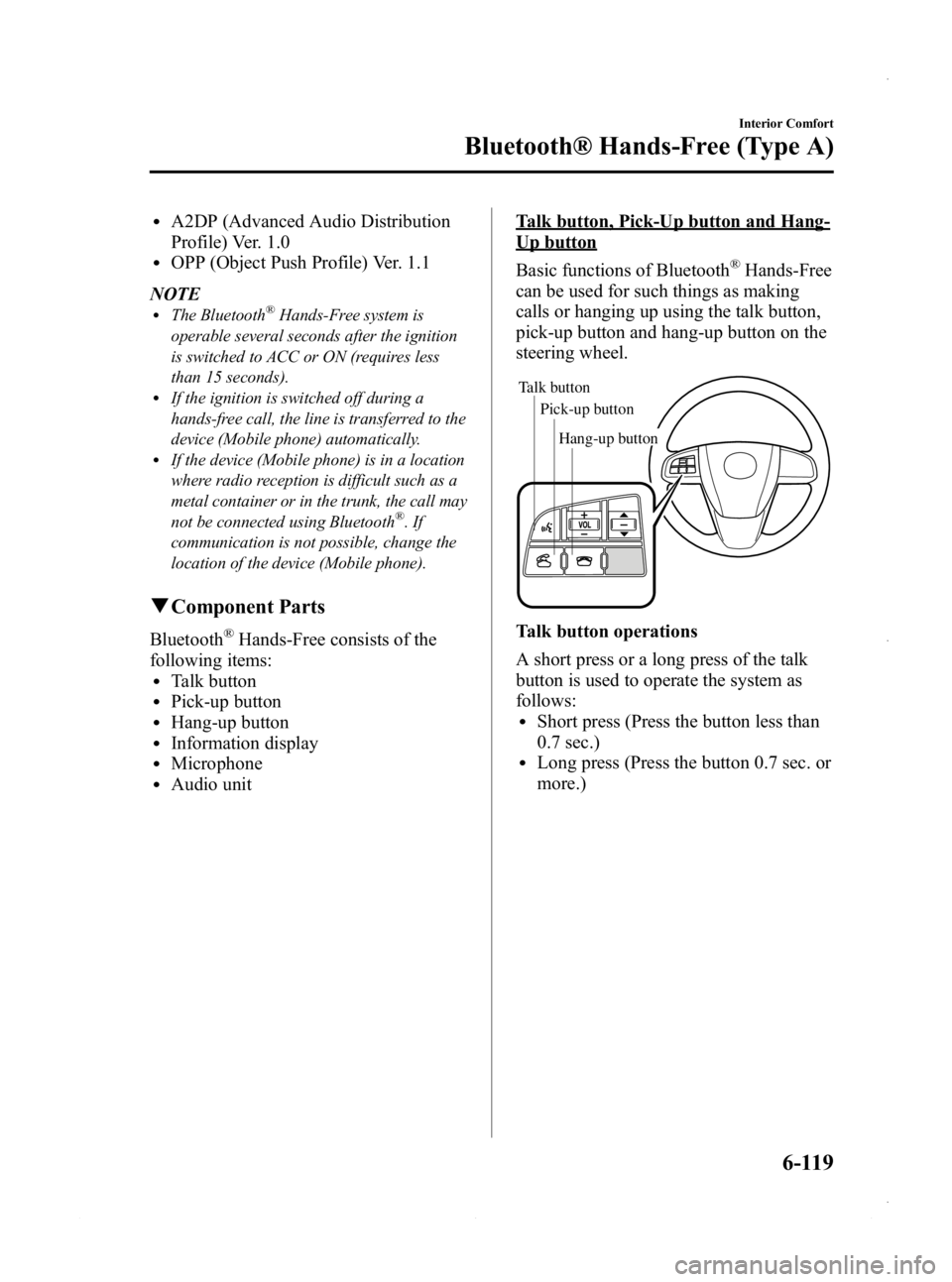
pick-up button and hang-up button on the
steering wheel.
Talk button
Pick-up buttonTalk button
Hang-up button
Pick-up button
Talk button operations
A short press or a long press of the talk
button is used to operate the system as
follows:
lShort press (Press the button less than
0.7 sec.)
lLong press (Press the button 0.7 sec. or
more.)
Interior Comfort
Bluetooth® Hands-Free (Type A)
6-119
Mazda3_8CV6-EA-12H_Edition3 Page359
Thursday, February 28 2013 11:29 AM
Form No.8CV6-EA-12H
Page 365 of 610
![MAZDA MODEL 3 5-DOOR 2013 Owners Manual Black plate (365,1)
14.Prompt: “XXXXXX - - - (Ex.
“ Stans device ”) (Device tag). Is this
correct? ”
15. Say: [Beep] “Ye s ”
16. Prompt: “Pairing complete ”
After a device is register](/img/28/41005/w960_41005-364.png "MAZDA MODEL 3 5-DOOR 2013 Owners Manual Black plate (365,1)
14.Prompt: “XXXXXX - - - (Ex.
“ Stans device ”) (Device tag). Is this
correct? ”
15. Say: [Beep] “Ye s ”
16. Prompt: “Pairing complete ”
After a device is register")
Black plate (365,1)
14.Prompt: “XXXXXX - - - (Ex.
“ Stan's device ”) (Device tag). Is this
correct? ”
15. Say: [Beep] “Ye s ”
16. Prompt: “Pairing complete ”
After a device is registered, the system
automatically identifies the device. By
activating Bluetooth
®Hands-Free again,
or by activating Bluetooth®Hands-Free
first after switching the ignition from OFF
to ACC, the system reads out a voice
guidance, “XXXXXX - - - (Ex. “Stan's
device ”) (Device tag) is connected ”.
NOTE
lDevice registration can also be done by
operating the audio unit.
Refer to Bluetooth® Audio Preparation on
page 6-110.
lDepending on the device, the registration
status may be lost after a certain period of
time. If this occurs, repeat the entire
process from Step 1.
q Making a Call Using a Telephone
Number
NOTE
Practice this while parked until you are
confident you can do it while driving in a non-
taxing road situation. If you are not completely
comfortable, make all calls from a safe
parking position, and move out only when fully
under control and you can devote your eyes
and mind to driving.
1. Press the pick-up button or talk button
with a short press.
2. Say: [Beep] “Dial ”
3. Prompt: “Number, please ”
4. Say: [Beep] “XXXXXXXXXXX
(Telephone number) ” 5.
Prompt: “XXXXXXXXXXX.
(Telephone number) After the beep,
continue to add numbers, or say Go-
Back to re-enter the last entered
numbers, or press the Pick-Up button
to execute dialing. ”
6. (Dialing)
Press the pick-up button or say “Dial ”,
then go to Step 7.
(Adding/inputting telephone
number)
Say, “XXXX ”(desired telephone
number), then go to Step 5.
(Telephone number correction)
Say, “Go Back ”. The prompt replies,
“ Go Back. The last entered numbers
have been removed. ”. Then go back to
Step 3.
7. Prompt: “Dialing ”
NOTE
The “Dial ”command and a telephone number
can be combined.
Ex. In Step 2, say, “Dial 123-4567 ”, then,
Steps 3 and 4 can be skipped.
Interior Comfort
Bluetooth® Hands-Free (Type A)
6-125
Mazda3_8CV6-EA-12H_Edition3 Page365
Thursday, February 28 2013 11:29 AM
Form No.8CV6-EA-12H
Page 374 of 610
Black plate (374,1)
Press the talk button with a short press
during the read-out at the desired device,
and then say one of the following voice
commands to execute it.
l“Select phone ”: Selects device (Mobile
phone) when the talk button is short-
pressed.
l“ Select music player ”: Selects device
(Music player) when the talk button is
short-pressed.
l“ Edit ”: Edits device when the talk
button is short-pressed.
l“ Continue ”: Continues the list read-
out.
l“ Delete ”: Deletes the registered device
when the talk button is short-pressed.
l“ Previous ”: Returns to the previous
device in read-out when the talk button
is short-pressed.
8. Prompt: “End of list, would you like
to start from the beginning?”
9. Say: [Beep] “No ”
10. Prompt: “Returning to main menu. ”
Device selection
If several devices have been programmed,
the Bluetooth
®unit links the device last
connected. If you would like to link a
different programmed device, it is
necessary to change the link. The order of
device priority after the link has been
changed is maintained even when the
ignition is switched off.
Hands-free phone
1. Press the pick-up button or talk button with a short press.
2. Say: [Beep] “Setup ” 3.
Prompt: “Select one of the following:
Pairing options, confirmation prompts,
language, passcode, select phone or
select music player.”
4. Say: [Beep] “Select phone ”
5. Prompt: “Please say the name of the
device you would like to select.
Available devices are XXXXX... (Ex.
device A), XXXXX... (Ex. device B),
XXXXX... (Ex. device C). Which
device please? ”
6. Say: [Beep] “XXXXX... (Ex. Device
B) ”
7. Prompt: “XXXXX... (Ex. Device B).
Is this correct? ”
8. Say: [Beep] “Ye s ”or “No ”
9. If “Ye s ”, go to Step 10. If “No” , the
procedure returns to Step 5.
10. Prompt: “XXXXX... (Ex. Device B)
selected.”
Music player
1. Press the pick-up button or talk button with a short press.
2. Say: [Beep] “Setup ”
3. Prompt: “Select one of the following:
Pairing options, confirmation prompts,
language, passcode, select phone or
select music player.”
4. Say: [Beep] “Select music player ”
5. Prompt: “Please say the name of the
device you would like to select.
Available devices are XXXXX... (Ex.
device A), XXXXX... (Ex. device B),
XXXXX... (Ex. device C). Which
device please? ”
6-134
Interior Comfort
Bluetooth® Hands-Free (Type A)
Mazda3_8CV6-EA-12H_Edition3 Page374
Thursday, February 28 2013 11:29 AM
Form No.8CV6-EA-12H
Page 379 of 610
Black plate (379,1)
NOTElThe applicable phrase appears in the
display.
lAfter user voice registration is completed,
voice guidance“Speaker enrollment is
complete, returning to main menu ”is
announced.
Voice recognition learning on/off
1. Press the pick-up button or talk button with a short press.
2. Say: [Beep] “Voice training ”
3. Prompt: “Enrollment is enabled/
disabled. Would you like to disable/
enable or retrain? ”
4. Say: [Beep] “Disable ”or “Enable ”
5. When “Disable ”is spoken, the voice
recognition learning is turned off.
When “Enable ”is spoken, the voice
recognition learning is turned on.
6. Prompt: “Speaker Enrollment is
disabled/enabled, returning to main
menu. ”
When Bluetooth® Hands-
Free Cannot be Used
Bluetooth®Hands-Free cannot be used
under the following conditions:
lThe device is outside of the
communication area.
lThe device has a malfunction.lThe device is not connected to the
hands-free unit equipped on the
vehicle.
lThe device's battery is weak.lThe device is turned off.lThe device is placed where radio
reception is difficult.
lThe ignition is switched off.
Interior Comfort
Bluetooth® Hands-Free (Type A)
6-139
Mazda3_8CV6-EA-12H_Edition3 Page379
Thursday, February 28 2013 11:29 AM
Form No.8CV6-EA-12H
Page 384 of 610
Black plate (384,1)
5. Using your device, perform a searchfor the Bluetooth®device (Peripheral
device).
6. Select “Mazda ”from the device list
searched by the device.
7. (Device with Bluetooth
®version 2.0)
Input the displayed 4-digit pairing code
into the device.
(Device with Bluetooth
®version 2.1
or higher)
lJust Works is detected
The pairing is performed
automatically.
lNumeric Comparison is detected
Make sure the displayed 6-digit
code on the audio is also displayed
on the device, and touch the
on-screen button. A connection
license agreement may be required
depending on the device.
8. (Device with PBAP profile)
Call history (incoming/outgoing
history) for the device is downloaded
automatically. The operation may be
required depending on the device.
After a device is registered, the system
automatically identifies the device. By
activating Bluetooth
®Hands-Free again,
or by activating Bluetooth®Hands-Free
first after switching the ignition from OFF
to ACC, the device connection condition
is indicated in the display.
Device selection
If several devices have been programmed,
the Bluetooth
®unit links the device last
programmed. If you would like to link a
different programmed device, it is
necessary to change the link. The order of
device priority after the link has been
changed is maintained even when the
ignition is switched off.
NOTE
If the device name cannot be displayed, “... ” is
added at the end of the title which is displayed.
Connecting other devices
1. Press the phone button (
).
2. Touch the
on-screen tab.
3. Touch the
on-screen
button.
4. Touch the device name which you want to connect to display the device
information screen.
5. Touch the
on-screen button to
connect as a Hands-Free device. Touch
the
on-screen button to connect
as a Bluetooth®audio device.
6. Touch the
on-screen button.
7. (Device with PBAP profile)
Call history (incoming/outgoing
history) for the device is downloaded
automatically.
If the connection is completed, the device
name is displayed. Touch the
on-
screen button to display the device list
screen and display the
oricon in the
new device name which is connected.
Disconnecting a device
1. Touch the
on-screen tab.
6-144
Interior Comfort
Bluetooth® (Type B)
Mazda3_8CV6-EA-12H_Edition3 Page384
Thursday, February 28 2013 11:30 AM
Form No.8CV6-EA-12H
Page 386 of 610

Black plate (386,1)
NOTElWhen activating the Phone Menu from the
Main Menu, the user is informed of the
available options (Call, Dial, Redial, Call
back, Setup or Emergency) via voice
navigation.
lFor voice recognition details with the
navigation system, refer to the separate
“NAVIGATION SYSTEM Owner's
Manual” .
Ending Voice Recognition
Use one of the following methods:
lPress and hold the talk-button.lPress the hang-up button.
Skipping Voice Guidance (for faster
operation)
Press and release the talk-button.
NOTE
lThe Bluetooth®Hands-Free system is
operable several seconds after the ignition
is switched to ACC or ON (requires less
than 15 seconds).
lWhen operating the audio unit or the A/C
while using Bluetooth®Hands-Free, the
beep sounds or voice guidance (audio unit)/
cannot be heard.
Tutorial
The tutorial explains how to use
Bluetooth
®Hands-Free.
The available tutorial items are General,
Phone, and Audio.
To activate the tutorial, do the following:
1. Press the talk button.
2. Prompt: “Ready ”
3. Say: [Beep] “Tutorial ”
4. Prompt: “Tutorial ”
5. Say: [Beep]
“ XXXXX... (Tutorial item) ”6. Follow the prompts to receive the
appropriate voice guidance
instructions.
Commands useable anytime during
voice recognition
“Help ”,“Go Back ”,“Cancel” ,
“ Display OFF/Display ON ”are
commands which can be used at anytime
during voice recognition.
Help function use
The help function informs the user of all
the available voice commands under the
current conditions.
1. Say: [Beep] “Help ”
2. Follow the prompts to receive the appropriate voice guidance
instructions.
Returning to previous operation
This command is for returning to the
previous operation while in the voice
recognition mode.
Say : [Beep] “Go Back ”
Cancel
The Bluetooth
®Hands-Free system
transitions to standby status if the
following operation is performed while
the system is activated.
Say : [Beep] “Cancel ”
Display OFF/Display ON
The audio unit display can be switched
off/on by voice recognition operation.
Say: [Beep] “Display OFF ”(or
“ Display ON ”)
6-146
Interior Comfort
Bluetooth® (Type B)
Mazda3_8CV6-EA-12H_Edition3 Page386
Thursday, February 28 2013 11:30 AM
Form No.8CV6-EA-12H
Page 391 of 610
Black plate (391,1)
2. If theon-screen button or hang-
up button is not pressed within 10
seconds, the call is made to 911
automatically.
NOTE
A Hands-free device must be paired and
connected. The 911 operator can verify the
vehicle's position information using the Hands-
free device GPS if equipped.
The 911 operator can verify the vehicle's
position information.
(Switching automatic 911 on and off)
The system can be set to not call 911 if
the vehicle is involved in a moderate to
severe collision.
CAUTION
Though the system can be set to not
call 911, doing so will defeat the
purpose of the system to immediately
contact rescue personnel to assist you
after your accident. For the safety of
the driver and all passengers, Mazda
recommends that the Automatic 911
system remain activated so that a
call will be made to 911 when needed.
1. Touch the
on-screen tab.
2. Touch the
on-screen
button.
3. Touch the
on-screen button or
on-screen button.
4. Touch the
on screen button.
q Receiving an Incoming Call
1. Prompt:
“Incoming call, press the pick-up
button to answer ”
2. To accept the call, press the pick-up button or touch the
on-screen
button.
To reject the call, press the hang-up
button or touch the
on-screen
button.
NOTE
To stop receiving phone calls, turn the Don't
Disturb Me function on.
q Hanging Up a Call
Press the hang-up button or touch the
on-screen button during the call.
qMute
The microphone can be muted during a
call.
Touch the
on-screen button.
Touch the
on-screen button during
mute to cancel the mute.
q Transferring a call from Hands-
Free to a mobile phone
Communication between the Hands-free
unit and a device (Mobile phone) is
canceled, and the line can be switched to
the device (Mobile phone) as a standard
call.
Touch the
on-screen button.
NOTE
If the ignition is switched off during a Hands-
Free call, the line is transferred to the device
(Mobile phone) automatically.
Interior Comfort
Bluetooth® (Type B)
6-151
Mazda3_8CV6-EA-12H_Edition3 Page391
Thursday, February 28 2013 11:30 AM
Form No.8CV6-EA-12H
Page 405 of 610
Black plate (405,1)
Updating the database
The Gracenote media database can be updated using USB device.
1. Connect a USB device containing the software for updating Gracenote.
2. Touch the
on-screen button.
3. Touch the
on-screen button.
4. Touch the
on-screen button to scroll the display.
When the display is scrolled to the end of the explanation, the
on-screen
button is displayed.
5. Touch the
on-screen button. The update is initiated.
6. Touch the
on-screen button.
NOTE
Do not switch the ignition off or disconnect the USB device while updating the database. Otherwise,
data could be lost.
Interior Comfort
Bluetooth® (Type B)
6-165
Mazda3_8CV6-EA-12H_Edition3 Page405
Thursday, February 28 2013 11:30 AM
Form No.8CV6-EA-12H