warning MAZDA MODEL 3 5-DOOR 2017 Owners Manual
[x] Cancel search | Manufacturer: MAZDA, Model Year: 2017, Model line: MODEL 3 5-DOOR, Model: MAZDA MODEL 3 5-DOOR 2017Pages: 612
Page 224 of 612
4–94
When Driving
i-ACTIVSENSE
*Some models.
Traffic Sign Recognition System (TSR)*
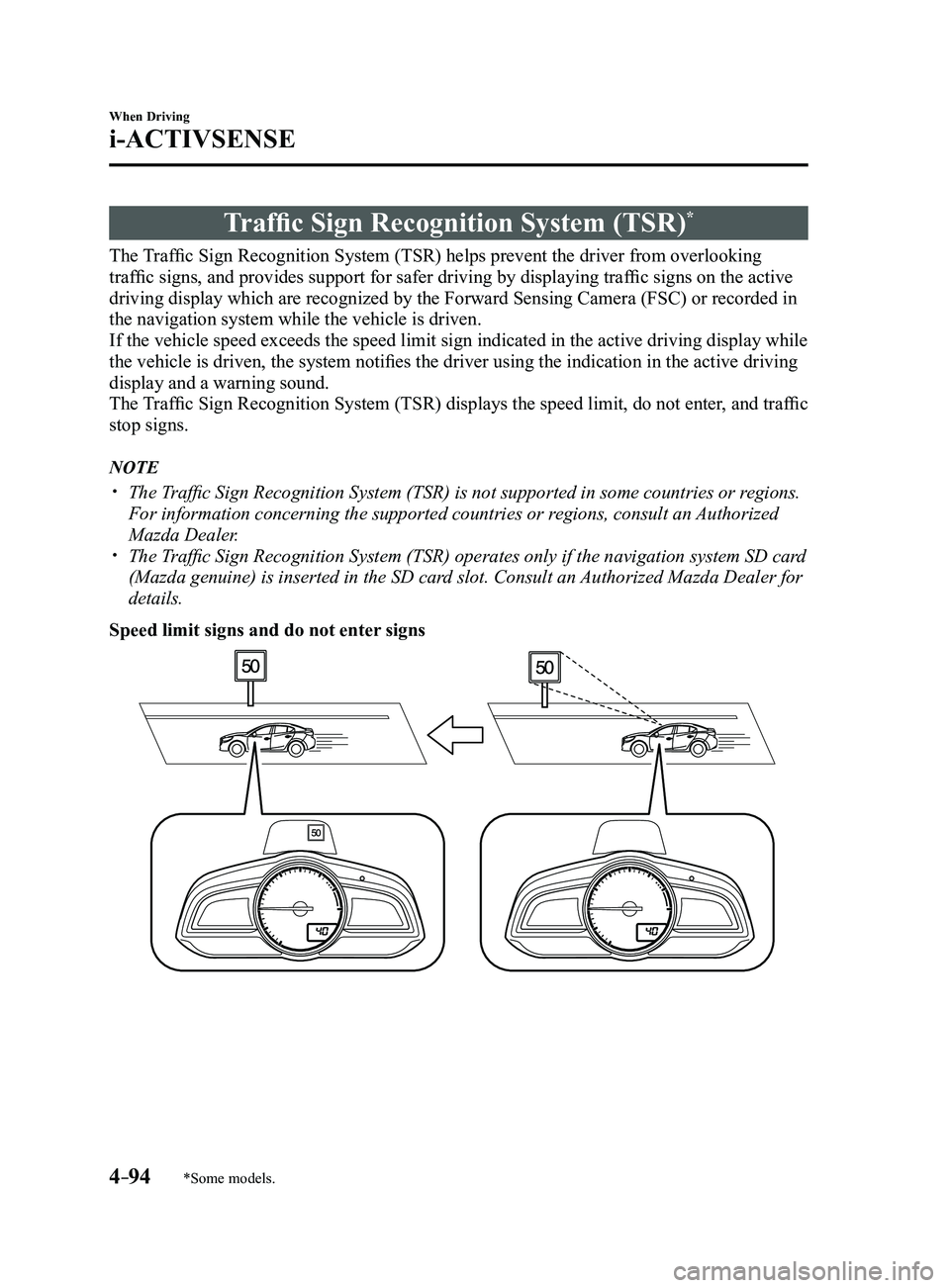
The Traffic Sign Recognition System (TSR) helps prevent the driver from overlooking
traffic signs, and provides support for safer driving by displaying traffic signs on the active
driving display which are recognized by the Forward Sensing Camera (FSC\
) or recorded in
the navigation system while the vehicle is driven.
If the vehicle speed exceeds the speed limit sign indicated in the activ\
e driving display while
the vehicle is driven, the system notifies the driver using the indication in the active driving
display and a warning sound.
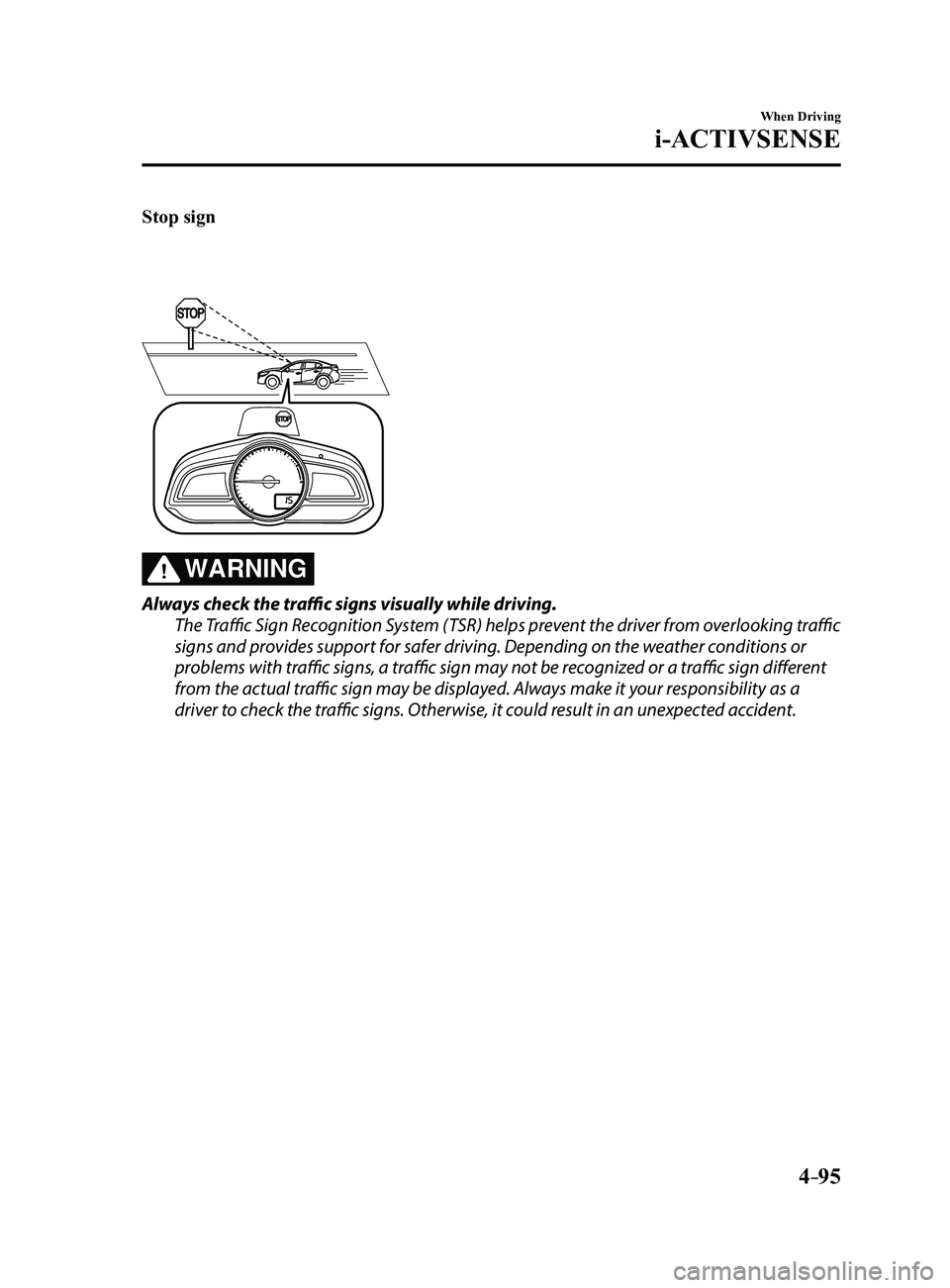
The Traffic Sign Recognition System (TSR) displays the speed limit, do not enter, and traffic
stop signs.
NOTE
The Traffic Sign Recognition System (TSR) is not supported in some countries or regions.
For information concerning the supported countries or regions, consult an Authorized
Mazda Dealer.
The Traffic Sign Recognition System (TSR) operates only if the navigation system SD card
(Mazda genuine) is inserted in the SD card slot. Consult an Authorized Mazda Dealer for
details.
Speed limit signs and do not enter signs
Mazda3_8FL6-EA-16F_Edition2.indb 942016/08/10 17:36:40
Page 225 of 612
4–95
When Driving
i-ACTIVSENSE
Stop sign
WARNING
Always check the traffic signs visually while driving.
The Traffic Sign Recognition System (TSR) helps prevent the driver from overlooking traffic
signs and provides support for safer driving. Depending on the weather conditions or
problems with traffic signs, a traffic sign may not be recognized or a traffic sign different
from the actual traffic sign may be displayed. Always make it your responsibility as a
driver to check the traffic signs. Otherwise, it could result in an unexpected accident.
Mazda3_8FL6-EA-16F_Edition2.indb 952016/08/10 17:36:41
Page 229 of 612
4–99
When Driving
i-ACTIVSENSE
Stop sign
A stop sign is displayed when all of the following conditions are met:
The vehicle speed is about 30 km/h (19 mph) or slower. The Forward Sensing Camera (FSC) recognizes a stop sign as a sign targeted for your
vehicle.
In the following cases, display of the stop sign stops.
A certain period of time has elapsed since the stop sign was displayed.
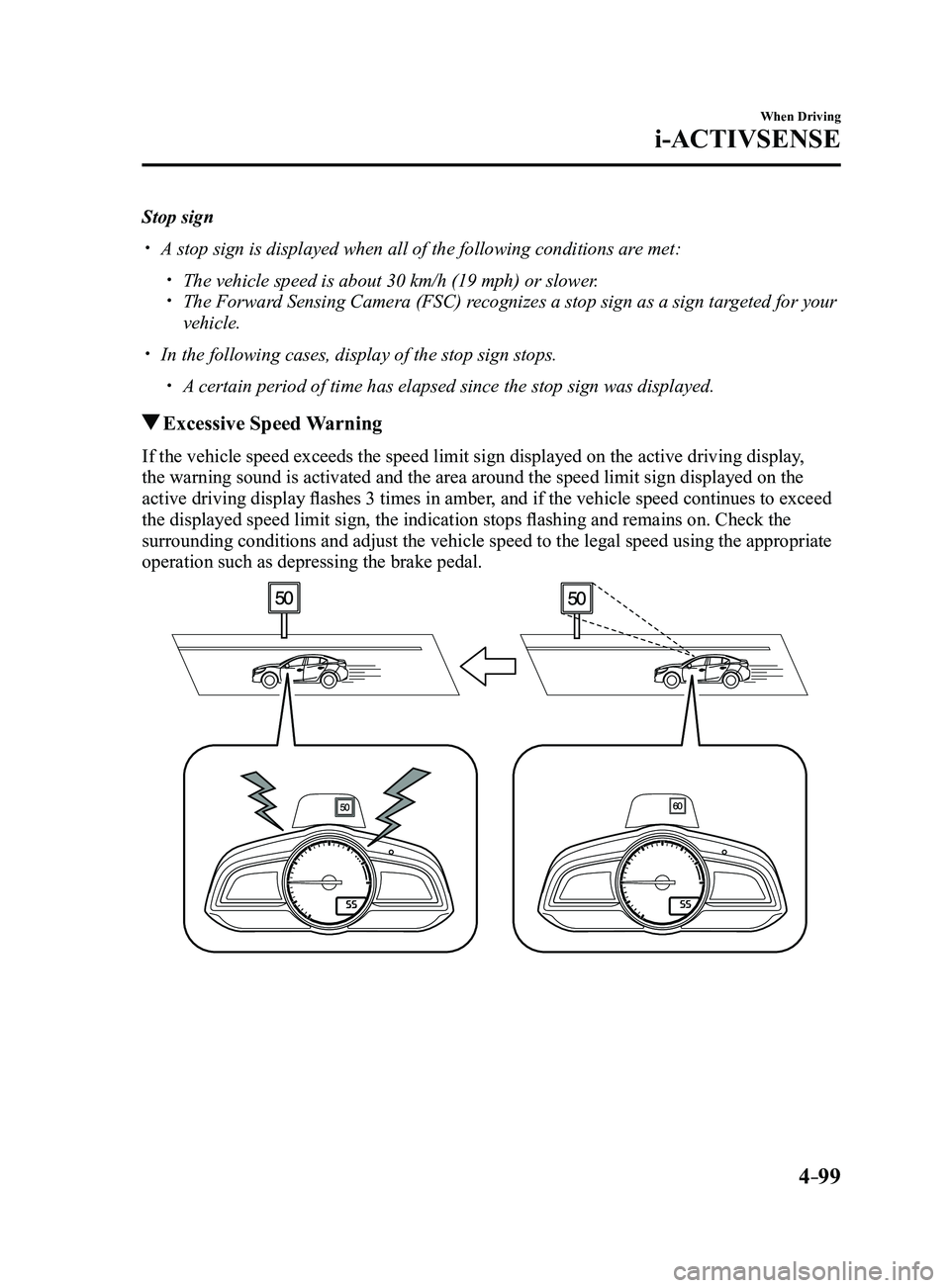
Excessive Speed Warning
If the vehicle speed exceeds the speed limit sign displayed on the activ\
e driving display,
the warning sound is activated and the area around the speed limit sign \
displayed on the
active driving display flashes 3 times in amber, and if the vehicle speed continues to exceed
the displayed speed limit sign, the indication stops flashing and remains on. Check the
surrounding conditions and adjust the vehicle speed to the legal speed u\
sing the appropriate
operation such as depressing the brake pedal.
Mazda3_8FL6-EA-16F_Edition2.indb 992016/08/10 17:36:42
Page 230 of 612

4–10 0
When Driving
i-ACTIVSENSE
NOTE
The excessive speed warning is initially set to inoperable. If you want \
to activate the
excessive speed warning, change the setting in the personalization featu\
res.
Off: The excessive speed warning is not activated. Warning display only: The area around the speed limit sign flashes 3 times in amber,
and if the vehicle speed continues to exceed the displayed speed limit s\
ign, the
indication stops flashing and remains on.
Warning display warning sound: The area around the speed limit sign flashes 3
times in amber, and if the vehicle speed continues to exceed the displayed speed limit\
sign, the indication stops flashing and remains on and the warning sound is activated.
In the following cases, the excessive speed warning stops operating.
The vehicle speed is less than the speed of the displayed speed limit si\
gn. (If the
activation timing for the excessive speed warning is changed in the pers\
onalization
features, the excessive speed warning stops operating when the vehicle speed i\
s less
than the changed vehicle speed.
A speed limit sign indication has been updated and the conditions for act\
ivating the
excessive speed warning are not met. Display of the speed limit sign stops.
The warning indication is displayed at the same time the excessive speed\
warning sound
is activated if the vehicle speed exceeds the speed indicated on the spe\
ed limit sign.
Refer to W arning Sound is Activated on page 7-39. If the Forwar d Sensing Camera (FSC) displays a speed limit sign which was recognized
incorrectly, the excessive speed alarm is activated even if the vehicle is driven a\
t the legal
speed.
The following settings can be changed for the excessive speed warning.
Warning sound and indication pattern Timing at which the warning is activated
Refer to Personalization Featur es on page 9-12.
Mazda3_8FL6-EA-16F_Edition2.indb 1002016/08/10 17:36:43
Page 231 of 612
4–101
When Driving
i-ACTIVSENSE
*Some models.
Distance Recognition Support System (DRSS)*
The Distance Recognition Support System (DRSS) measures the distance between your
vehicle and a vehicle ahead using a radar sensor (front) while the veh\
icle speed is about 30
km/h (19 mph) or faster, and if your vehicle approaches a vehicle ahead more closely than
what is appropriate for maintaining distance between the vehicles accord\
ing to the vehicle
speed, a notification in the active driving display is indicated to advise you to keep a safe
distance from the vehicle ahead.
WARNING
Do not rely completely on the Distance Recognition Support System (DRSS) and always
drive carefully:The Distance Recognition Support System (DRSS) provides advice for safer driving and
notifies the driver of a recommended, safer distance to maintain with a vehicle ahead.
The ability to detect a vehicle ahead is limited depending on the type of vehicle ahead,
the weather conditions, and the traffic conditions. Therefore, if the accelerator and brake
pedals are not operated correctly it could lead to an accident. Always verify the safety of
the surrounding area and depress the brake pedal or accelerator pedal while keeping a
safer distance from vehicles ahead or on-coming vehicles.
NOTE
The Distance Recognition Support System (DRSS) operates when all of th\
e following
conditions are met:
The ignition is switched ON. The Distance Recognition Support System (DRSS) is on. The selector lever is in a position other than r everse (R). The vehicle speed is 30 km/h or faster (19 mph or faster).
The objects which activate the system are 4-wheeled vehicles. The Distance Recognition Support System (DRSS) may also operate in the\
pr esence of
motorcycles and bicycles. The Distance Recognition Support System (DRSS) system may not operate \
normally
under the following conditions:
The Dynamic Stability Control (DSC) has a malfunction. The vehicle ahead is traveling at an extr emely slow speed.
The system does not operate with the following objects:
Vehicles approaching in the opposite direction. Stationary objects (stopped vehicles, obstructions)
Mazda3_8FL6-EA-16F_Edition2.indb 1012016/08/10 17:36:43
Page 232 of 612
4–102
When Driving
i-ACTIVSENSE
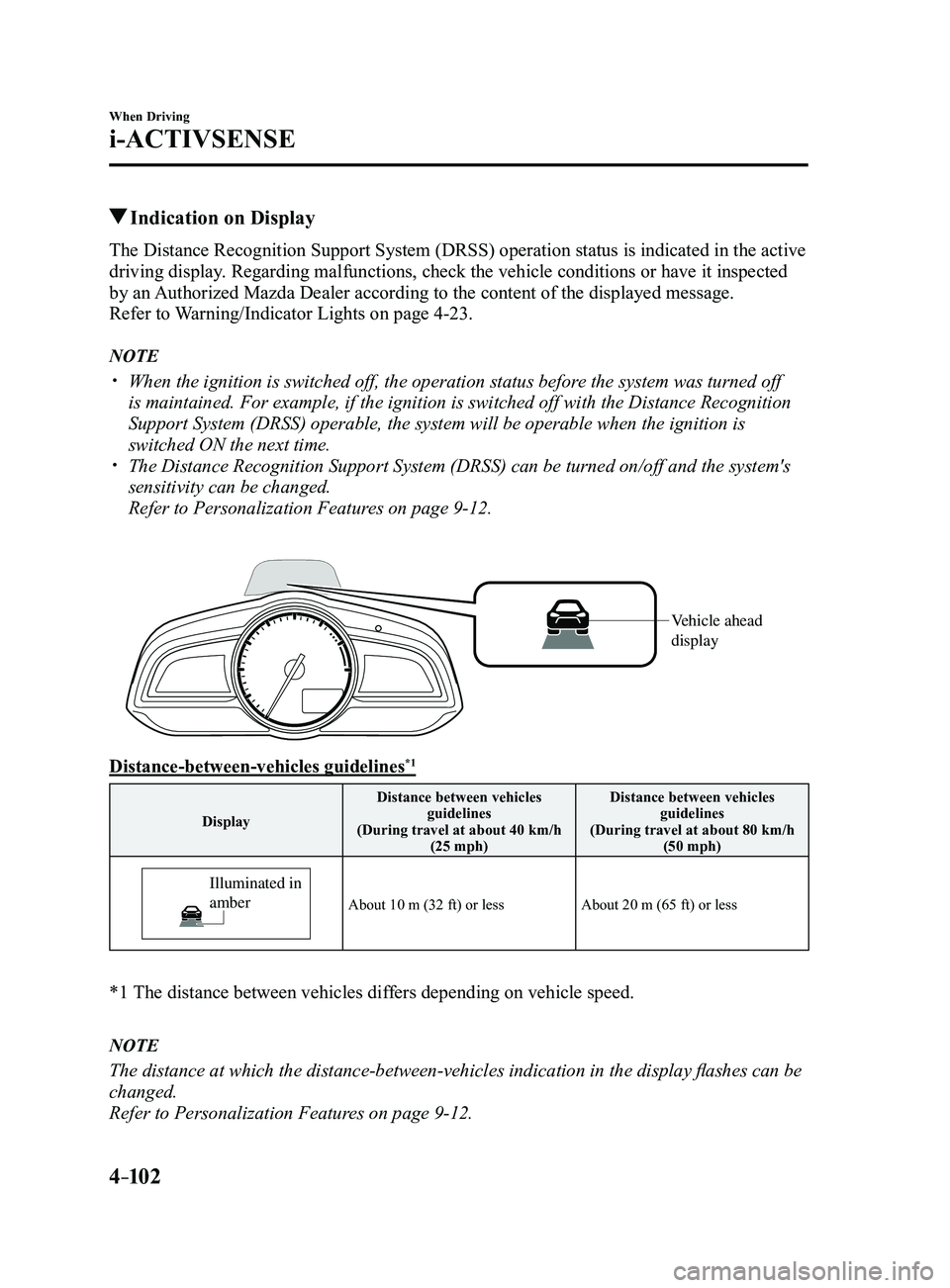
Indication on Display
The Distance Recognition Support System (DRSS) operation status is indicated in the active
driving display. Regarding malfunctions, check the vehicle conditions or have it inspected
by an Authorized Mazda Dealer according to the content of the displayed messag\
e.
Refer to Warning/Indicator Lights on page
4-23.
NOTE
When the ignition is switched off, the operation status before the system was turned off
is maintained. For example, if the ignition is switched off with the Dis\
tance Recognition
Support System (DRSS) operable, the system will be operable when the i\
gnition is
switched ON the next time.
The Distance Recognition Support System (DRSS) can be turned on/off an\
d the system's
sensitivity can be changed.
Refer to Personalization Features on page 9-12.
Vehicle ahead
display
Distance-between-vehicles guidelines*1
DisplayDistance between vehicles
guidelines
(During travel at about 40 km/h (25 mph) Distance between vehicles
guidelines
(During travel at about 80 km/h (50 mph)
Illuminated in
amber
About 10 m (32 ft) or lessAbout 20 m (65 ft) or less
*1 The distance between vehicles dif fers depending on vehicle speed.
NOTE
The distance at which the distance-between-vehicles indication in the display flashes can be
changed.
Refer to Personalization Features on page
9-12.
Mazda3_8FL6-EA-16F_Edition2.indb 1022016/08/10 17:36:44
Page 233 of 612
4–103
When Driving
i-ACTIVSENSE
*Some models.
Rear Cross Traffic Alert (RCTA)*
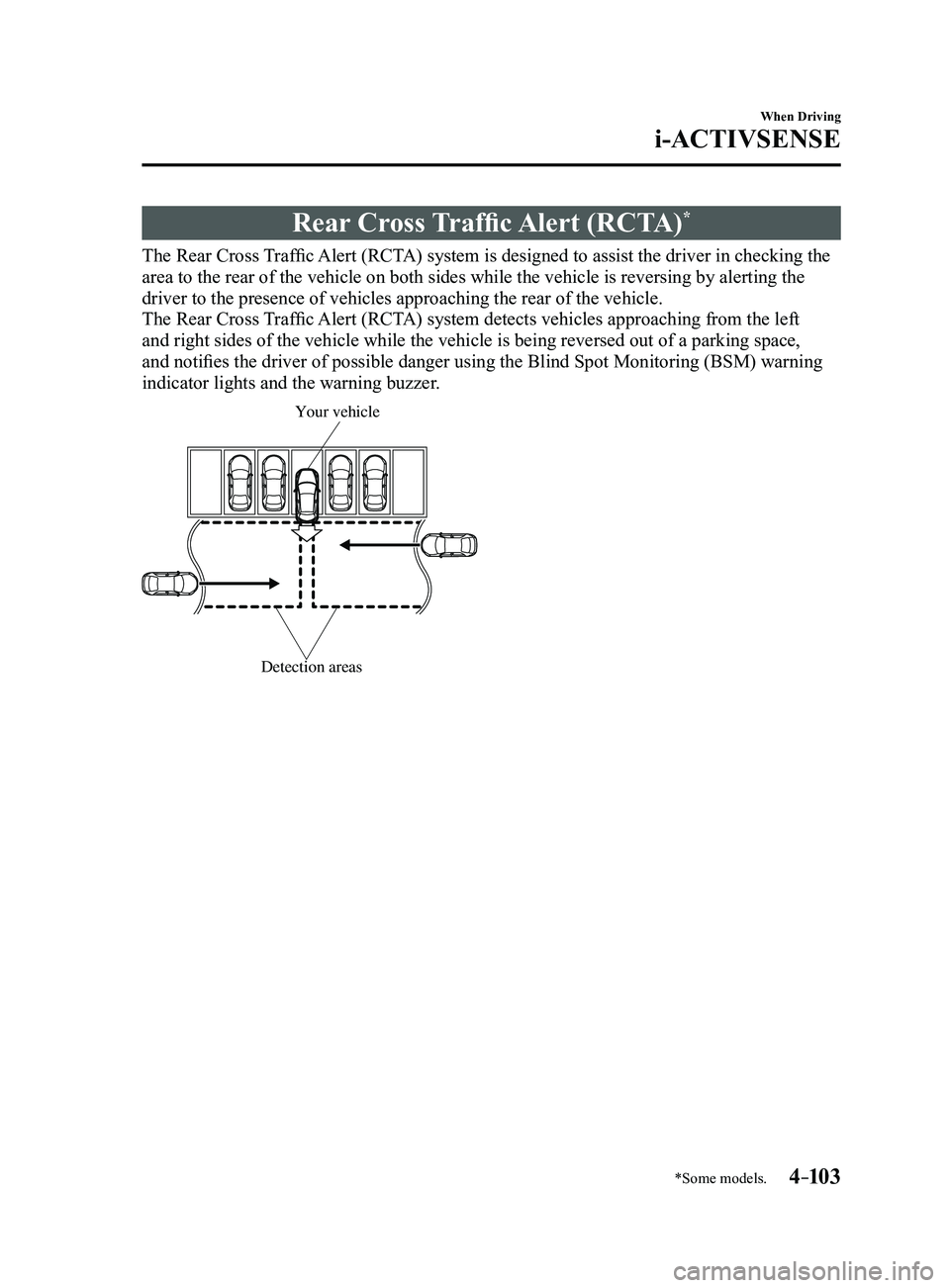
The Rear Cross Traffic Alert (RCTA) system is designed to assist the driver in checking the
area to the rear of the vehicle on both sides while the vehicle is rever\
sing by alerting the
driver to the presence of vehicles approaching the rear of the vehicle.
The Rear Cross Traffic Alert (RCTA) system detects vehicles approaching from the left
and right sides of the vehicle while the vehicle is being reversed out o\
f a parking space,
and notifies the driver of possible danger using the Blind Spot Monitoring (BSM) warning
indicator lights and the warning buzzer.
Detection areas
Your vehicle
Mazda3_8FL6-EA-16F_Edition2.indb 1032016/08/10 17:36:44
Page 234 of 612
4–104
When Driving
i-ACTIVSENSE
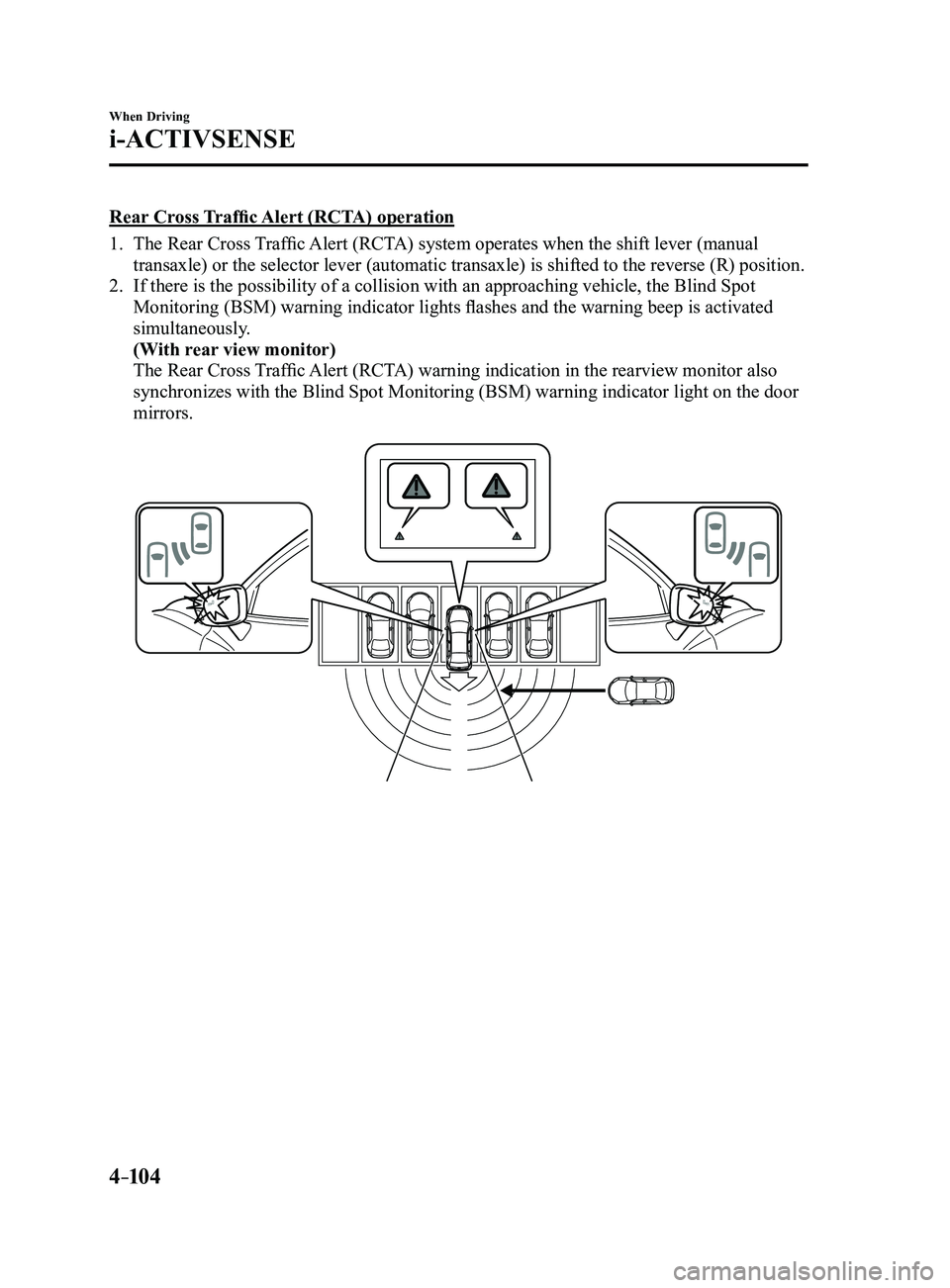
Rear Cross Traffic Alert (RCTA) operation
1. The Rear Cross Traffic Alert (RCTA) system operates when the shift lever (manual
transaxle) or the selector lever (automatic transaxle) is shifted to the reverse (R) position.
2. If there is the possibility of a collision with an approaching vehicle, the Blind Spot
Monitoring (BSM) warning indicator lights flashes and the warning beep is activated
simultaneously.
(With rear view monitor)
The Rear Cross Traffic Alert (RCTA) warning indication in the rearview monitor also
synchronizes with the Blind Spot Monitoring (BSM) warning indicator light on the door
mirrors.
Mazda3_8FL6-EA-16F_Edition2.indb 1042016/08/10 17:36:44
Page 235 of 612
4–105
When Driving
i-ACTIVSENSE
WARNING
Always check the surrounding area visually before actually putting the vehicle in
reverse:The system is only designed to assist you in checking for vehicles at the rear when putting
the vehicle in reverse. Due to certain limitations with the operation of this system, the
Blind Spot Monitoring (BSM) warning indicator lights may not flash or it might be delayed
even though a vehicle is behind your vehicle. Always make it your responsibility as a
driver to check the rear.
NOTE
In the following cases, the Blind Spot Monitoring (BSM) warning indica\
tion/warning
light turns on and operation of the system is stopped. If the Blind Spot\
Monitoring (BSM)
warning indication/warning light remains illuminated, have the vehicle inspected at an
Authorized Mazda Dealer as soon as possible.
Some problem with the system including the Blind Spot Monitoring (BSM) warnin\
g
indicator lights has occurred. A large deviation in the installation position of a radar sensor (rear) on the vehicle has
occurred. There is a large accumulation of snow or ice on the rear bumper near a radar sensor
(rear). Driving on snow-cover ed roads for long periods. The temperature near the radar sensors becomes extremely hot due to driving for long
periods on slopes during the summer. The battery voltage has decr eased.
Mazda3_8FL6-EA-16F_Edition2.indb 1052016/08/10 17:36:45
Page 236 of 612
4–106
When Driving
i-ACTIVSENSE
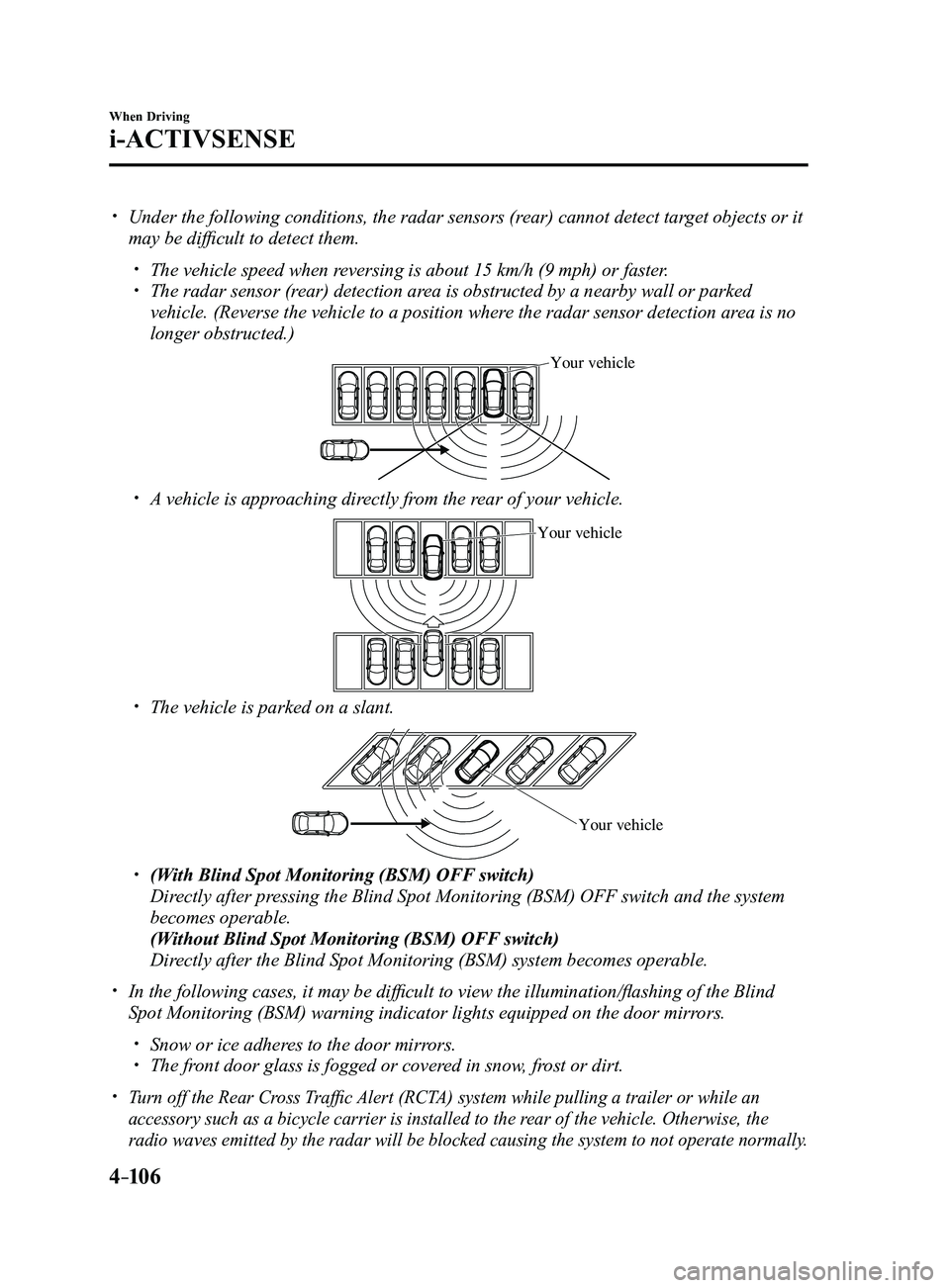
Under the following conditions, the radar sensors (rear) cannot detect target objects or it
may be difficult to detect them.
The vehicle speed when reversing is about 15 km/h (9 mph) or faster. The radar sensor (rear) detection area is obstructed by a nearby wall or parked
vehicle. (Reverse the vehicle to a position where the radar sensor detection area is no
longer obstructed.)
Your vehicle
A vehicle is approaching directly from the rear of your vehicle.
Your vehicle
The vehicle is parked on a slant.
Your vehicle
(With Blind Spot Monitoring (BSM) OFF switch)
Directly after pressing the Blind Spot Monitoring (BSM) OFF switch and the system
becomes operable.
(Without Blind Spot Monitoring (BSM) OFF switch)
Directly after the Blind Spot Monitoring (BSM) system becomes operable.
In the following cases, it may be difficult to view the illumina tion/flashing of the Blind
Spot Monitoring (BSM) warning indicator lights equipped on the door mi\
rrors.
Snow or ice adheres to the door mirrors. The front door glass is fogged or covered in snow, frost or dirt.
Turn off the Rear Cross Traffic Alert (RCTA) system while pulling a trailer or while an
accessory such as a bicycle carrier is installed to the rear of the vehicle. Otherwise, the
radio waves emitted by the radar will be blocked causing the system to n\
ot operate normally.
Mazda3_8FL6-EA-16F_Edition2.indb 1062016/08/10 17:36:45