warning MAZDA MODEL 3 5-DOOR 2017 Manual Online
[x] Cancel search | Manufacturer: MAZDA, Model Year: 2017, Model line: MODEL 3 5-DOOR, Model: MAZDA MODEL 3 5-DOOR 2017Pages: 612
Page 154 of 612
4–24
When Driving
Instrument Cluster and Display
*Some models.
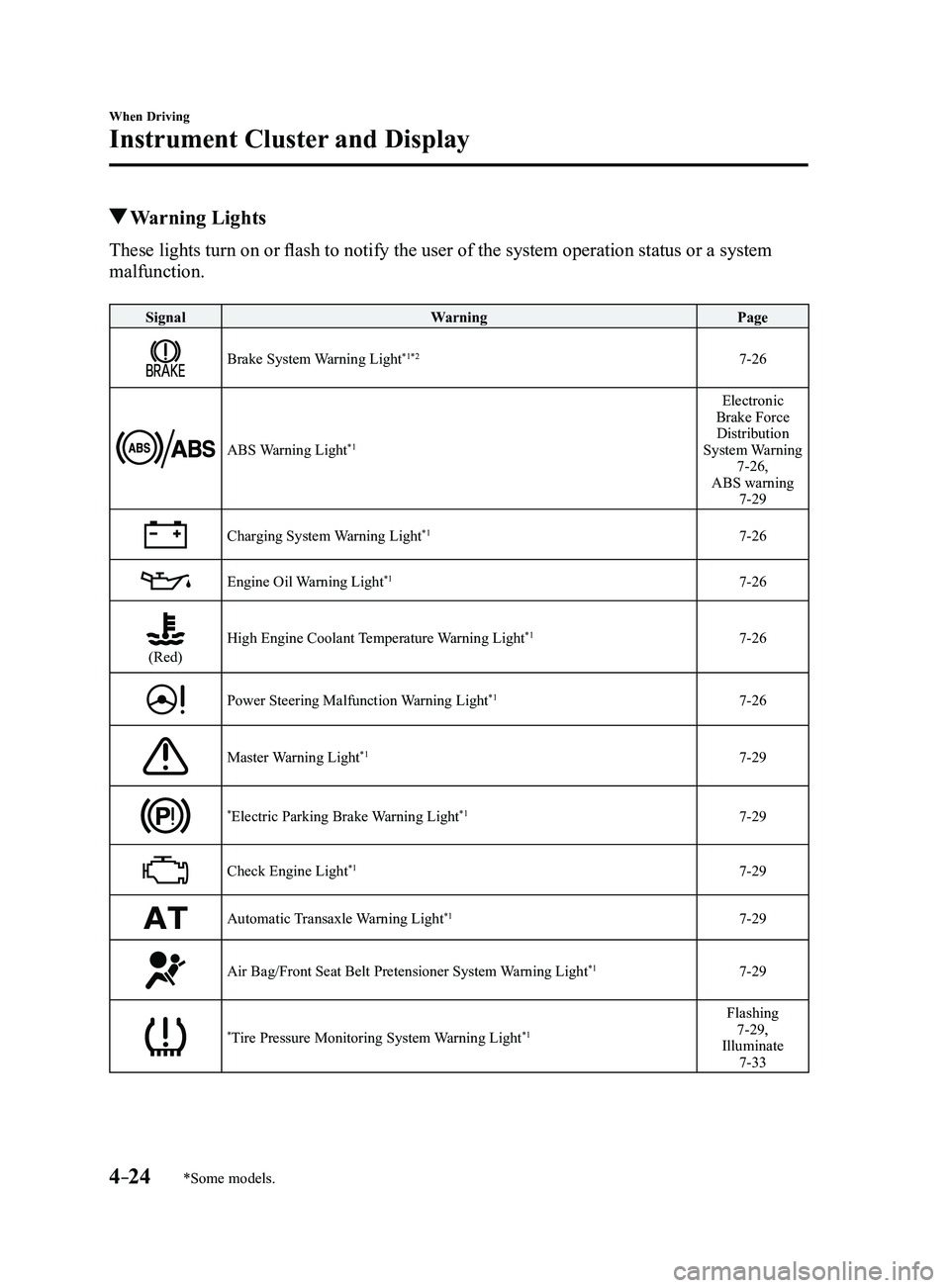
Warning Lights
These lights turn on or flash to notify the user of the system operation status or a system
malfunction.
SignalWarning Page
Brake System Warning Light*1*27-26
ABS Warning Light*1
Electronic
Brake Force Distribution
System Warning
7-26,
ABS warning
7-29
Charging System Warning Light*17-26
Engine Oil Warning Light*17-26
(Red)High Engine Coolant Temperature Warning Light*17-26
Power Steering Malfunction Warning Light*17-26
Master Warning Light*17-29
*Electric Parking Brake Warning Light*17-29
Check Engine Light*17-29
Automatic Transaxle Warning Light*17-29
Air Bag/Front Seat Belt Pretensioner System Warning Light*17-29
*Tire Pressure Monitoring System Warning Light*1
Flashing 7-29,
Illuminate
7-33
Mazda3_8FL6-EA-16F_Edition2.indb 242016/08/10 17:35:55
Page 155 of 612
4–25
When Driving
Instrument Cluster and Display
*Some models.
SignalWarning Page
(Red)
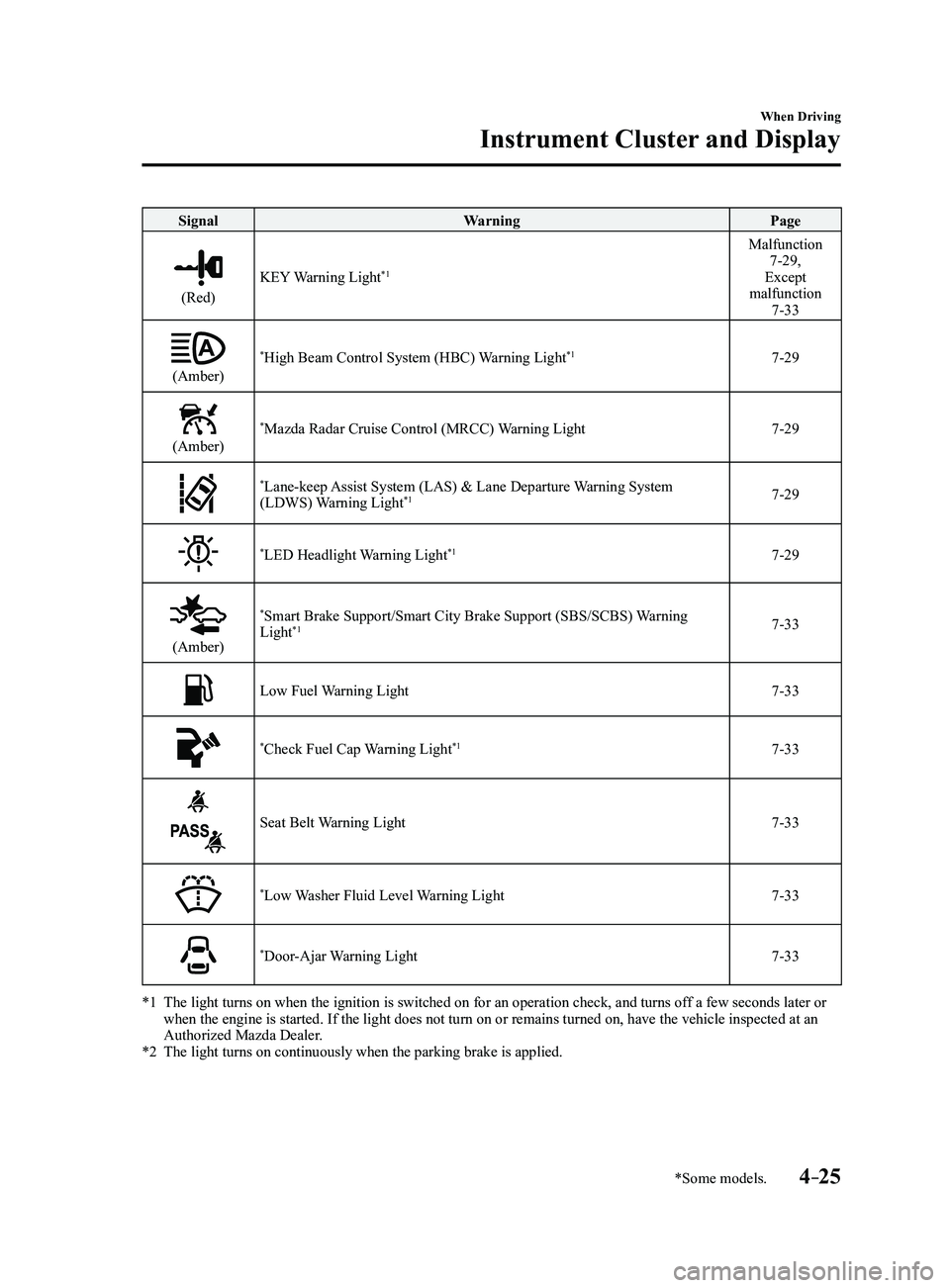
KEY Warning Light*1
Malfunction 7-29,
Except
malfunction
7-33
(Amber)
*High Beam Control System (HBC) Warning Light*17-29
(Amber)
*Mazda Radar Cruise Control (MRCC) Warning Light7-29
*Lane-keep Assist System (LAS) & Lane Departure Warning System
(LDWS) Warning Light*17-29
*LED Headlight Warning Light*17-29
(Amber)
*Smart Brake Support/Smart City Brake Support (SBS/SCBS) Warning
Light*17-33
Low Fuel Warning Light7-33
*Check Fuel Cap Warning Light*17-33
Seat Belt Warning Light7-33
*Low Washer Fluid Level Warning Light7-33
*Door-Ajar Warning Light7-33
*1 The light turns on when the ignition is switched on for an operation che\
ck, and turns of f a few seconds later or when the engine is started. If the light does not turn on or remains tur\
ned on, have the vehicle inspected at an
Authorized Mazda Dealer.
*2 The light turns on continuously when the parking brake is applied.
Mazda3_8FL6-EA-16F_Edition2.indb 252016/08/10 17:35:58
Page 156 of 612
4–26
When Driving
Instrument Cluster and Display
*Some models.
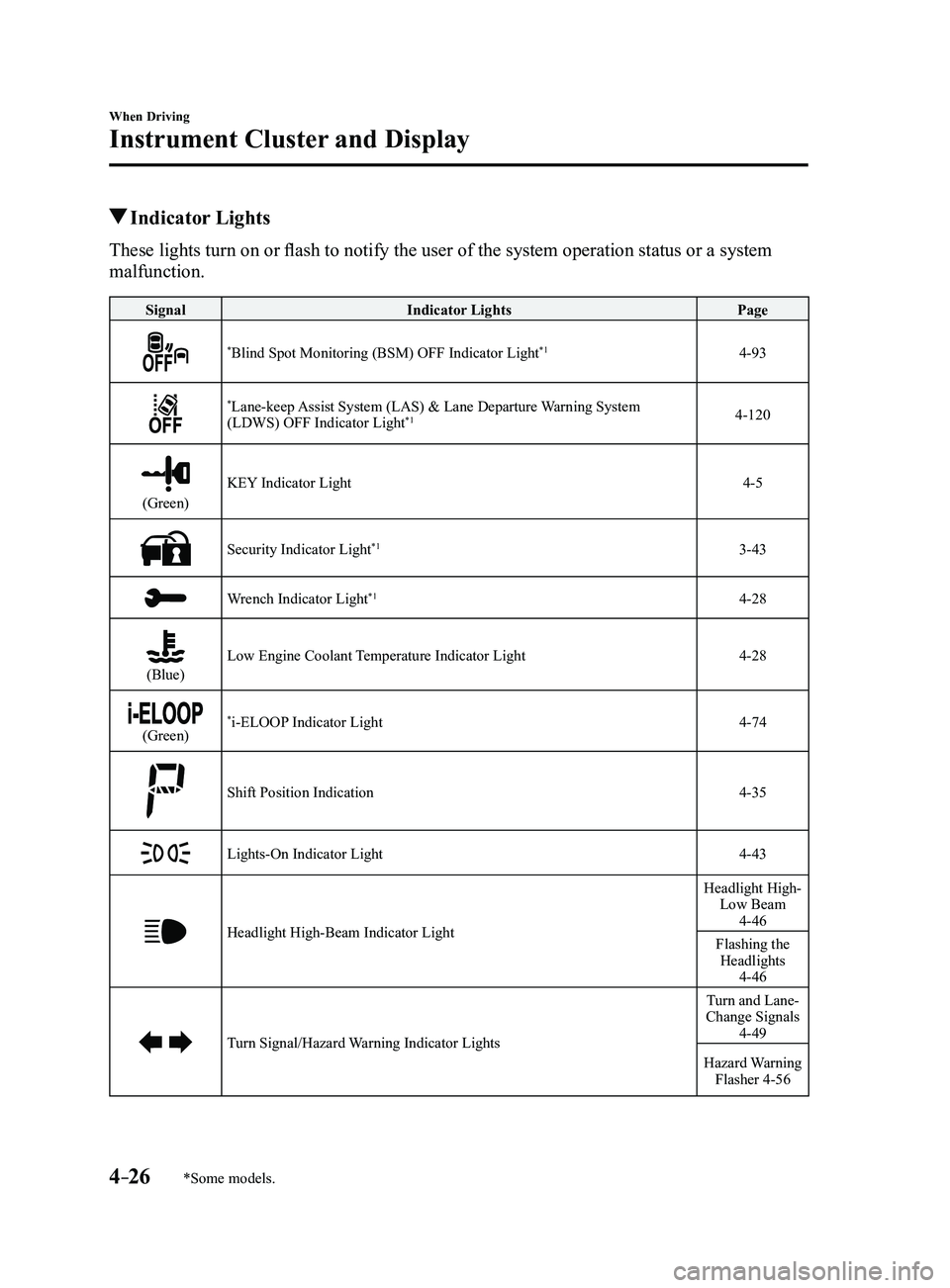
Indicator Lights
These lights turn on or flash to notify the user of the system operation status or a system
malfunction.
SignalIndicator Lights Page
*Blind Spot Monitoring (BSM) OFF Indicator Light*14-93
*Lane-keep Assist System (LAS) & Lane Departure Warning System
(LDWS) OFF Indicator Light*14-120
(Green)
KEY Indicator Light4-5
Security Indicator Light*13-43
Wrench Indicator Light*14-28
(Blue)Low Engine Coolant Temperature Indicator Light4-28
(Green)*i-ELOOP Indicator Light4-74
Shift Position Indication4-35
Lights-On Indicator Light4-43
Headlight High-Beam Indicator Light
Headlight High- Low Beam
4-46
Flashing the Headlights
4-46
Turn Signal/Hazard Warning Indicator Lights
Turn and Lane-
Change Signals
4-49
Hazard Warning Flasher 4-56
Mazda3_8FL6-EA-16F_Edition2.indb 262016/08/10 17:36:01
Page 159 of 612
4–29
When Driving
Manual Transaxle Operation
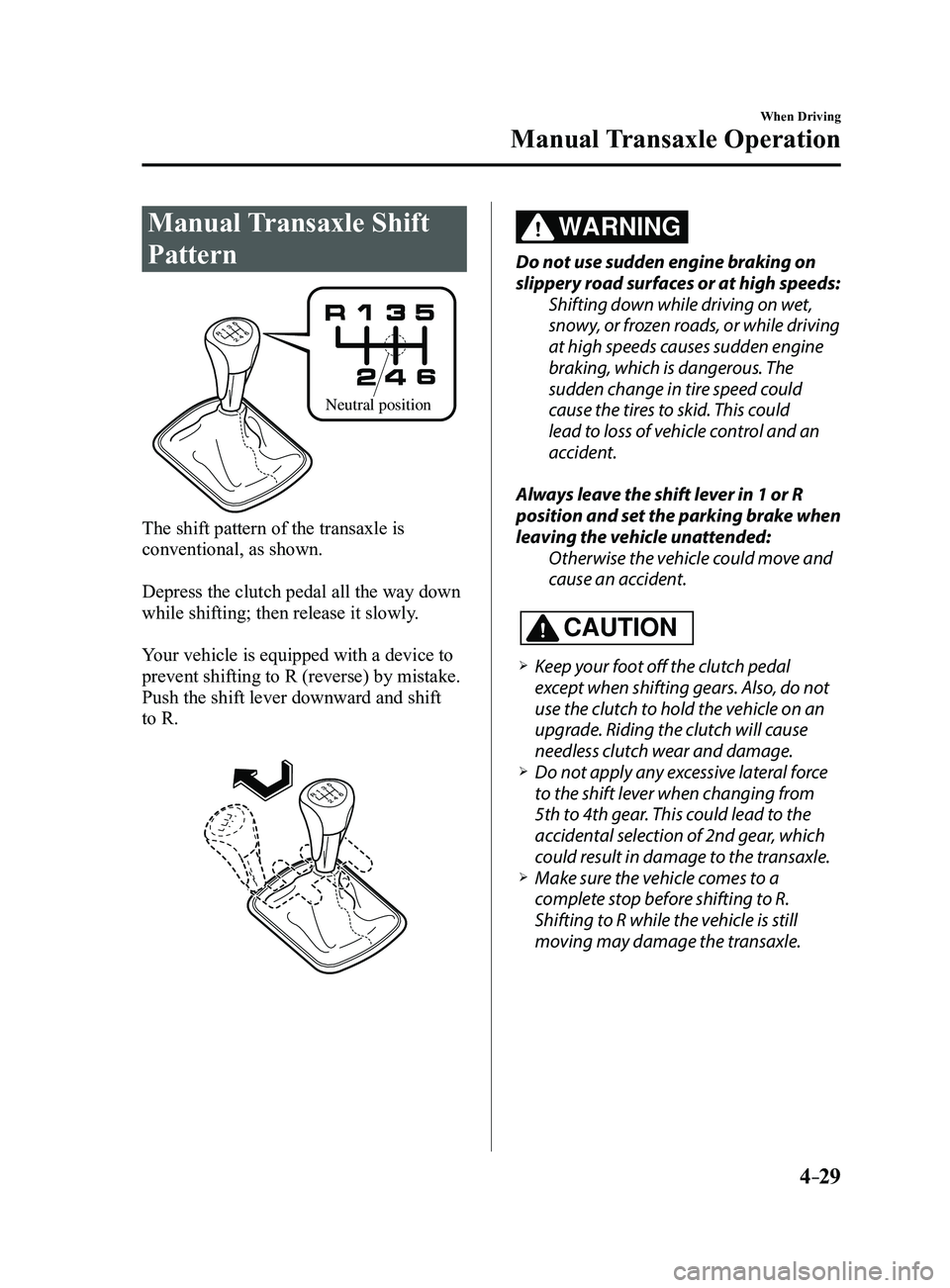
Manual Transaxle Shift
Pattern
Neutral position
The shift pattern of the transaxle is
conventional, as shown.
Depress the clutch pedal all the way down
while shifting; then release it slowly.
Your vehicle is equipped with a device to
prevent shifting to R (reverse) by mistake.
Push the shift lever downward and shift
to R.
WARNING
Do not use sudden engine braking on
slippery road surfaces or at high speeds:Shifting down while driving on wet,
snowy, or frozen roads, or while driving
at high speeds causes sudden engine
braking, which is dangerous. The
sudden change in tire speed could
cause the tires to skid. This could
lead to loss of vehicle control and an
accident.
Always leave the shift lever in 1 or R
position and set the parking brake when
leaving the vehicle unattended: Otherwise the vehicle could move and
cause an accident.
CAUTION
Keep your foot off the clutch pedal
except when shifting gears. Also, do not
use the clutch to hold the vehicle on an
upgrade. Riding the clutch will cause
needless clutch wear and damage.
Do not apply any excessive lateral force
to the shift lever when changing from
5th to 4th gear. This could lead to the
accidental selection of 2nd gear, which
could result in damage to the transaxle.
Make sure the vehicle comes to a
complete stop before shifting to R.
Shifting to R while the vehicle is still
moving may damage the transaxle.
Mazda3_8FL6-EA-16F_Edition2.indb 292016/08/10 17:36:06
Page 164 of 612
4–34
When Driving
Automatic Transaxle
Transaxle Ranges
The shift position indicator light in the
instrument cluster illuminates. Refer
to Warning/Indicator Lights on page
4-23. The selector lever must be in P or N to
operate the starter.
P (Park)
P locks the transaxle and prevents the front
wheels from rotating.
WARNING
Always set the selector lever to P and set
the parking brake: Only setting the selector lever to the
P position without using the parking
brake to hold the vehicle is dangerous.
If P fails to hold, the vehicle could move
and cause an accident.
CAUTION
Shifting into P, N or R while the vehicle is
moving can damage your transaxle. Shifting into a driving gear or reverse
when the engine is running faster than
idle can damage the transaxle.
R (Reverse)
In position R, the vehicle moves only
backward. You must be at a complete
stop before shifting to or from R, except
under rare circumstances as explained in
Rocking the Vehicle (page
3-48).
N (Neutral)
In N, the wheels and transaxle are not
locked. The vehicle will roll freely even
on the slightest incline unless the parking
brake or brakes are on.
WARNING
If the engine is running faster than idle,
do not shift from N or P into a driving
gear: It's dangerous to shift from N or P
into a driving gear when the engine
is running faster than idle. If this is
done, the vehicle could move suddenly,
causing an accident or serious injury.
Do not shift into N when driving the
vehicle: Shifting into N while driving is
dangerous. Engine braking cannot
be applied when decelerating which
could lead to an accident or serious
injury.
CAUTION
Do not shift into N when driving the
vehicle. Doing so can cause transaxle
damage.
NOTE
Apply the parking brake or depress the
brake pedal before moving the selector
lever from N to prevent the vehicle from
moving unexpectedly.
D (Drive)
D is the normal driving position. From a
stop, the transaxle will automatically shift
through a 6-gear sequence.
M (Manual)
M is the manual shift mode position. Gears
can be shifted up or down by operating the
selector lever. Refer to Manual Shift Mode
on page
4-35.
Mazda3_8FL6-EA-16F_Edition2.indb 342016/08/10 17:36:08
Page 167 of 612
4–37
When Driving
Automatic Transaxle
*Some models.
Manually Shifting Up
You can shift gears up by operating
the selector lever or the steering shift
switches
*.
M1 → M2 → M3 → M4 → M5 → M6
Using selector lever
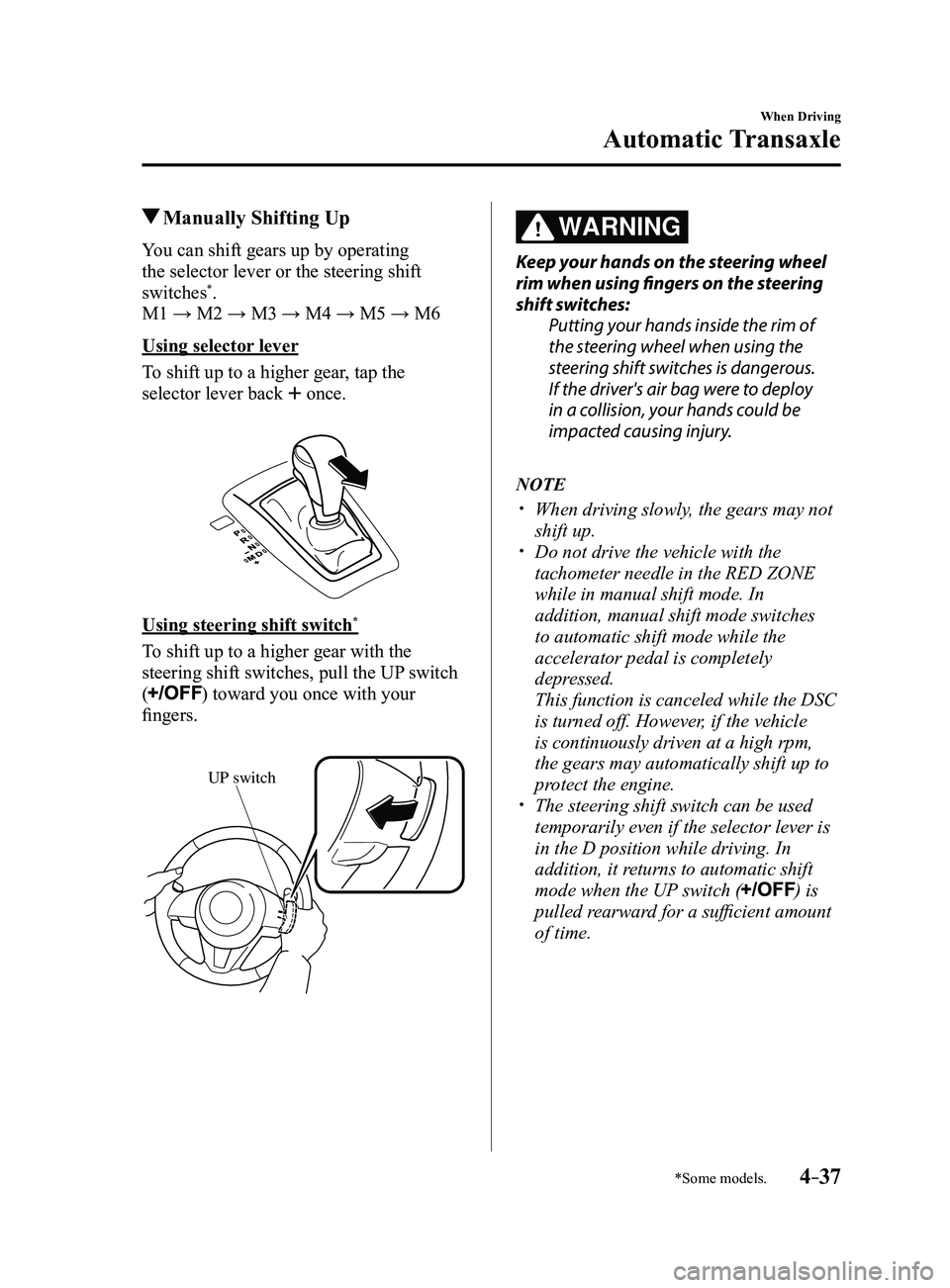
To shift up to a higher gear, tap the
selector lever back
once.
Using steering shift switch*
To shift up to a higher gear with the
steering shift switches, pull the UP switch
(
) toward you once with your
fingers.
UP switch
WARNING
Keep your hands on the steering wheel
rim when using fingers on the steering
shift switches: Putting your hands inside the rim of
the steering wheel when using the
steering shift switches is dangerous.
If the driver's air bag were to deploy
in a collision, your hands could be
impacted causing injury.
NOTE
When driving slowly , the gears may not
shift up. Do not drive the vehicle with the
tachometer needle in the RED ZONE
while in manual shift mode. In
addition, manual shift mode switches
to automatic shift mode while the
accelerator pedal is completely
depressed.
This function is canceled while the DSC
is turned off. However, if the vehicle
is continuously driven at a high rpm,
the gears may automatically shift up to
protect the engine.
The steering shift switch can be used
temporarily even if the selector lever is
in the D position while driving. In
addition, it returns to automatic shift
mode when the UP switch (
) is
pulled rearward for a sufficient amount
of time.
Mazda3_8FL6-EA-16F_Edition2.indb 372016/08/10 17:36:11
Page 168 of 612
4–38
When Driving
Automatic Transaxle
*Some models.
Manually Shifting Down
You can shift gears down by operating
the selector lever or the steering shift
switches
*.
M6 → M5 → M4 → M3 → M2→ M1
Using selector lever
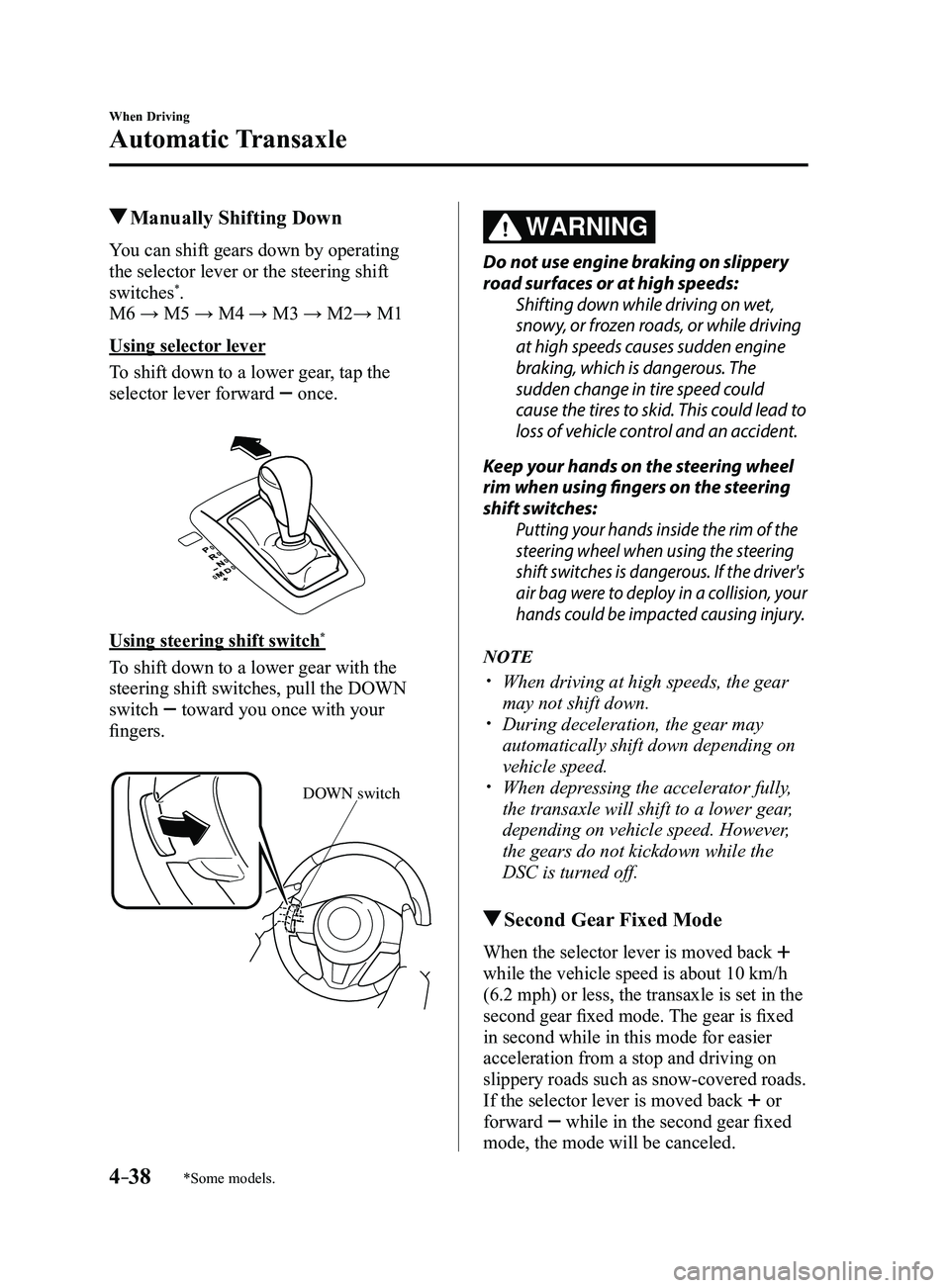
To shift down to a lower gear, tap the
selector lever forward
once.
Using steering shift switch*
To shift down to a lower gear with the
steering shift switches, pull the DOWN
switch
toward you once with your
fingers.
DOWN switch
WARNING
Do not use engine braking on slippery
road surfaces or at high speeds:
Shifting down while driving on wet,
snowy, or frozen roads, or while driving
at high speeds causes sudden engine
braking, which is dangerous. The
sudden change in tire speed could
cause the tires to skid. This could lead to
loss of vehicle control and an accident.
Keep your hands on the steering wheel
rim when using fingers on the steering
shift switches:
Putting your hands inside the rim of the
steering wheel when using the steering
shift switches is dangerous. If the driver's
air bag were to deploy in a collision, your
hands could be impacted causing injury.
NOTE
When driving at high speeds, the gear
may not shift down. During deceleration, the gear may
automatically shift down depending on
vehicle speed.
When depressing the accelerator fully,
the transaxle will shift to a lower gear,
depending on vehicle speed. However,
the gears do not kickdown while the
DSC is turned off.
Second Gear Fixed Mode
When the selector lever is moved back
while the vehicle speed is about 10 km/h
(6.2 mph) or less, the transaxle is set in the
second gear fixed mode. The gear is fixed
in second while in this mode for easier
acceleration from a stop and driving on
slippery roads such as snow-covered roads.
If the selector lever is moved back or
forward
while in the second gear fixed
mode, the mode will be canceled.
Mazda3_8FL6-EA-16F_Edition2.indb 382016/08/10 17:36:12
Page 172 of 612
4–42
When Driving
Automatic Transaxle
Driving Tips
WARNING
Do not let the vehicle move in a
direction opposite to the direction
selected by the selector lever:Do not let the vehicle move backward
with the selector lever in a forward
position, or do not let the vehicle
move forward with the selector lever
in the reverse position. Otherwise, the
engine may stop, causing the loss of
the power brake and power steering
functions, and make it difficult to
control the vehicle which could result
in an accident.
Passing
For extra power when passing another
vehicle or climbing steep grades, depress
the accelerator fully. The transaxle will
shift to a lower gear, depending on vehicle
speed.
NOTE
(Some models)
The accelerator pedal may initially feel
heavy as it is being depressed, then feel
lighter as it is depressed further. This
change in pedal force aids the engine
control system in determining how
much the accelerator pedal has been
depressed for performing kickdown,
and functions to control whether or not
kickdown should be performed.
While the selector lever is in the M
position and the DSC is turned off,
manual shift mode does not switch
to automatic shift mode even if the
accelerator pedal is completely
depressed. Operate the selector lever.
Climbing steep grades from a stop
To climb a steep grade from a stopped
position:
1. Depress the brake pedal.
2. Shift to D or M1, depending on the
load weight and grade steepness.
3. Release the brake pedal while gradually
accelerating.
Descending steep grades
When descending a steep grade, shift to
lower gears, depending on load weight and
grade steepness. Descend slowly, using the
brakes only occasionally to prevent them
from overheating.
Mazda3_8FL6-EA-16F_Edition2.indb 422016/08/10 17:36:13
Page 180 of 612
4–50
When Driving
Switches and Controls
Windshield Wipers and
Washer
The ignition must be switched ON to use
the wipers.
WARNING
Use only windshield washer fluid or
plain water in the reservoir:Using radiator antifreeze as washer
fluid is dangerous. If sprayed on the
windshield, it will dirty the windshield,
affect your visibility, and could result in
an accident.
Only use windshield washer fluid mixed
with anti-freeze protection in freezing
weather conditions: Using windshield washer fluid without
anti-freeze protection in freezing
weather conditions is dangerous as
it could freeze on the windshield and
block your vision which could cause
an accident. In addition, make sure
the windshield is sufficiently warmed
using the defroster before spraying the
washer fluid.
NOTE
If the windshield wipers are operated
under cold weather conditions or
during snowfall, they could stop due to
accumulated snow on the windshield. If the
windshield wipers stop due to accumulated
snow on the windshield, park the vehicle in
a safe place, turn the wiper switch off, and
then remove the accumulated snow. If the
wiper switch is turned to another position
other than OFF, the wipers will operate. If
the wipers do not operate even though the
wiper switch is turned to a position other
than OFF, consult an Authorized Mazda
Dealer as soon as possible.
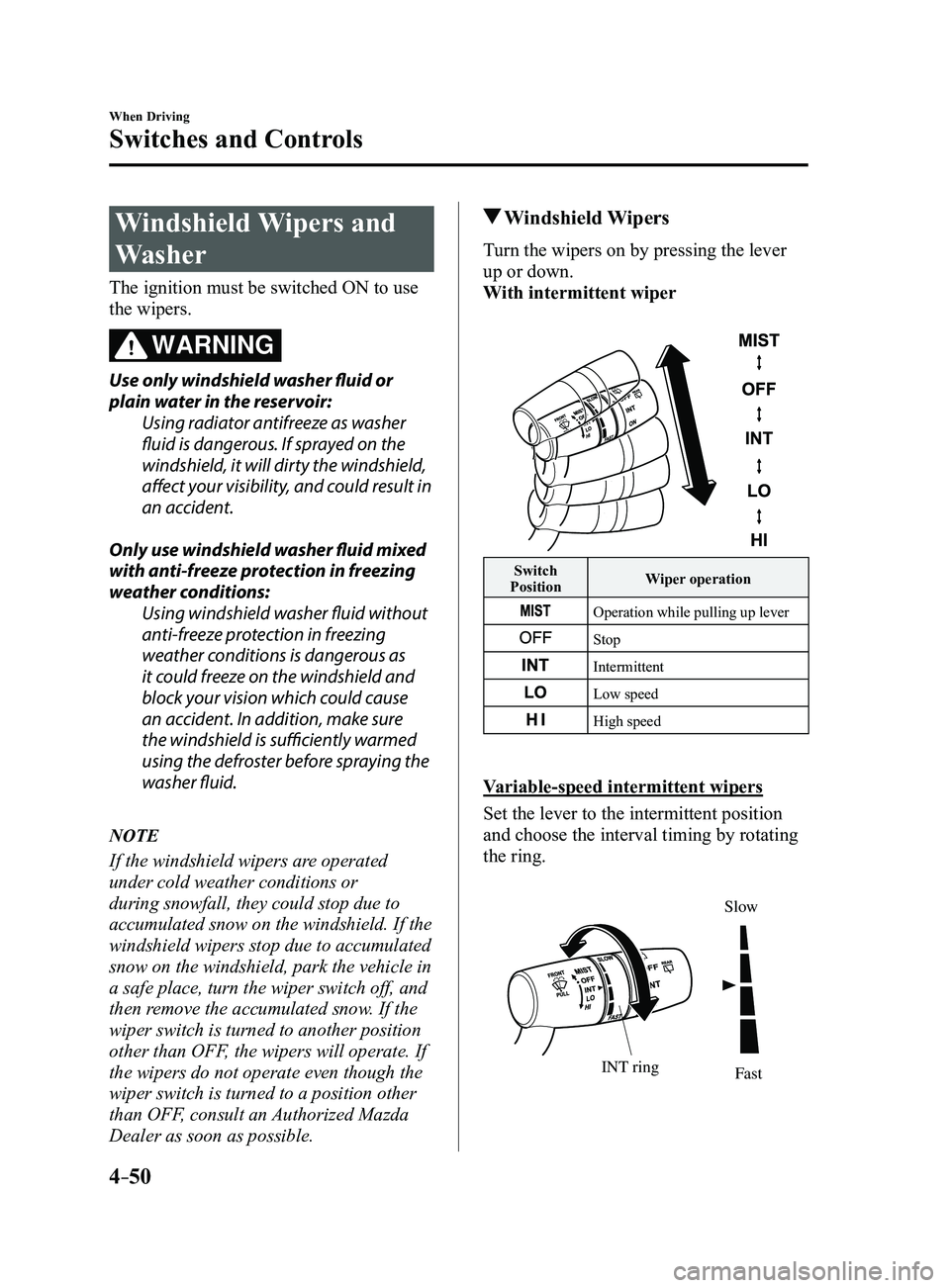
Windshield Wipers
Turn the wipers on by pressing the lever
up or down.
With intermittent wiper
Switch
Position Wiper operation
Operation while pulling up lever
Stop
Intermittent
Low speed
High speed
Variable-speed intermittent wipers
Set the lever to the intermittent position
and choose the interval timing by rotating
the ring.
INT ringFast
Slow
Mazda3_8FL6-EA-16F_Edition2.indb 502016/08/10 17:36:20
Page 186 of 612
4–56
When Driving
Switches and Controls
Horn
To sound the horn, press the mark on
the steering wheel.
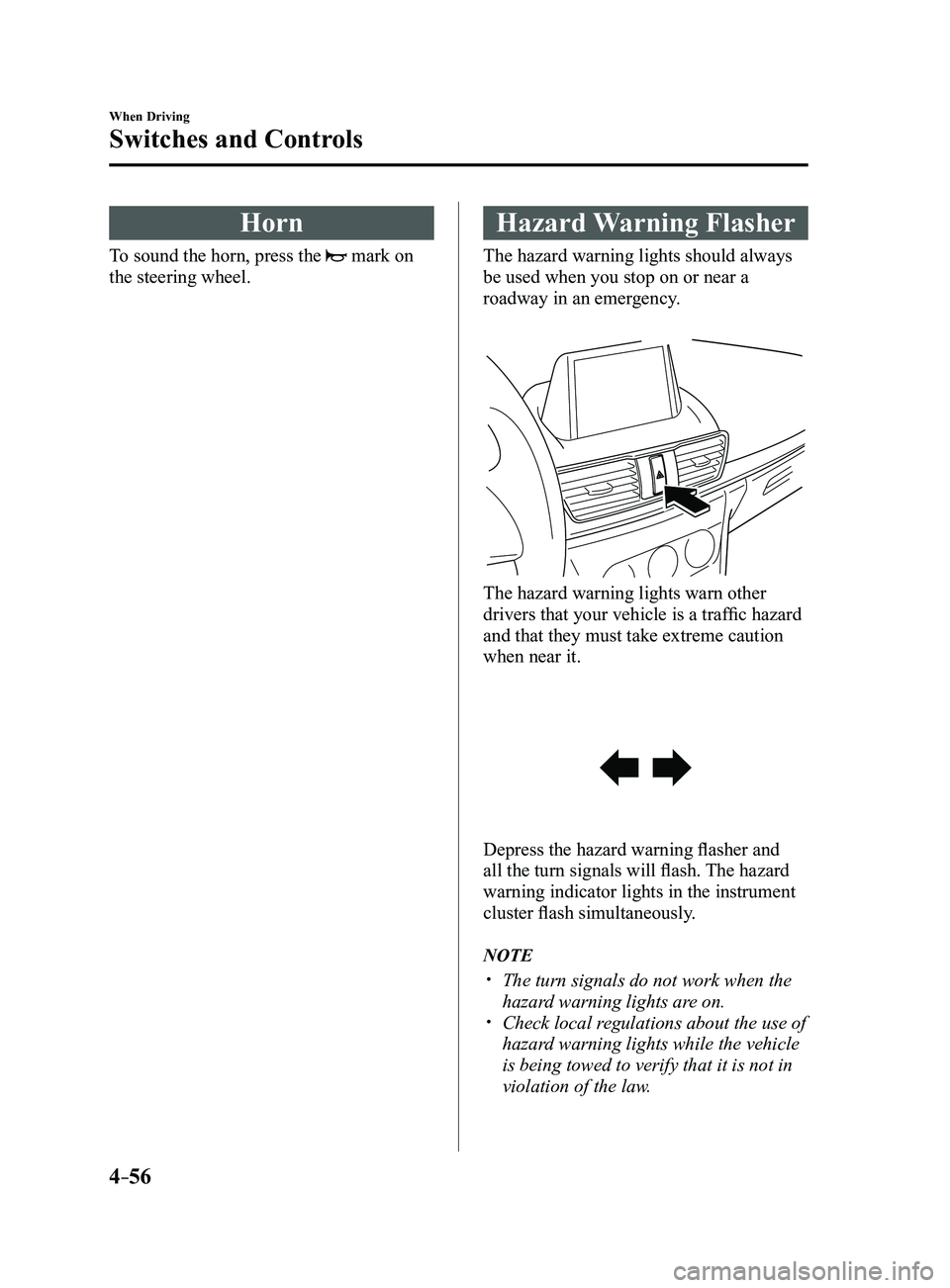
Hazard Warning Flasher
The hazard warning lights should always
be used when you stop on or near a
roadway in an emergency.
The hazard warning lights warn other
drivers that your vehicle is a traffic hazard
and that they must take extreme caution
when near it.
Depress the hazard warning flasher and
all the turn signals will flash. The hazard
warning indicator lights in the instrument
cluster flash simultaneously.
NOTE
The turn signals do not work when the
hazard warning lights are on. Check local regulations about the use of
hazard warning lights while the vehicle
is being towed to verify that it is not in
violation of the law.
Mazda3_8FL6-EA-16F_Edition2.indb 562016/08/10 17:36:24