low MAZDA MODEL 3 HATCHBACK 2006 Owner's Manual (in English)
[x] Cancel search | Manufacturer: MAZDA, Model Year: 2006, Model line: MODEL 3 HATCHBACK, Model: MAZDA MODEL 3 HATCHBACK 2006Pages: 372, PDF Size: 5.55 MB
Page 184 of 372
Black plate (184,1)
NOTE
lThe displayed ambient temperature
may vary from the actual ambient
temperature depending on the
surrounding area and vehicle
conditions.
lPress the AMB button again to
switch the display from ambient
temperature to the temperature set
for the air conditioner.
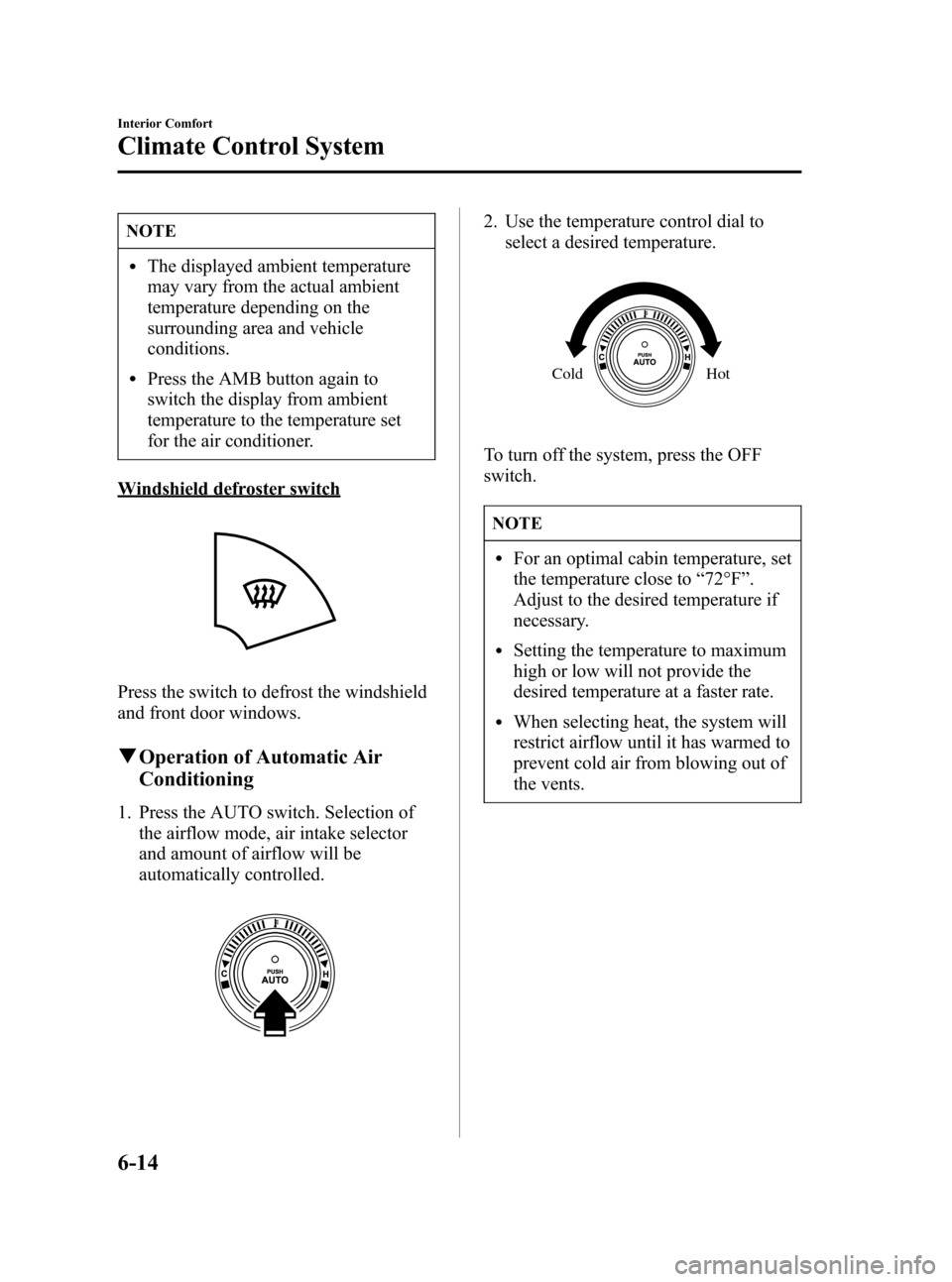
Windshield defroster switch
Press the switch to defrost the windshield
and front door windows.
qOperation of Automatic Air
Conditioning
1. Press the AUTO switch. Selection of
the airflow mode, air intake selector
and amount of airflow will be
automatically controlled.
2. Use the temperature control dial to
select a desired temperature.
Hot Cold
To turn off the system, press the OFF
switch.
NOTE
lFor an optimal cabin temperature, set
the temperature close to“72°F”.
Adjust to the desired temperature if
necessary.
lSetting the temperature to maximum
high or low will not provide the
desired temperature at a faster rate.
lWhen selecting heat, the system will
restrict airflow until it has warmed to
prevent cold air from blowing out of
the vents.
6-14
Interior Comfort
Climate Control System
Mazda3_8U55-EA-05G_Edition2 Page184
Thursday, June 23 2005 2:54 PM
Form No.8U55-EA-05G
Page 185 of 372
Black plate (185,1)
qWindshield Defrosting and Defogging
Press the windshield defroster switch.
In this position, the
position is
automatically selected, and the air
conditioner automatically turned on. The
air conditioner will direct dehumidified air
to the front windshield and side windows
(page 6-4). Airflow amount will be
increased.
WARNING
Foggy Windshield:
Using the
position with the
temperature control set to the cold
position will cause the outside of the
windshield to fog up. Your vision will
be hampered, which could lead to a
serious accident. Set the temperature
control to hot or warm position when
using the
position.
NOTE
Use the temperature control dial to
increase the air flow temperature and
defog the windshield more quickly.
qSunlight/Temperature Sensor
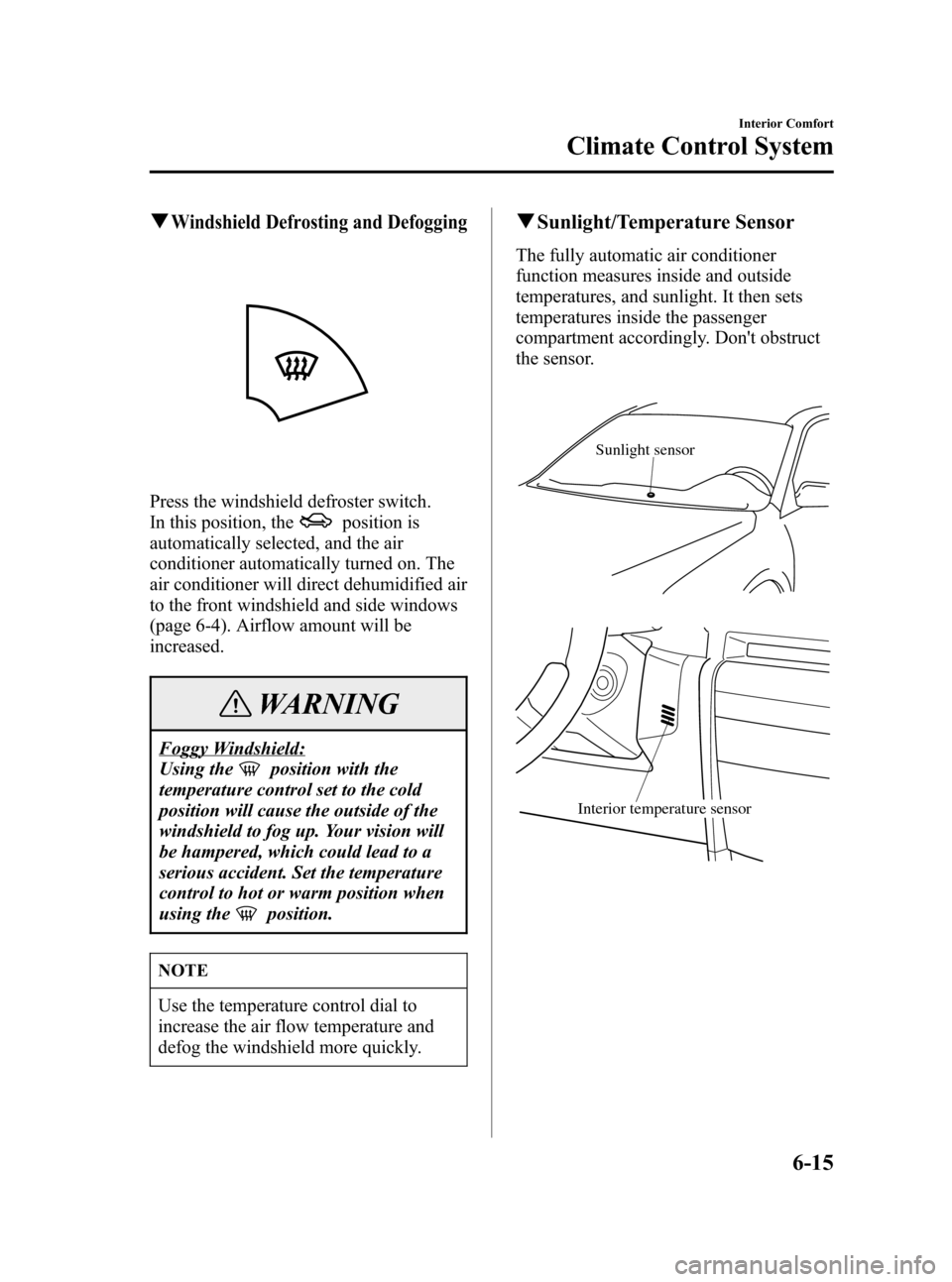
The fully automatic air conditioner
function measures inside and outside
temperatures, and sunlight. It then sets
temperatures inside the passenger
compartment accordingly. Don't obstruct
the sensor.
Sunlight sensor
Interior temperature sensor
Interior Comfort
Climate Control System
6-15
Mazda3_8U55-EA-05G_Edition2 Page185
Thursday, June 23 2005 2:54 PM
Form No.8U55-EA-05G
Page 186 of 372
Black plate (186,1)
Antenna
qDetachable Type
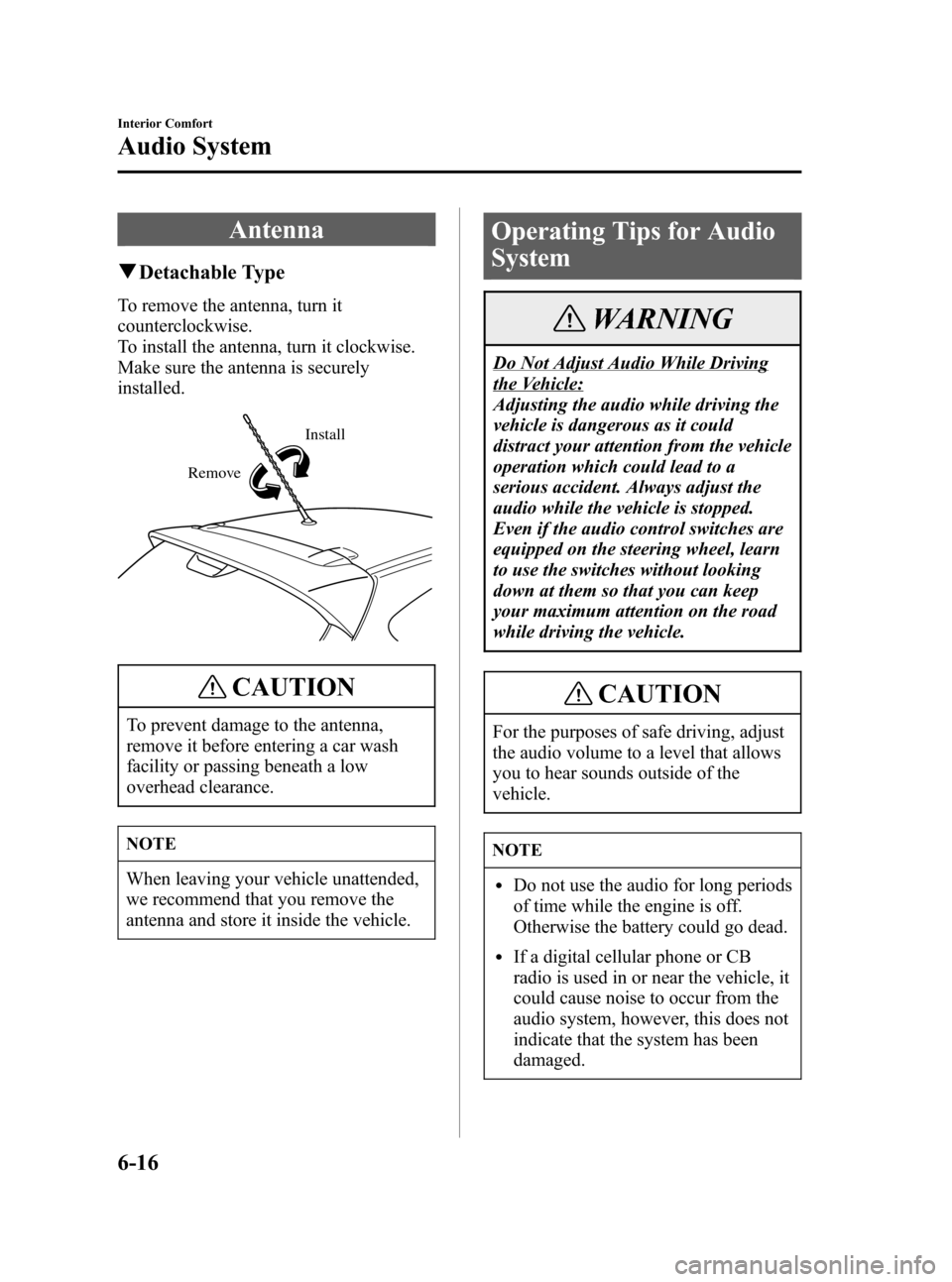
To remove the antenna, turn it
counterclockwise.
To install the antenna, turn it clockwise.
Make sure the antenna is securely
installed.
RemoveInstall
CAUTION
To prevent damage to the antenna,
remove it before entering a car wash
facility or passing beneath a low
overhead clearance.
NOTE
When leaving your vehicle unattended,
we recommend that you remove the
antenna and store it inside the vehicle.
Operating Tips for Audio
System
WARNING
Do Not Adjust Audio While Driving
the Vehicle:
Adjusting the audio while driving the
vehicle is dangerous as it could
distract your attention from the vehicle
operation which could lead to a
serious accident. Always adjust the
audio while the vehicle is stopped.
Even if the audio control switches are
equipped on the steering wheel, learn
to use the switches without looking
down at them so that you can keep
your maximum attention on the road
while driving the vehicle.
CAUTION
For the purposes of safe driving, adjust
the audio volume to a level that allows
you to hear sounds outside of the
vehicle.
NOTE
lDo not use the audio for long periods
of time while the engine is off.
Otherwise the battery could go dead.
lIf a digital cellular phone or CB
radio is used in or near the vehicle, it
could cause noise to occur from the
audio system, however, this does not
indicate that the system has been
damaged.
6-16
Interior Comfort
Audio System
Mazda3_8U55-EA-05G_Edition2 Page186
Thursday, June 23 2005 2:54 PM
Form No.8U55-EA-05G
Page 189 of 372
Black plate (189,1)
qOperating Tips for Cassette Tape
Player
Cleaning the cassette tape player
The tape head, capstans, and pinch rollers
will gather oxide residue from cassette
tapes. This can cause weak or wavering
sounds and damage to the cassette tapes
and player. Use a good quality head-
cleaning tape or a liquid cleaner cassette
tape to remove it.
Should the unit not operate normally,
consult an Authorized Mazda Dealer.
Never attempt to repair it or insert a
screwdriver or anything else.
Handling the cassette tape player
The following precautions should be
observed.
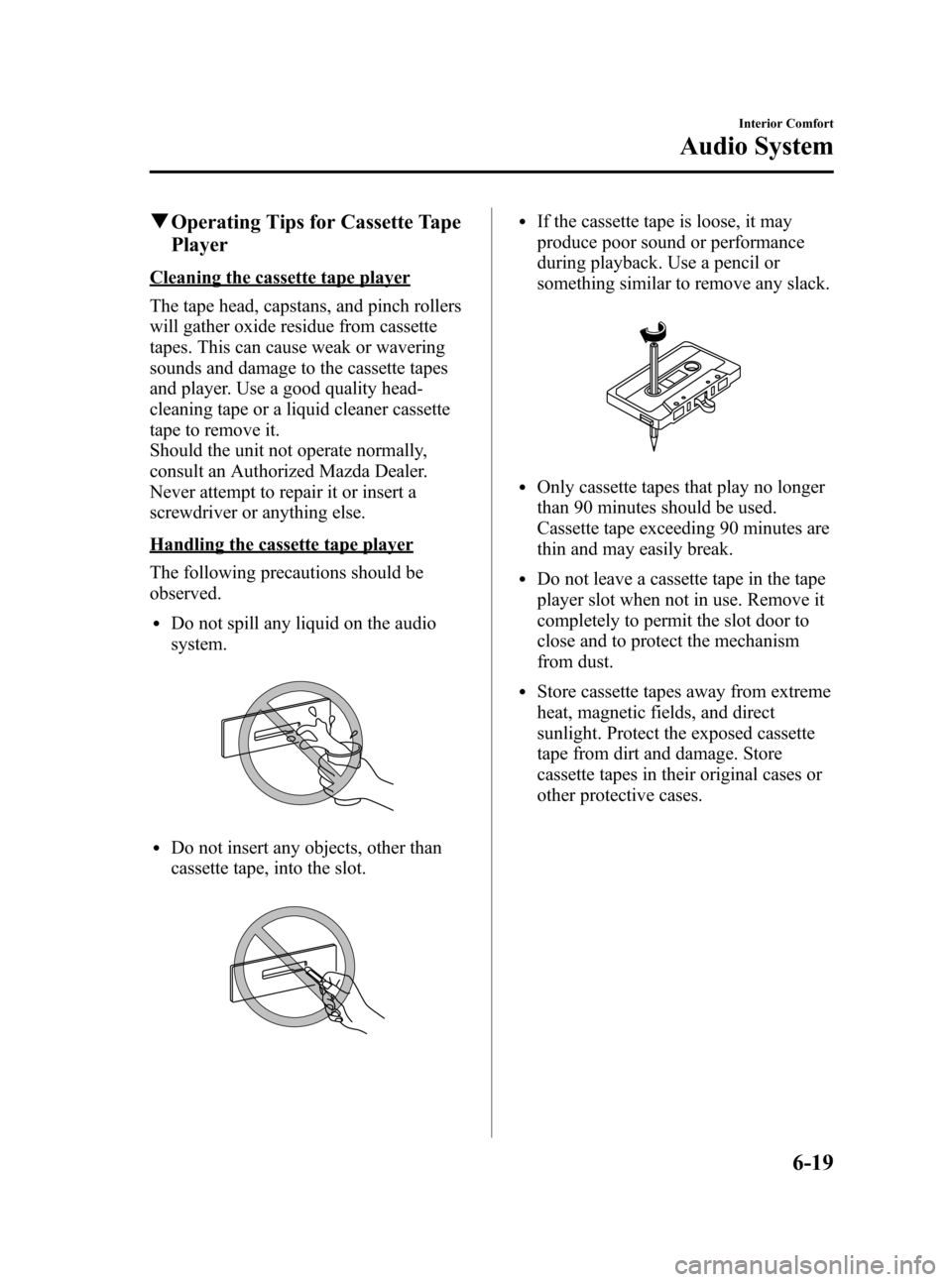
lDo not spill any liquid on the audio
system.
lDo not insert any objects, other than
cassette tape, into the slot.
lIf the cassette tape is loose, it may
produce poor sound or performance
during playback. Use a pencil or
something similar to remove any slack.
lOnly cassette tapes that play no longer
than 90 minutes should be used.
Cassette tape exceeding 90 minutes are
thin and may easily break.
lDo not leave a cassette tape in the tape
player slot when not in use. Remove it
completely to permit the slot door to
close and to protect the mechanism
from dust.
lStore cassette tapes away from extreme
heat, magnetic fields, and direct
sunlight. Protect the exposed cassette
tape from dirt and damage. Store
cassette tapes in their original cases or
other protective cases.
Interior Comfort
Audio System
6-19
Mazda3_8U55-EA-05G_Edition2 Page189
Thursday, June 23 2005 2:54 PM
Form No.8U55-EA-05G
Page 190 of 372
Black plate (190,1)
qOperating Tips for CD Player/In-
Dash CD Changer
Condensation phenomenon
Immediately after turning on the heater
when the vehicle is cold, the CD or
optical components (prism and lens) in the
CD player/changer may become clouded
with condensation. At this time, the CD
will eject immediately when placed in the
unit. A clouded CD can be corrected
simply by wiping it with a soft cloth.
Clouded optical components will clear
naturally in about an hour. Wait for
normal operation to return before
attempting to use the unit.
Handling the CD player/In-dash CD
changer
The following precautions should be
observed.
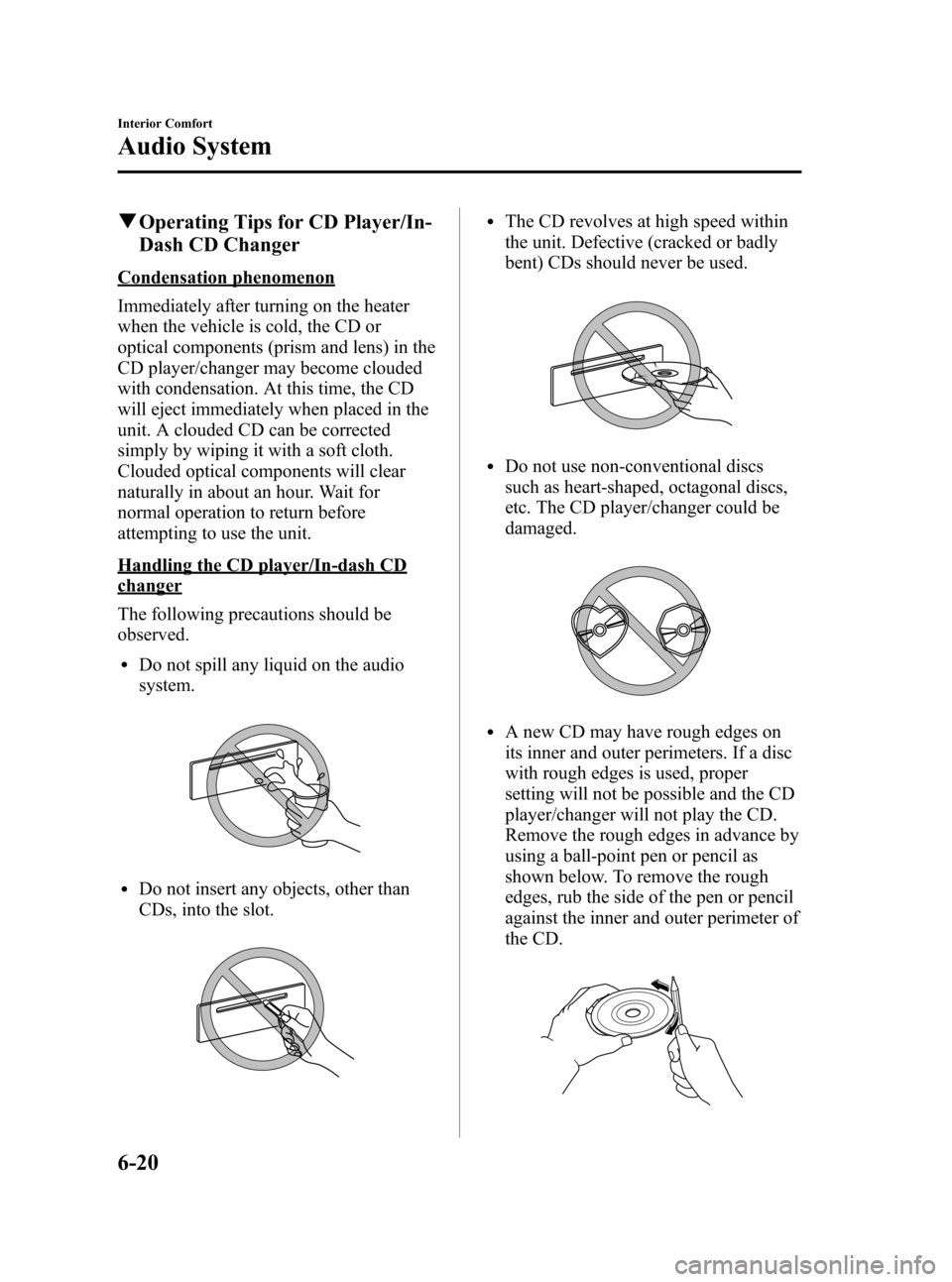
lDo not spill any liquid on the audio
system.
lDo not insert any objects, other than
CDs, into the slot.
lThe CD revolves at high speed within
the unit. Defective (cracked or badly
bent) CDs should never be used.
lDo not use non-conventional discs
such as heart-shaped, octagonal discs,
etc. The CD player/changer could be
damaged.
lA new CD may have rough edges on
its inner and outer perimeters. If a disc
with rough edges is used, proper
setting will not be possible and the CD
player/changer will not play the CD.
Remove the rough edges in advance by
using a ball-point pen or pencil as
shown below. To remove the rough
edges, rub the side of the pen or pencil
against the inner and outer perimeter of
the CD.
6-20
Interior Comfort
Audio System
Mazda3_8U55-EA-05G_Edition2 Page190
Thursday, June 23 2005 2:54 PM
Form No.8U55-EA-05G
Page 195 of 372
Black plate (195,1)
*
**
*
Depending on the mode selected, the
indication changes. BOSE Sound
System-equipped
model
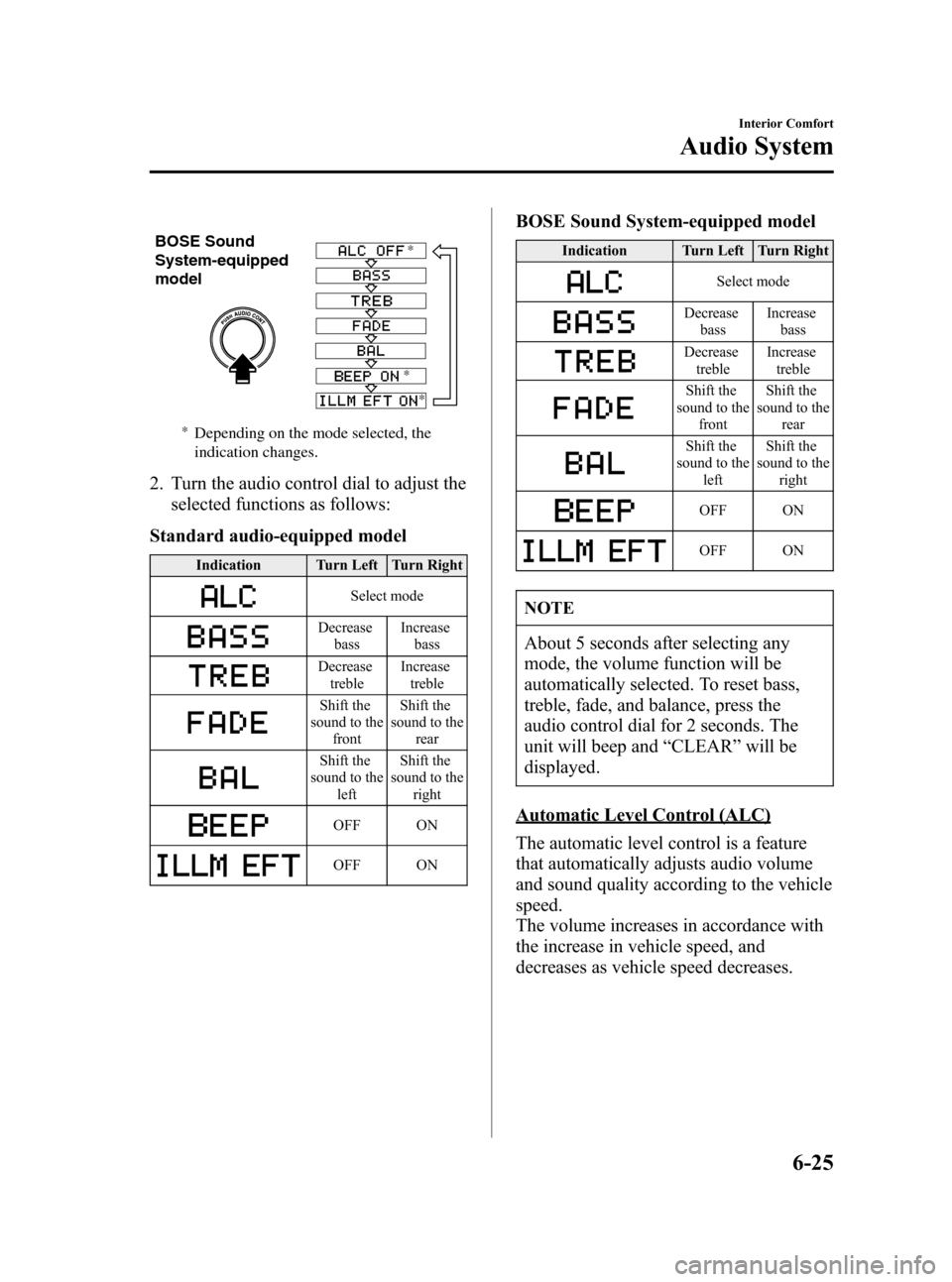
2. Turn the audio control dial to adjust the
selected functions as follows:
Standard audio-equipped model
Indication Turn Left Turn Right
Select mode
Decrease
bassIncrease
bass
Decrease
trebleIncrease
treble
Shift the
sound to the
frontShift the
sound to the
rear
Shift the
sound to the
leftShift the
sound to the
right
OFF ON
OFF ON
BOSE Sound System-equipped model
Indication Turn Left Turn Right
Select mode
Decrease
bassIncrease
bass
Decrease
trebleIncrease
treble
Shift the
sound to the
frontShift the
sound to the
rear
Shift the
sound to the
leftShift the
sound to the
right
OFF ON
OFF ON
NOTE
About 5 seconds after selecting any
mode, the volume function will be
automatically selected. To reset bass,
treble, fade, and balance, press the
audio control dial for 2 seconds. The
unit will beep and“CLEAR”will be
displayed.
Automatic Level Control (ALC)
The automatic level control is a feature
that automatically adjusts audio volume
and sound quality according to the vehicle
speed.
The volume increases in accordance with
the increase in vehicle speed, and
decreases as vehicle speed decreases.
Interior Comfort
Audio System
6-25
Mazda3_8U55-EA-05G_Edition2 Page195
Thursday, June 23 2005 2:54 PM
Form No.8U55-EA-05G
Page 196 of 372

Black plate (196,1)
The following four modes are available.
Select the desired mode.
Mode Volume change
No change
Minimum
Medium
Maximum
Turn the audio control dial to select the
ALC OFF, ALC LEVEL1―3 mode. The
selected mode will be indicated.
BEEP setting
The beep-sound when operating the audio
system can be set on or off.
ILLM EFT setting (Illumination setting
during operation)
The audio system illumination during
operation can be set on or off.
6-26
Interior Comfort
Audio System
Mazda3_8U55-EA-05G_Edition2 Page196
Thursday, June 23 2005 2:54 PM
Form No.8U55-EA-05G
Page 198 of 372
Black plate (198,1)
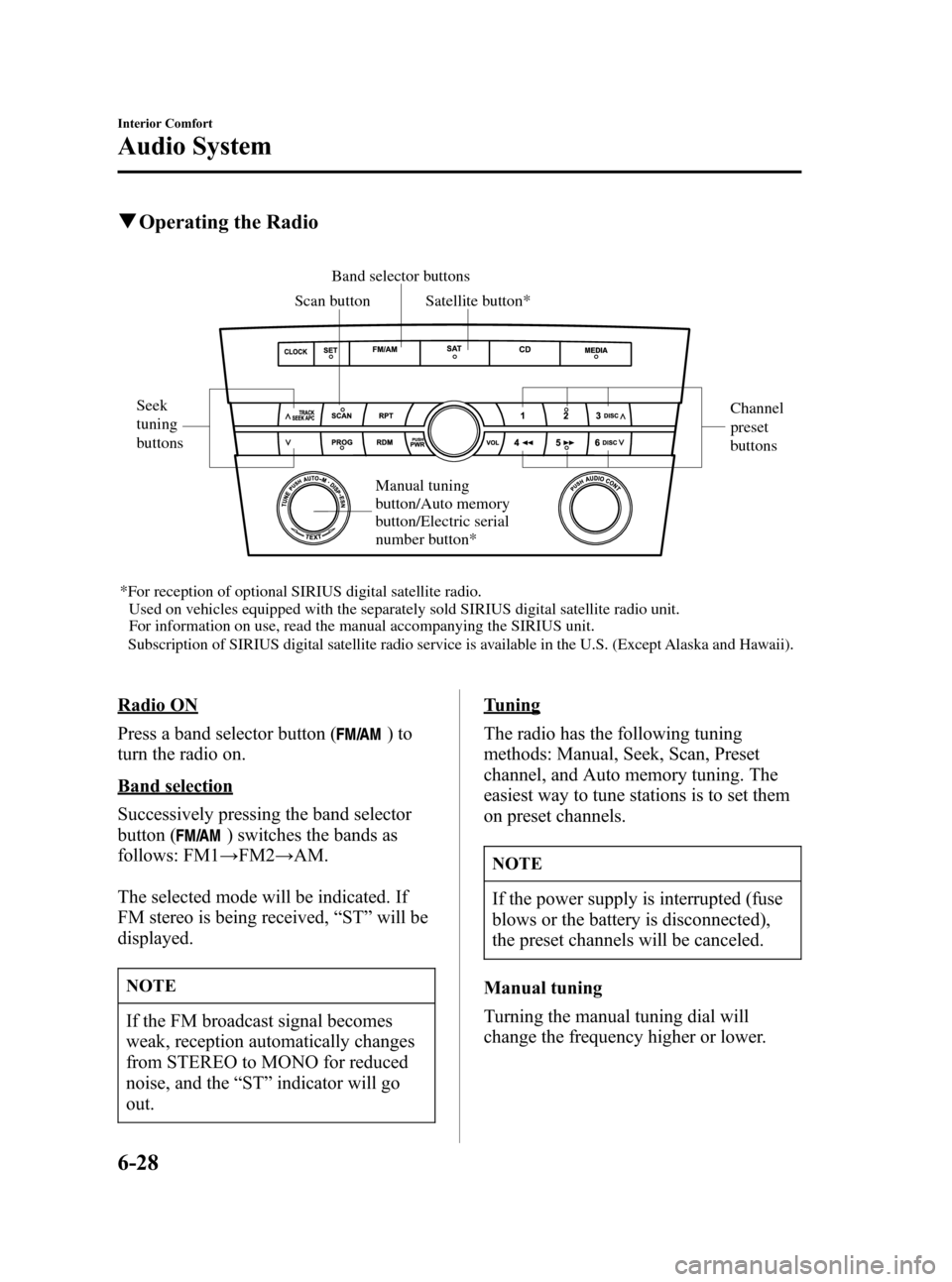
qOperating the Radio
Scan buttonBand selector buttons
Seek
tuning
buttonsChannel
preset
buttons
*For reception of optional SIRIUS digital satellite radio.
Used on vehicles equipped with the separately sold SIRIUS digital satellite radio unit.
For information on use, read the manual accompanying the SIRIUS unit.
Subscription of SIRIUS digital satellite radio service is available in the U.S. (Except Alaska and Hawaii).Satellite button*
Manual tuning
button/Auto memory
button/Electric serial
number button*
Radio ON
Press a band selector button (
)to
turn the radio on.
Band selection
Successively pressing the band selector
button (
) switches the bands as
follows: FM1→FM2→AM.
The selected mode will be indicated. If
FM stereo is being received,“ST”will be
displayed.
NOTE
If the FM broadcast signal becomes
weak, reception automatically changes
from STEREO to MONO for reduced
noise, and the“ST”indicator will go
out.
Tuning
The radio has the following tuning
methods: Manual, Seek, Scan, Preset
channel, and Auto memory tuning. The
easiest way to tune stations is to set them
on preset channels.
NOTE
If the power supply is interrupted (fuse
blows or the battery is disconnected),
the preset channels will be canceled.
Manual tuning
Turning the manual tuning dial will
change the frequency higher or lower.
6-28
Interior Comfort
Audio System
Mazda3_8U55-EA-05G_Edition2 Page198
Thursday, June 23 2005 2:54 PM
Form No.8U55-EA-05G
Page 199 of 372
Black plate (199,1)
Seek tuning
Pressing the seek tuning button (
,)
will cause the tuner to seek a higher or
lower frequency automatically.
NOTE
If you continue to press and hold the
button, the frequency will continue
changing without stopping.
Scan tuning
Press the scan button (
)to
automatically sample strong stations.
Scanning stops at each station for about 5
seconds. To hold a station, press the scan
button (
) again during this interval.
Preset channel tuning
The 6 preset channels can be used to store
6 AM and 12 FM stations.
1. To set a channel first select AM, FM1,
or FM2. Tune to the desired station.
2. Depress a channel preset button for
about 2 seconds until a beep sound is
heard. The preset channel number and
station frequency will be displayed.
The station is now held in the memory.
3. Repeat this operation for the other
stations and bands you want to store.
To tune one in the memory, select AM,
FM1, or FM2 and then press its
channel preset button. The station
frequency and the channel number will
be displayed.
NOTE
If the power supply is interrupted (fuse
blows or the battery is disconnected),
the preset channels will be canceled.Auto memory tuning
This is especially useful when driving in
an area where the local stations are not
known. Additional AM/FM stations can
be stored without disturbing the
previously set channels.
Press and hold the auto memory button
(
) for about 2 seconds until a beep
sound is heard; the system will
automatically scan and temporarily store
up to 6 stations with the strongest
frequencies in each selected band in that
area.
After scanning is completed, the station
with the strongest frequency will be tuned
and its frequency displayed.
Press and release the auto memory button
(
) to recall stations from the auto-
stored stations. One stored station will be
selected each time; its frequency and
channel number will be displayed.
NOTE
If no stations can be tuned after
scanning operations,“A”will be
displayed.
Interior Comfort
Audio System
6-29
Mazda3_8U55-EA-05G_Edition2 Page199
Thursday, June 23 2005 2:54 PM
Form No.8U55-EA-05G
Page 201 of 372

Black plate (201,1)
NOTE
The cassette tape can be ejected when
the ignition switch is in the OFF
position.
Fast-forward/Rewind
Press the fast-forward button (
)to
fast-forward.
Press the rewind button (
) to rewind.
To stop this operation and play the
cassette tape, press the button again.
NOTE
When the cassette tape ends during fast-
forward or rewind, it automatically
stops and starts playing.
Reversing
Press the program button (
)to
change cassette tape-play direction.
NOTE
When the cassette tape ends, the unit
automatically reverses play.
Automatic program control (APC)
APC is used to find the beginning of
either the next program or the one being
played.
Press the APC button (
) to the
beginning of the next selection.
Press the APC button (
) to the
beginning of the one being played. To
stop this operation and play the cassette
tape, press the button again.
NOTE
APC may not operate properly if:
lA tape was recorded at a low level.
lA tape has long, silent intervals.
lA tape is a live recording.
lA tape has very short intervals of
less than 3 seconds.
Repeat play
This operation makes it possible to listen
to a selection repeatedly.
Press the repeat button (
) during play.
The current selection playing will be
repeated (“RPT”will be displayed).
Press the repeat button (
) once again
to cancel repeat play.
NOTE
RPT may not operate properly if:
lA tape was recorded at a low level.
lA tape has long, silent intervals.
lA tape is a live recording.
lA tape has very short intervals of
less than 3 seconds.
Interior Comfort
Audio System
6-31
Mazda3_8U55-EA-05G_Edition2 Page201
Thursday, June 23 2005 2:54 PM
Form No.8U55-EA-05G