low MAZDA MODEL 3 HATCHBACK 2006 Owner's Manual (in English)
[x] Cancel search | Manufacturer: MAZDA, Model Year: 2006, Model line: MODEL 3 HATCHBACK, Model: MAZDA MODEL 3 HATCHBACK 2006Pages: 372, PDF Size: 5.55 MB
Page 219 of 372
Black plate (219,1)
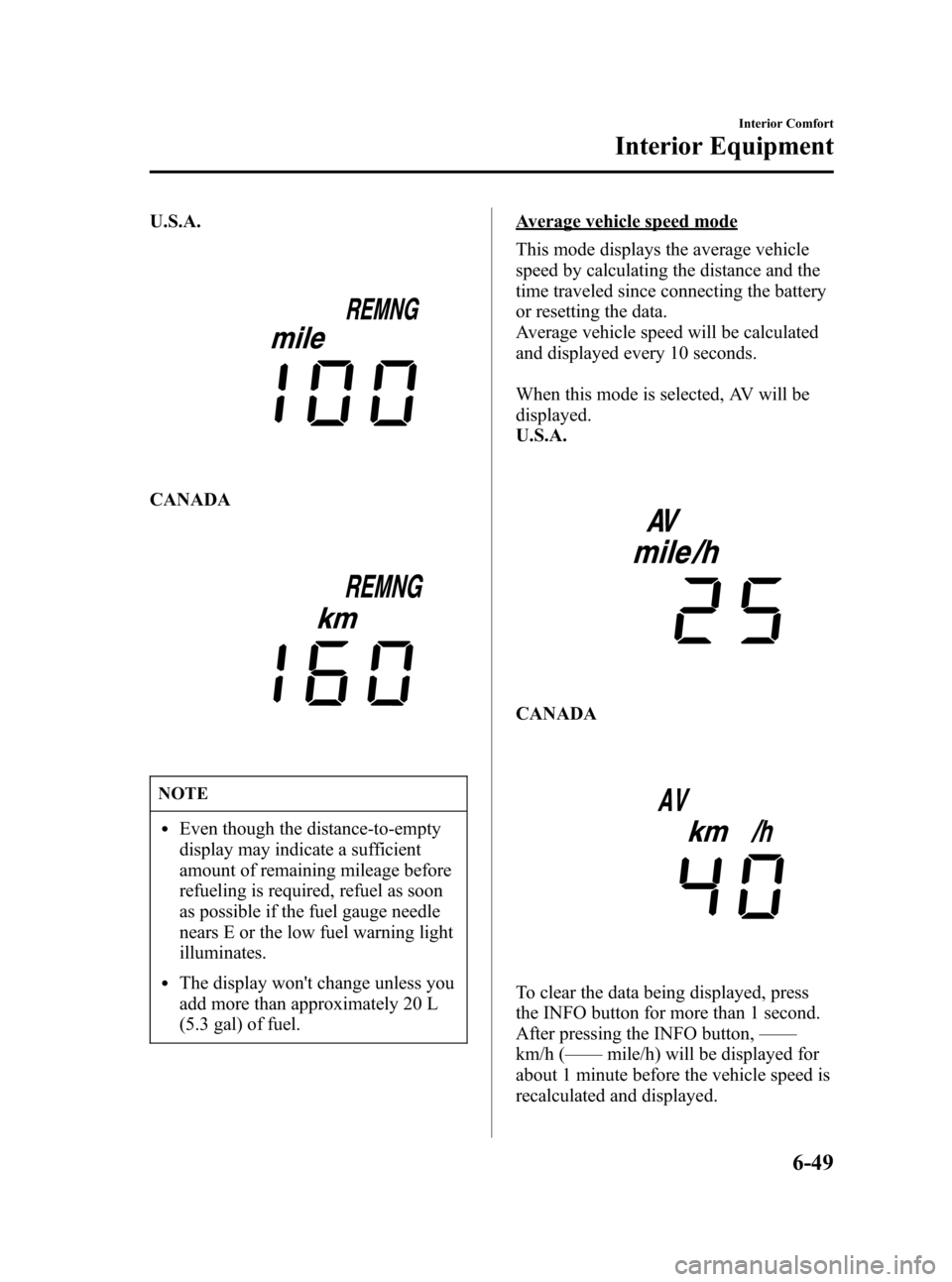
U.S.A.
CANADA
NOTE
lEven though the distance-to-empty
display may indicate a sufficient
amount of remaining mileage before
refueling is required, refuel as soon
as possible if the fuel gauge needle
nears E or the low fuel warning light
illuminates.
lThe display won't change unless you
add more than approximately 20 L
(5.3 gal) of fuel.
Average vehicle speed mode
This mode displays the average vehicle
speed by calculating the distance and the
time traveled since connecting the battery
or resetting the data.
Average vehicle speed will be calculated
and displayed every 10 seconds.
When this mode is selected, AV will be
displayed.
U.S.A.
CANADA
To clear the data being displayed, press
the INFO button for more than 1 second.
After pressing the INFO button,——
km/h (——mile/h) will be displayed for
about 1 minute before the vehicle speed is
recalculated and displayed.
Interior Comfort
Interior Equipment
6-49
Mazda3_8U55-EA-05G_Edition2 Page219
Thursday, June 23 2005 2:55 PM
Form No.8U55-EA-05G
Page 223 of 372
Black plate (223,1)
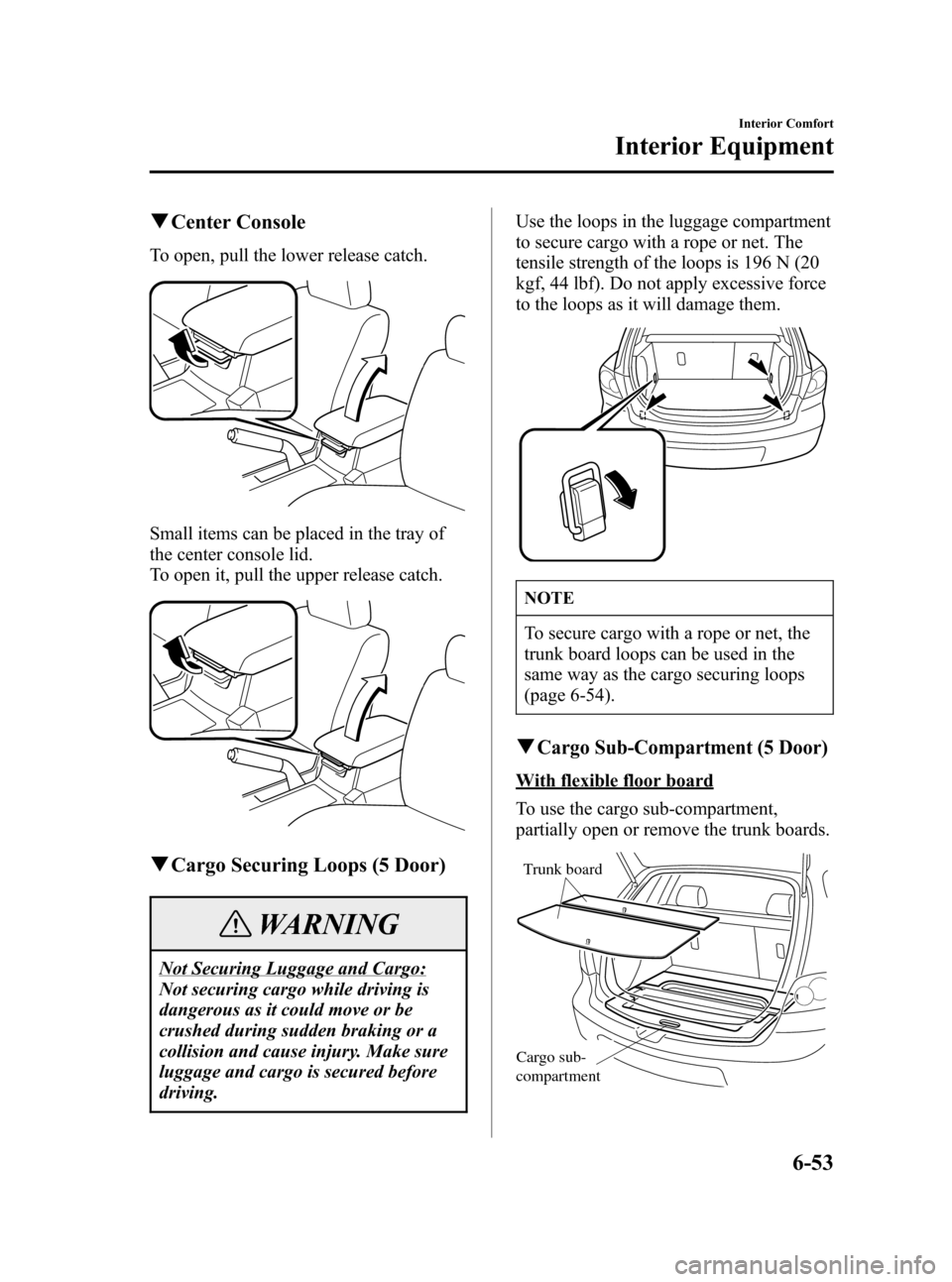
qCenter Console
To open, pull the lower release catch.
Small items can be placed in the tray of
the center console lid.
To open it, pull the upper release catch.
qCargo Securing Loops (5 Door)
WARNING
Not Securing Luggage and Cargo:
Not securing cargo while driving is
dangerous as it could move or be
crushed during sudden braking or a
collision and cause injury. Make sure
luggage and cargo is secured before
driving.Use the loops in the luggage compartment
to secure cargo with a rope or net. The
tensile strength of the loops is 196 N (20
kgf, 44 lbf). Do not apply excessive force
to the loops as it will damage them.
NOTE
To secure cargo with a rope or net, the
trunk board loops can be used in the
same way as the cargo securing loops
(page 6-54).
qCargo Sub-Compartment (5 Door)
With flexible floor board
To use the cargo sub-compartment,
partially open or remove the trunk boards.
Trunk board
Cargo sub-
compartment
Interior Comfort
Interior Equipment
6-53
Mazda3_8U55-EA-05G_Edition2 Page223
Thursday, June 23 2005 2:55 PM
Form No.8U55-EA-05G
Page 230 of 372
Black plate (230,1)
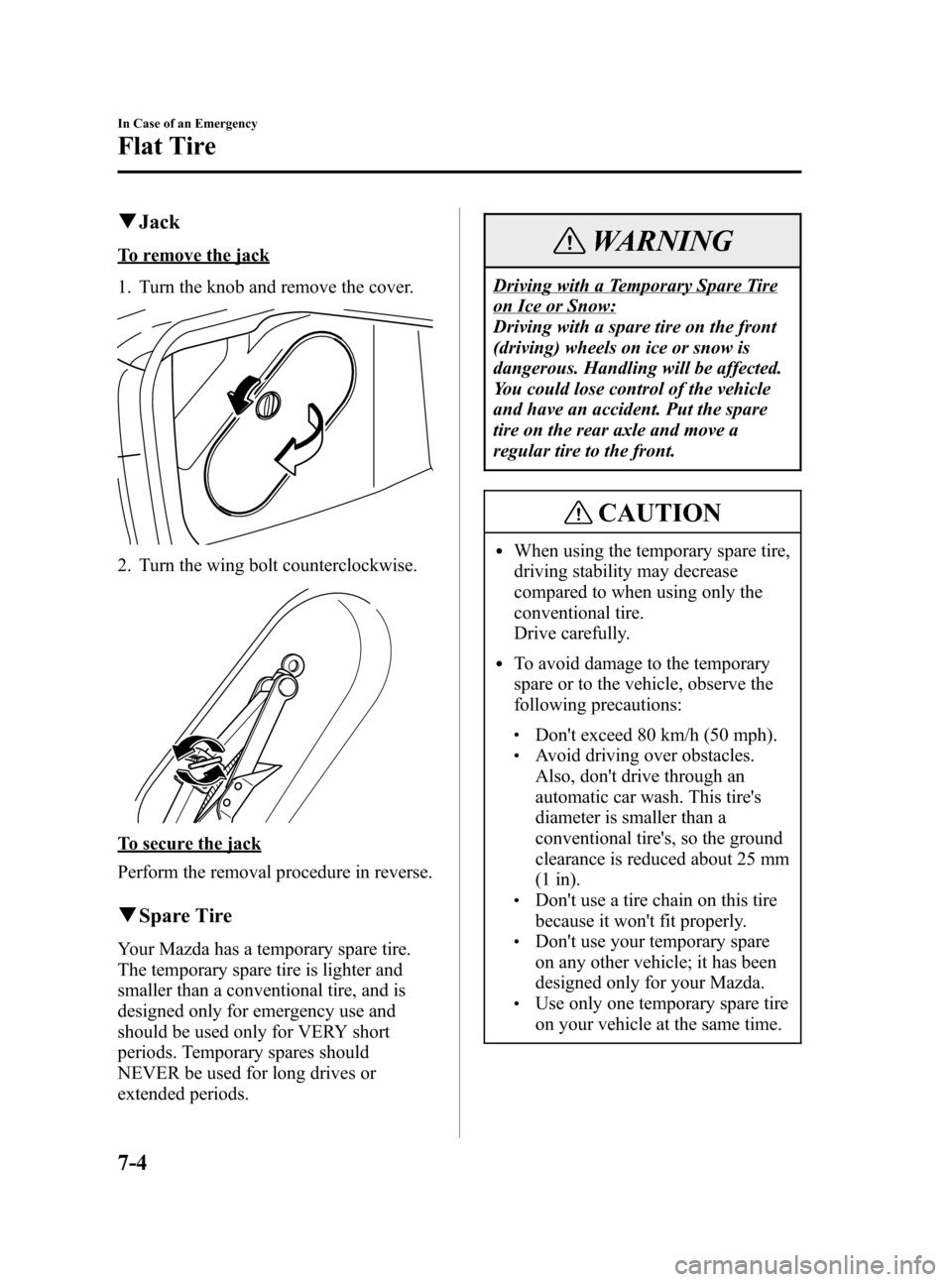
qJack
To remove the jack
1. Turn the knob and remove the cover.
2. Turn the wing bolt counterclockwise.
To secure the jack
Perform the removal procedure in reverse.
qSpare Tire
Your Mazda has a temporary spare tire.
The temporary spare tire is lighter and
smaller than a conventional tire, and is
designed only for emergency use and
should be used only for VERY short
periods. Temporary spares should
NEVER be used for long drives or
extended periods.
WARNING
Driving with a Temporary Spare Tire
on Ice or Snow:
Driving with a spare tire on the front
(driving) wheels on ice or snow is
dangerous. Handling will be affected.
You could lose control of the vehicle
and have an accident. Put the spare
tire on the rear axle and move a
regular tire to the front.
CAUTION
lWhen using the temporary spare tire,
driving stability may decrease
compared to when using only the
conventional tire.
Drive carefully.
lTo avoid damage to the temporary
spare or to the vehicle, observe the
following precautions:
lDon't exceed 80 km/h (50 mph).lAvoid driving over obstacles.
Also, don't drive through an
automatic car wash. This tire's
diameter is smaller than a
conventional tire's, so the ground
clearance is reduced about 25 mm
(1 in).
lDon't use a tire chain on this tire
because it won't fit properly.
lDon't use your temporary spare
on any other vehicle; it has been
designed only for your Mazda.
lUse only one temporary spare tire
on your vehicle at the same time.
7-4
In Case of an Emergency
Flat Tire
Mazda3_8U55-EA-05G_Edition2 Page230
Thursday, June 23 2005 2:55 PM
Form No.8U55-EA-05G
Page 232 of 372
Black plate (232,1)
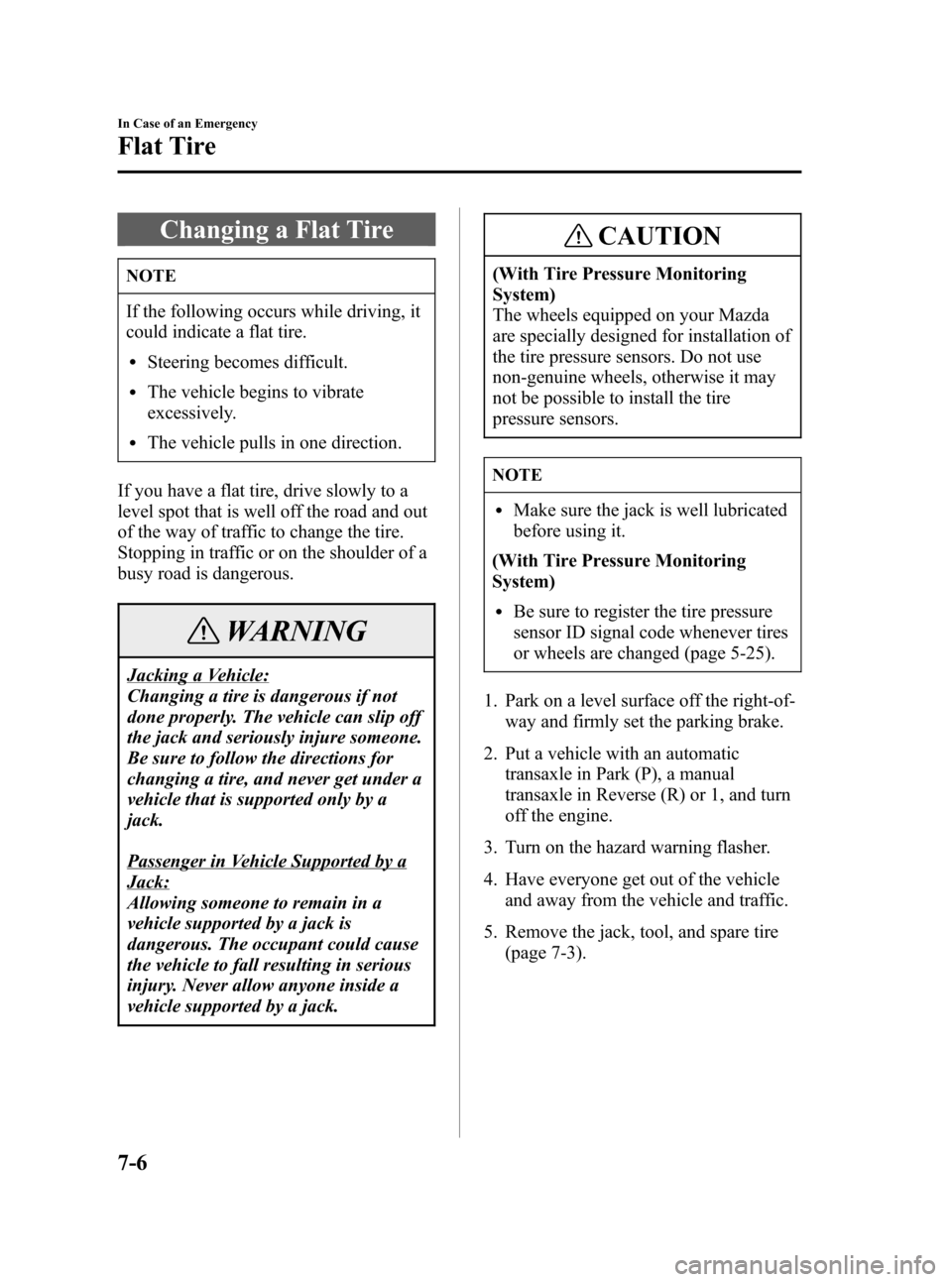
Changing a Flat Tire
NOTE
If the following occurs while driving, it
could indicate a flat tire.
lSteering becomes difficult.
lThe vehicle begins to vibrate
excessively.
lThe vehicle pulls in one direction.
If you have a flat tire, drive slowly to a
level spot that is well off the road and out
of the way of traffic to change the tire.
Stopping in traffic or on the shoulder of a
busy road is dangerous.
WARNING
Jacking a Vehicle:
Changing a tire is dangerous if not
done properly. The vehicle can slip off
the jack and seriously injure someone.
Be sure to follow the directions for
changing a tire, and never get under a
vehicle that is supported only by a
jack.
Passenger in Vehicle Supported by a
Jack:
Allowing someone to remain in a
vehicle supported by a jack is
dangerous. The occupant could cause
the vehicle to fall resulting in serious
injury. Never allow anyone inside a
vehicle supported by a jack.
CAUTION
(With Tire Pressure Monitoring
System)
The wheels equipped on your Mazda
are specially designed for installation of
the tire pressure sensors. Do not use
non-genuine wheels, otherwise it may
not be possible to install the tire
pressure sensors.
NOTE
lMake sure the jack is well lubricated
before using it.
(With Tire Pressure Monitoring
System)
lBe sure to register the tire pressure
sensor ID signal code whenever tires
or wheels are changed (page 5-25).
1. Park on a level surface off the right-of-
way and firmly set the parking brake.
2. Put a vehicle with an automatic
transaxle in Park (P), a manual
transaxle in Reverse (R) or 1, and turn
off the engine.
3. Turn on the hazard warning flasher.
4. Have everyone get out of the vehicle
and away from the vehicle and traffic.
5. Remove the jack, tool, and spare tire
(page 7-3).
7-6
In Case of an Emergency
Flat Tire
Mazda3_8U55-EA-05G_Edition2 Page232
Thursday, June 23 2005 2:55 PM
Form No.8U55-EA-05G
Page 236 of 372
Black plate (236,1)
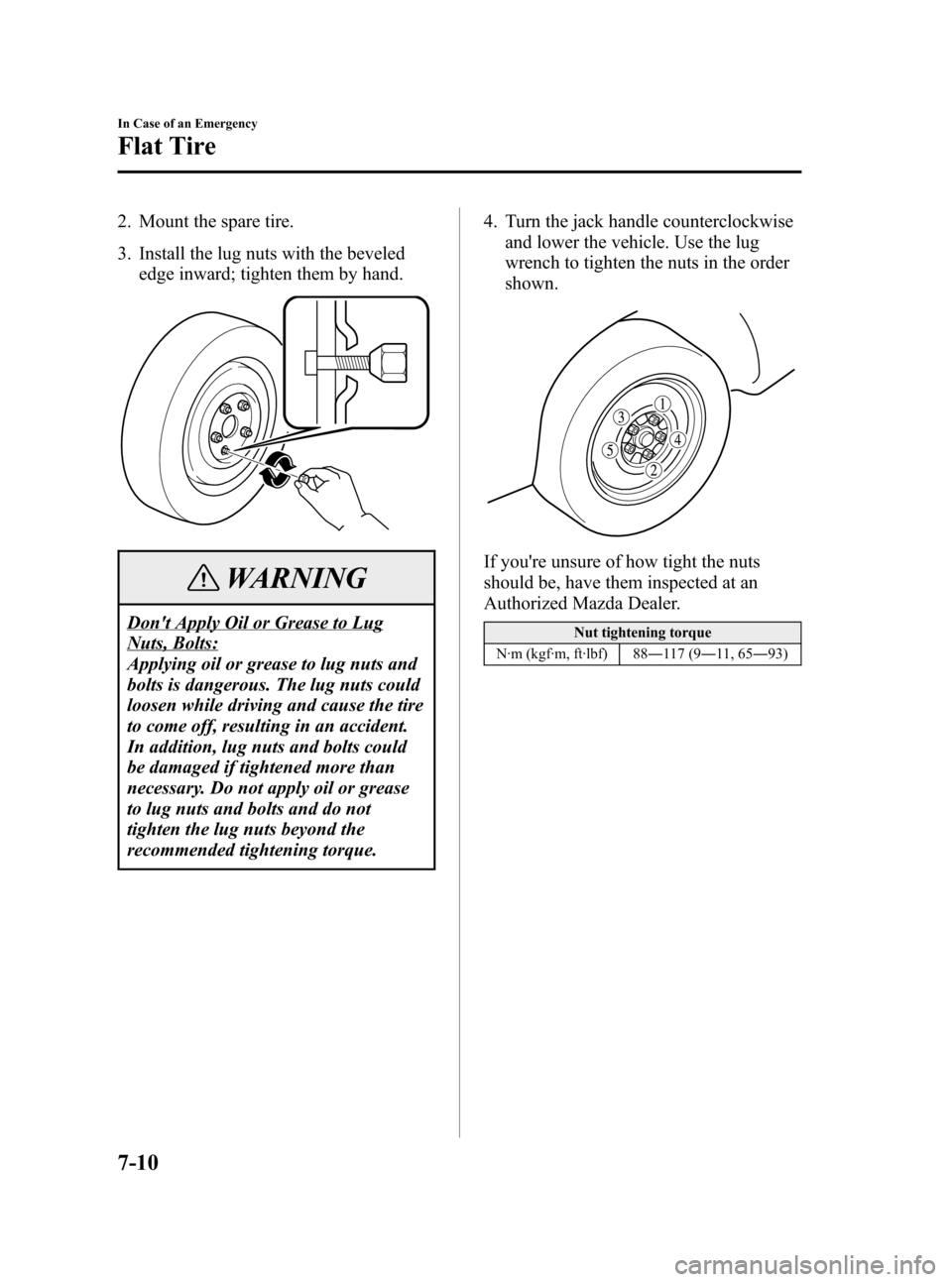
2. Mount the spare tire.
3. Install the lug nuts with the beveled
edge inward; tighten them by hand.
WARNING
Don't Apply Oil or Grease to Lug
Nuts, Bolts:
Applying oil or grease to lug nuts and
bolts is dangerous. The lug nuts could
loosen while driving and cause the tire
to come off, resulting in an accident.
In addition, lug nuts and bolts could
be damaged if tightened more than
necessary. Do not apply oil or grease
to lug nuts and bolts and do not
tighten the lug nuts beyond the
recommended tightening torque.4. Turn the jack handle counterclockwise
and lower the vehicle. Use the lug
wrench to tighten the nuts in the order
shown.
If you're unsure of how tight the nuts
should be, have them inspected at an
Authorized Mazda Dealer.
Nut tightening torque
N·m (kgf·m, ft·lbf) 88―117 (9―11, 65―93)
7-10
In Case of an Emergency
Flat Tire
Mazda3_8U55-EA-05G_Edition2 Page236
Thursday, June 23 2005 2:55 PM
Form No.8U55-EA-05G
Page 238 of 372
Black plate (238,1)
Overheating
If the temperature gauge indicates
overheating, the vehicle loses power, or
you hear a loud knocking or pinging
noise, the engine is probably too hot.
WARNING
Cooling Fan and Engine
Inspection:
Inspecting the engine with the ignition
switch in the ON position is
dangerous. The cooling fan could turn
on unexpectedly even when the engine
isn't running. You could be seriously
injured by the fan. Turn the ignition
switch off and remove the key from the
ignition switch when you inspect the
engine.
Cooling System Cap:
When the engine and radiator are hot,
scalding coolant and steam may shoot
out under pressure and cause serious
injury. Don't remove the cooling
system cap when the engine and
radiator are hot.
Steam from Overheated Engine:
Steam from an overheated engine is
dangerous. The escaping steam could
seriously burn you. Open the hood
ONLY after steam is no longer
escaping from the engine.If the temperature gauge indicates
overheating:
1. Drive safely to the side of the road and
park off the right-of-way.
2. Put a vehicle with an automatic
transaxle in park (P), a manual
transaxle in neutral.
Apply the parking brake.
3. Turn off the air conditioner.
4. Check whether coolant or steam is
escaping from under the hood or from
the engine compartment.
If steam is coming from the engine
compartment:
Don't go near the front of the vehicle.
Stop the engine.
Wait until the steam dissipates, then
open the hood and start the engine.
If neither coolant nor steam is
escaping:
Open the hood and idle the engine until
it cools.
CAUTION
If the cooling fan does not operate
while the engine is running, the engine
temperature will increase. Stop the
engine and call an Authorized Mazda
Dealer.
5. Make sure the cooling fan is operating,
then turn off the engine after the
temperature has decreased.
6. When cool, check the coolant level.
If it's low, look for coolant leaks from
the radiator and hoses.
7-12
In Case of an Emergency
Overheating
Mazda3_8U55-EA-05G_Edition2 Page238
Thursday, June 23 2005 2:55 PM
Form No.8U55-EA-05G
Page 240 of 372

Black plate (240,1)
Starting a Flooded Engine
If the engine fails to start, it may be
flooded (excessive fuel in the engine).
Follow this procedure:
1. Depress the accelerator all the way and
hold it there.
2. Turn the ignition switch to the START
position and hold it there―for up to 10
seconds. If the engine starts, release the
key and accelerator immediately
because the engine will suddenly rev
up.
3. If the engine fails to start, crank it
without depressing the accelerator―for
up to 10 seconds.
7-14
In Case of an Emergency
Emergency Starting
Mazda3_8U55-EA-05G_Edition2 Page240
Thursday, June 23 2005 2:55 PM
Form No.8U55-EA-05G
Page 241 of 372

Black plate (241,1)
Jump-Starting
Jump-starting is dangerous if done incorrectly. So follow the procedure carefully. If you
feel unsure about jump-starting, we strongly recommend that you have a competent service
technician do the work.
WARNING
Follow These Precautions Carefully:
To ensure safe and correct handling of the battery, read the following precautions
carefully before using the battery or inspecting it.
Eye Protection:
Working without eye protection is dangerous. Battery fluid contains SULFURIC
ACID which could cause blindness if splashed into your eyes. Also, hydrogen gas
produced during normal battery operation, could ignite and cause the battery to
explode. Always wear eye protection when working near the battery.
Spilled Battery Fluid:
Spilled battery fluid is dangerous.
Battery fluid contains SULFURIC ACID which could cause serious injuries if it gets
in eyes, skin or clothing. If this happens, immediately flush your eyes with water for
15 minutes or wash your skin thoroughly and get medical attention. Wear eye
protection and protective gloves to prevent contact with battery fluid.
Children and Batteries:
Allowing children to play near batteries is dangerous. Battery fluid could cause
serious injuries if it gets in the eyes or on the skin. Always keep batteries out of the
reach of children.
In Case of an Emergency
Emergency Starting
7-15
Mazda3_8U55-EA-05G_Edition2 Page241
Thursday, June 23 2005 2:55 PM
Form No.8U55-EA-05G
Page 242 of 372
Black plate (242,1)
WARNING
Keep Flames Away:
Flames and sparks near open battery cells are dangerous. Hydrogen gas, produced
during normal battery operation, could ignite and cause the battery to explode. An
exploding battery can cause serious burns and injuries. Keep all flames including
cigarettes and sparks away from open battery cells. When working near a battery, do
not allow metal tools to contact the positive (
) or negative () terminal of the
battery. Do not allow the positive (
) terminal to contact the vehicle body.
Battery-Related Explosion:
Flames and sparks near open battery cells are dangerous. Hydrogen gas, produced
during normal battery operation, could ignite and cause the battery to explode. An
exploding battery can cause serious burns and injuries. Keep all flames, including
cigarettes, and sparks away from open battery cells.
Low Fluid Level or Frozen Battery:
Jump-starting a frozen battery or one with a low fluid level is dangerous. It may
rupture or explode, causing serious injury.
Don't jump-start a frozen battery or one with a low fluid level.
Connecting to Negative Terminal:
Connecting the end of the second cable to the negative (
) terminal of the discharged
battery is dangerous.
A spark could cause the gas around the battery to explode and injure someone.
Connect the negative cable to a good ground point away from the battery.
Connecting Jumper Cable to Moving Parts:
Connecting a jumper cable near or to moving parts (cooling fans, belts) is dangerous.
The cable could get caught when the engine starts and cause serious injury. Never
connect a jumper cable to or near any part that moves.
CAUTION
Use only a 12 V booster system. You can damage a 12 V starter, ignition system, and
other electrical parts beyond repair with a 24 V power supply (two 12 V batteries in
series or a 24 V motor generator set).
7-16
In Case of an Emergency
Emergency Starting
Mazda3_8U55-EA-05G_Edition2 Page242
Thursday, June 23 2005 2:55 PM
Form No.8U55-EA-05G
Page 243 of 372
Black plate (243,1)
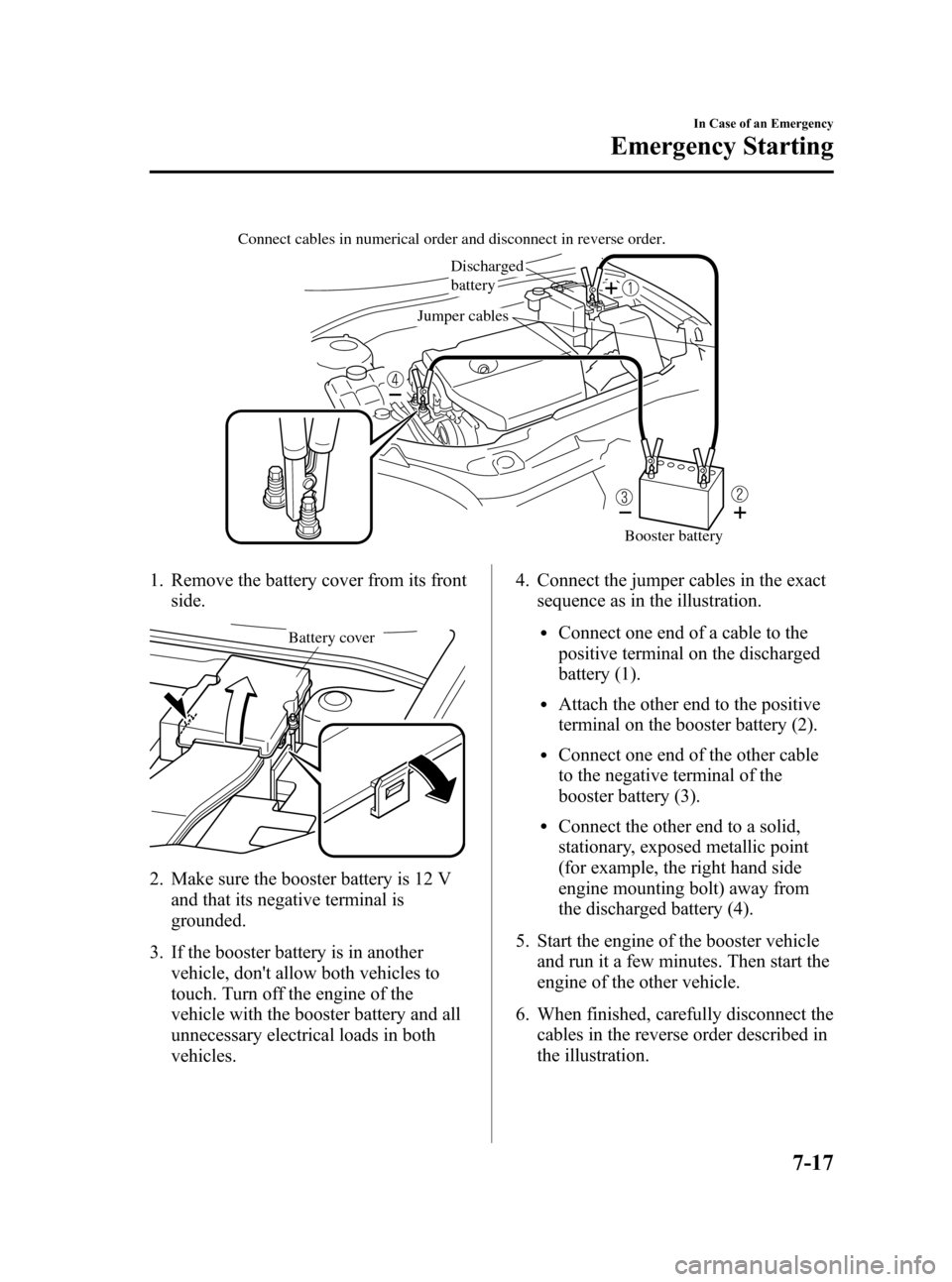
Discharged
battery
Jumper cables Connect cables in numerical order and disconnect in reverse order.
Booster battery
1. Remove the battery cover from its front
side.
Battery cover
2. Make sure the booster battery is 12 V
and that its negative terminal is
grounded.
3. If the booster battery is in another
vehicle, don't allow both vehicles to
touch. Turn off the engine of the
vehicle with the booster battery and all
unnecessary electrical loads in both
vehicles.4. Connect the jumper cables in the exact
sequence as in the illustration.
lConnect one end of a cable to the
positive terminal on the discharged
battery (1).
lAttach the other end to the positive
terminal on the booster battery (2).
lConnect one end of the other cable
to the negative terminal of the
booster battery (3).
lConnect the other end to a solid,
stationary, exposed metallic point
(for example, the right hand side
engine mounting bolt) away from
the discharged battery (4).
5. Start the engine of the booster vehicle
and run it a few minutes. Then start the
engine of the other vehicle.
6. When finished, carefully disconnect the
cables in the reverse order described in
the illustration.
In Case of an Emergency
Emergency Starting
7-17
Mazda3_8U55-EA-05G_Edition2 Page243
Thursday, June 23 2005 2:55 PM
Form No.8U55-EA-05G