brake MAZDA MODEL 3 HATCHBACK 2021 Owners Manual
[x] Cancel search | Manufacturer: MAZDA, Model Year: 2021, Model line: MODEL 3 HATCHBACK, Model: MAZDA MODEL 3 HATCHBACK 2021Pages: 612, PDF Size: 89.06 MB
Page 353 of 612

Rear Side Radar Sensor*
▼Rear Side Radar Sensor
Your vehicle is equipped with rear side
radar sensor. The following systems
also use the rear side radar sensor.
Blind Spot Monitoring (BSM)Rear Cross Tra
ffic Alert (RCTA)Smart Brake Support [Rear Crossing]
(SBS -RC)
The rear side radar sensors emit radio
waves and detect the radio waves
re flected off a vehicle approaching
from the rear or an obstruction.
4–Door
1. Rear side radar sensor
5–Door
1. Rear side radar sensor
The rear side radar sensors are installed
inside the rear bumper, one on each
side.
Always keep the surface of the rear
bumper near the rear side radar
sensors clean so that they operate
normally. Also, do not apply items such
as stickers.
Refer to Exterior Care on page 6-48.
CAUTION
If the rear bumper receives a severe
impact, the system may no longer
operate normally. Stop the system
immediately and have the vehicle
inspected at an Authorized Mazda
Dealer.
NOTE
The detection ability of the rear side
radar sensor has limitations. In the
following cases, the detection ability
may lower and the system may not
operate normally.
The rear bumper near the rear side
radar sensor has become
deformed.
Snow, ice or mud adheres to the
rear side radar sensor on the rear
bumper.
Under bad weather conditions
such as rain, snow and fog.
Under the following conditions, the
rear side radar sensor cannot detect
target objects or it may be di fficult to
detect them.
Small motorcycles, bicycles,
pedestrians, animals, shopping
carts, and stationary objects on a
road or a road side.
Vehicle shapes which do not re flect radar waves well such as
empty trailers with a low vehicle
height and sports cars.
When Driving
i-ACTIVSENSE
*Some models.4-211
Mazda3_8JM2-EA -20H_Edition1_new 2020-7-10 17:21:34
Page 358 of 612

Cruise Set Indication (Green)
The indication turns on (green) when a
cruising speed has been set.
▼Activation/Deactivation
WARNING
Always turn o
ff the cruise control
system when it is not in use:
Leaving the cruise control system in an
activation-ready state while the cruise
control is not in use is dangerous as the
cruise control could unexpectedly
activate if the activation button is
accidentally pressed, and result in loss
of vehicle control and an accident.
NOTE
When the ignition is switched OFF, the
system status before it was turned o ff is
maintained. For example, if the
ignition is switched OFF with the cruise
control system operable, the system
will be operable when the ignition is
switched ON the next time.
Activation
To activate the system, press the cruise
switch. The cruise standby indication
(white) turns on.
Deactivation
To deactivate the system, press the
cruise switch again.
The cruise standby indication (white)
turns off .
▼To Set Speed
1. Activate the cruise control system
by pressing the cruise switch. The
cruise standby indication (white)
turns on.
2. Accelerate to the desired speed, which must be more than 25 km/h
(16 mph).
3. Adjust the system to the desired vehicle speed using the accelerator
pedal. Press the RES switch up (SET
+) or down (SET -) to start cruise
control. The cruise control
indication (green) in the instrument
cluster turns on at the same time.
Quickly release the switch when the
cruise control indication (green)
turns on.
NOTE
If the RES switch is operated up (SET
+) or down (SET -) while the vehicle
speed is between 25 and 30 km/h
(16 to 19 mph), the set speed is set
to 30 km/h (19 mph).
The cruise control speed setting
cannot be performed under the
following conditions:
Any of the doors is opened.The driver's seat belt is unfastened.The brake pedal is depressed.The parking brake is applied.(Automatic transmission)
The selector lever is in the P, N, or
R position.
(Manual transmission)
The shift lever is in the neutral
position.
On a steep grade, the vehicle may
momentarily slow down while
ascending or speed up while
descending.
When Driving
Cruise Control
4-216
Mazda3_8JM2-EA -20H_Edition1_new 2020-7-10 17:21:34
Page 359 of 612

The cruise control will cancel if the
vehicle speed decreases below 20
km/h (12 mph) when the cruise
control is activated, such as when
climbing a steep grade.
The vehicle speed preset using the
cruise control is displayed in the
instrument cluster and the active
driving display (vehicles with active
driving display).
Instrument cluster (Basic display)
Instrument cluster (i-ACTIVSENSE
display)
Active driving display
▼ Changing the Set Vehicle Speed
Follow either of these procedures.
To increase/decrease speed using
cruise control switch
When the RES switch is pressed up
(SET+), the vehicle accelerates and
when the RES switch is pressed down
(SET
-), it decelerates.
Press and release immediately: 1
km/h (1 mph)
Press and hold: 10 km/h (5 mph)
NOTE
Even after releasing the RES switch, the
cruise control accelerates/decelerates
continuously until the set speed
displayed in the instrument cluster and
on the active driving display is reached.
If you want to stop accelerating/
decelerating , change the set speed or
cancel the system (such as by
depressing the brake pedal).
To increase speed using accelerator
pedal
Depress the accelerator pedal and
press the RES switch up (SET+) or
down (SET
-) at the desired speed. If
the switch is not operated, the system
returns to the set speed after you
release your foot from the accelerator
pedal.
NOTE
Accelerate if you want to speed up
temporarily when the cruise control is
on. Greater speed will not interfere
with or change the set speed. Take
your foot o ff the accelerator to return
to the set speed.
When Driving
Cruise Control
4-217
Mazda3_8JM2-EA -20H_Edition1_new 2020-7-10 17:21:34
Page 360 of 612

▼To Resume Cruisi
ng Speed at More
Than 30 km/h (19 mph)
If the cruise control system is
temporarily canceled (such as by
applying the brake pedal) and the
system is still activated, the most
recent set speed will automatically
resume when the RES switch is
pressed.
If vehicle speed is below 30 km/h (19
mph), increase the vehicle speed up to
30 km/h (19 mph) or more and press
the RES switch.
▼ To Te m p o ra r i l y C a n c e l
To temporarily cancel the system, use
one of these methods:
Slightly depress the brake pedal.Press the CANCEL switch.(Manual transmission)
Depress the clutch pedal.
If the RES switch is pressed when the
vehicle speed is 30 km/h (19 mph) or
higher, the system reverts to the
previously set speed.
NOTE
If any of the following conditions
occur, the cruise control system is
temporarily canceled.
Even when the brake pedal is
slightly depressed.
The DSC is operating.There is a problem in the system.Any of the doors is opened.The driver's seat belt is unfastened.The parking brake is applied.(Automatic transmission)
The selector lever is in the P, N, or
R position.
(Manual transmission)
The shift lever is in the neutral
position.
When the cruise control system is
temporarily canceled by even one of
the applicable cancel conditions, the
speed cannot be re-set.
(Automatic transmission)
The cruise control cannot be
canceled while driving in manual
mode (selector lever shifted from D
to M position). Therefore, engine
braking will not be applied even if
the transmission is shifted down to a
lower gear. If deceleration is
required, lower the set speed or
depress the brake pedal.
▼ To D e a c t i v a t e
Press the cruise switch again.
When Driving
Cruise Control
4-218
Mazda3_8JM2-EA
-20H_Edition1_new 2020-7-10 17:21:34
Page 381 of 612

CAUTION
Do not install any accessories within the detection ranges of the sensors. It may
a ff ect the system operation.
Depending on the type of obstruction and the surrounding conditions, the
detection range of a sensor may narrow, or the sensors may not be able to detect
obstructions.
NOTE
When the ignition is switched OFF, the system status before it was turned off is
maintained. For example, if the ignition is switched OFF while the parking sensor
is activated, the system will be activate d when the ignition is switched ON the
next time.
The system may not operate normally under the following conditions:
Mud, ice, or snow is adhering to the sensor area (Returns to normal operation
when removed).
The sensor area is frozen (Returns to normal operation when the ice is thawed).The sensor is covered by a hand.The sensor is excessively shocked.The vehicle is excessively tilted.Under extremely hot or cold weather conditions.The vehicle is driven on bumps, inclines, gravel, grating, or grass covered roads.Anything which generates ultrasonic wave s such as another vehicle's horn, the
engine sound of a motorcycle, the air brake sound of a large-sized vehicle, or
another vehicle's sensors approaches the vehicle.
The vehicle is driven in heavy rain or in road conditions causing water-splash.A commercially-available fender pole or an antenna for a radio transmitter is
installed to the vehicle.
The vehicle is moving towards a tall or square curbstone, or a steep grade.An obstruction is too close to the sensor.The vehicle is moving towards an uneven wall or stairs.There are multiple obstructions.The vehicle is driven in a place with low ceilings.Obstructions under the bumper cannot be detected. Obstructions which are
lower than the sensor or thin may not be detected even though they were
detected once.
The following types of obstructions may not be detected:
Thin objects such as wire, rope or polesThings which absorb sonic waves easily such as cotton or snowAngular shaped objectsVery tall objects, and those which are wide at the topSmall, short objectsAlways have the system inspected at an Authorized Mazda Dealer if any shock is
applied to the bumpers, even in a minor accident. If the sensors are deviated, they
cannot detect obstructions.
When Driving
Pa r k i n g S e n s o r Sys te m
4-239
Mazda3_8JM2-EA-20H_Edition1_new 2020-7-10 17:21:34
Page 384 of 612

DisplayDistance between vehicle and obstruc-
tion
Without 360° view monitor
With 360° viewmonitor Front ultrasonic
sensor
*/Front cor-
ner ultrasonic sen-
sor
*
Rear ultrasonic sen-sor/Rear corner ul- trasonic sensor/
Rear side ultrasonic
sensor
*
Without front ul-trasonic sensor
and front corner
ultrasonic sensor With front ultra-
sonic sensor and
front corner ultra-
sonic sensor
RedFront ultrasonic sen-
sor:
Within approx. 35.0
cm (13.7 in)
Front corner ultra- sonic sensor:
Within approx. 25 cm (9.8 in) Rear ultrasonic sen-
sor:
Within approx. 35.0 cm (13.7 in)
Rear corner ultra-
sonic sensor/Rear
side ultrasonic sen-
sor:
Within approx. 25
cm (9.8 in)
▼Parking Sensor OFF Switch
When the switch is pressed, the
parking sensor is stopped and the
indicator light turns on.
If the switch is pressed again, the
parking sensor becomes operational
and the indicator light turns o
ff.
1. Indicator light
NOTE
(Automatic vehicle)
The detection indicator and buzzer
of the front ultrasonic sensors/front
corner ultrasonic sensors do not
operate when the selector lever is in
the P position.
The detection indicator and buzzer
sound do not activate when the
parking brake is applied.
When Driving
Pa r k i n g S e n s o r Sys te m
4-242*Some models.
Mazda3_8JM2-EA -20H_Edition1_new 2020-7-10 17:21:34
Page 439 of 612

6Maintenance and Care
How to keep your Mazda in top condition.
Essential Information................. 6-2 Introduction.......................... 6-2
Scheduled Maintenance............ 6-4 Scheduled Maintenance......... 6-4
Owner Maintenance............... 6-12 Owner Maintenance
Precautions......................... 6-12
Hood.................................. 6-13
Engine Compartment
Overview............................ 6-15
Engine Oil........................... 6-17
Engine Coolant.................... 6-20
Brake/Clutch Fluid............... 6-21
Washer Fluid....................... 6-22
Body Lubrication.................. 6-23
Wiper Blades....................... 6-23
Battery................................ 6-29
Key Battery Replacement...... 6-31
Tires.................................... 6-33
Light Bulbs...........................6-37
Fuses.................................. 6-40
Appearance Care.................... 6-48 Exterior Care....................... 6-48
Interior Care........................ 6-54
6-1
Mazda3_8JM2-EA -20H_Edition1_new 2020-7-10 17:21:34
Page 443 of 612
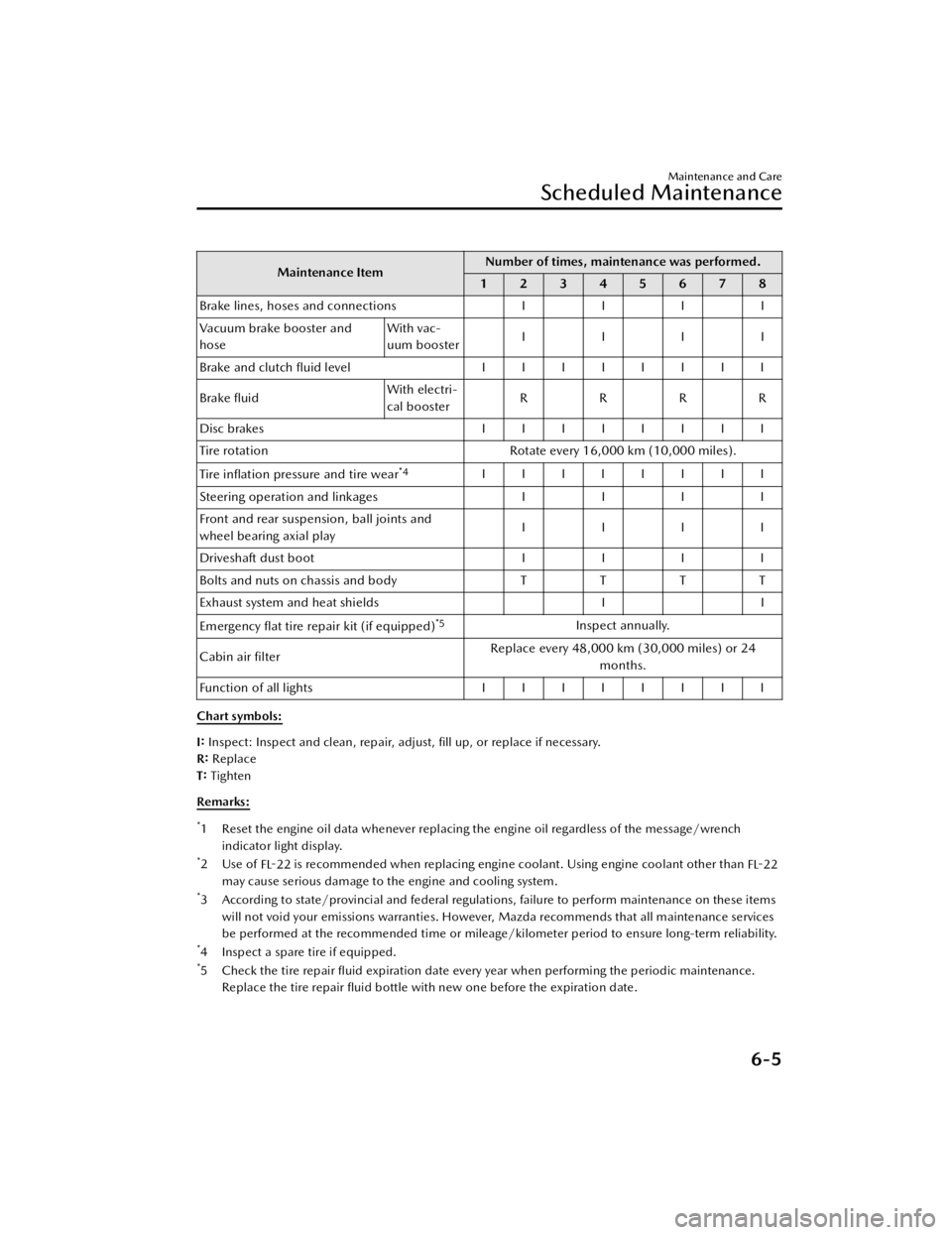
Maintenance ItemNumber of times, maintenance was performed.
12345678
B ra ke lin es, h ose s a nd c onnectio ns IIII
Vacuum brake booster and
hose With vac-
uum booster
IIII
Brake and clutch fluid level IIIIIIII
Brake fluid With electri-
cal booster
RRRR
Disc brakes IIIIIIII
Tire rotation Rotate every 16,000 km (10,000 miles).
Tire in flation pressure and tire wear
*4IIIIIIII
S te erin g o pera tio n a nd lin ka ge s IIII
Front and rear suspension, ball joints and
wheel bearing axial play IIII
D riv e sh aft d ust b oo t IIII
Bolts and nuts on chassis and body TTTT
Exhaust system and heat shields II
Emergency flat tire repair kit (if equipped)
*5Inspect annually.
Cabin air filter Replace every 48,000 km (30,000 miles) or 24
months.
Function of all lights IIIIIIII
Chart symbols:
I : Inspect: Inspect and clean, repair, adjust, fill up, or replace if necessary.
R : Replace
T: Tighten
Remarks:
*1 Reset the engine oil data whenever replacing the engine oil regardless of the message/wrench indicator light display.
*2Use of FL-22 is recommended when replacing engine coolant. Using engine coolant other than
FL-22
may cause serious damage to the engine and cooling system.
*3 According to state/provincial and federal regulations, failure to perform maintenance on these items will not void your emissions warranties. However, Mazda recommends that all maintenance services
be performed at the recommended time or mileage/kilometer period to ensure long-term reliability.
*4 Inspect a spare tire if equipped.*5Check the tire repair fl uid expiration date every year when performing the periodic maintenance.
Replace the tire repair fluid bottle with new one before the expiration date.
Maintenance and Care
Scheduled Maintenance
6-5
Mazda3_8JM2-EA -20H_Edition1_new 2020-7-10 17:21:34
Page 445 of 612
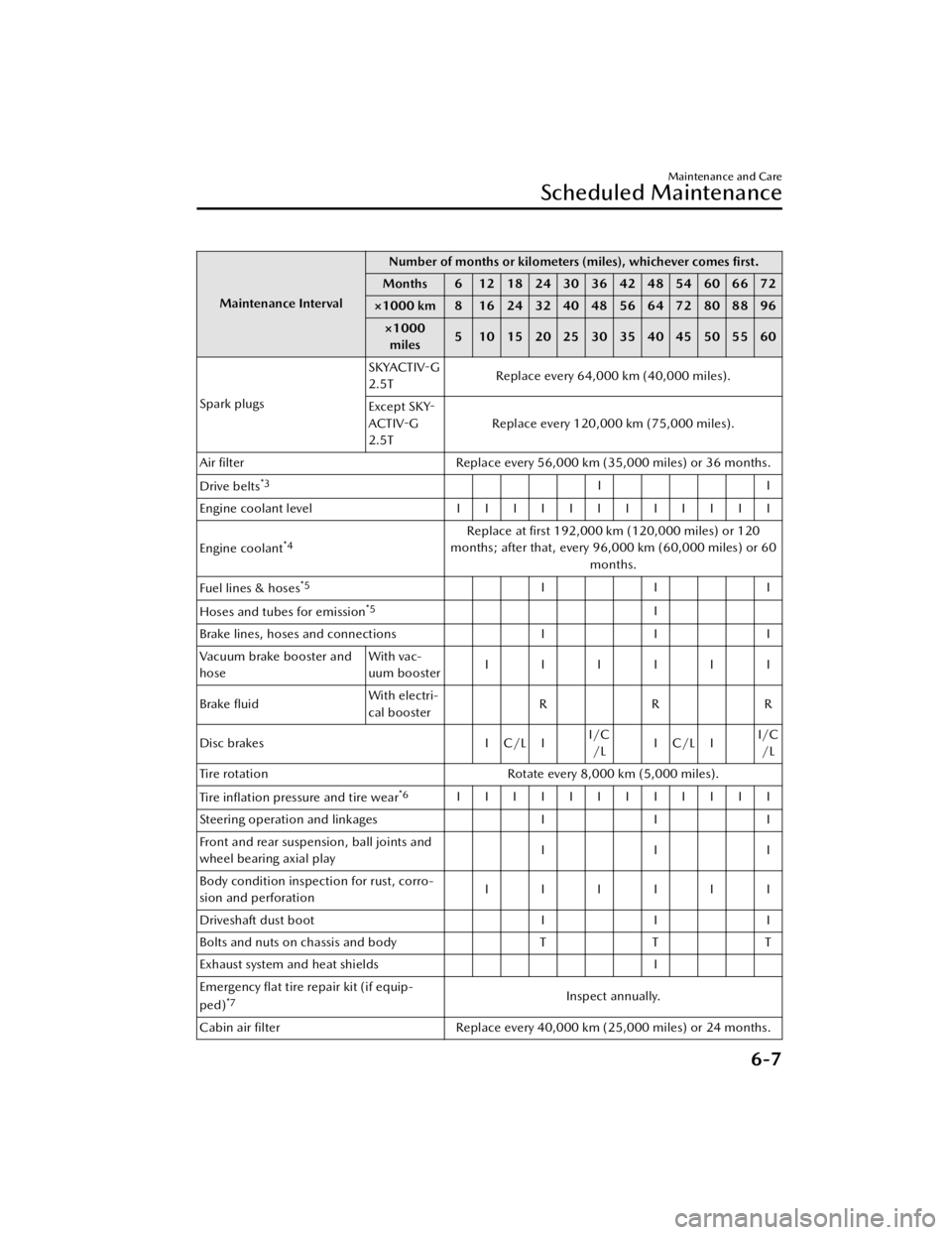
Maintenance IntervalNumber of months or kilometers (miles), whichever comes
first.
Months 6 1218243036424854606672
×1000 km 8 16 24 32 40 48 56 64 72 80 88 96
×1000miles 5 1015202530354045505560
Spark plugs SKYACTIV
-G
2.5T Replace every 64,000 km (40,000 miles).
Except SKY -
ACTIV -G
2.5T Replace every 120,000 km (75,000 miles).
Air filter Replace every 56,000 km (35,000 miles) or 36 months.
Drive belts
*3II
Engine coolant level IIIIIIIIIIII
Engine coolant
*4Replace at first 192,000 km (120,000 miles) or 120
months; after that, every 96,000 km (60,000 miles) or 60
months.
Fuel lines & hoses
*5III
Hoses and tubes for emission
*5I
Brake lines, hoses and connections III
Vacuum brake booster and
hose With vac-
uum booster
IIIIII
Brake fluid With electri-
cal booster
RRR
Disc brakes I C/L II/C
/L IC/LI I/C
/L
Tire rotation Rotate every 8,000 km (5,000 miles).
Tire in flation pressure and tire wear
*6IIIIIIIIIIII
Steering operation and linkages III
Front and rear suspension, ball joints and
wheel bearing axial play III
Body condition inspection for rust, corro-
sion and perforation IIIIII
Driveshaft dust boot III
Bolts and nuts on chassis and body TTT
Exhaust system and heat shields I
Emergency flat tire repair kit (if equip-
ped)
*7Inspect annually.
Cabin air filter Replace every 40,000 km (25,000 miles) or 24 months.
Maintenance and Care
Scheduled Maintenance
6-7
Mazda3_8JM2-EA-20H_Edition1_new 2020-7-10 17:21:34
Page 448 of 612
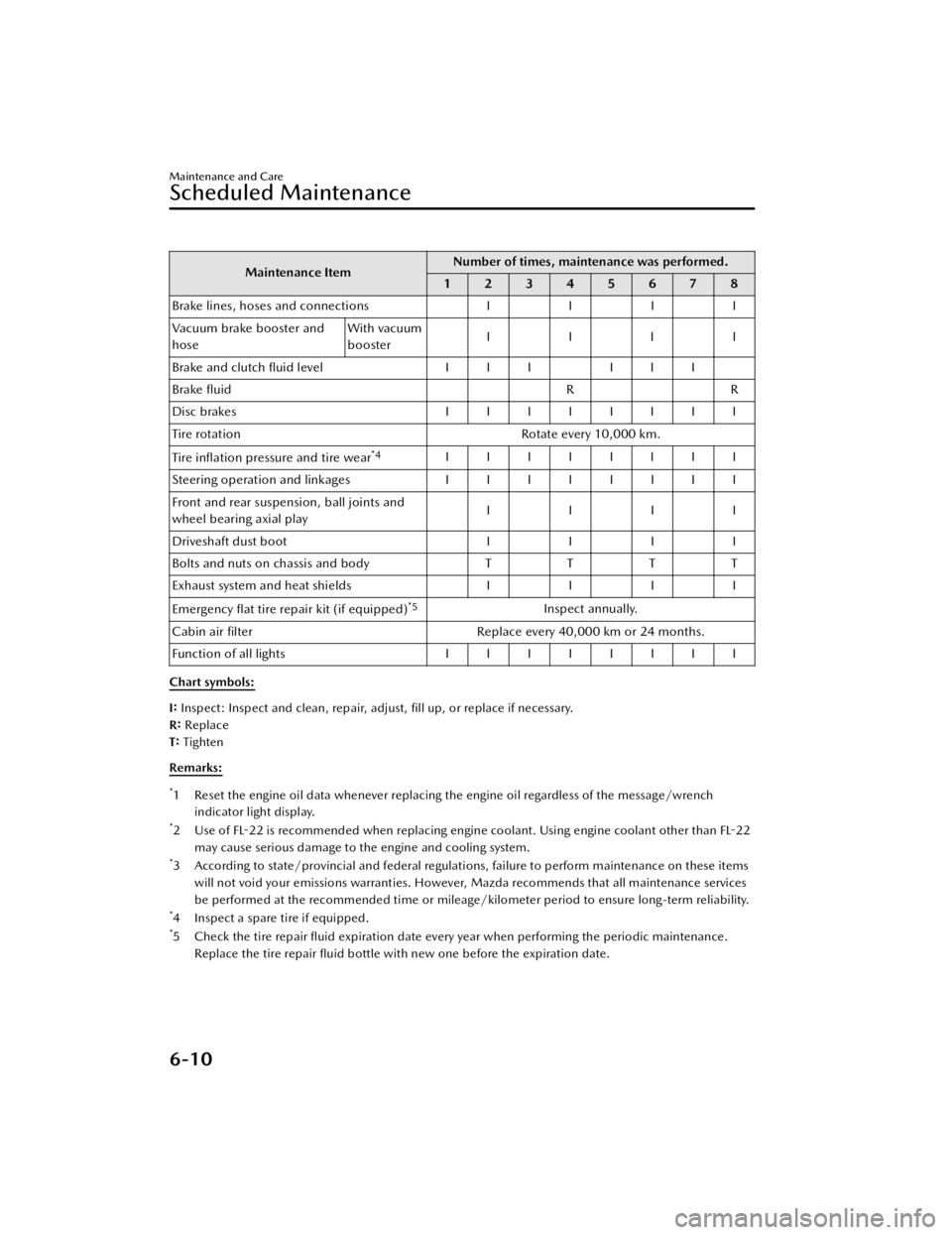
Maintenance ItemNumber of times, maintenance was performed.
12345678
Brake lines, hoses and connections II II
Vacuum brake booster and
hose With vacuum
booster
IIII
Brake and clutch fl uid level III III
Brake fluid RR
Disc brakes IIIIIIII
Tire rotation Rotate every 10,000 km.
Tire in flation pressure and tire wear
*4IIIIIIII
Steering operation and linkages I I I I I I I I
Front and rear suspension, ball joints and
wheel bearing axial play IIII
Driveshaft dust boot II II
Bolts and nuts on chassis and body TTT T
Exhaust system and heat shields II II
Emergency flat tire repair kit (if equipped)
*5Inspect annually.
Cabin air filter Replace every 40,000 km or 24 months.
Function of all lights IIIIIIII
Chart symbols:
I: Inspect: Inspect and clean, repair, adjust, fill up, or replace if necessary.
R : Replace
T: Tighten
Remarks:
*1 Reset the engine oil data whenever replacing the engine oil regardless of the message/wrench indicator light display.
*2Use of FL -22 is recommended when replacing engine c oolant. Using engine coolant other than FL-22
may cause serious damage to the engine and cooling system.
*3 According to state/provincial and federal regulati ons, failure to perform maintenance on these items
will not void your emissions warranties. However, Mazda recommends that all maintenance services
be performed at the recommended time or mileage/kilometer period to ensure long-term reliability.
*4 Inspect a spare tire if equipped.*5Check the tire repair fl uid expiration date every year when performing the periodic maintenance.
Replace the tire repair fluid bottle with new one before the expiration date.
Maintenance and Care
Scheduled Maintenance
6-10
Mazda3_8JM2-EA -20H_Edition1_new 2020-7-10 17:21:34