brakes MAZDA MODEL 3 SEDAN 2019 User Guide
[x] Cancel search | Manufacturer: MAZDA, Model Year: 2019, Model line: MODEL 3 SEDAN, Model: MAZDA MODEL 3 SEDAN 2019Pages: 592, PDF Size: 75.35 MB
Page 210 of 592

▼AUTOHOLD System is Turned On
Press the AUTOHOLD switch and when
the AUTOHOLD standby indicator light
turns on, the AUTOHOLD function turns
on.
1. AUTOHOLD standby indicator light
NOTE
When all of the following conditions are
met, the AUTOHOLD standby indicator
light turns on when the AUTOHOLD
switch is pressed and the AUTOHOLD
function turns on.
The ignition is switched ON (engine is
running).
The driver's seat belt is fastened.
The driver's door is closed.
There is no problem with the
AUTOHOLD function.
To operate AUTOHOLD and hold the
brakes
1. Depress the brake pedal and bring the vehicle to a complete stop.
2. The AUTOHOLD active indicator light in the instrume nt cluster turns on
and the brakes are held.
3. The vehicle is held in its stopped position even with the brake pedal
released.
NOTE
When all of the following conditions are
met, the AUTOHOLD operates and the
brakes are held.
The ignition is switched ON (engine is
running).
The vehicle is stopped.
The brake pedal is being depressed.
The AUTOHOLD active indicator light
turns on.
The accelerator pedal is not depressed.
The driver's seat belt is fastened.
The driver's door is closed.
There is no problem with the
AUTOHOLD function.
The parking brake is released.
There is no problem with the Electric
Parking Brake (EPB) function.
(Automatic transmission vehicle)
The selector lever is in a position other
than R position or the vehicle tilts
forward with the selector lever in the R
position.
To release AUTOHOLD and start
driving the vehicle
If you do any of the following actions to
resume driving the vehicle, the brakes
release automatically and the
AUTOHOLD active indicator light turns
off.
(Manual transmission vehicle)
You start to release the clutch pedal with
the shift lever shifted to a position other
than the neutral position
(Automatic transmission vehicle)
The accelerator pedal is depressed.
When Driving
Brake
4-70
Mazda3_8HE9-EA-18K_Edition3 2018-11-21 14:31:58
Page 211 of 592
The vehicle tilts rearward or the
selector lever is shifted to the R
position on level ground.
NOTE
If the Electric Parking Brake (EPB)
switch is pulled while the AUTOHOLD
is operating, the parking brake is
applied and the AUTOHOLD is
released. In addition, if the parking
brake is released under this condition,
the AUTOHOLD operates to hold the
brakes.
Under the following conditions, the
parking brake is automatically applied
and the AUTOHOLD is released. The
AUTOHOLD is re-enabled when the
conditions before the AUTOHOLD is
released are restored.
The driver’s seat belt is unfastened.
The driver’s door is opened.
When about 10 minutes or longer have
passed since the AUTOHOLD operation
started, the parking brake is
automatically applied. Because the
AUTOHOLD is restored when releasing
the parking brake, the hold on the
brakes by AUTOHOLD function
resumes.
(Manual transmission vehicle)
When starting to drive the vehicle
forward or in reverse on a down slope,
depress the clutch pedal and shift the
shift lever to the appropriate position for
driving in the desired direction, and then
depress the accelerator pedal to release
the AUTOHOLD.
The AUTOHOLD can be canceled
forcibly by fully depressing the
accelerator pedal for 1 second or longer
while the AUTOHOLD is operating.
Forcibly cancel the AUTOHOLD only
when the AUTOHOLD cannot be
canceled due to a system malfunction or
it is necessary to cancel the
AUTOHOLD in an emergency.
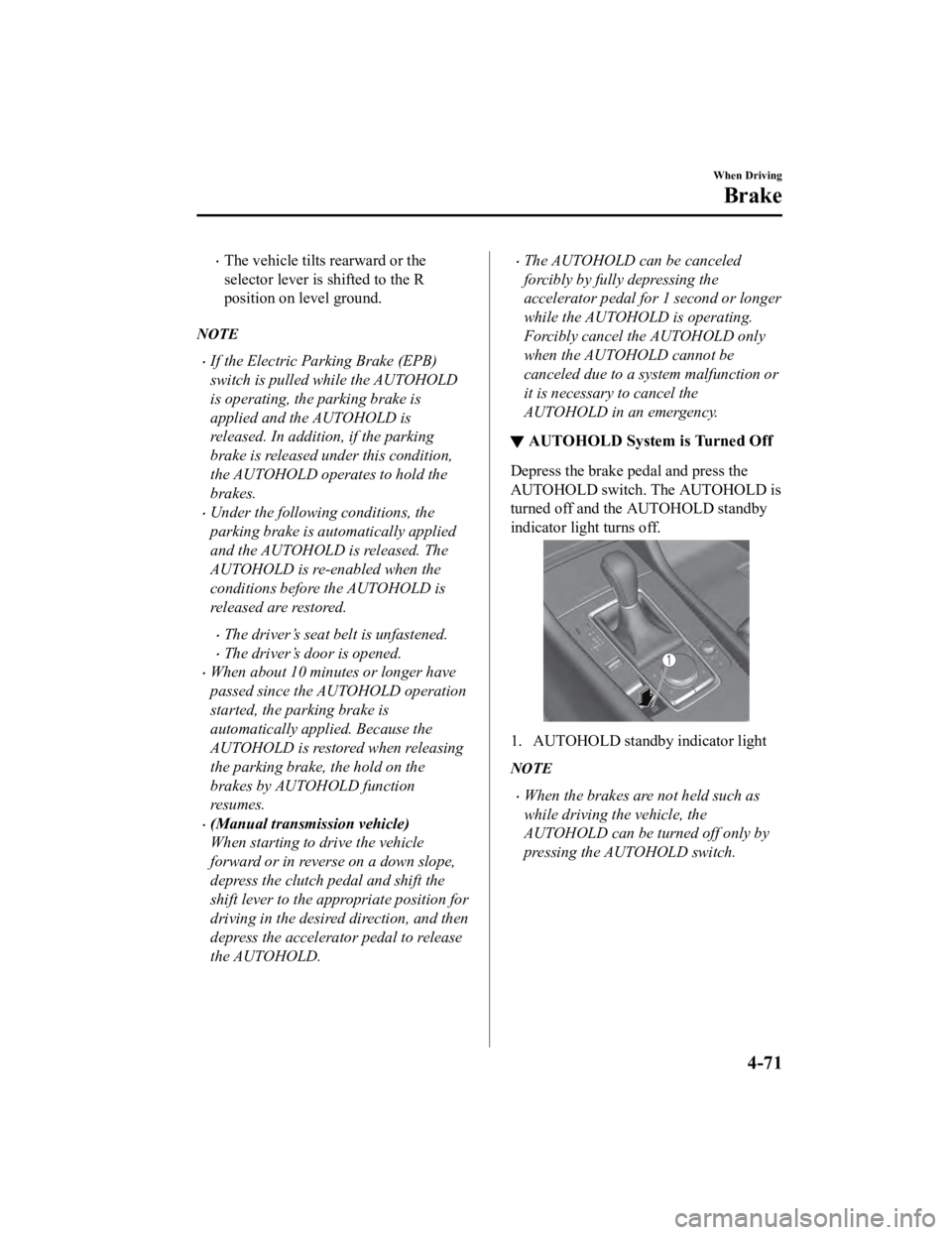
▼AUTOHOLD System is Turned Off
Depress the brake pedal and press the
AUTOHOLD switch. The AUTOHOLD is
turned off and the AUTOHOLD standby
indicator light turns off.
1. AUTOHOLD standby indicator light
NOTE
When the brakes are not held such as
while driving the vehicle, the
AUTOHOLD can be turned off only by
pressing the AUTOHOLD switch.
When Driving
Brake
4-71
Mazda3_8HE9-EA-18K_Edition3
2018-11-21 14:31:58
Page 214 of 592

Antilock Brake System(ABS)
▼Antilock Brake System (ABS)
The ABS control unit continuously
monitors the speed o
f each wheel. If one
wheel is about to lock up, the ABS
responds by automatically releasing and
reapplying that wheel's brake.
The driver will feel a slight vibration in
the brake pedal and may hear a chattering
noise from the brake system. This is
normal ABS system operation. Continue
to depress the brak e pedal without
pumping the brakes.
The warning light turns on when the
system has a malfunction.
Refer to ABS Warning Indication/Warning
Light on page 7-29.
WA R N I N G
Do not rely on ABS as a substitute for safe
driving:
The ABS cannot compensate for unsafe
and reckless driving, excessive speed,
tailgating (following another vehicle too
closely), driving on ice and snow, and
hydroplaning (reduced tire friction and
road contact because of water on the road
surface). You can still have an accident.
NOTE
Braking distances may be longer on
loose surfaces (snow or gravel, for
example) which usually have a hard
foundation. A vehicle with a normal
braking system may require less
distance to stop under these conditions
because the tires wi ll build up a wedge
of surface layer when the wheels skid.
The sound of the ABS operating may be
heard when starting the engine or
immediately after starting the vehicle,
however, it does not indicate a
malfunction.
When Driving
ABS/TCS/DSC
4-74
Mazda3_8HE9-EA-18K_Edition3 2018-11-21 14:31:58
Page 215 of 592
Traction Control System(TCS)
▼Traction Control System (TCS)
The Traction Control System (TCS)
enhances traction and
safety by controlling
engine torque and braking. When the TCS
detects driving wheel slippage, it lowers
engine torque and operates the brakes to
prevent loss of traction.
This means that on a slick surface, the
engine adjusts automatically to provide
optimum power to the drive wheels,
limiting wheel spin and loss of traction.
The warning light turns on when the
system has a malfunction.
Refer to TCS/DSC Indication/Indicator
Light (Turns on) on page 7-31.
WA R N I N G
Do not rely on the Traction Control System
(TCS) as a substitute for safe driving:
The Traction Control System (TCS) cannot
compensate for unsafe and reckless
driving, excessive speed, tailgating
(following another vehicle too closely), and
hydroplaning (reduced tire friction and
road contact because of water on the road
surface). You can still have an accident.
Use snow tires or tire chains and drive at
reduced speeds when roads are covered
with ice and/or snow:
Driving without proper traction devices on
snow and/or ice-covered roads is
dangerous. The Traction Control System
(TCS) alone cannot provide adequate
traction and you co uld still have an
accident.
NOTE
To turn off the TCS, press the DSC OFF
switch (page 4-77).
▼ TCS/DSC Indicator Light
This indicator light stays on for a few
seconds when the ignition is switched ON.
If the TCS or DSC
is operating, the
indicator light flashes.
If the light stays on, the TCS, DSC or the
brake assist system may have a
malfunction and they may not operate
correctly. Take your vehicle to an
Authorized Mazda Dealer.
NOTE
In addition to the indicator light
flashing, a slight lugging sound will
come from the engine. This indicates
that the TCS/DSC is operating properly.
On slippery surfaces, such as fresh
snow, it will be impossible to achieve
high rpm when the TCS is on.
When Driving
ABS/TCS/DSC
4-75
Mazda3_8HE9-EA-18K_Edition3 2018-11-21 14:31:58
Page 256 of 592

Mazda Radar Cruise
Control (MRCC) (Manual
Transmission)
*
▼Mazda Radar Cruise Control
(MRCC)
The MRCC system is designed to maintain
headway control
*1 with a vehicle ahead
according to your vehicle's speed using a
front radar sensor to detect the distance to
the vehicle ahead and a preset vehicle
speed without you having to use the
accelerator or brake pedals.
*1 Headway Control: Control of the distance between your vehicle and the
vehicle ahead detected by the MRCC
system.
Additionally, if your vehicle starts closing
in on the vehicle ahead such as if the
vehicle ahead brakes suddenly, a warning
sound and a warning indication in the
display are activated simultaneously to
alert you to maintain a sufficient distance
between the vehicles.
Also refer to the following before using
the MRCC.
Front radar sensor (page 4-202)
WA R N I N G
Do not rely completely on the MRCC:
The MRCC system has detection limitations
depending on the type of vehicle ahead
and its conditions, the weather conditions,
and the road conditions. Additionally, the
system may be unable to decelerate
sufficiently to avoid hitting the vehicle
ahead if the vehicle ahead applies the
brakes suddenly or another vehicle cuts
into the driving lane, which could result in
an accident.
Always drive carefully and verify the
surrounding conditions and depress the
brake pedal or accelerator pedal while
keeping a safe distance from vehicles
ahead or on-coming vehicles.
Do not use the MRCC system in the
following locations. Using the MRCC
system at the following locations may
result in an unexpected accident:
General roads other than highways
(Driving under these conditions using the
MRCC system is not possible.)
Roads with sharp curves and where
vehicle traffic is heavy and there is
insufficient space between vehicles.
Roads where frequent and repetitive
acceleration and deceleration occur
(Driving under these conditions using the
MRCC system is not possible).
When entering and exiting interchanges,
service areas, and parking areas of
highways (If you exit a highway while
headway control is in use, the vehicle
ahead will no longer be tracked and your
vehicle may accelerate to the set speed).
When Driving
i-ACTIVSENSE
4-116*Some models.
Mazda3_8HE9-EA-18K_Edition3 2018-11-21 14:31:58
Page 257 of 592

Slippery roads such as ice or snow-bound
roads (Tires could spin causing you to
lose vehicle control, or the stop hold
control may not operate.)
Long, descending slopes (to maintain
distance between vehicles, the system
automatically and continuously applies
the brakes which could result in the loss
of brake power.)
Two-wheeled vehicles such as
motorcycles or bicycles are ahead.
Slopes with a steep gradient (The vehicle
ahead may not be detected correctly,
your vehicle may slide while stopped by
the stop hold control, and it may
accelerate suddenly after it starts
moving.)
For safety purposes, switch the MRCC
system off when it is not being used.
CAUTION
If your vehicle is towed or you are towing
something, switch the MRCC system off to
prevent an unexpected operation.
NOTE
The MRCC system does not detect the
following as physical objects.
Vehicles approaching in the opposite
direction
Pedestrians
Stationary objects (stopped vehicles,
obstructions)
If a vehicle ahead is traveling at an
extremely low speed, the system may
not detect it correctly.
If there is a structure on the road or an
object (such as a monorail) at a low
height off the ground in front of the
vehicle, the system may operate.
Therefore, do not use the MRCC.
Do not use the MRCC system under
conditions in which close proximity
warnings are frequently activated.
During headway control travel, the
system accelerates and decelerates your
vehicle in conjunction with the speed of
the vehicle ahead. However, if it is
necessary to accelerate for a lane
change or if the vehicle ahead brakes
suddenly causing you to close in on the
vehicle rapidly, accelerate using the
accelerator pedal or decelerate using
the brake pedal depending on the
conditions.
While the MRCC system is in use, it
does not cancel even if the shift lever is
operated and any intended engine
braking will not occur. If deceleration is
required, lower the vehicle speed setting
or depress the brake pedal.
The sound of the automatic brakes
operating may be heard, however, it
does not indicate a problem.
The brake lights tu
rn on while the
MRCC automatic braking is operating.
When Driving
i-ACTIVSENSE
4-117
Mazda3_8HE9-EA-18K_Edition3 2018-11-21 14:31:58
Page 259 of 592

▼Close Proximity Warning
If your vehicle rapidly closes in on the
vehicle ahead because the vehicle ahead
applies the brakes s
uddenly while you are
traveling in headway c ontrol, the warning
sound activates and the brake warning is
indicated in the display. Always verify the
safety of the surrounding area and depress
the brake pedal while keeping a safe
distance from the vehicle ahead.
Additionally, keep a safe distance from the
vehicles behind you.
1. “Depress Brake Pedal” message is displayed
NOTE
In the following case s, the warnings and
brakes may not operate even if your
vehicle starts closing in on the vehicle
ahead.
You are driving your vehicle at the same
speed as the vehicle ahead.
Directly after the MRCC system has
been set.
Directly after the accelerator pedal is
released.
Another vehicle cuts into the driving
lane.
When Driving
i-ACTIVSENSE
4-119
Mazda3_8HE9-EA-18K_Edition3 2018-11-21 14:31:58
Page 264 of 592

NOTE
If the set speed is not indicated in the
display, the control does not resume even
if the RES switch is pressed.
Turning off the system
When the MRCC switch is pressed while
the MRCC is operating, the MRCC turns
off.
▼ Shift-up/Shift-down Request Display
The shift-up or shift-down request display
might be displayed while the MRCC is
operating. When this occurs, shift gears
because the gear position is not
appropriate.
Request Indication on display
Shift up Shift Up to a Higher Gear
Shift down Shift Do wn to a Lower Gear
NOTE
If the gears are not shifted up even
though the shift-up request indication is
displayed, load will be applied to the
engine and the MRCC might be
automatically canceled or engine
damage could occur.
If the gears are not shifted down even
though the shift-down request indication
is displayed, the MRCC might be
automatically canceled or engine
stalling could occur.
Mazda Radar Cruise
Control with Stop & Go
function (MRCC with Stop & Go function) (Automatic
Transmission)
*
▼Mazda Radar Cruise Control with
Stop & Go function (MRCC with
Stop & Go function)
The MRCC with St
op & Go function
system is designed to maintain headway
control
*1 with a vehicle ahead according
to your vehicle's speed using a front radar
sensor to detect the distance to the vehicle
ahead and a preset vehicle speed without
you having to use the accelerator or brake
pedals.
*1 Headway Control: Control of the
distance between your vehicle and the
vehicle ahead detected by the Mazda
Radar Cruise Control (MRCC)
system.
Additionally, if your vehicle starts closing
in on the vehicle ahead such as if the
vehicle ahead brakes suddenly, a warning
sound and a warning indication in the
display are activated simultaneously to
alert you to maintain a sufficient distance
between the vehicles.
If the vehicle ahead stops while you are
following behind it, y our vehicle will stop
and be held stopped automatically (stop
hold control), and he adway control will
resume when you resume driving the
vehicle such as by pressing the RES
switch.
Also refer to the fo llowing before using
the MRCC with Stop & Go function.
When Driving
i-ACTIVSENSE
4-124*Some models.
Mazda3_8HE9-EA-18K_Edition3 2018-11-21 14:31:58
Page 265 of 592

AUTOHOLD (page 4-68)
Forward Sensing Camera (FSC) (page
4-198)
Front radar sensor (page 4-202)
WA R N I N G
Do not rely completely on the MRCC with
Stop & Go function:
The MRCC with Stop & Go function system
has detection limitations depending on the
type of vehicle ahead and its conditions,
the weather conditions, and the road
conditions. Additionally, the system may be
unable to decelerate sufficiently to avoid
hitting the vehicle ahead if the vehicle
ahead applies the brakes suddenly or
another vehicle cuts into the driving lane,
which could result in an accident.
Always drive carefully and verify the
surrounding conditions and depress the
brake pedal or accelerator pedal while
keeping a safe distance from vehicles
ahead or on-coming vehicles.
Do not use the MRCC with Stop & Go
function system in the following locations.
Using the MRCC with Stop & Go function
system at the following locations may
result in an unexpected accident:
General roads other than highways
(Driving under these conditions using the
MRCC with Stop & Go function system is
not possible.)
Roads with sharp curves and where
vehicle traffic is heavy and there is
insufficient space between vehicles.
Roads where frequent and repetitive
acceleration and deceleration occur
(Driving under these conditions using the
MRCC with Stop & Go function system is
not possible).
When entering and exiting interchanges,
service areas, and parking areas of
highways (If you exit a highway while
headway control is in use, the vehicle
ahead will no longer be tracked and your
vehicle may accelerate to the set speed).
Slippery roads such as ice or snow-bound
roads (Tires could spin causing you to
lose vehicle control, or the stop hold
control may not operate.)
Long, descending slopes (to maintain
distance between vehicles, the system
automatically and continuously applies
the brakes which could result in the loss
of brake power.)
Two-wheeled vehicles such as
motorcycles or bicycles are ahead.
Slopes with a steep gradient (The vehicle
ahead may not be detected correctly,
your vehicle may slide while stopped by
the stop hold control, and it may
accelerate suddenly after it starts
moving.)
When Driving
i-ACTIVSENSE
4-125
Mazda3_8HE9-EA-18K_Edition3 2018-11-21 14:31:58
Page 266 of 592

For safety purposes, switch the MRCC with
Stop & Go function system off when it is not
being used.
Do not get out of the vehicle while the stop
hold control is operating:
Getting out of the vehicle while the stop
hold control is operating is dangerous as
the vehicle may move unexpectedly and
result in an accident. Before getting out of
the vehicle, switch the MRCC with Stop &
Go function system off, shift the selector
lever to the P position, and apply the
parking brake.
CAUTION
If your vehicle is towed or you are towing
something, switch the MRCC with Stop &
Go function system off to prevent an
unexpected operation.
NOTE
The MRCC with Stop & Go function
system does not detect the following as
physical objects.
Vehicles approaching in the opposite
direction
Pedestrians
Stationary objects (stopped vehicles,
obstructions)
If a vehicle ahead is traveling at an
extremely low speed, the system may
not detect it correctly.
If there is a structure on the road or an
object (such as a monorail) at a low
height off the ground in front of the
vehicle, the system may operate.
Therefore, do not use the MRCC with
Stop & Go function.
Do not use the MRCC with Stop & Go
function system under conditions in
which close proximity warnings are
frequently activated.
During headway control travel, the
system accelerates and decelerates your
vehicle in conjunction with the speed of
the vehicle ahead. However, if it is
necessary to accelerate for a lane
change or if the vehicle ahead brakes
suddenly causing you to close in on the
vehicle rapidly, accelerate using the
accelerator pedal or decelerate using
the brake pedal depending on the
conditions.
While the MRCC with Stop & Go
function system is in use, it does not
cancel even if the selector lever is
operated and any intended engine
braking does not occur. If deceleration
is required, lower the set speed or
depress the brake pedal.
The sound of the automatic brakes
operating may be heard, however, it
does not indicate a problem.
The brake lights turn on while the
MRCC with Stop & Go function
automatic braking is operating.
When Driving
i-ACTIVSENSE
4-126
Mazda3_8HE9-EA-18K_Edition3 2018-11-21 14:31:58