phone MAZDA MODEL 5 2010 User Guide
[x] Cancel search | Manufacturer: MAZDA, Model Year: 2010, Model line: MODEL 5, Model: MAZDA MODEL 5 2010Pages: 392, PDF Size: 4.81 MB
Page 218 of 392

Black plate (218,1)
NOTE
For the operation of the mobile telephone,
refer to its instruction manual.
15. Select“Mazda ”from the device list
searched by the mobile phone.
16. Input the 4-digit pairing code set in Step 9 to the mobile telephone.
17. Prompt: “Please say the name of the
phone after the beep. ”
18. Say: [Beep] “XXXX - - - ”(Speak a
“ phone tag ”, an arbitrary name for the
phone.)
Example: “Stan's phone. ”
NOTE
Speak a programmed “phone tag ”within 10
seconds.
If more than two mobile telephones are to be
programmed, they cannot be programmed with
the same or similar “phone tag ”.
19. Prompt: “Adding XXXXXX - - -
(Ex. “Stan's phone ”) (Phone tag). Is
this correct? ”
20. Say: [Beep] “Ye s ”
21. Prompt: “Assign a priority for this
phone between 1 and 7, where 1 is
the phone used most often.”
22. Say: [Beep] “1 ” (Speak a number of
the desired priority from 1 to 7.)
NOTE
lNormally, “1” is to be input (Highest
priority).
lIf more than two mobile telephones are
registered, input the priority order from 1 to
7.
23. Prompt: “XXXXXX - - - (Ex.
“ Stan's phone ”) (Phone tag) set to
priority X (Priority number). Is this
correct? ”
24. Say: [Beep] “Ye s ”
25. Prompt: “Pairing complete ”
After a mobile telephone is registered, the
system automatically identifies the phone.
By pressing the voice recognition/hands-
free switch again, or by pressing the voice
recognition/hands-free switch first after
turning the ignition switch from the
LOCK to the ACC position, the system
reads out a voice guidance, “XXXXXX -
- - (Ex. “Stan's phone ”) (Phone tag) is
connected ”. If two or more telephones are
registered, the one with the highest
priority is selected.
NOTE
Depending on the device, the registration
status may be lost after a certain period of
time. If this occurs, repeat the entire process
from Step 1.
q Making a call using a telephone
number
NOTE
Practice this while parked until you are
confident you can do it while driving in a non-
taxing road situation. If you are not completely
comfortable, make all calls from a safe
parking position, and move out only when fully
under control and you can devote your eyes
and mind to driving.
6-50
Interior Comfort
Bluetooth Hands-Free
Mazda5_8AU7-EA-09H_Edition4 Page218
Tuesday, March 30 2010 1:11 PM
Form No.8AU7-EA-09H
Page 219 of 392
Black plate (219,1)
1. Press the voice recognition/hands-freeswitch with a short press (without
navigation system) or a long press
(with navigation system).
NOTE
For vehicles with the navigation system, you
can also press the voice recognition/hands-free
switch with a short press and say: [Beep]
“ Telephone ”or “Phone ”.
2. Say: [Beep] “Dial ”
3. Prompt: “Number, please ”
4. Say: [Beep] “XXXXXXXXXXX (Ex.
“ 555-1234 ”) (Telephone number) ”
5. Prompt: “Dialing XXXXXXXXXXX
(Ex. “555-1234 ”) (Telephone number)
is this correct? ”
6. Say: [Beep] “Ye s ”or “No ”.
7. When “Ye s ”is spoken, the call is
made.
When “No ”is spoken, the procedure
returns to Step 3.
NOTE
The “Dial ”command and a telephone number
can be combined.
Ex. In Step 2, say, “Dial 123-4567 ”, then,
Steps 3 and 4 can be skipped.
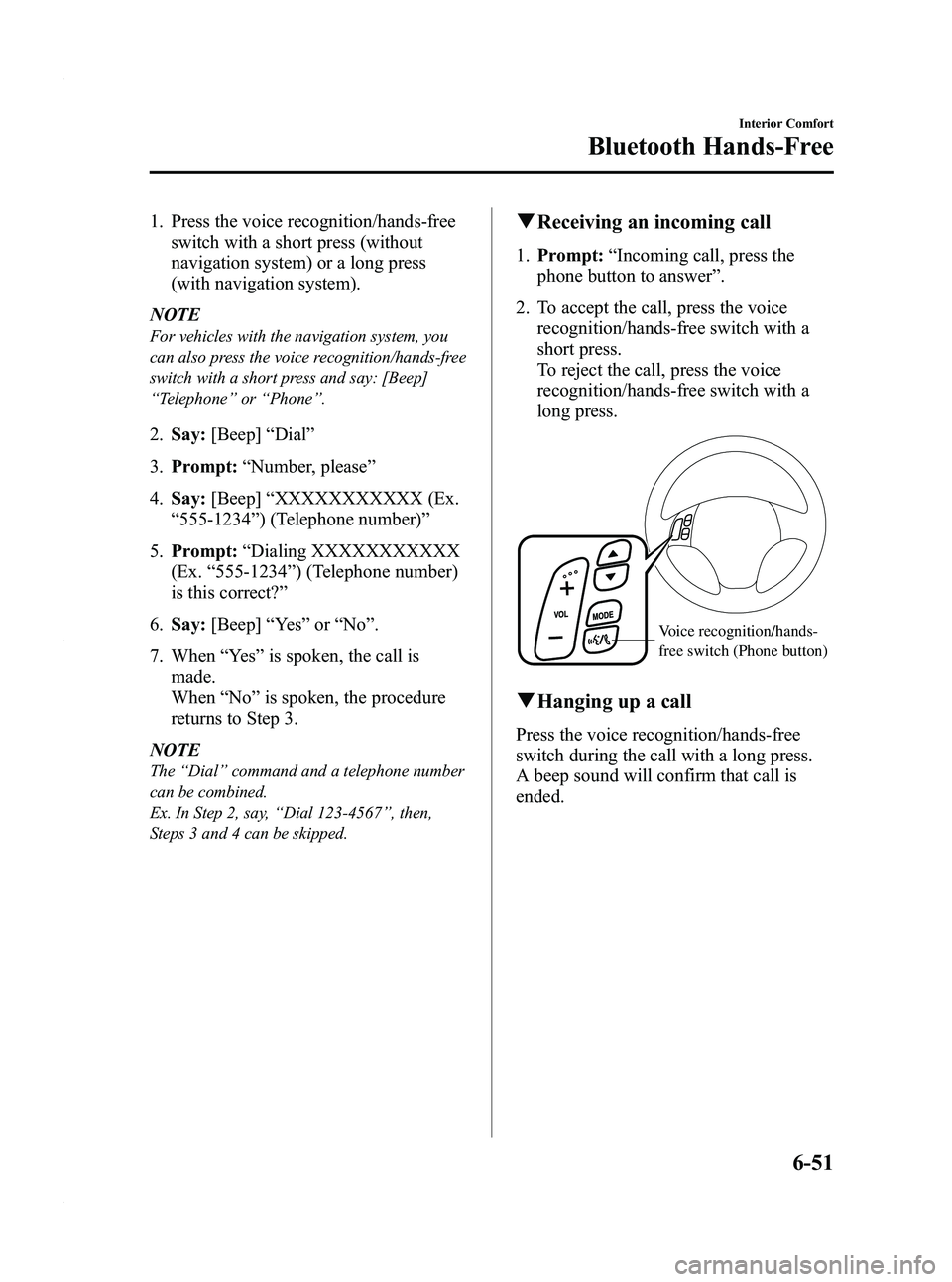
q Receiving an incoming call
1. Prompt: “Incoming call, press the
phone button to answer ”.
2. To accept the call, press the voice recognition/hands-free switch with a
short press.
To reject the call, press the voice
recognition/hands-free switch with a
long press.
Voice recognition/hands-
free switch (Phone button)
qHanging up a call
Press the voice recognition/hands-free
switch during the call with a long press.
A beep sound will confirm that call is
ended.
Interior Comfort
Bluetooth Hands-Free
6-51
Mazda5_8AU7-EA-09H_Edition4 Page219
Tuesday, March 30 2010 1:11 PM
Form No.8AU7-EA-09H
Page 220 of 392
Black plate (220,1)
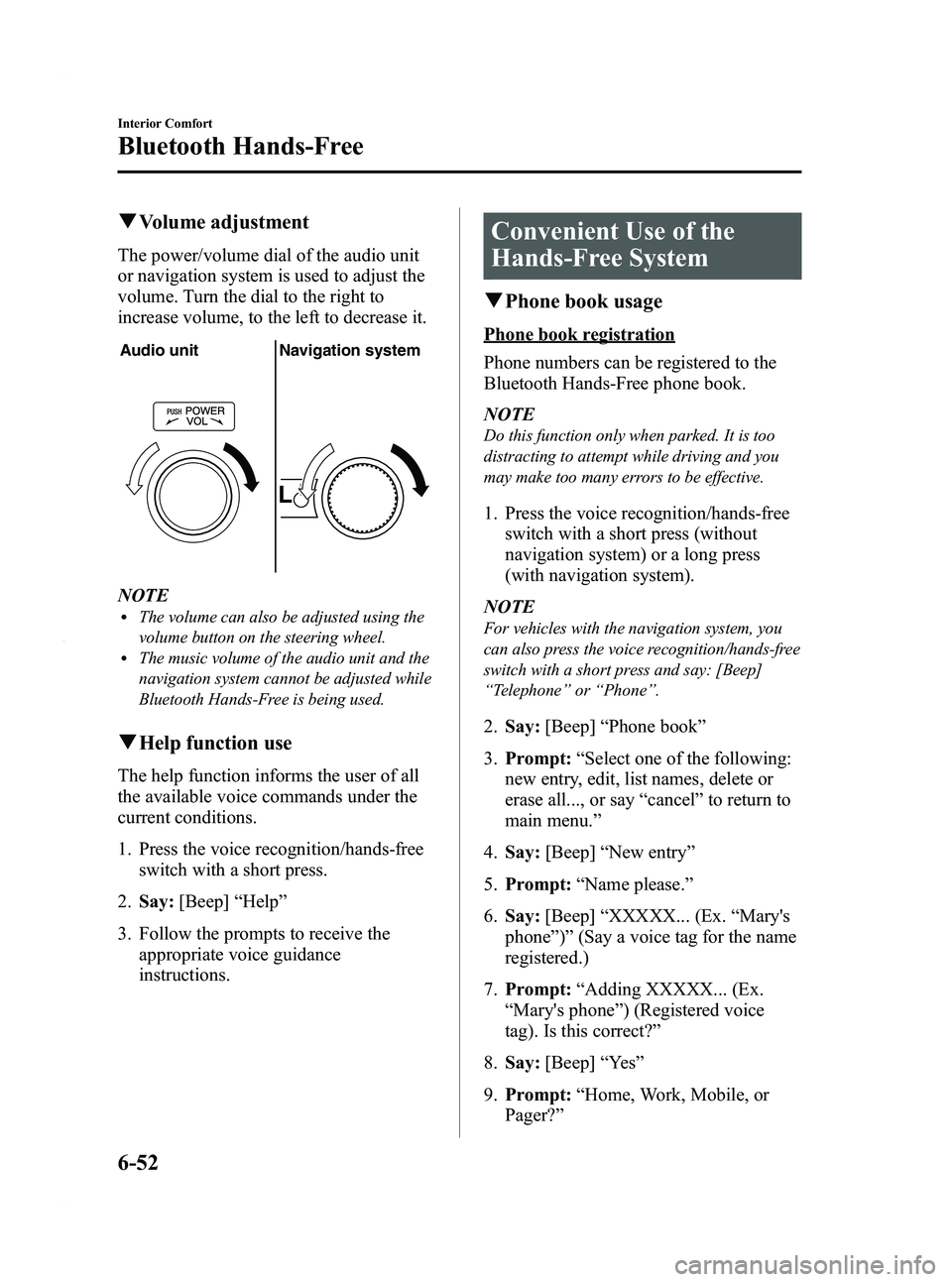
qVolume adjustment
The power/volume dial of the audio unit
or navigation system is used to adjust the
volume. Turn the dial to the right to
increase volume, to the left to decrease it.
Audio unit Navigation system
NOTElThe volume can also be adjusted using the
volume button on the steering wheel.
lThe music volume of the audio unit and the
navigation system cannot be adjusted while
Bluetooth Hands-Free is being used.
qHelp function use
The help function informs the user of all
the available voice commands under the
current conditions.
1. Press the voice recognition/hands-free
switch with a short press.
2. Say: [Beep] “Help ”
3. Follow the prompts to receive the appropriate voice guidance
instructions.
Convenient Use of the
Hands-Free System
qPhone book usage
Phone book registration
Phone numbers can be registered to the
Bluetooth Hands-Free phone book.
NOTE
Do this function only when parked. It is too
distracting to attempt while driving and you
may make too many errors to be effective.
1. Press the voice recognition/hands-free
switch with a short press (without
navigation system) or a long press
(with navigation system).
NOTE
For vehicles with the navigation system, you
can also press the voice recognition/hands-free
switch with a short press and say: [Beep]
“ Telephone ”or “Phone ”.
2. Say: [Beep] “Phone book ”
3. Prompt: “Select one of the following:
new entry, edit, list names, delete or
erase all..., or say “cancel ”to return to
main menu. ”
4. Say: [Beep] “New entry ”
5. Prompt: “Name please. ”
6. Say: [Beep] “XXXXX... (Ex. “Mary's
phone ”)” (Say a voice tag for the name
registered.)
7. Prompt: “Adding XXXXX... (Ex.
“ Mary's phone ”) (Registered voice
tag). Is this correct? ”
8. Say: [Beep] “Ye s ”
9. Prompt: “Home, Work, Mobile, or
Pager? ”
6-52
Interior Comfort
Bluetooth Hands-Free
Mazda5_8AU7-EA-09H_Edition4 Page220
Tuesday, March 30 2010 1:11 PM
Form No.8AU7-EA-09H
Page 221 of 392
![MAZDA MODEL 5 2010 User Guide Black plate (221,1)
10.Say: [Beep] “Mobile ”(Say “Home ”,
“ Work ”, “Mobile ”,or “Pager ”, for the
desired location to be registered.)
11. Prompt: “Mobile (Location to be
registe](/img/28/41017/w960_41017-220.png "MAZDA MODEL 5 2010 User Guide Black plate (221,1)
10.Say: [Beep] “Mobile ”(Say “Home ”,
“ Work ”, “Mobile ”,or “Pager ”, for the
desired location to be registered.)
11. Prompt: “Mobile (Location to be
registe")
Black plate (221,1)
10.Say: [Beep] “Mobile ”(Say “Home ”,
“ Work ”, “Mobile ”,or “Pager ”, for the
desired location to be registered.)
11. Prompt: “Mobile (Location to be
registered). Is this correct? ”
12. Say: [Beep] “Ye s ”
13. Prompt: “Number, please. ”
14. Say: [Beep] “XXXXXXXXXXX
(Ex. “555-1234 ”)” (Say the phone
number to be registered.)
15. Prompt: “XXXXXXXXXXX (Ex.
“ 555-1234 ”) (Phone number
registration). Is this correct? ”
16. Say: [Beep] “Ye s ”
17. Prompt: “Number saved. Would you
like to add another number for this
entry? ”
18. Say: [Beep] “Ye s ”or “No ”.
19. If “Ye s ”, an additional phone number
registration can be made for the same
entry.
If “No” , the procedure proceeds to
Step 20.
20. Prompt: “Returning to main menu. ”
Making calls using the phone book
Telephone calls can be made by saying
the name of a person (voice tag) whose
phone number has been registered in
Bluetooth Hands-Free in advance.
For the phone book setting method, refer
to (page 6-55).
1. Press the voice recognition/hands-free
switch with a short press (without
navigation system) or a long press
(with navigation system). NOTE
For vehicles with the navigation system, you
can also press the voice recognition/hands-free
switch with a short press and say: [Beep]
“
Telephone ”or “Phone ”.
2. Say: [Beep] “Call ”
3. Prompt: “Name please. ”
4. Say: [Beep] “XXXXX... (Ex. “John's
phone ”)” (Say a voice tag registered in
the phone book.)
5. Prompt: “Calling XXXXX... (Ex.
“ John's phone ”) XXXX (Ex. “at
home ”). Is this correct? ”(Voice tag and
phone number location registered in
phone book).
6. Say: [Beep] “Ye s ”
7. Prompt: “Dialing ”
NOTE
The “Call ”command and the voice tag can be
combined.
Ex. In Step 2, say, “Call John's phone ”, then,
Steps 3 and 4 can be skipped.
q Redialing function
Redialing the number of the person
previously dialed using the phone is
possible.
1. Press the voice recognition/hands-free
switch with a short press (without
navigation system) or a long press
(with navigation system).
NOTE
For vehicles with the navigation system, you
can also press the voice recognition/hands-free
switch with a short press and say: [Beep]
“ Telephone ”or “Phone ”.
2. Say: [Beep] “Redial ”
Interior Comfort
Bluetooth Hands-Free
6-53
Mazda5_8AU7-EA-09H_Edition4 Page221
Tuesday, March 30 2010 1:11 PM
Form No.8AU7-EA-09H
Page 222 of 392
Black plate (222,1)
3.Prompt: “Dialing ”
qEmergency calls
A call can be made to the emergency
phone number (911) using the voice input
command.
1. Press the voice recognition/hands-free
switch with a short press (without
navigation system) or a long press
(with navigation system).
NOTE
For vehicles with the navigation system, you
can also press the voice recognition/hands-free
switch with a short press and say: [Beep]
“ Telephone ”or “Phone ”.
2. Say: [Beep] “Emergency ”
3. Prompt: “Calling “911 ”, is this
correct? ”
4. Say: [Beep] “Ye s ”
5. Prompt: “Dialing ”
qRefusing an incoming call
For incoming call refusal, refer to
“Receiving an incoming call ”(page 6-51).
q Mute
The microphone can be muted during a
call.
1. Press the voice recognition/hands-free
switch with a short press.
2. Say: [Beep] “Mute ”
3. Prompt: “Microphone muted ”
Canceling mute
1. Press the voice recognition/hands-free
switch with a short press. 2.
Say: [Beep] “Mute off ”
3. Prompt: “Microphone unmuted ”
qTransferring a call
Transferring a call from Hands-Free to
a mobile phone
Communication between the hands-free
unit and a mobile phone is canceled, and
the line can be switched to a standard call
using a mobile phone.
1. Press the voice recognition/hands-free
switch with a short press.
2. Say: [Beep] “Transfer call ”
3. Prompt: “Transferred call to phone ”
Transferring a call from a mobile
phone to Hands-Free
Communication between mobile phones
can be switched to the Bluetooth Hands-
Free system.
1. Press the voice recognition/hands-free
switch with a short press.
2. Say: [Beep] “Transfer call ”
3. Prompt: “Transferred call to Hands
Free system ”
Call waiting
A call can be interrupted to receive an
incoming call from a third party.
Call interrupt
A call can be switched to a new incoming
call.
Press the voice recognition/hands-free
switch with a short press.
6-54
Interior Comfort
Bluetooth Hands-Free
Mazda5_8AU7-EA-09H_Edition4 Page222
Tuesday, March 30 2010 1:11 PM
Form No.8AU7-EA-09H
Page 223 of 392

Black plate (223,1)
NOTElTo refuse an incoming call, press the voice
recognition/hands-free switch with a long
press.
lAfter receiving a new incoming call, the
previous call is placed on hold.
Switching calls
Switching back to the previous call can
also be done.
Press the voice recognition/hands-free
switch with a short press.
Ending the current call
Press the voice recognition/hands-free
switch during the call with a long press.
qVoice guidance interrupt operation
Voice guidance can be stopped by
pressing the voice recognition/hands-free
switch with a short press while it is being
heard. A new voice input command can
then be spoken by the user.
· Press the voice recognition/hands-freeswitch with a short press.
q Phone book settings
Editing phone book
The data registered to the Bluetooth
Hands-Free phone book can be edited.
NOTE
Do this function only when parked. It is too
distracting to attempt while driving and you
may make too many errors to be effective.
1. Press the voice recognition/hands-free
switch with a short press (without
navigation system) or a long press
(with navigation system). NOTE
For vehicles with the navigation system, you
can also press the voice recognition/hands-free
switch with a short press and say: [Beep]
“
Telephone ”or “Phone ”.
2. Say: [Beep] “Phone book ”
3. Prompt: “Select one of the following:
new entry, edit, list names, delete or
erase all..., or say “cancel ”to return to
main menu. ”
4. Say: [Beep] “Edit ”
5. Prompt: “Please say the name of the
entry you would like to edit, or say
“ List names ”..., or say “cancel ”to
return to main menu. ”
6. Say: [Beep] “XXXXX... (Ex. “Mary's
phone ”)” (Say the voice tag for the
registered name to be edited in the
phone book.)
7. Prompt: “Home, Work, Mobile, or
Pager? ”
8. Say: [Beep] “Home ”(Say the
registered location to be edited:
“ Home ”, “Work ”, “Mobile ”,or
“ Pager ”).
9. Prompt: “XXXXX... (Ex. “Mary's
phone ”) (Registered voice tag) XXXX
(Ex. “Home ”) (Registered location). Is
this correct? ”
10. Say: [Beep] “Ye s ”
11. Prompt: “The current number is
XXXXXXXXXXX (Ex. “555-1234 ”)
(Currently registered number). New
number, please. ”
NOTE
If there was no previous phone number
registered to a location (Ex. “Work ”), the
prompt will only read out “Number, please” .
Interior Comfort
Bluetooth Hands-Free
6-55
Mazda5_8AU7-EA-09H_Edition4 Page223
Tuesday, March 30 2010 1:11 PM
Form No.8AU7-EA-09H
Page 224 of 392
![MAZDA MODEL 5 2010 User Guide Black plate (224,1)
12.Say: [Beep] “XXXXXXXXXXX
(Ex. “666-1234 ”)” (Say the new
phone number to be registered.)
13. Prompt: “XXXXXXXXXXX (Ex.
“ 666-1234 ”) (The new phone number
to be re](/img/28/41017/w960_41017-223.png "MAZDA MODEL 5 2010 User Guide Black plate (224,1)
12.Say: [Beep] “XXXXXXXXXXX
(Ex. “666-1234 ”)” (Say the new
phone number to be registered.)
13. Prompt: “XXXXXXXXXXX (Ex.
“ 666-1234 ”) (The new phone number
to be re")
Black plate (224,1)
12.Say: [Beep] “XXXXXXXXXXX
(Ex. “666-1234 ”)” (Say the new
phone number to be registered.)
13. Prompt: “XXXXXXXXXXX (Ex.
“ 666-1234 ”) (The new phone number
to be registered). Is this correct? ”
14. Say: [Beep] “Ye s ”
15. Prompt: “Number changed. Would
you like to call this number, edit
another entry..., or say “cancel ”to
return to main menu. ”
Phone book data deletion
Erasing individual phone book data
Individual data registered to the Bluetooth
Hands-Free phone book can be cleared.
NOTE
Do this function only when parked. It is too
distracting to attempt while driving and you
may make too many errors to be effective.
1. Press the voice recognition/hands-free
switch with a short press (without
navigation system) or a long press
(with navigation system).
NOTE
For vehicles with the navigation system, you
can also press the voice recognition/hands-free
switch with a short press and say: [Beep]
“ Telephone ”or “Phone ”.
2. Say: [Beep] “Phone book ”
3. Prompt: “Select one of the following:
new entry, edit, list names, delete or
erase all..., or say “cancel ”to return to
main menu. ”
4. Say: [Beep] “Delete ” 5.
Prompt: “Please say the name of the
entry you would like to delete, or say
“ List names ”..., or say “cancel ”to
return to main menu. ”
6. Say: [Beep] “XXXXX... (Ex. “John's
phone ”)” (Say the registered voice tag
to be deleted from the phone book.)
7. Prompt: “Deleting XXXXX... (Ex.
“ John's phone ”) (Registered voice tag)
Home (Registered location). Is this
correct? ”
8. Say: [Beep] “Ye s ”
9. Prompt: “XXXXX... (Ex. “John's
phone ”) (Registered voice tag) Home
(Registered location) deleted, returning
to main menu. ”
Complete deletion of the phone book
data
All data registered to the Bluetooth
Hands-Free phone book can be erased.
NOTE
Do this function only when parked. It is too
distracting to attempt while driving and you
may make too many errors to be effective.
1. Press the voice recognition/hands-free
switch with a short press (without
navigation system) or a long press
(with navigation system).
NOTE
For vehicles with the navigation system, you
can also press the voice recognition/hands-free
switch with a short press and say: [Beep]
“ Telephone ”or “Phone ”.
2. Say: [Beep] “Phone book ”
3. Prompt: “Select one of the following:
new entry, edit, list names, delete or
erase all..., or say “cancel ”to return to
main menu. ”
6-56
Interior Comfort
Bluetooth Hands-Free
Mazda5_8AU7-EA-09H_Edition4 Page224
Tuesday, March 30 2010 1:11 PM
Form No.8AU7-EA-09H
Page 225 of 392
![MAZDA MODEL 5 2010 User Guide Black plate (225,1)
4.Say: [Beep] “Erase all ”
5. Prompt: “Are you sure you want to
erase everything from your Hands Free
system phone book? ”
6. Say: [Beep] “Ye s ”
7. Prompt: “You are](/img/28/41017/w960_41017-224.png "MAZDA MODEL 5 2010 User Guide Black plate (225,1)
4.Say: [Beep] “Erase all ”
5. Prompt: “Are you sure you want to
erase everything from your Hands Free
system phone book? ”
6. Say: [Beep] “Ye s ”
7. Prompt: “You are")
Black plate (225,1)
4.Say: [Beep] “Erase all ”
5. Prompt: “Are you sure you want to
erase everything from your Hands Free
system phone book? ”
6. Say: [Beep] “Ye s ”
7. Prompt: “You are about to delete
everything from your Hands Free
system phone book. Do you want to
continue? ”
8. Say: [Beep] “Ye s ”
9. Prompt: “Please wait, erasing the
Hands Free system phone book. ”
10. Prompt: “Hands-Free system phone
book erased, returning to main
menu. ”
Read-out of names registered to the
Bluetooth Hands-Free phone book
The Bluetooth Hands-Free system can
read out the list of names registered to its
phone book.
1. Press the voice recognition/hands-free
switch with a short press (without
navigation system) or a long press
(with navigation system).
NOTE
For vehicles with the navigation system, you
can also press the voice recognition/hands-free
switch with a short press and say: [Beep]
“ Telephone ”or “Phone ”.
2. Say: [Beep] “Phone book ”
3. Prompt: “Select one of the following:
new entry, edit, list names, delete or
erase all..., or say “cancel ”to return to
main menu. ”
4. Say: [Beep] “List names ” 5.
Prompt: “XXXXX..., XXXXX...,
XXXXX... (Ex. “John's phone ”, Mary's
phone, Bill's phone) ”(Voice guidance
reads out the voice tags registered to
the phone book.)
Press the voice recognition/hands-free
switch during the read-out at the desired
name, and then say one of the following
voice commands to execute it.
l“ Continue ”: Continues the voice
guidance.
l“ Call ”: Calls the registered phone
number.
l“ Edit ”: Edits the registered phone
number.
l“ Delete ”: Deletes the registered phone
number.
l“ Previous ”: Returns to the previous
phone number.
l“ Cancel ”: Returns to main menu.
6. Prompt: “End of list, would you like
to start from the beginning?”
7. Say: [Beep] “No ”
8. Prompt: “Returning to main menu. ”
Interior Comfort
Bluetooth Hands-Free
6-57
Mazda5_8AU7-EA-09H_Edition4 Page225
Tuesday, March 30 2010 1:11 PM
Form No.8AU7-EA-09H
Page 226 of 392

Black plate (226,1)
Hands-Free Telephone Setting
qMobile phone
Mobile phone registration
For the registration of a Bluetooth
equipped mobile telephone to Bluetooth
Hands-Free, refer to “Bluetooth Hands-
Free preparation ”(page 6-48).
Registered mobile phone read-out
Bluetooth Hands-Free can read-out the
mobile phones registered to its system.
NOTE
Do this function only when parked. It is too
distracting to attempt while driving and you
may make too many errors to be effective.
1. Press the voice recognition/hands-free
switch with a short press (without
navigation system) or a long press
(with navigation system).
NOTE
For vehicles with the navigation system, you
can also press the voice recognition/hands-free
switch with a short press and say: [Beep]
“ Telephone ”or “Phone ”.
2. Say: [Beep] “Setup ”
3. Prompt: “Select one of the following:
pairing options, confirmation prompts,
select phone, language, or passcode...,
or say “cancel ”to return to main
menu. ”
4. Say: [Beep] “Pairing options ”
5. Prompt: “Do you want to pair a
phone, delete a phone, or list paired
phones? ”
6. Say: [Beep] “List phones ” 7.
Prompt: “XXXXX..., XXXXX...,
XXXXX... (Ex. Phone A, phone B,
phone C) ”(The voice guidance reads
out the phone tags registered to the
hands-free system.)
Press the voice recognition/hands-free
switch during the read-out at the desired
phone, and then say one of the following
voice commands to execute it.
l“ Select ”: Programmed the mobile
phone when the voice recognition/
hands-free switch was pressed.
l“ Continue ”: Continues the voice
guidance.
l“ Delete ”: Deletes the registered mobile
phone.
l“ Previous ”: Returns to the previous
mobile phone.
8. Prompt: “End of list, would you like
to start from the beginning?”
9. Say: [Beep] “No ”
10. Prompt: “Returning to main menu. ”
Mobile phone selection
This function is for switching to a
different mobile phone which has been
registered beforehand. The selected
mobile phone will remain in effect until
the ignition switch is turned off.
1. Press the voice recognition/hands-free
switch with a short press (without
navigation system) or a long press
(with navigation system).
NOTE
For vehicles with the navigation system, you
can also press the voice recognition/hands-free
switch with a short press and say: [Beep]
“ Telephone ”or “Phone ”.
2. Say: [Beep] “Setup ”
6-58
Interior Comfort
Bluetooth Hands-Free
Mazda5_8AU7-EA-09H_Edition4 Page226
Tuesday, March 30 2010 1:11 PM
Form No.8AU7-EA-09H
Page 227 of 392

Black plate (227,1)
3.Prompt: “Select one of the following:
pairing options, confirmation prompts,
select phone, language, or passcode...,
or say “cancel ”to return to main
menu. ”
4. Say: [Beep] “Select phone ”
5. Prompt: “Please say 1 (priority 1) for
XXXXX... (Ex. phone A), 2 (priority
2) for XXXXX... (Ex. phone B...) ”
6. Say: [Beep] “2 ” (Say the priority
number for the mobile phone to be
used as first priority.)
7. Prompt: “XXXXX... (Ex. phone B...)
(Registered phone tag) selected, is this
correct? ”
8. Say: [Beep] “Ye s ”
9. Prompt: “XXXXX... (Ex. phone B...)
(Phone tag) will temporarily override
phone priorities, returning to main
menu. ”
Registered mobile phone deletion
Registered mobile phones can be deleted
individually or collectively.
NOTE
Do this function only when parked. It is too
distracting to attempt while driving and you
may make too many errors to be effective.
1. Press the voice recognition/hands-free
switch with a short press (without
navigation system) or a long press
(with navigation system).
NOTE
For vehicles with the navigation system, you
can also press the voice recognition/hands-free
switch with a short press and say: [Beep]
“ Telephone ”or “Phone ”.
2. Say: [Beep] “Setup ” 3.
Prompt: “Select one of the following:
pairing options, confirmation prompts,
select phone, language, or passcode...,
or say “cancel ”to return to main
menu. ”
4. Say: [Beep] “Pairing options ”
5. Prompt: “Do you want to pair a
phone, delete a phone, or list paired
phones? ”
NOTE
A registered mobile phone can be deleted
using the registration list.
6. Say: [Beep] “Delete phone ”
7. Prompt: “Please say 1 (priority 1) for
XXXXX... (Ex. phone A), 2 (priority
2) for XXXXX... (Ex. phone B...) ”
(The voice guidance reads out each
phone in the order of priority and the
phone tag).
8. Say: [Beep] “2 ” (Say the order of
priority of the mobile phone to be
deleted.)
NOTE
Say “All” to delete all mobile phones.
9.Prompt: “Removing XXXXX... (Ex.
phone B...) (Registered phone tag). Is
this correct? ”
10. Say: [Beep] “Ye s ”
11. Prompt: “Deleted ”
qSecurity setting
If a passcode is set, the system cannot be
activated unless the passcode is input.
NOTE
Do this function only when parked. It is too
distracting to attempt while driving and you
may make too many errors to be effective.
Interior Comfort
Bluetooth Hands-Free
6-59
Mazda5_8AU7-EA-09H_Edition4 Page227
Tuesday, March 30 2010 1:11 PM
Form No.8AU7-EA-09H