lock MAZDA MODEL 5 2010 Manual PDF
[x] Cancel search | Manufacturer: MAZDA, Model Year: 2010, Model line: MODEL 5, Model: MAZDA MODEL 5 2010Pages: 392, PDF Size: 4.81 MB
Page 206 of 392
Black plate (206,1)
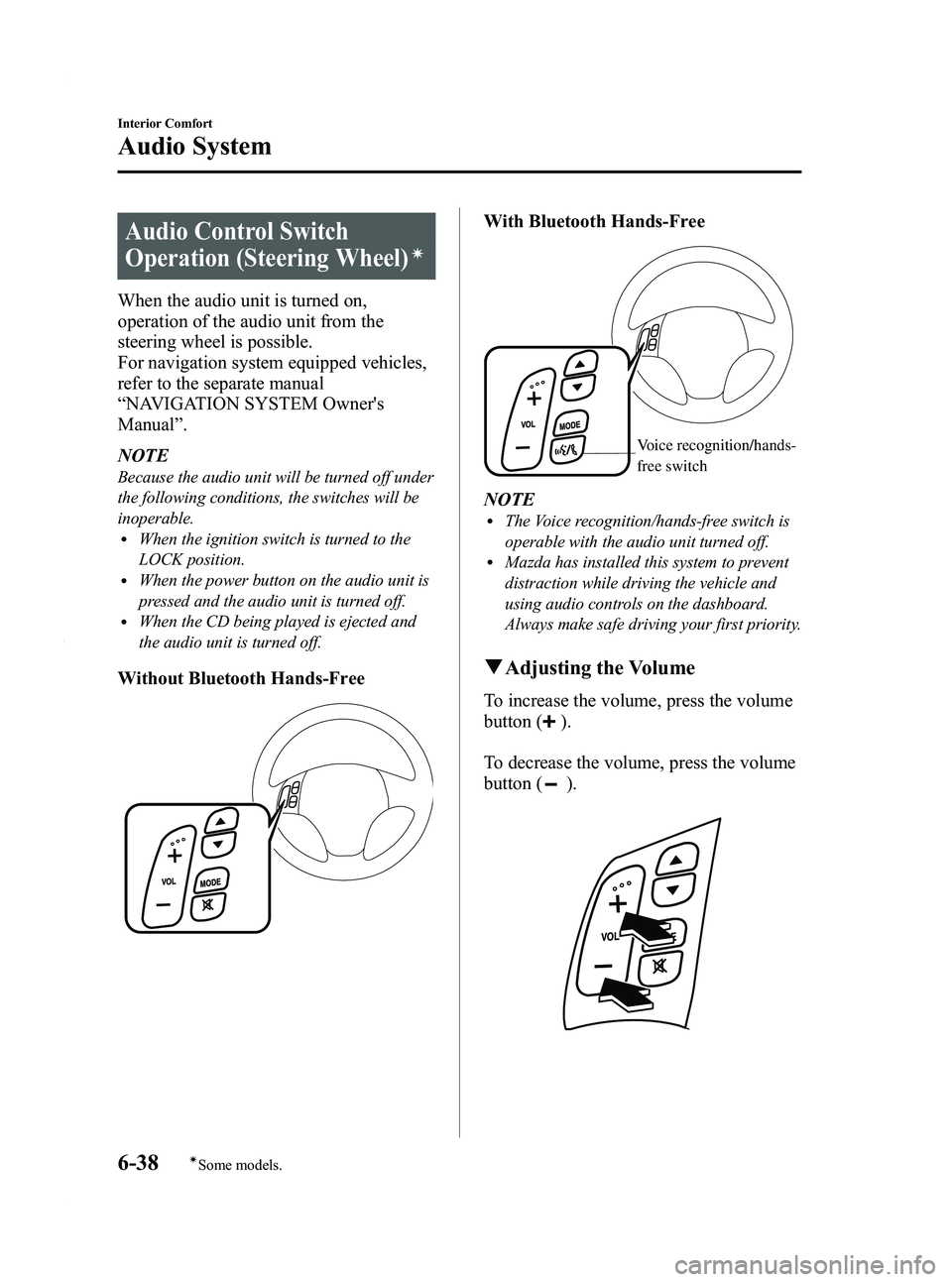
Audio Control Switch
Operation (Steering Wheel)
í
When the audio unit is turned on,
operation of the audio unit from the
steering wheel is possible.
For navigation system equipped vehicles,
refer to the separate manual
“NAVIGATION SYSTEM Owner's
Manual ”.
NOTE
Because the audio unit will be turned off under
the following conditions, the switches will be
inoperable.
lWhen the ignition switch is turned to the
LOCK position.
lWhen the power button on the audio unit is
pressed and the audio unit is turned off.
lWhen the CD being played is ejected and
the audio unit is turned off.
Without Bluetooth Hands-Free
With Bluetooth Hands-Free
Voice recognition/hands-
free switch
NOTElThe Voice recognition/hands-free switch is
operable with the audio unit turned off.
lMazda has installed this system to prevent
distraction while driving the vehicle and
using audio controls on the dashboard.
Always make safe driving your first priority.
q Adjusting the Volume
To increase the volume, press the volume
button (
).
To decrease the volume, press the volume
button (
).
6-38
Interior Comfort
íSome models.
Audio System
Mazda5_8AU7-EA-09H_Edition4 Page206
Tuesday, March 30 2010 1:10 PM
Form No.8AU7-EA-09H
Page 207 of 392

Black plate (207,1)
qChanging the Source
Press the mode switch () to change
the audio source (FM1 radio →FM2
radio →AM radio →CD player or CD
changer →SIRIUS1 →SIRIUS2 →
SIRIUS3 →AUX →cyclical).
NOTE
CD, CD changer, and SIRIUS digital satellite
radio modes cannot be selected in the
following cases:
· CD, CD changer, or SIRIUS digital satellite
radio unit is not equipped on the audio
system.
· CD has not been inserted.
The AUX mode is locked out unless you
connect a commercially available portable
audio unit to the auxiliary jack. Connect a
portable audio unit or similar product on the
market to the auxiliary jack to listen to music
or audio over the vehicle's speakers. Change
the audio source to AUX mode (page 6-40).
q Seek Switch
When listening to the radio or SIRIUS
digital satellite radio
Press the seek switch (
,), the radio
switches to the next/previous stored
station in the order that it was stored
(1 ― 6).
Press the seek switch (
,) for about 2
seconds until a beep sound is heard to
seek all usable stations at a higher or
lower frequency whether programmed or
not.
When playing a CD
Press the seek switch (
) to skip to the
next track.
Press the seek switch (
) to repeat the
current track.
Press the seek switch (
) for about 2
seconds until a beep sound is heard to
advance through a track at high speed.
Press the seek switch (
) for about 2
seconds until a beep sound is heard to
reverse through a track at high speed.
Interior Comfort
Audio System
6-39
Mazda5_8AU7-EA-09H_Edition4 Page207
Tuesday, March 30 2010 1:11 PM
Form No.8AU7-EA-09H
Page 208 of 392
Black plate (208,1)
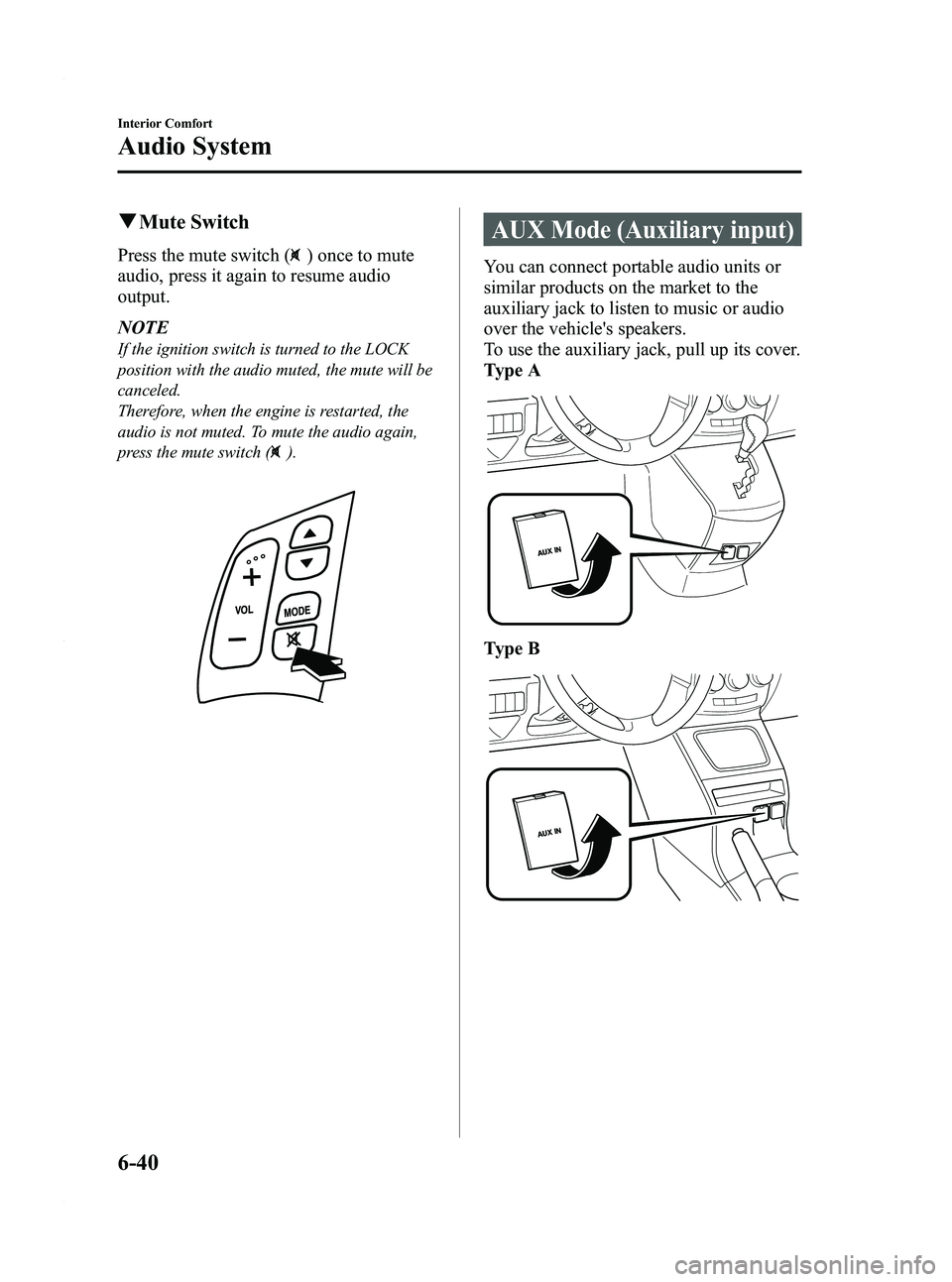
qMute Switch
Press the mute switch () once to mute
audio, press it again to resume audio
output.
NOTE
If the ignition switch is turned to the LOCK
position with the audio muted, the mute will be
canceled.
Therefore, when the engine is restarted, the
audio is not muted. To mute the audio again,
press the mute switch (
).
AUX Mode (Auxiliary input)
You can connect portable audio units or
similar products on the market to the
auxiliary jack to listen to music or audio
over the vehicle's speakers.
To use the auxiliary jack, pull up its cover.
Type A
Type B
6-40
Interior Comfort
Audio System
Mazda5_8AU7-EA-09H_Edition4 Page208
Tuesday, March 30 2010 1:11 PM
Form No.8AU7-EA-09H
Page 218 of 392

Black plate (218,1)
NOTE
For the operation of the mobile telephone,
refer to its instruction manual.
15. Select“Mazda ”from the device list
searched by the mobile phone.
16. Input the 4-digit pairing code set in Step 9 to the mobile telephone.
17. Prompt: “Please say the name of the
phone after the beep. ”
18. Say: [Beep] “XXXX - - - ”(Speak a
“ phone tag ”, an arbitrary name for the
phone.)
Example: “Stan's phone. ”
NOTE
Speak a programmed “phone tag ”within 10
seconds.
If more than two mobile telephones are to be
programmed, they cannot be programmed with
the same or similar “phone tag ”.
19. Prompt: “Adding XXXXXX - - -
(Ex. “Stan's phone ”) (Phone tag). Is
this correct? ”
20. Say: [Beep] “Ye s ”
21. Prompt: “Assign a priority for this
phone between 1 and 7, where 1 is
the phone used most often.”
22. Say: [Beep] “1 ” (Speak a number of
the desired priority from 1 to 7.)
NOTE
lNormally, “1” is to be input (Highest
priority).
lIf more than two mobile telephones are
registered, input the priority order from 1 to
7.
23. Prompt: “XXXXXX - - - (Ex.
“ Stan's phone ”) (Phone tag) set to
priority X (Priority number). Is this
correct? ”
24. Say: [Beep] “Ye s ”
25. Prompt: “Pairing complete ”
After a mobile telephone is registered, the
system automatically identifies the phone.
By pressing the voice recognition/hands-
free switch again, or by pressing the voice
recognition/hands-free switch first after
turning the ignition switch from the
LOCK to the ACC position, the system
reads out a voice guidance, “XXXXXX -
- - (Ex. “Stan's phone ”) (Phone tag) is
connected ”. If two or more telephones are
registered, the one with the highest
priority is selected.
NOTE
Depending on the device, the registration
status may be lost after a certain period of
time. If this occurs, repeat the entire process
from Step 1.
q Making a call using a telephone
number
NOTE
Practice this while parked until you are
confident you can do it while driving in a non-
taxing road situation. If you are not completely
comfortable, make all calls from a safe
parking position, and move out only when fully
under control and you can devote your eyes
and mind to driving.
6-50
Interior Comfort
Bluetooth Hands-Free
Mazda5_8AU7-EA-09H_Edition4 Page218
Tuesday, March 30 2010 1:11 PM
Form No.8AU7-EA-09H
Page 228 of 392

Black plate (228,1)
Passcode setting
1. Press the voice recognition/hands-freeswitch with a short press (without
navigation system) or a long press
(with navigation system).
NOTE
For vehicles with the navigation system, you
can also press the voice recognition/hands-free
switch with a short press and say: [Beep]
“ Telephone ”or “Phone ”.
2. Say: [Beep] “Setup ”
3. Prompt: “Select one of the following:
pairing options, confirmation prompts,
select phone, language, or passcode...,
or say “cancel ”to return to main
menu. ”
4. Say: [Beep] “Passcode ”
5. Prompt: “Passcode is disabled. Would
you like to enable it? ”
6. Say: [Beep] “Ye s ”
7. Prompt: “Please say a 4-digit passcode.
Remember this passcode. It will be
required to use this system.”
8. Say: [Beep] “XXXX ”(Say a desired 4-
digit passcode, “PCode ”.)
9. Prompt: “Passcode XXXX (Passcode,
PCode). Is this correct? ”
10. Say: [Beep] “Ye s ”
11. Prompt: “Passcode is enabled,
returning to main menu. ”
Using Bluetooth Hands-Free with a
passcode
1. Press the voice recognition/hands-free
switch with a short press (without
navigation system) or a long press
(with navigation system). NOTE
For vehicles with the navigation system, you
can also press the voice recognition/hands-free
switch with a short press and say: [Beep]
“
Telephone ”or “Phone ”.
2. Prompt: “Hands-Free system is locked.
State the passcode to continue. ”
3. Say: [Beep] “XXXX ”(Say the set
passcode “PCode ”.)
4. If the correct passcode is input, voice guidance “XXXXXX... (Ex. “Mary's
phone ”) (Phone tag) is connected ”is
announced.
If the passcode is incorrect, voice
guidance “XXXX (4-digit passcode,
Pcode) incorrect passcode, please try
again ”is announced.
Canceling the passcode
NOTE
Do this function only when parked. It is too
distracting to attempt while driving and you
may make too many errors to be effective.
1. Press the voice recognition/hands-free
switch with a short press (without
navigation system) or a long press
(with navigation system).
NOTE
For vehicles with the navigation system, you
can also press the voice recognition/hands-free
switch with a short press and say: [Beep]
“ Telephone ”or “Phone ”.
2. Say: [Beep] “Setup ”
3. Prompt: “Select one of the following:
pairing options, confirmation prompts,
select phone, language, or passcode...,
or say “cancel ”to return to main
menu. ”
4. Say: [Beep] “Passcode ”
6-60
Interior Comfort
Bluetooth Hands-Free
Mazda5_8AU7-EA-09H_Edition4 Page228
Tuesday, March 30 2010 1:11 PM
Form No.8AU7-EA-09H
Page 233 of 392
Black plate (233,1)
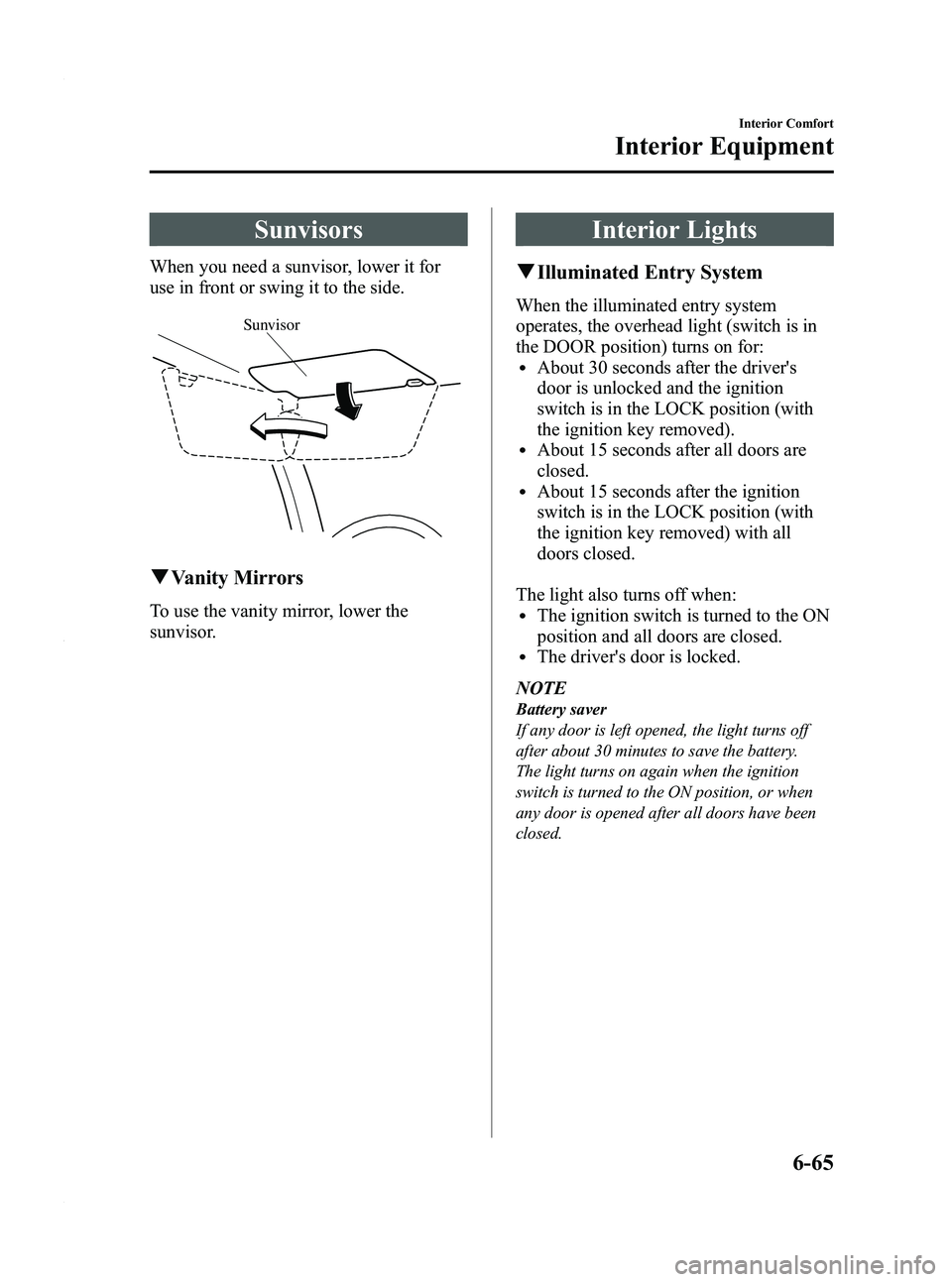
Sunvisors
When you need a sunvisor, lower it for
use in front or swing it to the side.
Sunvisor
qVanity Mirrors
To use the vanity mirror, lower the
sunvisor.
Interior Lights
qIlluminated Entry System
When the illuminated entry system
operates, the overhead light (switch is in
the DOOR position) turns on for:
lAbout 30 seconds after the driver's
door is unlocked and the ignition
switch is in the LOCK position (with
the ignition key removed).
lAbout 15 seconds after all doors are
closed.
lAbout 15 seconds after the ignition
switch is in the LOCK position (with
the ignition key removed) with all
doors closed.
The light also turns off when:
lThe ignition switch is turned to the ON
position and all doors are closed.
lThe driver's door is locked.
NOTE
Battery saver
If any door is left opened, the light turns off
after about 30 minutes to save the battery.
The light turns on again when the ignition
switch is turned to the ON position, or when
any door is opened after all doors have been
closed.
Interior Comfort
Interior Equipment
6-65
Mazda5_8AU7-EA-09H_Edition4 Page233
Tuesday, March 30 2010 1:11 PM
Form No.8AU7-EA-09H
Page 235 of 392

Black plate (235,1)
Information Display
ClockAudio display Climate control display/
Ambient temperature display
q
Information Display Functions
The information display has the following functions:lClocklAmbient Temperature Display (Outside Temperature Display, Fully Automatic Type Air
Conditioning System)
lClimate Control Display (Fully Automatic Type Air Conditioning System)lAudio Display
Interior Comfort
Interior Equipment
6-67
Mazda5_8AU7-EA-09H_Edition4 Page235
Tuesday, March 30 2010 1:11 PM
Form No.8AU7-EA-09H
Page 236 of 392
Black plate (236,1)
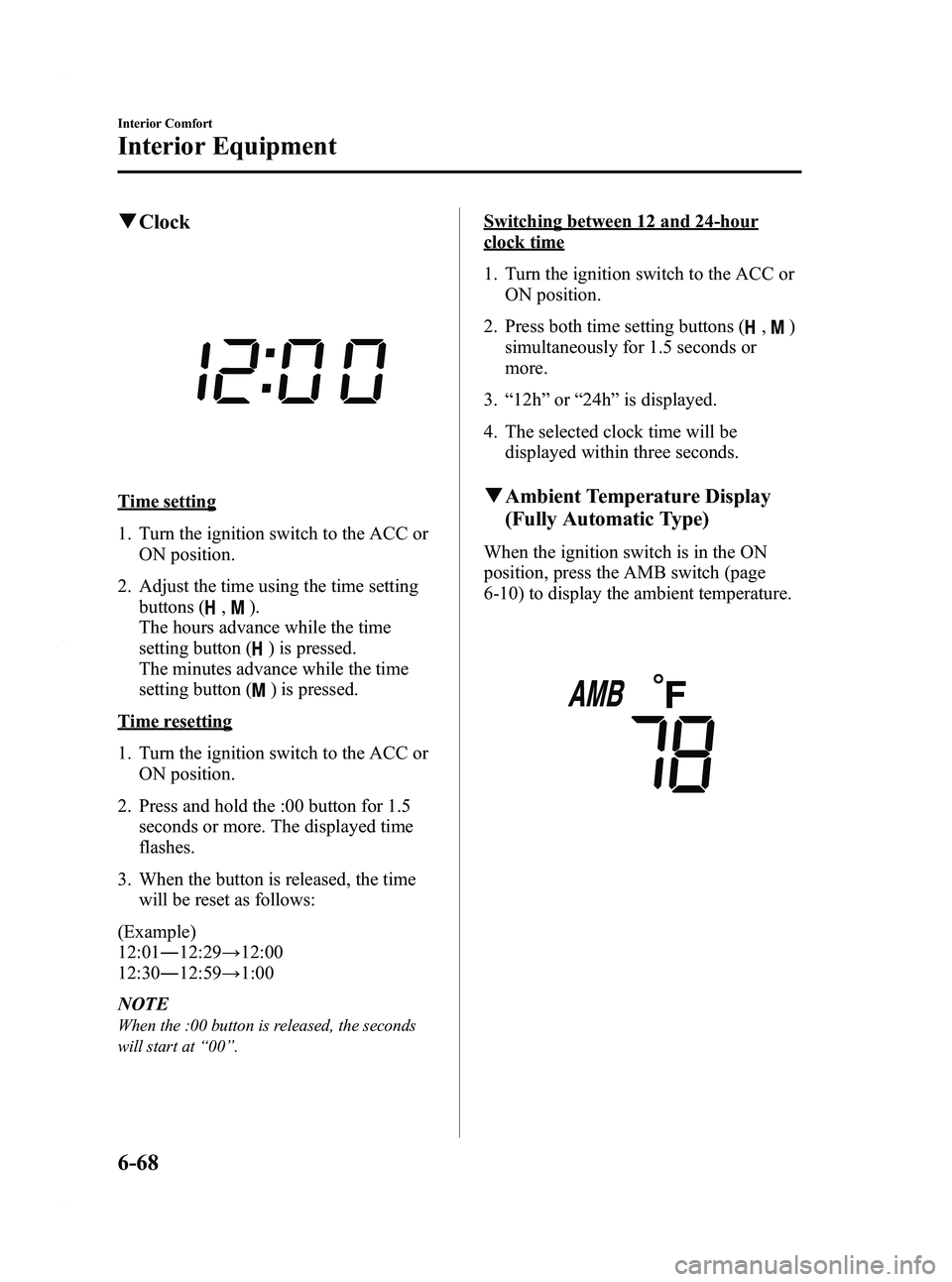
qClock
Time setting
1. Turn the ignition switch to the ACC or
ON position.
2. Adjust the time using the time setting buttons (
,).
The hours advance while the time
setting button (
) is pressed.
The minutes advance while the time
setting button (
) is pressed.
Time resetting
1. Turn the ignition switch to the ACC or ON position.
2. Press and hold the :00 button for 1.5 seconds or more. The displayed time
flashes.
3. When the button is released, the time will be reset as follows:
(Example)
12:01 ―12:29 →12:00
12:30 ―12:59 →1:00
NOTE
When the :00 button is released, the seconds
will start at “00 ”.
Switching between 12 and 24-hour
clock time
1. Turn the ignition switch to the ACC or
ON position.
2. Press both time setting buttons (
,)
simultaneously for 1.5 seconds or
more.
3. “12h ”or “24h ”is displayed.
4. The selected clock time will be displayed within three seconds.
qAmbient Temperature Display
(Fully Automatic Type)
When the ignition switch is in the ON
position, press the AMB switch (page
6-10) to display the ambient temperature.
6-68
Interior Comfort
Interior Equipment
Mazda5_8AU7-EA-09H_Edition4 Page236
Tuesday, March 30 2010 1:11 PM
Form No.8AU7-EA-09H
Page 240 of 392

Black plate (240,1)
Storage Compartments
WARNING
Keep storage boxes closed when
driving:Driving with the storage boxes open
is dangerous. To reduce the
possibility of injury in an accident or
a sudden stop, keep the storage
boxes closed when driving.
CAUTION
Do not leave lighters or eyeglasses in
the storage boxes while parked under
the sun. A lighter could explode or
the plastic material in eyeglasses
could deform and crack from high
temperature.
qGlove Box
To open the glove box, pull the latch
toward you.
Insert the key and turn it clockwise to
lock, counterclockwise to unlock.
Lock
Unlock
q
Center Console
To open, pull the left release latch.
Type A
Type B
Small items can be placed in the tray of
the center console lid.
To open it, pull the right release latch.
6-72
Interior Comfort
Interior Equipment
Mazda5_8AU7-EA-09H_Edition4 Page240
Tuesday, March 30 2010 1:11 PM
Form No.8AU7-EA-09H
Page 241 of 392

Black plate (241,1)
qUnderseat Storage
If your vehicle has a right second-row
storage box (page 6-74), when using the
storage box, small items can be stored
under the both bottoms of the second-row
seats.
To use the under seat storage
Pull the strap and lift the seat bottom up
and forward.
CAUTION
Do not store items above the marked
line indicated in the illustration
below. If the items are stored above
the marked line, the seat bottom will
not lock and could cause serious
injury.
Marked line
To return the seat bottom
Carefully lower the seat bottom backward
until it locks in place. Attempt to lift the
seat bottom to make sure it is firmly
locked down.
Interior Comfort
Interior Equipment
6-73
Mazda5_8AU7-EA-09H_Edition4 Page241
Tuesday, March 30 2010 1:11 PM
Form No.8AU7-EA-09H