lock MAZDA MODEL 5 2010 Manual Online
[x] Cancel search | Manufacturer: MAZDA, Model Year: 2010, Model line: MODEL 5, Model: MAZDA MODEL 5 2010Pages: 392, PDF Size: 4.81 MB
Page 243 of 392

Black plate (243,1)
3. More items can be stowed if the coveris removed.
NOTE
The cover can be kept in the seatback pocket of
the driver's seat.
4. Carefully lower the seat bottom
backward until it locks in place.
Attempt to lift the seat bottom to make
sure it is firmly locked down.
To stow the storage box
1. Clean out the inside of the storage box,and then attach the cover to it.
2. Pull the strap and lift the seat bottom up and forward.
3. Make sure the underseat storage area is empty before storing it.
4. Carefully lower the seat bottom backward until it locks in place.
Attempt to lift the seat bottom to make
sure it is firmly locked down.
When folding the seatback of the right
second-row seat, make sure the storage
box is stowed. If the storage box is not
stowed, it could be damaged.
CAUTION
When returning the seat-bottom to
its upright position, make sure there
is no object lodged between the
seatback and the seat belt buckle. If
the seat-bottom is returned to its
upright position in this condition it
could damage the seat belt buckle. If
the seat belt buckle does not return
to its position after removing the
obstruction, move the buckle
rearward with your hand and then
lower the seat-bottom.
Buckle
q Cargo Securing Loops
WARNING
Make sure luggage and cargo is
secured before driving:
Not securing cargo while driving is
dangerous as it could move or be
crushed during sudden braking or a
collision and cause injury.
Interior Comfort
Interior Equipment
6-75
Mazda5_8AU7-EA-09H_Edition4 Page243
Tuesday, March 30 2010 1:11 PM
Form No.8AU7-EA-09H
Page 250 of 392

Black plate (250,1)
qJack
To remove the jack
1. Remove the cover.
2. Turn the wing bolt and jack screw
counterclockwise.
Wing bolt
Jack screw
To secure the jack
1. Insert the wing bolt into the jack with the jack screw pointing down and turn
the wing bolt clockwise to temporarily
tighten it.
2. Turn the jack screw in the direction shown in the figure.
Wing bolt
Jack screw
3. Turn the wing bolt completely to secure the jack.
NOTE
If the jack is not completely secured, it could
rattle while driving. Make sure the jack screw
is sufficiently tightened.
Maintenance
lAlways keep the jack clean.lMake sure the moving parts are kept
free from dirt or rust.
lMake sure the screw thread is
adequately lubricated.
7-4
In Case of an Emergency
Flat Tire
Mazda5_8AU7-EA-09H_Edition4 Page250
Tuesday, March 30 2010 1:11 PM
Form No.8AU7-EA-09H
Page 252 of 392
Black plate (252,1)
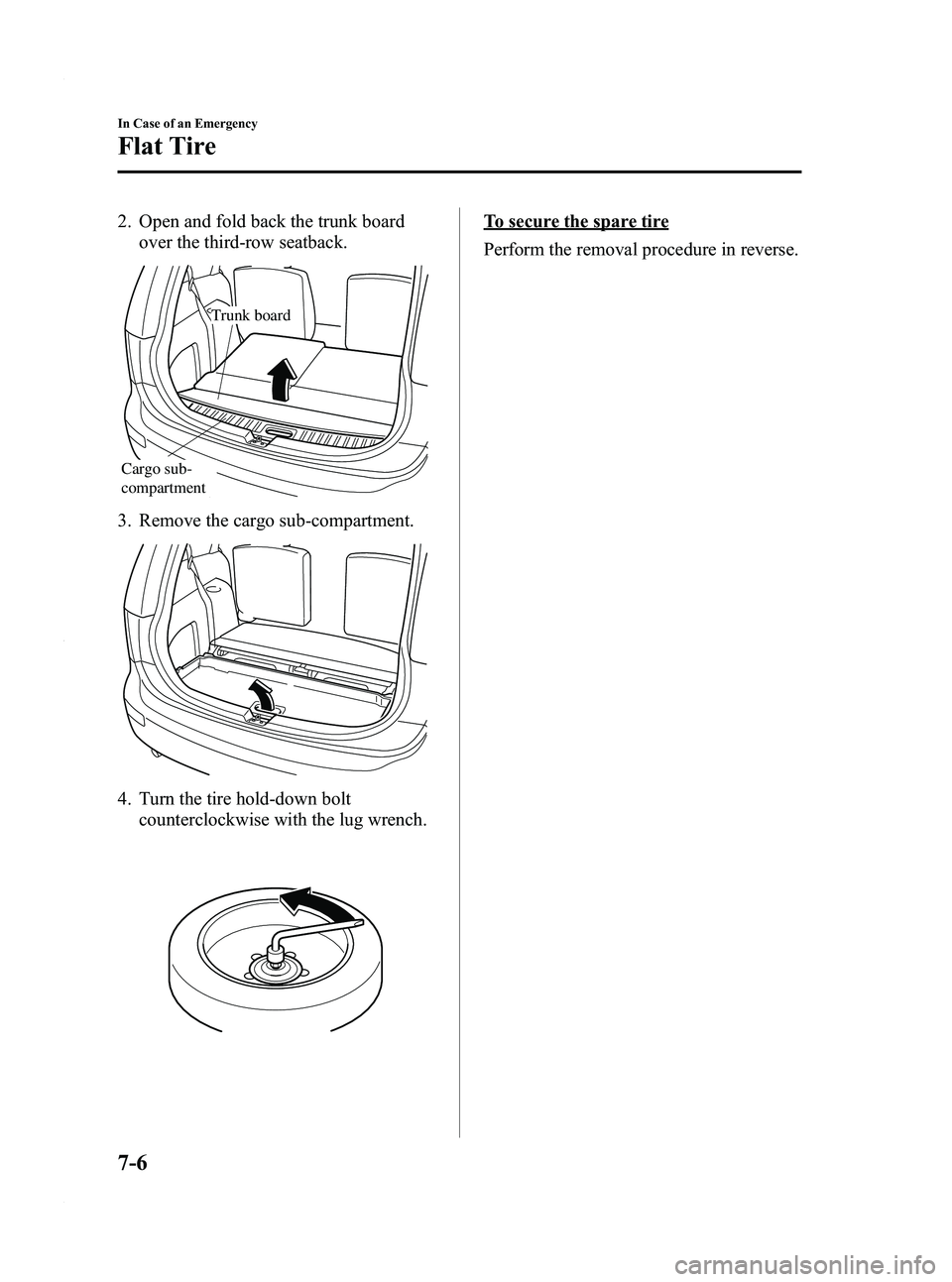
2. Open and fold back the trunk boardover the third-row seatback.
Trunk board
Cargo sub-
compartment
3. Remove the cargo sub-compartment.
4. Turn the tire hold-down bolt
counterclockwise with the lug wrench.
To secure the spare tire
Perform the removal procedure in reverse.
7-6
In Case of an Emergency
Flat Tire
Mazda5_8AU7-EA-09H_Edition4 Page252
Tuesday, March 30 2010 1:11 PM
Form No.8AU7-EA-09H
Page 253 of 392
Black plate (253,1)
Changing a Flat Tire
NOTE
If the following occurs while driving, it could
indicate a flat tire.
lSteering becomes difficult.lThe vehicle begins to vibrate excessively.lThe vehicle pulls in one direction.
If you have a flat tire, drive slowly to a
level spot that is well off the road and out
of the way of traffic to change the tire.
Stopping in traffic or on the shoulder of a
busy road is dangerous.
WARNING
Be sure to follow the directions for
changing a tire, and never get under a
vehicle that is supported only by a jack:Changing a tire is dangerous if not
done properly. The vehicle can slip off
the jack and seriously injure
someone.
Never allow anyone inside a vehicle
supported by a jack: Allowing someone to remain in a
vehicle supported by a jack is
dangerous. The occupant could cause
the vehicle to fall resulting in serious
injury.
CAUTION
(With Tire Pressure Monitoring
System)
The wheels equipped on your Mazda
are specially designed for installation
of the tire pressure sensors. Do not
use non-genuine wheels, otherwise it
may not be possible to install the tire
pressure sensors. NOTE
lMake sure the jack is well lubricated before
using it.
(With Tire Pressure Monitoring System)
lBe sure to register the tire pressure sensor
ID signal code whenever tires or wheels are
changed (page 5-30).
1. Park on a level surface off the right-of- way and firmly set the parking brake.
2. Put a vehicle with an automatic transaxle in Park (P), a manual
transaxle in Reverse (R) or 1, and turn
off the engine.
3. Turn on the hazard warning flasher.
4. Have everyone get out of the vehicle and away from the vehicle and traffic.
5. Remove the jack, tool, and spare tire (page 7-3).
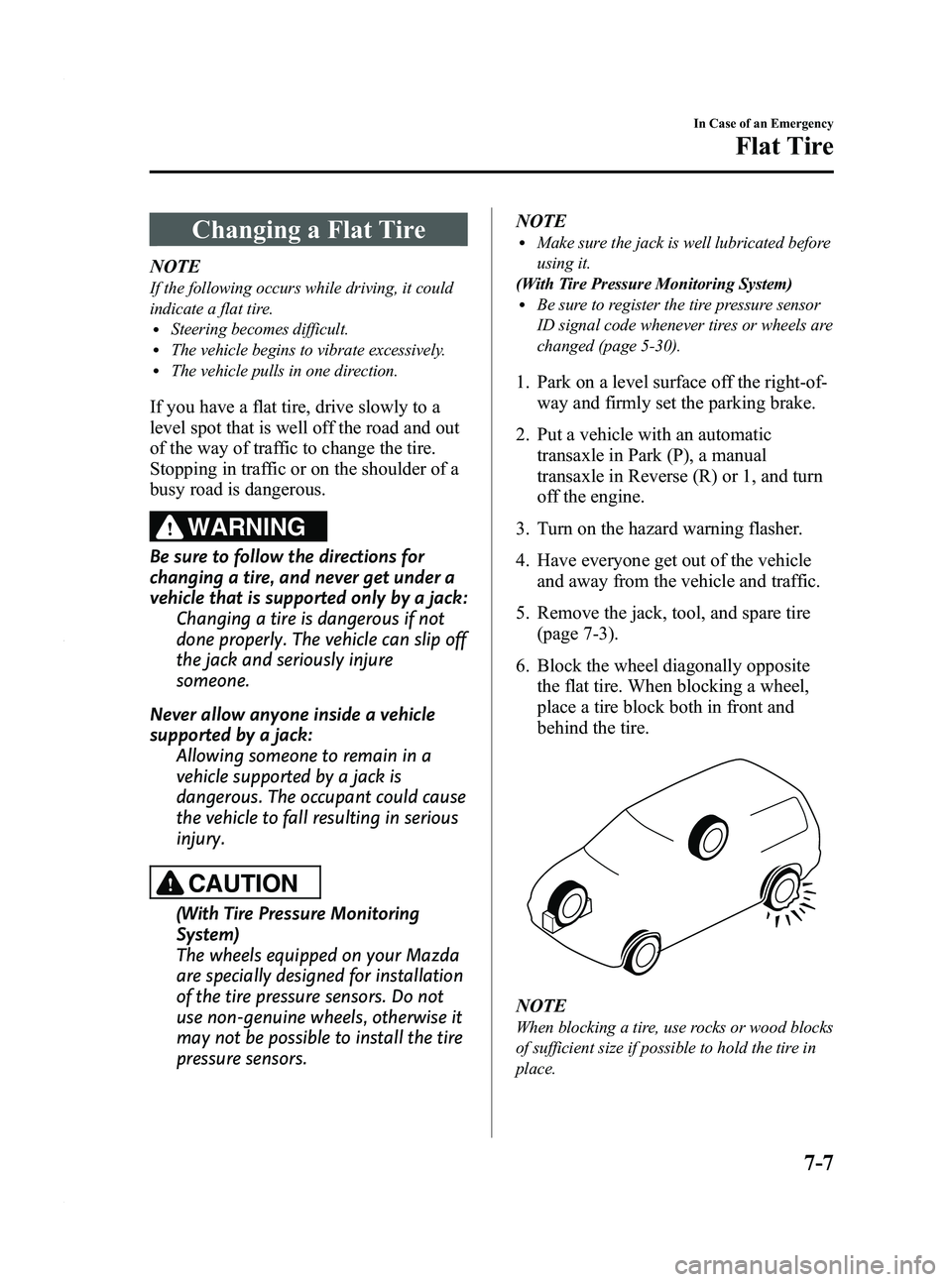
6. Block the wheel diagonally opposite the flat tire. When blocking a wheel,
place a tire block both in front and
behind the tire.
NOTE
When blocking a tire, use rocks or wood blocks
of sufficient size if possible to hold the tire in
place.
In Case of an Emergency
Flat Tire
7-7
Mazda5_8AU7-EA-09H_Edition4 Page253
Tuesday, March 30 2010 1:11 PM
Form No.8AU7-EA-09H
Page 254 of 392

Black plate (254,1)
qRemoving a Flat Tire
1. Loosen the lug nuts by turning them
counterclockwise one turn each, but do
not remove any lug nuts until the tire
has been raised off the ground.
2. Place the jack under the jacking
position closest to the tire being
changed.
Jacking position
WARNING
Use only the front and rear jacking
positions recommended in this manual: Attempting to jack the vehicle in
positions other than those
recommended in this manual is
dangerous. The vehicle could slip off
the jack and seriously injure or even
kill someone.
Use only the jack provided with your
Mazda: Using a jack that is not designed for
your Mazda is dangerous. The vehicle
could slip off the jack and seriously
injure someone.
Never place objects under the jack: Jacking the vehicle with an object
under the jack is dangerous. The jack
could slip and someone could be
seriously injured by the jack or the
falling vehicle.
3. Insert the jack lever and attach the lug wrench to tire jack.
7-8
In Case of an Emergency
Flat Tire
Mazda5_8AU7-EA-09H_Edition4 Page254
Tuesday, March 30 2010 1:11 PM
Form No.8AU7-EA-09H
Page 255 of 392

Black plate (255,1)
4. Turn the lug wrench clockwise andraise the vehicle high enough so that
the spare tire can be installed. Before
removing the lug nuts, make sure your
Mazda is firmly in position and that it
cannot slip or move.
5. Remove the lug nuts by turning themcounterclockwise; then remove the
wheel.
qLocking Lug Nutsí
If your vehicle has optional antitheft
wheel lug nuts, one on each wheel will
lock the tires and you must use a special
key to unlock them. This key is attached
to the lug wrench and is stored with the
spare tire. Register them with the lock
manufacturer by filling out the card
provided in the glove box and mailing it
in the accompanying envelope. If you lose
this key, consult an Authorized Mazda
Dealer or use the lock manufacturer's
order form, which is with the registration
card.
Special key
Antitheft lug nut
To remove an antitheft lug nut
1. Obtain the key for the antitheft lug nut.
2. Place the key on top of the nut, and be
sure to hold the key square to it. If you
hold the key at an angle, you may
damage both key and nut. Don't use a
power impact wrench.
3. Place the lug wrench on top of the key and apply pressure. Turn the wrench
counterclockwise.
In Case of an Emergency
Flat Tire
7-9íSome models.
Mazda5_8AU7-EA-09H_Edition4 Page255
Tuesday, March 30 2010 1:11 PM
Form No.8AU7-EA-09H
Page 256 of 392

Black plate (256,1)
To install the nut
1. Place the key on top of the nut, and besure to hold the key square to it. If you
hold the key at an angle, you may
damage both key and nut. Don't use a
power impact wrench.
2. Place the lug wrench on top of the key, apply pressure, and turn it clockwise.
qMounting the Spare Tire
1. Remove dirt and grime from the
mounting surfaces of the wheel and
hub, including the hub bolts, with a
cloth.
WARNING
Make sure the mounting surfaces of
the wheel, hub and lug nuts are clean
before changing or replacing tires: When changing or replacing a tire,
not removing dirt and grime from the
mounting surfaces of the wheel, hub
and hub bolts is dangerous. The lug
nuts could loosen while driving and
cause the tire to come off, resulting in
an accident.
2. Mount the spare tire. 3. Install the lug nuts with the beveled
edge inward; tighten them by hand.
WARNING
Do not apply oil or grease to lug nuts
and bolts and do not tighten the lug
nuts beyond the recommended
tightening torque: Applying oil or grease to lug nuts and
bolts is dangerous. The lug nuts
could loosen while driving and cause
the tire to come off, resulting in an
accident. In addition, lug nuts and
bolts could be damaged if tightened
more than necessary.
4. Turn the lug wrench counterclockwise and lower the vehicle. Use the lug
wrench to tighten the nuts in the order
shown.
7-10
In Case of an Emergency
Flat Tire
Mazda5_8AU7-EA-09H_Edition4 Page256
Tuesday, March 30 2010 1:11 PM
Form No.8AU7-EA-09H
Page 258 of 392

Black plate (258,1)
11. Pull the belt end to secure the flat tire.
12. Remove the tire blocks and store thetools and jack.
13. Check the tire inflation pressure. Refer to the specification charts on
page 10-6.
14. Have the flat tire repaired or replaced as soon as possible.
WARNING
Do not drive with any tires that have
incorrect air pressure:Driving on tires with incorrect air
pressure is dangerous. Tires with
incorrect pressure could affect
handling and result in an accident.
When you check the regular tires' air
pressure, check the spare tire, too. NOTE
(With Tire Pressure Monitoring System)
A tire pressure sensor is not installed to the
temporary spare tire. The warning light will
flash continuously while the temporary spare
tire is being used (page 5-28).
NOTE
To prevent the jack and tool from rattling, store
them properly.
7-12
In Case of an Emergency
Flat Tire
Mazda5_8AU7-EA-09H_Edition4 Page258
Tuesday, March 30 2010 1:11 PM
Form No.8AU7-EA-09H
Page 261 of 392

Black plate (261,1)
Starting a Flooded Engine
If the engine fails to start, it may be
flooded (excessive fuel in the engine).
Follow this procedure:
1. If the engine does not start within fiveseconds on the first try, turn the key to
the LOCK position, wait ten seconds
and try again.
2. Depress the accelerator all the way and hold it there.
3. Turn the ignition switch to the START position and hold it there ―for up to
ten seconds. If the engine starts, release
the key and accelerator immediately
because the engine will suddenly rev
up.
4. If the engine fails to start, crank it without depressing the accelerator ―for
up to ten seconds.
If the engine still does not start using the
above procedure, have your vehicle
inspected by an Authorized Mazda
Dealer.
In Case of an Emergency
Emergency Starting
7-15
Mazda5_8AU7-EA-09H_Edition4 Page261
Tuesday, March 30 2010 1:11 PM
Form No.8AU7-EA-09H
Page 264 of 392

Black plate (264,1)
1. For vehicles equipped with an enginecover, remove the engine cover.
2. Remove the battery cover from its front
side.
CAUTION
ØDo not use a tool which applies
excessive force such as a
screwdriver or pliers.
If excessive force is applied to the
clips, they could be damaged.
To prevent damaging the battery
cover, remove/install the battery
cover using the following
procedure.
Removing battery cover
1 Detach the clip facing the side of
the vehicle first and pull it outward
with your finger approx. 4 mm (0.2
in). Then, lift the cover slightly to
clear the lock.
Clip
7-18
In Case of an Emergency
Emergency Starting
Mazda5_8AU7-EA-09H_Edition4 Page264
Tuesday, March 30 2010 1:11 PM
Form No.8AU7-EA-09H