Sound MAZDA MODEL 5 2012 Workshop Manual
[x] Cancel search | Manufacturer: MAZDA, Model Year: 2012, Model line: MODEL 5, Model: MAZDA MODEL 5 2012Pages: 440, PDF Size: 5.51 MB
Page 217 of 440

Black plate (217,1)
“UPDATING xx% ”is displayed when the
SIRIUS channel map is changed. If the
unit is initialized or the user contract
content is changed, “UPDATING ”is
displayed. Updating could take as long as
three minutes depending on the
geographical area. When the unit is in an
initialized state, channel 184 is displayed
after the display indicates
“ UPDATING 100% ”. If the SIRIUS
channel map or the user contract content
is changed, the channel prior to the
change is displayed after “UPDATING ”is
displayed. After the initialization display,
it may take as long as 12 seconds to
receive channel 184.
NOTE
Do not perform the following operation while
“ UPDATING ”is displayed. Otherwise, the
updating procedure will be cancelled.
lTurning off the audio powerlSwitching to other modeslSwitching the ignition off
When the SIRIUS mode is switched to
another mode, or when the power is
turned off, the present channel which is
being received is stored as the last
channel.
Channel selection
Turning the manual tuning dial allows you
to select the desired receiving channel.
lTurn the knob clockwise: Channel UplTurn the knob counterclockwise:
Channel Down
Unsubscribed channel
When a selected station has not been
subscribed to, the display indicates the
following:
After the channel number is displayed,
[CALL
888] and [539SIRI]
(Flashes alternately) is displayed. NOTE
When the subscription contract is canceled, all
of the channels including channel 184 appear
as unsubscribed.
Invalid channel
The display switches between [SR
(bank number)INVALID] and [SR
(bank number)CHANNEL] only when
a selected channel is not broadcasting.
NOTE
If the last channel selected has become
unavailable because of a channel update the
above indication is displayed until any button
is pressed.
Preset channel programming
(Programming with “channel number ”
display)
1. Select the desired channel to be programmed. At this point, the
following is displayed:
[SR
(bank number)(channel
number)]
2. Keep pressing the channel preset button for 1.5 seconds or more.
The programming process is complete
after the channel number flashes. Then,
[SR
(bank number)] is displayed
and a beep sound is heard at the same
time.
3. [SR
(bank number)CH
(preset number)(channel number)]
are displayed.
Interior Comfort
Audio System
6-31
Mazda5_8BR9-EA-10J_Edition3 Page217
Monday, February 21 2011 1:45 PM
Form No.8BR9-EA-10J
Page 218 of 440

Black plate (218,1)
(Programming with“text ”display (e.g.
channel name))
1. Select the desired channel to be programmed. At this point, the
following is displayed:
[SR
(bank number)(selected text
(e.g. channel name))]
2. Keep pressing the channel preset button for 1.5 seconds or more.
The programming process is complete
after the text (e.g. channel name)
flashes. Then, [SR
(bank number)]
is displayed and you will hear beep
sound at the same time.
3. [SR
(bank number)CH
(preset number)(channel number)]
are displayed.
4. Three seconds later, it returns to normal display. [SR
(bank number)(text
(e.g. channel name))]
NOTE
Six stations can be stored in each bank, SR1,
SR2, and SR3 for convenient access to your
favorite stations.
Preset channel call-up
Press and release the channel preset
button,
[SR
(bank number)CH(preset
number)
(channel number)] appears.
When the preset button is pressed during
text mode, its channel number is
displayed first for three second and then
its text is displayed.
NOTE
In the initial setting, all channels are preset to
184.
Category change
Press the category button (
or) and
select the desired category.
lPress the category button ():
Category up
lPress the category button ():
Category down
Every time the category button (
)is
pressed, the category is changed over in
the order shown below.
At this time, the lowest (smallest-number)
channel within the category indicated is
received.
When the highest (or lowest) category is
reached, the category is changed over in
the order shown below.
Highest category →All categories →
Lowest category
NOTE
While all categories are selected, all channels
covering a category can be accessed
(Category off condition).
Channel selection within a category
If you are in a selected category and the
channel number is displayed, turning the
manual tuning dial moves the channel
number up/down in that category.
lTurn the manual tuning dial clockwise:
Channel Up
lTurn the manual tuning dial
counterclockwise: Channel Down
NOTE
The channel number needs to be indicated in
the display to use manual tuning dial for this
function.
6-32
Interior Comfort
Audio System
Mazda5_8BR9-EA-10J_Edition3 Page218
Monday, February 21 2011 1:45 PM
Form No.8BR9-EA-10J
Page 223 of 440
Black plate (223,1)
(New ID code input determination)
10. Determine the new ID code whichhas been input by pressing the scan
button (
).
11. “PIN CHANGED ”appears for three
seconds which indicates that the new
ID code input has been completed.
12. It returns to the former display.
NOTE
lIf an ID code is not input for ten seconds,
“ Err ”is displayed and it returns to the
former display.
lChannel preset buttons 1, 2, 3, 4 and the
scan button (
) are used for input of
the ID code. Buttons 5 and 6 cannot be
used.
Individual channel locking
If a channel is locked, the channel is
muted.
NOTE
If the registered ID code is forgotten, return
the ID code to the default [0000]. (See
“ INTIALIZATION OF ID CODE” section)
(Locking a channel)
1. Select a channel to be locked by
turning the manual tuning dial.
Example: Select channel 100
(Registered ID code input preparation)
2. Press and hold the scan button (
),
then press channel preset button 6.
Hold both buttons together for 1.5
seconds.
3. “ENTER PIN ”appears for three
seconds which indicates that it is in
code input mode.
4. “SR1 - - - - ”appears which indicates
that it is ready for code input. (Registered ID code input)
5. Input the registered ID code using
channel preset buttons 1-4. Example: If
the registered ID code is “2323 ”, input
“ 2323 ”. At this time “SR1 2323 ”is
displayed.
(Registered ID code input
determination)
6. Determine the code which has been input by pressing the scan button
(
).
7. If it does not match the registered code, “SR1 Err ”is displayed and then it
returns to “SR1 - - - - ”.
8. If it matches the registered code, “SR1 LOCK ”appears for three
seconds which indicates that the code
input has been completed.
9. “SR1 LOCK 100 ”appears which
indicates that the parental lock is
activated. At this time, mute is on and
no sound is heard.
NOTE
lIf an ID code is not input for ten seconds,
“ Err ”is displayed and it returns to the
former display.
lChannel preset buttons 1, 2, 3, 4 and the
scan button (
) are used for input of
the ID code. Buttons 5 and 6 cannot be
used.
Lock cancellation
Setting condition: SAT mode
(Releasing a locked channel)
1. Select a channel to be released by turning the manual tuning dial.
Example: Select the locked channel
(i.e. 100). At this time,
“SR1 LOCK 100 ”is displayed.
Interior Comfort
Audio System
6-37
Mazda5_8BR9-EA-10J_Edition3 Page223
Monday, February 21 2011 1:45 PM
Form No.8BR9-EA-10J
Page 224 of 440
Black plate (224,1)
(Registered ID code input preparation)
2. Press and hold the scan button (
),
then press channel preset button 6.
Hold both buttons together for 1.5
seconds.
3. “ENTER PIN ”appears for three
seconds which indicates that it is in
code input mode.
4. “SR1 - - - - ”appears, which indicates
that it is ready for code input.
(Registered ID code input)
5. Input the registered ID code using channel preset buttons 1-4. Example:
When the registered ID code is “2323 ”,
input “2323 ”. At this time “SR1 2323 ”
is displayed.
NOTE
If “Err ”is displayed, go to the
“ INITIALIZATION OF ID CODE” section to
reset the ID code to [0000].
(Registered ID code input
determination)
6. Determine the input code by pressing the scan button (
).
7. If it does not match the registered code, “SR1 Err ”is displayed and then it
returns to “SR1 - - - - ”.
8. If it matches the registered code, “SR1 UNLOCK ”appears for three
seconds which indicates that the code
input has been completed.
9. “SR1 100 ”appears which indicates that
the parental lock is off. At this time,
sound is heard. NOTE
lIf an ID code is not input for ten seconds,
“
Err ”is displayed and it returns to the
former display.
lChannel preset buttons 1, 2, 3, 4 and the
scan button (
) are used for input of
the ID code. Buttons 5 and 6 cannot be
used.
6-38
Interior Comfort
Audio System
Mazda5_8BR9-EA-10J_Edition3 Page224
Monday, February 21 2011 1:45 PM
Form No.8BR9-EA-10J
Page 230 of 440
Black plate (230,1)
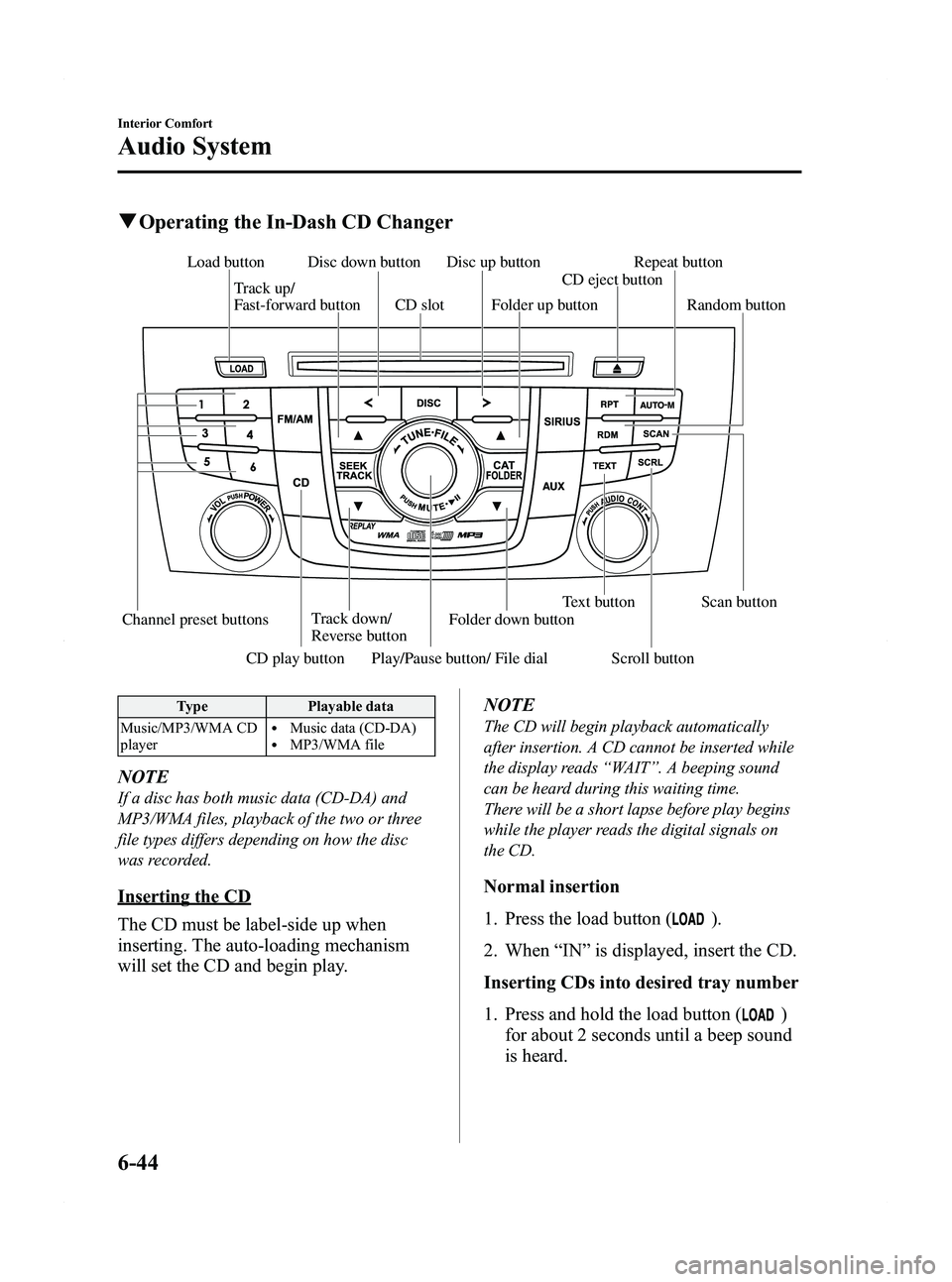
qOperating the In-Dash CD Changer
Channel preset buttons Track down/
Reverse button Text button Scan button
Play/Pause button/ File dial
Track up/
Fast-forward button
Disc down button Disc up button
Load button
CD play button Scroll button Folder down buttonCD eject button
Folder up button
CD slot Random button Repeat button
Type
Playable data
Music/MP3/WMA CD
player
lMusic data (CD-DA)lMP3/WMA file
NOTE
If a disc has both music data (CD-DA) and
MP3/WMA files, playback of the two or three
file types differs depending on how the disc
was recorded.
Inserting the CD
The CD must be label-side up when
inserting. The auto-loading mechanism
will set the CD and begin play. NOTE
The CD will begin playback automatically
after insertion. A CD cannot be inserted while
the display reads
“WAIT ”. A beeping sound
can be heard during this waiting time.
There will be a short lapse before play begins
while the player reads the digital signals on
the CD.
Normal insertion
1. Press the load button (
).
2. When “IN ”is displayed, insert the CD.
Inserting CDs into desired tray number
1. Press and hold the load button (
)
for about 2 seconds until a beep sound
is heard.
6-44
Interior Comfort
Audio System
Mazda5_8BR9-EA-10J_Edition3 Page230
Monday, February 21 2011 1:45 PM
Form No.8BR9-EA-10J
Page 231 of 440
Black plate (231,1)
2. Press the channel preset button for thedesired tray number while “WAIT ”is
displayed.
3. When “IN ”is displayed, insert the CD.
NOTE
The CD cannot be inserted to the desired tray
number if the number is already occupied.
Multiple insertion
1. Press and hold the load button (
)
for about 2 seconds until a beep sound
is heard.
2. When “IN ”is displayed, insert the CD.
3. When “IN ”is displayed again, insert
the next CD.
NOTE
The first-inserted CD will be played
automatically when:
lNo other CD is inserted within 15 seconds
after “IN ”is displayed.
lThe CD trays are full.
Displaying the CD-inserted tray
number
When you want to know the number for a
CD-inserted tray, press the text button
(
). The tray number will be
displayed for 5 seconds.
Ejecting the CD
Normal ejection
1. Press the CD eject button (
). The
disc number and “DISC OUT ”will be
displayed.
2. Pull out the CD.
NOTE
When the CD is ejected during play, the next
CD will be played automatically.
Ejecting CDs from desired tray number
1. Press and hold the CD eject button (
)
for about 2 seconds until a beep sound
is heard.
The “DISC OUT ”display flashes.
2. Press the channel preset button for the desired CD number for less than 5
seconds after the beep sound is heard.
3. Pull out the CD.
Multiple ejection
1. Press and hold the CD eject button (
)
for about 2 seconds until a beep sound
is heard.
The “DISC OUT ”display flashes.
2. Press the CD eject button (
) again
for less than 5 seconds after the beep
sound is heard.
NOTE
If the button is not pressed and about 5
seconds have elapsed while “DISC OUT ”is
flashing, CDs are automatically ejected.
3. Pull out the CD, then the next CD will be ejected.
NOTE
lCDs will be ejected starting with the one
with the lowest number.
lAll CDs in the tray will be ejected
continuously.
lCDs can be ejected when the ignition is
switched off. Press and hold the CD eject
button (
) for about 2 seconds and all
CDs will eject.
Playback
Press the CD play button (
) to start
play when a CD is in the unit.
If a CD is not in the unit when the CD
play button (
) is pressed, “NO DISC ”
will flash on and off.
Interior Comfort
Audio System
6-45
Mazda5_8BR9-EA-10J_Edition3 Page231
Monday, February 21 2011 1:45 PM
Form No.8BR9-EA-10J
Page 240 of 440
Black plate (240,1)
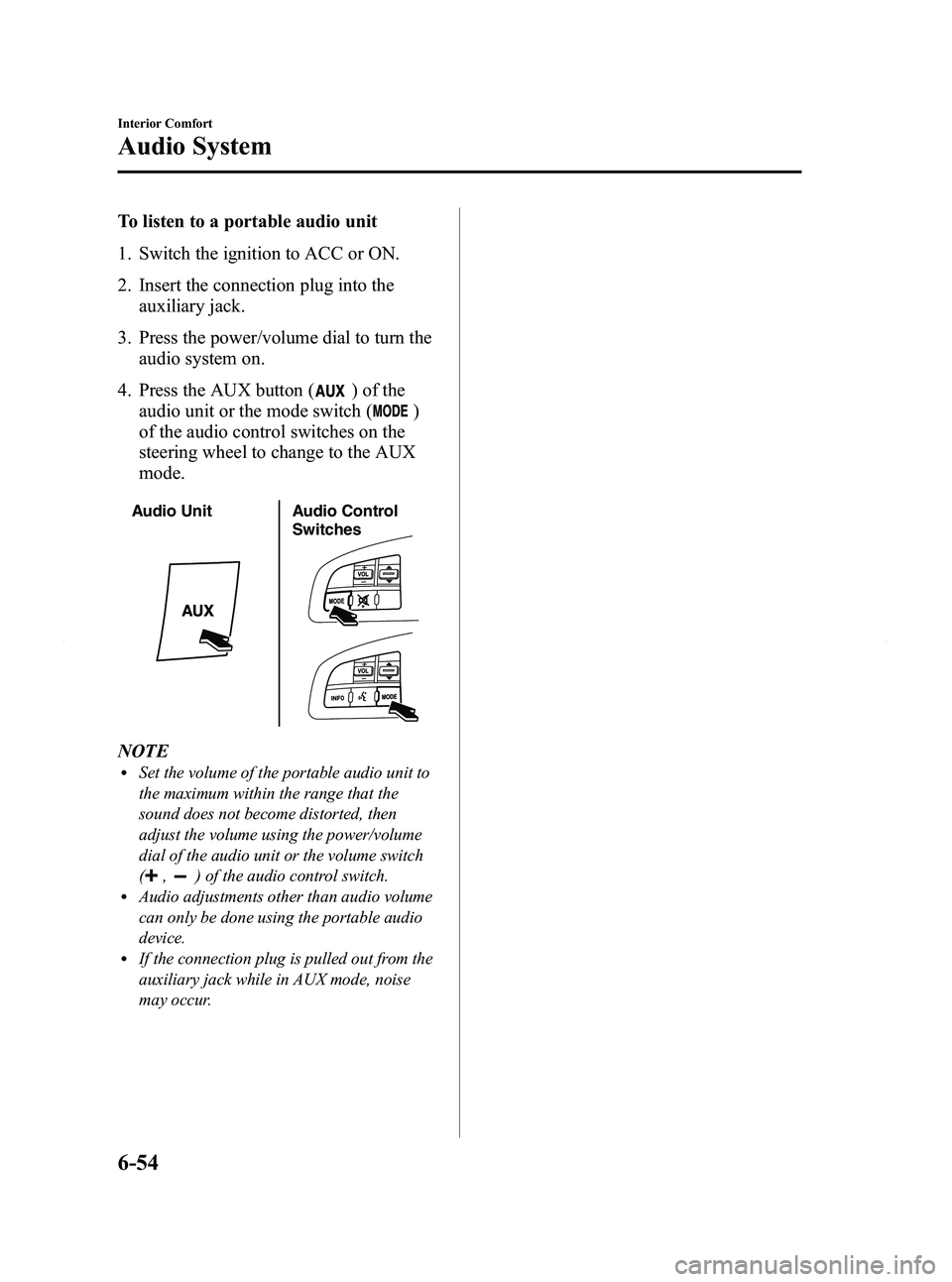
To listen to a portable audio unit
1. Switch the ignition to ACC or ON.
2. Insert the connection plug into theauxiliary jack.
3. Press the power/volume dial to turn the audio system on.
4. Press the AUX button (
) of the
audio unit or the mode switch (
)
of the audio control switches on the
steering wheel to change to the AUX
mode.
Audio Unit Audio Control
Switches
NOTElSet the volume of the portable audio unit to
the maximum within the range that the
sound does not become distorted, then
adjust the volume using the power/volume
dial of the audio unit or the volume switch
(
,) of the audio control switch.lAudio adjustments other than audio volume
can only be done using the portable audio
device.
lIf the connection plug is pulled out from the
auxiliary jack while in AUX mode, noise
may occur.
6-54
Interior Comfort
Audio System
Mazda5_8BR9-EA-10J_Edition3 Page240
Monday, February 21 2011 1:45 PM
Form No.8BR9-EA-10J
Page 255 of 440

Black plate (255,1)
NOTE
If the voice recognition performance is not
satisfactory, refer to“Voice Recognition
Learning Function (Speaker Enrollment) ”
(page 6-85).
Please be aware that the voice recognition
may still make an error despite following
the above points.
q Function Restrictions While
Using Bluetooth Hands-Free
Some functions are limited while
Bluetooth Hands-Free is being used. They
include:
lBeep sound and voice guidance related
to the audio unit are not heard.
lBeep sound related to the A/C
operation is not heard.
qHow to Use This Section
Descriptions in the text are as follows:
Say: Voice commands to be spoken by
you.
Prompt: Voice guidance output from the
speaker.
NOTE
Say voice commands after the beep sound
[Beep] is heard.
Example)
Say: [Beep] “Dial ”
Prompt: “Number, please ”
Say: [Beep] “XXXXXXXXXXX (Ex.
“ 555-1234 ”) (Telephone number) ”
Bluetooth Hands-Free Activation
Method
Press the pick-up button or talk button
with a short press.
The hands-free system is activated.
Functions of the hands-free telephone,
such as making and receiving calls, can be
used after the activation. (For details on
the telephone functions, refer to “Basic
Bluetooth Hands-Free Operation ”or
“ Convenient Use of the Hands-Free
System ”.)
Tutorial
The tutorial explains how to use
Bluetooth Hands-Free.
To activate the tutorial, do the following:
1. Press the pick-up button or talk button
with a short press.
2. Say: [Beep] “Tutorial ”
3. Follow the prompts to receive the appropriate voice guidance
instructions.
qUseful Commands at Anytime,
Convenient Operations
Help function use
The help function informs the user of all
the available voice commands under the
current conditions.
1. Press the talk button with a short press.
2. Say: [Beep] “Help ”
3. Follow the prompts to receive the appropriate voice guidance
instructions.
Interior Comfort
Bluetooth Hands-Free
6-69
Mazda5_8BR9-EA-10J_Edition3 Page255
Monday, February 21 2011 1:45 PM
Form No.8BR9-EA-10J
Page 260 of 440
Black plate (260,1)
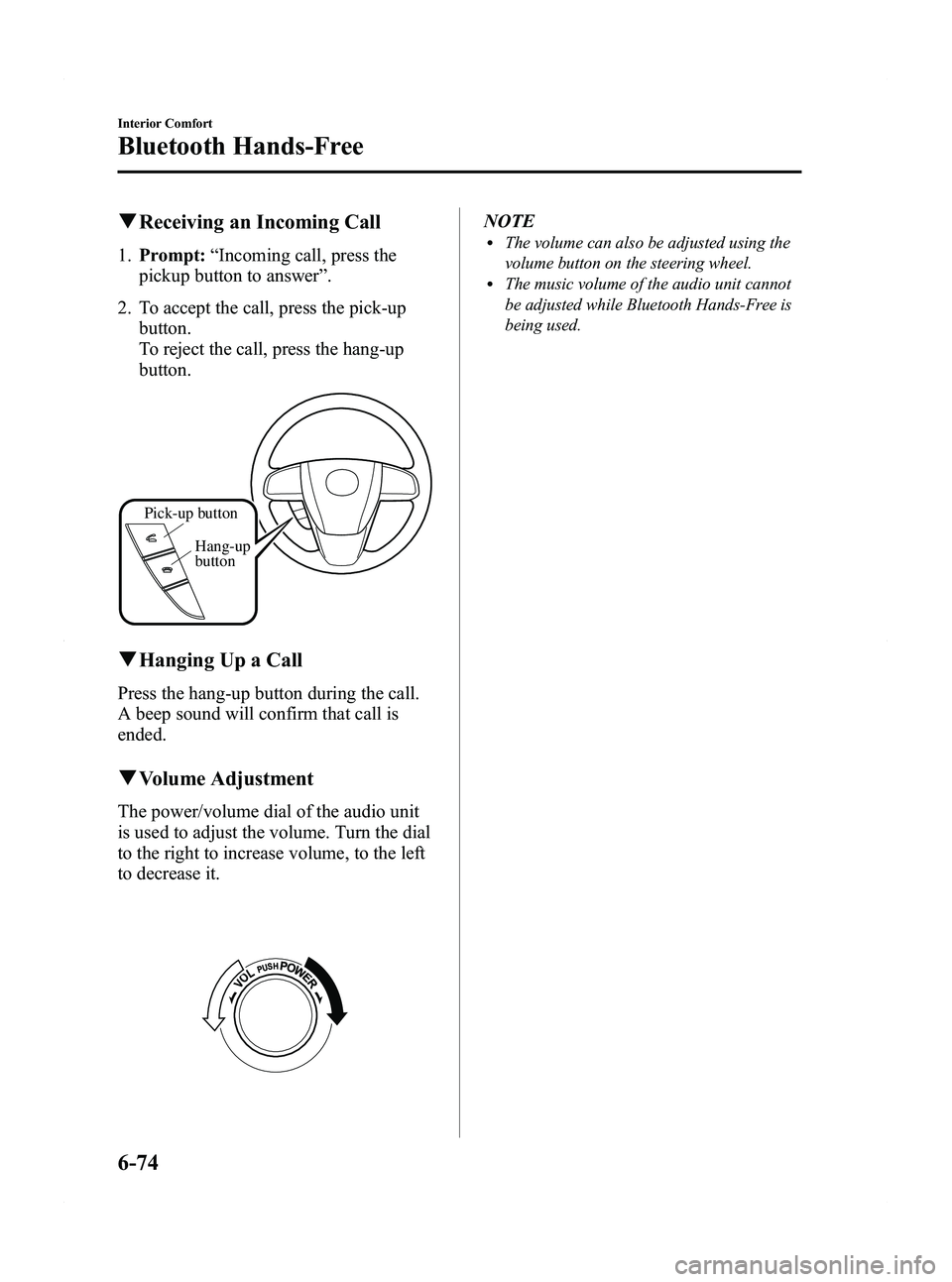
qReceiving an Incoming Call
1. Prompt: “Incoming call, press the
pickup button to answer ”.
2. To accept the call, press the pick-up button.
To reject the call, press the hang-up
button.
Pick-up button
Hang-up
button
qHanging Up a Call
Press the hang-up button during the call.
A beep sound will confirm that call is
ended.
qVolume Adjustment
The power/volume dial of the audio unit
is used to adjust the volume. Turn the dial
to the right to increase volume, to the left
to decrease it.
NOTElThe volume can also be adjusted using the
volume button on the steering wheel.
lThe music volume of the audio unit cannot
be adjusted while Bluetooth Hands-Free is
being used.
6-74
Interior Comfort
Bluetooth Hands-Free
Mazda5_8BR9-EA-10J_Edition3 Page260
Monday, February 21 2011 1:45 PM
Form No.8BR9-EA-10J
Page 432 of 440

Black plate (432,1)
Personalization Features
The following“Personalization Features ”are available. These settings can only be changed by an Authorized
Mazda Dealer.
Setting Function Initial Setting After Setting Change
Key reminder
warning alarm The volume of the key reminder warning alarm
can be changed
High Low
Lights-on reminder
warning alarm The volume of the lights-on reminder warning
alarm can be changed
High Low/Deactivated
Turn indicator The beep volume level can be changed High Low/Deactivated
Illumination entry The time required for the interior lamp to turn
off automatically after all the doors are closed
can be changed
15 seconds 7.5/30/60 seconds
The time required for the interior lamp to
illuminate after unlocking any door can be
changed 30 seconds 7.5/15/60 seconds
The function that allows the interior lamp to
illuminate automatically when the doors are
unlocked can be changed Activated Deactivated
The function allowing the interior lamp to turn
off automatically when any door is opened
(or not securely closed) can be changed Activated Deactivated
The time required for the interior lamp to turn
off automatically can be changed
(prevents battery depletion when a door is
open/ajar) 30 minutes 10/60 minutes
Keyless entry The unlocking method using the retractable key
can be changed
Press × 2 Press × 1
The time required for the doors to relock
automatically after unlocking with the
transmitter can be changed 30 seconds 60/90 seconds
The flashing of the hazard warning lights when
the doors are locked/unlocked can be changed Activated Deactivated
The function allowing the horn to sound
automatically when the doors are locked by
pressing the transmitter two times consecutively
can be changed Activated Deactivated
Auto headlight on/off The headlight illumination on/off timing based
on surrounding lightness/darkness can be
changed Standard
(Illuminates under
average levels of darkness) Earlier/
Somewhat earlier/
Somewhat later/ Later
Two-step down
power window The two-step down power window function can
be changed
Activated Deactivated
10-8
Personalization Features
Mazda5_8BR9-EA-10J_Edition3 Page432
Monday, February 21 2011 1:46 PM
Form No.8BR9-EA-10J