Button MAZDA MODEL 6 2005 (in English) User Guide
[x] Cancel search | Manufacturer: MAZDA, Model Year: 2005, Model line: MODEL 6, Model: MAZDA MODEL 6 2005Pages: 340, PDF Size: 3.73 MB
Page 111 of 340
Black plate (111,1)
After adjusting the mirror, lock the control
by placing the selector switch in the
middle position.
Mirror defrosterí
To turn on the mirror defrosters, turn the
ignition switch to the ON position and
push the rear window defroster switch
(page 5-42).
qRearview Mirror
WARNING
Blocked View:
Cargo stacked higher than the
seatbacks is dangerous. It can block
your view in the rearview mirror,
which might cause you to hit another
car when changing lanes. Don't stack
things higher than the seatbacks.
Rearview mirror adjustment
Before driving, adjust the rearview mirror
to center on the scene through the rear
window.
NOTE
For the manual day/night mirror,
perform the adjustment with the day/
night lever in the day position.
Reducing glare from headlights
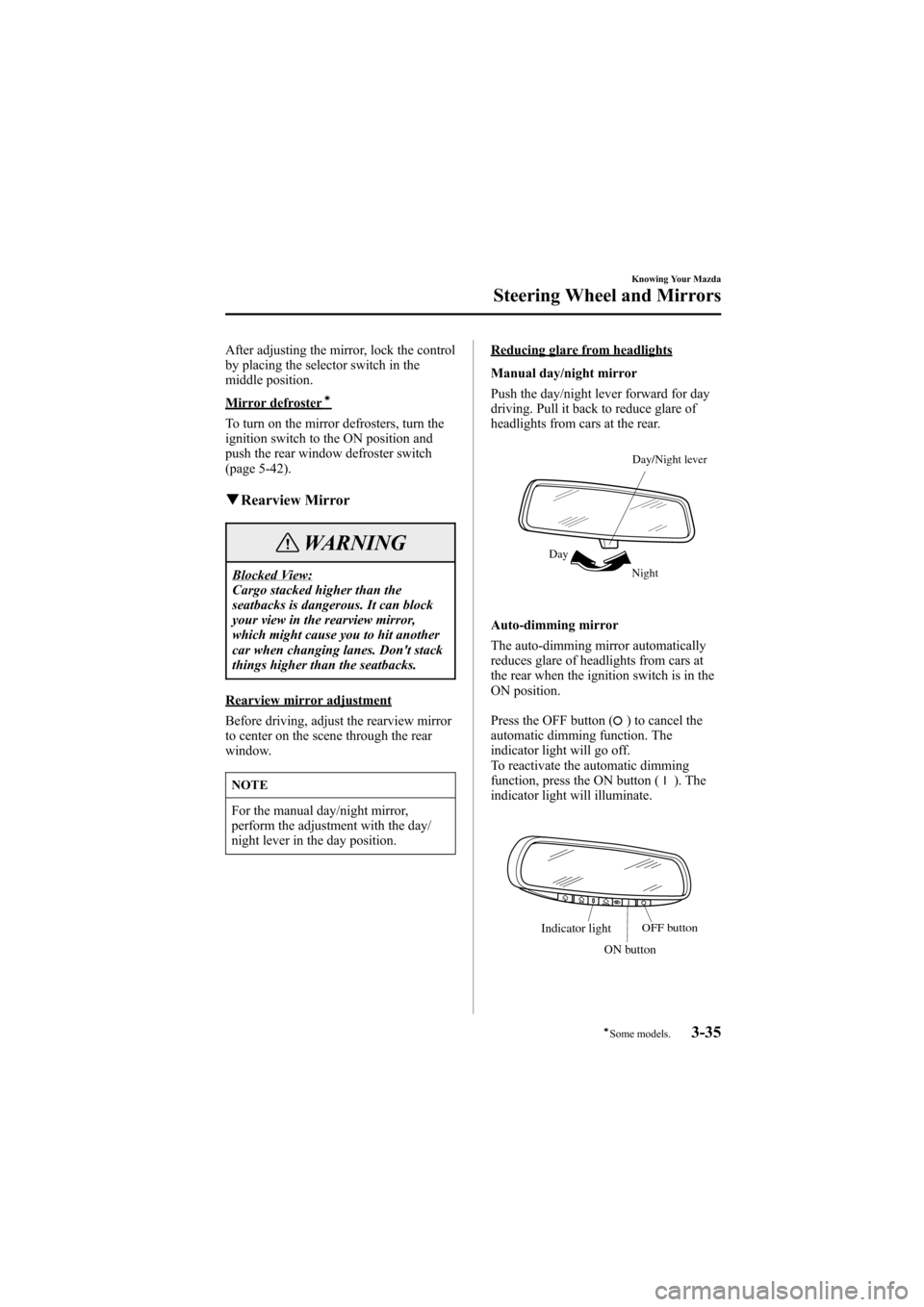
Manual day/night mirror
Push the day/night lever forward for day
driving. Pull it back to reduce glare of
headlights from cars at the rear.
Night DayDay/Night lever
Auto-dimming mirror
The auto-dimming mirror automatically
reduces glare of headlights from cars at
the rear when the ignition switch is in the
ON position.
Press the OFF button (
) to cancel the
automatic dimming function. The
indicator light will go off.
To reactivate the automatic dimming
function, press the ON button (
). The
indicator light will illuminate.
Indicator lightOFF button
ON button
Knowing Your Mazda
Steering Wheel and Mirrors
3-35íSome models. Mazda6_8T56-EC-04G_Edition2 Page111
Monday, November 15 2004 4:33 PM
Form No.8T56-EC-04G
Page 112 of 340
Black plate (112,1)
NOTE
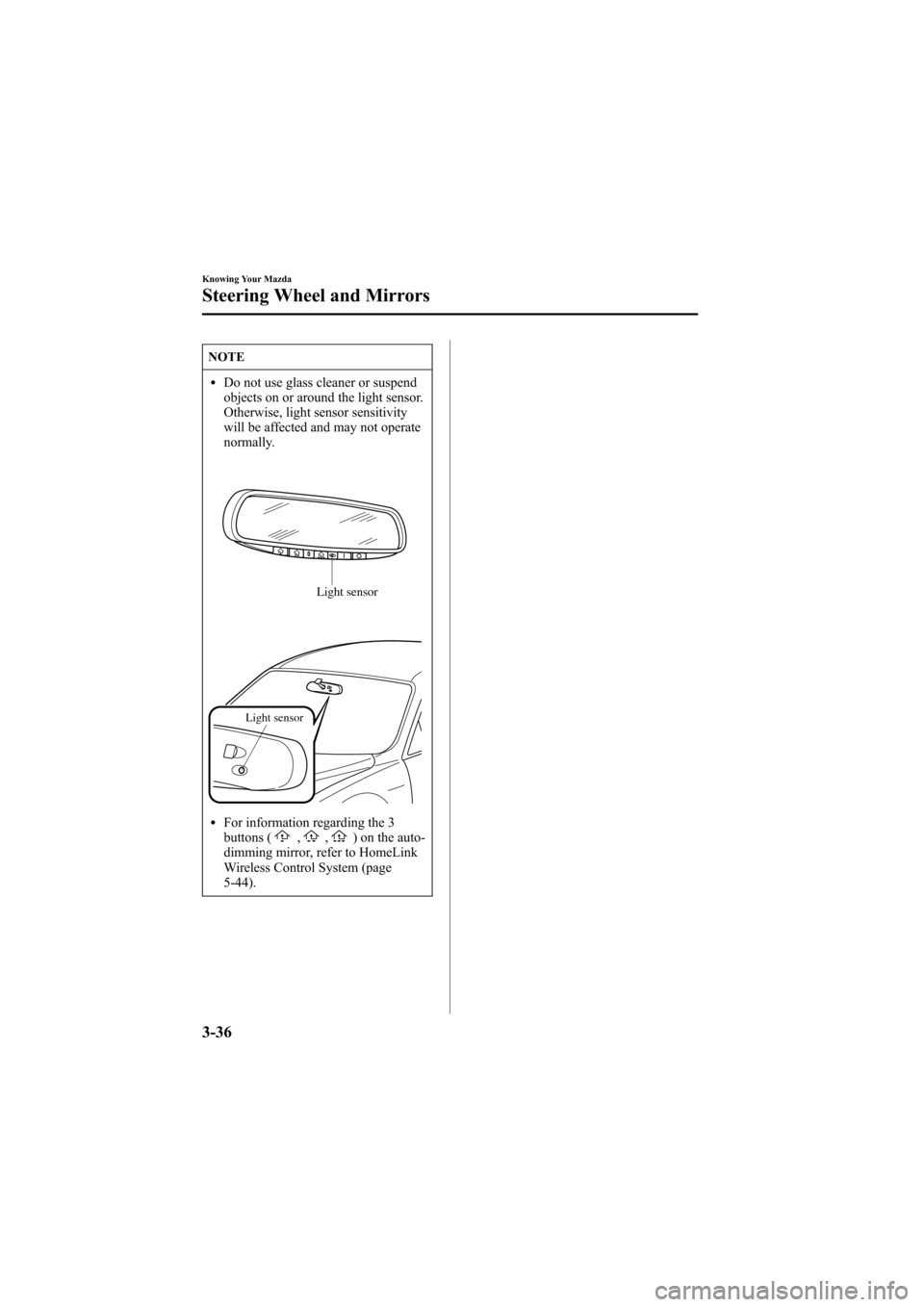
lDo not use glass cleaner or suspend
objects on or around the light sensor.
Otherwise, light sensor sensitivity
will be affected and may not operate
normally.
Light sensor
Light sensor
lFor information regarding the 3
buttons (,,) on the auto-
dimming mirror, refer to HomeLink
Wireless Control System (page
5-44).
3-36
Knowing Your Mazda
Steering Wheel and Mirrors
Mazda6_8T56-EC-04G_Edition2 Page112
Monday, November 15 2004 4:33 PM
Form No.8T56-EC-04G
Page 129 of 340
Black plate (129,1)
WARNING
Driving with Wet Brakes:
Driving with wet brakes is dangerous.
Increased stopping distance or the
vehicle pulling to one side when
braking could result in a serious
accident. Light braking will indicate
whether the brakes have been affected.
Dry the brakes by driving very slowly
and applying the brakes lightly until
brake performance is normal.
qParking Brake
CAUTION
Driving with the parking brake on will
cause excessive wear of the brake
linings or pads.
NOTE
For parking in snow, refer to Winter
Driving (page 4-9) regarding parking
brake use.
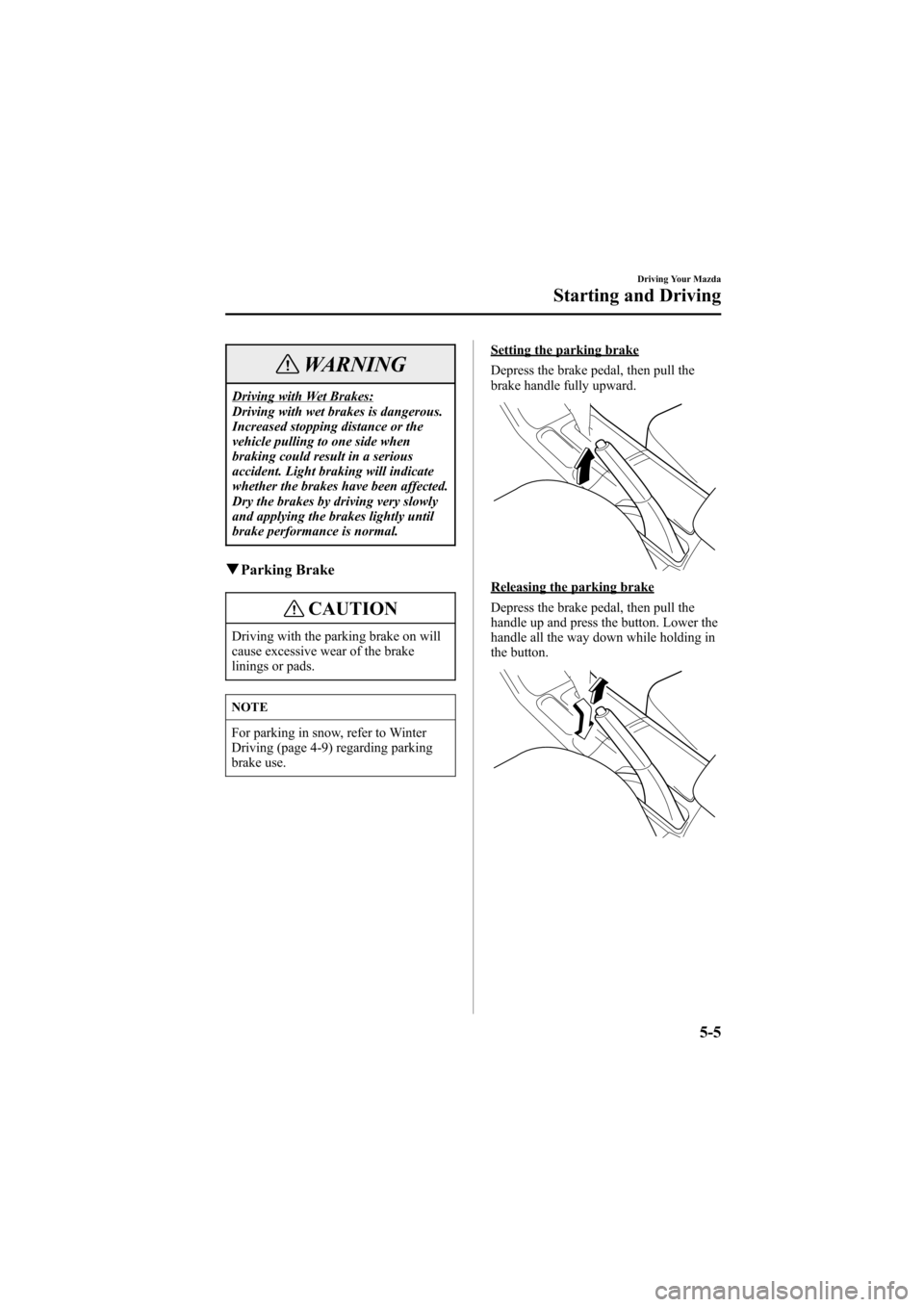
Setting the parking brake
Depress the brake pedal, then pull the
brake handle fully upward.
Releasing the parking brake
Depress the brake pedal, then pull the
handle up and press the button. Lower the
handle all the way down while holding in
the button.
Driving Your Mazda
Starting and Driving
5-5
Mazda6_8T56-EC-04G_Edition2 Page129
Monday, November 15 2004 4:33 PM
Form No.8T56-EC-04G
Page 141 of 340
Black plate (141,1)
qCruise Set Indicator Light
This light comes on when a cruising speed
is set.
qActivation/Deactivation
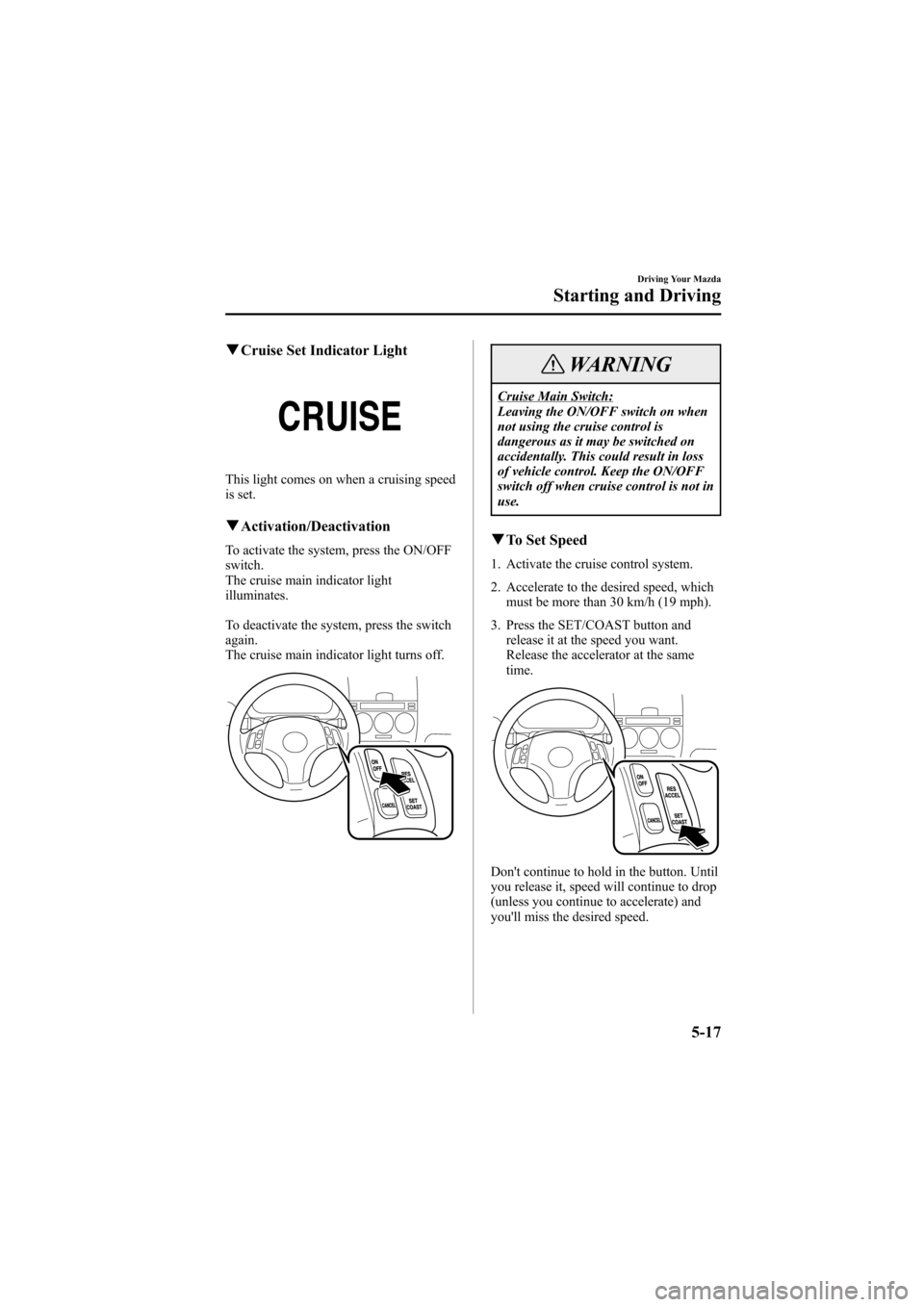
To activate the system, press the ON/OFF
switch.
The cruise main indicator light
illuminates.
To deactivate the system, press the switch
again.
The cruise main indicator light turns off.
WARNING
Cruise Main Switch:
Leaving the ON/OFF switch on when
not using the cruise control is
dangerous as it may be switched on
accidentally. This could result in loss
of vehicle control. Keep the ON/OFF
switch off when cruise control is not in
use.
qTo Set Speed
1. Activate the cruise control system.
2. Accelerate to the desired speed, which
must be more than 30 km/h (19 mph).
3. Press the SET/COAST button and
release it at the speed you want.
Release the accelerator at the same
time.
Don't continue to hold in the button. Until
you release it, speed will continue to drop
(unless you continue to accelerate) and
you'll miss the desired speed.
Driving Your Mazda
Starting and Driving
5-17
Mazda6_8T56-EC-04G_Edition2 Page141
Monday, November 15 2004 4:33 PM
Form No.8T56-EC-04G
Page 142 of 340
Black plate (142,1)
NOTE
lThe SET function can't be activated
until about 2 seconds after the ON/
OFF switch has been engaged.
lOn a steep grade, the vehicle may
momentarily slow down going up or
speed up while going down.
qTo Increase Cruising Speed
Follow either of these procedures.
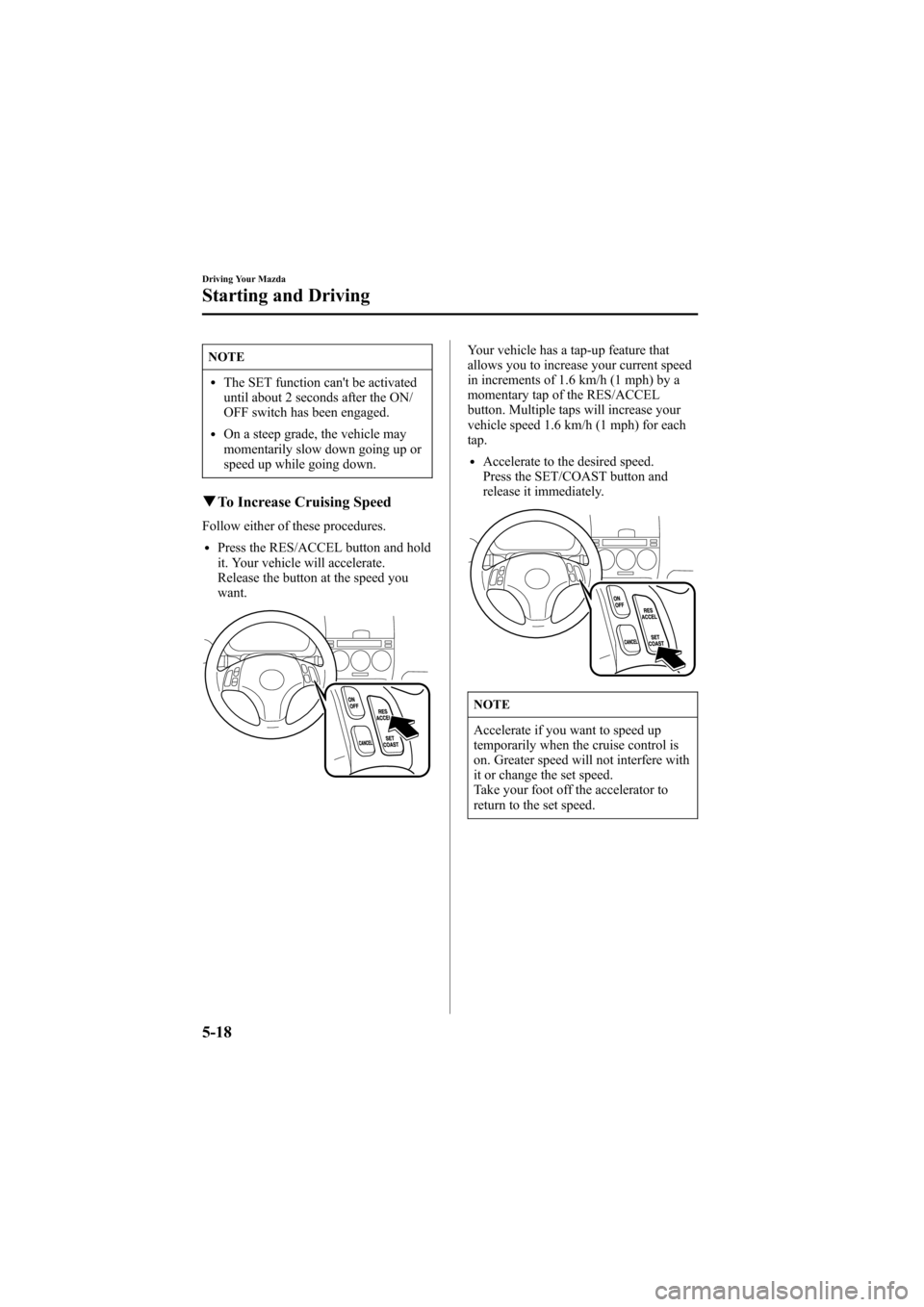
lPress the RES/ACCEL button and hold
it. Your vehicle will accelerate.
Release the button at the speed you
want.
Your vehicle has a tap-up feature that
allows you to increase your current speed
in increments of 1.6 km/h (1 mph) by a
momentary tap of the RES/ACCEL
button. Multiple taps will increase your
vehicle speed 1.6 km/h (1 mph) for each
tap.
lAccelerate to the desired speed.
Press the SET/COAST button and
release it immediately.
NOTE
Accelerate if you want to speed up
temporarily when the cruise control is
on. Greater speed will not interfere with
it or change the set speed.
Take your foot off the accelerator to
return to the set speed.
5-18
Driving Your Mazda
Starting and Driving
Mazda6_8T56-EC-04G_Edition2 Page142
Monday, November 15 2004 4:33 PM
Form No.8T56-EC-04G
Page 143 of 340
Black plate (143,1)
qTo Decrease Cruising Speed
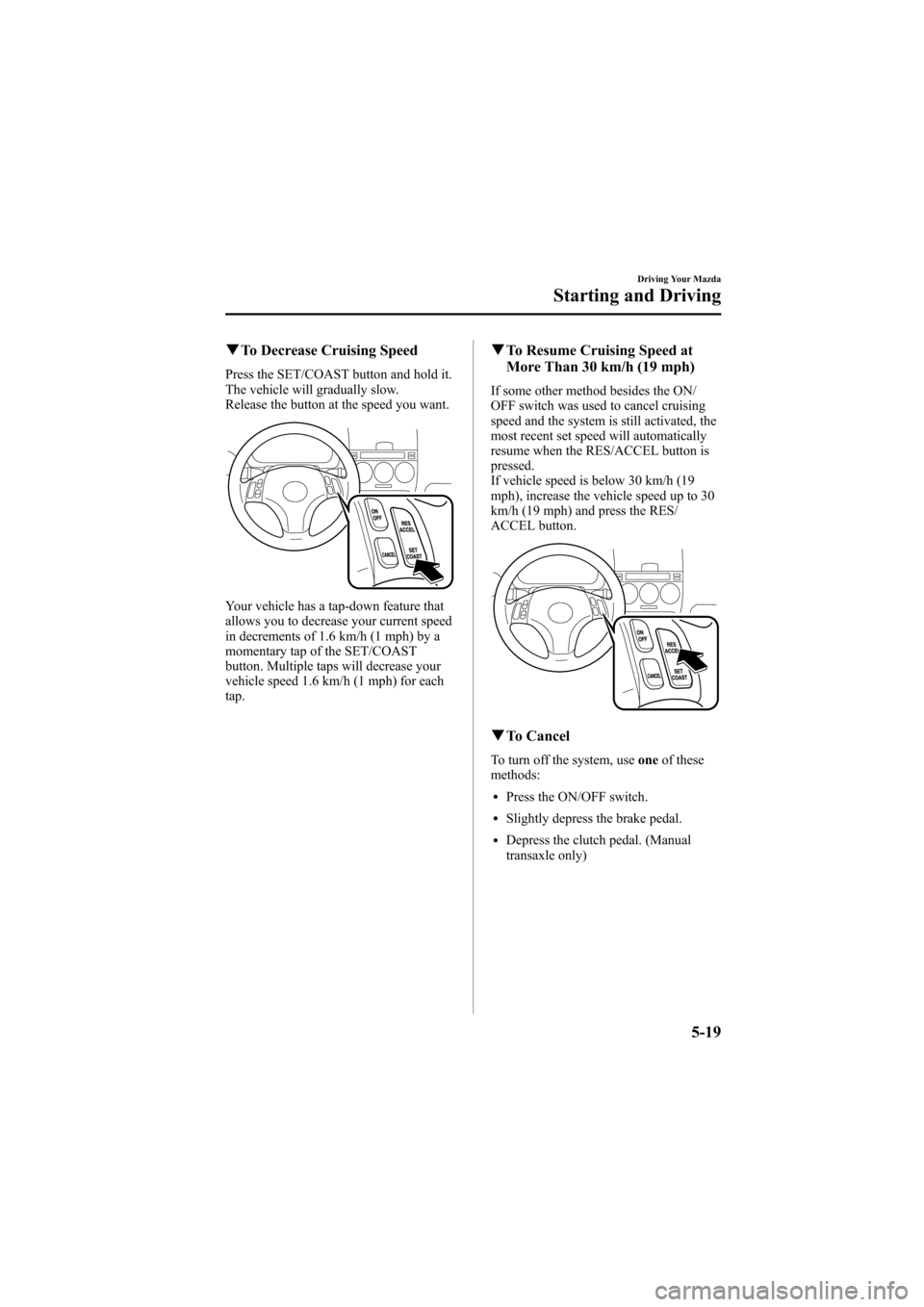
Press the SET/COAST button and hold it.
The vehicle will gradually slow.
Release the button at the speed you want.
Your vehicle has a tap-down feature that
allows you to decrease your current speed
in decrements of 1.6 km/h (1 mph) by a
momentary tap of the SET/COAST
button. Multiple taps will decrease your
vehicle speed 1.6 km/h (1 mph) for each
tap.
qTo Resume Cruising Speed at
More Than 30 km/h (19 mph)
If some other method besides the ON/
OFF switch was used to cancel cruising
speed and the system is still activated, the
most recent set speed will automatically
resume when the RES/ACCEL button is
pressed.
If vehicle speed is below 30 km/h (19
mph), increase the vehicle speed up to 30
km/h (19 mph) and press the RES/
ACCEL button.
qTo Cancel
To turn off the system, useoneof these
methods:
lPress the ON/OFF switch.
lSlightly depress the brake pedal.
lDepress the clutch pedal. (Manual
transaxle only)
Driving Your Mazda
Starting and Driving
5-19
Mazda6_8T56-EC-04G_Edition2 Page143
Monday, November 15 2004 4:33 PM
Form No.8T56-EC-04G
Page 144 of 340
Black plate (144,1)
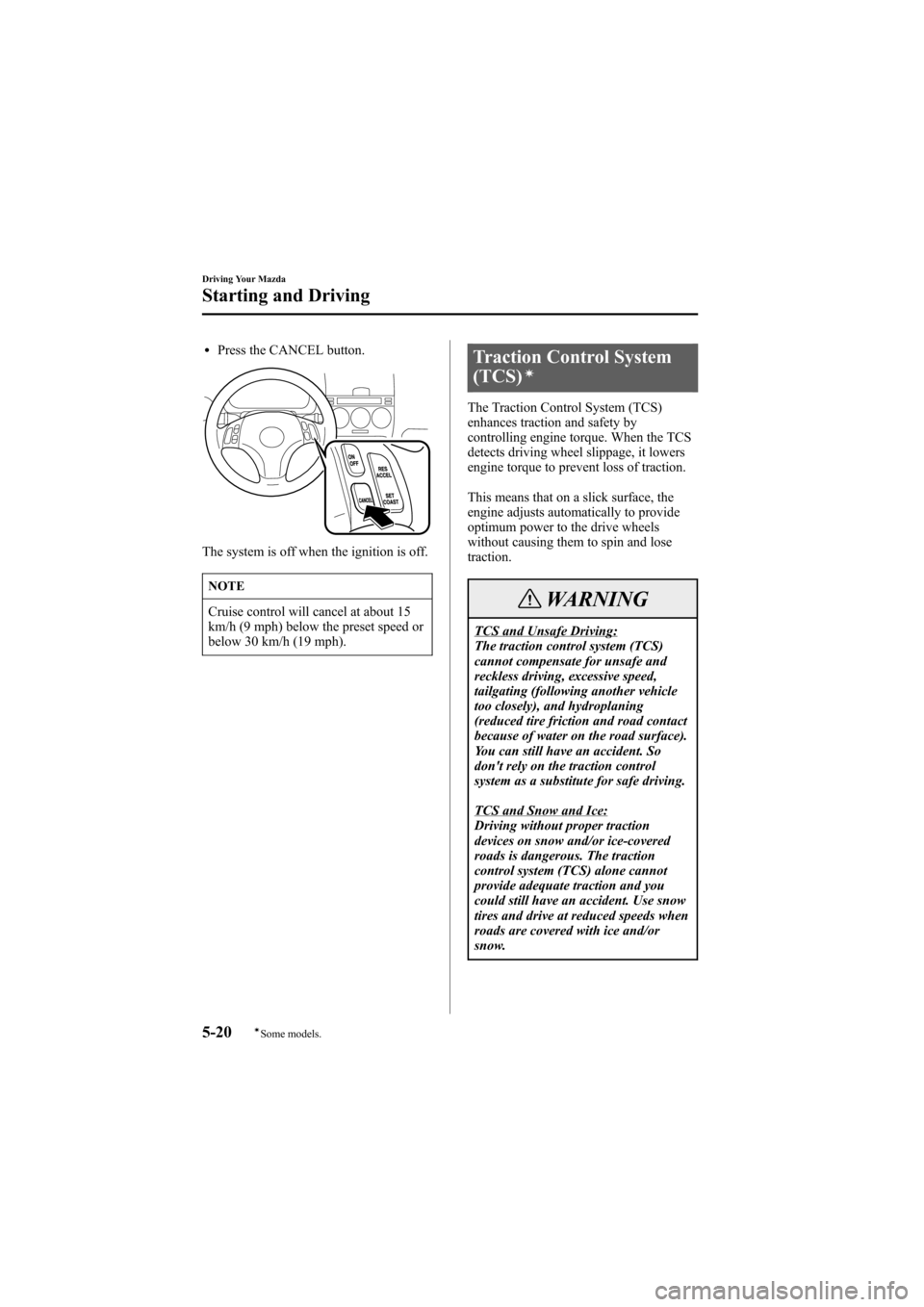
lPress the CANCEL button.
The system is off when the ignition is off.
NOTE
Cruise control will cancel at about 15
km/h (9 mph) below the preset speed or
below 30 km/h (19 mph).
Traction Control System
(TCS)í
The Traction Control System (TCS)
enhances traction and safety by
controlling engine torque. When the TCS
detects driving wheel slippage, it lowers
engine torque to prevent loss of traction.
This means that on a slick surface, the
engine adjusts automatically to provide
optimum power to the drive wheels
without causing them to spin and lose
traction.
WARNING
TCS and Unsafe Driving:
The traction control system (TCS)
cannot compensate for unsafe and
reckless driving, excessive speed,
tailgating (following another vehicle
too closely), and hydroplaning
(reduced tire friction and road contact
because of water on the road surface).
You can still have an accident. So
don't rely on the traction control
system as a substitute for safe driving.
TCS and Snow and Ice:
Driving without proper traction
devices on snow and/or ice-covered
roads is dangerous. The traction
control system (TCS) alone cannot
provide adequate traction and you
could still have an accident. Use snow
tires and drive at reduced speeds when
roads are covered with ice and/or
snow.
5-20
Driving Your Mazda
íSome models.
Starting and Driving
Mazda6_8T56-EC-04G_Edition2 Page144
Monday, November 15 2004 4:33 PM
Form No.8T56-EC-04G
Page 168 of 340
Black plate (168,1)
Hazard Warning Flasher
The hazard warning lights should always
be used when you stop on or near a
roadway.
The hazard warning lights warn other
drivers that your vehicle is a traffic hazard
and that they must take extreme caution
when near it.
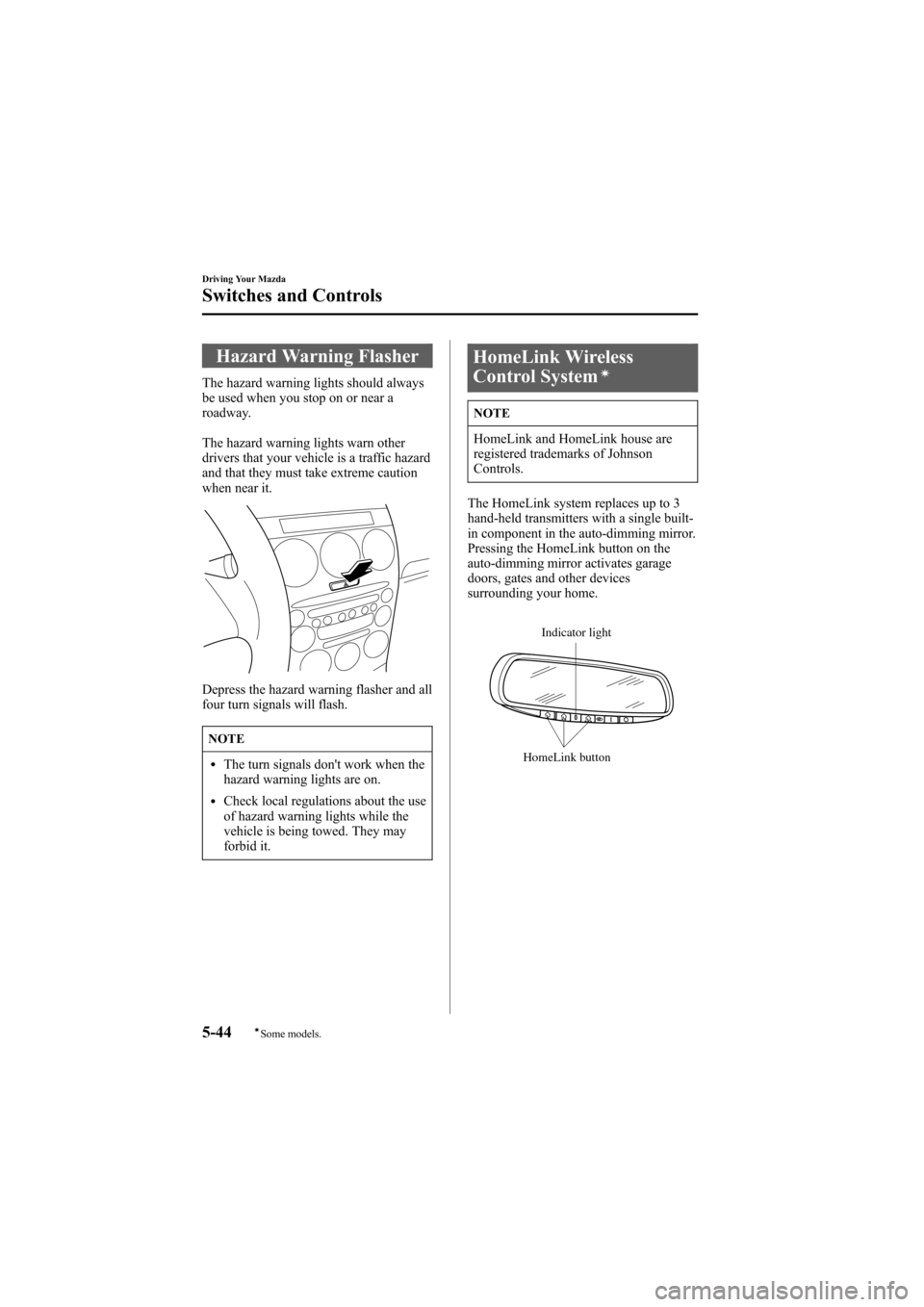
Depress the hazard warning flasher and all
four turn signals will flash.
NOTE
lThe turn signals don't work when the
hazard warning lights are on.
lCheck local regulations about the use
of hazard warning lights while the
vehicle is being towed. They may
forbid it.
HomeLink Wireless
Control Systemí
NOTE
HomeLink and HomeLink house are
registered trademarks of Johnson
Controls.
The HomeLink system replaces up to 3
hand-held transmitters with a single built-
in component in the auto-dimming mirror.
Pressing the HomeLink button on the
auto-dimming mirror activates garage
doors, gates and other devices
surrounding your home.
Indicator light
HomeLink button
5-44
Driving Your Mazda
íSome models.
Switches and Controls
Mazda6_8T56-EC-04G_Edition2 Page168
Monday, November 15 2004 4:34 PM
Form No.8T56-EC-04G
Page 170 of 340
Black plate (170,1)
qProgramming the HomeLink
System
CAUTION
When programming a garage door
opener or a gate, disconnect the power
to these devices before performing
programming, as continuous operation
of the devices could damage the motor.
The HomeLink system provides 3 buttons
which can be individually selected and
programmed using the transmitters for
current, on-market devices as follows:
1. Press and hold the two outer
HomeLink buttons (buttons one and
three) - releasing only when the
indicator light begins to flash (after 20
seconds).Do nothold the buttons for
longer than 30 seconds anddo not
repeat step 1to program a second and/
or third hand-held transmitter to the
remaining two HomeLink buttons.
2. Position the end of your hand-held
transmitter 2.5―7.5 cm (1―3 inches)
away from the HomeLink button you
wish to program while keeping the
indicator light in view.
3. Simultaneously press and hold both the
chosen HomeLink and hand-held
transmitter buttons.Do not release the
buttons until step 4 has been
completed.
NOTE
Some gate operators and garage door
openers may require you to replace this
Programming Step 3 with procedures
noted in the“Gate Operator/Canadian
Programming”section.4. After the HomeLink indicator light
changes from a slow to a rapidly
blinking light, release both the
HomeLink and hand-held transmitter
buttons.
NOTE
If the HomeLink indicator light does
not change to a rapidly blinking light,
contact HomeLink at
www.homelink.comor call1-800-355-
3515for assistance.
5. Press and hold the just-trained
HomeLink button and observe the
indicator light.
If the indicator lightstays on constantly,
programming is completeand your
device should activate when the
HomeLink button is pressed and released.
NOTE
To program the remaining two
HomeLink buttons, begin with
“Programming”- step 2. Do not repeat
step 1.
If the indicator light blinksrapidly for
two seconds and then turns to a
constant light, continue with
“Programming”steps 6―8to complete
the programming of a rolling code
equipped device (most commonly a
garage door opener).
6. At the garage door opener receiver
(motor-head unit) in the garage, locate
the“learn”or“smart”button. This can
usually be found where the hanging
antenna wire is attached to the motor-
head unit.
5-46
Driving Your Mazda
Switches and Controls
Mazda6_8T56-EC-04G_Edition2 Page170
Monday, November 15 2004 4:34 PM
Form No.8T56-EC-04G
Page 171 of 340
Black plate (171,1)
7. Firmly press and release the“learn”or
“smart”button. (The name and color of
the button may vary by manufacturer.)
NOTE
There are 30 seconds in which to
initiate step 8.
8. Return to the vehicle and firmlypress,
hold for two seconds and releasethe
programmed HomeLink button. Repeat
the“press/hold/release”sequence a
second time, and, depending on the
brand of the garage door opener (or
other rolling code equipped device),
repeat this sequence a third time to
complete the programming process.
HomeLink should now activate your
rolling code equipped device.
NOTE
To program the remaining two
HomeLink buttons, begin with
“Programming”- step 2. Do not repeat
step 1.
For questions or comments, please contact
HomeLink atwww.homelink.comor1-
800-355-3515.
qGate operator/Canadian
Programming
Canadian radio-frequency laws require
transmitter signals to“time-out”(or quit)
after several seconds of transmission -
which may not be long enough for
HomeLink to pick up the signal during
programming. Similar to this Canadian
law, some U.S. gate operators are
designed to“time-out”in the same
manner.
If you live in Canada or you are having
difficulties programming a gate operator
by using the“Programming”procedures
(regardless of where you live),replace
“Programming HomeLink”step 3with
the following:
NOTE
If programming a garage door opener or
gate operator, it is advised to unplug the
device during the“cycling”process to
prevent possible overheating.
Continue to press and hold the HomeLink
button while youpress and release -
every two seconds(“cycle”) your hand-
held transmitter until the frequency signal
has successfully been accepted by
HomeLink. (The indicator light will flash
slowly and then rapidly.)
Proceed with“Programming”step 4 to
complete.
qOperating the HomeLink System
Press the programmed HomeLink button
to operate a programmed device. The
code will continue being transmitted for a
maximum of 20 seconds.
Driving Your Mazda
Switches and Controls
5-47
Mazda6_8T56-EC-04G_Edition2 Page171
Monday, November 15 2004 4:34 PM
Form No.8T56-EC-04G