light MAZDA MODEL 6 2009 Owners Manual (in English)
[x] Cancel search | Manufacturer: MAZDA, Model Year: 2009, Model line: MODEL 6, Model: MAZDA MODEL 6 2009Pages: 464, PDF Size: 4.61 MB
Page 177 of 464

Black plate (177,1)
Blind Spot Monitoring (BSM) Systemí
The Blind Spot Monitoring (BSM) system is designed to assist the driver by monitoring
blind spots on both sides of the vehicle to the rear in certain situations such as when
changing lanes on roads and freeways.
The BSM system monitors the detection areas on both sides of the vehicle to the rear when
the vehicle speed is about 32 km/h (20 mph) or more, and notifies the driver of vehicles in
the detection area by illuminating the BSM warning light.
If the turn signal lever is operated in the direction the BSM warning light is illuminated, the
system warns the driver of the vehicle in the detection area with a beep sound.
Detection areas
WARNING
Do not rely completely on the BSM system and be sure to look over your shoulder
before changing lanes:The BSM system can assist the driver in confirming the safety of the surroundings
but is not a complete substitute. The driver is responsible for assuring lane changes
and other maneuvers. Always pay attention to the direction in which the vehicle is
traveling and the vehicle's surroundings.
NOTE
lThe BSM system does not operate when the vehicle speed is lower than about 32 km/h (20 mph).lThe radar sensors are equipped inside the rear bumper. (page 5-36)lThe radar sensors do not detect human, animal, or static objects such as fences. In addition, the
system pauses when the selector lever is shifted to the R position. (The system resumes
automatically when the selector lever is shifted from the R position.)
Driving Your Mazda
Starting and Driving
5-33íSome models.
Mazda6_8Z64-EA-08H_Edition1 Page177
Wednesday, June 25 2008 10:4 AM
Form No.8Z64-EA-08H
Page 178 of 464

Black plate (178,1)
lThe detectability of the radar sensors has its limitations. The BSM system may not operate
properly under the following conditions:
lIce, snow, or soil adheres to the rear bumper surface around the radar sensors.lDuring adverse weather conditions such as rain or snow, or under conditions where water is
sprayed.
lThe rear bumper area around the radar sensors is blocked by foreign material (such as
stickers or a bicycle carrier).
lThe radar sensors may not detect all types of vehicles around your vehicle, especially the
following types of vehicles:
lMotorcycleslVehicles with body shapes that radar may not reflect such as a flatbed trailer with no cargo.lVehicles with lower body height such as sports cars.lHave the radar sensors inspected at an Authorized Mazda Dealer if any shock is applied to the
rear bumper, even in a minor accident. If the vehicle is driven with a damaged radar sensor, the
system may not operate properly resulting in an accident.
lFor repairs or paintwork around the radar sensors, or replacement of the bumper, consult an
Authorized Mazda Dealer.
lThe radar sensors of the BSM system may be regulated under the radio wave related laws of the
country where the vehicle is driven. The sensors in this system are approved for use in the U.S.A.
(including territories), Canada, and Mexico. If a vehicle with a BSM system is driven in a country
other than the U.S.A., Canada, or Mexico, the system has to be turned off using the BSM OFF
switch.
lThe detection area of the system has been determined based on the lane width of general
freeways. Therefore on a road with a narrower lane width, the system may detect vehicles on a
lane next to the adjacent lane and operate the warning light/beep. On a road with wider lane
width, the system may not detect vehicles on the adjacent lane and may not operate the warning
light/beep.
lOperation of the warning light/beep may be delayed or the system may not operate the warning
light/beep under the following conditions:
lThe vehicle accelerates from a standing-start with a vehicle alongside.lA vehicle moves from a lane two lanes over to the adjacent lane.lThe difference in vehicle speed between your vehicle and another vehicle is larger when
passing or being passed, and the vehicle passes the detection area within a short period of
time.
lOn a steep incline, or when there is a difference in height between lanes.lImmediately after the system has been activated by pressing the BSM OFF switch again after it
has been turned off (BSM OFF indicator light in instrument panel illuminates) by pressing the
switch.
lAlthough the system may detect objects on the road side such as parked vehicles or guardrails and
operate the warning light/beep, it does not indicate a malfunction.
lIf the vehicle is driven on a road with less traffic and few vehicles that the radar sensors can
detect, the system may pause (The BSM OFF indicator light in the instrument panel flashes).
However, it does not indicate a malfunction.
5-34
Driving Your Mazda
Starting and Driving
Mazda6_8Z64-EA-08H_Edition1 Page178
Wednesday, June 25 2008 10:4 AM
Form No.8Z64-EA-08H
Page 179 of 464

Black plate (179,1)
lThe following conditions may affect the visibility of the BSM warning lights on the outside mirror,
making it difficult to confirm the illumination of the lights:
lIce or snow adheres to the surface of the outside mirrors.lThe door window glass is tinted.
qBSM Warning Light/Beep
BSM warning light
Equipped on the left and right door
mirrors.
This warning light illuminates for a few
seconds when the ignition is switched
ON.
If the BSM system detects a vehicle in the
detection area while the vehicle is driven
at a speed of about 32 km/h (20 mph) or
more, the BSM warning light illuminates
on the side of the vehicle where the rear
on-coming vehicle is detected.
NOTE
lIf ice or snow adhere to the outer mirror
surface, the BSM warning light may not be
visible.
lIf the door window glass is tinted, it may
affect the visibility of the BSM warning
light, making it difficult to confirm the
illumination of the light.
BSM warning beep
The warning beep operates when the turn
signal lever is operated to the side where
the BSM warning light is illuminated.
NOTE
The system can be personalized so that the
BSM warning beep does not operate. Refer to
Personalization Features on page 10-8.
qBSM OFF Indicator Light
This indicator light illuminates for a few
seconds when the ignition is switched
ON.
The BSM OFF indicator light illuminates
when the BSM system is turned off by
pressing the BSM OFF switch.
The indicator light flashes if the BSM
system has a malfunction. Consult an
Authorized Mazda Dealer.
NOTE
If the vehicle is driven on a road with less
traffic and few vehicles that the radar sensors
can detect, the system may pause (The BSM
OFF indicator light in the instrument panel
flashes). However, it does not indicate a
malfunction.
Driving Your Mazda
Starting and Driving
5-35
Mazda6_8Z64-EA-08H_Edition1 Page179
Wednesday, June 25 2008 10:4 AM
Form No.8Z64-EA-08H
Page 180 of 464

Black plate (180,1)
qBSM OFF Switch
When the BSM switch is pressed, the
BSM system turns off and the BSM OFF
indicator light illuminates.
Press the BSM OFF switch again to turn
on the BSM system. The BSM OFF
indicator light turns off.
NOTE
If the ignition is switched off (LOCK) with the
BSM system turned off, the system becomes
operable automatically when the ignition is
switched ON.
qCare of Radar Sensors
The radar sensors are equipped inside the
rear bumper.
Radar sensors
Always keep the bumper surface near the
radar sensor area clean so that the BSM
system operates normally. Refer to the
Exterior Care (page 8-54).
NOTE
lThe BSM OFF indicator light flashes if the
radar sensors cannot operate normally. If
the light remains flashing after cleaning the
bumper surface near the radar sensor area,
consult an Authorized Mazda Dealer.
lFor repairs or paintwork around the radar
sensors, or replacement of the bumper,
consult an Authorized Mazda Dealer.
qSafety Certification
Radiation Hazard
This BSM (blind spot monitoring) device
emits intentional electromagnetic
radiation in the 24 GHz to 25 GHz
frequency range. The total radiated
average power over the entire bandwidth
is below _
14 dBm (40 µW). The active
emitting antenna surface is 72 cm
2;
therefore the radiated power density in
front of the BSM device is 0.55 µW/cm
2.
This value is far below the legal human
exposure protection limit of 1 mW/
cm
2(MPE) in Europe and US.
Declaration of compliance for 24 GHzblind spot radar
(U.S.A)
FCC ID: KR5SV2008BSD
This vehicle is equipped with a 24 GHz
blind spot monitoring (BSM) radar
system, which complies with part 15 of
the FCC rules. Operation is subject to the
following conditions:
1. This device may not cause harmful interference, and
5-36
Driving Your Mazda
Starting and Driving
Mazda6_8Z64-EA-08H_Edition1 Page180
Wednesday, June 25 2008 10:4 AM
Form No.8Z64-EA-08H
Page 183 of 464

Black plate (183,1)
qSpeedometer
The speedometer indicates the speed of
the vehicle.
qOdometer, Trip Meter and Trip
Meter Selector
The display mode can be changed
between trip meter A and trip meter B by
pressing the selector while one of them is
displayed. The selected mode will be
displayed.
Trip meter B
Press the selector
Press the selector
Trip meter A Odometer
Odometer
NOTE(Standard meter)
The odometer and trip meter can be displayed
as follows even when the ignition is switched
to ACC or off (LOCK).
The headlight switch must be in the
orposition to see the display.lDisplays for 10 minutes after the ignition is
switched to ACC or off (LOCK) from ON.
lDisplays for 10 minutes after the driver's
door is opened.
Odometer
The odometer records the total distance
the vehicle has been driven.
Trip meter
The trip meter can record the total
distance of two trips. One is recorded in
trip meter A, and the other is recorded in
trip meter B.
For instance, trip meter A can record the
distance from the point of origin, and trip
meter B can record the distance from
where the fuel tank is filled.
When trip meter A is selected, pressing
the selector again within one second will
change to trip meter B mode.
When trip meter A is selected, TRIP A
will be displayed. When trip meter B is
selected, TRIP B will be displayed.
The trip meter records the total distance
the vehicle is driven until the meter is
again reset. Return it to “0.0 ”by holding
the selector depressed for 1 second or
more. Use this meter to measure trip
distances and to compute fuel
consumption.
Driving Your Mazda
Instrument Cluster and Indicators
5-39
Mazda6_8Z64-EA-08H_Edition1 Page183
Wednesday, June 25 2008 10:4 AM
Form No.8Z64-EA-08H
Page 185 of 464
Black plate (185,1)
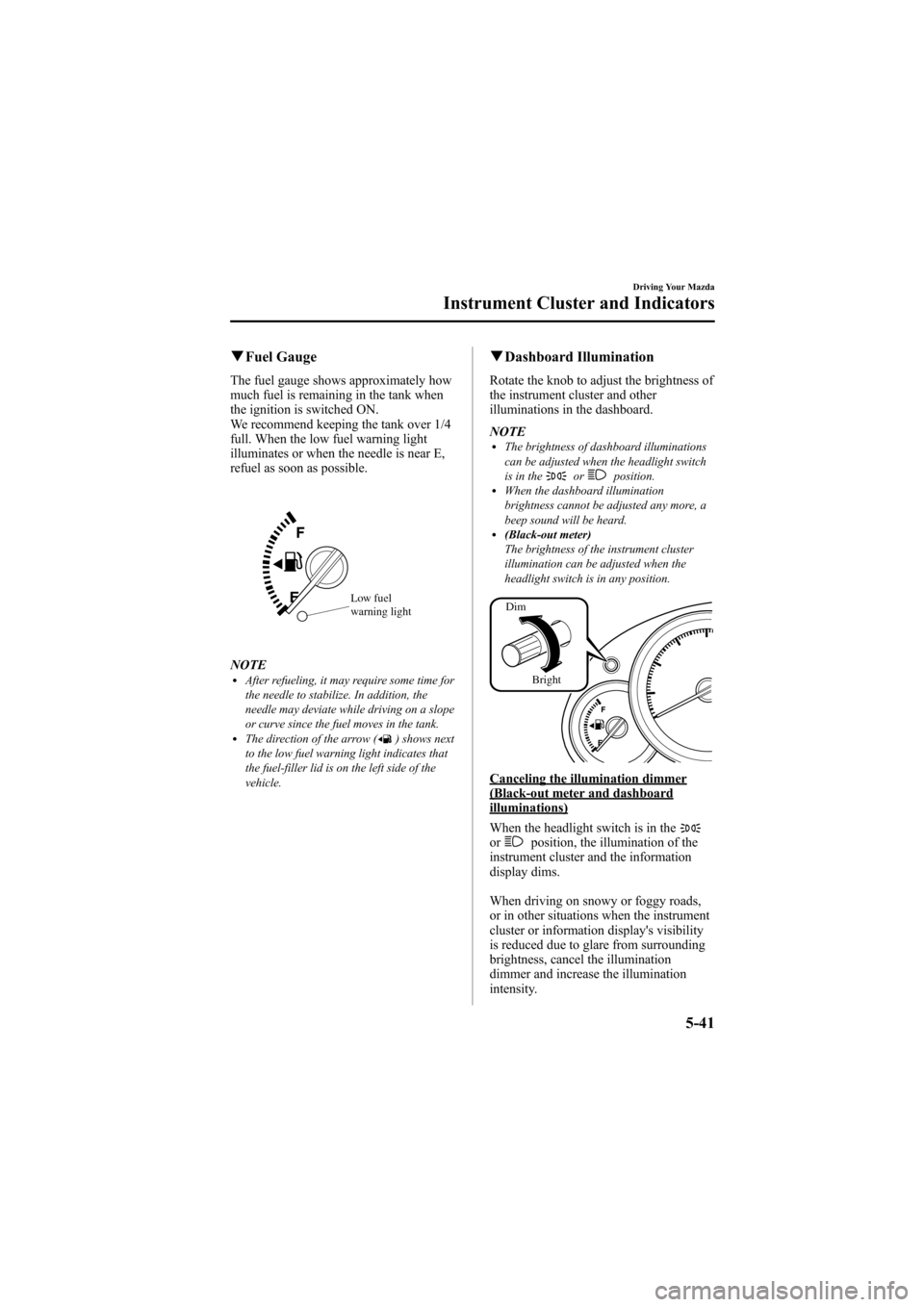
qFuel Gauge
The fuel gauge shows approximately how
much fuel is remaining in the tank when
the ignition is switched ON.
We recommend keeping the tank over 1/4
full. When the low fuel warning light
illuminates or when the needle is near E,
refuel as soon as possible.
Low fuel
warning light
NOTElAfter refueling, it may require some time for
the needle to stabilize. In addition, the
needle may deviate while driving on a slope
or curve since the fuel moves in the tank.
lThe direction of the arrow () shows next
to the low fuel warning light indicates that
the fuel-filler lid is on the left side of the
vehicle.
q Dashboard Illumination
Rotate the knob to adjust the brightness of
the instrument cluster and other
illuminations in the dashboard.
NOTE
lThe brightness of dashboard illuminations
can be adjusted when the headlight switch
is in the
orposition.lWhen the dashboard illumination
brightness cannot be adjusted any more, a
beep sound will be heard.
l(Black-out meter)
The brightness of the instrument cluster
illumination can be adjusted when the
headlight switch is in any position.
Dim
Bright
Canceling the illumination dimmer(Black-out meter and dashboardilluminations)
When the headlight switch is in the
orposition, the illumination of the
instrument cluster and the information
display dims.
When driving on snowy or foggy roads,
or in other situations when the instrument
cluster or information display's visibility
is reduced due to glare from surrounding
brightness, cancel the illumination
dimmer and increase the illumination
intensity.
Driving Your Mazda
Instrument Cluster and Indicators
5-41
Mazda6_8Z64-EA-08H_Edition1 Page185
Wednesday, June 25 2008 10:4 AM
Form No.8Z64-EA-08H
Page 186 of 464

Black plate (186,1)
To cancel the illumination dimmer, press
the dashboard illumination knob.
NOTE
If the dashboard illumination knob is kept at
the illumination dimmer cancel position, the
instrument cluster and the information display
will not dim when the headlight switch is
turned to the
orposition again.
qOutside Temperature Display
The outside temperature is displayed
when the ignition is switched ON.
NOTElThe displayed ambient temperature varies
from the actual ambient temperature
depending on the surrounding conditions as
well as the driving conditions.
lTo have the ambient temperature display
changed from Fahrenheit (°F) to
Centigrade (°C), contact an Authorized
Mazda Dealer.
5-42
Driving Your Mazda
Instrument Cluster and Indicators
Mazda6_8Z64-EA-08H_Edition1 Page186
Wednesday, June 25 2008 10:4 AM
Form No.8Z64-EA-08H
Page 187 of 464

Black plate (187,1)
Warning/Indicator Lights
SignalWarning/Indicator Lights Page
Brake System Warning Light 5-45
Charging System Warning Light5-47
Engine Oil Pressure Warning Light5-47
Check Engine Light5-47
Powertrain Malfunction/Reduced Power Warning Light5-48
ABS Warning Light5-46
Air Bag/Front Seat Belt Pretensioner System Warning Light5-48
Driving Your Mazda
Warning/Indicator Lights and Beep Sounds
5-43
Mazda6_8Z64-EA-08H_Edition1 Page187
Wednesday, June 25 2008 10:4 AM
Form No.8Z64-EA-08H
Page 188 of 464
Black plate (188,1)
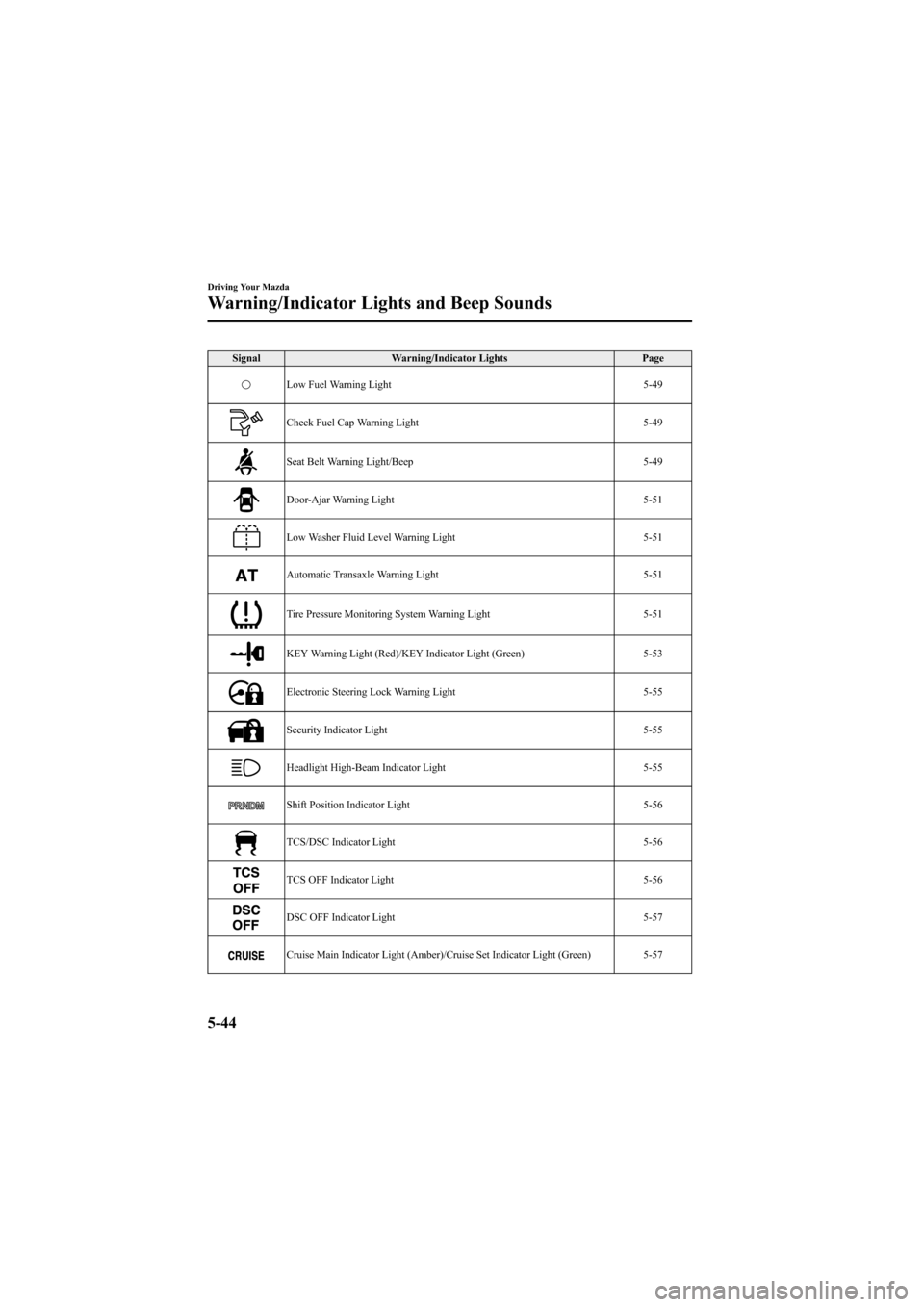
SignalWarning/Indicator Lights Page
Low Fuel Warning Light 5-49
Check Fuel Cap Warning Light5-49
Seat Belt Warning Light/Beep5-49
Door-Ajar Warning Light5-51
Low Washer Fluid Level Warning Light5-51
Automatic Transaxle Warning Light5-51
Tire Pressure Monitoring System Warning Light5-51
KEY Warning Light (Red)/KEY Indicator Light (Green)5-53
Electronic Steering Lock Warning Light5-55
Security Indicator Light5-55
Headlight High-Beam Indicator Light5-55
Shift Position Indicator Light5-56
TCS/DSC Indicator Light5-56
TCS OFF Indicator Light5-56
DSC OFF Indicator Light5-57
Cruise Main Indicator Light (Amber)/Cruise Set Indicator Light (Green) 5-57
5-44
Driving Your Mazda
Warning/Indicator Lights and Beep Sounds
Mazda6_8Z64-EA-08H_Edition1 Page188
Wednesday, June 25 2008 10:4 AM
Form No.8Z64-EA-08H
Page 189 of 464

Black plate (189,1)
SignalWarning/Indicator Lights Page
BSM OFF Indicator Light 5-58
Lights-On Indicator Light5-58
Turn Signal/Hazard Warning Indicator Lights5-58
qBrake System Warning Light
This warning has the following functions:
Parking brake warning
The light illuminates when the parking
brake is applied with the ignition switched
to START or ON. It turns off when the
parking brake is fully released.
Low brake fluid level warning
If the light stays on after the parking brake
is fully released, you may have a brake
problem.
Drive to the side of the road and park off
the right-of-way.
You may notice that the pedal is harder to
depress or that it may go closer to the
floor. In either case, it will take longer to
stop the vehicle.
1. With the engine stopped, open the
hood and check the brake fluid level
immediately, and then add fluid if
required (page 8-22). 2. After adding fluid, check the light
again.
If the warning light remains on, or if the
brakes do not operate properly, do not
drive the vehicle. Have it towed to an
Authorized Mazda Dealer.
Even if the light turns off have your brake
system inspected as soon as possible by
an Authorized Mazda Dealer.
NOTE
Having to add brake fluid is sometimes an
indicator of leakage. Consult an Authorized
Mazda Dealer as soon as possible even if the
brake light is no longer illuminated.
WARNING
Do not drive with the brake system
warning light illuminated. Contact an
Authorized Mazda Dealer to have the
brakes inspected as soon as possible: Driving with the brake system
warning light illuminated is
dangerous. It indicates that your
brakes may not work at all or that
they could completely fail at any
time. If this light remains
illuminated, after checking that the
parking brake is fully released, have
the brakes inspected immediately.
Driving Your Mazda
Warning/Indicator Lights and Beep Sounds
5-45
Mazda6_8Z64-EA-08H_Edition1 Page189
Wednesday, June 25 2008 10:4 AM
Form No.8Z64-EA-08H