light MAZDA MODEL 6 2009 Owners Manual (in English)
[x] Cancel search | Manufacturer: MAZDA, Model Year: 2009, Model line: MODEL 6, Model: MAZDA MODEL 6 2009Pages: 464, PDF Size: 4.61 MB
Page 231 of 464

Black plate (231,1)
Mode selector switch
The desired airflow mode can be selected
(page 6-4).
NOTE
lWith the airflow mode set to theposition and the temperature control dial
set at a medium temperature, heated air is
directed to the feet and a comparably lower
air temperature will flow through the
central, left and right vents.
lTo set the air vent to, press the
windshield defroster switch.
lIn theposition, the air conditioner is
automatically turned on and the outside air
mode is automatically selected to defrost
the windshield. In the
position, the
outside air mode cannot be changed to the
recirculated air mode.
A/C switch
Pressing the A/C switch while the AUTO
switch is turned on will turn off the air
conditioning (cooling/dehumidifying
functions). The air conditioning can be
turned on and off by pressing the A/C
switch while the fan control dial is on. NOTE
lThe air conditioning operates when the A/C
switch is pressed even if the fan is off.
lThe air conditioner may not function when
the outside temperature approaches 0 °C
(32 °F). (Indicator light remains on even
when system is off.)
Air intake selector
Outside or recirculated air positions can
be selected. Press the switch to select
outside/recirculated air positions.
Recirculated air position (
)
Use this position when going through
tunnels, driving in congested traffic (high
engine exhaust areas) or when quick
cooling is desired.
Outside air position (
)
Use this position for normal conditions
and defogging.
WARNING
Do not use theposition in cold or
rainy weather: Using the
position in cold or
rainy weather is dangerous as it will
cause the windows to fog up. Your
vision will be hampered, which could
lead to a serious accident.
Interior Comfort
Climate Control System
6-13
Mazda6_8Z64-EA-08H_Edition1 Page231
Wednesday, June 25 2008 10:4 AM
Form No.8Z64-EA-08H
Page 232 of 464

Black plate (232,1)
DUAL switch
Use the DUAL switch to change the mode
between the individual operation (driver
and passenger) and interconnection
modes.
Individual operation mode (indicator
light illuminated)
The set temperature can be controlled
individually for the driver and front
passenger.
Interconnection mode (indicator light
turned off)
The set temperature for the driver and
front passenger is controlled
simultaneously.
NOTE
The system changes to the interconnection
mode automatically if the windshield defroster
switch is pressed. The system will not change
to the individual operation mode by pressing
the DUAL switch or turning the front
passenger temperature control dial.
Windshield defroster switch
Press the switch to defrost the windshield
and front door windows.
NOTE
In theposition, the air conditioner is
automatically turned on and the outside air
mode is automatically selected to defrost the
windshield. In the
position, the outside air
mode cannot be changed to the recirculated
air mode.
q Operation of Automatic Air
Conditioning
1. Press the AUTO switch. Selection of
the airflow mode, air intake selector
and amount of airflow will be
automatically controlled.
2. Use the temperature control dial toselect a desired temperature.
Press the DUAL switch or turn the
front passenger temperature control
dial to control the set temperature
individually for the driver and front
passenger.
To turn off the system, press the OFF
switch.
6-14
Interior Comfort
Climate Control System
Mazda6_8Z64-EA-08H_Edition1 Page232
Wednesday, June 25 2008 10:4 AM
Form No.8Z64-EA-08H
Page 233 of 464

Black plate (233,1)
NOTElSetting the temperature to the maximum
high or low will not provide the desired
temperature at a faster rate.
lWhen selecting heat, the system will restrict
airflow until it has warmed to prevent cold
air from blowing out of the vents.
qWindshield Defrosting and Defogging
Press the windshield defroster switch.
In this position, the outside air position is
automatically selected, and the air
conditioner automatically turns on. The
air conditioner will directly dehumidify
the air to the front windshield and side
windows (page 6-4). Airflow amount will
be increased.
WARNING
Set the temperature control to the hot
or warm position when defogging (
position):Using theposition with the
temperature control set to the cold
position is dangerous as it will cause
the outside of the windshield to fog
up. Your vision will be hampered,
which could lead to a serious
accident. NOTE
Use the temperature control dial to increase
the air flow temperature and defog the
windshield more quickly.
q
Sunlight/Temperature Sensor
The fully automatic air conditioner
function measures inside and outside
temperatures, and sunlight. It then sets
temperatures inside the passenger
compartment accordingly.
CAUTION
Do not obstruct either sensor,
otherwise the automatic air
conditioner will not operate properly.
Sunlight sensor
Interior temperature sensor
Interior Comfort
Climate Control System
6-15
Mazda6_8Z64-EA-08H_Edition1 Page233
Wednesday, June 25 2008 10:4 AM
Form No.8Z64-EA-08H
Page 235 of 464

Black plate (235,1)
qRadio Reception
AM characteristics
AM signals bend around such things as
buildings or mountains and bounce off the
ionosphere. Therefore, they can reach
longer distances than FM signals. Because
of this, two stations may sometimes be
picked up on the same frequency at the
same time.
Station 2
Station 1 Ionosphere
FM characteristics
An FM broadcast range is usually about
40
―50 km (25 ―30 miles) from the
source. Because of extra coding needed to
break the sound into two channels, stereo
FM has even less range than monaural
(non-stereo) FM.
FM Station
40—50km
(25—30 miles)
Signals from an FM transmitter are similar
to beams of light because they do not
bend around corners, but they do reflect.
Unlike AM signals, FM signals cannot
travel beyond the horizon. Therefore, FM
stations cannot be received at the great
distances possible with AM reception.
AM wave
FM wave
FM wave
100—200 km (60—120 miles) Ionosphere
Atmospheric conditions can also affect
FM reception. High humidity will cause
poor reception. However, cloudy days
may provide better reception than clear
days.
Multipath noise
Since FM signals can be reflected by
obstructions, it is possible to receive both
the direct signal and the reflected signal at
the same time. This causes a slight delay
in reception and may be heard as a broken
sound or a distortion. This problem may
also be encountered when in close
proximity to the transmitter.
Reflected wave
Direct
Interior Comfort
Audio System
6-17
Mazda6_8Z64-EA-08H_Edition1 Page235
Wednesday, June 25 2008 10:4 AM
Form No.8Z64-EA-08H
Page 238 of 464
Black plate (238,1)
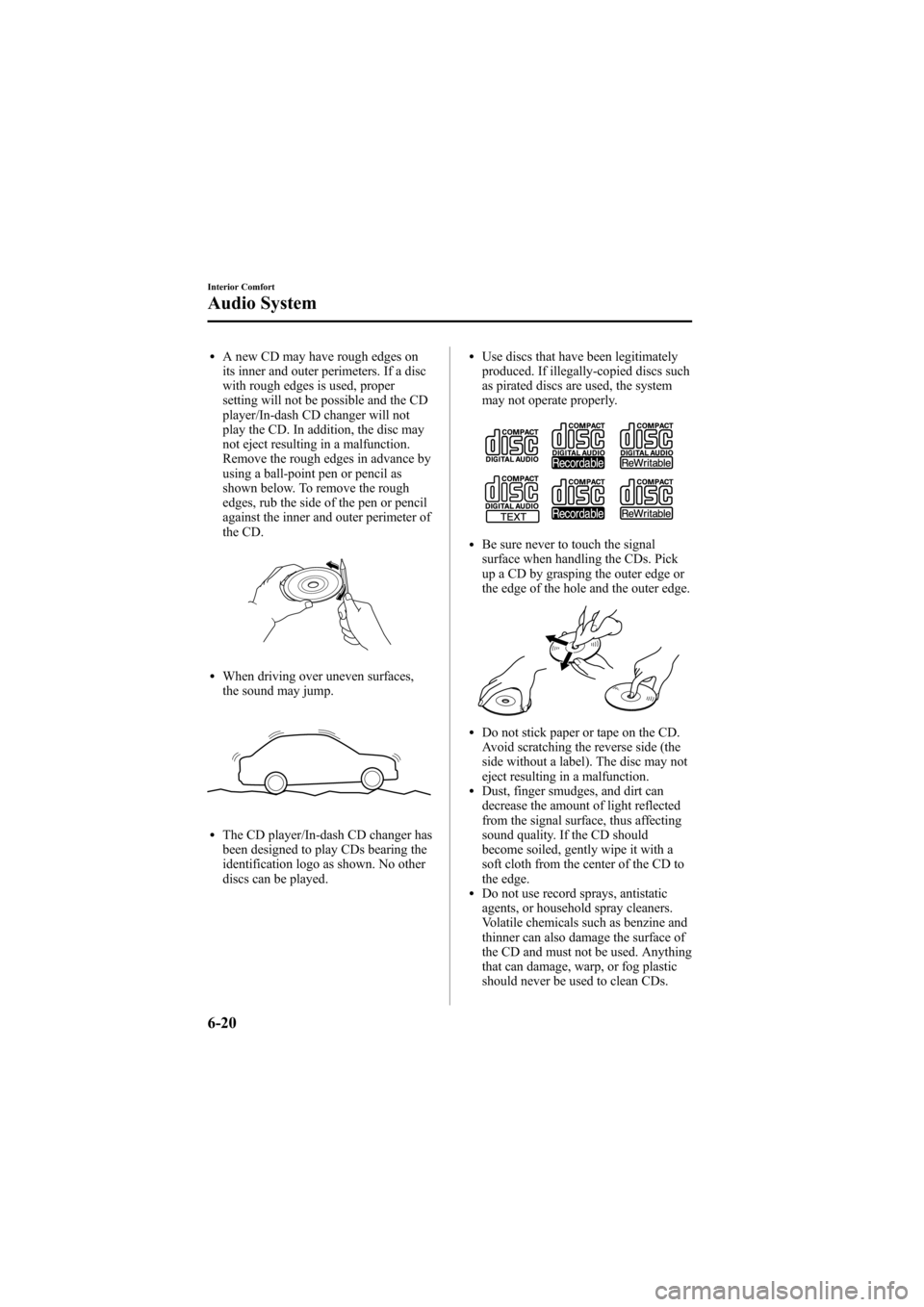
lA new CD may have rough edges on
its inner and outer perimeters. If a disc
with rough edges is used, proper
setting will not be possible and the CD
player/In-dash CD changer will not
play the CD. In addition, the disc may
not eject resulting in a malfunction.
Remove the rough edges in advance by
using a ball-point pen or pencil as
shown below. To remove the rough
edges, rub the side of the pen or pencil
against the inner and outer perimeter of
the CD.
lWhen driving over uneven surfaces,
the sound may jump.
lThe CD player/In-dash CD changer has
been designed to play CDs bearing the
identification logo as shown. No other
discs can be played.
lUse discs that have been legitimately
produced. If illegally-copied discs such
as pirated discs are used, the system
may not operate properly.
lBe sure never to touch the signal
surface when handling the CDs. Pick
up a CD by grasping the outer edge or
the edge of the hole and the outer edge.
lDo not stick paper or tape on the CD.
Avoid scratching the reverse side (the
side without a label). The disc may not
eject resulting in a malfunction.
lDust, finger smudges, and dirt can
decrease the amount of light reflected
from the signal surface, thus affecting
sound quality. If the CD should
become soiled, gently wipe it with a
soft cloth from the center of the CD to
the edge.
lDo not use record sprays, antistatic
agents, or household spray cleaners.
Volatile chemicals such as benzine and
thinner can also damage the surface of
the CD and must not be used. Anything
that can damage, warp, or fog plastic
should never be used to clean CDs.
6-20
Interior Comfort
Audio System
Mazda6_8Z64-EA-08H_Edition1 Page238
Wednesday, June 25 2008 10:4 AM
Form No.8Z64-EA-08H
Page 239 of 464
Black plate (239,1)
lInsert discs one by one. If two discs are
inserted at the same time, the system
may not operate properly.
lCD TEXT textual information cannot
be displayed by audio units other than
the CD player/In-dash CD changer.
(Only playback is possible.)
lThe following player can play MP3/
WMA files recorded in CD-ROM, CD-
R, and CD-RW.
· CD player
· In-dash CD changer
lThe CD player/In-dash CD changer
ejects the CD if the CD is inserted
upside down. Also dirty and/or
defective CDs may be ejected.
lAn 8 cm (3 in) CD can be played in the
CD player.
When playing an 8 cm (3 in) CD with
the CD player, use a CD adapter. If an
8 cm (3 in) CD adapter is not used, the
CD player may be damaged. Always
use a CD adapter.
The In-dash CD changer is specially
made for 12 cm (5 in) CDs.
An 8 cm (3 in) CD can be played in the
In-dash CD changer if an 8 cm (3 in)
CD adapter is used.
If an 8 cm (3 in) CD adapter is not
used, the In-dash CD changer may be
damaged. Always use a CD adapter.
lDo not insert cleaning discs in the CD
player/In-dash CD changer.
lDo not insert any disc with a peel-off
seal affixed to it.
lThis unit may not be able to play
certain CD-R/CD-RWs made using a
computer or music CD recorder due to
disc characteristics, scratches,
smudges, dirt, etc., or due to dust or
condensation on the lens inside the
unit.
lStoring CDs in the vehicle exposed to
direct sunlight or high temperature may
damage the CD-R/CD-RWs, and make
them unplayable.
lCD-R/CD-RW exceeding 700 MB
cannot be played.
lThis unit may not be able to play
certain discs made using a computer
due to the application (writing
software) setting used. (For details,
consult the store where the application
was purchased.)
lIt is possible that certain text data, such
as titles, recorded on a CD-R/CD-RW
may not be displayed when musical
data (CD-DA) is playing.
lThe period from when a CD-RW is
inserted to when it begins playing is
longer than a normal CD or CD-R.
lCompletely read the instruction manual
and cautions for CD-R/CD-RWs.
lDo not use discs with cellophane tape
adhering, partially peeled off labels, or
adhesive material exuding from the
edges of the CD label. Also, do not use
discs with a commercially-available
CD-R label affixed. The disc may not
eject resulting in a malfunction.
Interior Comfort
Audio System
6-21
Mazda6_8Z64-EA-08H_Edition1 Page239
Wednesday, June 25 2008 10:4 AM
Form No.8Z64-EA-08H
Page 311 of 464

Black plate (311,1)
Sunvisors
When you need a sunvisor, lower it for
use in front or swing it to the side.
Sunvisor
qSide Extension Sunvisors
The visor extender extends the sunvisor's
range of sun shading.
To use, pull it out.
CAUTION
When moving the sunvisor, retract
the visor extender to its original
position. Otherwise, the visor
extender could hit the rearview
mirror, headliner, or overhead
console.
qVanity Mirrors
To use the vanity mirror, lower the
sunvisor.
The vanity mirror light will illuminate
when you open the cover.
Interior Comfort
Interior Equipment
6-93
Mazda6_8Z64-EA-08H_Edition1 Page311
Wednesday, June 25 2008 10:5 AM
Form No.8Z64-EA-08H
Page 312 of 464

Black plate (312,1)
Interior Lights
qIlluminated Entry System
When the illuminated entry system
operates, the overhead light (switch is in
the DOOR position), the courtesy lights
and the ground illumination light turn on
for:
lAbout 30 seconds after the driver's
door is unlocked and the ignition key is
removed (without advanced key) or the
ignition is switched off (with advanced
key).
lAbout 15 seconds after all doors are
closed.
(With Advanced key)
About 5 seconds after all doors when
the advanced key is outside of the
vehicle.
lAbout 15 seconds after the ignition is
switched off (LOCK) and the ignition
key removed (without advanced key)
with all doors closed.
The light also turns off when:
lThe ignition is switched on and all
doors are closed.
lThe driver's door is locked.
NOTE
lBattery saver
If any door is left opened, the light turns off
after about 30 minutes to save the battery.
The light turns on again when the ignition
is switched on, or when any door is opened
after all doors have been closed.
lThe operation of the illuminated entry
system can be changed.
Refer to Personalization Features on page
10-8.
q Overhead Lights
Front
Rear
Switch
Position Overhead Lights
Light off
lLight is on when any door is openlLight is on or off when the
illuminated entry system is on
Light on
6-94
Interior Comfort
Interior Equipment
Mazda6_8Z64-EA-08H_Edition1 Page312
Wednesday, June 25 2008 10:5 AM
Form No.8Z64-EA-08H
Page 313 of 464

Black plate (313,1)
qMap Lights
The map lights are switched on or off by
pressing the switches.
qCourtesy Lights
Turns on when any door is open or the
illuminated entry system is on.
Courtesy light
Interior Comfort
Interior Equipment
6-95
Mazda6_8Z64-EA-08H_Edition1 Page313
Wednesday, June 25 2008 10:5 AM
Form No.8Z64-EA-08H
Page 315 of 464

Black plate (315,1)
qClock
NOTEWhen the trip computer is being displayed,
press the CLOCK button to change the display
to the time.
The time is displayed when the ignition is
switched to ACC or ON.
Without navigation system
Time setting
1. Turn the ignition switch to the ACC or
ON position.
2. Adjust the time using the time setting buttons (
,).
The hours advance while the time
setting button (
) is pressed.
The minutes advance while the time
setting button (
) is pressed.
Time resetting (Without trip computer
type only)
1. Turn the ignition switch to the ACC or ON position.
2. Press and hold the :00 button for 1.5 seconds or more. The displayed time
flashes. 3. When the button is released, the time
will be reset as follows:
(Example)
12:01 ―12:29 →12:00
12:30 ―12:59 →1:00
NOTE
When the :00 button is released, the seconds
will start at “00 ”.
NOTE(With trip computer type only)
The clock display can be switched on or off by
pressing the CLOCK button.
With navigation system
Refer to the separate manual
“NAVIGATION SYSTEM ”.
NOTE
Minutes and seconds are adjusted by the GPS,
however, it is necessary to adjust hours under
the following conditions:
lDriving across different time zoneslDaylight saving time start and end
q Climate Control Display (Fully
Automatic Type)
The climate control system status is
displayed. To operate the climate control
system, refer to “Climate Control System ”
(page 6-2).
q Audio Display
The audio system status is displayed. To
operate the audio system, refer to
“Audio System ”(page 6-16).
Interior Comfort
Interior Equipment
6-97
Mazda6_8Z64-EA-08H_Edition1 Page315
Wednesday, June 25 2008 10:5 AM
Form No.8Z64-EA-08H