lock MAZDA MODEL 6 2009 Owners Manual (in English)
[x] Cancel search | Manufacturer: MAZDA, Model Year: 2009, Model line: MODEL 6, Model: MAZDA MODEL 6 2009Pages: 464, PDF Size: 4.61 MB
Page 260 of 464
![MAZDA MODEL 6 2009 Owners Manual (in English) Black plate (260,1)
Initialization of ID code
If the registered ID code is forgotten,
return the ID code to the default [0000] by
performing the following steps:
Setting condition: SAT mode
(Master co](/img/28/13572/w960_13572-259.png "MAZDA MODEL 6 2009 Owners Manual (in English) Black plate (260,1)
Initialization of ID code
If the registered ID code is forgotten,
return the ID code to the default [0000] by
performing the following steps:
Setting condition: SAT mode
(Master co")
Black plate (260,1)
Initialization of ID code
If the registered ID code is forgotten,
return the ID code to the default [0000] by
performing the following steps:
Setting condition: SAT mode
(Master code input preparation)
1. Hold the scan button, then presschannel preset button 4, hold both
buttons together for 1.5 seconds.
2. “ENTER PIN ”appears for 3 seconds
which indicates that it is in code input
mode.
3. “SR1 - - - - ”appears, which indicates
that it is ready for code input.
(Master code input)
4. Input the master code using the channel preset buttons 1-4.
Press the scan button inputting the
code.
(The master code is already set at the
time of factory shipment.)
(Master code input determination)
5. Determine the master code which has been input by pressing the scan button.
6. “PIN CLEARED ”appears which
indicates that the master code input has
been completed.
7. The ID code is set to the default [0000] and the initialization process is
completed. NOTEMaster code:
The Master Code is used to initialize or re-
initialize the ID code in the event that the code
is not set to [0000] and/or the personalized ID
code is not known. The initialization process
resets the ID code to [0000]. The master code
can potentially defeat the intent of the security
of the parental lock if it is located by persons
not authorized by the owner to access certain
channels.
SIRIUS Satellite Radio Master Code: [0913]
(How to clear the message)lPress any of the following FM/AM,
SAT, CD, AUX, LOAD, EJECT,
POWER buttons.
lTurn the ACC off or insert a CD.
NOTE
lWhen a numeric value other than the
master code is input and the scan button is
pressed, “SR1 Err ”is displayed and then it
returns to the “SR1---- ”display again.
lIf an ID code is not input for 10 seconds,
“Err ”is displayed and it returns to the
former display.
lChannel preset buttons 1, 2, 3, 4 and the
scan button are used for inputting the ID
code. Buttons 5 and 6 cannot be used.
Change of ID code
Setting condition: SAT mode
When changing the ID code, the new ID
code is input after the previous one is
input first.
(Registered ID code input)
1. Hold the scan button, then press channel preset button 5, hold both
buttons together for 1.5 seconds.
6-42
Interior Comfort
Audio System
Mazda6_8Z64-EA-08H_Edition1 Page260
Wednesday, June 25 2008 10:4 AM
Form No.8Z64-EA-08H
Page 261 of 464
Black plate (261,1)
2.“ENTER PIN ”appears for 3 seconds
which indicates that it is in code input
mode.
3. “SR1 - - - - ”appears, which indicates
that it is ready for code input.
4. Input the registered ID code using channel preset buttons 1-4. Then press
the scan button.
Example: When the registered ID code
is“2323 ”, input “2323 ”. At this time
“ SR1 2323 ”is displayed.
Press 1 for the first digit, 2 for the
second, 3 for the third, and 4 for the
last digit. For example, if your number
is 2323, press 1 three times, 2 four
times, 3 three, and 4 four times. If the
display goes off while inputting, begin
from Step 1.
NOTE
The registered ID code is the default [0000] at
the time of factory shipment. If [0000] results
in “Err ”on the display, go to the
“ INITIALIZATION OF ID CODE” section to
reset to [0000].
(Verification with the registered ID
code)
5. Determine the input code by pressing the scan button.
6. If it does not match with the previously registered code, “SR1 Err ”is displayed
and then it returns to “SR1 - - - - ”.
7. If it matches with the previously registered code, “ENTER PIN ”appears
again and it switches to code input
mode.
8. “SR1 - - - - ”appears, and it is ready for
input of the new ID code. (New ID code input)
9. Input the new ID code using channel
preset buttons 1-4.
Example: If “1234 ”is input as the new
code, “SR1 1234 ”is displayed.
Press the scan button after the code is
input.
(New ID code input determination)
10. Determine the new ID code which has been input by pressing the scan
button.
11. “PIN CHANGED” appears for 3
seconds which indicates that the new
ID code input has been completed.
12. It returns to the former display.
(How to clear the message)
lPress any of the following FM/AM,
SAT, CD, AUX, LOAD, EJECT,
POWER buttons.
lTurn the ACC off or insert a CD.
NOTE
lIf an ID code is not input for 10 seconds,
“ Err ”is displayed and it returns to the
former display.
lChannel preset buttons 1, 2, 3, 4 and the
scan button are used for input of the ID
code. Buttons 5 and 6 cannot be used.
Individual channel locking
If a channel is locked, the channel is
muted.
NOTE
If the registered ID code is forgotten, return
the ID code to the default [0000]. (See
“ INTIALIZATION OF ID CODE” section)
Interior Comfort
Audio System
6-43
Mazda6_8Z64-EA-08H_Edition1 Page261
Wednesday, June 25 2008 10:4 AM
Form No.8Z64-EA-08H
Page 262 of 464
Black plate (262,1)
(Locking a channel)
1. Select a channel to be locked byturning the manual tuning dial.
Example: Select channel 100
(Registered ID code input preparation)
2. Hold the scan button, then press channel preset button 6, hold both
buttons together for 1.5 seconds.
3. “ENTER PIN ”appears for 3 seconds
which indicates that it is in code input
mode.
4. “SR1 - - - - ”appears which indicates
that it is ready for code input.
(Registered ID code input)
5. Input the registered ID code using channel preset buttons 1-4. Example: If
the registered ID code is “2323 ”, input
“ 2323 ”. At this time “SR1 2323 ”is
displayed. Press the scan button after
the code is input.
(Registered ID code input
determination)
6. Determine the code which has been input by pressing the scan button.
7. If it does not match the registered code, “SR1 Err ”is displayed and then it
returns to “SR1 - - - - ”.
8. If it matches the registered code, “SR1 LOCK ”appears for 3 seconds
which indicates that the code input has
been completed.
9. “SR1 LOCK 100 ”appears which
indicates that the parental lock is
activated. At this time, mute is on and
no sound is heard. (How to clear the message)lPress any of the following FM/AM,
SAT, CD, AUX, LOAD, EJECT,
POWER buttons.
lTurn the ACC off or insert a CD.
NOTE
lIf an ID code is not input for 10 seconds,
“ Err ”is displayed and it returns to the
former display.
lChannel preset buttons 1, 2, 3, 4 and the
scan button are used for input of the ID
code. Buttons 5 and 6 cannot be used.
Lock cancellation
Setting condition: SAT mode
(Releasing a locked channel)
1. Select a channel to be released by turning the manual tuning dial.
Example: Select the locked channel
(i.e. 100). At this time,
“SR1 LOCK 100 ”is displayed.
(Registered ID code input preparation)
2. Hold the scan button, then press channel preset button 6, hold both
buttons together for 1.5 seconds.
3. “ENTER PIN ”appears for 3 seconds
which indicates that it is in code input
mode.
4. “SR1 - - - - ”appears, which indicates
that it is ready for code input.
(Registered ID code input)
5. Input the registered ID code using channel preset buttons 1-4. Example:
When the registered ID code is “2323 ”,
input “2323 ”. At this time “SR1 2323 ”
is displayed. Press the scan button after
the code is input.
6-44
Interior Comfort
Audio System
Mazda6_8Z64-EA-08H_Edition1 Page262
Wednesday, June 25 2008 10:4 AM
Form No.8Z64-EA-08H
Page 263 of 464
![MAZDA MODEL 6 2009 Owners Manual (in English) Black plate (263,1)
NOTEIf“Err ”is displayed, go to the
“ INITIALIZATION OF ID CODE” section to
reset the ID code to [0000].
(Registered ID code input
determination)
6. Determine the input cod](/img/28/13572/w960_13572-262.png "MAZDA MODEL 6 2009 Owners Manual (in English) Black plate (263,1)
NOTEIf“Err ”is displayed, go to the
“ INITIALIZATION OF ID CODE” section to
reset the ID code to [0000].
(Registered ID code input
determination)
6. Determine the input cod")
Black plate (263,1)
NOTEIf“Err ”is displayed, go to the
“ INITIALIZATION OF ID CODE” section to
reset the ID code to [0000].
(Registered ID code input
determination)
6. Determine the input code by pressing the scan button.
7. If it does not match the registered code, “SR1 Err ”is displayed and then it
returns to “SR1 - - - - ”.
8. If it matches the registered code, “SR1 UNLOCK ”appears for 3
seconds which indicates that the code
input has been completed.
9. “SR1 100 ”appears which indicates that
the parental lock is off. At this time,
sound is heard.
(How to clear the message)
lPress any of the following FM/AM,
SAT, CD, AUX, LOAD, EJECT,
POWER buttons.
lTurn the ACC off or insert a CD.
NOTE
lIf an ID code is not input for 10 seconds,
“ Err ”is displayed and it returns to the
former display.
lChannel preset buttons 1, 2, 3, 4 and the
scan button are used for input of the ID
code. Buttons 5 and 6 cannot be used.
Error signs
(1) Depending on the surrounding conditions (such as large trees,
buildings, or tunnels) and special
weather conditions, the reception of
SIRIUS radio waves may be
decreased or temporarily interrupted.
“ACQUIRING SIGNAL” may
appear. (2) In case of an antenna malfunction,
“ANTENNA FAIL” is displayed.
Check the satellite radio antenna,
antenna cable and DLP antenna
connector.
NOTE
If a broken DLP* unit is replaced with a new
unit, cancel the license for the broken unit and
make sure to carry out new registration for the
replaced unit. If the license for the broken unit
is not canceled, you will be charged a
reception fee for both units.
* DLP: Down Link Processor (SATELLITE RADIO Module)
Interior Comfort
Audio System
6-45
Mazda6_8Z64-EA-08H_Edition1 Page263
Wednesday, June 25 2008 10:4 AM
Form No.8Z64-EA-08H
Page 274 of 464

Black plate (274,1)
Audio Control Switch
Operationí
When the audio unit is turned on,
operation of the audio unit from the
steering wheel is possible.
NOTE
Because the audio unit will be turned off under
the following conditions, the switches will be
inoperable.
lWhen the ignition is turned off (LOCK).lWhen the power button on the audio unit is
pressed and the audio unit is turned off.
lWhen the CD being played is ejected and
the audio unit is turned off.
Without Bluetooth Hands-Free and
navigation system
With Bluetooth Hands-Free only/
Bluetooth Hands-Free and navigation
system
Use the talk button, pick-up button, and
hang-up button for navigation system
sound operation.
For details, refer to the separate manual
“NAVIGATION SYSTEM ”.
Talk button
Hang-up button
Pick-up button
NOTElThe talk button, pick-up button, and hang-
up button are operable with the audio unit
turned off.
lMazda has installed this system to prevent
distraction while driving the vehicle and
using audio controls on the dashboard.
Always make safe driving your first priority.
q
Adjusting the Volume
To increase the volume, pull up the
volume switch.
To decrease the volume, press down the
volume switch.
6-56
Interior Comfort
íSome models.
Audio System
Mazda6_8Z64-EA-08H_Edition1 Page274
Wednesday, June 25 2008 10:4 AM
Form No.8Z64-EA-08H
Page 277 of 464

Black plate (277,1)
qMute Switchí
Press the mute switch () once to mute
audio, press it again to resume audio
output.
NOTE
If the ignition is turned off (LOCK) with the
audio muted, the mute will be canceled.
Therefore, when the engine is restarted, the
audio is not muted. To mute the audio again,
press the mute switch (
).
Without Bluetooth Hands-Free and
navigation system
AUX Mode (Auxiliary
input)í
You can connect portable audio units or
similar products on the market to the
auxiliary jack to listen to music or audio
over the vehicle's speakers.
Auxiliary jack
WARNING
Do not adjust the portable audio unit
or a similar product while driving the
vehicle: Adjusting the portable audio unit or
a similar product while driving the
vehicle is dangerous as it could
distract your attention from the
vehicle operation which could lead to
a serious accident. Always adjust the
portable audio unit or a similar
product while the vehicle is stopped.
Interior Comfort
Audio System
6-59íSome models.
Mazda6_8Z64-EA-08H_Edition1 Page277
Wednesday, June 25 2008 10:4 AM
Form No.8Z64-EA-08H
Page 285 of 464
Black plate (285,1)
NOTElIf the programming failed,“Err ”flashes
for three seconds then it returns to the
normal display.
lProgramming cannot be performed while
the vehicle is moving. If you attempt to
perform programming while the vehicle is
moving, “PAIR DISABLE ”is displayed and
it returns to the normal display.
lIf seven Bluetooth audio devices have
already been programmed to the vehicle,
programming cannot be performed and
“ MEMORY FULL ”is displayed. Delete
one programmed device to program
another one.
Programming a Bluetooth audio devicewhich does not have a PIN code (4digits)
1. Using the audio control dial, select the pairing program mode
“PAIR DEVICE ”in the “BT SETUP”
mode. (Refer to
“ Bluetooth audio set up ”for details.)
2. Press the audio control dial to determine the mode.
After “ENTER PIN ”is displayed on
the information display for 3 seconds,
“ PIN 0000 ”is displayed and the PIN
code can be input.
3. Press the audio control dial while “PIN 0000 ”is displayed.
“ PAIRING ”flashes on the display.
4. Operate the Bluetooth audio device and set it to the program mode while
“PAIRING ”is flashing.
5. As the Bluetooth audio device requires a PIN code, input “0000 ”. 6. When the programming is completed,
“
”and “PAIR SUCCESS” are
displayed after about 10-30 seconds,
after which “PAIR SUCCESS”
continues to be displayed for three
seconds, and then the unit returns to the
normal display.
NOTE
lIf the programming failed, “Err ”flashes
for three seconds then returns to the normal
display.
lProgramming cannot be performed while
the vehicle is moving. If you attempt to
perform programming, “PAIR DISABLE ”
is displayed and it returns to the normal
display.
lIf seven Bluetooth audio devices have
already been programmed to the vehicle,
programming cannot be performed and
“ MEMORY FULL ”is displayed. Delete
one programmed device to program
another one.
Changing the link to a Bluetooth audiodevice
If several devices have been programmed,
the Bluetooth unit links the device last
programmed. If you would like to link a
different programmed device, it is
necessary to change the link. The order of
device priority after the link has been
changed is maintained even when the
ignition is switched off (LOCK).
1. Using the audio control dial, select the link change mode “LINK CHANGE ”
in the “BT SETUP” mode. (Refer to
“ Bluetooth audio device set-up ”for
details.)
2. Press the audio control dial to determine the mode.
Interior Comfort
Bluetooth Audio
6-67
Mazda6_8Z64-EA-08H_Edition1 Page285
Wednesday, June 25 2008 10:4 AM
Form No.8Z64-EA-08H
Page 287 of 464
Black plate (287,1)
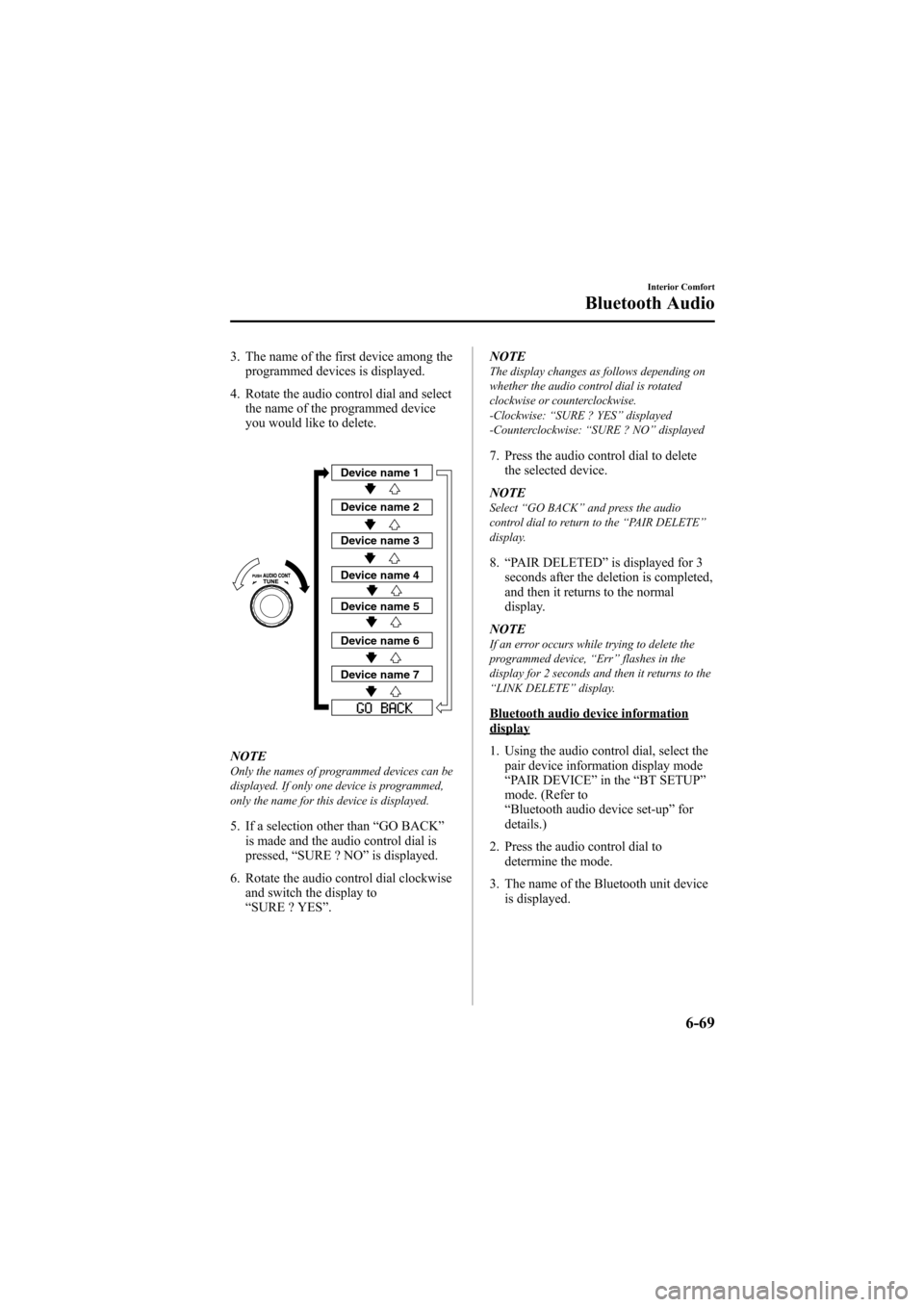
3. The name of the first device among theprogrammed devices is displayed.
4. Rotate the audio control dial and select the name of the programmed device
you would like to delete.
Device name 1
Device name 2
Device name 3
Device name 4
Device name 5
Device name 6
Device name 7
NOTEOnly the names of programmed devices can be
displayed. If only one device is programmed,
only the name for this device is displayed.
5. If a selection other than “GO BACK ”
is made and the audio control dial is
pressed, “SURE ? NO ”is displayed.
6. Rotate the audio control dial clockwise and switch the display to
“SURE ? YES ”. NOTE
The display changes as follows depending on
whether the audio control dial is rotated
clockwise or counterclockwise.
-Clockwise:
“SURE ? YES ”displayed
-Counterclockwise: “SURE ? NO ”displayed
7. Press the audio control dial to delete
the selected device.
NOTE
Select “GO BACK ”and press the audio
control dial to return to the “PAIR DELETE ”
display.
8. “PAIR DELETED ”is displayed for 3
seconds after the deletion is completed,
and then it returns to the normal
display.
NOTE
If an error occurs while trying to delete the
programmed device, “Err ”flashes in the
display for 2 seconds and then it returns to the
“ LINK DELETE ”display.
Bluetooth audio device informationdisplay
1. Using the audio control dial, select the
pair device information display mode
“PAIR DEVICE ”in the “BT SETUP”
mode. (Refer to
“ Bluetooth audio device set-up ”for
details.)
2. Press the audio control dial to determine the mode.
3. The name of the Bluetooth unit device is displayed.
Interior Comfort
Bluetooth Audio
6-69
Mazda6_8Z64-EA-08H_Edition1 Page287
Wednesday, June 25 2008 10:4 AM
Form No.8Z64-EA-08H
Page 291 of 464

Black plate (291,1)
Bluetooth is the registered trademark of
Bluetooth SIG. Inc.
NOTE
lIf the ignition is turned off (LOCK) during
a hands-free call, the line is transferred to
the device (Mobile phone) automatically.
lIf the device (Mobile phone) is in a location
where radio reception is difficult such as a
metal container or in the trunk, the call may
not be connected using Bluetooth. If
communication is not possible, change the
location of the device (Mobile phone).
qComponent Parts
Bluetooth Hands-Free consists of the
following parts:
lTalk buttonlPick-up buttonlHang-up buttonlInformation displaylMicrophonelAudio unit/Navigation system
Talk button, Pick-Up button and Hang-Up button
Basic functions of Bluetooth Hands-Free
can be used such as making calls or
hanging up using the talk button, pick-up
button and hang-up button on the steering
wheel.
Talk button
Hang-up button
Pick-up button
Talk button operations
A short press or a long press of the talk
button is used depending on the operation
status as follows:
lShort press (Press the button less than
0.7 sec.)
lLong press (Press the button 0.7 sec. or
more.)
Information display
Telephone numbers, Bluetooth Hands-
Free messages, and operation status are
displayed.
Microphone
The microphone is used for speaking
voice commands or exchanging
conversation.
Microphone
Interior Comfort
Bluetooth Hands-Free
6-73
Mazda6_8Z64-EA-08H_Edition1 Page291
Wednesday, June 25 2008 10:4 AM
Form No.8Z64-EA-08H
Page 296 of 464
![MAZDA MODEL 6 2009 Owners Manual (in English) Black plate (296,1)
19.Prompt :“Adding XXXXXX - - -
(Ex. “Stans device ”) (Device tag). Is
this correct? ”
20. Say: [Beep] “Ye s ”
21. Prompt :“Pairing complete ”
After a device is re](/img/28/13572/w960_13572-295.png "MAZDA MODEL 6 2009 Owners Manual (in English) Black plate (296,1)
19.Prompt :“Adding XXXXXX - - -
(Ex. “Stans device ”) (Device tag). Is
this correct? ”
20. Say: [Beep] “Ye s ”
21. Prompt :“Pairing complete ”
After a device is re")
Black plate (296,1)
19.Prompt :“Adding XXXXXX - - -
(Ex. “Stan's device ”) (Device tag). Is
this correct? ”
20. Say: [Beep] “Ye s ”
21. Prompt :“Pairing complete ”
After a device is registered, the system
automatically identifies the device. By
activating Bluetooth Hands-Free again, or
by activating Bluetooth Hands-Free first
after switching the ignition from off
(LOCK) to ACC, the system reads out a
voice guidance, “XXXXXX - - - (Ex.
“ Stan's device ”) (Device tag) is
connected ”.
NOTE
Device registration can also be done by
operating the audio unit or panel buttons on
the navigation unit. Refer to “Bluetooth Audio
Preparation ”(page 6-64)(For audio unit) or
the separate manual “NAVIGATION
SYSTEM ”(For navigation unit).
q Making a Call Using a Telephone
Number
1. Activate Bluetooth Hands-Free (page
6-74).
2. Say : [Beep] “Dial ”
3. Prompt :“Number, please ”
4. Say : [Beep] “XXXXXXXXXXX (Ex.
“ 555-1234 ”) (Telephone number) ”
5. Prompt :“Dialing XXXXXXXXXXX
(Ex. “555-1234 ”) (Telephone number)
is this correct? ”
6. Say : [Beep] “Ye s ”or “No” .
7. When “Ye s ”is spoken, the procedure
proceeds to Step 8.
When “No ”is spoken, the procedure
returns to Step 3. 8.
Prompt :“Dialing ”
qReceiving an Incoming Call
1. Prompt :“Incoming call, press the
pickup button to answer ”.
2. To accept the call, press the pick-up button.
To reject the call, press the hang-up
button.
qHanging Up a Call
Press the hang-up button during the call.
Beep will confirm that call is ended.
qVolume Adjustment
Turn the power/volume dial of the audio
unit or navigation system to adjust the
volume.
Turn the power/volume dial to the right to
increase volume, to the left to decrease it.
Audio unit Navigation system
NOTElThe volume can also be adjusted using the
volume button on the steering wheel.
lThe music volume of the audio unit and the
navigation system cannot be adjusted while
Bluetooth Hands-Free is being used.
6-78
Interior Comfort
Bluetooth Hands-Free
Mazda6_8Z64-EA-08H_Edition1 Page296
Wednesday, June 25 2008 10:4 AM
Form No.8Z64-EA-08H