lock MAZDA MODEL 6 2009 Owners Manual (in English)
[x] Cancel search | Manufacturer: MAZDA, Model Year: 2009, Model line: MODEL 6, Model: MAZDA MODEL 6 2009Pages: 464, PDF Size: 4.61 MB
Page 201 of 464

Black plate (201,1)
NOTE(3.7-liter engine)
If the battery is disconnected or a fuse is
replaced, the TCS will be inoperable. When
this happens, the TCS OFF indicator light
flashes and the TCS indicator light illuminates.
To reactivate the TCS, perform the following
procedure with the battery connected.
1. Switch the ignition ON
2. Turn the steering clockwise fully, then turnit counterclockwise fully.
3. Make sure the TCS OFF indicator light and TCS indicator light turn off.
If the TCS indicator light and the TCS OFF
indicator light remain illuminated even after
switching the ignition ON, attempt the
procedure again. If this still does not work,
consult an Authorized Mazda Dealer.
q DSC OFF Indicator Lightí
This indicator light stays on for a few
seconds when the ignition is switched
ON.
It also illuminates when the DSC OFF
switch is pressed and TCS/DSC is
switched off (page 5-26).
If the light stays on when the TCS/DSC is
not switched off, take your vehicle to an
Authorized Mazda Dealer. The dynamic
stability control may have a malfunction. NOTE
If the battery is disconnected or a fuse is
replaced, the DSC will be inoperable. In this
case, the DSC OFF indicator light flashes and
the TCS/DSC indicator light illuminates.
To make the DSC operable, do the following
procedure with the battery connected.
1. Switch the ignition ON.
2. Turn the steering clockwise fully, then turn
it counterclockwise fully.
3. Make sure the DSC OFF indicator and the TCS/DSC indicator goes off.
If the TCS/DSC indicator light and the DSC
OFF indicator light remain illuminated even
after switching the ignition ON, consult an
Authorized Mazda Dealer.
q Cruise Main Indicator Light
(Amber)/Cruise Set Indicator
Light (Green)
í
The indicator light has two colors.
Cruise Main Indicator Light (Amber)
The indicator light illuminates amber
when the ON/OFF switch is pressed and
the cruise control system is activated.
Cruise Set Indicator Light (Green)
The indicator light illuminates green when
a cruising speed has been set.
Driving Your Mazda
Warning/Indicator Lights and Beep Sounds
5-57íSome models.
Mazda6_8Z64-EA-08H_Edition1 Page201
Wednesday, June 25 2008 10:4 AM
Form No.8Z64-EA-08H
Page 203 of 464

Black plate (203,1)
Beep Sounds
qAir Bag/Front Seat Belt
Pretensioner System Warning Beep
If a malfunction is detected in both the air
bag/front seat belt pretensioner system
and the warning light, a warning beep
sound will be heard for about 1 minute.
After that, the one-minute beep will be
repeated every 30 minutes.
Have your vehicle inspected at an
Authorized Mazda Dealer as soon as
possible.
WARNING
Do not drive the vehicle with the air
bag/front seat belt pretensioner system
warning beep sounding:Driving the vehicle with the air bag/
front seat belt pretensioner system
warning beep sounding is dangerous.
In a collision, the air bags and the
front seat belt pretensioner system
will not deploy and this could result
in death or serious injury.
Contact an Authorized Mazda Dealer
to have the vehicle inspected as soon
as possible.
qSeat Belt Warning Beep
If the driver's seat belt is not fastened
when the ignition is switched ON, a beep
sound will be heard for about 6 seconds.
If the driver or the front passenger's seat
belt is not fastened and the vehicle is
driven at a speed faster than about 20
km/h (12 mph), a beep sound will be
heard again for a specified period of time.
Refer to Seat Belt Warning Light/Beep on
page 5-49.
qIgnition Key Reminder
If the ignition is switched to off (LOCK)
or ACC with the key inserted, a
continuous beep sound will be heard
when the driver's door is opened.
qTire Inflation Pressure Warning
Beep
The warning beep sound will be heard for
about 3 seconds when there is any
abnormality in tire inflation pressures
(page 5-27).
qAdvanced Keyless Warningí
Warning indicators for the advanced key,
such as “the advanced key removed from
vehicle warning ”, use a beep sound and
warning/indicator lights in the instrument
cluster.
Refer to Warning and Beep Sounds on
page 3-19.
q Electronic Steering Lock
Warning Beepí
The warning beep operates if the steering
wheel is not unlocked after the push
button start is pressed. (page 3-10)
Driving Your Mazda
Warning/Indicator Lights and Beep Sounds
5-59íSome models.
Mazda6_8Z64-EA-08H_Edition1 Page203
Wednesday, June 25 2008 10:4 AM
Form No.8Z64-EA-08H
Page 204 of 464
Black plate (204,1)
Lighting Control
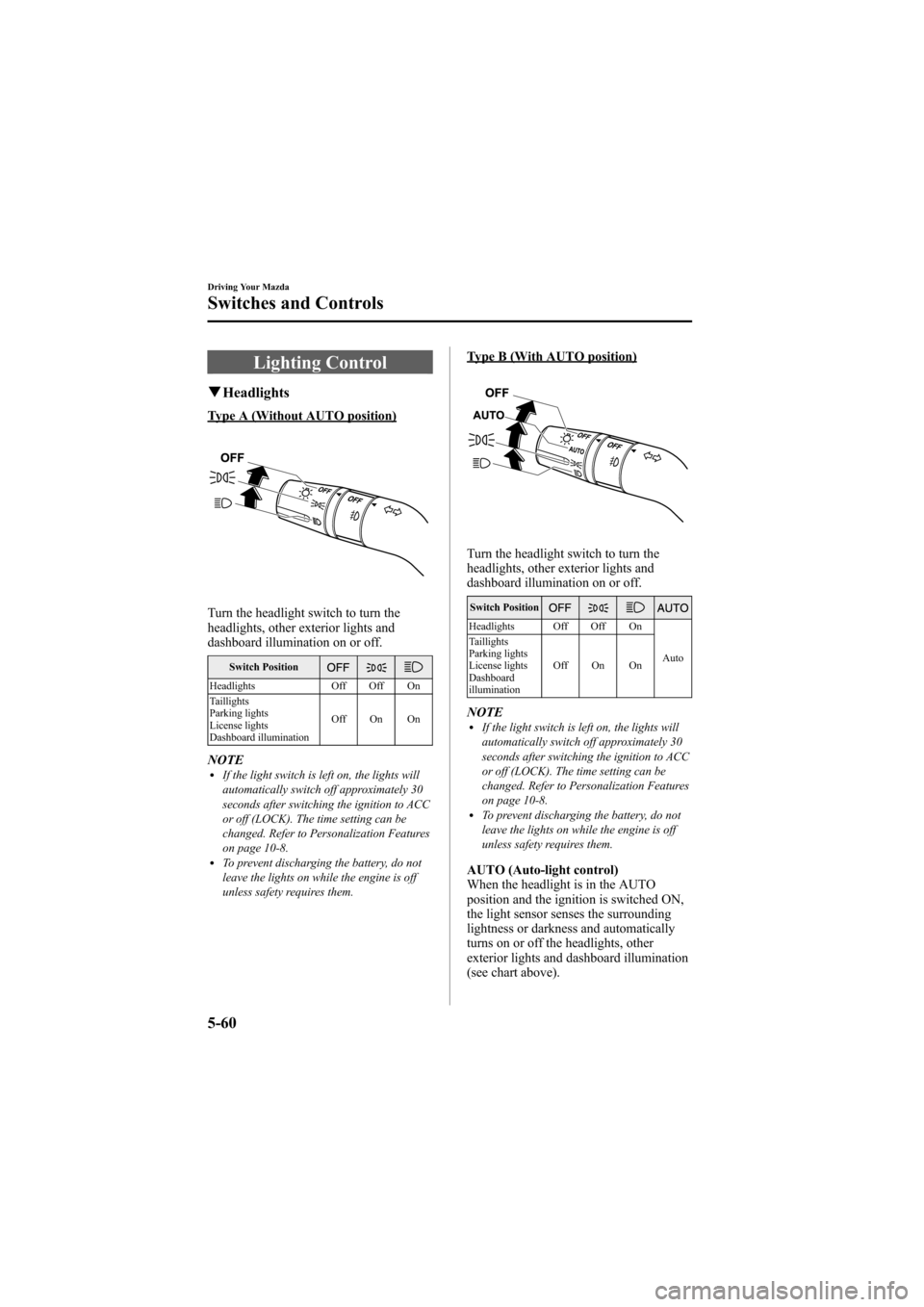
qHeadlights
Type A (Without AUTO position)
Turn the headlight switch to turn the
headlights, other exterior lights and
dashboard illumination on or off.
Switch Position
Headlights Off Off On
Taillights
Parking lights
License lights
Dashboard illumination Off On On
NOTElIf the light switch is left on, the lights will
automatically switch off approximately 30
seconds after switching the ignition to ACC
or off (LOCK). The time setting can be
changed. Refer to Personalization Features
on page 10-8.
lTo prevent discharging the battery, do not
leave the lights on while the engine is off
unless safety requires them.
Type B (With AUTO position)
Turn the headlight switch to turn the
headlights, other exterior lights and
dashboard illumination on or off.
Switch Position
Headlights Off Off On
Auto
Taillights
Parking lights
License lights
Dashboard
illumination Off On On
NOTElIf the light switch is left on, the lights will
automatically switch off approximately 30
seconds after switching the ignition to ACC
or off (LOCK). The time setting can be
changed. Refer to Personalization Features
on page 10-8.
lTo prevent discharging the battery, do not
leave the lights on while the engine is off
unless safety requires them.
AUTO (Auto-light control)
When the headlight is in the AUTO
position and the ignition is switched ON,
the light sensor senses the surrounding
lightness or darkness and automatically
turns on or off the headlights, other
exterior lights and dashboard illumination
(see chart above).
5-60
Driving Your Mazda
Switches and Controls
Mazda6_8Z64-EA-08H_Edition1 Page204
Wednesday, June 25 2008 10:4 AM
Form No.8Z64-EA-08H
Page 208 of 464

Black plate (208,1)
Fog Lightsí
Use this switch to turn on the fog lights.
They help you to see as well as to be seen.
To turn the fog lights on, rotate the fog
light switch to the
position.
The headlight switch must be in the
position to turn on the fog lights.
Fog light switch
To turn them off, rotate the fog light
switch to the OFF position or turn the
headlight switch to the
or OFF
position.
NOTE
lThe fog lights will turn off when the
headlights are set at high beam.
l(With auto-light control)
If the fog light switch is in the ON position
and the headlight switch is in the AUTO
position, the fog lights will be turned on
when the headlights, the exterior lights and
dashboard illumination are automatically
turned on.
Windshield Wipers and
Washer
The ignition must be switched ON.
WARNING
Use only windshield washer fluid or
plain water in the reservoir: Using radiator antifreeze as washer
fluid is dangerous. If sprayed on the
windshield, it will dirty the
windshield, affect your visibility, and
could result in an accident.
Only use windshield washer fluid
mixed with anti-freeze protection in
freezing weather conditions: Using windshield washer fluid
without anti-freeze protection in
freezing weather conditions is
dangerous as it could freeze on the
windshield and block your vision
which could cause an accident.
In addition, make sure the
windshield is sufficiently warmed
using the defroster before spraying
the washer fluid.
5-64
Driving Your Mazda
íSome models.
Switches and Controls
Mazda6_8Z64-EA-08H_Edition1 Page208
Wednesday, June 25 2008 10:4 AM
Form No.8Z64-EA-08H
Page 224 of 464

Black plate (224,1)
Manual Type
Temperature control dialFan control dial
Mode selector dial
A/C switch
Air intake selector
qControl Switches
Temperature control dial
Cold Hot
This dial controls temperature. Turn it
clockwise for hot and counterclockwise
for cold. MAX-A/C position
For quick cabin cooling, rotate the
temperature control dial counterclockwise
to the MAX-A/C position. The A/C
system automatically turns on and the air
intake mode switches to the recirculation
position automatically.
Fan control dial
Slow
Fast
6-6
Interior Comfort
Climate Control System
Mazda6_8Z64-EA-08H_Edition1 Page224
Wednesday, June 25 2008 10:4 AM
Form No.8Z64-EA-08H
Page 228 of 464
Black plate (228,1)
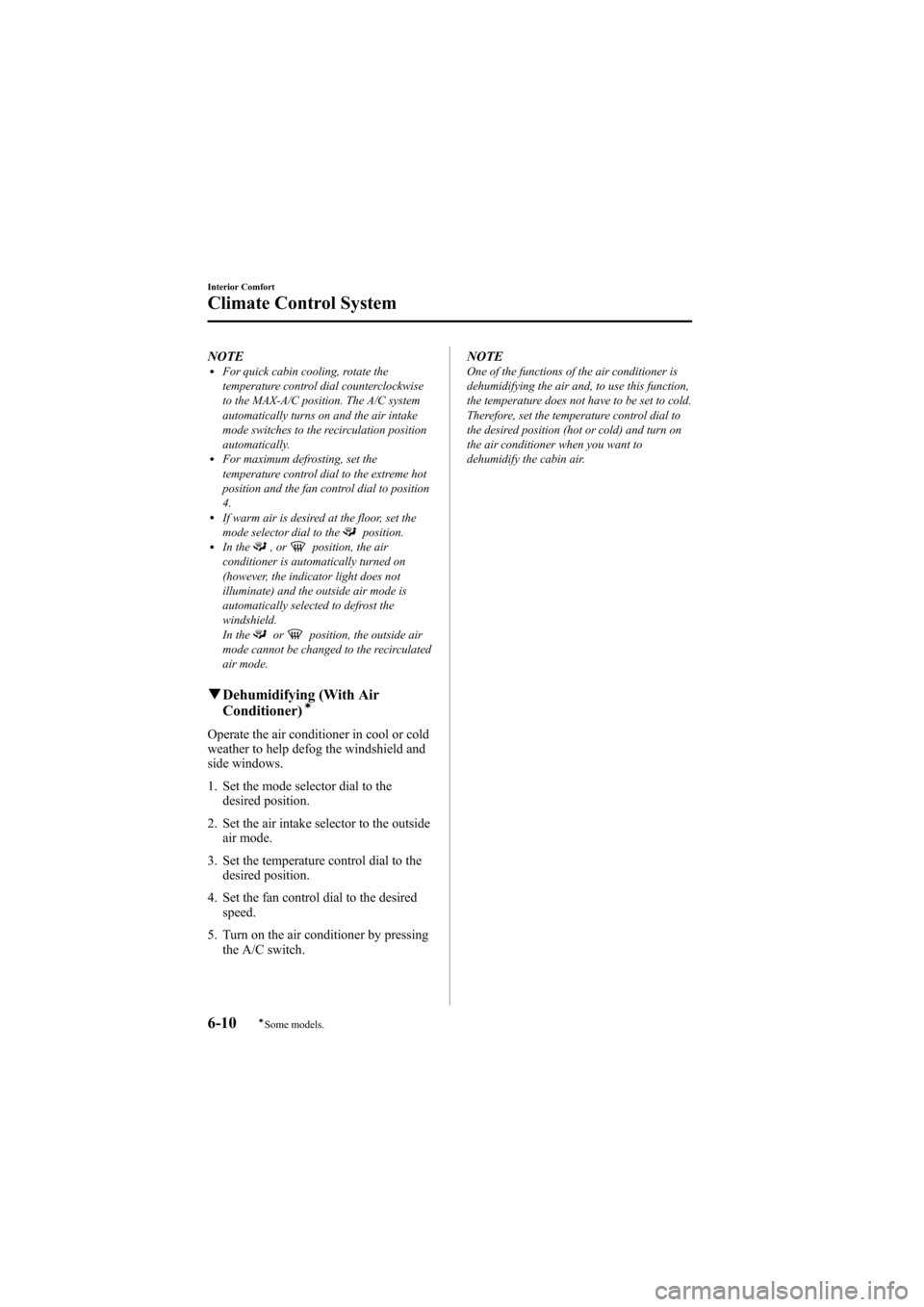
NOTElFor quick cabin cooling, rotate the
temperature control dial counterclockwise
to the MAX-A/C position. The A/C system
automatically turns on and the air intake
mode switches to the recirculation position
automatically.
lFor maximum defrosting, set the
temperature control dial to the extreme hot
position and the fan control dial to position
4.
lIf warm air is desired at the floor, set the
mode selector dial to theposition.lIn the,orposition, the air
conditioner is automatically turned on
(however, the indicator light does not
illuminate) and the outside air mode is
automatically selected to defrost the
windshield.
In the
orposition, the outside air
mode cannot be changed to the recirculated
air mode.
q Dehumidifying (With Air
Conditioner)í
Operate the air conditioner in cool or cold
weather to help defog the windshield and
side windows.
1. Set the mode selector dial to the
desired position.
2. Set the air intake selector to the outside air mode.
3. Set the temperature control dial to the desired position.
4. Set the fan control dial to the desired speed.
5. Turn on the air conditioner by pressing the A/C switch. NOTE
One of the functions of the air conditioner is
dehumidifying the air and, to use this function,
the temperature does not have to be set to cold.
Therefore, set the temperature control dial to
the desired position (hot or cold) and turn on
the air conditioner when you want to
dehumidify the cabin air.
6-10
Interior Comfort
íSome models.
Climate Control System
Mazda6_8Z64-EA-08H_Edition1 Page228
Wednesday, June 25 2008 10:4 AM
Form No.8Z64-EA-08H
Page 230 of 464

Black plate (230,1)
qControl Switches
AUTO switch
By pressing the AUTO switch the
following functions will be automatically
controlled in accordance with the selected
set temperature:
lAirflow temperaturelAmount of airflowlSelection of airflow modelOutside/Recirculated air selectionlAir conditioner operation
NOTE
AUTO switch indicator lightlWhen on, it indicates AUTO operation, and
the system will function automatically.
lWhen off, it indicates the operation of other
switches such as the mode selector switch,
fan control dial and windshield defroster
switch. Other functions will continue to
operate automatically.
OFF switch
Pressing the OFF switch shuts off the
climate control system.
Temperature control dial
Cold Hot
This dial controls temperature. Turn it
clockwise for hot and counterclockwise
for cold.
lWhen the DUAL switch is off:
Turn the driver temperature control dial
to control the temperature.
lWhen the DUAL switch is on:
Turn the driver or front passenger
temperature control dial to control the
temperature.
NOTE
The system changes to the individual operation
mode (DUAL switch indicator light
illuminated) by turning the front passenger
temperature control dial even when the DUAL
switch is off, which allows individual control
of the set temperature for the driver and front
passenger.
Fan control dial
Slow Fast
The fan has seven speeds. The selected
speed will be displayed.
6-12
Interior Comfort
Climate Control System
Mazda6_8Z64-EA-08H_Edition1 Page230
Wednesday, June 25 2008 10:4 AM
Form No.8Z64-EA-08H
Page 249 of 464
Black plate (249,1)
*AUDIOPILOT®(Bose®SoundSystem-equipped model)
AUDIOPILOT®automatically adjusts
audio volume and sound quality in
accordance with the level of noise
entering the vehicle interior while driving.
When AUDIOPILOT
®is turned on, the
system automatically calculates the
conditions for optimum hearing of sound
which may be difficult to hear depending
on exterior noise.
* AUDIOPILOT
®is a registered
trademark of Bose Corporation.
*Centerpoint®(Bose®Sound System-equipped model)
Centerpoint®offers you the experience of
5.1-channel surround sound in your
vehicle even with your conventional 2-
channel stereo CDs.
Centerpoint
®can be set on or off.
NOTE
lCenterpoint®operates optimally with a 2-
channel stereo CD. MP3 audio files can be
played, however, MP3 audio files encoded
with high compression may result in poor
sound quality.
lCenterpoint®is available for 2-channel
stereo audio except for AM radio/FM radio/
SIRIUS digital satellite radio/AUX/BT
audio.
* Centerpoint®is a registered trademark
of Bose Corporation.
BEEP setting
The beep-sound when operating the audio
system can be set on or off.
ILLM EFT setting (Illumination settingduring operation)
The audio system illumination during
operation can be set on or off.
Welcome modeí
The welcome mode provides the
following presentation:
lSound is heard when the ignition is
turned on.
lIllumination turns on when a door is
opened after unlocking the doors.
Only the sound effect can be switched on
or off.
BT SETUP modeí
Music and other audio such as voice data
recorded on portable audio devices and
mobile phones available on the market
which are equipped with the Bluetooth
transmission function can be listened to
via wireless transmission over the
vehicle's speakers. Using the BT SETUP
mode, these devices can be programmed
to the Bluetooth unit or changed. For
details, refer to Bluetooth audio (page
6-63).
Interior Comfort
Audio System
6-31íSome models.
Mazda6_8Z64-EA-08H_Edition1 Page249
Wednesday, June 25 2008 10:4 AM
Form No.8Z64-EA-08H
Page 255 of 464
Black plate (255,1)
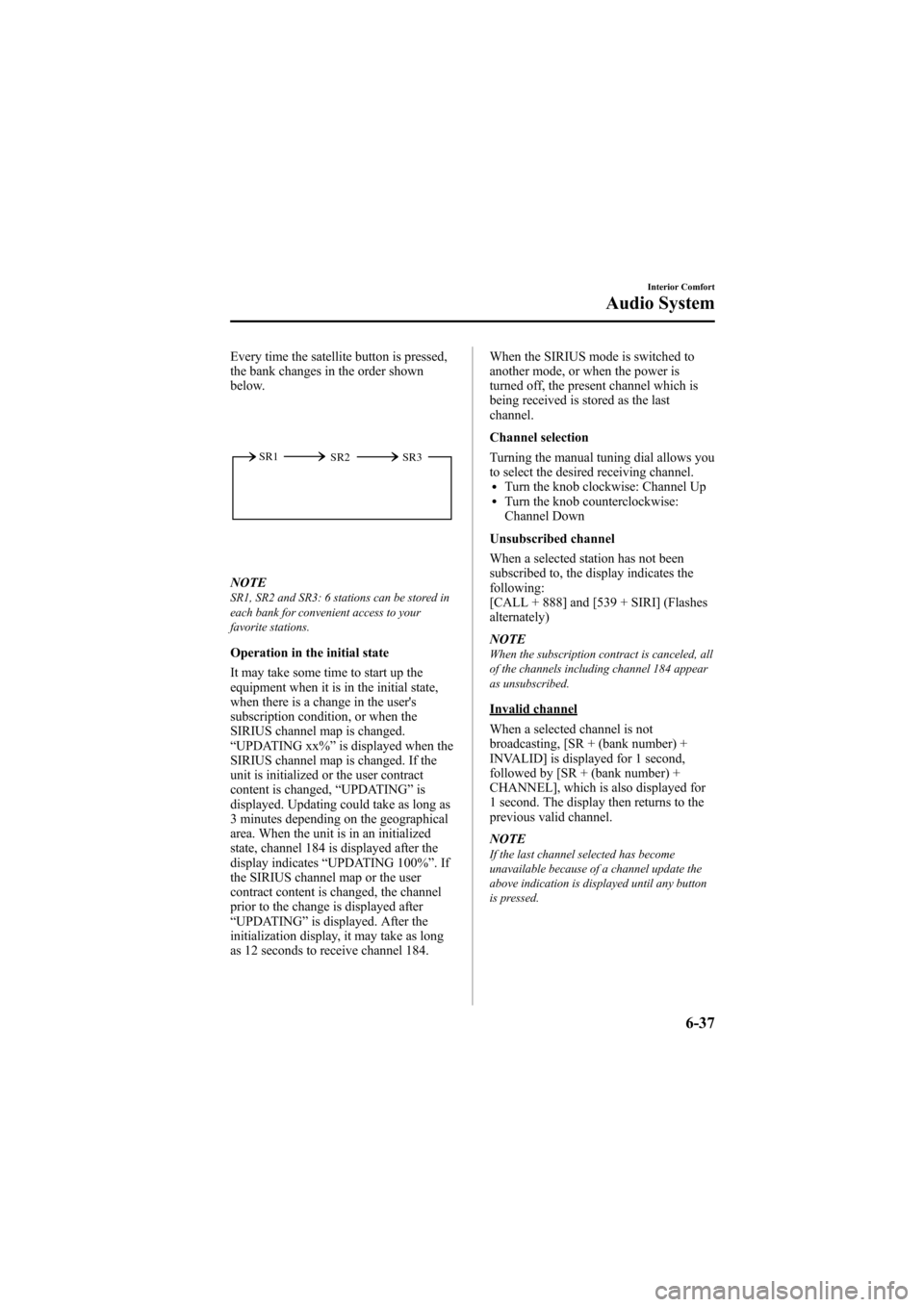
Every time the satellite button is pressed,
the bank changes in the order shown
below.
SR2
SR1
SR3
NOTESR1, SR2 and SR3: 6 stations can be stored in
each bank for convenient access to your
favorite stations.
Operation in the initial state
It may take some time to start up the
equipment when it is in the initial state,
when there is a change in the user's
subscription condition, or when the
SIRIUS channel map is changed.
“UPDATING xx% ”is displayed when the
SIRIUS channel map is changed. If the
unit is initialized or the user contract
content is changed, “UPDATING ”is
displayed. Updating could take as long as
3 minutes depending on the geographical
area. When the unit is in an initialized
state, channel 184 is displayed after the
display indicates “UPDATING 100% ”.If
the SIRIUS channel map or the user
contract content is changed, the channel
prior to the change is displayed after
“ UPDATING ”is displayed. After the
initialization display, it may take as long
as 12 seconds to receive channel 184. When the SIRIUS mode is switched to
another mode, or when the power is
turned off, the present channel which is
being received is stored as the last
channel.
Channel selection
Turning the manual tuning dial allows you
to select the desired receiving channel.
lTurn the knob clockwise: Channel UplTurn the knob counterclockwise:
Channel Down
Unsubscribed channel
When a selected station has not been
subscribed to, the display indicates the
following:
[CALL + 888] and [539 + SIRI] (Flashes
alternately)
NOTE
When the subscription contract is canceled, all
of the channels including channel 184 appear
as unsubscribed.
Invalid channel
When a selected channel is not
broadcasting, [SR + (bank number) +
INVALID] is displayed for 1 second,
followed by [SR + (bank number) +
CHANNEL], which is also displayed for
1 second. The display then returns to the
previous valid channel.
NOTE
If the last channel selected has become
unavailable because of a channel update the
above indication is displayed until any button
is pressed.
Interior Comfort
Audio System
6-37
Mazda6_8Z64-EA-08H_Edition1 Page255
Wednesday, June 25 2008 10:4 AM
Form No.8Z64-EA-08H
Page 257 of 464
Black plate (257,1)
Channel selection within a category
If category is not in“ALL ”and the
channel number is displayed, turning the
manual tuning dial moves the channel
number up/down in the present category.
lTurn the manual tuning dial clockwise:
Channel Up
lTurn the manual tuning dial
counterclockwise: Channel Down
NOTE
The channel number needs to be indicated in
the display to use manual tuning dial for this
function.
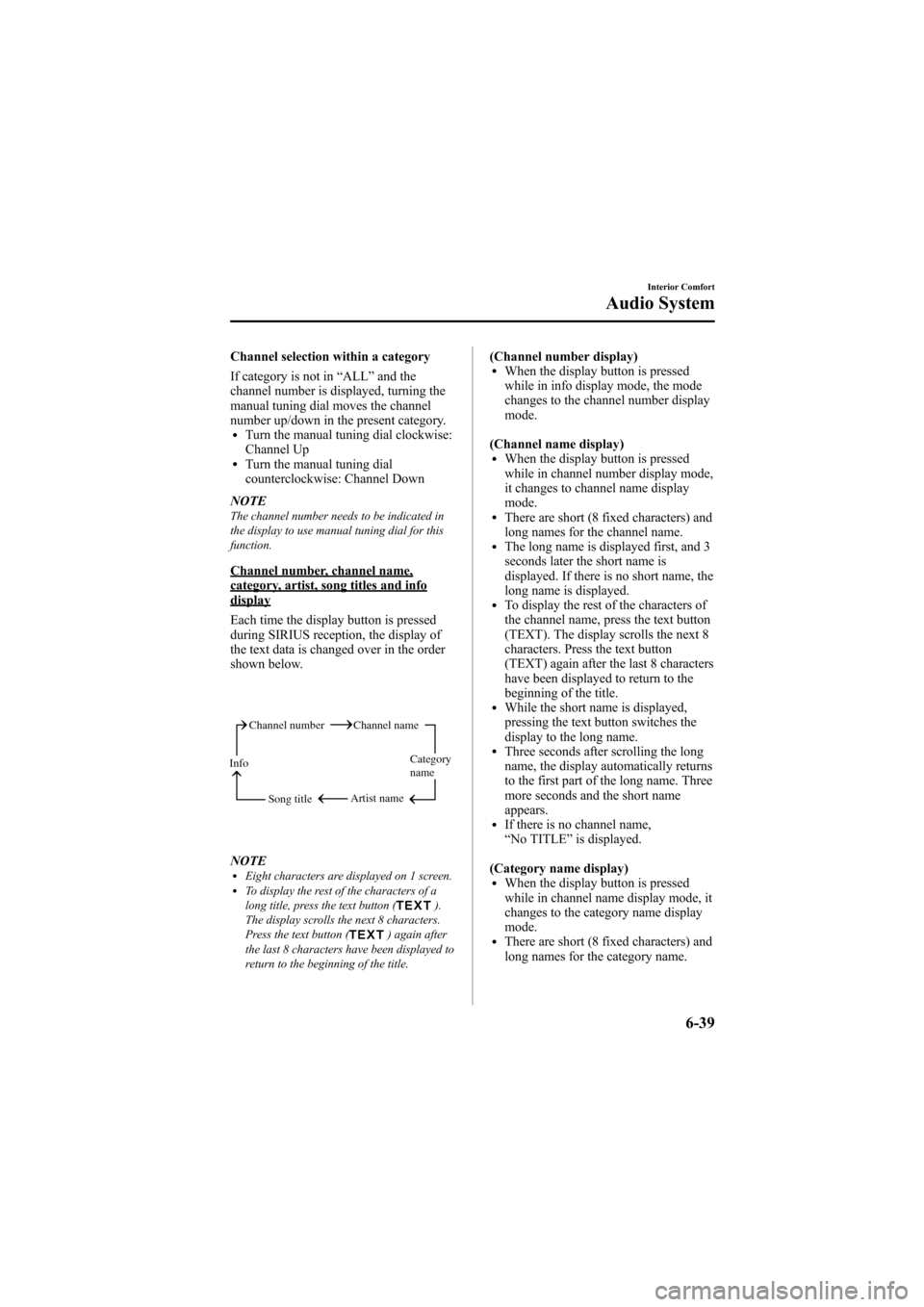
Channel number, channel name,category, artist, song titles and infodisplay
Each time the display button is pressed
during SIRIUS reception, the display of
the text data is changed over in the order
shown below.
Channel number Channel name
Category
name
Artist name
Info
Song title
NOTElEight characters are displayed on 1 screen.lTo display the rest of the characters of a
long title, press the text button ().
The display scrolls the next 8 characters.
Press the text button (
) again after
the last 8 characters have been displayed to
return to the beginning of the title.
(Channel number display)lWhen the display button is pressed
while in info display mode, the mode
changes to the channel number display
mode.
(Channel name display)
lWhen the display button is pressed
while in channel number display mode,
it changes to channel name display
mode.
lThere are short (8 fixed characters) and
long names for the channel name.
lThe long name is displayed first, and 3
seconds later the short name is
displayed. If there is no short name, the
long name is displayed.
lTo display the rest of the characters of
the channel name, press the text button
(TEXT). The display scrolls the next 8
characters. Press the text button
(TEXT) again after the last 8 characters
have been displayed to return to the
beginning of the title.
lWhile the short name is displayed,
pressing the text button switches the
display to the long name.
lThree seconds after scrolling the long
name, the display automatically returns
to the first part of the long name. Three
more seconds and the short name
appears.
lIf there is no channel name,
“ No TITLE ”is displayed.
(Category name display)
lWhen the display button is pressed
while in channel name display mode, it
changes to the category name display
mode.
lThere are short (8 fixed characters) and
long names for the category name.
Interior Comfort
Audio System
6-39
Mazda6_8Z64-EA-08H_Edition1 Page257
Wednesday, June 25 2008 10:4 AM
Form No.8Z64-EA-08H