reset MAZDA MODEL 6 2009 (in English) User Guide
[x] Cancel search | Manufacturer: MAZDA, Model Year: 2009, Model line: MODEL 6, Model: MAZDA MODEL 6 2009Pages: 464, PDF Size: 4.61 MB
Page 252 of 464
Black plate (252,1)
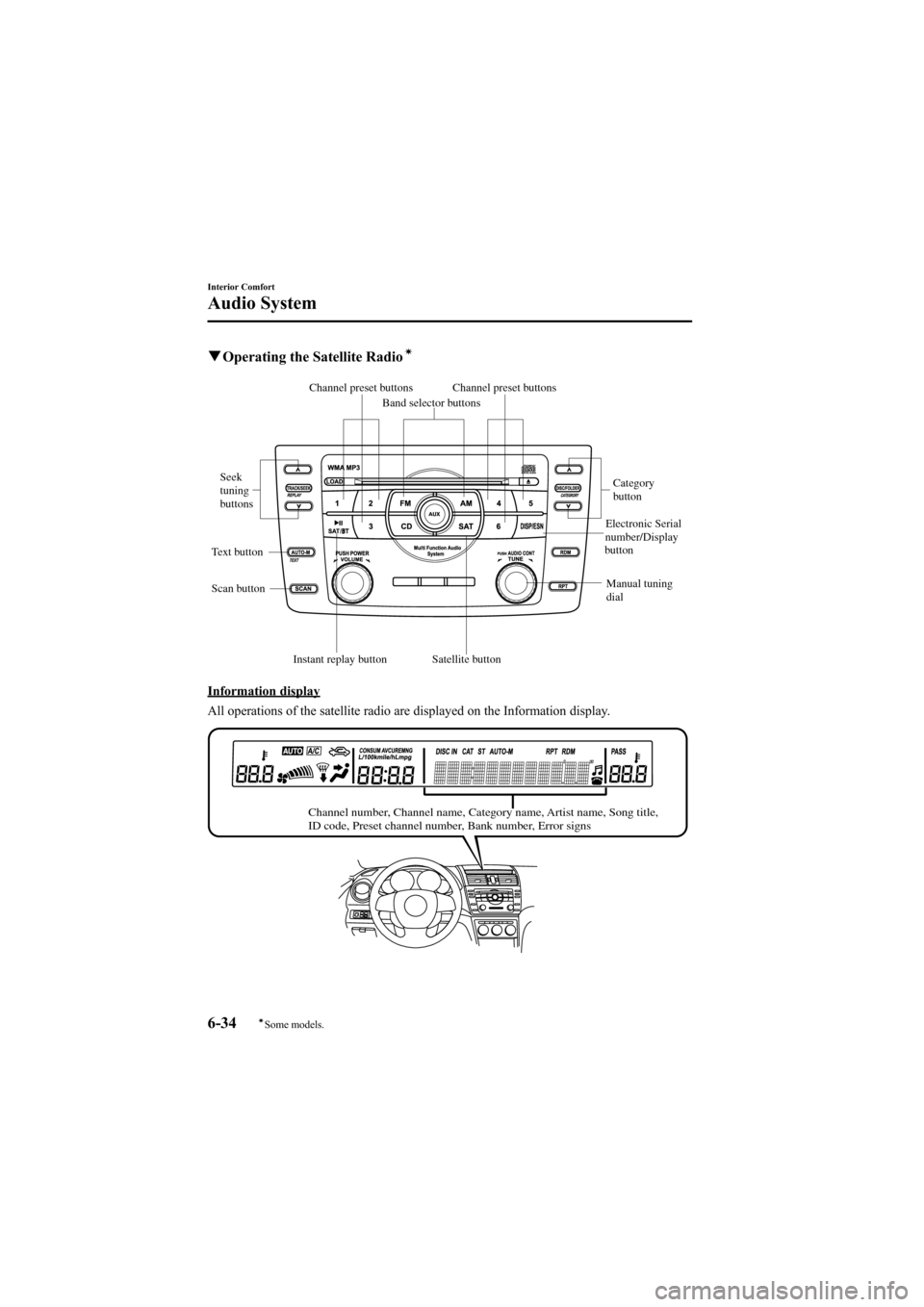
qOperating the Satellite Radioí
Channel preset buttons
Seek
tuning
buttons
Manual tuning
dialCategory
button
Electronic Serial
number/Display
button
Band selector buttons
Scan button
Channel preset buttons
Text button
Satellite button
Instant replay button
Information display
All operations of the satellite radio are displayed on the Information display.
Channel number, Channel name, Category name, Artist name, Song title,
ID code, Preset channel number, Bank number, Error signs
6-34
Interior Comfort
íSome models.
Audio System
Mazda6_8Z64-EA-08H_Edition1 Page252
Wednesday, June 25 2008 10:4 AM
Form No.8Z64-EA-08H
Page 256 of 464
Black plate (256,1)
Preset channel programming
(Programming with“channel number ”
display)
1. Select the desired channel to be programmed. At this point, the
following is displayed:
[SR + (bank number) + (channel
number)]
2. Keep pressing the channel preset button for 1.5 seconds or more.
The programming process is complete
after the channel number flashes. Then,
[SR + (bank number)] is displayed and
a beep sound is heard at the same time.
3. [SR + (bank number) + CH + (preset number) + (channel number)] are
displayed.
(Programming with “text ”display (e.g.
channel name))
1. Select the desired channel to be
programmed. At this point, the
following is displayed:
[SR + (bank number) + (selected text
(e.g. channel name))]
2. Keep pressing the channel preset button for 1.5 seconds or more.
The programming process is complete
after the text (e.g. channel name)
flashes. Then, [SR + (bank number)] is
displayed and you will hear beep sound
at the same time.
3. SR + (bank number) + CH + (preset number) + (channel number)] are
displayed.
4. Three seconds later, it returns to normal display. [SR + (bank number) + (text
(e.g. channel name))] NOTESix stations can be stored in each bank, SR1,
SR2, and SR3 for convenient access to your
favorite stations.
Preset channel call-up
Press and release the channel preset
button,
[SR + (bank number) + CH + (preset
number) + (channel number)] appears.
When the preset button is pressed during
text mode, its channel number is
displayed first for 3 second and then its
text is displayed.
NOTE
In the initial setting, all channels are preset to
184.
Category change
Press the category button (UP or DOWN)
and select the desired category.
lPress the category button (UP):
Category up
lPress the category button (DOWN):
Category down
Every time the category (UP) button is
pressed for 1.5 second or less, the
category is changed over in the order
shown below.
At this time, the lowest (smallest-number)
channel within the category indicated is
received.
When the highest (or lowest) category is
reached, the category is changed over in
the order shown below.
Highest category →Category all →Lowest
category
NOTE
While in “CATEGORY ALL” mode, all
channels covering a category can be accessed
(Category off condition).
6-38
Interior Comfort
Audio System
Mazda6_8Z64-EA-08H_Edition1 Page256
Wednesday, June 25 2008 10:4 AM
Form No.8Z64-EA-08H
Page 259 of 464
Black plate (259,1)
When the seek tuning button ()is
pressed (about 1.5 seconds), playback
starts from the beginning of the current
program.
When the seek tuning button (
)is
pressed twice, playback starts from the
beginning of the previous program.
When the seek tuning button (
)is
pressed for about 1.5 seconds or longer,
the program is reversed while the button
is being pressed.
When the seek tuning button (
)is
pressed (about 1.5 seconds), playback
starts from the beginning of the next
program. When the seek tuning button
(
) is pressed (about 1.5 seconds) while
the last program is being played, the
instant replay mode is cancelled.
When the seek tuning button (
)is
pressed for 1.5 seconds or longer, the
program is fast-forwarded while the
button is being pressed. When pressing
and holding the button until the end of the
program, the instant replay mode is
cancelled.
When the instant replay button is pressed
again, playback is paused, or playback
starts if it has been paused.
Instant replay (PAUSE)
If the instant replay button is pressed
while the instant replay mode is off,
instant replay mode is turned on in a
paused condition (PAUSE). Press the
instant replay button again to resume
playback from the point at which it was
paused.
NOTE
lIf the channel is changed, the instant replay
buffer data is deleted.
lAfter turning on the power and switching to
SIRIUS digital satellite radio mode, the
instant replay mode is not available for
several seconds after changing channels.
(How to cancel the instant replay)lTurn off the ACC or POWER.lPress any one of the following buttons:
FM/AM, CD, AUX, SAT,
CATEGORY, or a channel preset
button.
lShort-press the seek tuning button ()
to the last track while tracking up.
lTo fast-forward to the end of the track
long-press the seek tuning button ().lHold the scan button, then press
channel preset button 4, 5, or 6.
lTurn the manual tuning dial.lPress the up/down switch on the audio
control switch.
lInsert or play a CD.
Displaying the SIRIUS ID (ESN)
When the ESN button is pressed for 1.5
seconds or longer, a 12-digit Electronic
Serial Number (ESN) for the SIRIUS
tuner is displayed.
(How to clear the message)
lTurn off the ACC.lTurn off the POWER.lPress any one of the following buttons:
FM/AM, CD, AUX, SAT, ESN/DISP,
CAT, SCAN, Instant replay, seek
tuning button (
), or a channel preset
button.
lTurn the manual tuning dial.lInsert or play a CD.
(If the SIRIUS ID (ESN) for the tuner
does not display)
If “ESN + FAIL ”is displayed after
pressing the ESN button for 1.5 seconds
or longer, contact an Authorized Mazda
Dealer.
Interior Comfort
Audio System
6-41
Mazda6_8Z64-EA-08H_Edition1 Page259
Wednesday, June 25 2008 10:4 AM
Form No.8Z64-EA-08H
Page 260 of 464
![MAZDA MODEL 6 2009 (in English) User Guide Black plate (260,1)
Initialization of ID code
If the registered ID code is forgotten,
return the ID code to the default [0000] by
performing the following steps:
Setting condition: SAT mode
(Master co](/img/28/13572/w960_13572-259.png "MAZDA MODEL 6 2009 (in English) User Guide Black plate (260,1)
Initialization of ID code
If the registered ID code is forgotten,
return the ID code to the default [0000] by
performing the following steps:
Setting condition: SAT mode
(Master co")
Black plate (260,1)
Initialization of ID code
If the registered ID code is forgotten,
return the ID code to the default [0000] by
performing the following steps:
Setting condition: SAT mode
(Master code input preparation)
1. Hold the scan button, then presschannel preset button 4, hold both
buttons together for 1.5 seconds.
2. “ENTER PIN ”appears for 3 seconds
which indicates that it is in code input
mode.
3. “SR1 - - - - ”appears, which indicates
that it is ready for code input.
(Master code input)
4. Input the master code using the channel preset buttons 1-4.
Press the scan button inputting the
code.
(The master code is already set at the
time of factory shipment.)
(Master code input determination)
5. Determine the master code which has been input by pressing the scan button.
6. “PIN CLEARED ”appears which
indicates that the master code input has
been completed.
7. The ID code is set to the default [0000] and the initialization process is
completed. NOTEMaster code:
The Master Code is used to initialize or re-
initialize the ID code in the event that the code
is not set to [0000] and/or the personalized ID
code is not known. The initialization process
resets the ID code to [0000]. The master code
can potentially defeat the intent of the security
of the parental lock if it is located by persons
not authorized by the owner to access certain
channels.
SIRIUS Satellite Radio Master Code: [0913]
(How to clear the message)lPress any of the following FM/AM,
SAT, CD, AUX, LOAD, EJECT,
POWER buttons.
lTurn the ACC off or insert a CD.
NOTE
lWhen a numeric value other than the
master code is input and the scan button is
pressed, “SR1 Err ”is displayed and then it
returns to the “SR1---- ”display again.
lIf an ID code is not input for 10 seconds,
“Err ”is displayed and it returns to the
former display.
lChannel preset buttons 1, 2, 3, 4 and the
scan button are used for inputting the ID
code. Buttons 5 and 6 cannot be used.
Change of ID code
Setting condition: SAT mode
When changing the ID code, the new ID
code is input after the previous one is
input first.
(Registered ID code input)
1. Hold the scan button, then press channel preset button 5, hold both
buttons together for 1.5 seconds.
6-42
Interior Comfort
Audio System
Mazda6_8Z64-EA-08H_Edition1 Page260
Wednesday, June 25 2008 10:4 AM
Form No.8Z64-EA-08H
Page 261 of 464
Black plate (261,1)
2.“ENTER PIN ”appears for 3 seconds
which indicates that it is in code input
mode.
3. “SR1 - - - - ”appears, which indicates
that it is ready for code input.
4. Input the registered ID code using channel preset buttons 1-4. Then press
the scan button.
Example: When the registered ID code
is“2323 ”, input “2323 ”. At this time
“ SR1 2323 ”is displayed.
Press 1 for the first digit, 2 for the
second, 3 for the third, and 4 for the
last digit. For example, if your number
is 2323, press 1 three times, 2 four
times, 3 three, and 4 four times. If the
display goes off while inputting, begin
from Step 1.
NOTE
The registered ID code is the default [0000] at
the time of factory shipment. If [0000] results
in “Err ”on the display, go to the
“ INITIALIZATION OF ID CODE” section to
reset to [0000].
(Verification with the registered ID
code)
5. Determine the input code by pressing the scan button.
6. If it does not match with the previously registered code, “SR1 Err ”is displayed
and then it returns to “SR1 - - - - ”.
7. If it matches with the previously registered code, “ENTER PIN ”appears
again and it switches to code input
mode.
8. “SR1 - - - - ”appears, and it is ready for
input of the new ID code. (New ID code input)
9. Input the new ID code using channel
preset buttons 1-4.
Example: If “1234 ”is input as the new
code, “SR1 1234 ”is displayed.
Press the scan button after the code is
input.
(New ID code input determination)
10. Determine the new ID code which has been input by pressing the scan
button.
11. “PIN CHANGED” appears for 3
seconds which indicates that the new
ID code input has been completed.
12. It returns to the former display.
(How to clear the message)
lPress any of the following FM/AM,
SAT, CD, AUX, LOAD, EJECT,
POWER buttons.
lTurn the ACC off or insert a CD.
NOTE
lIf an ID code is not input for 10 seconds,
“ Err ”is displayed and it returns to the
former display.
lChannel preset buttons 1, 2, 3, 4 and the
scan button are used for input of the ID
code. Buttons 5 and 6 cannot be used.
Individual channel locking
If a channel is locked, the channel is
muted.
NOTE
If the registered ID code is forgotten, return
the ID code to the default [0000]. (See
“ INTIALIZATION OF ID CODE” section)
Interior Comfort
Audio System
6-43
Mazda6_8Z64-EA-08H_Edition1 Page261
Wednesday, June 25 2008 10:4 AM
Form No.8Z64-EA-08H
Page 262 of 464
Black plate (262,1)
(Locking a channel)
1. Select a channel to be locked byturning the manual tuning dial.
Example: Select channel 100
(Registered ID code input preparation)
2. Hold the scan button, then press channel preset button 6, hold both
buttons together for 1.5 seconds.
3. “ENTER PIN ”appears for 3 seconds
which indicates that it is in code input
mode.
4. “SR1 - - - - ”appears which indicates
that it is ready for code input.
(Registered ID code input)
5. Input the registered ID code using channel preset buttons 1-4. Example: If
the registered ID code is “2323 ”, input
“ 2323 ”. At this time “SR1 2323 ”is
displayed. Press the scan button after
the code is input.
(Registered ID code input
determination)
6. Determine the code which has been input by pressing the scan button.
7. If it does not match the registered code, “SR1 Err ”is displayed and then it
returns to “SR1 - - - - ”.
8. If it matches the registered code, “SR1 LOCK ”appears for 3 seconds
which indicates that the code input has
been completed.
9. “SR1 LOCK 100 ”appears which
indicates that the parental lock is
activated. At this time, mute is on and
no sound is heard. (How to clear the message)lPress any of the following FM/AM,
SAT, CD, AUX, LOAD, EJECT,
POWER buttons.
lTurn the ACC off or insert a CD.
NOTE
lIf an ID code is not input for 10 seconds,
“ Err ”is displayed and it returns to the
former display.
lChannel preset buttons 1, 2, 3, 4 and the
scan button are used for input of the ID
code. Buttons 5 and 6 cannot be used.
Lock cancellation
Setting condition: SAT mode
(Releasing a locked channel)
1. Select a channel to be released by turning the manual tuning dial.
Example: Select the locked channel
(i.e. 100). At this time,
“SR1 LOCK 100 ”is displayed.
(Registered ID code input preparation)
2. Hold the scan button, then press channel preset button 6, hold both
buttons together for 1.5 seconds.
3. “ENTER PIN ”appears for 3 seconds
which indicates that it is in code input
mode.
4. “SR1 - - - - ”appears, which indicates
that it is ready for code input.
(Registered ID code input)
5. Input the registered ID code using channel preset buttons 1-4. Example:
When the registered ID code is “2323 ”,
input “2323 ”. At this time “SR1 2323 ”
is displayed. Press the scan button after
the code is input.
6-44
Interior Comfort
Audio System
Mazda6_8Z64-EA-08H_Edition1 Page262
Wednesday, June 25 2008 10:4 AM
Form No.8Z64-EA-08H
Page 263 of 464
![MAZDA MODEL 6 2009 (in English) User Guide Black plate (263,1)
NOTEIf“Err ”is displayed, go to the
“ INITIALIZATION OF ID CODE” section to
reset the ID code to [0000].
(Registered ID code input
determination)
6. Determine the input cod](/img/28/13572/w960_13572-262.png "MAZDA MODEL 6 2009 (in English) User Guide Black plate (263,1)
NOTEIf“Err ”is displayed, go to the
“ INITIALIZATION OF ID CODE” section to
reset the ID code to [0000].
(Registered ID code input
determination)
6. Determine the input cod")
Black plate (263,1)
NOTEIf“Err ”is displayed, go to the
“ INITIALIZATION OF ID CODE” section to
reset the ID code to [0000].
(Registered ID code input
determination)
6. Determine the input code by pressing the scan button.
7. If it does not match the registered code, “SR1 Err ”is displayed and then it
returns to “SR1 - - - - ”.
8. If it matches the registered code, “SR1 UNLOCK ”appears for 3
seconds which indicates that the code
input has been completed.
9. “SR1 100 ”appears which indicates that
the parental lock is off. At this time,
sound is heard.
(How to clear the message)
lPress any of the following FM/AM,
SAT, CD, AUX, LOAD, EJECT,
POWER buttons.
lTurn the ACC off or insert a CD.
NOTE
lIf an ID code is not input for 10 seconds,
“ Err ”is displayed and it returns to the
former display.
lChannel preset buttons 1, 2, 3, 4 and the
scan button are used for input of the ID
code. Buttons 5 and 6 cannot be used.
Error signs
(1) Depending on the surrounding conditions (such as large trees,
buildings, or tunnels) and special
weather conditions, the reception of
SIRIUS radio waves may be
decreased or temporarily interrupted.
“ACQUIRING SIGNAL” may
appear. (2) In case of an antenna malfunction,
“ANTENNA FAIL” is displayed.
Check the satellite radio antenna,
antenna cable and DLP antenna
connector.
NOTE
If a broken DLP* unit is replaced with a new
unit, cancel the license for the broken unit and
make sure to carry out new registration for the
replaced unit. If the license for the broken unit
is not canceled, you will be charged a
reception fee for both units.
* DLP: Down Link Processor (SATELLITE RADIO Module)
Interior Comfort
Audio System
6-45
Mazda6_8Z64-EA-08H_Edition1 Page263
Wednesday, June 25 2008 10:4 AM
Form No.8Z64-EA-08H
Page 268 of 464
Black plate (268,1)
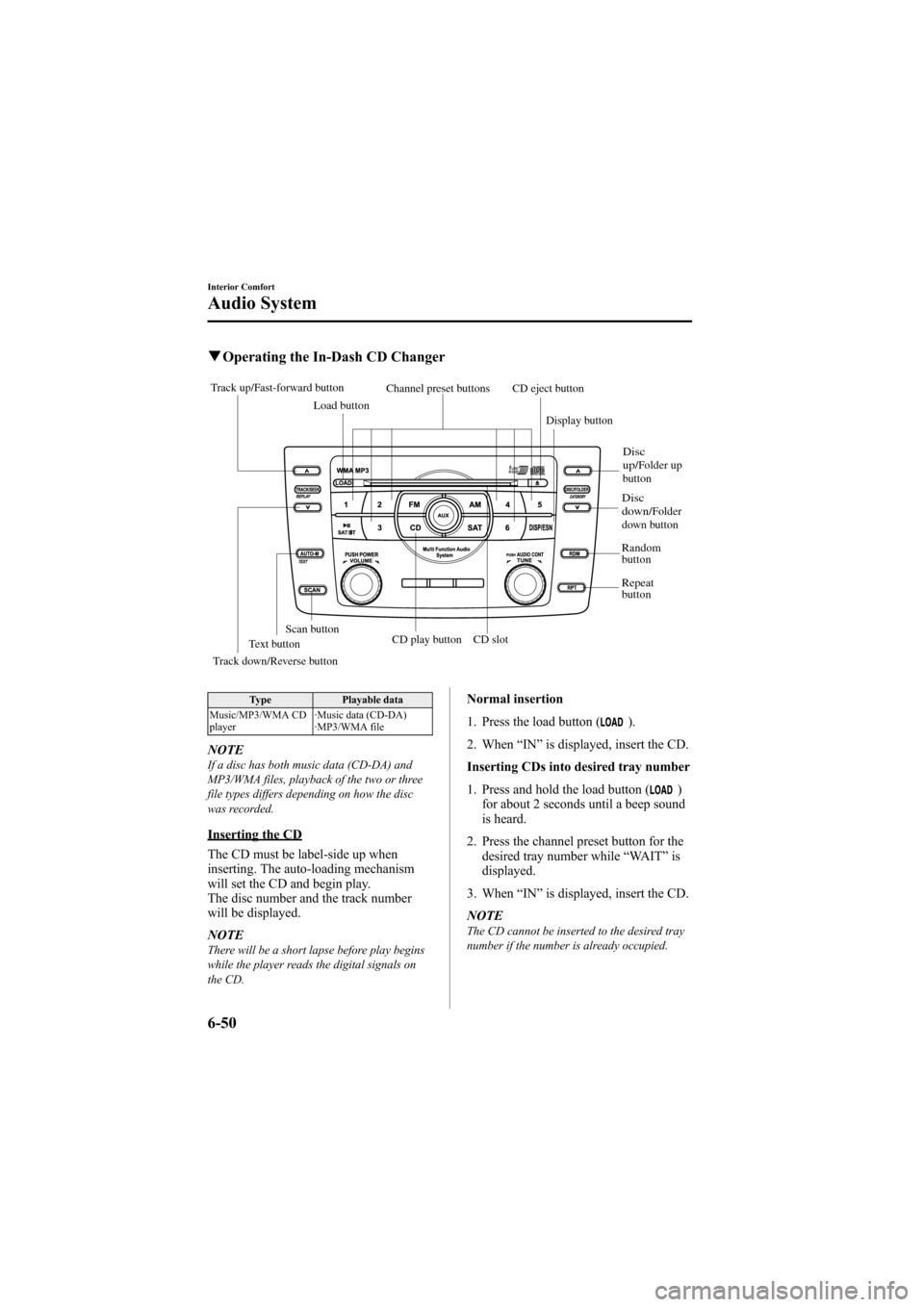
qOperating the In-Dash CD Changer
Track up/Fast-forward button
CD eject button
Display button
Load button
Channel preset buttons
Track down/Reverse button Text button
Disc
down/Folder
down button
Disc
up/Folder up
button
Random
button
Repeat
button
CD slot
CD play buttonScan button
Type Playable data
Music/MP3/WMA CD
player ·Music data (CD-DA)
·MP3/WMA file
NOTEIf a disc has both music data (CD-DA) and
MP3/WMA files, playback of the two or three
file types differs depending on how the disc
was recorded.
Inserting the CD
The CD must be label-side up when
inserting. The auto-loading mechanism
will set the CD and begin play.
The disc number and the track number
will be displayed.
NOTE
There will be a short lapse before play begins
while the player reads the digital signals on
the CD.
Normal insertion
1. Press the load button (
).
2. When “IN ”is displayed, insert the CD.
Inserting CDs into desired tray number
1. Press and hold the load button (
)
for about 2 seconds until a beep sound
is heard.
2. Press the channel preset button for the desired tray number while “WAIT ”is
displayed.
3. When “IN ”is displayed, insert the CD.
NOTE
The CD cannot be inserted to the desired tray
number if the number is already occupied.
6-50
Interior Comfort
Audio System
Mazda6_8Z64-EA-08H_Edition1 Page268
Wednesday, June 25 2008 10:4 AM
Form No.8Z64-EA-08H
Page 269 of 464
Black plate (269,1)
Multiple insertion
1. Press and hold the load button (
)
for about 2 seconds until a beep sound
is heard.
2. When “IN ”is displayed, insert the CD.
3. When “IN ”is displayed again, insert
the next CD.
NOTE
The first-inserted CD will be played
automatically when:
lNo other CD is inserted within 15 seconds
after “IN ”is displayed.
lThe CD trays are full.
Ejecting the CD
Normal ejection
1. Press the CD eject button (
). The
disc number and “DISC OUT ”will be
displayed.
2. Pull out the CD.
NOTE
When the CD is ejected during play, the next
CD will be played automatically.
Ejecting CDs from desired tray number
1. Press and hold the CD eject button (
)
for about 2 seconds until a beep sound
is heard.
The “DISC OUT ”display flashes.
2. Press the channel preset button for the desired CD number for less than 5
seconds after the beep sound is heard.
3. Pull out the CD. Multiple ejection
1. Press and hold the CD eject button (
)
for about 2 seconds until a beep sound
is heard.
The “DISC OUT ”display flashes.
2. Press the CD eject button (
) again
for less than 5 seconds after the beep
sound is heard.
NOTE
If the button is not pressed and about 5
seconds have elapsed while “DISC OUT ”is
flashing, CDs are automatically ejected.
3. Pull out the CD, then the next CD will be ejected.
NOTE
lCDs will be ejected starting with the one
with the lowest number.
lAll CDs in the tray will be ejected
continuously.
lCDs can be ejected when the ignition is
switched off. Press and hold the CD eject
button (
) for about 2 seconds and all
CDs will eject.
Playback
Press the CD play button (
) to start
play when a CD is in the unit.
If a CD is not in the unit when the CD
play button (
) is pressed, “NO DISC ”
will flash on and off.
Fast-forward/Reverse
Press and hold the fast-forward button
(
) to advance through a track at high
speed.
Press and hold the reverse button (
)to
reverse through a track at high speed.
Track search
Press the track up button (
) once to skip
forward to the beginning of the next track.
Interior Comfort
Audio System
6-51
Mazda6_8Z64-EA-08H_Edition1 Page269
Wednesday, June 25 2008 10:4 AM
Form No.8Z64-EA-08H
Page 284 of 464
Black plate (284,1)
NOTElAlways perform Bluetooth audio device
programming while the vehicle is stopped.
lIf a Bluetooth device has already been
programmed to the vehicle as a hands-free
mobile phone, it does not need to be
programmed again when using the device
as a Bluetooth audio device. Conversely, it
does not need to be programmed again as a
hands-free mobile phone if it has already
been programmed as a Bluetooth audio
device.
lThe transmission range of a Bluetooth
audio device is about 10 m (32 ft).
Therefore, if there is another Bluetooth
audio device within a 10 m (32 ft) radius of
the vehicle, the device may be identified
and programmed instead.
lDevice registration can also be done using
voice recognition (page 6-76).
Concerning the operation of a Bluetooth
audio device itself, refer to its instruction
manual.
Some Bluetooth audio devices have PIN
codes (four digits). Refer to the audio
device's instruction manual because the
programming procedure differs depending
on whether it has a PIN code or not.
Programming a Bluetooth audio devicewhich has a PIN code (4 digits)
1. Using the audio control dial, select thepairing program mode
“PAIR DEVICE ”in the “BT SETUP”
mode. (Refer to
“ Bluetooth audio device set-up ”for
details.)
2. Press the audio control dial to determine the mode.
After “ENTER PIN ”is displayed on
the information display for 3 seconds,
“ PIN 0000 ”is displayed and the PIN
code can be input. 3. Input the PIN code of your Bluetooth
audio device by pressing channel
preset buttons 1 to 4 while “PIN 0000 ”
is displayed.
Press channel preset button 1 to input
the first digit, 2 for the second, 3 for
the third, and 4 for the forth. For
example, if the PIN code were “4213 ”,
press channel preset button 1 four
times (1, 2, 3, 4), button 2 twice (1, 2),
button 3 once (1), and button 4 three
times (1, 2, 3). If the “PIN 0000 ”
display disappears before finishing the
PIN code input, repeat the procedure
from Step 1.
4. Press the audio control dial while the input PIN code is displayed.
“PAIRING ”flashes on the display.
5. Operate the Bluetooth audio device and set it to the program mode while
“PAIRING ”is flashing.
6. When the programming is completed, “
”and “PAIR SUCCESS” are
displayed after about 10-30 seconds,
after which “PAIR SUCCESS”
continues to be displayed for three
seconds, and then the unit returns to the
normal display.
6-66
Interior Comfort
Bluetooth Audio
Mazda6_8Z64-EA-08H_Edition1 Page284
Wednesday, June 25 2008 10:4 AM
Form No.8Z64-EA-08H