ECU MAZDA MODEL 6 2009 (in English) Owner's Guide
[x] Cancel search | Manufacturer: MAZDA, Model Year: 2009, Model line: MODEL 6, Model: MAZDA MODEL 6 2009Pages: 464, PDF Size: 4.61 MB
Page 126 of 464
Black plate (126,1)
lOpening the hood by operating the
hood release handle.
l(Without advanced key)
Switching the ignition ON without the
key.
(With advanced key)
Switching the ignition ON without
using the push button start.
lOpening the trunk lid by operating the
trunk lid release button.
If the system is triggered again, the lights
and horn will activate until a door is
unlocked or the trunk lid is opened with
the key or with the transmitter.
(With advanced key)
The lights and horn can also be
deactivated by unlocking a door using the
sensor on the inside of the door handle.
NOTE
If the battery goes dead while the theft-
deterrent system is armed, the horn will
activate and the hazard warning lights will
flash when the battery is charged or replaced.
q How to Arm the System
1. Remove the key from the ignition
switch.
(With advanced key)
Press the push button start to off
position, if the auxiliary key is inserted
in the key slot, remove it.
2. Make sure the hood and the trunk lid are closed. Close and lock all doors and
the trunk lid from the outside using the
key. If you have the keyless entry
system, press the lock button on the
transmitter.
(With advanced key)
Press a request switch on the doors or
the lock button on the transmitter.
(Without advanced key)
The following method will also arm the
theft-deterrent system:
Close the hood and the trunk lid . Press
the area on the door-lock switch
marked “
”once. Close all doors.
The hazard warning lights will flash
once to indicate that the system is
armed.
The theft deterrent system can also be
armed by activating the auto re-lock
function with all the doors, the trunk lid
and the hood closed.
3. After 20 seconds, the system is fully armed.
3-56
Knowing Your Mazda
Security System
Mazda6_8Z64-EA-08H_Edition1 Page126
Wednesday, June 25 2008 10:3 AM
Form No.8Z64-EA-08H
Page 127 of 464

Black plate (127,1)
NOTElThe system will disarm if one of the
following operations takes place within 20
seconds after closing the trunk lid and
locking all the doors:
lPressing the unlock button on the
transmitter.
lAny door or the trunk lid is opened.lUnlocking a door with the inside door-
lock knob.
lThe hood is opened.lThe key is inserted in the ignition switch.lThe auxiliary key inserted into the key
slot (with advanced key).
l(With advanced key)
The push button start is pressed or a
door is unlocked using the sensor on the
inside of the door handle.
lThe ignition is switched on.
To rearm the system, do the arming
procedure again.
lWhen the doors are locked by pressing the
lock button on the transmitter or using the
key while the theft-deterrent system is
armed, the hazard warning lights will flash
once to indicate that the system is armed.
lThere is nothing to sense that a window or
moonroof is open in the system, you must
confirm the windows and moonroof before
you activate the system, and be careful with
the advanced key not to open the windows
and moonroof unintentionally when
unlocking the vehicle.
q To Turn Off an Armed System
An armed system can be turned off by any
one of the following methods:
lUnlock a door with the key.lPress the unlock button on the keyless
entry system transmitter.
lInsert the key into the ignition switch
(key slot) and switch the ignition to
ON.
l(With advanced key)lUnlock a door using the sensor on
the inside of the door handle.
lThe ignition is switched on.
The hazard warning lights will flash twice
to indicate that the system is turned off.
NOTE
When the doors are unlocked by pressing the
unlock button on the transmitter or using the
key while the theft-deterrent system is turned
off, the hazard warning lights will flash twice
to indicate that the system is turned off.
q To Stop the Alarm
A triggered alarm can be turned off by
any one of the following methods:
lUnlock a door with the key.lPress the unlock button or press and
hold the trunk button on the keyless
entry system transmitter.
lThe engine is started with the ignition
key or the start knob.
l(With advanced key)lPress the unlock button or press and
hold the trunk button on the
transmitter.
lUnlock a door using the sensor on
the inside of the door handle.
lThe engine is started with the push
button start.
NOTE
If you have any problem with the theft-
deterrent system, consult an Authorized Mazda
Dealer.
Knowing Your Mazda
Security System
3-57
Mazda6_8Z64-EA-08H_Edition1 Page127
Wednesday, June 25 2008 10:3 AM
Form No.8Z64-EA-08H
Page 128 of 464
Black plate (128,1)
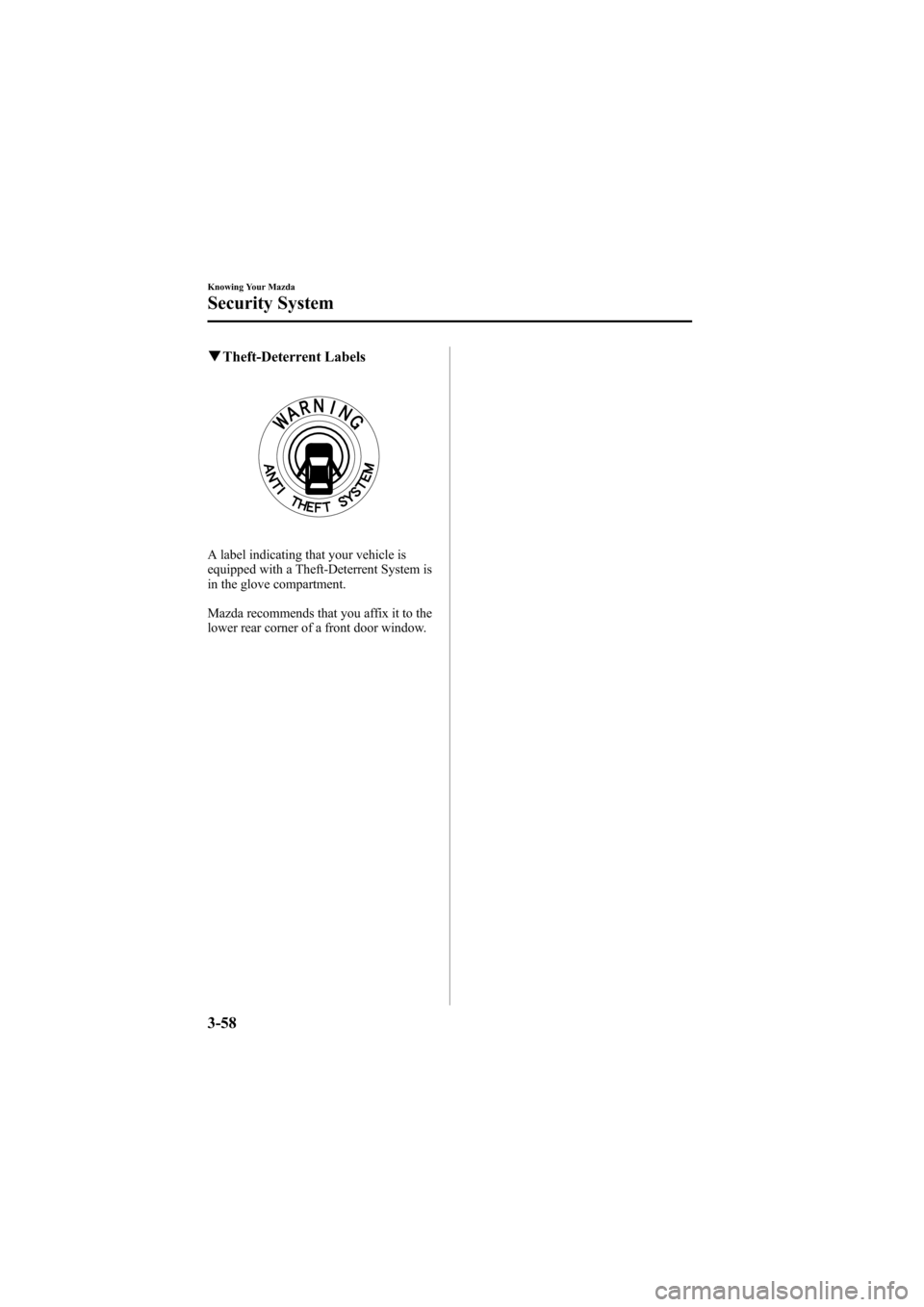
qTheft-Deterrent Labels
A label indicating that your vehicle is
equipped with a Theft-Deterrent System is
in the glove compartment.
Mazda recommends that you affix it to the
lower rear corner of a front door window.
3-58
Knowing Your Mazda
Security System
Mazda6_8Z64-EA-08H_Edition1 Page128
Wednesday, June 25 2008 10:3 AM
Form No.8Z64-EA-08H
Page 139 of 464

Black plate (139,1)
Hazardous Driving
WARNING
Be extremely careful if it is necessary to
downshift on slippery surfaces:Downshifting into lower gear while
driving on slippery surfaces is
dangerous. The sudden change in tire
speed could cause the tires to skid.
This could lead to loss of vehicle
control and an accident.
Do not rely on ABS as a substitute for
safe driving: The ABS cannot compensate for
unsafe and reckless driving, excessive
speed, tailgating (following another
vehicle too closely), driving on ice and
snow, and hydroplaning (reduced tire
friction and road contact because of
water on the road surface). You can
still have an accident.
When driving on ice or in water, snow,
mud, sand, or similar hazards:
lBe cautious and allow extra distance
for braking.
lAvoid sudden braking and sudden
maneuvering.
lDo not pump the brakes. Continue to
press down on the brake pedal.
Refer to Anti-Lock Brake System
(ABS) on page 5-7.
lIf you get stuck, select a lower gear and
accelerate slowly. Do not spin the front
wheels.
lFor more traction in starting on
slippery surfaces such as ice or packed
snow, use sand, rock salt, chains,
carpeting, or other nonslip material
under the front wheels.
NOTE
Use snow chains only on the front wheels.
Floor Mat
WARNING
Make sure the floor mats are hooked
on the retention pins to prevent them
from bunching up under the foot
pedals: Using a floor mat that is not secured
is dangerous as it will interfere with
the accelerator and brake pedal
operation, which could result in an
accident.
Do not install two floor mats, one on
top of the other, on the driver's side: Installing two floor mats, one on top
of the other, on the driver's side is
dangerous as the retention pins can
only keep one floor mat from sliding
forward.
In using a heavy duty floor mat for
winter use always remove the
original floor mat.
Loose floor mat(s) will interfere with
the foot pedal and could result in an
accident.
When setting a floor mat, position the
floor mat so that its eyelets and inserted
over the pointed end of the retention
posts.
Before Driving Your Mazda
Driving Tips
4-7
Mazda6_8Z64-EA-08H_Edition1 Page139
Wednesday, June 25 2008 10:3 AM
Form No.8Z64-EA-08H
Page 147 of 464
Black plate (147,1)
WARNING
Remove the key only when the vehicle
is parked:Removing the key from the ignition
switch while the vehicle is moving is
dangerous. Removing the key allows
the steering wheel to lock. You will
lose steering control and a serious
accident could occur.
Before leaving the driver's seat, always
switch the ignition off, set the parking
brake, and make sure the shift lever is
in P (automatic transaxle) or in 1st gear
or R (manual transaxle): Leaving the driver's seat without
switching off the ignition, setting the
parking brake, and shifting the shift
lever to P (automatic transaxle) or to
1st gear or R (manual transaxle) is
dangerous. Unexpected vehicle
movement could occur which could
result in an accident.
In addition, if your intention is to
leave the vehicle for even a short
period, it is important to switch the
ignition off, as leaving it in another
position will disable some of the
vehicle's security systems and run the
battery down.
NOTE
If turning the key is difficult, jiggle the steering
wheel from side to side.
Leaving the key in any position but LOCK
position also disables some of the security
features and may run the battery down.
ACC (Accessory)
The steering wheel unlocks and some
electrical accessories will operate.
ON
This is the normal running position after
the engine is started. The warning lights
(except brakes) should be inspected
before the engine is started (page 5-43).
NOTE
When the ignition switch is turned to the ON
position, the sound of the fuel pump motor
operating near the fuel tank can be heard. This
does not indicate an abnormality.
START
The engine is started in this position. It
will crank until you release the key; then
it returns to the ON position. The brake
warning light can be checked after the
engine is started (page 5-43).
q Ignition Key Reminder
If the ignition is switched to off (LOCK)
or ACC with the key inserted, a
continuous beep sound will be heard
when the driver's door is opened.
Driving Your Mazda
Starting and Driving
5-3
Mazda6_8Z64-EA-08H_Edition1 Page147
Wednesday, June 25 2008 10:3 AM
Form No.8Z64-EA-08H
Page 150 of 464
Black plate (150,1)
qParking Brake
WARNING
Before leaving the driver's seat, always
switch the ignition off, set the parking
brake, and make sure the shift lever is
in P (automatic transaxle) or in 1st gear
or R (manual transaxle):
Leaving the driver's seat without
switching off the ignition, setting the
parking brake, and shifting the shift
lever to P (automatic transaxle) or to
1st gear or R (manual transaxle) is
dangerous. Unexpected vehicle
movement could occur which could
result in an accident.
In addition, if your intention is to
leave the vehicle for even a short
period, it is important to switch the
ignition off, as leaving it in another
position will disable some of the
vehicle's security systems and run the
battery down.
CAUTION
Driving with the parking brake on
will cause excessive wear of the brake
linings or pads.
NOTE
For parking in snow, refer to Winter Driving
(page 4-8) regarding parking brake use.
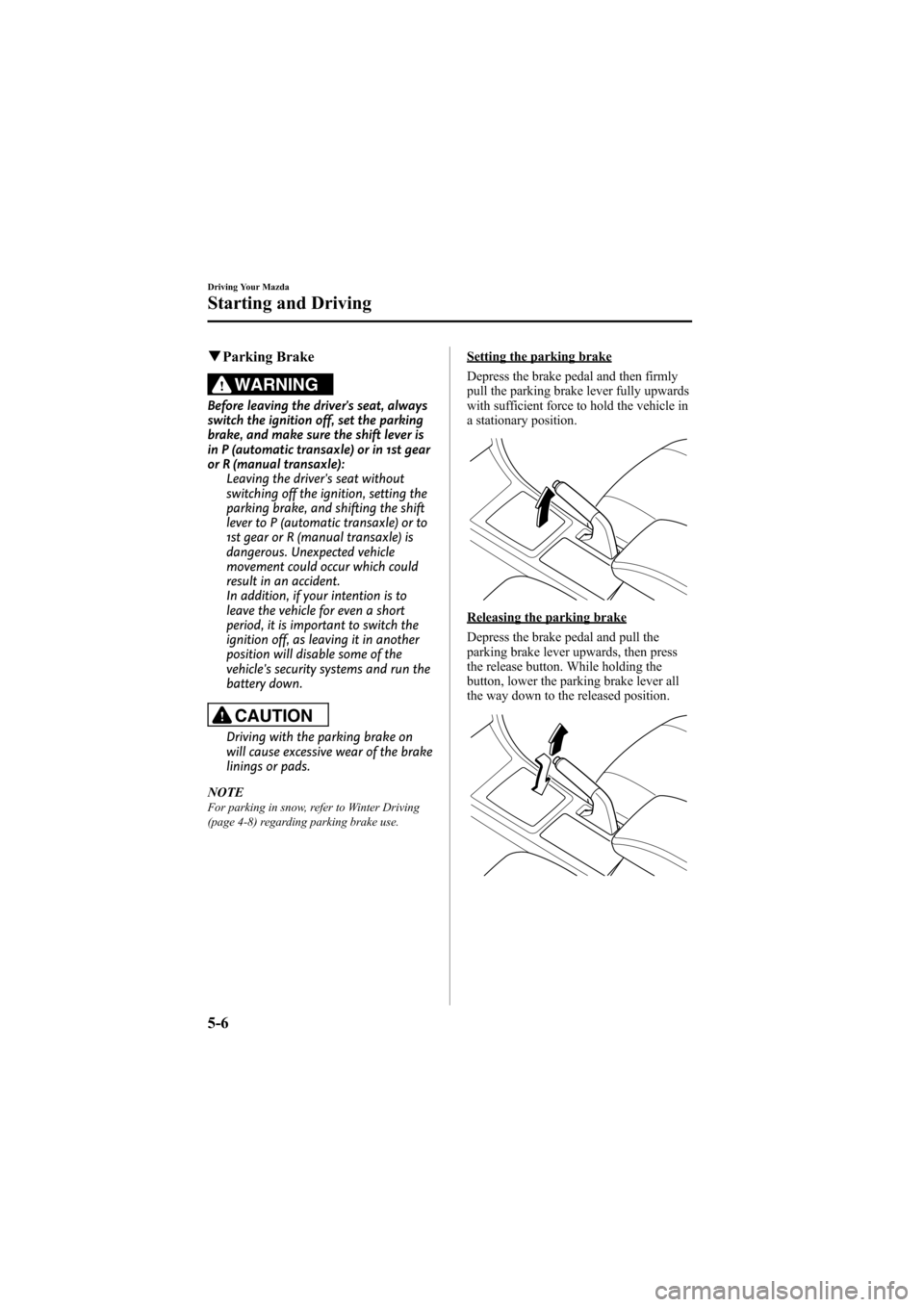
Setting the parking brake
Depress the brake pedal and then firmly
pull the parking brake lever fully upwards
with sufficient force to hold the vehicle in
a stationary position.
Releasing the parking brake
Depress the brake pedal and pull the
parking brake lever upwards, then press
the release button. While holding the
button, lower the parking brake lever all
the way down to the released position.
5-6
Driving Your Mazda
Starting and Driving
Mazda6_8Z64-EA-08H_Edition1 Page150
Wednesday, June 25 2008 10:3 AM
Form No.8Z64-EA-08H
Page 188 of 464
Black plate (188,1)
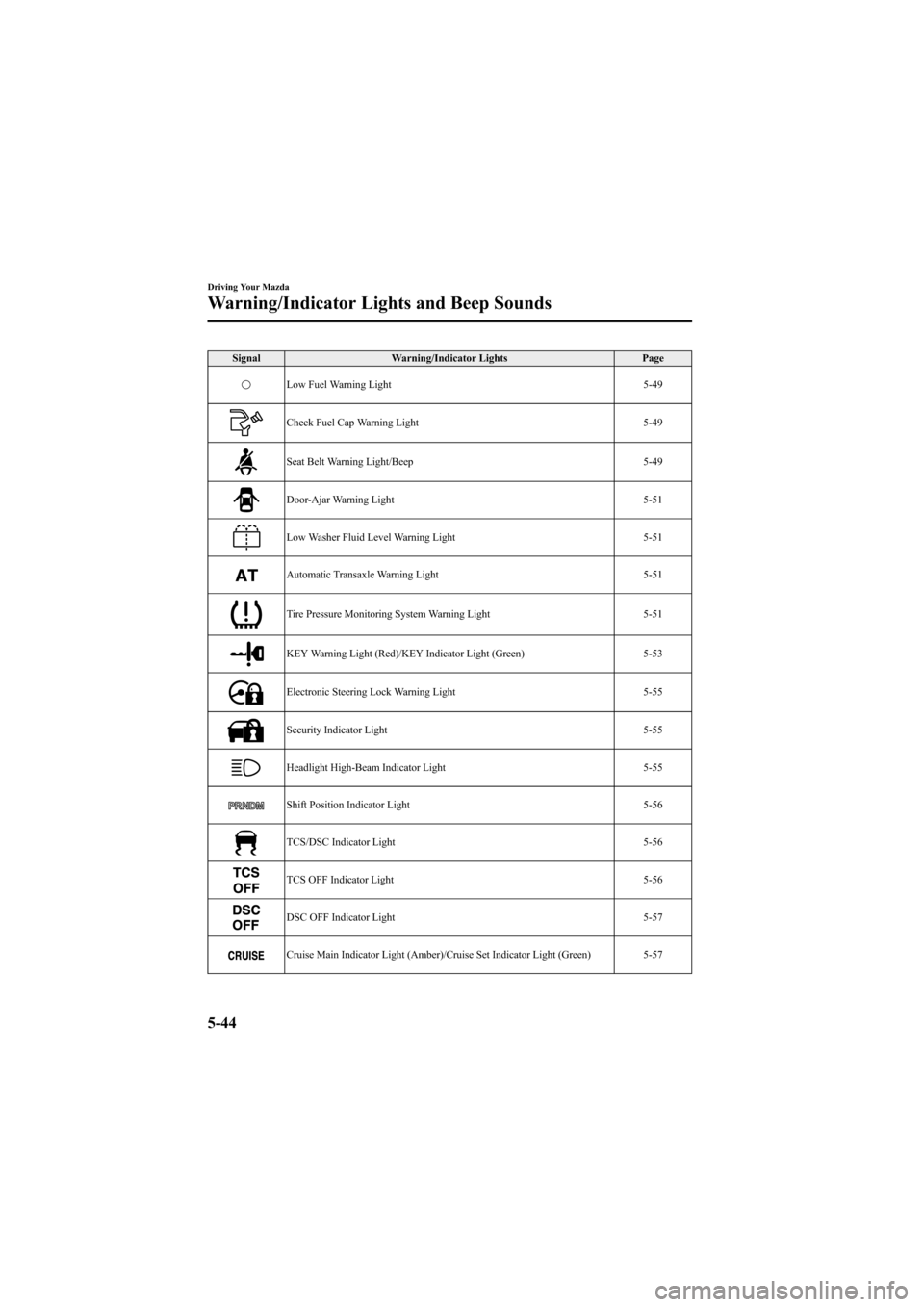
SignalWarning/Indicator Lights Page
Low Fuel Warning Light 5-49
Check Fuel Cap Warning Light5-49
Seat Belt Warning Light/Beep5-49
Door-Ajar Warning Light5-51
Low Washer Fluid Level Warning Light5-51
Automatic Transaxle Warning Light5-51
Tire Pressure Monitoring System Warning Light5-51
KEY Warning Light (Red)/KEY Indicator Light (Green)5-53
Electronic Steering Lock Warning Light5-55
Security Indicator Light5-55
Headlight High-Beam Indicator Light5-55
Shift Position Indicator Light5-56
TCS/DSC Indicator Light5-56
TCS OFF Indicator Light5-56
DSC OFF Indicator Light5-57
Cruise Main Indicator Light (Amber)/Cruise Set Indicator Light (Green) 5-57
5-44
Driving Your Mazda
Warning/Indicator Lights and Beep Sounds
Mazda6_8Z64-EA-08H_Edition1 Page188
Wednesday, June 25 2008 10:4 AM
Form No.8Z64-EA-08H
Page 195 of 464
Black plate (195,1)
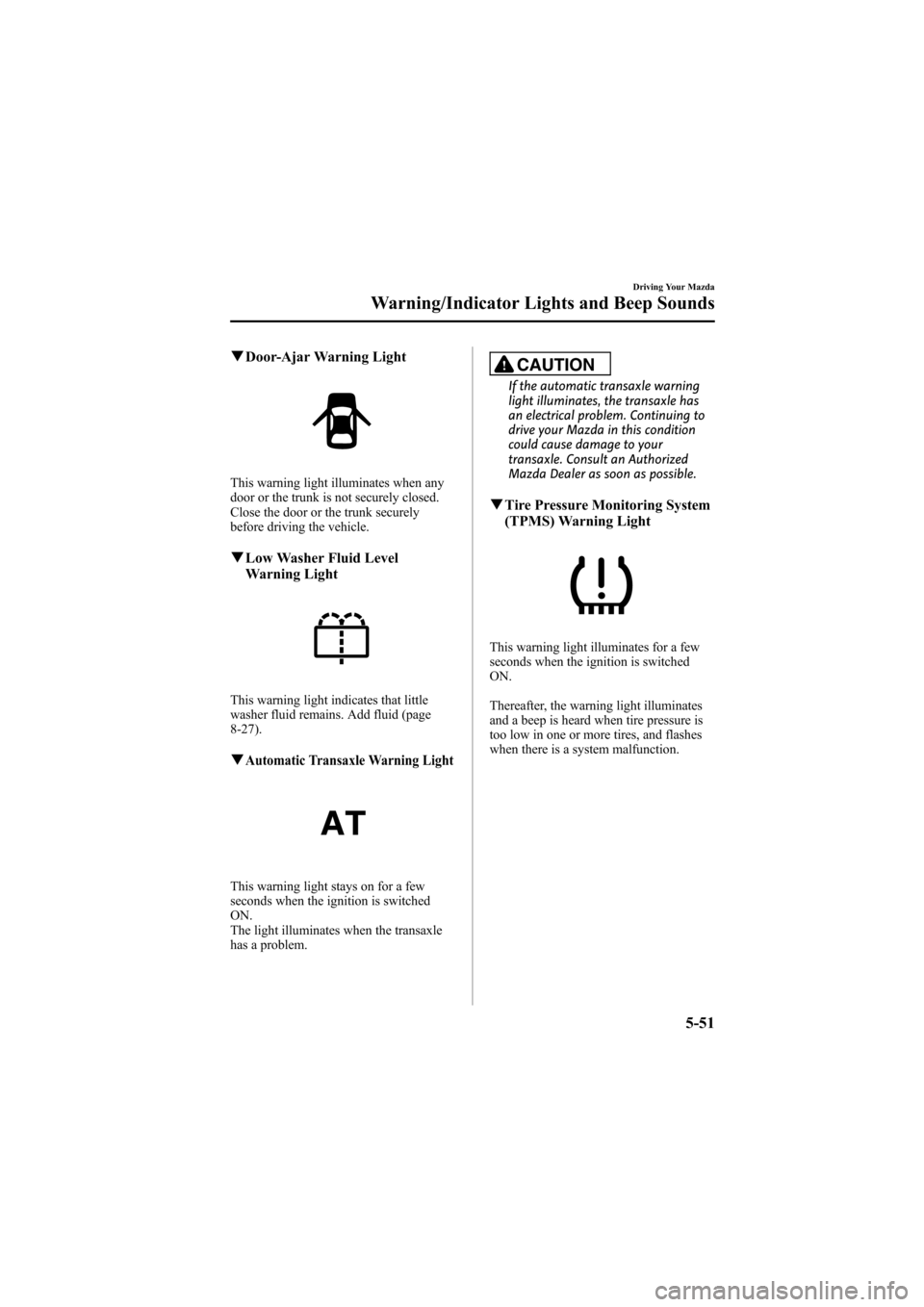
qDoor-Ajar Warning Light
This warning light illuminates when any
door or the trunk is not securely closed.
Close the door or the trunk securely
before driving the vehicle.
qLow Washer Fluid Level
Warning Light
This warning light indicates that little
washer fluid remains. Add fluid (page
8-27).
qAutomatic Transaxle Warning Light
This warning light stays on for a few
seconds when the ignition is switched
ON.
The light illuminates when the transaxle
has a problem.
CAUTION
If the automatic transaxle warning
light illuminates, the transaxle has
an electrical problem. Continuing to
drive your Mazda in this condition
could cause damage to your
transaxle. Consult an Authorized
Mazda Dealer as soon as possible.
qTire Pressure Monitoring System
(TPMS) Warning Light
This warning light illuminates for a few
seconds when the ignition is switched
ON.
Thereafter, the warning light illuminates
and a beep is heard when tire pressure is
too low in one or more tires, and flashes
when there is a system malfunction.
Driving Your Mazda
Warning/Indicator Lights and Beep Sounds
5-51
Mazda6_8Z64-EA-08H_Edition1 Page195
Wednesday, June 25 2008 10:4 AM
Form No.8Z64-EA-08H
Page 199 of 464
Black plate (199,1)
Refer to Advanced Key Maintenance on
page 3-6.
NOTE
The advanced key can be set so that the KEY
indicator light (green) does not flash even if
the battery power is low.
Refer to Personalization Features on page
10-8.
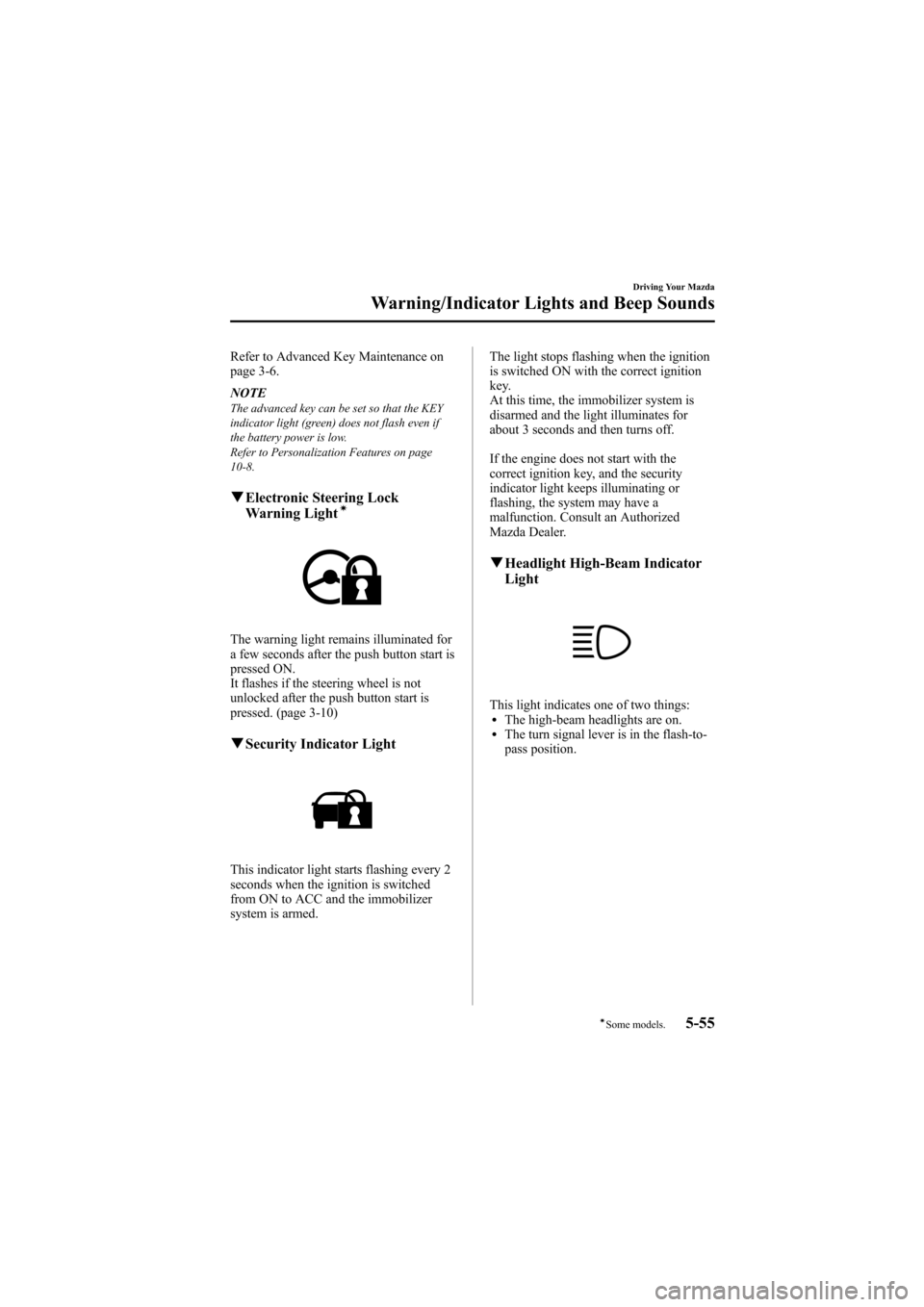
qElectronic Steering Lock
Warning Lightí
The warning light remains illuminated for
a few seconds after the push button start is
pressed ON.
It flashes if the steering wheel is not
unlocked after the push button start is
pressed. (page 3-10)
qSecurity Indicator Light
This indicator light starts flashing every 2
seconds when the ignition is switched
from ON to ACC and the immobilizer
system is armed. The light stops flashing when the ignition
is switched ON with the correct ignition
key.
At this time, the immobilizer system is
disarmed and the light illuminates for
about 3 seconds and then turns off.
If the engine does not start with the
correct ignition key, and the security
indicator light keeps illuminating or
flashing, the system may have a
malfunction. Consult an Authorized
Mazda Dealer.
q
Headlight High-Beam Indicator
Light
This light indicates one of two things:lThe high-beam headlights are on.lThe turn signal lever is in the flash-to-
pass position.
Driving Your Mazda
Warning/Indicator Lights and Beep Sounds
5-55íSome models.
Mazda6_8Z64-EA-08H_Edition1 Page199
Wednesday, June 25 2008 10:4 AM
Form No.8Z64-EA-08H
Page 260 of 464
![MAZDA MODEL 6 2009 (in English) Owners Guide Black plate (260,1)
Initialization of ID code
If the registered ID code is forgotten,
return the ID code to the default [0000] by
performing the following steps:
Setting condition: SAT mode
(Master co](/img/28/13572/w960_13572-259.png "MAZDA MODEL 6 2009 (in English) Owners Guide Black plate (260,1)
Initialization of ID code
If the registered ID code is forgotten,
return the ID code to the default [0000] by
performing the following steps:
Setting condition: SAT mode
(Master co")
Black plate (260,1)
Initialization of ID code
If the registered ID code is forgotten,
return the ID code to the default [0000] by
performing the following steps:
Setting condition: SAT mode
(Master code input preparation)
1. Hold the scan button, then presschannel preset button 4, hold both
buttons together for 1.5 seconds.
2. “ENTER PIN ”appears for 3 seconds
which indicates that it is in code input
mode.
3. “SR1 - - - - ”appears, which indicates
that it is ready for code input.
(Master code input)
4. Input the master code using the channel preset buttons 1-4.
Press the scan button inputting the
code.
(The master code is already set at the
time of factory shipment.)
(Master code input determination)
5. Determine the master code which has been input by pressing the scan button.
6. “PIN CLEARED ”appears which
indicates that the master code input has
been completed.
7. The ID code is set to the default [0000] and the initialization process is
completed. NOTEMaster code:
The Master Code is used to initialize or re-
initialize the ID code in the event that the code
is not set to [0000] and/or the personalized ID
code is not known. The initialization process
resets the ID code to [0000]. The master code
can potentially defeat the intent of the security
of the parental lock if it is located by persons
not authorized by the owner to access certain
channels.
SIRIUS Satellite Radio Master Code: [0913]
(How to clear the message)lPress any of the following FM/AM,
SAT, CD, AUX, LOAD, EJECT,
POWER buttons.
lTurn the ACC off or insert a CD.
NOTE
lWhen a numeric value other than the
master code is input and the scan button is
pressed, “SR1 Err ”is displayed and then it
returns to the “SR1---- ”display again.
lIf an ID code is not input for 10 seconds,
“Err ”is displayed and it returns to the
former display.
lChannel preset buttons 1, 2, 3, 4 and the
scan button are used for inputting the ID
code. Buttons 5 and 6 cannot be used.
Change of ID code
Setting condition: SAT mode
When changing the ID code, the new ID
code is input after the previous one is
input first.
(Registered ID code input)
1. Hold the scan button, then press channel preset button 5, hold both
buttons together for 1.5 seconds.
6-42
Interior Comfort
Audio System
Mazda6_8Z64-EA-08H_Edition1 Page260
Wednesday, June 25 2008 10:4 AM
Form No.8Z64-EA-08H