ignition MAZDA MODEL 6 2009 (in English) Manual Online
[x] Cancel search | Manufacturer: MAZDA, Model Year: 2009, Model line: MODEL 6, Model: MAZDA MODEL 6 2009Pages: 464, PDF Size: 4.61 MB
Page 213 of 464
Black plate (213,1)
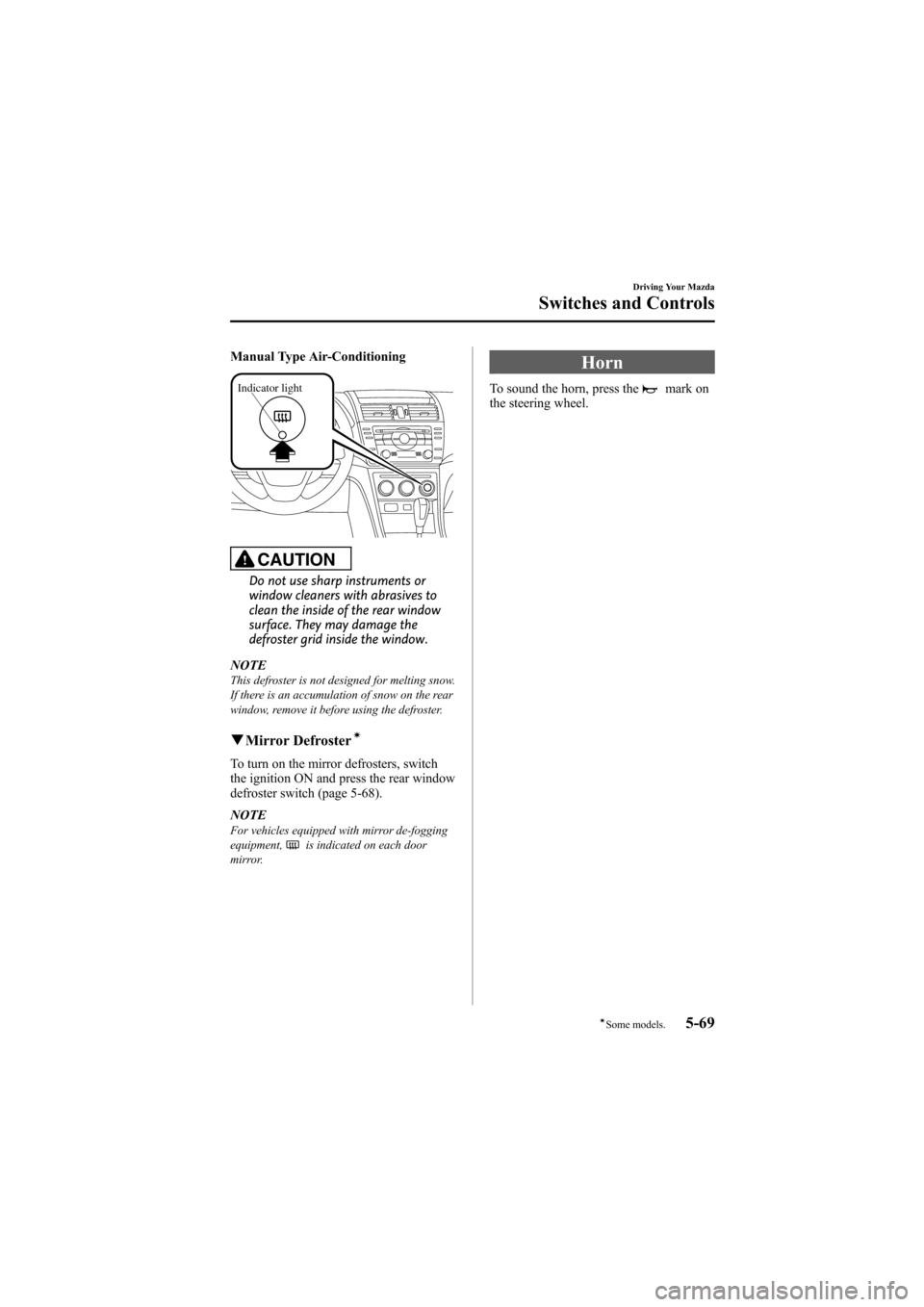
Manual Type Air-Conditioning
Indicator light
CAUTION
Do not use sharp instruments or
window cleaners with abrasives to
clean the inside of the rear window
surface. They may damage the
defroster grid inside the window.
NOTE
This defroster is not designed for melting snow.
If there is an accumulation of snow on the rear
window, remove it before using the defroster.
q Mirror Defrosterí
To turn on the mirror defrosters, switch
the ignition ON and press the rear window
defroster switch (page 5-68).
NOTE
For vehicles equipped with mirror de-fogging
equipment,is indicated on each door
mirror.
Horn
To sound the horn, press themark on
the steering wheel.
Driving Your Mazda
Switches and Controls
5-69íSome models.
Mazda6_8Z64-EA-08H_Edition1 Page213
Wednesday, June 25 2008 10:4 AM
Form No.8Z64-EA-08H
Page 220 of 464

Black plate (220,1)
Operating Tips
qOperating the Climate Control
System
Operate the climate control system with
the engine running.
NOTE
To prevent the battery from being discharged,
do not leave the fan control dial on for a long
period of time with the ignition in ON when the
engine is not running.
qClearing the Air Inlet
Clear all obstructions such as leaves,
snow and ice from the hood and the air
inlet in the cowl grille to improve the
system efficiency.
qFoggy Windows
The windows may fog up easily in humid
weather. Use the climate control system to
defog the windows.
To help defog the windows, operate the
air conditioner to dehumidify the air.
NOTE
The air conditioner may be used along with the
heater to dehumidify the air.
qOutside/Recirculated Air Position
Use the outside air position in normal
conditions. The recirculated air position
should be used only when driving on
dusty roads or for quick cooling of the
interior.
qParking in Direct Sunlight
If the vehicle has been parked in direct
sunlight during hot weather, open the
windows to let warm air escape, then run
the climate control system.
qNot Using for a Long Period
Run the air conditioner about 10 minutes
at least once a month to keep internal
parts lubricated.
qCheck the Refrigerant before the
Weather Gets Hot
Have the air conditioner checked before
the weather gets hot. Lack of refrigerant
may make the air conditioner less
efficient. Consult an Authorized Mazda
Dealer for refrigerant inspection.
The air conditioner is filled with
HFC134a (R134a), a refrigerant that will
not damage the ozone layer.
If the air conditioner is low on refrigerant
or has a malfunction, consult an
Authorized Mazda Dealer.
qReplacement of the Cabin Air Filter
If your vehicle is equipped with an air
filter for the air conditioner, it is necessary
to change the filter periodically as
indicated in scheduled maintenance (page
8-3). Consult an Authorized Mazda
Dealer for replacement of the cabin air
filter.
6-2
Interior Comfort
Climate Control System
Mazda6_8Z64-EA-08H_Edition1 Page220
Wednesday, June 25 2008 10:4 AM
Form No.8Z64-EA-08H
Page 246 of 464
Black plate (246,1)
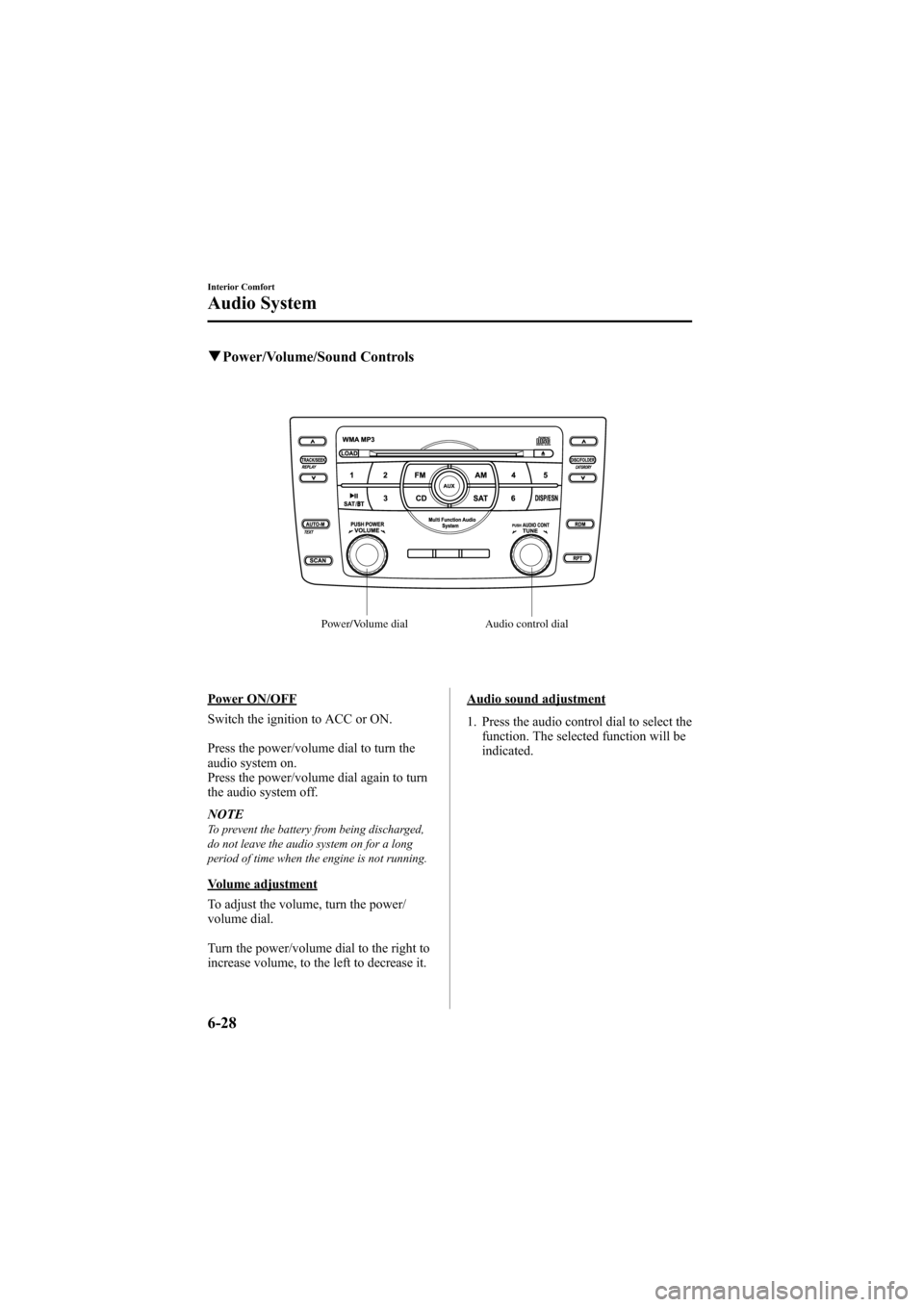
qPower/Volume/Sound Controls
Power/Volume dial Audio control dial
Power ON/OFF
Switch the ignition to ACC or ON.
Press the power/volume dial to turn the
audio system on.
Press the power/volume dial again to turn
the audio system off.
NOTE
To prevent the battery from being discharged,
do not leave the audio system on for a long
period of time when the engine is not running.
Volume adjustment
To adjust the volume, turn the power/
volume dial.
Turn the power/volume dial to the right to
increase volume, to the left to decrease it.
Audio sound adjustment
1. Press the audio control dial to select the
function. The selected function will be
indicated.
6-28
Interior Comfort
Audio System
Mazda6_8Z64-EA-08H_Edition1 Page246
Wednesday, June 25 2008 10:4 AM
Form No.8Z64-EA-08H
Page 249 of 464
Black plate (249,1)
*AUDIOPILOT®(Bose®SoundSystem-equipped model)
AUDIOPILOT®automatically adjusts
audio volume and sound quality in
accordance with the level of noise
entering the vehicle interior while driving.
When AUDIOPILOT
®is turned on, the
system automatically calculates the
conditions for optimum hearing of sound
which may be difficult to hear depending
on exterior noise.
* AUDIOPILOT
®is a registered
trademark of Bose Corporation.
*Centerpoint®(Bose®Sound System-equipped model)
Centerpoint®offers you the experience of
5.1-channel surround sound in your
vehicle even with your conventional 2-
channel stereo CDs.
Centerpoint
®can be set on or off.
NOTE
lCenterpoint®operates optimally with a 2-
channel stereo CD. MP3 audio files can be
played, however, MP3 audio files encoded
with high compression may result in poor
sound quality.
lCenterpoint®is available for 2-channel
stereo audio except for AM radio/FM radio/
SIRIUS digital satellite radio/AUX/BT
audio.
* Centerpoint®is a registered trademark
of Bose Corporation.
BEEP setting
The beep-sound when operating the audio
system can be set on or off.
ILLM EFT setting (Illumination settingduring operation)
The audio system illumination during
operation can be set on or off.
Welcome modeí
The welcome mode provides the
following presentation:
lSound is heard when the ignition is
turned on.
lIllumination turns on when a door is
opened after unlocking the doors.
Only the sound effect can be switched on
or off.
BT SETUP modeí
Music and other audio such as voice data
recorded on portable audio devices and
mobile phones available on the market
which are equipped with the Bluetooth
transmission function can be listened to
via wireless transmission over the
vehicle's speakers. Using the BT SETUP
mode, these devices can be programmed
to the Bluetooth unit or changed. For
details, refer to Bluetooth audio (page
6-63).
Interior Comfort
Audio System
6-31íSome models.
Mazda6_8Z64-EA-08H_Edition1 Page249
Wednesday, June 25 2008 10:4 AM
Form No.8Z64-EA-08H
Page 269 of 464
Black plate (269,1)
Multiple insertion
1. Press and hold the load button (
)
for about 2 seconds until a beep sound
is heard.
2. When “IN ”is displayed, insert the CD.
3. When “IN ”is displayed again, insert
the next CD.
NOTE
The first-inserted CD will be played
automatically when:
lNo other CD is inserted within 15 seconds
after “IN ”is displayed.
lThe CD trays are full.
Ejecting the CD
Normal ejection
1. Press the CD eject button (
). The
disc number and “DISC OUT ”will be
displayed.
2. Pull out the CD.
NOTE
When the CD is ejected during play, the next
CD will be played automatically.
Ejecting CDs from desired tray number
1. Press and hold the CD eject button (
)
for about 2 seconds until a beep sound
is heard.
The “DISC OUT ”display flashes.
2. Press the channel preset button for the desired CD number for less than 5
seconds after the beep sound is heard.
3. Pull out the CD. Multiple ejection
1. Press and hold the CD eject button (
)
for about 2 seconds until a beep sound
is heard.
The “DISC OUT ”display flashes.
2. Press the CD eject button (
) again
for less than 5 seconds after the beep
sound is heard.
NOTE
If the button is not pressed and about 5
seconds have elapsed while “DISC OUT ”is
flashing, CDs are automatically ejected.
3. Pull out the CD, then the next CD will be ejected.
NOTE
lCDs will be ejected starting with the one
with the lowest number.
lAll CDs in the tray will be ejected
continuously.
lCDs can be ejected when the ignition is
switched off. Press and hold the CD eject
button (
) for about 2 seconds and all
CDs will eject.
Playback
Press the CD play button (
) to start
play when a CD is in the unit.
If a CD is not in the unit when the CD
play button (
) is pressed, “NO DISC ”
will flash on and off.
Fast-forward/Reverse
Press and hold the fast-forward button
(
) to advance through a track at high
speed.
Press and hold the reverse button (
)to
reverse through a track at high speed.
Track search
Press the track up button (
) once to skip
forward to the beginning of the next track.
Interior Comfort
Audio System
6-51
Mazda6_8Z64-EA-08H_Edition1 Page269
Wednesday, June 25 2008 10:4 AM
Form No.8Z64-EA-08H
Page 274 of 464

Black plate (274,1)
Audio Control Switch
Operationí
When the audio unit is turned on,
operation of the audio unit from the
steering wheel is possible.
NOTE
Because the audio unit will be turned off under
the following conditions, the switches will be
inoperable.
lWhen the ignition is turned off (LOCK).lWhen the power button on the audio unit is
pressed and the audio unit is turned off.
lWhen the CD being played is ejected and
the audio unit is turned off.
Without Bluetooth Hands-Free and
navigation system
With Bluetooth Hands-Free only/
Bluetooth Hands-Free and navigation
system
Use the talk button, pick-up button, and
hang-up button for navigation system
sound operation.
For details, refer to the separate manual
“NAVIGATION SYSTEM ”.
Talk button
Hang-up button
Pick-up button
NOTElThe talk button, pick-up button, and hang-
up button are operable with the audio unit
turned off.
lMazda has installed this system to prevent
distraction while driving the vehicle and
using audio controls on the dashboard.
Always make safe driving your first priority.
q
Adjusting the Volume
To increase the volume, pull up the
volume switch.
To decrease the volume, press down the
volume switch.
6-56
Interior Comfort
íSome models.
Audio System
Mazda6_8Z64-EA-08H_Edition1 Page274
Wednesday, June 25 2008 10:4 AM
Form No.8Z64-EA-08H
Page 277 of 464

Black plate (277,1)
qMute Switchí
Press the mute switch () once to mute
audio, press it again to resume audio
output.
NOTE
If the ignition is turned off (LOCK) with the
audio muted, the mute will be canceled.
Therefore, when the engine is restarted, the
audio is not muted. To mute the audio again,
press the mute switch (
).
Without Bluetooth Hands-Free and
navigation system
AUX Mode (Auxiliary
input)í
You can connect portable audio units or
similar products on the market to the
auxiliary jack to listen to music or audio
over the vehicle's speakers.
Auxiliary jack
WARNING
Do not adjust the portable audio unit
or a similar product while driving the
vehicle: Adjusting the portable audio unit or
a similar product while driving the
vehicle is dangerous as it could
distract your attention from the
vehicle operation which could lead to
a serious accident. Always adjust the
portable audio unit or a similar
product while the vehicle is stopped.
Interior Comfort
Audio System
6-59íSome models.
Mazda6_8Z64-EA-08H_Edition1 Page277
Wednesday, June 25 2008 10:4 AM
Form No.8Z64-EA-08H
Page 278 of 464

Black plate (278,1)
CAUTION
ØClose the lid when the auxiliary
jack is not in use to prevent
foreign objects and liquids from
penetrating the auxiliary jack.
Ø Noise may occur during playback
if the accessory socket equipped
on the vehicle is used. (If noise
occurs, do not use the accessory
socket.)
NOTE
lBefore using the auxiliary jack, read the
manufacturer's instructions for the product
being connected.
lUse a commercially-available, non-
impedance (3.5) stereo mini plug for
connecting the portable audio unit to the
auxiliary jack. Before using the auxiliary
jack, read the manufacture's instructions
for connecting a portable audio unit to the
auxiliary jack.
lTo prevent discharging of the battery, do
not use the auxiliary input for long periods
with the engine off or idling.
lNoise may occur depending on the product
connected to the auxiliary jack.
lWith regard to connecting a portable audio
or similar device to a power source, use the
battery for the device, not the accessory
socket.
Connecting the auxiliary jack
1. Open the console lid. 2. Pass the connection plug cord through
the cutout of the console and insert the
plug into the auxiliary jack.
Plug
WARNING
Do not allow the connection plug cord
to get tangled with the parking brake
or the shift lever: Allowing the plug cord to become
tangled with the parking brake or
the shift lever is dangerous as it
could interfere with driving, resulting
in an accident.
CAUTION
Do not place objects or apply force to
the auxiliary jack with the plug
connected.
NOTE
lInsert the plug to the auxiliary jack
securely.
lInsert or remove the plug with the plug
perpendicular to the auxiliary jack hole.
lInsert or remove the plug by holding its
base.
To operate the portable audio unit
1. Switch the ignition to ACC or ON.
2. Press the power/volume dial to turn the audio system on.
6-60
Interior Comfort
Audio System
Mazda6_8Z64-EA-08H_Edition1 Page278
Wednesday, June 25 2008 10:4 AM
Form No.8Z64-EA-08H
Page 285 of 464
Black plate (285,1)
NOTElIf the programming failed,“Err ”flashes
for three seconds then it returns to the
normal display.
lProgramming cannot be performed while
the vehicle is moving. If you attempt to
perform programming while the vehicle is
moving, “PAIR DISABLE ”is displayed and
it returns to the normal display.
lIf seven Bluetooth audio devices have
already been programmed to the vehicle,
programming cannot be performed and
“ MEMORY FULL ”is displayed. Delete
one programmed device to program
another one.
Programming a Bluetooth audio devicewhich does not have a PIN code (4digits)
1. Using the audio control dial, select the pairing program mode
“PAIR DEVICE ”in the “BT SETUP”
mode. (Refer to
“ Bluetooth audio set up ”for details.)
2. Press the audio control dial to determine the mode.
After “ENTER PIN ”is displayed on
the information display for 3 seconds,
“ PIN 0000 ”is displayed and the PIN
code can be input.
3. Press the audio control dial while “PIN 0000 ”is displayed.
“ PAIRING ”flashes on the display.
4. Operate the Bluetooth audio device and set it to the program mode while
“PAIRING ”is flashing.
5. As the Bluetooth audio device requires a PIN code, input “0000 ”. 6. When the programming is completed,
“
”and “PAIR SUCCESS” are
displayed after about 10-30 seconds,
after which “PAIR SUCCESS”
continues to be displayed for three
seconds, and then the unit returns to the
normal display.
NOTE
lIf the programming failed, “Err ”flashes
for three seconds then returns to the normal
display.
lProgramming cannot be performed while
the vehicle is moving. If you attempt to
perform programming, “PAIR DISABLE ”
is displayed and it returns to the normal
display.
lIf seven Bluetooth audio devices have
already been programmed to the vehicle,
programming cannot be performed and
“ MEMORY FULL ”is displayed. Delete
one programmed device to program
another one.
Changing the link to a Bluetooth audiodevice
If several devices have been programmed,
the Bluetooth unit links the device last
programmed. If you would like to link a
different programmed device, it is
necessary to change the link. The order of
device priority after the link has been
changed is maintained even when the
ignition is switched off (LOCK).
1. Using the audio control dial, select the link change mode “LINK CHANGE ”
in the “BT SETUP” mode. (Refer to
“ Bluetooth audio device set-up ”for
details.)
2. Press the audio control dial to determine the mode.
Interior Comfort
Bluetooth Audio
6-67
Mazda6_8Z64-EA-08H_Edition1 Page285
Wednesday, June 25 2008 10:4 AM
Form No.8Z64-EA-08H
Page 288 of 464
Black plate (288,1)
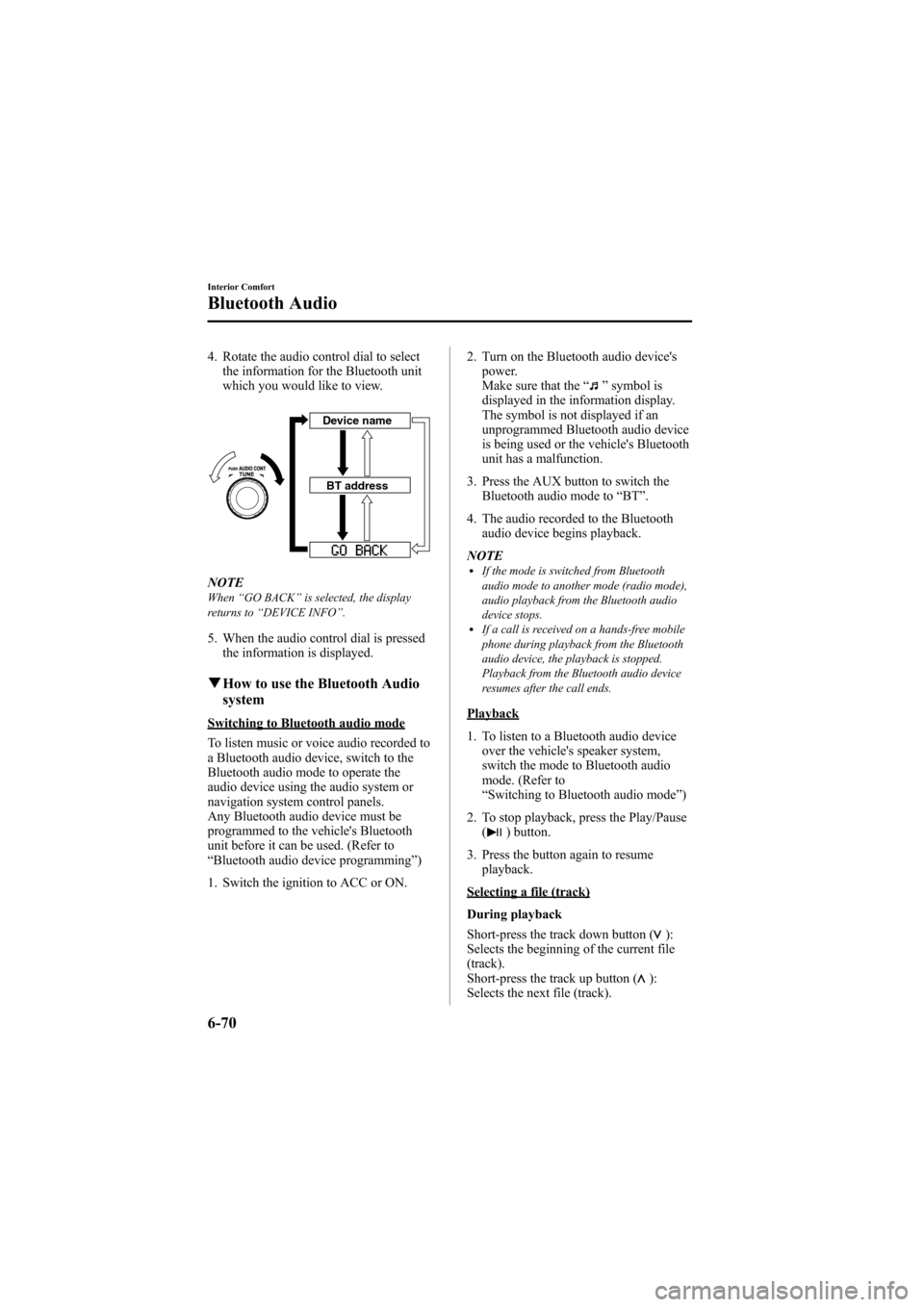
4. Rotate the audio control dial to selectthe information for the Bluetooth unit
which you would like to view.
Device name
BT address
NOTEWhen “GO BACK ”is selected, the display
returns to “DEVICE INFO ”.
5. When the audio control dial is pressed
the information is displayed.
qHow to use the Bluetooth Audio
system
Switching to Bluetooth audio mode
To listen music or voice audio recorded to
a Bluetooth audio device, switch to the
Bluetooth audio mode to operate the
audio device using the audio system or
navigation system control panels.
Any Bluetooth audio device must be
programmed to the vehicle's Bluetooth
unit before it can be used. (Refer to
“Bluetooth audio device programming ”)
1. Switch the ignition to ACC or ON. 2. Turn on the Bluetooth audio device's
power.
Make sure that the “
”symbol is
displayed in the information display.
The symbol is not displayed if an
unprogrammed Bluetooth audio device
is being used or the vehicle's Bluetooth
unit has a malfunction.
3. Press the AUX button to switch the Bluetooth audio mode to “BT ”.
4. The audio recorded to the Bluetooth audio device begins playback.
NOTE
lIf the mode is switched from Bluetooth
audio mode to another mode (radio mode),
audio playback from the Bluetooth audio
device stops.
lIf a call is received on a hands-free mobile
phone during playback from the Bluetooth
audio device, the playback is stopped.
Playback from the Bluetooth audio device
resumes after the call ends.
Playback
1. To listen to a Bluetooth audio device over the vehicle's speaker system,
switch the mode to Bluetooth audio
mode. (Refer to
“Switching to Bluetooth audio mode ”)
2. To stop playback, press the Play/Pause (
) button.
3. Press the button again to resume playback.
Selecting a file (track)
During playback
Short-press the track down button (
):
Selects the beginning of the current file
(track).
Short-press the track up button (
):
Selects the next file (track).
6-70
Interior Comfort
Bluetooth Audio
Mazda6_8Z64-EA-08H_Edition1 Page288
Wednesday, June 25 2008 10:4 AM
Form No.8Z64-EA-08H