radio MAZDA MODEL 6 2014 (in English) User Guide
[x] Cancel search | Manufacturer: MAZDA, Model Year: 2014, Model line: MODEL 6, Model: MAZDA MODEL 6 2014Pages: 576, PDF Size: 8.58 MB
Page 200 of 576

Black plate (200,1)
NOTE
If the HomeLink indicator light does not
change to a rapidly blinking light, contact
HomeLink atwww.homelink.comor call1-
800-355-3515for assistance.
4. Firmly press and hold the programmed
HomeLink button for five seconds, and
then release it. Perform this operation
two times to activate the door. If the
door does not activate, press and hold
the just-trained HomeLink button and
observe the indicator light.
If the indicator lightstays on constantly,
programming is completeand your
device should activate when the
HomeLink button is pressed and released.
NOTE
To program the remaining two HomeLink
buttons, begin with“Programming”―step 1.
If the indicator light blinksrapidly for
two seconds and then turns to a
constant light, continue with
“Programming”steps 5―7to complete
the programming of a rolling code
equipped device (most commonly a
garage door opener).
5. At the garage door opener receiver
(motor-head unit) in the garage, locate
the“learn”or“smart”button. This can
usually be found where the hanging
antenna wire is attached to the motor-
head unit.
6. Firmly press and release the“learn”or
“smart”button. (The name and color of
the button may vary by manufacturer.)
NOTE
Complete the programming within 30 seconds.
7. Return to the vehicle and firmlypress,
hold for two seconds and releasethe
programmed HomeLink button. Repeat
the“press/hold/release”sequence a
second time, and, depending on the
brand of the garage door opener (or
other rolling code equipped device),
repeat this sequence a third time to
complete the programming process.
HomeLink should now activate your
rolling code equipped device.
NOTE
To program the remaining two HomeLink
buttons, begin with“Programming”―step 1.
For questions or comments, please contact
HomeLink atwww.homelink.comor1-
800-355-3515.
qGate operator/Canadian
Programming
Canadian radio-frequency laws require
transmitter signals to“time-out”(or quit)
after several seconds of transmission―
which may not be long enough for
HomeLink to pick up the signal during
programming. Similar to this Canadian
law, some U.S. gate operators are
designed to“time-out”in the same
manner.
If you live in Canada or you are having
difficulties programming a gate operator
by using the“Programming”procedures
(regardless of where you live),replace
“Programming HomeLink”step 2with
the following:
NOTE
If programming a garage door opener or gate
operator, it is advised to unplug the device
during the“cycling”process to prevent
possible overheating.
4-76
When Driving
Switches and Controls
Mazda6_8DQ8-EA-13L_Edition3 Page200
Friday, June 13 2014 6:21 PM
Form No.8DQ8-EA-13L
Page 202 of 576

Black plate (202,1)
Radar Sensorí
Your vehicle is equipped with a radar sensor.
The following systems also use the radar sensor.
lMazda Radar Cruise Control (MRCC)lForward Obstruction Warning (FOW)
The radar sensor functions by detecting the radio waves reflected off a vehicle ahead or an
obstruction sent from the radar sensor.
The radar sensor is mounted behind the front emblem.
Radar Sensor
If“Radar blocked”is displayed in the multi-display of the instrument cluster, clean the area
around the radar sensor.
4-78
When Driving
íSome models.
Radar Sensor
Mazda6_8DQ8-EA-13L_Edition3 Page202
Friday, June 13 2014 6:21 PM
Form No.8DQ8-EA-13L
Page 204 of 576
Black plate (204,1)
NOTElIn the following cases, the radar sensor may not be able to detect vehicles ahead or obstructions.lThe rear surface of a vehicle ahead does not reflect radio waves effectively, such as an
unloaded trailer or an automobile with a loading platform covered by a soft top, vehicles with
a hard plastic tailgate, and round-shaped vehicles.
lVehicles ahead with low vehicle height and thus less area for reflecting radio waves.lVisibility is reduced due to a vehicle ahead casting off water, snow, or sand from its tires and
onto your windshield.
lThe trunk/luggage compartment is loaded with heavy objects or the rear passenger seats are
occupied.
lIce, snow, or soiling is on the front surface of the front emblem.lDuring inclement weather such as rain, snow, or sand storms.lWhen driving near facilities or objects emitting strong radio waves.lIn the following cases, the radar sensor may detect vehicles in the opposite lane or surrounding
obstructions, or it may not be able to detect vehicles ahead or obstructions.
lThe beginning and end of a curve.lRoads with continuous curves.lNarrow lane roads due to road construction or lane closures.lThe vehicle ahead enters the radar sensor's blind spot.lThe vehicle ahead is running abnormally due to accident or vehicle damage.lRoads with repeated up and down slopeslDriving on poor roads or unpaved roads.lThe distance between your vehicle and the vehicle ahead is extremely short.lA vehicle suddenly comes close such as by cutting into the lane.lTo prevent incorrect operation of the system, use tires of the same specified size, manufacturer,
brand, and tread pattern on all four wheels. In addition, do not use tires with significantly
different wear patterns or tire pressures on the same vehicle. (Including the temporary spare tire)
lIf the battery power is weak, the system may not operate correctly.lWhen driving on roads with little traffic and few vehicles ahead or obstructions for the radar
sensor to detect,“Radar blocked”may be temporarily displayed, however, this does not indicate a
problem.
4-80
When Driving
Radar Sensor
Mazda6_8DQ8-EA-13L_Edition3 Page204
Friday, June 13 2014 6:21 PM
Form No.8DQ8-EA-13L
Page 246 of 576
Black plate (246,1)
NOTElThe detectability of the radar sensors has its limitations. The Blind Spot Monitoring (BSM) System
may not operate properly under the following conditions:
lIce, snow, or soil adheres to the rear bumper surface around the radar sensors.lDuring adverse weather conditions such as rain or snow, or under conditions where water is
sprayed.
lThe rear bumper area around the radar sensors is blocked by foreign material (such as
stickers or a bicycle carrier).
lThe radar sensors do not detect human, animal, shopping cart, bicycle, or static objects such as
fences.
lThe radar sensors may not detect all types of vehicles around your vehicle, especially the
following types of vehicles:
lMotorcycleslVehicles with body shapes that radar may not reflect such as a flatbed trailer with no cargo.lVehicles with lower body height such as sports cars.lAlthough the system may detect objects on the road side such as parked vehicles or guardrails and
operate the warning light/beep, it does not indicate a malfunction.
lIf the vehicle is driven on a road with less traffic and few vehicles that the radar sensors can
detect, the system may pause (the Blind Spot Monitoring (BSM) OFF indicator light in the
instrument panel flashes). However, it does not indicate a malfunction.
lThe following conditions may affect the visibility of the Blind Spot Monitoring (BSM) warning
lights on the outside mirror, making it difficult to confirm the illumination of the lights:
lIce or snow adheres to the surface of the outside mirrors.lThe door window glass is tinted.lThe radar sensors are equipped inside the rear bumper. (page 4-129)lHave the radar sensors inspected at an Authorized Mazda Dealer if any shock is applied to the
rear bumper, even in a minor accident. If the vehicle is driven with a damaged radar sensor, the
system may not operate properly resulting in an accident.
lFor repairs or paintwork around the radar sensors, or replacement of the bumper, consult an
Authorized Mazda Dealer.
lThe radar sensors of the Blind Spot Monitoring (BSM) system may be regulated under the radio
wave related laws of the country where the vehicle is driven. The sensors in this system are
approved for use in the U.S.A. (including territories), Canada, and Mexico. If a vehicle with a
Blind Spot Monitoring (BSM) system is driven in a country other than the U.S.A., Canada, or
Mexico, the system has to be turned off using the Blind Spot Monitoring (BSM) OFF switch.
4-122
When Driving
Blind Spot Monitoring (BSM) System
Mazda6_8DQ8-EA-13L_Edition3 Page246
Friday, June 13 2014 6:21 PM
Form No.8DQ8-EA-13L
Page 285 of 576

Black plate (285,1)
Antenna
qAM/FM Radio Antenna
The antenna is embedded into the window
glass.
CAUTION
When washing the inside of the
window which has an antenna, use a
soft cloth dampened in lukewarm
water, gently wiping the antenna
lines.
Use of glass cleaning products could
damage the antenna.
qSatellite Radio Antennaí
The satellite radio antenna receives
SIRIUS signals.
Satellite radio antenna
Operating Tips for Audio
System
WARNING
Always adjust the audio while the
vehicle is stopped:
Do not adjust the audio control
switches while driving the vehicle.
Adjusting the audio while driving the
vehicle is dangerous as it could
distract your attention from the
vehicle operation which could lead to
a serious accident.
Even if the audio control switches are
equipped on the steering wheel, learn
to use the switches without looking
down at them so that you can keep
your maximum attention on the road
while driving the vehicle.
CAUTION
For the purposes of safe driving,
adjust the audio volume to a level
that allows you to hear sounds
outside of the vehicle including car
horns and particularly emergency
vehicle sirens.
NOTE
lTo prevent the battery from being
discharged, do not leave the audio system
on for a long period of time when the
engine is not running.
lIf a cellular phone or CB radio is used in
or near the vehicle, it could cause noise to
occur from the audio system, however, this
does not indicate that the system has been
damaged.
Interior Features
Audio System
5-13íSome models. Mazda6_8DQ8-EA-13L_Edition3 Page285
Friday, June 13 2014 6:22 PM
Form No.8DQ8-EA-13L
Page 286 of 576

Black plate (286,1)
Do not spill any liquid on the audio
system.
Do not insert any objects, other than CDs,
into the slot.
qRadio Reception
AM characteristics
AM signals bend around such things as
buildings or mountains and bounce off the
ionosphere.
Therefore, they can reach longer distances
than FM signals.
Because of this, two stations may
sometimes be picked up on the same
frequency at the same time.
Station 2 Station 1Ionosphere
FM characteristics
An FM broadcast range is usually about
40―50 km (25―30 miles) from the
source. Because of extra coding needed to
break the sound into two channels, stereo
FM has even less range than monaural
(non-stereo) FM.
FM Station
40—50km
(25—30 miles)
Signals from an FM transmitter are similar
to beams of light because they do not
bend around corners, but they do reflect.
Unlike AM signals, FM signals cannot
travel beyond the horizon. Therefore, FM
stations cannot be received at the great
distances possible with AM reception.
AM wave FM wave
FM wave
100—200 km (60—120 miles)Ionosphere
Atmospheric conditions can also affect
FM reception. High humidity will cause
poor reception. However, cloudy days
may provide better reception than clear
days.
5-14
Interior Features
Audio System
Mazda6_8DQ8-EA-13L_Edition3 Page286
Friday, June 13 2014 6:22 PM
Form No.8DQ8-EA-13L
Page 287 of 576

Black plate (287,1)
Multipath noise
Since FM signals can be reflected by
obstructions, it is possible to receive both
the direct signal and the reflected signal at
the same time. This causes a slight delay
in reception and may be heard as a broken
sound or a distortion. This problem may
also be encountered when in close
proximity to the transmitter.
Reflected wave
Direct
Flutter/Skip noise
Signals from an FM transmitter move in
straight lines and become weak in valleys
between tall buildings, mountains, and
other obstacles. When a vehicle passes
through such an area, the reception
conditions may change suddenly, resulting
in annoying noise.
Weak signal noise
In suburban areas, broadcast signals
become weak because of distance from
the transmitter. Reception in such fringe
areas is characterized by sound breakup.
Strong signal noise
This occurs very close to a transmitter
tower. The broadcast signals are
extremely strong, so the result is noise and
sound breakup at the radio receiver.
Station drift noise
When a vehicle reaches the area of two
strong stations broadcasting at similar
frequencies, the original station may be
temporarily lost and the second station
picked up. At this time there will be some
noise from this disturbance.
Station 2
88.3 MHz Station 1
88.1 MHz
Interior Features
Audio System
5-15
Mazda6_8DQ8-EA-13L_Edition3 Page287
Friday, June 13 2014 6:22 PM
Form No.8DQ8-EA-13L
Page 293 of 576

Black plate (293,1)
Playable AAC file specifications
This unit supports playback of AAC files
recorded in CD-R and CD-RW.
Playable AAC files are as follows:
Item Content
Specification MPEG-4 AAC
Sampling rate8/11.025/12 kHz
16/22.05/24 kHz
32/44.1/48 kHz
Bit rate 24―320 kbps
CAUTION
This unit plays files with the file
extension (m4a) as an AAC file. Do
not use the AAC file extension for files
other than AAC files. Otherwise, it
could result in noise or a
malfunction.
lSong, artist, and album name
information in the AAC file is recorded
as data termed“iTunes, m4a, Meta-
Data applicable”, and this information
is displayable.
lAAC files written under specifications
other than the indicated specification
may not play normally or files or folder
names may not display correctly.
lThe file extension may not be provided
depending on the computer operating
system, version, software, or settings.
In this case, add the file extension“.
m4a”to the end of the file name, then
write it to the disc.
qOperating Tips for USB device
This unit supports playback of MP3/
WMA/AAC files recorded to USB device.
NOTE
lMusic data (MP3/WMA/AAC (.m4a)
format) stored in a USB mass-storage class
compliant device (such as USB flash
memory) can be played.
lPlayback may not be possible depending on
the type and condition of the USB flash
memory even if the audio file complies with
the standard above.
lA copyright protected WMA/AAC file
cannot be played in this unit.
lThe order of the music data stored in the
device may differ from the playback order.
lTo prevent loss or damage of stored data,
we recommend that you always back up
your data.
lIf a device exceeds the maximum electric
current value of 500 mA, it may not operate
or recharge when connected.
lDo not pull out the USB device while in the
USB mode (only pull it out while in FM/AM
radio or CD mode).
lThe device will not operate if the data is
password protected.
Playable MP3 file specifications
Playable MP3 files are as follows:
Item Content
SpecificationMPEG1 AUDIO LAYER III
MPEG2 AUDIO LAYER III
MPEG2.5
Sampling rate44.1/48/32 kHz (MPEG1)
22.05/24/16 kHz (MPEG2)
11.025/12/8 kHz (MPEG2.5)
Bit rate32―320 kbps (MPEG1)
8―160 kbps (MPEG2)
8―160 kbps (MPEG2.5)
Interior Features
Audio System
5-21
Mazda6_8DQ8-EA-13L_Edition3 Page293
Friday, June 13 2014 6:22 PM
Form No.8DQ8-EA-13L
Page 297 of 576

Black plate (297,1)
Audio Set (Type A)
Power/Volume/Sound Controls ......................................................................... page 5-26
Operating the Radio ........................................................................................... page 5-28
Operating the Compact Disc (CD) Player .......................................................... page 5-30
How to use auxiliary jack/USB port .................................................................. page 5-33
Error Indications ................................................................................................ page 5-33
Interior Features
Audio System
5-25
Mazda6_8DQ8-EA-13L_Edition3 Page297
Friday, June 13 2014 6:22 PM
Form No.8DQ8-EA-13L
Page 300 of 576
Black plate (300,1)
qOperating the Radio
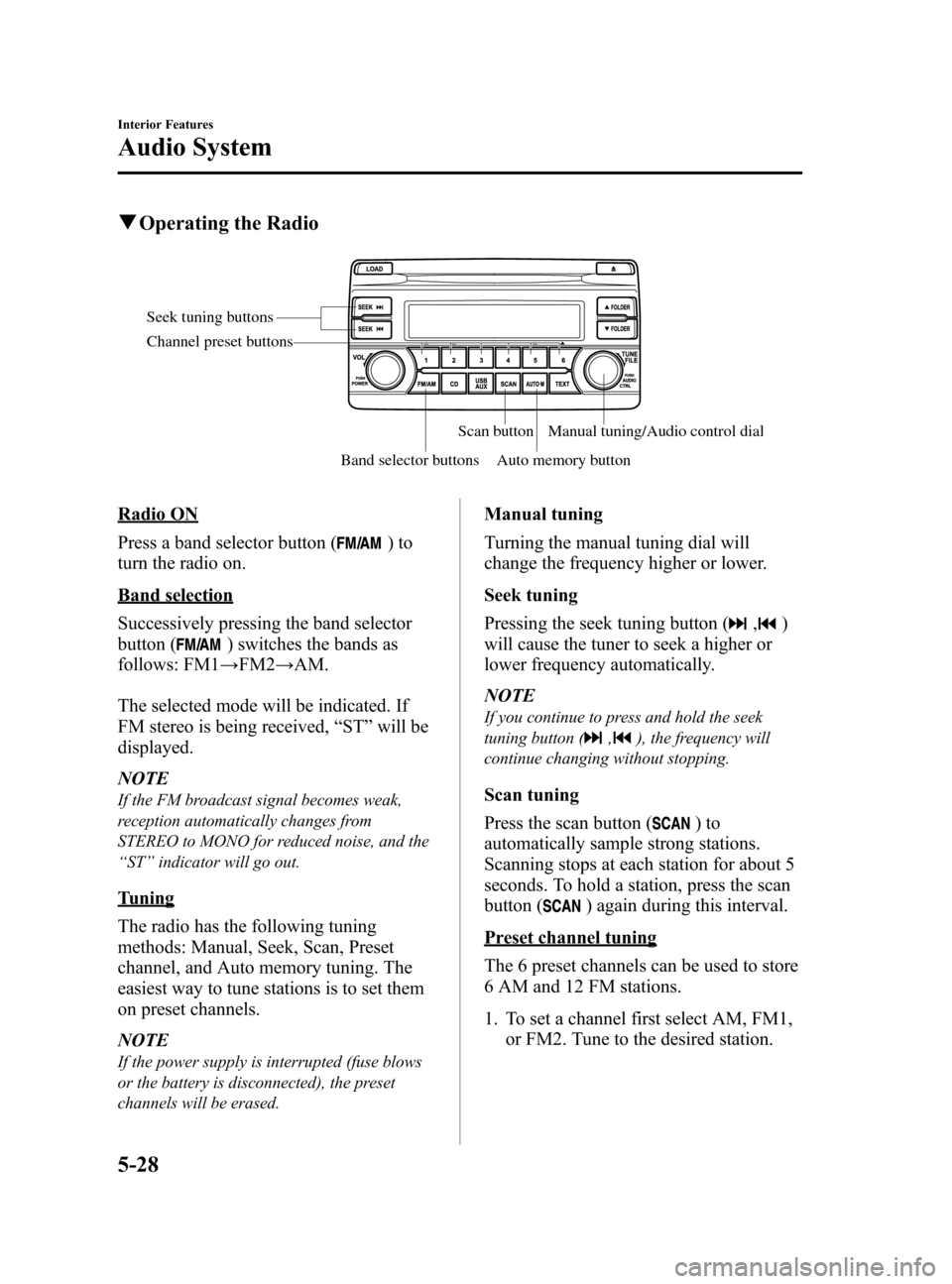
Seek tuning buttons
Band selector buttonsScan button
Auto memory buttonManual tuning/Audio control dial Channel preset buttons
Radio ON
Press a band selector button (
)to
turn the radio on.
Band selection
Successively pressing the band selector
button (
) switches the bands as
follows: FM1→FM2→AM.
The selected mode will be indicated. If
FM stereo is being received,“ST”will be
displayed.
NOTE
If the FM broadcast signal becomes weak,
reception automatically changes from
STEREO to MONO for reduced noise, and the
“ST”indicator will go out.
Tuning
The radio has the following tuning
methods: Manual, Seek, Scan, Preset
channel, and Auto memory tuning. The
easiest way to tune stations is to set them
on preset channels.
NOTE
If the power supply is interrupted (fuse blows
or the battery is disconnected), the preset
channels will be erased.
Manual tuning
Turning the manual tuning dial will
change the frequency higher or lower.
Seek tuning
Pressing the seek tuning button (
,)
will cause the tuner to seek a higher or
lower frequency automatically.
NOTE
If you continue to press and hold the seek
tuning button (
,), the frequency will
continue changing without stopping.
Scan tuning
Press the scan button (
)to
automatically sample strong stations.
Scanning stops at each station for about 5
seconds. To hold a station, press the scan
button (
) again during this interval.
Preset channel tuning
The 6 preset channels can be used to store
6 AM and 12 FM stations.
1. To set a channel first select AM, FM1,
or FM2. Tune to the desired station.
5-28
Interior Features
Audio System
Mazda6_8DQ8-EA-13L_Edition3 Page300
Friday, June 13 2014 6:22 PM
Form No.8DQ8-EA-13L