cruise control MAZDA MODEL 6 2014 Owners Manual (in English)
[x] Cancel search | Manufacturer: MAZDA, Model Year: 2014, Model line: MODEL 6, Model: MAZDA MODEL 6 2014Pages: 576, PDF Size: 8.58 MB
Page 9 of 576
Black plate (9,1)
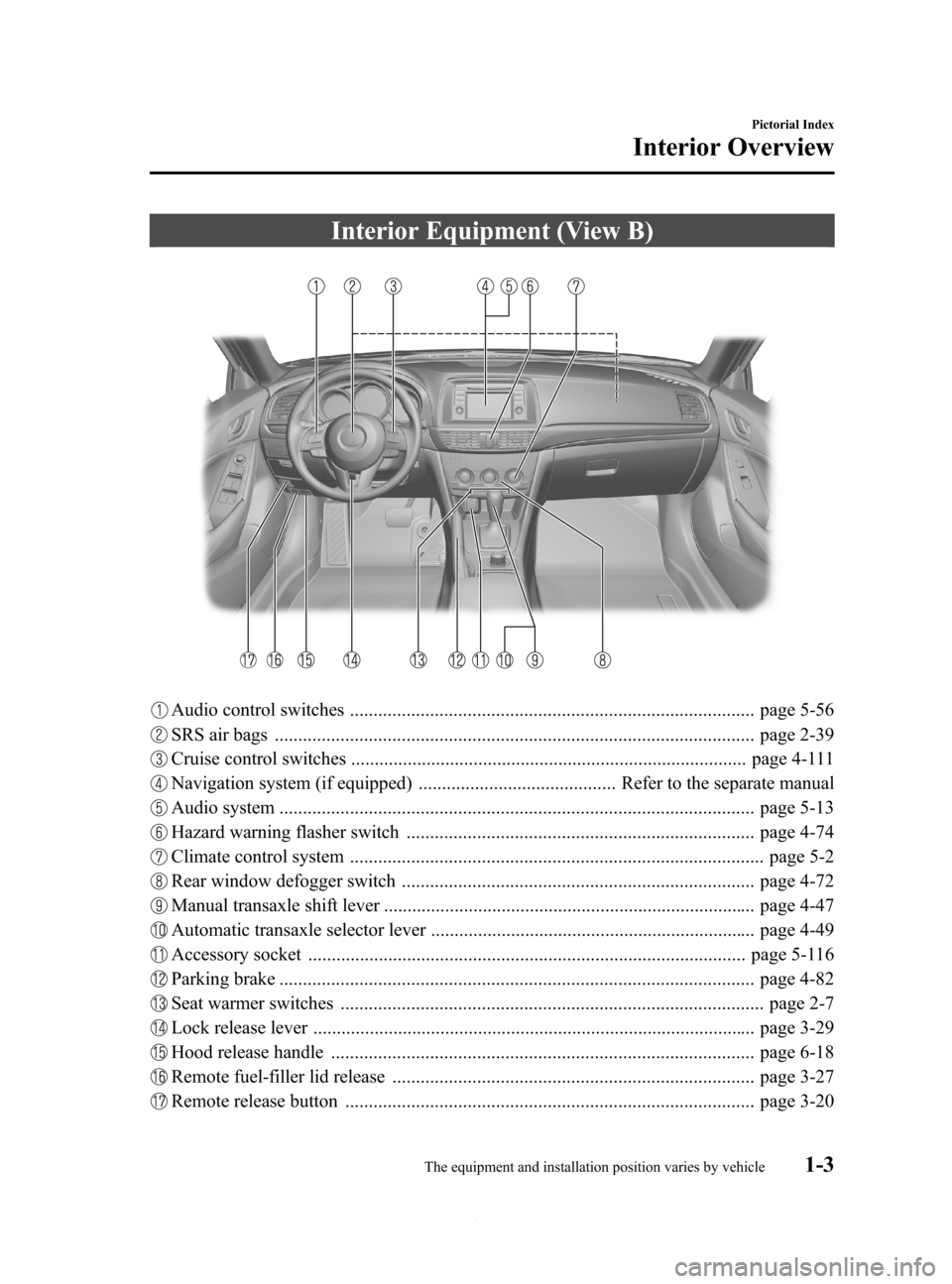
Interior Equipment (View B)
Audio control switches ...................................................................................... page 5-56
SRS air bags ...................................................................................................... page 2-39
Cruise control switches .................................................................................... page 4-111
Navigation system (if equipped) .......................................... Refer to the separate manual
Audio system ..................................................................................................... page 5-13
Hazard warning flasher switch .......................................................................... page 4-74
Climate control system ........................................................................................ page 5-2
Rear window defogger switch ........................................................................... page 4-72
Manual transaxle shift lever ............................................................................... page 4-47
Automatic transaxle selector lever ..................................................................... page 4-49
Accessory socket ............................................................................................. page 5-116
Parking brake ..................................................................................................... page 4-82
Seat warmer switches .......................................................................................... page 2-7
Lock release lever .............................................................................................. page 3-29
Hood release handle .......................................................................................... page 6-18
Remote fuel-filler lid release ............................................................................. page 3-27
Remote release button ....................................................................................... page 3-20
Pictorial Index
Interior Overview
1-3The equipment and installation position varies by vehicle Mazda6_8DQ8-EA-13L_Edition3 Page9
Friday, June 13 2014 6:20 PM
Form No.8DQ8-EA-13L
Page 125 of 576

Black plate (125,1)
4When Driving
Information concerning safe driving and stopping.
Start/Stop Engine .................................... 4-2
Ignition Switch .................................... 4-2
Starting the Engine .............................. 4-3
Turning the Engine Off ....................... 4-8
Instrument Cluster and Display ........... 4-10
Meters and Gauges ............................ 4-10
Warning/Indicator Lights .................. 4-23
Transaxle ................................................ 4-47
Manual Transaxle Operation ............. 4-47
Automatic Transaxle Controls .......... 4-49
Switches and Controls ........................... 4-58
Lighting Control ............................... 4-58
High Beam Control System (HBC)í... 4-63
Fog Lightsí...................................... 4-67
Turn and Lane-Change Signals ......... 4-67
Windshield Wipers and Washer ........ 4-68
Rear Window Defogger .................... 4-72
Horn .................................................. 4-73
Hazard Warning Flasher .................... 4-74
HomeLink Wireless Control
System
í............................................ 4-74
Radar Sensor .......................................... 4-78
Radar Sensor
í.................................. 4-78
Brake ...................................................... 4-81
Brake System .................................... 4-81
Hill Launch Assist (HLA) ................. 4-84
Smart City Brake Support (SCBS)í... 4-86
ABS/TCS/DSC ....................................... 4-92
Antilock Brake System (ABS) .......... 4-92
Traction Control System (TCS) ........ 4-93
Dynamic Stability Control (DSC) ..... 4-94i-ELOOP ................................................. 4-96
i-ELOOP
í........................................ 4-96
Drive Selection ....................................... 4-99
Drive Selection
í............................... 4-99
Power Steering ..................................... 4-101
Power Steering ................................ 4-101
Mazda Radar Cruise Control (MRCC)... 4-102
Mazda Radar Cruise Control (MRCC)í... 4-102
Cruise Control ...................................... 4-111
Cruise Control
í.............................. 4-111
Forward Obstruction Warning (FOW)... 4-114
Forward Obstruction Warning (FOW)í... 4-114
Tire Pressure Monitoring System ....... 4-117
Tire Pressure Monitoring System .... 4-117
Blind Spot Monitoring (BSM)
System .................................................. 4-121
Blind Spot Monitoring (BSM)
System
í.......................................... 4-121
Lane Departure Warning System
(LDWS) ................................................ 4-130
Lane Departure Warning System
(LDWS)
í....................................... 4-130
Rear View Monitor .............................. 4-137
Rear View Monitor
í...................... 4-137
4-1íSome models.
Mazda6_8DQ8-EA-13L_Edition3 Page125
Friday, June 13 2014 6:21 PM
Form No.8DQ8-EA-13L
Page 134 of 576

Black plate (134,1)
Meters and Gauges
Type A
Type B
Speedometer ....................................................................................................... page 4-11
Odometer, Trip Meter and Trip Meter Selector .................................................. page 4-11
Tachometer ........................................................................................................ page 4-12
Fuel Gauge ........................................................................................................ page 4-13
Dashboard Illumination ..................................................................................... page 4-13
Outside Temperature Display ............................................................................. page 4-14
Cruise Control Set Vehicle Speed Display (Type A instrument cluster) ............ page 4-15
Maintenance Monitor (Type A instrument cluster) ............................................ page 4-15
Trip Computer and INFO Switch ...................................................................... page 4-18
4-10
When Driving
Instrument Cluster and Display
Mazda6_8DQ8-EA-13L_Edition3 Page134
Friday, June 13 2014 6:21 PM
Form No.8DQ8-EA-13L
Page 139 of 576

Black plate (139,1)
qCruise Control Set Vehicle Speed
Display (Type A instrument cluster)
The vehicle speed preset using the cruise
control is displayed.
qMaintenance Monitor (Type A
instrument cluster)
The following maintenance period
notifications can be displayed by turning
the Maintenance Monitor on.
lScheduled MaintenancelTire RotationlTire Pressure Check
The maintenance monitor displays the
information when the ignition is switched
ON.
NOTE
This function is inoperable while the vehicle is
being driven.
Initial setting method
1. Press the up
or downpart of the
INFO switch and select Settings, and
then press the INFO button.
2. Press the up
or downpart of the
INFO switch and select Maintenance,
and then press the INFO button.3. Press the up
or downpart of the
INFO switch to select the item you
want to turn on from the following, and
then press the INFO button.
lScheduledlTire RotationlTire Pressure
NOTE
If a Scheduled Maintenance item has been set,
both the time and distance can be set. For
items other than Scheduled Maintenance,
either distance or time can be set.
4. Press the upor downpart of the
INFO switch and select Set Time or Set
Distance, and then press the INFO
button. The screen for setting the
distance or time to the next
maintenance period is displayed.
When Driving
Instrument Cluster and Display
4-15
Mazda6_8DQ8-EA-13L_Edition3 Page139
Friday, June 13 2014 6:21 PM
Form No.8DQ8-EA-13L
Page 142 of 576

Black plate (142,1)
Method for turning the system off
The maintenance monitor can be turned
off even after it has been turned on. If you
want to turn it off, the remaining distance
and time calculation to the next
maintenance period is stopped, and a
message does not display to indicate an
approaching maintenance period.
1. Press the up
or downpart of the
INFO switch and select Settings, and
then press the INFO button.
2. Press the up
or downpart of the
INFO switch and select Maintenance,
and then press the INFO button.
3. Press the up
or downpart of the
INFO switch to select the item you
want to turn off from the following,
and then press the INFO button.
lScheduledlTire RotationlTire Pressure
4. Select OFF and press the INFO button.
qTrip Computer and INFO Switch
The following information can be selected
by pressing the up
or downpart of
the INFO switch with the ignition
switched ON.
lApproximate distance you can travel
on the available fuel
lAverage fuel economylCurrent fuel economylAverage vehicle speedli-ELOOP display (Type A instrument
cluster)í
lLane departure warning system
(LDWS) display (Type A instrument
cluster)
í
lMazda Radar Cruise Control (MRCC)
display (Type A instrument cluster)í
lSettings (Type A instrument cluster)lWarning (Type A instrument cluster)
If you have any problems with your trip
computer, consult an Authorized Mazda
Dealer.
Distance-to-empty mode
This mode displays the approximate
distance you can travel on the remaining
fuel based on the fuel economy.
4-18
When Driving
íSome models.
Instrument Cluster and Display
Mazda6_8DQ8-EA-13L_Edition3 Page142
Friday, June 13 2014 6:21 PM
Form No.8DQ8-EA-13L
Page 145 of 576

Black plate (145,1)
Refer to i-ELOOP on page 4-96.
Lane Departure Warning System
(LDWS) display (Type A instrument
cluster)í
Information regarding the Lane Departure
Warning System (LDWS) is displayed.
Refer to Lane Departure Warning System
(LDWS) on page 4-130.
Mazda Radar Cruise Control (MRCC)
display (Type A instrument cluster)í
Information regarding the Mazda Radar
Cruise Control (MRCC) is displayed.Refer to Mazda Radar Cruise Control
(MRCC) on page 4-102.
Settings (Type A instrument cluster)
The following settings can be changed
(Setting changes cannot be made while
driving because the settings are not
displayed.):
lReset AverageslSmart City Brake Support (SCBS)lLane Departure Warning System
(LDWS)
lBlind Spot Monitoring (BSM) SystemlMaintenancelOptional ScreenlVolumeslUnitslLanguagelRestore Default
To change settings
1. Press the up
or downpart of the
INFO switch and select Settings, and
then press the INFO button.
2. Press the up
or downpart of the
INFO switch to select the item you
want to change, and then press the
INFO button.
When Driving
Instrument Cluster and Display
4-21íSome models. Mazda6_8DQ8-EA-13L_Edition3 Page145
Friday, June 13 2014 6:21 PM
Form No.8DQ8-EA-13L
Page 151 of 576

Black plate (151,1)
Signal Warning/Indicator Lights Page
Turn Signal/Hazard Warning Indicator Lights 4-44
Security Indicator Light 4-44
Cruise Main Indicator Light (Amber)/Cruise Set Indicator Light (Green) 4-45
Mazda Radar Cruise Control (MRCC) Warning Light (Amber)/Indicator
Light (Green)4-45
Lights-On Indicator Light 4-46
qType B
Warning/Indicator lights will appear in any of the highlighted areas
Signal Warning/Indicator Lights Page
Master Warning Light 4-29
Brake System Warning Light 4-30
ABS Warning Light 4-30
Charging System Warning Light 4-31
Engine Oil Warning Light 4-31
When Driving
Instrument Cluster and Display
4-27
Mazda6_8DQ8-EA-13L_Edition3 Page151
Friday, June 13 2014 6:21 PM
Form No.8DQ8-EA-13L
Page 168 of 576
Black plate (168,1)
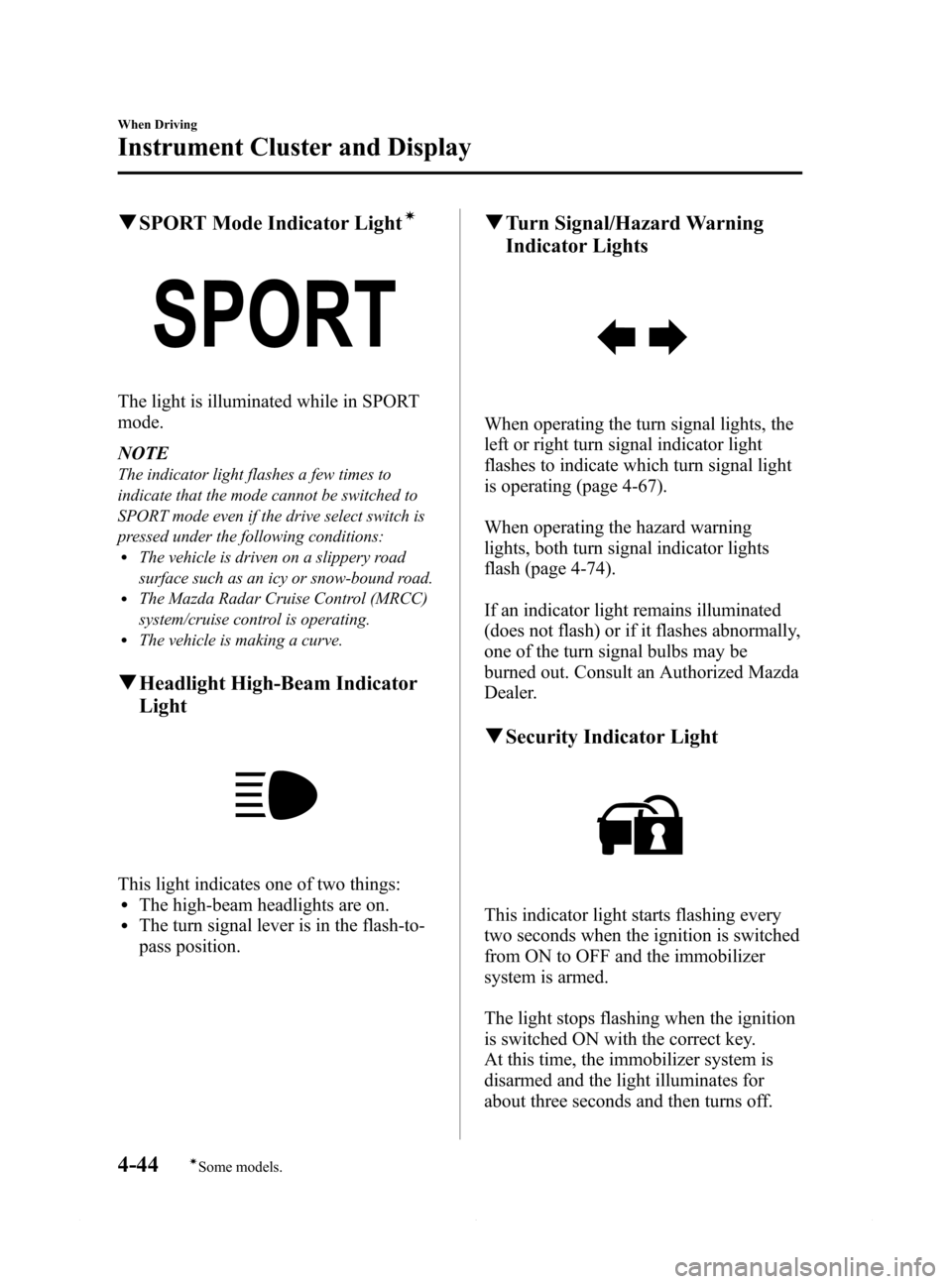
qSPORT Mode Indicator Lightí
The light is illuminated while in SPORT
mode.
NOTE
The indicator light flashes a few times to
indicate that the mode cannot be switched to
SPORT mode even if the drive select switch is
pressed under the following conditions:
lThe vehicle is driven on a slippery road
surface such as an icy or snow-bound road.
lThe Mazda Radar Cruise Control (MRCC)
system/cruise control is operating.
lThe vehicle is making a curve.
qHeadlight High-Beam Indicator
Light
This light indicates one of two things:lThe high-beam headlights are on.lThe turn signal lever is in the flash-to-
pass position.
qTurn Signal/Hazard Warning
Indicator Lights
When operating the turn signal lights, the
left or right turn signal indicator light
flashes to indicate which turn signal light
is operating (page 4-67).
When operating the hazard warning
lights, both turn signal indicator lights
flash (page 4-74).
If an indicator light remains illuminated
(does not flash) or if it flashes abnormally,
one of the turn signal bulbs may be
burned out. Consult an Authorized Mazda
Dealer.
qSecurity Indicator Light
This indicator light starts flashing every
two seconds when the ignition is switched
from ON to OFF and the immobilizer
system is armed.
The light stops flashing when the ignition
is switched ON with the correct key.
At this time, the immobilizer system is
disarmed and the light illuminates for
about three seconds and then turns off.
4-44
When Driving
íSome models.
Instrument Cluster and Display
Mazda6_8DQ8-EA-13L_Edition3 Page168
Friday, June 13 2014 6:21 PM
Form No.8DQ8-EA-13L
Page 169 of 576

Black plate (169,1)
If the engine does not start with the
correct key, and the security indicator
light keeps illuminating or flashing, the
system may have a malfunction. Consult
an Authorized Mazda Dealer.
qMazda Radar Cruise Control
(MRCC) Warning Light (Amber)/
Indicator Light (Green)
í
Mazda Radar Cruise Control (MRCC)
Warning Light (Amber)
Illuminated
When the ignition is switched ON, the
warning light is illuminated and then turns
off after a few seconds.
Flashing
The warning light flashes if there is a
malfunction in the system while the
Mazda Radar Cruise Control (MRCC)
system is on. Have your vehicle inspected
at an Authorized Mazda Dealer.
Mazda Radar Cruise Control (MRCC)
Indicator Light (Green)
Illuminated
Illuminated when the speed for the Mazda
Radar Cruise Control (MRCC) system is
set.
qCruise Main Indicator Light
(Amber)/Cruise Set Indicator
Light (Green)
í
The indicator light has two colors.
Cruise Main Indicator Light (Amber)
The indicator light illuminates amber
when the ON switch is pressed and the
cruise control system is activated.
Cruise Set Indicator Light (Green)
The indicator light illuminates green when
a cruising speed has been set.
qBSM OFF Indicator Lightí
This indicator light illuminates for a few
seconds when the ignition is switched
ON.
The BSM OFF indicator light illuminates
when the BSM system is turned off by
pressing the BSM OFF switch.
The indicator light flashes if the BSM
system has a malfunction. Consult an
Authorized Mazda Dealer.
When Driving
Instrument Cluster and Display
4-45íSome models. Mazda6_8DQ8-EA-13L_Edition3 Page169
Friday, June 13 2014 6:21 PM
Form No.8DQ8-EA-13L
Page 202 of 576

Black plate (202,1)
Radar Sensorí
Your vehicle is equipped with a radar sensor.
The following systems also use the radar sensor.
lMazda Radar Cruise Control (MRCC)lForward Obstruction Warning (FOW)
The radar sensor functions by detecting the radio waves reflected off a vehicle ahead or an
obstruction sent from the radar sensor.
The radar sensor is mounted behind the front emblem.
Radar Sensor
If“Radar blocked”is displayed in the multi-display of the instrument cluster, clean the area
around the radar sensor.
4-78
When Driving
íSome models.
Radar Sensor
Mazda6_8DQ8-EA-13L_Edition3 Page202
Friday, June 13 2014 6:21 PM
Form No.8DQ8-EA-13L