warning MAZDA MODEL 6 2016 Owners Manual (in English)
[x] Cancel search | Manufacturer: MAZDA, Model Year: 2016, Model line: MODEL 6, Model: MAZDA MODEL 6 2016Pages: 614, PDF Size: 12.82 MB
Page 177 of 614
Black plate (177,1)
Shifting
You can shift gears up and down by
operating the selector lever or the steering
shift switches
í.
Manually Shifting up
(M1→M2→M3→M4→M5→M6)
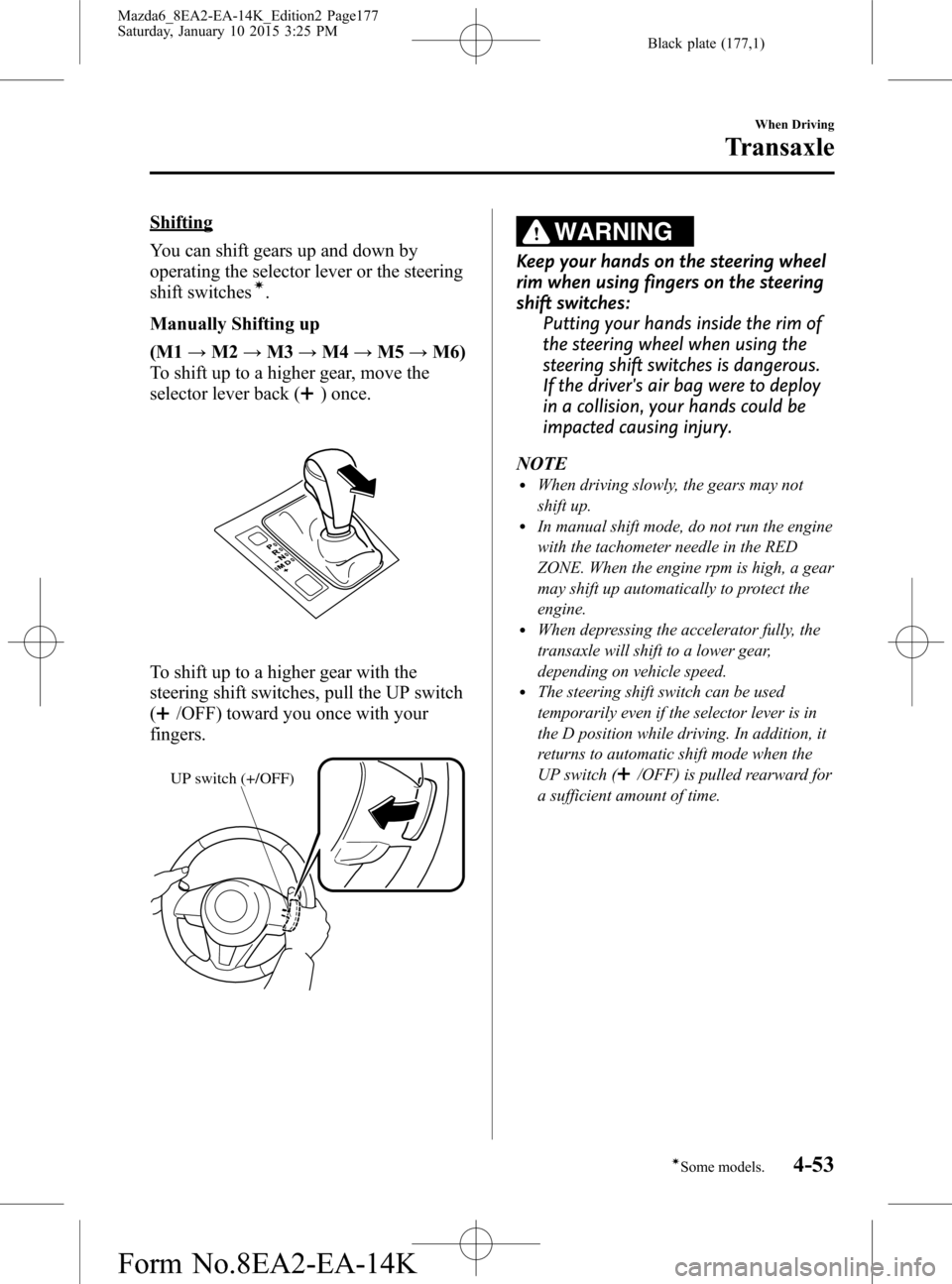
To shift up to a higher gear, move the
selector lever back (
) once.
To shift up to a higher gear with the
steering shift switches, pull the UP switch
(
/OFF) toward you once with your
fingers.
UP switch (+/OFF)
WARNING
Keep your hands on the steering wheel
rim when using fingers on the steering
shift switches:
Putting your hands inside the rim of
the steering wheel when using the
steering shift switches is dangerous.
If the driver's air bag were to deploy
in a collision, your hands could be
impacted causing injury.
NOTE
lWhen driving slowly, the gears may not
shift up.
lIn manual shift mode, do not run the engine
with the tachometer needle in the RED
ZONE. When the engine rpm is high, a gear
may shift up automatically to protect the
engine.
lWhen depressing the accelerator fully, the
transaxle will shift to a lower gear,
depending on vehicle speed.
lThe steering shift switch can be used
temporarily even if the selector lever is in
the D position while driving. In addition, it
returns to automatic shift mode when the
UP switch (
/OFF) is pulled rearward for
a sufficient amount of time.
When Driving
Transaxle
4-53íSome models. Mazda6_8EA2-EA-14K_Edition2 Page177
Saturday, January 10 2015 3:25 PM
Form No.8EA2-EA-14K
Page 178 of 614
Black plate (178,1)
Manually Shifting down
(M6→M5→M4→M3→M2→M1)
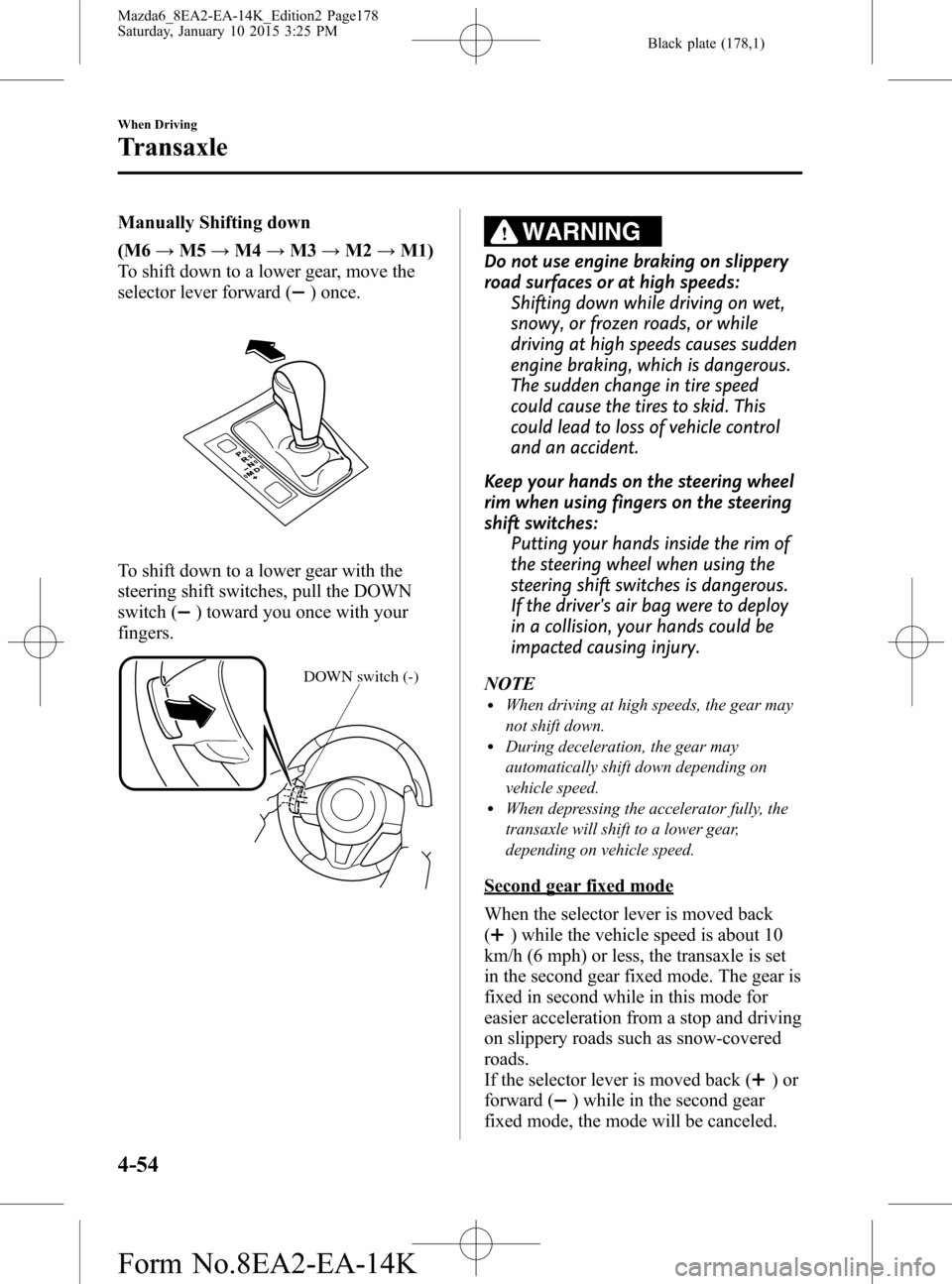
To shift down to a lower gear, move the
selector lever forward (
) once.
To shift down to a lower gear with the
steering shift switches, pull the DOWN
switch (
) toward you once with your
fingers.
DOWN switch (-)
WARNING
Do not use engine braking on slippery
road surfaces or at high speeds:
Shifting down while driving on wet,
snowy, or frozen roads, or while
driving at high speeds causes sudden
engine braking, which is dangerous.
The sudden change in tire speed
could cause the tires to skid. This
could lead to loss of vehicle control
and an accident.
Keep your hands on the steering wheel
rim when using fingers on the steering
shift switches:
Putting your hands inside the rim of
the steering wheel when using the
steering shift switches is dangerous.
If the driver's air bag were to deploy
in a collision, your hands could be
impacted causing injury.
NOTE
lWhen driving at high speeds, the gear may
not shift down.
lDuring deceleration, the gear may
automatically shift down depending on
vehicle speed.
lWhen depressing the accelerator fully, the
transaxle will shift to a lower gear,
depending on vehicle speed.
Second gear fixed mode
When the selector lever is moved back
(
) while the vehicle speed is about 10
km/h (6 mph) or less, the transaxle is set
in the second gear fixed mode. The gear is
fixed in second while in this mode for
easier acceleration from a stop and driving
on slippery roads such as snow-covered
roads.
If the selector lever is moved back (
)or
forward (
) while in the second gear
fixed mode, the mode will be canceled.
4-54
When Driving
Transaxle
Mazda6_8EA2-EA-14K_Edition2 Page178
Saturday, January 10 2015 3:25 PM
Form No.8EA2-EA-14K
Page 180 of 614
Black plate (180,1)
Recommendations for shifting (U.S.A.
and Canada)
Upshifting
For normal acceleration and cruising, we
recommend these shift points.
Gear Vehicle speed*1
M1 to M2 24 km/h (15 mph)
M2 to M3 40 km/h (25 mph)
M3 to M4 65 km/h (40 mph)
M4 to M5 73 km/h (45 mph)
M5 to M6 81 km/h (50 mph)
*1: Always observe local speed limit regulations.
Downshifting
When you must slow down in heavy
traffic or on a steepupgrade, downshift
before the engine starts to overwork. This
gives better acceleration when you need
more speed.
On a steepdowngrade, downshifting
helps maintain safe speed and prolongs
brake life.
qDirect Mode
Direct mode can be used for temporarily
switching gears by operating the steering
shift switch while the vehicle is being
driven with the selector lever in the D
range.
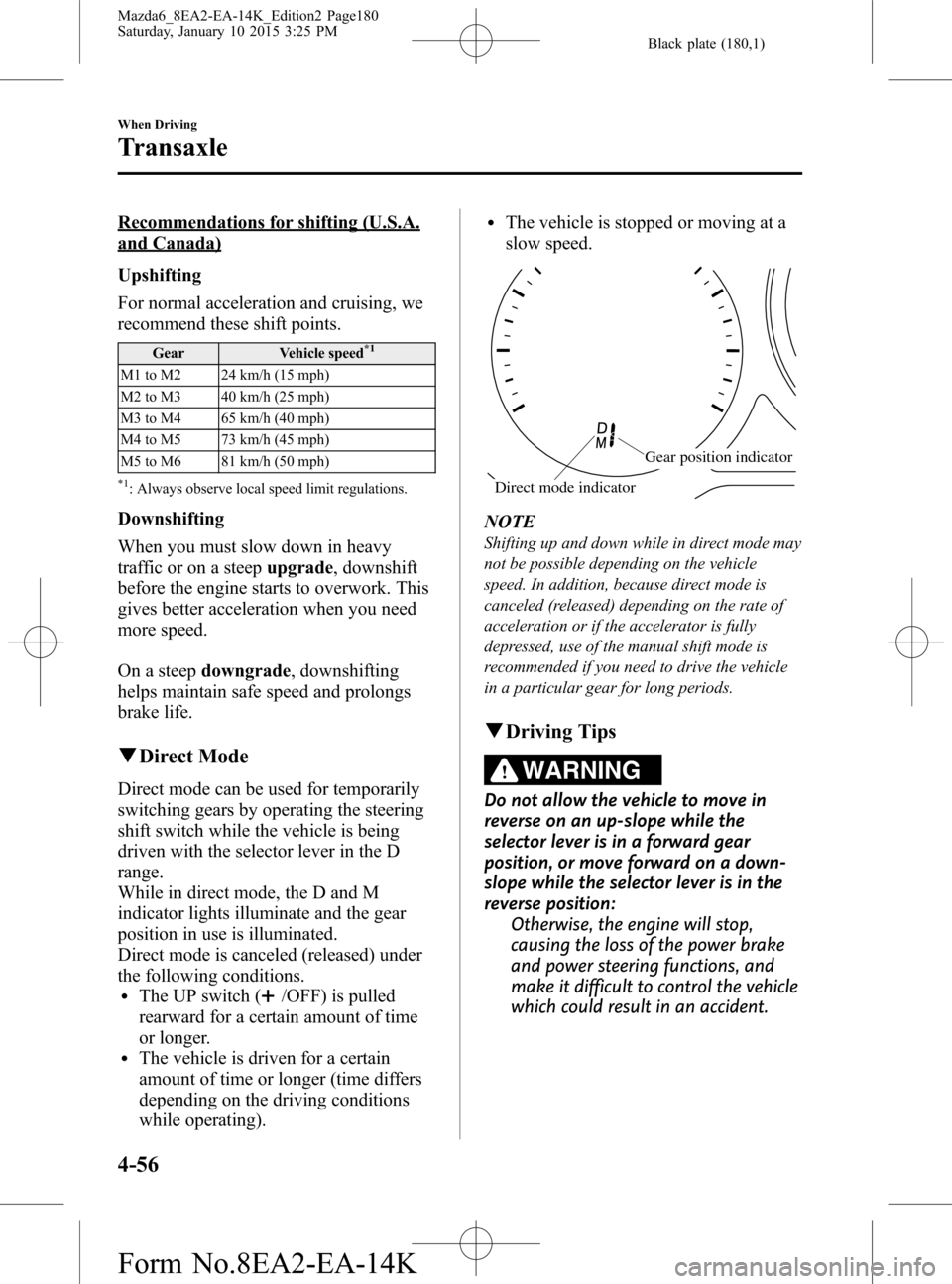
While in direct mode, the D and M
indicator lights illuminate and the gear
position in use is illuminated.
Direct mode is canceled (released) under
the following conditions.
lThe UP switch (/OFF) is pulled
rearward for a certain amount of time
or longer.
lThe vehicle is driven for a certain
amount of time or longer (time differs
depending on the driving conditions
while operating).
lThe vehicle is stopped or moving at a
slow speed.
Gear position indicator
Direct mode indicator
NOTE
Shifting up and down while in direct mode may
not be possible depending on the vehicle
speed. In addition, because direct mode is
canceled (released) depending on the rate of
acceleration or if the accelerator is fully
depressed, use of the manual shift mode is
recommended if you need to drive the vehicle
in a particular gear for long periods.
qDriving Tips
WARNING
Do not allow the vehicle to move in
reverse on an up-slope while the
selector lever is in a forward gear
position, or move forward on a down-
slope while the selector lever is in the
reverse position:
Otherwise, the engine will stop,
causing the loss of the power brake
and power steering functions, and
make it difficult to control the vehicle
which could result in an accident.
4-56
When Driving
Transaxle
Mazda6_8EA2-EA-14K_Edition2 Page180
Saturday, January 10 2015 3:25 PM
Form No.8EA2-EA-14K
Page 182 of 614
Black plate (182,1)
Lighting Control
qHeadlights
lTurn the headlight switch to turn the headlights, other exterior lights and dashboard
illumination on or off.
lFor vehicles with the type A instrument cluster, check the vehicle condition or have the
vehicle inspected at an Authorized Mazda Dealer according to the indication.
lA system malfunction or operation conditions are indicated by a warning.
Refer to Warning/Indicator Lights on page 4-22.
NOTE
lIf the light switch is left on, the lights will automatically switch off approximately 30 seconds after
switching the ignition off.
The time setting can be changed.
Refer to Personalization Features on page 9-9.
lTo prevent discharging the battery, do not leave the lights on while the engine is off unless safety
requires them.
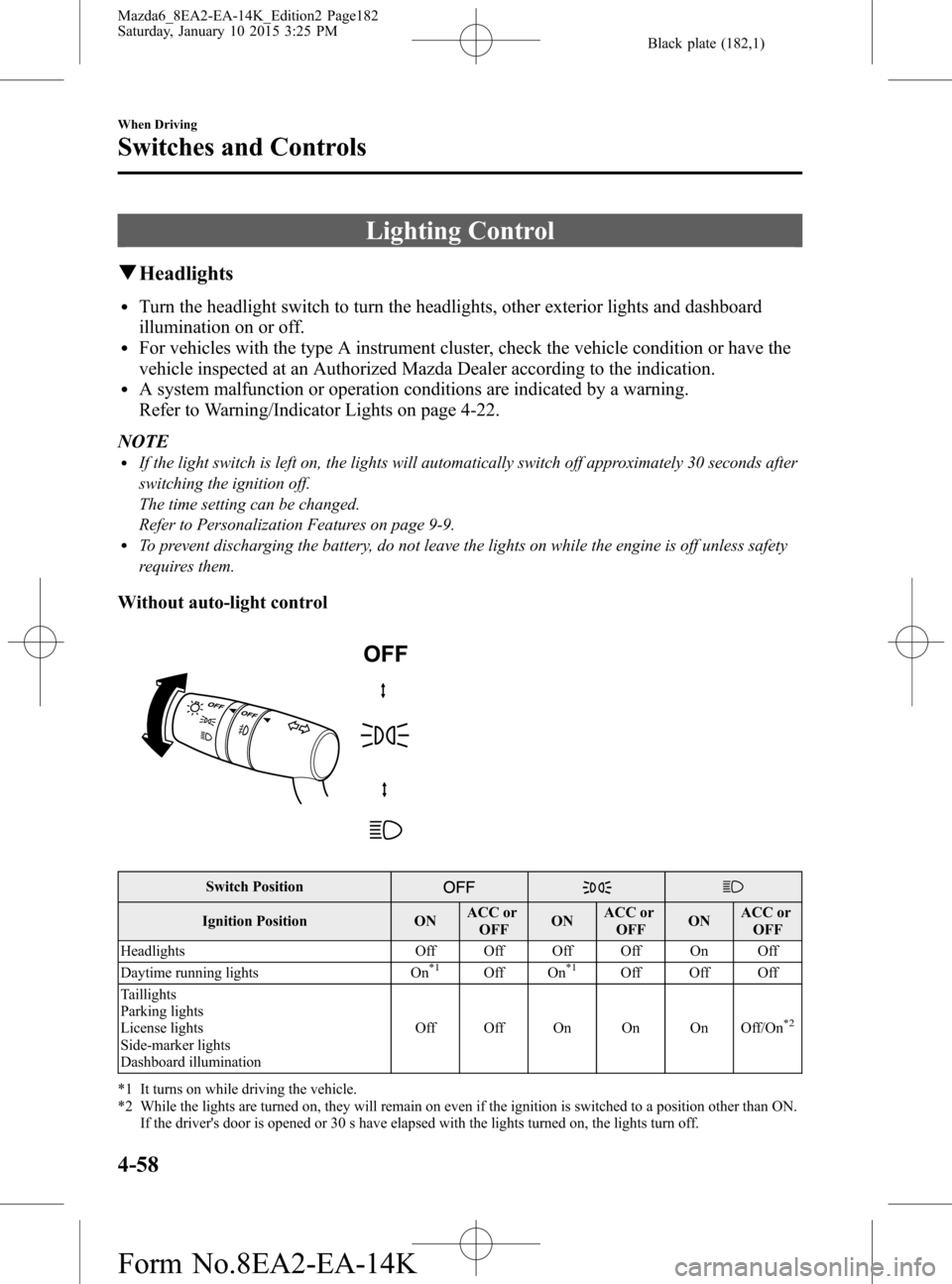
Without auto-light control
Switch Position
Ignition Position ONACC or
OFFONACC or
OFFONACC or
OFF
Headlights Off Off Off Off On Off
Daytime running lights On
*1Off On*1Off Off Off
Taillights
Parking lights
License lights
Side-marker lights
Dashboard illuminationOff Off On On On Off/On
*2
*1 It turns on while driving the vehicle.
*2 While the lights are turned on, they will remain on even if the ignition is switched to a position other than ON.
If the driver's door is opened or 30 s have elapsed with the lights turned on, the lights turn off.
4-58
When Driving
Switches and Controls
Mazda6_8EA2-EA-14K_Edition2 Page182
Saturday, January 10 2015 3:25 PM
Form No.8EA2-EA-14K
Page 186 of 614

Black plate (186,1)
qLeaving Home Light System
The leaving home light system turns on
the lights when the key unlock button is
pressed while away from the vehicle.
To turn on the system
When the ignition switch and the
headlight switch are as indicated below,
the lights will illuminate when the
transmitter unlock button is pressed and
the vehicle receives the transmitter signal.
The lights turn off after a certain period of
time has elapsed (30 seconds).
lIgnition switch: offlHeadlight switch:or
The following lights turn on when the
leaving home light system is operated.
Low beams, Parking lights, Taillights,
License lights
Unlock button
Lock button
NOTElOperation of the leaving home light system
can be turned on or off.
Refer to Personalization Features on page
9-9.
lWhen the transmitter lock button is pressed
and the vehicle receives the transmitter
signal, the lights turn off.
lWhen the headlight switch is in a position
other than
or, the lights turn off.
qHeadlight Levelingí
The number of passengers and weight of
cargo in the luggage compartment change
the angle of the headlights.
The angle of the headlights will be
automatically adjusted when turning on
the headlights.
A system malfunction or operation
conditions are indicated by a warning.
Refer to Warning/Indicator Lights on page
4-22.
qDaytime Running Lightsí
Some countries require moving vehicles
to have their lights on (daytime running
lights) during the daytime.
The daytime running lights turn on
automatically when the vehicle starts
moving.
They turn off when the parking brake is
operated or the shift lever is shifted to the
P position (automatic transaxle vehicle).
NOTE
(Except Canada)
The daytime running lights can be deactivated.
Refer to Personalization Features on page 9-9.
4-62
When Driving
íSome models.
Switches and Controls
Mazda6_8EA2-EA-14K_Edition2 Page186
Saturday, January 10 2015 3:25 PM
Form No.8EA2-EA-14K
Page 188 of 614

Black plate (188,1)
qThree-Flash Turn Signal
After releasing the turn signal lever, the
turn signal indicator flashes three times.
The operation can be cancelled by moving
the lever in the direction opposite to
which it was operated.
NOTE
The three-flash turn signal function can be
switched to operable/inoperable using the
personalization function.
Refer to Personalization Features on page 9-9.
Windshield Wipers and
Washer
The ignition must be switched ON.
WARNING
Use only windshield washer fluid or
plain water in the reservoir:
Using radiator antifreeze as washer
fluid is dangerous. If sprayed on the
windshield, it will dirty the
windshield, affect your visibility, and
could result in an accident.
Only use windshield washer fluid
mixed with anti-freeze protection in
freezing weather conditions:
Using windshield washer fluid
without anti-freeze protection in
freezing weather conditions is
dangerous as it could freeze on the
windshield and block your vision
which could cause an accident.
In addition, make sure the
windshield is sufficiently warmed
using the defroster before spraying
the washer fluid.
4-64
When Driving
Switches and Controls
Mazda6_8EA2-EA-14K_Edition2 Page188
Saturday, January 10 2015 3:25 PM
Form No.8EA2-EA-14K
Page 194 of 614

Black plate (194,1)
Hazard Warning Flasher
The hazard warning lights should always
be used when you stop on or near a
roadway in an emergency.
The hazard warning lights warn other
drivers that your vehicle is a traffic hazard
and that they must take extreme caution
when near it.
Depress the hazard warning flasher switch
and all the turn signals will flash. The
hazard warning indicator lights in the
instrument cluster flash simultaneously.
NOTE
lThe turn signals do not work when the
hazard warning lights are on.
lCheck local regulations about the use of
hazard warning lights while the vehicle is
being towed to verify that it is not in
violation of the law.
HomeLink Wireless
Control System
í
NOTE
HomeLink and HomeLink house icon are
registered trademarks of Gentex Corporation.
The HomeLink system replaces up to 3
hand-held transmitters with a single built-
in component in the auto-dimming mirror.
Pressing the HomeLink button on the
auto-dimming mirror activates garage
doors, gates and other devices
surrounding your home.
HomeLink button
Indicator light
4-70
When Driving
íSome models.
Switches and Controls
Mazda6_8EA2-EA-14K_Edition2 Page194
Saturday, January 10 2015 3:25 PM
Form No.8EA2-EA-14K
Page 195 of 614

Black plate (195,1)
WARNING
Do not use the HomeLink system with
any garage door opener that lacks the
safety stop and reverse feature:
Using the HomeLink system with any
garage door opener that lacks the
safety stop and reverse feature as
required by federal safety standards
is dangerous. (This includes garage
doors manufactured before April 1,
1982.)
Using these garage door openers can
increase the risk of serious injury or
death. For further information,
contact HomeLink at 1-800-355-3515
or www.homelink.com or your
Authorized Mazda Dealer.
Always check the areas surrounding
garage doors and gates for people or
obstructions before programming or
during operation of the HomeLink
system:
Programming or operating the
HomeLink system without verifying
the safety of areas surrounding
garage doors and gates is dangerous
and could result in an unexpected
accident and serious injury if
someone were to be hit.
NOTE
The programming will not be erased even if
the battery is disconnected.
qPre-programming the HomeLink
System
NOTE
It is recommended that a new battery be
placed in the hand-held transmitter of the
device being programmed to HomeLink for
quicker training and accurate transmission of
the radio-frequency signal.
lVerify that there is a remote control
transmitter available for the device you
would like to program.
lDisconnect the power to the device.
qProgramming the HomeLink System
CAUTION
When programming a garage door
opener or a gate, disconnect the
power to these devices before
performing programming, as
continuous operation of the devices
could damage the motor.
The HomeLink system provides 3 buttons
which can be individually selected and
programmed using the transmitters for
current, on-market devices as follows:
1. Position the end of your hand-held
transmitter 2.5―7.5 cm (1―3 inches)
away from the HomeLink button you
wish to program while keeping the
indicator light in view.
2. Simultaneously press and hold both the
chosen HomeLink and hand-held
transmitter buttons.Do not release the
buttons until step 3 has been
completed.
NOTE
Some gate operators and garage door openers
may require you to replace this Programming
Step 2 with procedures noted in the“Gate
Operator/Canadian Programming”section.
3. After the HomeLink indicator light
changes from a slow to a rapidly
blinking light, release both the
HomeLink and hand-held transmitter
buttons.
When Driving
Switches and Controls
4-71
Mazda6_8EA2-EA-14K_Edition2 Page195
Saturday, January 10 2015 3:25 PM
Form No.8EA2-EA-14K
Page 198 of 614

Black plate (198,1)
Brake System
qFoot Brake
Your Mazda has power-assisted brakes
that adjust automatically through normal
use.
Should power-assist fail, you can stop by
applying greater force than normal to the
brake pedal. But the distance required to
stop will be greater than usual.
WARNING
Do not coast with the engine stalled or
turned off, find a safe place to stop:
Coasting with the engine stalled or
turned off is dangerous. Braking will
require more effort, and the brake's
power-assist could be depleted if you
pump the brake. This will cause
longer stopping distances or even an
accident.
Shift to a lower gear when going down
steep hills:
Driving with your foot continuously
on the brake pedal or steadily
applying the brakes for long
distances is dangerous. This causes
overheated brakes, resulting in
longer stopping distances or even
total brake failure. This could cause
loss of vehicle control and a serious
accident. Avoid continuous
application of the brakes.
Dry off brakes that have become wet
by driving slowly, releasing the
accelerator pedal and lightly applying
the brakes several times until the brake
performance returns to normal:
Driving with wet brakes is
dangerous. Increased stopping
distance or the vehicle pulling to one
side when braking could result in a
serious accident. Light braking will
indicate whether the brakes have
been affected.
4-74
When Driving
Brake
Mazda6_8EA2-EA-14K_Edition2 Page198
Saturday, January 10 2015 3:25 PM
Form No.8EA2-EA-14K
Page 199 of 614

Black plate (199,1)
CAUTION
ØDo not drive with your foot held
on the clutch pedal or brake pedal,
or hold the clutch pedal depressed
halfway unnecessarily. Doing so
could result in the following:
ØThe clutch and brake parts will
wear out more quickly.
ØThe brakes can overheat and
adversely affect brake
performance.
ØAlways depress the brake pedal
with the right foot. Applying the
brakes with the unaccustomed left
foot could slow your reaction time
to an emergency situation
resulting in insufficient braking
operation.
ØWear shoes appropriate for driving
in order to avoid your shoe
contacting the brake pedal when
depressing the accelerator pedal.
qElectric Parking Brake
The electric parking brake equipment
applies the parking brake using an electric
motor. The indicator light on the electric
parking brake switch turns on when the
switch is turned on.
Indicator light
WARNING
Do not drive the vehicle with the
electric parking brake applied:
If the vehicle is driven with the
parking brake applied, the brake
parts may generate heat and the
brake system may not operate,
leading to an accident.
Before driving, release the electric
parking brake and verify that the
brake system warning light is turned
off.
When Driving
Brake
4-75
Mazda6_8EA2-EA-14K_Edition2 Page199
Saturday, January 10 2015 3:25 PM
Form No.8EA2-EA-14K