warning light MAZDA MODEL 6 2017 Owners Manual (in English)
[x] Cancel search | Manufacturer: MAZDA, Model Year: 2017, Model line: MODEL 6, Model: MAZDA MODEL 6 2017Pages: 578, PDF Size: 54.72 MB
Page 283 of 578
 4–159
When Driving
Tire Pressure Monitoring System
Tire Pressure Monitoring System
The Tire Pressure Monitoring System (TPMS) monitors the air pressure of all\
four tires. If
the air pressure of o")
4–159
When Driving
Tire Pressure Monitoring System
Tire Pressure Monitoring System
The Tire Pressure Monitoring System (TPMS) monitors the air pressure of all\
four tires. If
the air pressure of one or more tires is too low, the system warns the driver by indicating the
tire pressure monitoring system warning light in the instrument cluster \
and operating a beep
sound. The system monitors the tire pressures indirectly using the data sent from the ABS
wheel speed sensors.
To allow the system to operate correctly, the system needs to be initialized with the specified
tire pressure (value on the tire pressure label). Follow the procedure\
and perform the
initialization.
Refer to Tire Pressure Monitoring System Initialization on page 4-162.
The warning light flashes when the system has a malfunction.
Refer to Warning Indication/Warning Lights on page 4-33.
ABS wheel speed sensor
Mazda6_8FH2-EA-16F_Edition2.indb 1592016/07/07 13:45:22
Page 285 of 578
4–161
When Driving
Tire Pressure Monitoring System
NOTE
Because this system detects slight changes in tire conditions, the timing of the warning may
be faster or slower in the following cases:
The size, manufacturer, or the type of tires is different from the specification. The size, manufacturer, or the type of a tire is different from the others, or the level of tire
wear is excessively different between them.
A run-flat tire, studless tire, snow tire, or tire chains are used. An emergency tire is used (The tire pressure monitoring system warning light may flash
and then continue illuminating).
A tire is repaired using the emergency flat tire repair kit. The tire pressure is excessively higher than the specified pressure, or the tire pressure is
suddenly lowered for some reason such as a tire burst during driving.
The vehicle speed is lower than about 15 km/h (9.3 mph) (including wh\
en the vehicle is
stopped), or the drive period is shorter than 5 minutes.
The vehicle is driven on an extremely rough road or a slippery, icy road. Hard steering and rapid acceleration/deceleration are repeated such as during aggressive
driving on a winding road.
Load on the vehicle is applied to a tire such as by loading heavy luggage to one side of
the vehicle.
System initialization has not been implemented with the specified tire pressure.
Mazda6_8FH2-EA-16F_Edition2.indb 1612016/07/07 13:45:22
Page 286 of 578
4–162
When Driving
Tire Pressure Monitoring System
Tire Pressure Monitoring System
Initialization
In the following cases, system
initialization must be performed so that the
system operates normally.
A tire pressure is adjusted. Tire rotation is performed. A tire or wheel is replaced. The battery is replaced or completely
drained.
The tire pressure monitoring system
warning light is illuminated.
Initialization method
1. Park the car in a safe place and firmly
apply the parking brake.
2. Let the tires cool, then adjust the tire
pressure of all four (4) tires to the
specified pressure indicated on the tire
pressure label located on the driver's
door frame (door open).
Refer to Tires on page 9-8.
3. Switch the ignition ON.
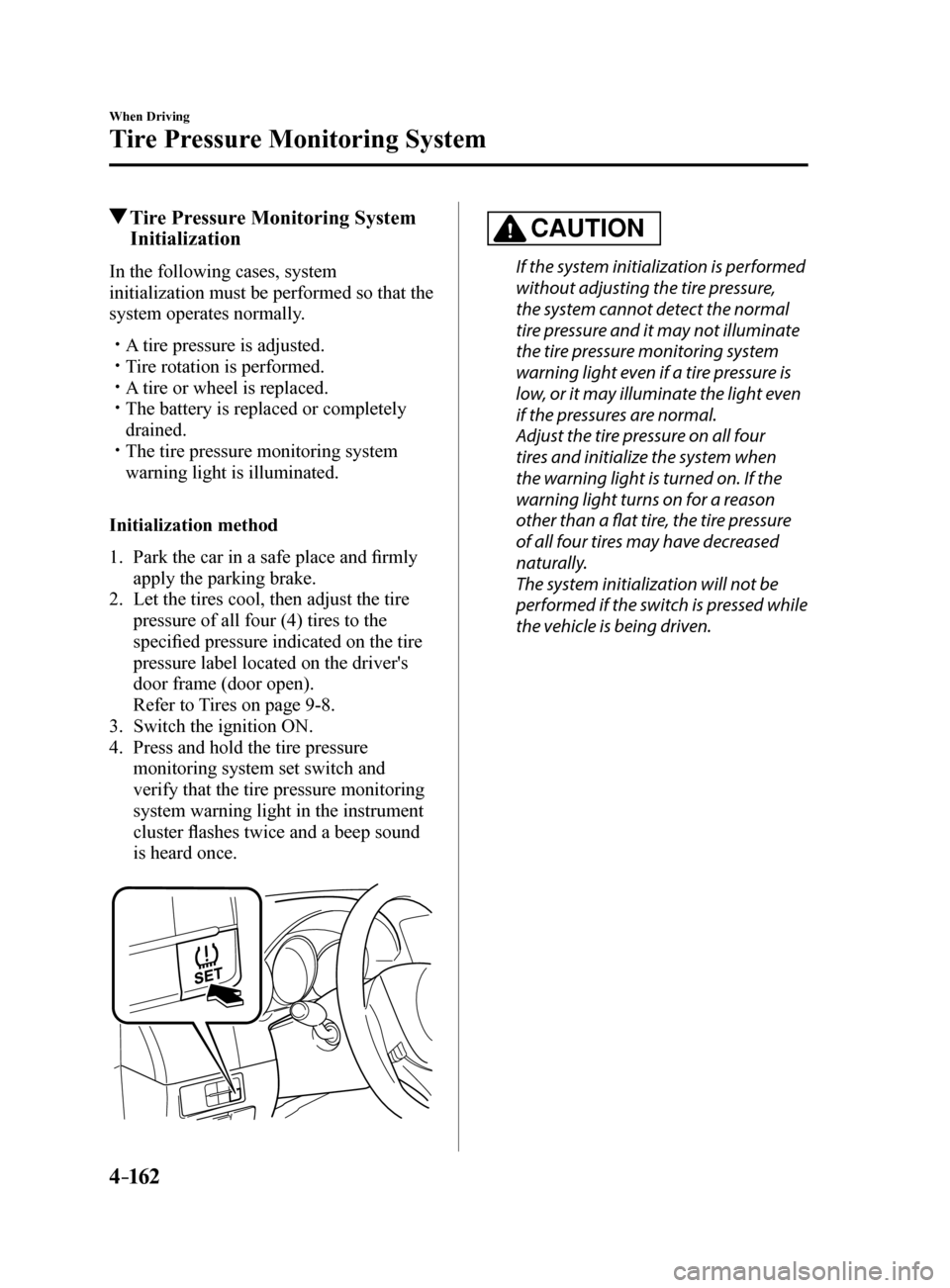
4. Press and hold the tire pressure
monitoring system set switch and
verify that the tire pressure monitoring
system warning light in the instrument
cluster flashes twice and a beep sound
is heard once.
CAUTION
If the system initialization is performed
without adjusting the tire pressure,
the system cannot detect the normal
tire pressure and it may not illuminate
the tire pressure monitoring system
warning light even if a tire pressure is
low, or it may illuminate the light even
if the pressures are normal.
Adjust the tire pressure on all four
tires and initialize the system when
the warning light is turned on. If the
warning light turns on for a reason
other than a flat tire, the tire pressure
of all four tires may have decreased
naturally.
The system initialization will not be
performed if the switch is pressed while
the vehicle is being driven.
Mazda6_8FH2-EA-16F_Edition2.indb 1622016/07/07 13:45:22
Page 300 of 578
5–6
Interior Features
Climate Control System
Air intake selector
This switch controls the source of air
entering the vehicle.
Outside or recirculated air positions can be
selected. Press the switch to select outside/
recirculated air positions.
Recirculated air position (indicator light
illuminated)
Outside air is shut off. Use this position
when going through tunnels, driving in
congested traffic (high engine exhaust
areas) or when quick cooling is desired.
Outside air position (indicator light
turned off)
Outside air is allowed to enter the
cabin. Use this mode for ventilation or
windshield defrosting.
WARNING
Do not use the position in cold or
rainy weather: Using the
position in cold or rainy
weather is dangerous as it will cause
the windows to fog up. Your vision will
be hampered, which could lead to a
serious accident.
Rear window defogger switch
Press the rear window defogger switch to
defrost the rear window.
Refer to Rear Window Defogger on page
4-63.
Heating
1. Set the mode selector dial to the
position.
2. Set the air intake selector to the outside
air position (indicator light turns off).
3. Set the temperature control dial to the
hot position.
4. Set the fan control dial to the desired
speed.
5. If dehumidified heating is desired, turn
on the air conditioner.
NOTE
If the windshield fogs up easily, set the
mode selector dial to the
position. If cooler air is desired at face level, set
the mode selector dial at the
position
and adjust the temperature control dial
to maintain maximum comfort.
The air to the floor is warmer than air
to the face (except when the temperature
control dial is set at the extreme hot or
cold position).
Mazda6_8FH2-EA-16F_Edition2.indb 62016/07/07 13:45:27
Page 301 of 578
5–7
Interior Features
Climate Control System
Cooling (With air conditioner)
1. Set the mode selector dial to the
position.
2. Set the temperature control dial to the
cold position.
3. Set the fan control dial to the desired
speed.
4. Turn on the air conditioner by pressing
the A/C switch.
5. After cooling begins, adjust the fan
control dial and temperature control
dial as needed to maintain maximum
comfort.
CAUTION
If the air conditioner is used while
driving up long hills or in heavy
traffic, monitor the engine coolant
temperature warning light to see if it is
illuminated or flashing (page 4-32).
The air conditioner may cause engine
overheating. If the warning light is
illuminated or flashing, turn the air-
conditioning off (page 7-17).
NOTE
When maximum cooling is desired,
set the temperature control dial to the
extreme cold position and set the air
intake selector to the recirculated air
position, then turn the fan control dial
fully clockwise.
If warmer air is desired at floor level,
set the mode selector dial at the
position and adjust the temperature
control dial to maintain maximum
comfort.
The air to the floor is warmer than air
to the face (except when the temperature
control dial is set at the extreme hot or
cold position).
Ventilation
1. Set the mode selector dial to the
position.
2. Set the air intake selector to the outside
air position (indicator light turns off).
3. Set the temperature control dial to the
desired position.
4. Set the fan control dial to the desired
speed.
Windshield Defrosting and
Defogging
1. Set the mode selector dial to the
position.
2. Set the temperature control dial to the
desired position.
3. Set the fan control dial to the desired
speed.
4. If dehumidified heating is desired, turn
on the air conditioner.
WARNING
Do not defog the windshield using the
position with the temperature
control set to the cold position: Using the
position with the
temperature control set to the cold
position is dangerous as it will cause
the outside of the windshield to fog up.
Your vision will be hampered, which
could lead to a serious accident. Set
the temperature control to the hot or
warm position when using the
position.
Mazda6_8FH2-EA-16F_Edition2.indb 72016/07/07 13:45:28
Page 305 of 578

5–11
Interior Features
Climate Control System
Air intake selector
Outside or recirculated air positions can be
selected. Press the switch to select outside/
recirculated air positions.
Recirculated air position (
)
Outside air is shut off. Use this position
when going through tunnels, driving in
congested traffic (high engine exhaust
areas) or when quick cooling is desired.
Outside air position (
)
Outside air is allowed to enter the
cabin. Use this mode for ventilation or
windshield defrosting.
WARNING
Do not use the position in cold or
rainy weather: Using the
position in cold or rainy
weather is dangerous as it will cause
the windows to fog up. Your vision will
be hampered, which could lead to a
serious accident.
DUAL switch
Use the DUAL switch to change the
mode between the individual operation
(driver and passenger) and interconnection
(simultaneous) modes.
Individual operation mode (indicator
light illuminated)
The set temperature can be controlled
individually for the driver and front
passenger.
Interconnection mode (indicator light
turned off)
The set temperature for the driver
and front passenger is controlled
simultaneously.
Windshield defroster switch
Press the switch to defrost the windshield
and front door windows.
Refer to Windshield Defrosting and
Defogging on page 5-12.
Rear window defogger switch
Press the rear window defogger switch to
defrost the rear window.
Refer to Rear Window Defogger on page
4-63.
Operation of Automatic Air-
conditioning
1. Press the AUTO switch. Selection
of the airflow mode, air intake
selector and amount of airflow will be
automatically controlled.
2. Use the temperature control dial to
select a desired temperature.
Press the DUAL switch or turn the
front passenger temperature control
dial to control the set temperature
individually for the driver and front
passenger.
To turn off the system, press the OFF
switch.
NOTE
Setting the temperature to maximum
hot or cold will not provide the desired
temperature at a faster rate.
When selecting heat, the system will
restrict airflow until it has warmed to
prevent cold air from blowing out of the
vents.
Mazda6_8FH2-EA-16F_Edition2.indb 112016/07/07 13:45:29
Page 306 of 578
5–12
Interior Features
Climate Control System
Windshield Defrosting and
Defogging
Press the windshield defroster switch.
In this position, the outside air position
is automatically selected, and the air
conditioner automatically turns on. The
air conditioner will directly dehumidify
the air to the front windshield and side
windows on page 5-4.
Airflow amount will be increased.
WARNING
Set the temperature control to the hot
or warm position when defogging (
position): Using the
position with the
temperature control set to the cold
position is dangerous as it will cause
the outside of the windshield to fog up.
Your vision will be hampered, which
could lead to a serious accident.
NOTE
Use the temperature control dial to
increase the air flow temperature and
defog the windshield more quickly.
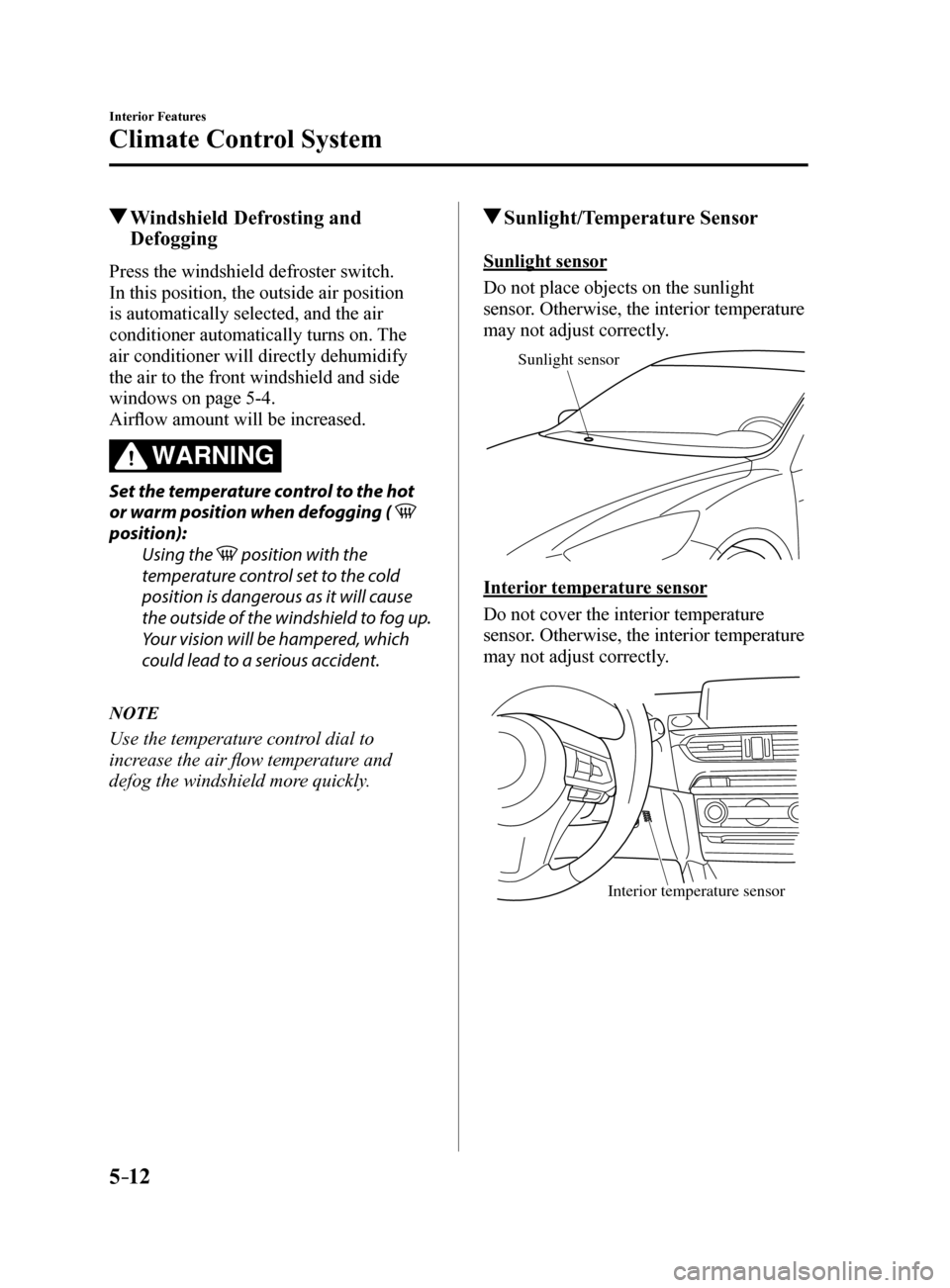
Sunlight/Temperature Sensor
Sunlight sensor
Do not place objects on the sunlight
sensor. Otherwise, the interior temperature
may not adjust correctly.
Sunlight sensor
Interior temperature sensor
Do not cover the interior temperature
sensor. Otherwise, the interior temperature
may not adjust correctly.
Interior temperature sensor
Mazda6_8FH2-EA-16F_Edition2.indb 122016/07/07 13:45:29
Page 335 of 578
5–41
Interior Features
Audio System
Applications
NOTE
Depending on the grade and specification,
the screen display may differ.
Select the
icon on the home screen to
display the Applications screen. The
following information can be verified.
Top screen ItemFunction
HD Radio™ Traffic
Map —
—
Fuel Economy
Monitor
Fuel
Consumption
Control
Status
(Vehicles
with
i-ELOOP)
Settings
Refer to Fuel
Economy
Monitor on
page 4-83.
Vehicle
Status
Monitor
Maintenance
Scheduled
Maintenance
Tire Rotation
Oil Change Refer to
Maintenance
Monitor on
page 6-18.
Warning
Guidance Warnings
currently
active can be
verified. Refer to If
a Warning
Light Turns
On or
Flashes on
page 7-22.
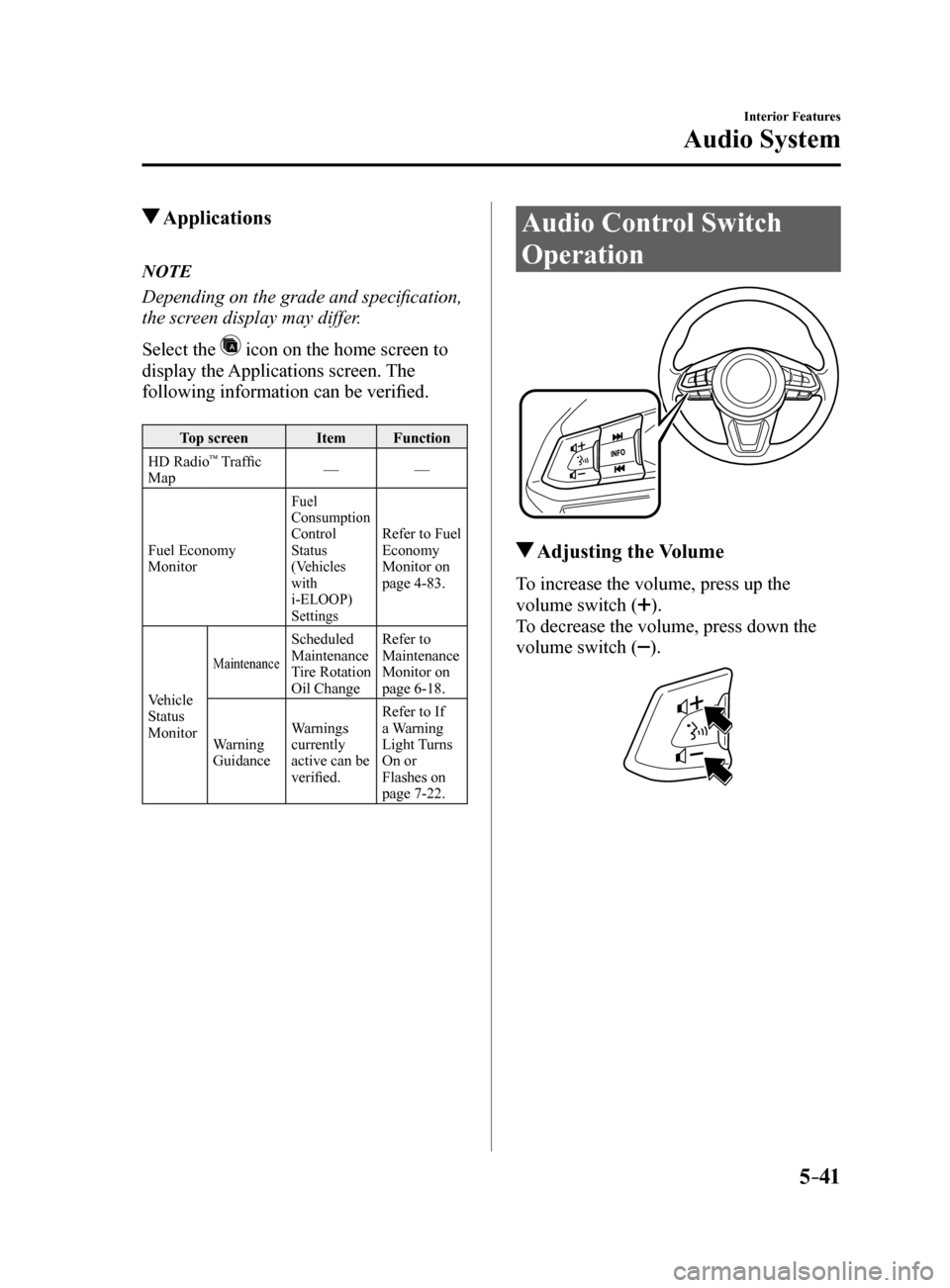
Audio Control Switch
Operation
Adjusting the Volume
To increase the volume, press up the
volume switch (
).
To decrease the volume, press down the
volume switch (
).
Mazda6_8FH2-EA-16F_Edition2.indb 412016/07/07 13:45:44
Page 382 of 578
5–88
Interior Features
Interior Equipment
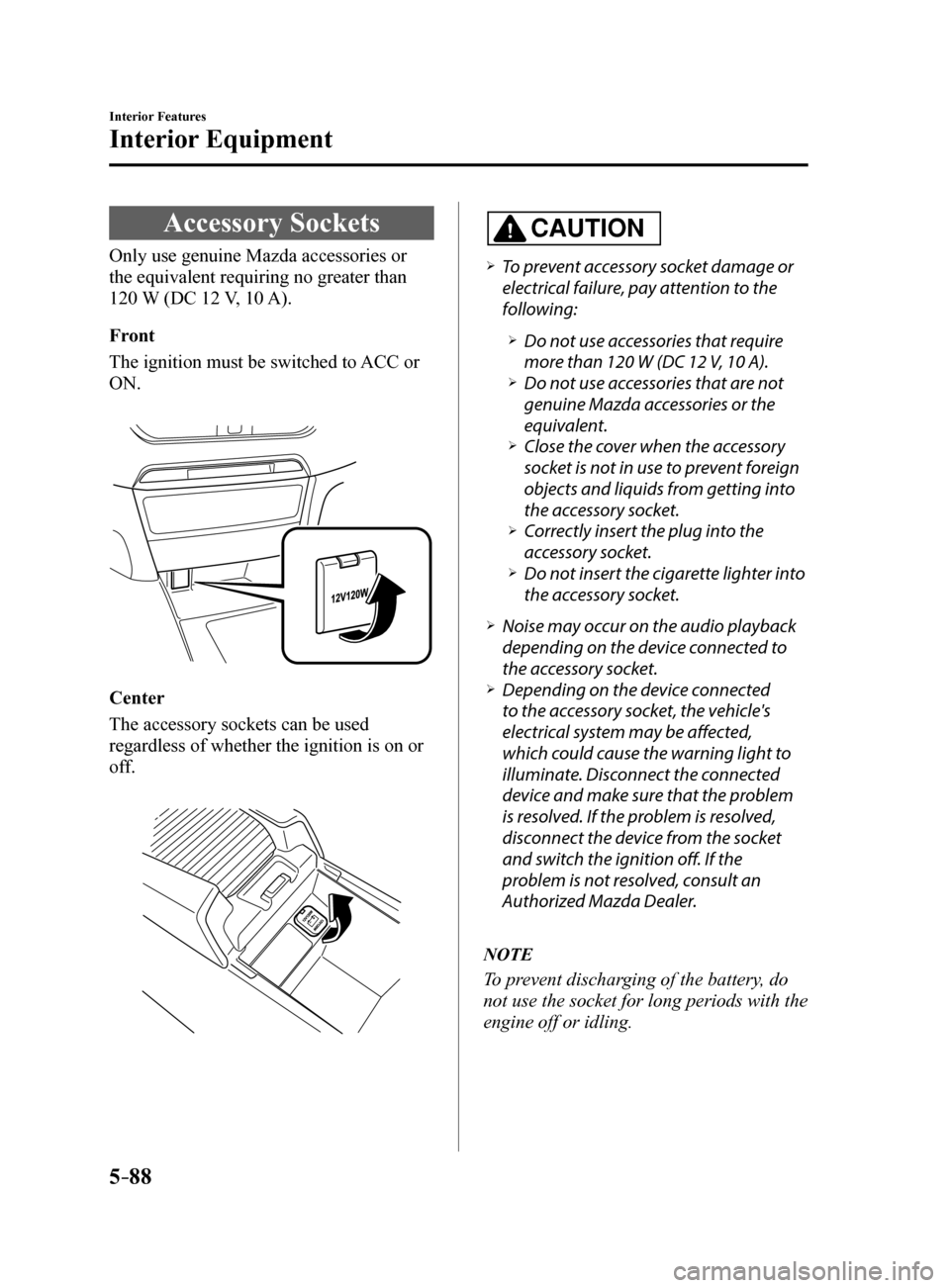
Accessory Sockets
Only use genuine Mazda accessories or
the equivalent requiring no greater than
120 W (DC 12 V, 10 A).
Front
The ignition must be switched to ACC or
ON.
Center
The accessory sockets can be used
regardless of whether the ignition is on or
off.
CAUTION
To prevent accessory socket damage or
electrical failure, pay attention to the
following:
Do not use accessories that require
more than 120 W (DC 12 V, 10 A).
Do not use accessories that are not
genuine Mazda accessories or the
equivalent.
Close the cover when the accessory
socket is not in use to prevent foreign
objects and liquids from getting into
the accessory socket.
Correctly insert the plug into the
accessory socket.
Do not insert the cigarette lighter into
the accessory socket.
Noise may occur on the audio playback
depending on the device connected to
the accessory socket.
Depending on the device connected
to the accessory socket, the vehicle's
electrical system may be affected,
which could cause the warning light to
illuminate. Disconnect the connected
device and make sure that the problem
is resolved. If the problem is resolved,
disconnect the device from the socket
and switch the ignition off. If the
problem is not resolved, consult an
Authorized Mazda Dealer.
NOTE
To prevent discharging of the battery, do
not use the socket for long periods with the
engine off or idling.
Mazda6_8FH2-EA-16F_Edition2.indb 882016/07/07 13:46:04
Page 385 of 578

5–91
Interior Features
Interior Equipment
Storage Compartments
WARNING
Keep storage boxes closed when
driving:Driving with the storage boxes open is
dangerous. To reduce the possibility of
injury in an accident or a sudden stop,
keep the storage boxes closed when
driving.
Do not put articles in storage spaces
with no lid: Putting articles in storage spaces with
no lid is dangerous as they could be
thrown around the cabin if the vehicle
is suddenly accelerated and cause
injury depending on how the article is
stored.
CAUTION
Do not leave lighters or eyeglasses
in the storage boxes while parked
under the sun. A lighter could explode
or the plastic material in eyeglasses
could deform and crack from high
temperature.
Overhead Console
This console box is designed to store
eyeglasses or other accessories.
Push and release to open.
Storage Pocket
To use, open the lid.
Mazda6_8FH2-EA-16F_Edition2.indb 912016/07/07 13:46:05