roof MAZDA MODEL 6 2017 (in English) User Guide
[x] Cancel search | Manufacturer: MAZDA, Model Year: 2017, Model line: MODEL 6, Model: MAZDA MODEL 6 2017Pages: 578, PDF Size: 54.72 MB
Page 111 of 578
3–37
Before Driving
Windows
*Some models.
NOTE
When the power window lock switch is
in the locked position, the light on each
power window switch, except for the
driver's power window switch, turns off.
The light may be difficult to see depending
on the surrounding brightness.Moonroof *
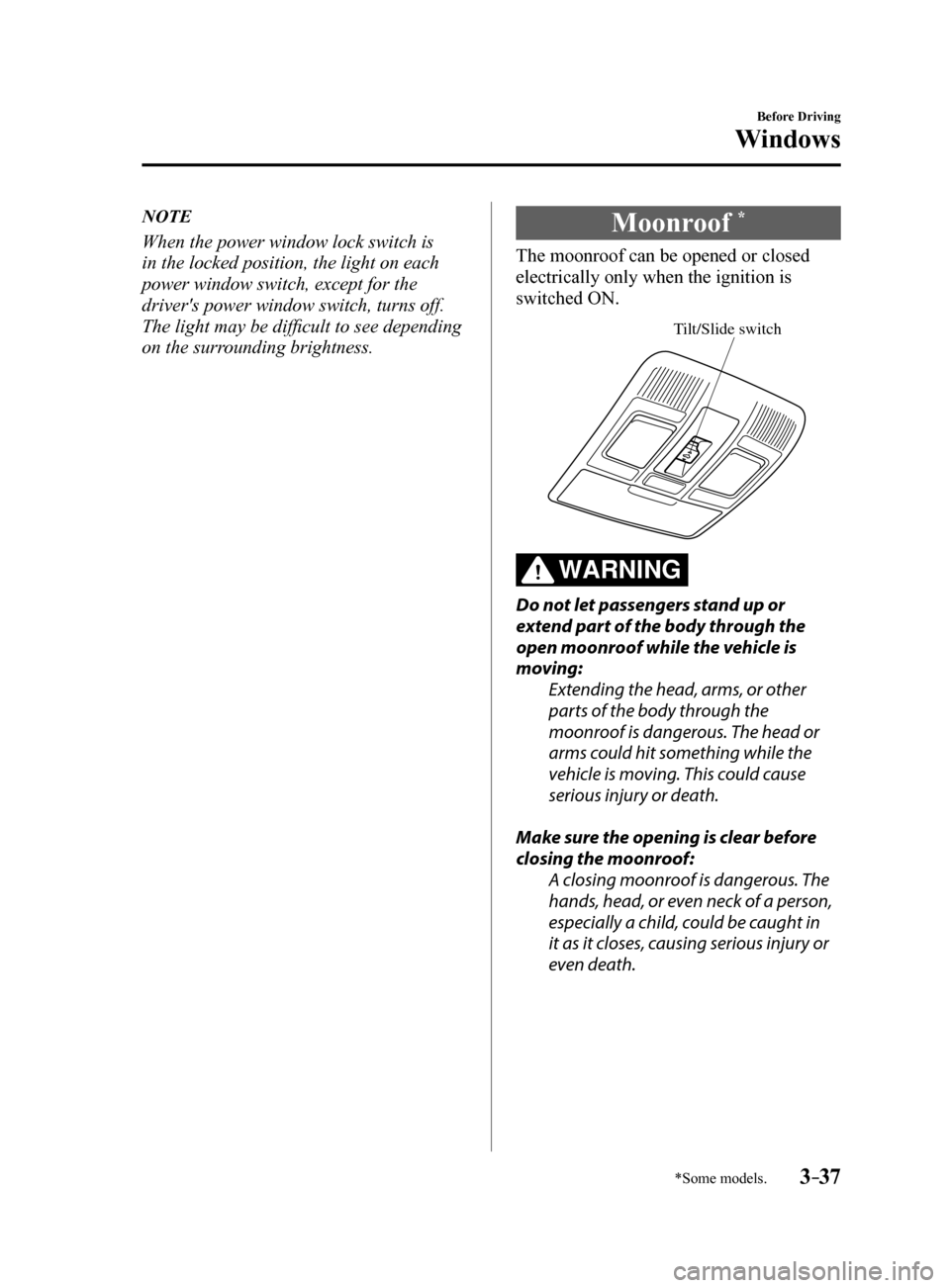
The moonroof can be opened or closed
electrically only when the ignition is
switched ON.
Tilt/Slide switch
WARNING
Do not let passengers stand up or
extend part of the body through the
open moonroof while the vehicle is
moving:
Extending the head, arms, or other
parts of the body through the
moonroof is dangerous. The head or
arms could hit something while the
vehicle is moving. This could cause
serious injury or death.
Make sure the opening is clear before
closing the moonroof: A closing moonroof is dangerous. The
hands, head, or even neck of a person,
especially a child, could be caught in
it as it closes, causing serious injury or
even death.
Mazda6_8FH2-EA-16F_Edition2.indb 372016/07/07 13:44:30
Page 112 of 578

3–38
Before Driving
Windows
NOTE
Before washing your Mazda, make sure
the moonroof is completely closed so that
water does not get inside the cabin area.
After washing your Mazda or after it rains,
wipe the water off the moonroof before
operating it to avoid water penetration
which could cause rust and water damage
to your headliner.
Tilt Operation
The rear of the moonroof can be tilted
open to provide more ventilation.
To fully tilt automatically, momentarily
press the tilt/slide switch.
To fully close automatically, momentarily
press the tilt/slide switch in the forward
direction.
To stop tilting partway, press the tilt/slide
switch.
Close (Tilt down)
Tilt up
Slide Operation
To fully open automatically, momentarily
press the tilt/slide switch in the backward
direction.
To fully close automatically, momentarily
press the tilt/slide switch in the forward
direction.
To stop sliding partway, press the tilt/slide
switch.
Close Open
Power Moonroof Reset Procedure
If the battery is disconnected, the
moonroof will not operate. The moonroof
will not operate correctly until it is reset.
Carry out the following procedure to reset
the moonroof and resume operation:
1. Switch the ignition ON.
2. Press the tilt switch, to partially tilt
open the rear of the moonroof.
3. Repeat Step 2. The rear of the
moonroof tilts open to the fully open
position, then closes a little.
NOTE
If the reset procedure is performed while
the moonroof is in the slide position
(partially open) it will close before the
rear tilt opens.
Mazda6_8FH2-EA-16F_Edition2.indb 382016/07/07 13:44:30
Page 113 of 578

3–39
Before Driving
Windows
Jam-safe Moonroof
If a person's hands, head or an object
blocks the moonroof while it is closing,
the moonroof will stop and move in the
reverse direction.
WARNING
Make sure nothing blocks the moonroof
just before it reaches the fully closed
position:Blocking the moonroof just before
it reaches the closed position is
dangerous.
In this case, the jam-safe function
cannot prevent the moonroof from
closing. If fingers are caught, serious
injuries could occur.
NOTE
Depending on driving conditions, a
closing moonroof could stop and start
opening when the moonroof feels a
shock that is similar to something
blocking it.
The moonroof's jam-safe function does
not function while the moonroof is
initializing.
Sunshade
The sunshade can be opened and closed
by hand.
The sunshade opens automatically when
the moonroof is opened, but must be
closed by hand.
Sunshade
CAUTION
The sunshade does not tilt. To avoid
damaging the sunshade, do not push up
on it.
Do not close the sunshade while the
moonroof is opening. Trying to force the
sunshade closed could damage it.
Mazda6_8FH2-EA-16F_Edition2.indb 392016/07/07 13:44:31
Page 116 of 578
3–42
Before Driving
Security System
*Some models.
Theft-Deterrent System*
If the theft-deterrent system detects an
inappropriate entry into the vehicle,
which could result in the vehicle or its
contents being stolen, the alarm alerts the
surrounding area of an abnormality by
sounding the horn and flashing the hazard
warning lights.
The system will not function unless it's
properly armed. So when you leave the
vehicle, follow the arming procedure
correctly.
Operation
System triggering conditions
The horn sounds intermittently and the
hazard warning lights flash for about 30
seconds when the system is triggered by
any one of the following:
Unlocking a door with the key, door
lock switch, or an inside door-lock knob.
Forcing open a door, the hood or the
trunk lid.
Opening the hood by operating the hood
release handle.
Switching the ignition ON without using
the push button start.
If the system is triggered again, the lights
and horn will activate until the driver's
door or the trunk lid is unlocked with the
transmitter.
(With the advanced keyless function)
The lights and horn can also be
deactivated by pressing the request switch
on a door.
NOTE
If the battery goes dead while the theft-
deterrent system is armed, the horn will
activate and the hazard warning lights
will flash when the battery is charged or
replaced.
How to Arm the System
1. Close the windows and the moonroof *
securely.
2. Switch the ignition OFF.
3. Make sure the hood, the doors, and the
trunk lid are closed.
4. Press the lock button on the transmitter
or lock the driver's door from the
outside with the auxiliary key.
The hazard warning lights will flash
once.
The following method will also arm the
theft-deterrent system:
Press the door-lock switch “
” while
any door is open and then close all of
the doors.
(With the advanced keyless function)
Press a request switch.
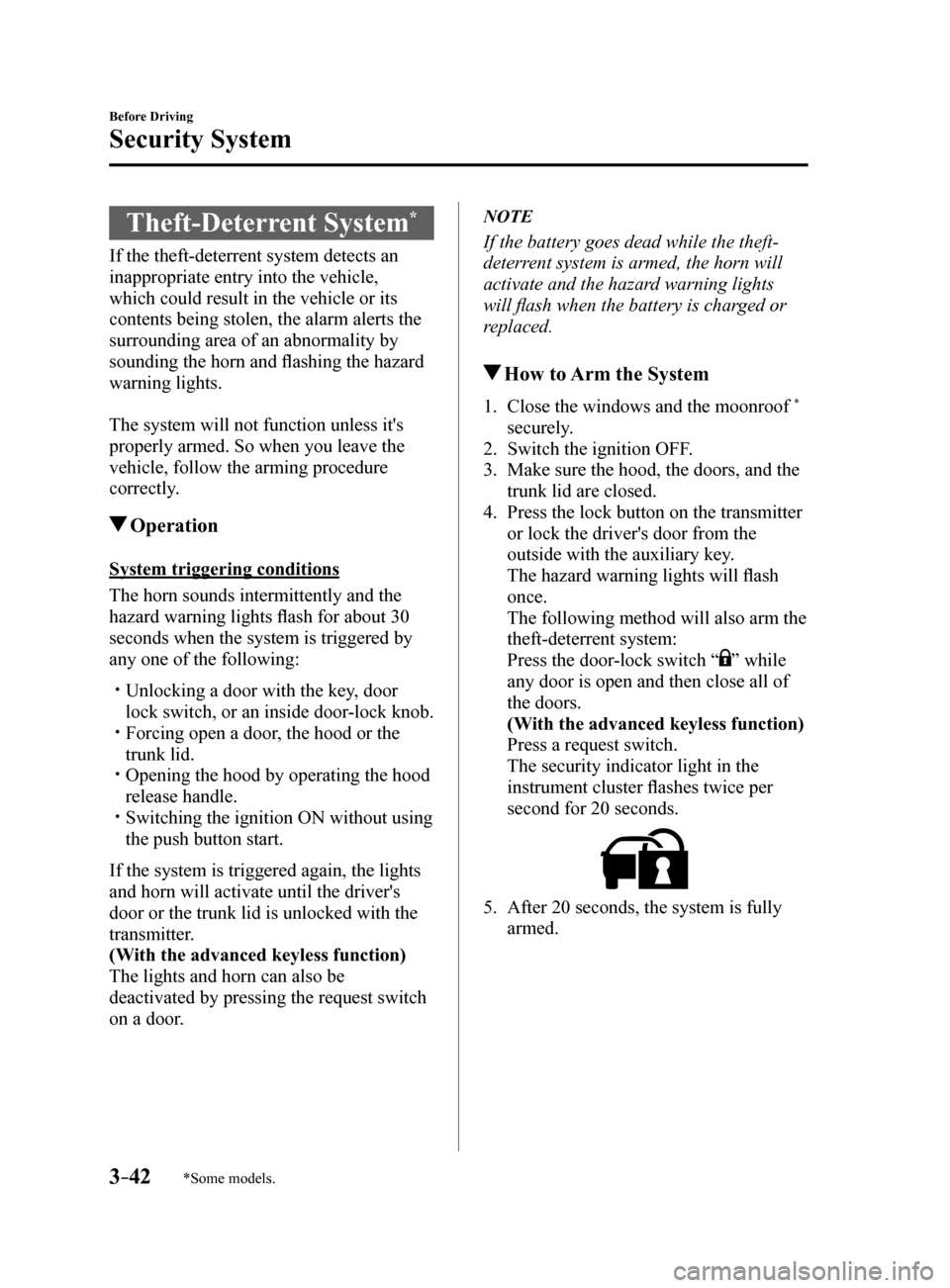
The security indicator light in the
instrument cluster flashes twice per
second for 20 seconds.
5. After 20 seconds, the system is fully
armed.
Mazda6_8FH2-EA-16F_Edition2.indb 422016/07/07 13:44:31
Page 272 of 578
4–14 8
When Driving
i-ACTIVSENSE
NOTE
In the following cases, the Forward Sensing Camera (FSC) cannot detect target objects
correctly, and each system may be unable to operate normally.
The height of the vehicle ahead is low. You drive your vehicle at the same speed as the vehicle ahead. Headlights are not turned on during the night or when going through a tunnel.
In the following cases, the Forward Sensing Camera (FSC) may not be able to detect
target objects correctly.
Under bad weather condition, such as rain, fog and snow. The window washer is being used or the windshield wipers are not used when it's raining. Ice, fog, snow, frost, rainfall, dirt, or foreign matter such as a plastic bag is stuck on
the windshield.
Trucks with low loading platforms and vehicles with an extremely low or high profile. When driving next to walls with no patterning (including fences and lon\
gitudinally
striped walls).
The taillights of the vehicle ahead are turned off. A vehicle is outside the illumination range of the headlights. The vehicle is making a sharp turn, or ascending or descending a steep s\
lope. Entering or exiting a tunnel. Heavy luggage is loaded causing the vehicle to tilt. Strong light is shone at the front of the vehicle (back light or high-beam light from on-
coming vehicles).
There are many light emitters on the vehicle ahead. When the vehicle ahead is not equipped with taillights or the taillights\
are turned off at
nighttime.
Elongated luggage or cargo is loaded onto installed roof rails and covers the Forward
Sensing Camera (FSC).
Exhaust gas from the vehicle in front, sand, snow, and water vapor rising from
manholes and grating, and water splashed into the air.
When towing a malfunctioning vehicle. The vehicle is driven with tires having significantly different wear. The vehicle is driven on down slopes or bumpy roads. There are water puddles on the road. The surroundings are dark such as during the night, early evening, or early morning,
or in a tunnel or indoor parking lot.
The illumination brightness of the headlights is reduced or the headlight illumination
is weakened due to dirt or a deviated optical axis.
The target object enters the blind spot of the Forward Sensing Camera (FSC). A person or object bursts onto the road from the shoulder or cuts right in front of you. You change lanes and approach a vehicle ahead. When driving extremely close to the target object. Tire chains or a temporary spare tire is installed. The vehicle ahead has a special shape. For example, a vehicle towing a t\
railer house
or a boat, or a vehicle carrier carrying a vehicle with its front pointed rearward.
Mazda6_8FH2-EA-16F_Edition2.indb 1482016/07/07 13:45:20
Page 287 of 578
 User Guide 4–163
When Driving
Rear View Monitor
Rear View Monitor
The rear view monitor provides visual images of the rear of the vehicle \
when reversing.
WARNING
Always drive carefully confirming the safety")
4–163
When Driving
Rear View Monitor
Rear View Monitor
The rear view monitor provides visual images of the rear of the vehicle \
when reversing.
WARNING
Always drive carefully confirming the safety of the rear and the surrounding conditions
by looking directly with your eyes:Reversing the vehicle by only looking at the screen is dangerous as it may cause an
accident or a collision with an object. The rear view monitor is only a visual assist device
when reversing the vehicle. The images on the screen may be different from the actual
conditions.
CAUTION
Do not use the rear view monitor under the following conditions: Using the rear view
monitor under the following conditions is dangerous and could result in injury or vehicle
damage or both.
Icy or snow-covered roads. Tire chains or a temporary spare tire is installed. The trunk lid is not fully closed. The vehicle is on a road incline.
When the display is cold, images may course across the monitor or the screen and may be
dimmer than usual, which could cause difficulty in confirming the surrounding conditions
of the vehicle. Always drive carefully confirming the safety of the rear and the surrounding
conditions by looking directly with your eyes.
Do not apply excessive force to the camera. The camera position and angle may deviate. Do not disassemble, modify, or remove it as it may no longer be waterproof. The camera cover is made of plastic. Do not apply degreasing agents, organic solvents,
wax, or glass coating agents to the camera cover. If any are spilled on the cover, wipe off
with a soft cloth immediately.
Do not rub the camera cover forcefully with an abrasive or hard brush. The camera cover or
lens may be scratched which might affect the images.
Mazda6_8FH2-EA-16F_Edition2.indb 1632016/07/07 13:45:22
Page 351 of 578
5–57
Interior Features
Bluetooth®
Cancel
To put the Bluetooth
® Hands-Free system
in standby mode, say, “Cancel” while in
voice recognition mode.
To prevent a deterioration in the voice
recognition rate and voice quality, the
following points should be observed:
The voice recognition cannot be
performed while voice guidance or
the beep sound is operating. Wait
until the voice guidance or the beep
sound is finished before saying your
commands.
Phone related commands are available
only when your phone is connected via
Bluetooth
®. Make sure your phone is
connected via Bluetooth® before you
operate phone related voice commands.
Music play commands, such as Play
Artist and Play Album can be used only
in USB audio mode.
Do not speak too slowly or loudly (no
loud voice).
Speak clearly, without pausing between
words or numbers.
Dialects or different wording other
than hands-free prompts cannot be
recognized by voice recognition. Speak
in the wording specified by the voice
commands.
It is not necessary to face the
microphone or approach it. Speak the
voice commands while maintaining a
safe driving position.
Close the windows and/or the moonroof
to reduce loud noises from outside
the vehicle, or turn down the airflow
of the air-conditioning system while
Bluetooth
® Hands-Free is being used. Make sure the vents are not directing air
up towards the microphone.
NOTE
If the voice recognition performance is not
satisfactory.
Refer to Troubleshooting on page 5-81.
Mazda6_8FH2-EA-16F_Edition2.indb 572016/07/07 13:45:50
Page 448 of 578
6–62
Maintenance and Care
Owner Maintenance
*Some models.
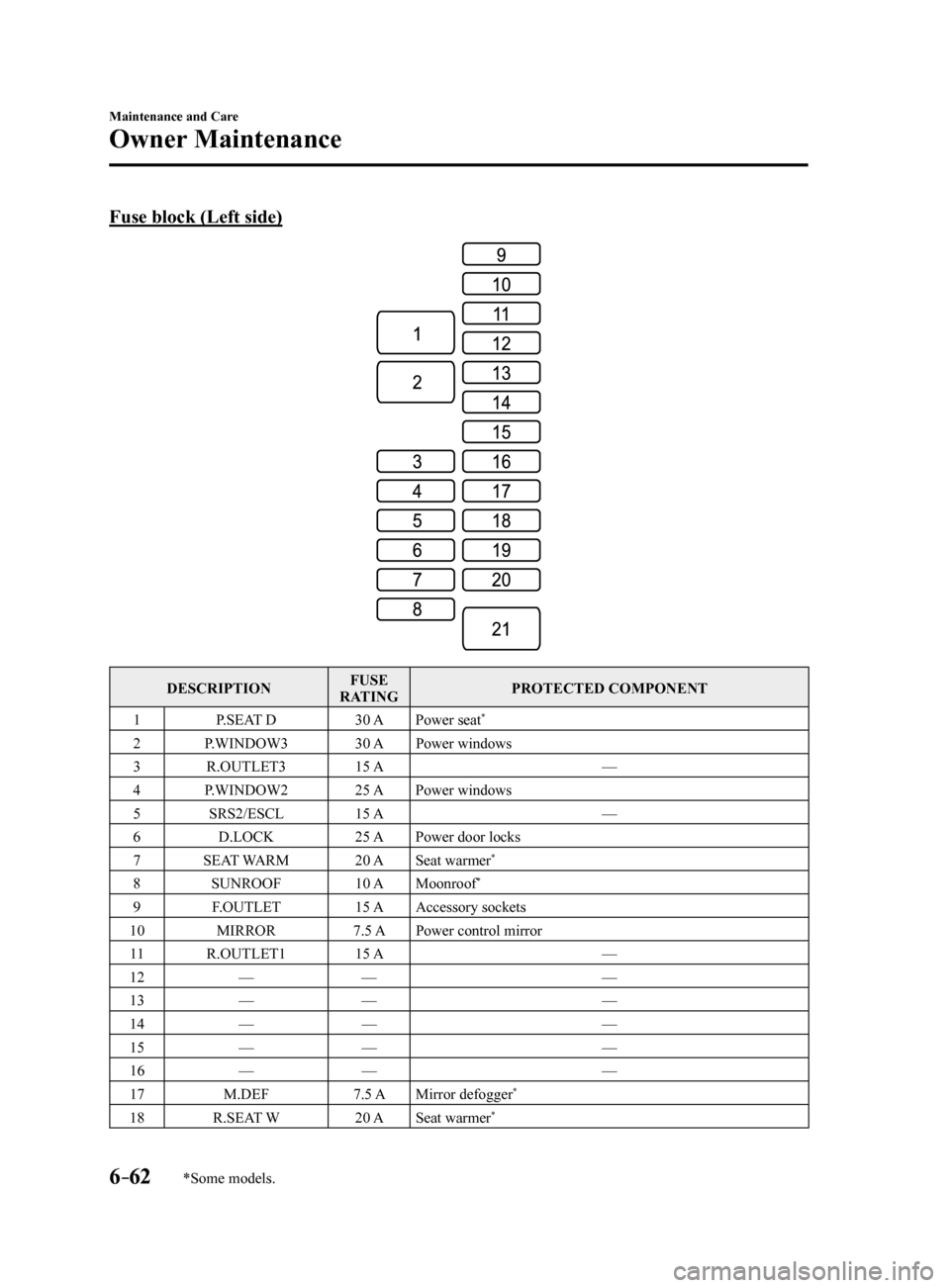
Fuse block (Left side)
DESCRIPTIONFUSE
RATING PROTECTED COMPONENT
1 P.SEAT D 30 APower seat
*
2 P.WINDOW3 30 APower windows
3 R.OUTLET3 15 A —
4 P.WINDOW2 25 APower windows
5 SRS2/ESCL 15 A —
6 D.LOCK 25 APower door locks
7 SEAT WARM 20 ASeat warmer
*
8 SUNROOF 10 AMoonroof*
9 F.OUTLET 15 AAccessory sockets
10 MIRROR 7.5 APower control mirror
11 R.OUTLET1 15 A —
12 — — —
13 — — —
14 — — —
15 — — —
16 — — —
17 M.DEF 7.5 AMirror defogger
*
18 R.SEAT W 20 ASeat warmer*
Mazda6_8FH2-EA-16F_Edition2.indb 622016/07/07 13:46:22
Page 452 of 578
6–66
Maintenance and Care
Appearance Care
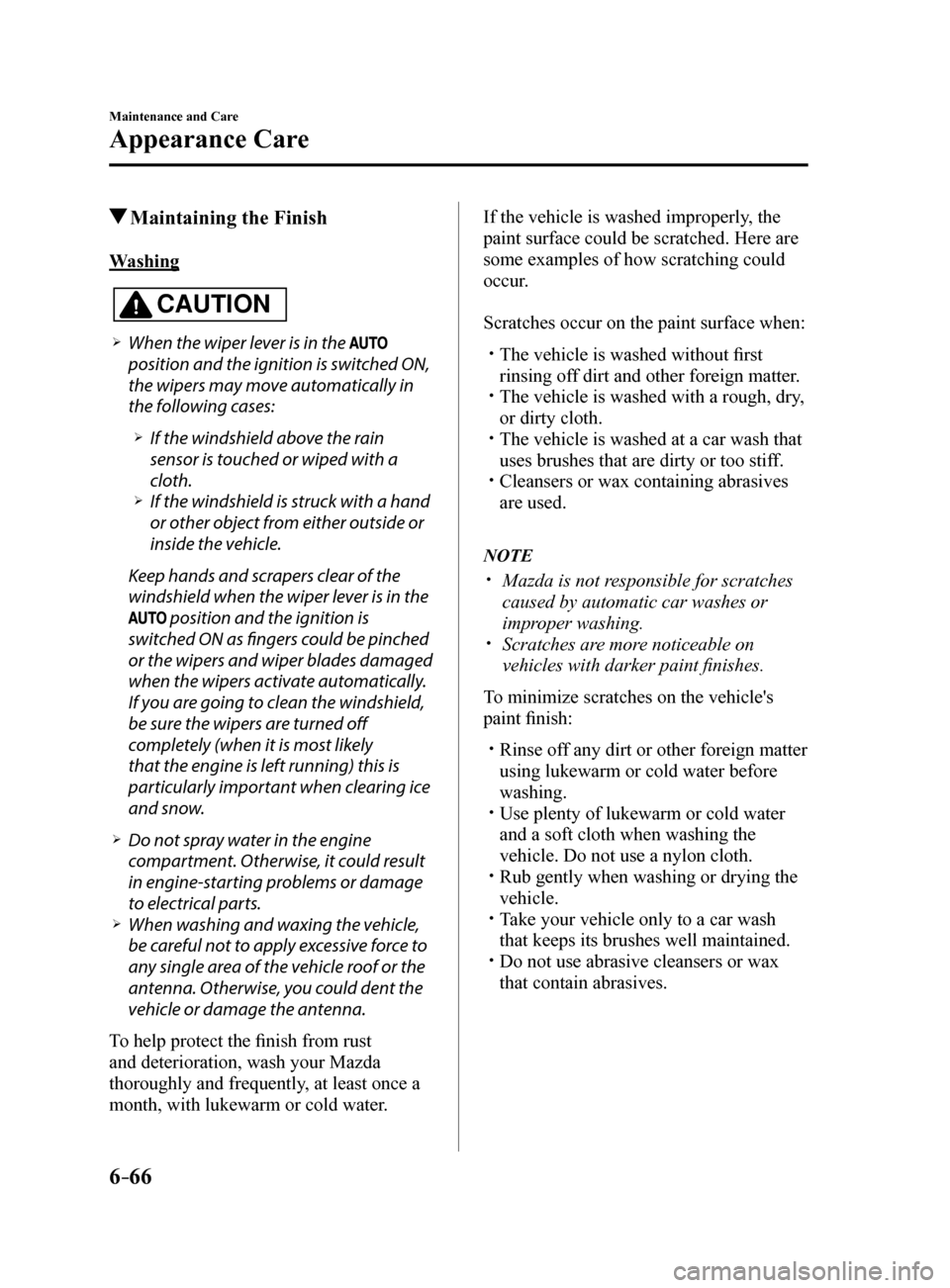
Maintaining the Finish
Washing
CAUTION
When the wiper lever is in the
position and the ignition is switched ON,
the wipers may move automatically in
the following cases:
If the windshield above the rain
sensor is touched or wiped with a
cloth.
If the windshield is struck with a hand
or other object from either outside or
inside the vehicle.
Keep hands and scrapers clear of the
windshield when the wiper lever is in the
position and the ignition is
switched ON as fingers could be pinched
or the wipers and wiper blades damaged
when the wipers activate automatically.
If you are going to clean the windshield,
be sure the wipers are turned off
completely (when it is most likely
that the engine is left running) this is
particularly important when clearing ice
and snow.
Do not spray water in the engine
compartment. Otherwise, it could result
in engine-starting problems or damage
to electrical parts.
When washing and waxing the vehicle,
be careful not to apply excessive force to
any single area of the vehicle roof or the
antenna. Otherwise, you could dent the
vehicle or damage the antenna.
To help protect the finish from rust
and deterioration, wash your Mazda
thoroughly and frequently, at least once a
month, with lukewarm or cold water. If the vehicle is washed improperly, the
paint surface could be scratched. Here are
some examples of how scratching could
occur.
Scratches occur on the paint surface when:
The vehicle is washed without first
rinsing off dirt and other foreign matter.
The vehicle is washed with a rough, dry,
or dirty cloth.
The vehicle is washed at a car wash that
uses brushes that are dirty or too stiff.
Cleansers or wax containing abrasives
are used.
NOTE
Mazda is not responsible for scratches
caused by automatic car washes or
improper washing.
Scratches are more noticeable on
vehicles with darker paint finishes.
To minimize scratches on the vehicle's
paint finish:
Rinse off any dirt or other foreign matter
using lukewarm or cold water before
washing.
Use plenty of lukewarm or cold water
and a soft cloth when washing the
vehicle. Do not use a nylon cloth.
Rub gently when washing or drying the
vehicle.
Take your vehicle only to a car wash
that keeps its brushes well maintained.
Do not use abrasive cleansers or wax
that contain abrasives.
Mazda6_8FH2-EA-16F_Edition2.indb 662016/07/07 13:46:22
Page 534 of 578
8–32
Customer Information and Reporting Safety Defects
Tire Information (U.S.A.)
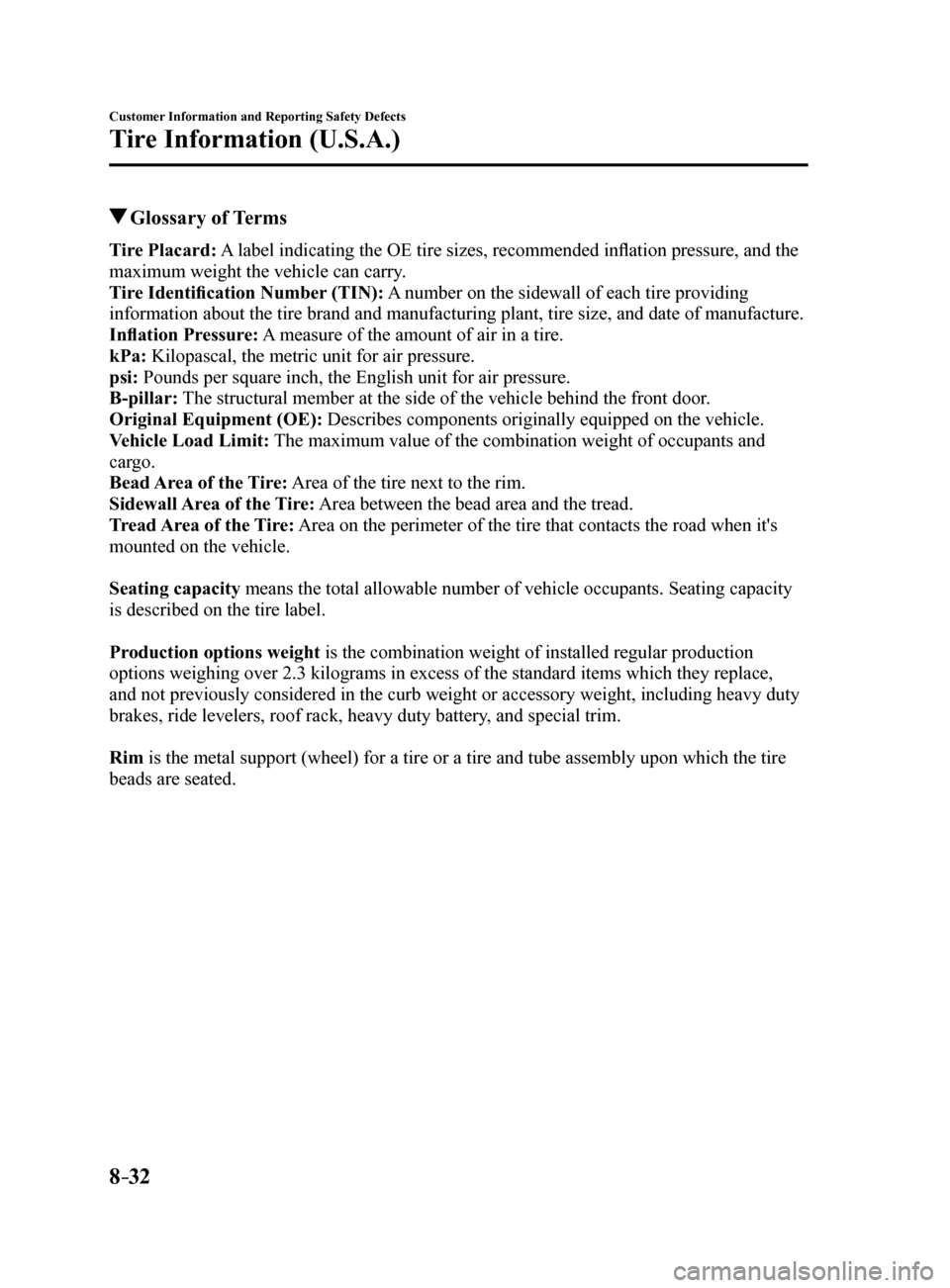
Glossary of Terms
Tire Placard: A label indicating the OE tire sizes, recommended inflation pressure, and the
maximum weight the vehicle can carry.
Tire Identification Number (TIN): A number on the sidewall of each tire providing
information about the tire brand and manufacturing plant, tire size, and\
date of manufacture.
Inflation Pressure: A measure of the amount of air in a tire.
kPa: Kilopascal, the metric unit for air pressure.
psi: Pounds per square inch, the English unit for air pressure.
B-pillar: The structural member at the side of the vehicle behind the front door.
Original Equipment (OE): Describes components originally equipped on the vehicle.
Vehicle Load Limit: The maximum value of the combination weight of occupants and
cargo.
Bead Area of the Tire: Area of the tire next to the rim.
Sidewall Area of the Tire: Area between the bead area and the tread.
Tread Area of the Tire: Area on the perimeter of the tire that contacts the road when it's
mounted on the vehicle.
Seating capacity means the total allowable number of vehicle occupants. Seating capacity\
is described on the tire label.
Production options weight is the combination weight of installed regular production
options weighing over 2.3 kilograms in excess of the standard items whic\
h they replace,
and not previously considered in the curb weight or accessory weight, in\
cluding heavy duty
brakes, ride levelers, roof rack, heavy duty battery, and special trim.
Rim is the metal support (wheel) for a tire or a tire and tube assembly u\
pon which the tire
beads are seated.
Mazda6_8FH2-EA-16F_Edition2.indb 322016/07/07 13:46:40