ECO mode MAZDA MODEL 6 2017 (in English) Owner's Manual
[x] Cancel search | Manufacturer: MAZDA, Model Year: 2017, Model line: MODEL 6, Model: MAZDA MODEL 6 2017Pages: 578, PDF Size: 54.72 MB
Page 172 of 578
4–48
When Driving
Automatic Transaxle
WARNING
Do not use engine braking on slippery
road surfaces or at high speeds:Shifting down while driving on wet,
snowy, or frozen roads, or while driving
at high speeds causes sudden engine
braking, which is dangerous. The
sudden change in tire speed could
cause the tires to skid. This could
lead to loss of vehicle control and an
accident.
Keep your hands on the steering wheel
rim when using fingers on the steering
shift switches: Putting your hands inside the rim of
the steering wheel when using the
steering shift switches is dangerous.
If the driver's air bag were to deploy
in a collision, your hands could be
impacted causing injury.
NOTE
When driving at high speeds, the gear
may not shift down.
During deceleration, the gear may
automatically shift down depending on
vehicle speed.
When depressing the accelerator fully,
the transaxle will shift to a lower gear,
depending on vehicle speed. However,
the gears do not kickdown while the
DSC is turned off.
Second Gear Fixed Mode
When the selector lever is moved back
while the vehicle speed is about 10 km/h
(6.2 mph) or less, the transaxle is set in the
second gear fixed mode. The gear is fixed
in second while in this mode for easier
acceleration from a stop and driving on
slippery roads such as snow-covered
roads.
If the selector lever is moved back
or
forward
while in the second gear fixed
mode, the mode will be canceled.
Mazda6_8FH2-EA-16F_Edition2.indb 482016/07/07 13:44:53
Page 173 of 578
 Owners Manual 4–49
When Driving
Automatic Transaxle
Shift Gear (Shifting) Speed Limit
For each gear position while in the manual mode, the speed limit is set \
as follows: When the
selector lever is operated wi")
4–49
When Driving
Automatic Transaxle
Shift Gear (Shifting) Speed Limit
For each gear position while in the manual mode, the speed limit is set \
as follows: When the
selector lever is operated within the range of the speed limit, the gear\
is shifted.
Shift up
The gear does not shift up while the vehicle speed is lower than the spe\
ed limit.
Shift down
The gear does not shift down while the vehicle speed exceeds the speed l\
imit.
If the vehicle speed exceeds the speed limit and the gear does not shift\
down, the gear
position indication flashes 2 times to notify the driver that the gear cannot be shifted.
Kickdown
When the accelerator pedal is depressed fully while driving, the gear sh\
ifts down.
However, the gears do not kickdown while the DSC is turned off.
NOTE
The gear also shifts down using kickdown while in the second gear fixed mode.
Auto-shift down
The gear shifts down automatically depending on the vehicle speed during\
deceleration.
NOTE
If the vehicle comes to a stop while in the second gear fixed mode, the gear remains in
second.
Mazda6_8FH2-EA-16F_Edition2.indb 492016/07/07 13:44:53
Page 175 of 578

4–51
When Driving
Automatic Transaxle
Direct Mode
Direct mode can be used for temporarily
switching gears by operating the steering
shift switch while the vehicle is being
driven with the selector lever in the D
range.
While in direct mode, the D and M
indication illuminate and the gear position
in use is illuminated.
Direct mode is canceled (released) under
the following conditions.
The UP switch () is pulled
rearward for a certain amount of time or
longer.
The vehicle is driven for a certain
amount of time or longer (time differs
depending on the driving conditions
while operating).
The vehicle is stopped or moving at a
slow speed.
Gear position indicator
Direct mode indicator
NOTE
Shifting up and down while in direct mode
may not be possible depending on the
vehicle speed. In addition, because direct
mode is canceled (released) depending
on the rate of acceleration or if the
accelerator is fully depressed, use of the
manual shift mode is recommended if you
need to drive the vehicle in a particular
gear for long periods.
Mazda6_8FH2-EA-16F_Edition2.indb 512016/07/07 13:44:53
Page 179 of 578
4–55
When Driving
Switches and Controls
*Some models.
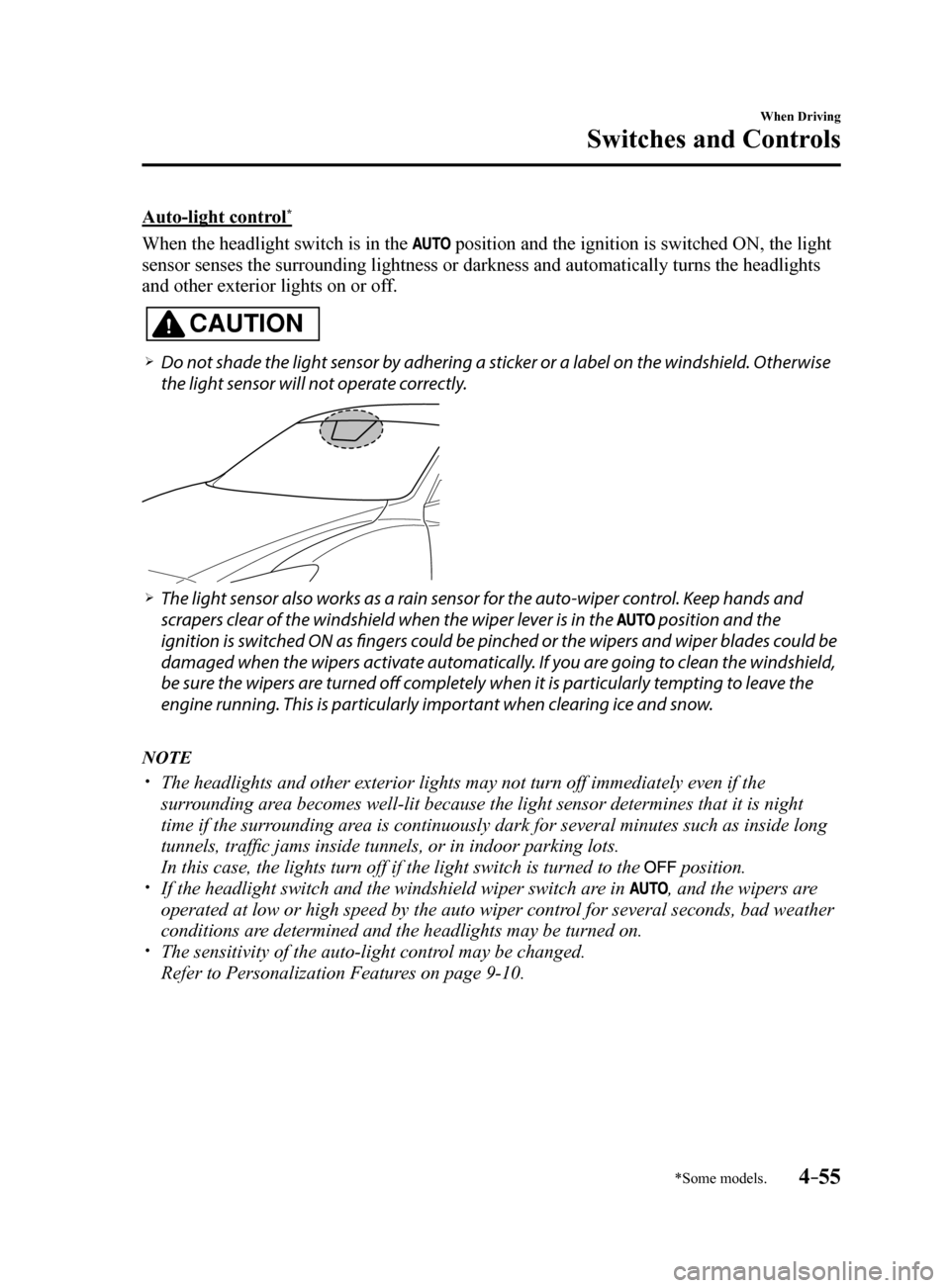
Auto-light control*
When the headlight switch is in the position and the ignition is switched ON, the light
sensor senses the surrounding lightness or darkness and automatically tu\
rns the headlights
and other exterior lights on or off.
CAUTION
Do not shade the light sensor by adhering a sticker or a label on the windshield. Otherwise
the light sensor will not operate correctly.
The light sensor also works as a rain sensor for the auto-wiper control. Keep hands and
scrapers clear of the windshield when the wiper lever is in the
position and the
ignition is switched ON as fingers could be pinched or the wipers and wiper blades could be
damaged when the wipers activate automatically. If you are going to clean the windshield,
be sure the wipers are turned off completely when it is particularly tempting to leave the
engine running. This is particularly important when clearing ice and snow.
NOTE
The headlights and other exterior lights may not turn off immediately ev\
en if the
surrounding area becomes well-lit because the light sensor determines that it is night\
time if the surrounding area is continuously dark for several minutes such as inside long
tunnels, traffic jams inside tunnels, or in indoor parking lots.
In this case, the lights turn off if the light switch is turned to the
position. If the headlight switch and the windshield wiper switch are in , and the wipers are
operated at low or high speed by the auto wiper control for several seconds, bad weather
conditions are determined and the headlights may be turned on.
The sensitivity of the auto-light control may be changed.
Refer to Personalization Features on page 9-10.
Mazda6_8FH2-EA-16F_Edition2.indb 552016/07/07 13:44:54
Page 210 of 578
4–86
When Driving
Drive Selection
*Some models.
Drive Selection*
Drive selection is a system to switch the vehicle's drive mode. When the sport mode
is selected, vehicle's response against accelerator operation is enhance\
d. This provides
additional quick acceleration which may be needed to safely make maneuvers such as lane
changes, merging onto freeways, or passing other vehicles.
CAUTION
Do not use the sport mode when driving on slippery roads such as wet or snow-covered
roads. It may cause tire slipping.
NOTE
When the sport mode is selected, driving at higher engine speeds increases and it may
increase fuel consumption. Mazda recommends that you cancel the sport mode on normal
driving.
Drive mode cannot be switched in the following conditions:
ABS/TCS/DSC is operating The Mazda Radar Cruise Control (MRCC) system/cruise control is operating. Steering wheel is being operated abruptly
Drive Selection Switch
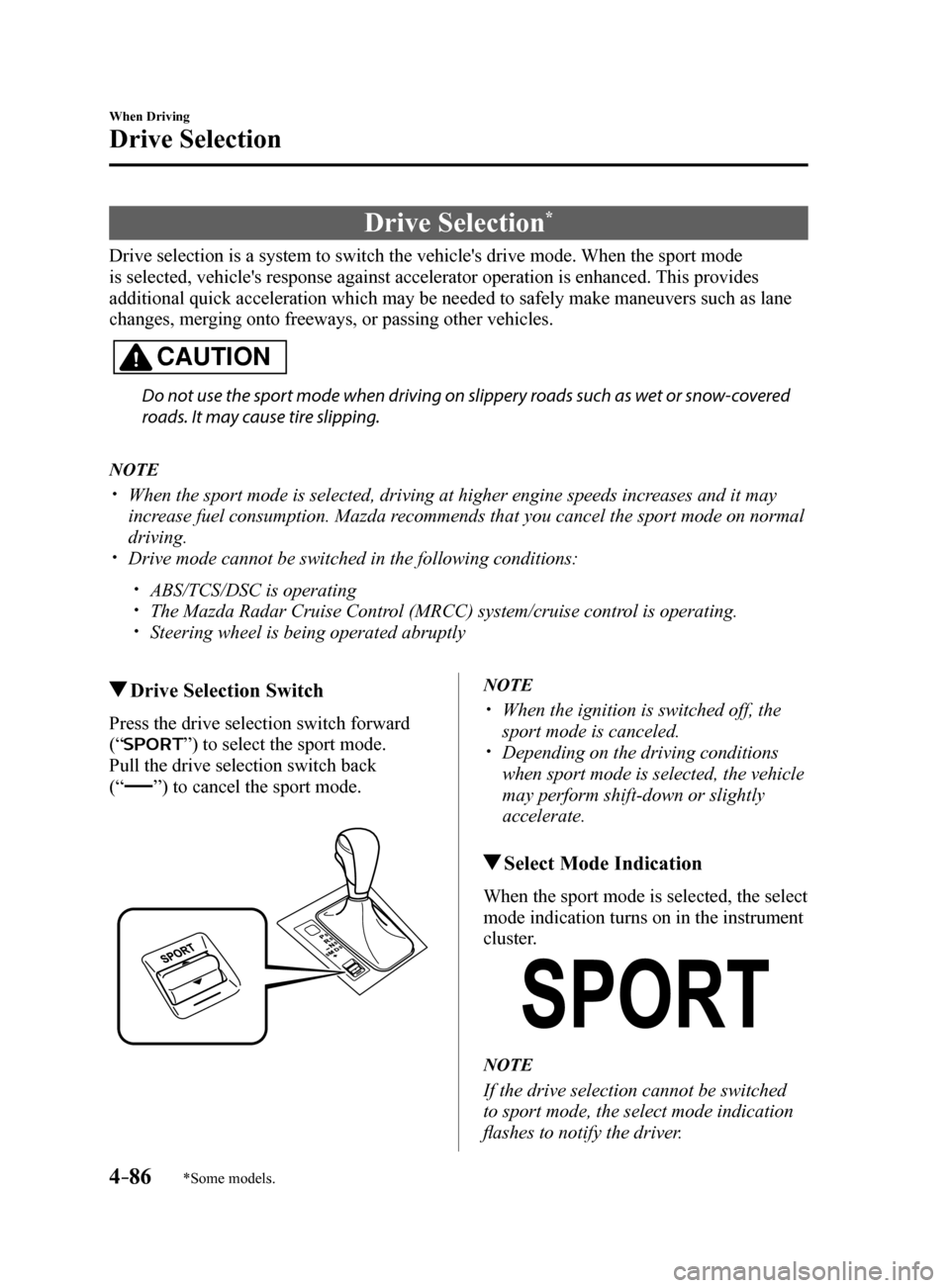
Press the drive selection switch forward
(“
”) to select the sport mode.
Pull the drive selection switch back
(“”) to cancel the sport mode.
NOTE
When the ignition is switched off, the
sport mode is canceled.
Depending on the driving conditions
when sport mode is selected, the vehicle
may perform shift-down or slightly
accelerate.
Select Mode Indication
When the sport mode is selected, the select
mode indication turns on in the instrument
cluster.
NOTE
If the drive selection cannot be switched
to sport mode, the select mode indication
flashes to notify the driver.
Mazda6_8FH2-EA-16F_Edition2.indb 862016/07/07 13:45:04
Page 212 of 578
4–88
When Driving
i-ACTIVSENSE
*Some models.
i-ACTIVSENSE*
i-ACTIVSENSE is a collective term covering a series of advanced safety and driver support
systems which make use of a Forward Sensing Camera (FSC) and radar sen\
sors. These
systems consist of active safety and pre-crash safety systems.
These systems are designed to assist the driver in safer driving by redu\
cing the load on the
driver and helping to avert collisions or reduce their severity. However, because each system
has its limitations, always drive carefully and do not rely solely on th\
e systems.
Active Safety Technology
Active Safety Technology supports safer driving by helping the driver to recognize pote\
ntial
hazards and avert accidents.
Driver awareness support systems
Nighttime visibility
Adaptive Front Lighting System (AFS) ........................................................................\
......4-90
High Beam Control System (HBC) ........................................................................\
............ 4-91
Rear side detection
Blind Spot Monitoring (BSM) ........................................................................\
.................... 4-94
Road sign recognition
Traffic Sign Recognition System (TSR) ........................................................................\
... 4-100
Inter-vehicle distance recognition
Distance Recognition Support System (DRSS) ................................................................ 4-107
Rear obstruction detection when leaving a parking space
Rear Cross Traffic Alert (RCTA) ........................................................................\
.............. 4-111
Driver support systems
Inter-vehicle distance
Mazda Radar Cruise Control (MRCC) ........................................................................\
..... 4-115
Lane departure
Lane-keep Assist System (LAS) & Lane Departure Warning System (LDWS) ............... 4-125
Pre-Crash Safety Technology
Pre-crash safety technology is designed to assist the driver in averting\
collisions or reduce
their severity in situations where they cannot be avoided.
Mazda6_8FH2-EA-16F_Edition2.indb 882016/07/07 13:45:04
Page 215 of 578
4–91
When Driving
i-ACTIVSENSE
*Some models.
High Beam Control System (HBC)*
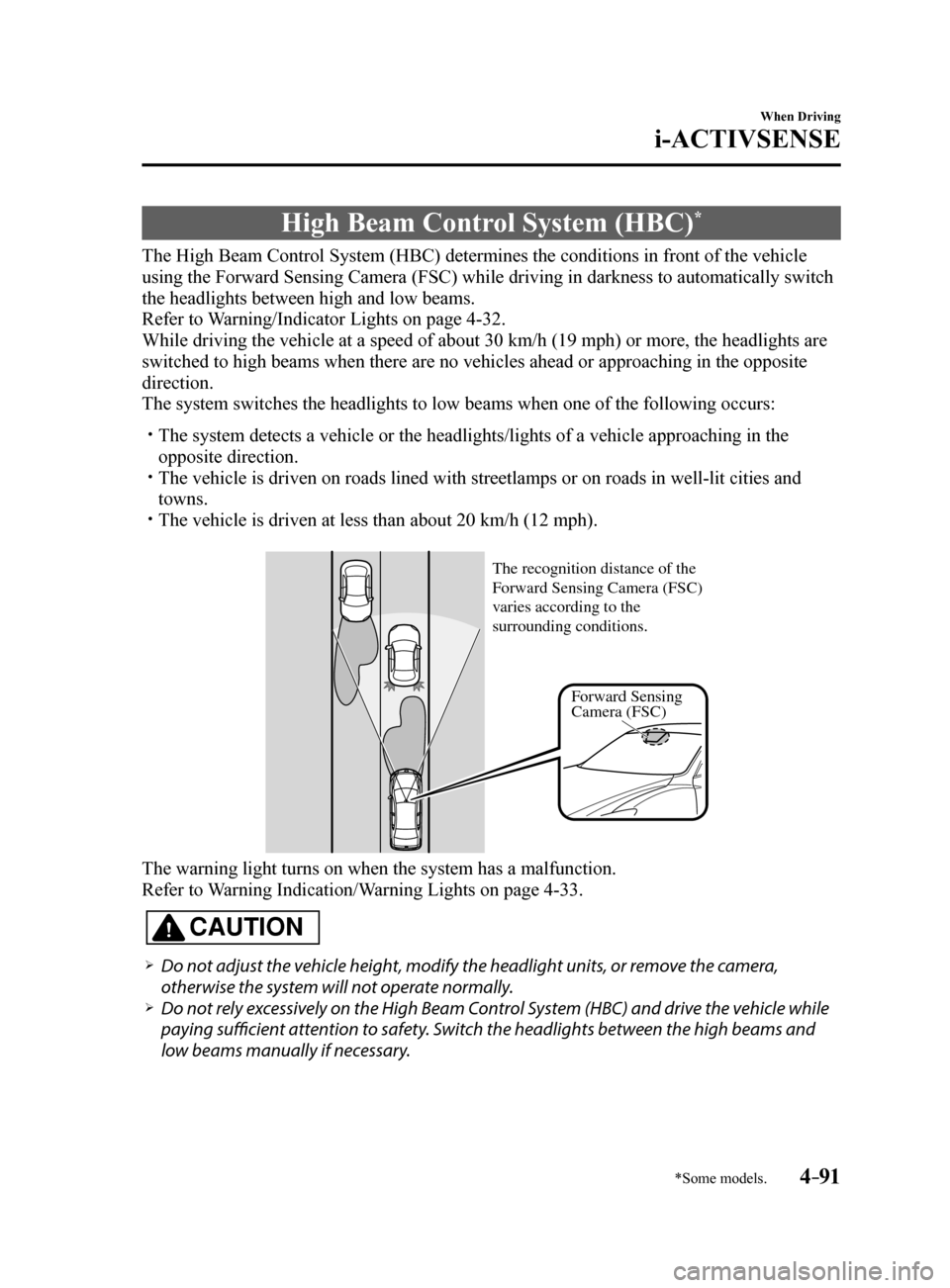
The High Beam Control System (HBC) determines the conditions in front of the vehicle
using the Forward Sensing Camera (FSC) while driving in darkness to au\
tomatically switch
the headlights between high and low beams.
Refer to Warning/Indicator Lights on page 4-32.
While driving the vehicle at a speed of about 30 km/h (19 mph) or more\
, the headlights are
switched to high beams when there are no vehicles ahead or approaching i\
n the opposite
direction.
The system switches the headlights to low beams when one of the followin\
g occurs:
The system detects a vehicle or the headlights/lights of a vehicle appro\
aching in the
opposite direction.
The vehicle is driven on roads lined with streetlamps or on roads in wel\
l-lit cities and
towns.
The vehicle is driven at less than about 20 km/h (12 mph).
F orward Sensing
Camera (FSC)
The recognition distance of the
F
orward Sensing Camera (FSC)
v aries according to the
surrounding conditions.
The warning light turns on when the system has a malfunction.
Refer to Warning Indication/Warning Lights on page 4-33.
CAUTION
Do not adjust the vehicle height, modify the headlight units, or remove the camera,
otherwise the system will not operate normally.
Do not rely excessively on the High Beam Control System (HBC) and drive the vehicle while
paying sufficient attention to safety. Switch the headlights between the high beams and
low beams manually if necessary.
Mazda6_8FH2-EA-16F_Edition2.indb 912016/07/07 13:45:05
Page 224 of 578
4–10 0
When Driving
i-ACTIVSENSE
*Some models.
Traffic Sign Recognition System (TSR)*
The Traffic Sign Recognition System (TSR) helps prevent the driver from overlooking
traffic signs, and provides support for safer driving by displaying traffic signs on the active
driving display which are recognized by the Forward Sensing Camera (FSC\
) or recorded in
the navigation system while the vehicle is driven.
If the vehicle speed exceeds the speed limit sign indicated in the activ\
e driving display while
the vehicle is driven, the system notifies the driver using the indication in the active driving
display and a warning sound.
The Traffic Sign Recognition System (TSR) displays the speed limit, do not enter, and traffic
stop signs.
NOTE
The Traffic Sign Recognition System (TSR) is not supported in some countries or regions.
For information concerning the supported countries or regions, consult an Authorized
Mazda Dealer.
The Traffic Sign Recognition System (TSR) operates only if the navigation system SD card
(Mazda genuine) is inserted in the SD card slot. Consult an Authorized Mazda Dealer for
details.
Mazda6_8FH2-EA-16F_Edition2.indb 1002016/07/07 13:45:06
Page 231 of 578

4–107
When Driving
i-ACTIVSENSE
*Some models.
Distance Recognition Support System (DRSS)*
The Distance Recognition Support System (DRSS) measures the distance between your
vehicle and a vehicle ahead using a radar sensor (front) while the veh\
icle speed is about 30
km/h (19 mph) or faster, and if your vehicle approaches a vehicle ahead more closely than
what is appropriate for maintaining distance between the vehicles accord\
ing to the vehicle
speed, a notification in the active driving display is indicated to advise you to keep a safe
distance from the vehicle ahead.
WARNING
Do not rely completely on the Distance Recognition Support System (DRSS) and always
drive carefully:The Distance Recognition Support System (DRSS) provides advice for safer driving and
notifies the driver of a recommended, safer distance to maintain with a vehicle ahead.
The ability to detect a vehicle ahead is limited depending on the type of vehicle ahead,
the weather conditions, and the traffic conditions. Therefore, if the accelerator and brake
pedals are not operated correctly it could lead to an accident. Always verify the safety of
the surrounding area and depress the brake pedal or accelerator pedal while keeping a
safer distance from vehicles ahead or on-coming vehicles.
NOTE
The Distance Recognition Support System (DRSS) operates when all of th\
e following
conditions are met:
The ignition is switched ON. The Distance Recognition Support System (DRSS) is on. The selector lever is in a position other than reverse (R). The vehicle speed is 30 km/h or faster (19 mph or faster).
The objects which activate the system are 4-wheeled vehicles. The Distance Recognition Support System (DRSS) may also operate in the\
presence of
motorcycles and bicycles.
The Distance Recognition Support System (DRSS) system may not operate \
normally
under the following conditions:
The Dynamic Stability Control (DSC) has a malfunction. The vehicle ahead is traveling at an extremely slow speed.
The system does not operate with the following objects:
Vehicles approaching in the opposite direction. Stationary objects (stopped vehicles, obstructions)
Mazda6_8FH2-EA-16F_Edition2.indb 1072016/07/07 13:45:08
Page 270 of 578
4–14 6
When Driving
i-ACTIVSENSE
*Some models.
Forward Sensing Camera (FSC)*
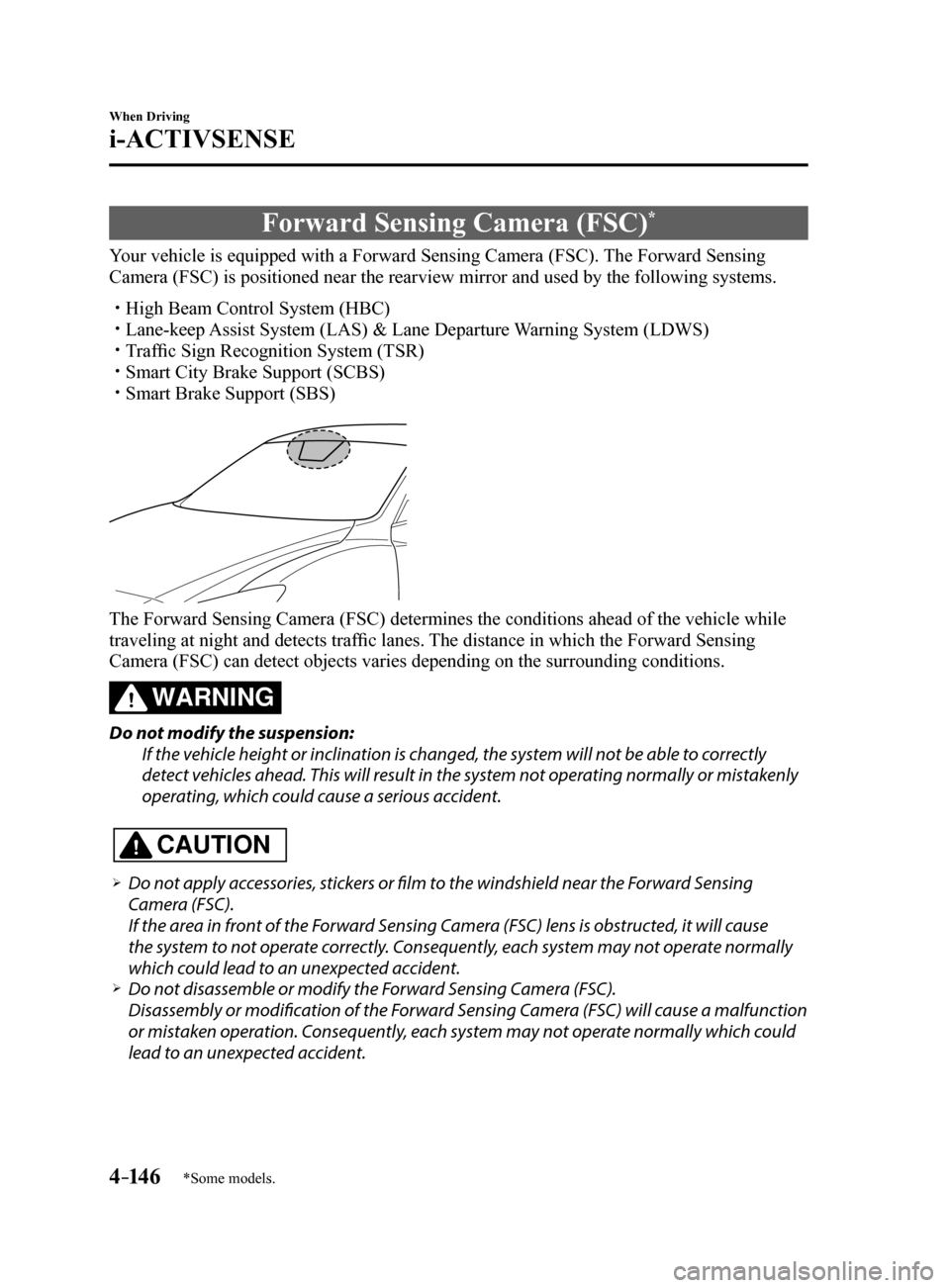
Your vehicle is equipped with a Forward Sensing Camera (FSC). The Forward Sensing
Camera (FSC) is positioned near the rearview mirror and used by the fo\
llowing systems.
High Beam Control System (HBC) Lane-keep Assist System (LAS) & Lane Departure Warning System (LDWS) Traffic Sign Recognition System (TSR) Smart City Brake Support (SCBS) Smart Brake Support (SBS)
The Forward Sensing Camera (FSC) determines the conditions ahead of th\
e vehicle while
traveling at night and detects traffic lanes. The distance in which the Forward Sensing
Camera (FSC) can detect objects varies depending on the surrounding co\
nditions.
WARNING
Do not modify the suspension:
If the vehicle height or inclination is changed, the system will not be able to correctly
detect vehicles ahead. This will result in the system not operating normally or mistakenly
operating, which could cause a serious accident.
CAUTION
Do not apply accessories, stickers or film to the windshield near the Forward Sensing
Camera (FSC).
If the area in front of the Forward Sensing Camera (FSC) lens is obstructed, it will cause
the system to not operate correctly. Consequently, each system may not operate normally
which could lead to an unexpected accident.
Do not disassemble or modify the Forward Sensing Camera (FSC).
Disassembly or modification of the Forward Sensing Camera (FSC) will cause a malfunction
or mistaken operation. Consequently, each system may not operate normally which could
lead to an unexpected accident.
Mazda6_8FH2-EA-16F_Edition2.indb 1462016/07/07 13:45:20