phone MAZDA MODEL 6 2017 (in English) Owner's Manual
[x] Cancel search | Manufacturer: MAZDA, Model Year: 2017, Model line: MODEL 6, Model: MAZDA MODEL 6 2017Pages: 578, PDF Size: 54.72 MB
Page 363 of 578
5–69
Interior Features
Bluetooth®
Bluetooth® Audio
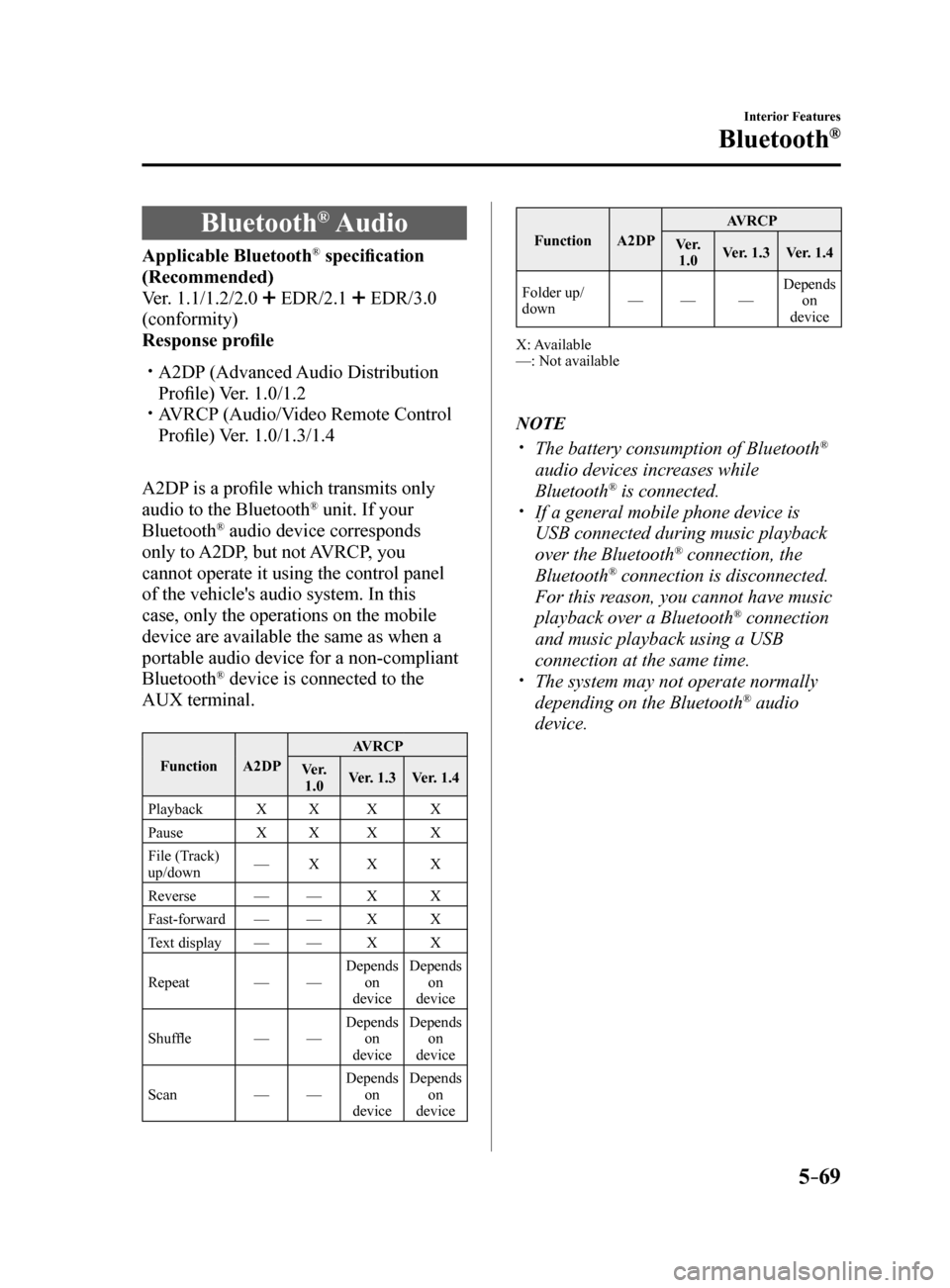
Applicable Bluetooth® specification
(Recommended)
Ver. 1.1/1.2/2.0
EDR/2.1 EDR/3.0
(conformity)
Response profile
A2DP (Advanced Audio Distribution
Profile) Ver. 1.0/1.2
AVRCP (Audio/Video Remote Control
Profile) Ver. 1.0/1.3/1.4
A2DP is a profile which transmits only
audio to the Bluetooth
® unit. If your
Bluetooth® audio device corresponds
only to A2DP, but not AVRCP, you
cannot operate it using the control panel
of the vehicle's audio system. In this
case, only the operations on the mobile
device are available the same as when a
portable audio device for a non-compliant
Bluetooth
® device is connected to the
AUX terminal.
Function A2DP AVRCP
Ve r. 1.0 Ver. 1.3
Ver. 1.4
Playback XX X X
Pause XX X X
File (Track)
up/down —
X X X
Reverse —— X X
Fast-forward —— X X
Text display —— X X
Repeat ——Depends
on
device Depends
on
device
Shuffle ——Depends
on
device Depends
on
device
Scan ——Depends
on
device Depends
on
device
Function A2DP AVRCP
Ve r. 1.0 Ver. 1.3
Ver. 1.4
Folder up/
down —
— —Depends
on
device
X: Available
—: Not available
NOTE
The battery consumption of Bluetooth®
audio devices increases while
Bluetooth
® is connected. If a general mobile phone device is
USB connected during music playback
over the Bluetooth
® connection, the
Bluetooth® connection is disconnected.
For this reason, you cannot have music
playback over a Bluetooth
® connection
and music playback using a USB
connection at the same time.
The system may not operate normally
depending on the Bluetooth® audio
device.
Mazda6_8FH2-EA-16F_Edition2.indb 692016/07/07 13:45:57
Page 370 of 578
5–76
Interior Features
Bluetooth®
Playback
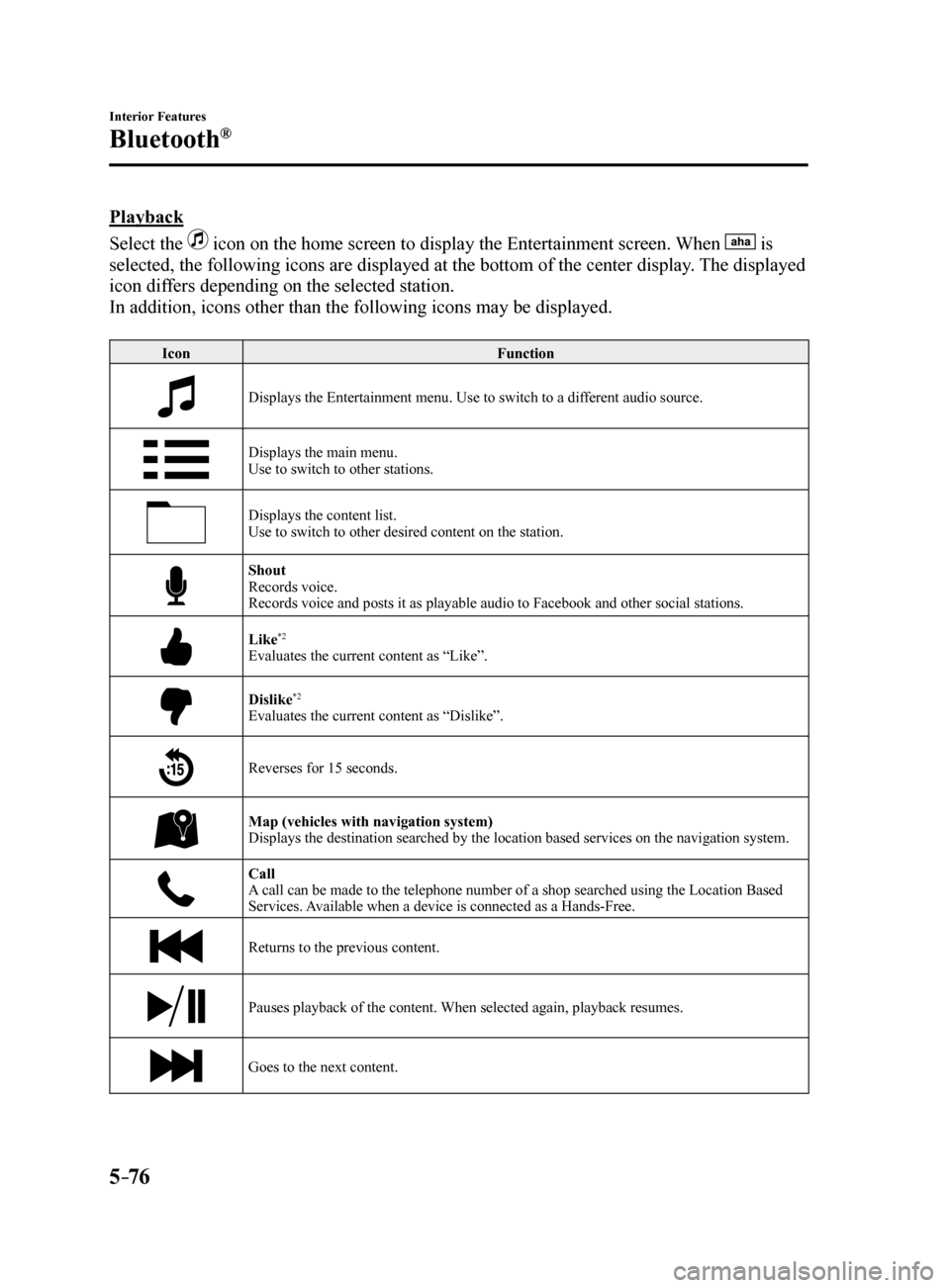
Select the
icon on the home screen to display the Entertainment screen. When is
selected, the following icons are displayed at the bottom of the center \
display. The displayed
icon differs depending on the selected station.
In addition, icons other than the following icons may be displayed.
Icon Function
Displays the Entertainment menu. Use to switch to a different audio source.
Displays the main menu.
Use to switch to other stations.
Displays the content list.
Use to switch to other desired content on the station.
Shout
Records voice.
Records voice and posts it as playable audio to Facebook and other social stations.
Like*2
Evaluates the current content as “Like”.
Dislike*2
Evaluates the current content as “Dislike”.
Reverses for 15 seconds.
Map (vehicles with navigation system)
Displays the destination searched by the location based services on the \
navigation system.
Call
A call can be made to the telephone number of a shop searched using the Location Based
Services. Available when a device is connected as a Hands-Free.
Returns to the previous content.
Pauses playback of the content. When selected again, playback resumes.
Goes to the next content.
Mazda6_8FH2-EA-16F_Edition2.indb 762016/07/07 13:46:00
Page 372 of 578
5–78
Interior Features
Bluetooth®
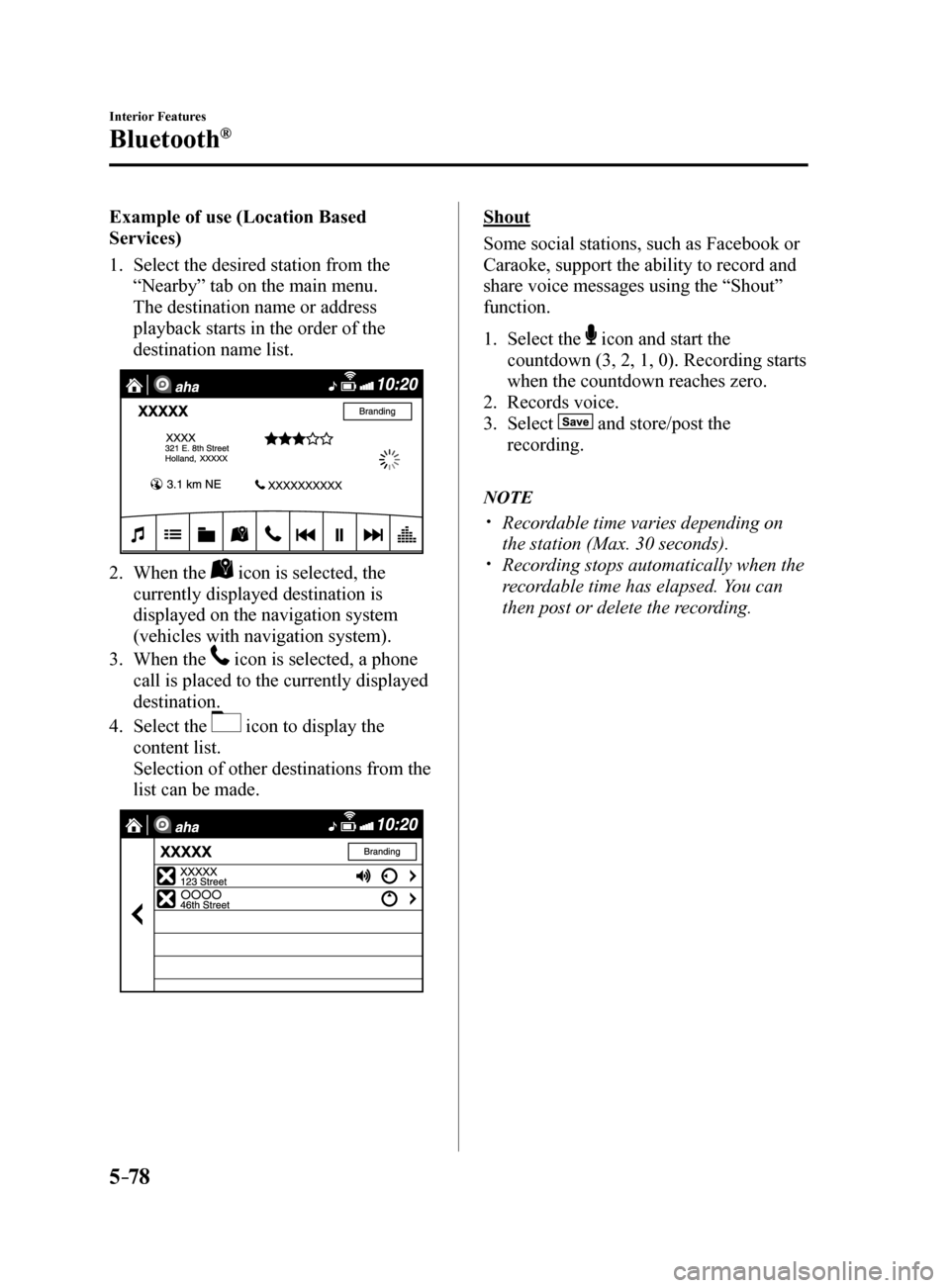
Example of use (Location Based
Services)
1. Select the desired station from the
“Nearby” tab on the main menu.
The destination name or address
playback starts in the order of the
destination name list.
2. When the icon is selected, the
currently displayed destination is
displayed on the navigation system
(vehicles with navigation system).
3. When the
icon is selected, a phone
call is placed to the currently displayed
destination.
4. Select the
icon to display the
content list.
Selection of other destinations from the
list can be made.
Shout
Some social stations, such as Facebook or
Caraoke, support the ability to record and
share voice messages using the “Shout”
function.
1. Select the
icon and start the
countdown (3, 2, 1, 0). Recording starts
when the countdown reaches zero.
2. Records voice.
3. Select
and store/post the
recording.
NOTE
Recordable time varies depending on
the station (Max. 30 seconds).
Recording stops automatically when the
recordable time has elapsed. You can
then post or delete the recording.
Mazda6_8FH2-EA-16F_Edition2.indb 782016/07/07 13:46:01
Page 375 of 578
5–81
Interior Features
Bluetooth®
Troubleshooting
Mazda Bluetooth® Hands-Free Customer Service
If you have any problems with Bluetooth
®, contact our toll-free customer service center.
U.S.A.
Phone: 800-430-0153 (Toll-free)
Web: www.MazdaUSA.com/bluetooth
Canada
Phone: 800-430-0153 (Toll-free)
Web: www.mazdahandsfree.ca
Mexico
Center of Attention to Client (CAC)
Phone: 01-800-01-MAZDA (Toll-free)
Web: www.mazdamexico.com.mx
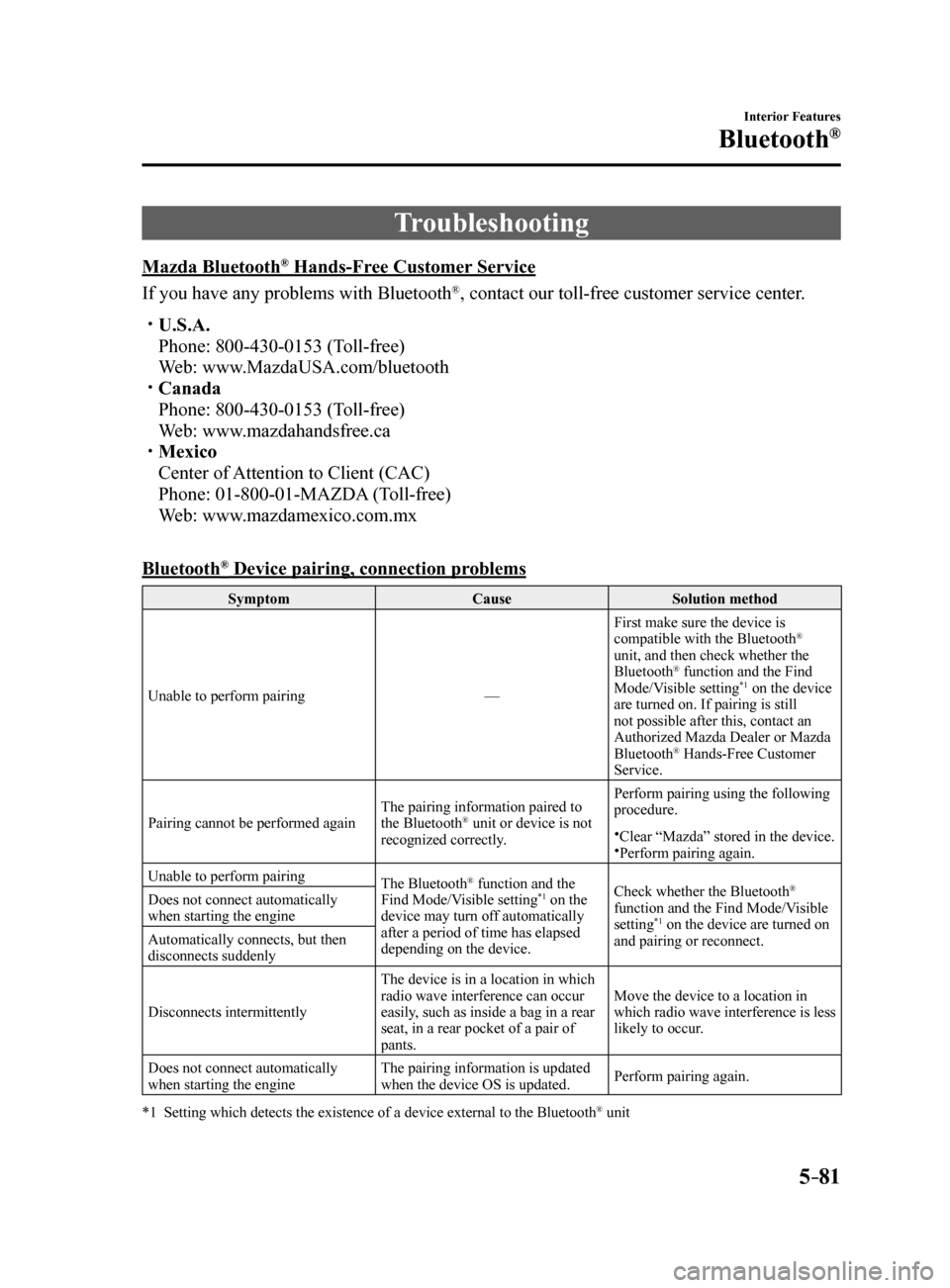
Bluetooth
® Device pairing, connection problems
Symptom CauseSolution method
Unable to perform pairing —First make sure the device is
compatible with the Bluetooth
®
unit, and then check whether the
Bluetooth
® function and the Find
Mode/Visible setting*1 on the device
are turned on. If pairing is still
not possible after this, contact an
Authorized Mazda Dealer or Mazda
Bluetooth
® Hands-Free Customer
Service.
Pairing cannot be performed again The pairing information paired to
the Bluetooth
® unit or device is not
recognized correctly. Perform pairing using the following
procedure.Clear “Mazda” stored in the device.Perform pairing again.
Unable to perform pairing The Bluetooth
® function and the
Find Mode/Visible setting*1 on the
device may turn off automatically
after a period of time has elapsed
depending on the device. Check whether the Bluetooth®
function and the Find Mode/Visible
setting
*1 on the device are turned on
and pairing or reconnect.
Does not connect automatically
when starting the engine
Automatically connects, but then
disconnects suddenly
Disconnects intermittently
The device is in a location in which
radio wave interference can occur
easily, such as inside a bag in a rear
seat, in a rear pocket of a pair of
pants.Move the device to a location in
which radio wave interference is less
likely to occur.
Does not connect automatically
when starting the engine The pairing information is updated
when the device OS is updated.
Perform pairing again.
*1 Setting which detects the existence of a device external to the Bluetooth
® unit
Mazda6_8FH2-EA-16F_Edition2.indb 812016/07/07 13:46:02
Page 376 of 578
 Owners Manual 5–82
Interior Features
Bluetooth®
NOTE
When the OS of the device is updated, the pairing information may be del\
eted. If this
happens, reprogram the pairing information to the Bluetooth® uni")
5–82
Interior Features
Bluetooth®
NOTE
When the OS of the device is updated, the pairing information may be del\
eted. If this
happens, reprogram the pairing information to the Bluetooth® unit. If you pair your phone which has already been paired to your vehicle more than once in
the past, you need to delete “Mazda” on your mobile device. Then, \
execute the Bluetooth®
search on your mobile device once again, and pair to a newly detected “Ma\
zda”.
Before you pair your device, make sure that Bluetooth® is “ON”, both on your phone and
on the vehicle.
If Bluetooth®-enabled devices are used in the following locations or conditions,
connection via Bluetooth® may not be possible.
The device is in a location hidden from the center display such as behind or under a
seat, or inside the glove compartment.
The device contacts or is covered by a metal object or body. The device is set to power-saving mode.
Different Bluetooth®-enabled devices can be used for Bluetooth® Hands-Free and
Bluetooth® audio. For example, device A can be connected as a Bluetooth® Hands-
Free device and device B can be connected as a Bluetooth® audio device. However, the
following may occur when they are used at the same time.
The Bluetooth® connection of the device is disconnected. Noise occurs in the Hands-Free audio. Hands-Free operates slowly.
Voice recognition related problems
Symptom CauseSolution method
Poor voice recognition
Excessive, slow speech. Excessive, forceful speech
(shouting).
Speaking before the beep sound
has ended.
Loud noise (speaking or noise from
outside/inside vehicle).
Airflow from A/C is blowing
against the microphone.
Speaking in off-standard
expressions (dialect). Regarding the causes indicated
on the left, be careful with how
you speak. In addition, when
numbers are spoken in a sequence,
recognition ability will improve
if no stop is placed between the
numbers.
False recognition of numbers
Poor voice recognition There is a malfunction in the
microphone.A poor connection or malfunction
with the microphone may have
occurred. Consult an Authorized
Mazda Dealer.
Phone-related voice recognition is
disabled There is a problem with the
connection between the Bluetooth
®
unit and the device. If there is any malfunction after
checking the pairing situation, check
for device pairing or connection
problems.
Mazda6_8FH2-EA-16F_Edition2.indb 822016/07/07 13:46:02
Page 377 of 578

5–83
Interior Features
Bluetooth®
SymptomCauseSolution method
Names in the phonebook are not
easily recognized The Bluetooth
® system is under a
condition in which recognition is
difficult. By carrying out the following
measures, the rate of recognition
will improve. Clear memory from the phonebook
which is not used very often.
Avoid shortened names, use full
names. (Recognition improves the
longer the name is. By not using
names such as “Mom”, “Dad”,
recognition will improve.)
When operating the audio, a song
name is not recognized Song names cannot be recognized
by voice.
—
You want to skip guidance —Guidance can be skipped by quickly
pressing and releasing the Talk
button.
Regarding problems with calls
Symptom
CauseSolution method
When starting a call, vehicle noise
from the other party can be heard For about three seconds after
starting a call, the Bluetooth
®
unit's Noise Suppression function
requires time to adapt to the call
environment. This does not indicate a problem
with the device.
The other party cannot be heard or
the speaker's voice is quiet The volume is set at zero or low.
Increase the volume.
Other problems
Symptom CauseSolution method
The indication for the remaining
battery is different between the
vehicle and the device The indication method is different
between the vehicle and the device.
—
When a call is made from the
vehicle, the telephone number is
updated in the incoming/outgoing
call record but the name does not
appear The number has not been registered
into the phonebook.If the number has been registered
into the phonebook, the incoming/
outgoing call record is updated by
the name in the phonebook when the
engine is restarted.
The cell phone does not synchronize
with the vehicle regarding the
incoming/outgoing call record Some types of cell phones do not
synchronize automatically.
Operate the cell phone for
synchronization.
It takes a long time to complete the
function for changing the language A maximum of 60 seconds is
required.
—
Mazda6_8FH2-EA-16F_Edition2.indb 832016/07/07 13:46:02
Page 503 of 578

8–1
8Customer Information and Reporting
Safety Defects
Important consumer information including warranties and add-on
equipment.
Customer Assistance ........................... 8-2
Customer Assistance (U.S.A.) ....... 8-2
Customer Assistance (Canada) ...... 8-7
Customer Assistance
(Puerto Rico) ................................ 8-10
Customer Assistance (Mexico) .... 8-11
Mazda Importer/Distributors .......... 8-13
Importer/Distributor ..................... 8-13
Reporting Safety Defects .................. 8-14
Reporting Safety Defects
(U.S.A.) ........................................ 8-14
Reporting Safety Defects
(Canada) ....................................... 8-15
Warranty ............................................ 8-16
Warranties for Your Mazda .......... 8-16
Outside the United States/
Canada .......................................... 8-17
Registering Your Vehicle in A Foreign
Country (Except United States and
Canada) ........................................ 8-18
Add-On Non-Genuine Parts and
Accessories .................................. 8-19
Cell Phones ........................................ 8-20
Cell Phones Warning .................... 8-20
Event Data Recorder ........................8-21
Event Data Recorder (U.S.A. and
Canada) ........................................ 8-21Recording of Vehicle Data ................
8-22
Recording of Vehicle Data ........... 8-22
Uniform Tire Quality Grading System
(UTQGS) ............................................ 8-23
Uniform Tire Quality Grading System
(UTQGS) ...................................... 8-23
Tire Information (U.S.A.) ................. 8-25
Tire Labeling ................................ 8-25
Location of the Tire Label
(Placard) ....................................... 8-30
Tire Maintenance ......................... 8-33
Vehicle Loading ........................... 8-36
Steps for Determining the Correct
Load Limit ................................... 8-42
Declaration of Conformity ............... 8-43
Declaration of Conformity ........... 8-43
Mazda6_8FH2-EA-16F_Edition2.indb 12016/07/07 13:46:38
Page 505 of 578
 Owners Manual 8–3
Customer Information and Reporting Safety Defects
Customer Assistance
STEP 2: Contact Mazda North American Operations
If for any reason you feel the need for further assistance after contact\
i")
8–3
Customer Information and Reporting Safety Defects
Customer Assistance
STEP 2: Contact Mazda North American Operations
If for any reason you feel the need for further assistance after contact\
ing your dealership
management or it becomes necessary to have the components or wiring syst\
em for the
supplementary restraint system modified to accommodate a person with certain medical
conditions in accordance with a certified physician, you can reach Mazda North American
Operations by one of the following ways.
Log on: at www.MazdaUSA.com
Answers to many questions, including how to locate or contact a local Mazda dealership in
the U.S., can be found here.
E-mail: click on “Contact Us” located on the “Inside Mazda” tab, or at the bottom of the
page at www.MazdaUSA.com
By phone at: 1 (800) 222-5500
By letter at:
Attn: Customer Assistance
Mazda North American Operations
7755 Irvine Center Drive
Irvine, CA 92618-2922
P.O. Box 19734
Irvine, CA 92623-9734
In order to serve you efficiently and effectively, please help us by providing the following
information:
1. Your name, address, and telephone number
2. Year and model of vehicle
3. Vehicle Identification Number (17 digits, noted on your registration or title or located on
the upper driver's side corner of the dash)
4. Purchase date and current mileage
5. Your dealer's name and location
6. Your question(s)
If you live outside the U.S.A., please contact your nearest Mazda Distri\
butor.
Mazda6_8FH2-EA-16F_Edition2.indb 32016/07/07 13:46:38
Page 509 of 578
8–7
Customer Information and Reporting Safety Defects
Customer Assistance
Customer Assistance (Canada)
Satisfaction Review Process
Your complete and permanent satisfaction is of primary concern to Mazda. \
All Authorized
Mazda Dealers have both the knowledge and tools to keep your Mazda in to\
p condition.
In our experience, any questions, problems, or complaints regarding the operation of your
Mazda or any other general service transactions are most effectively resolved by your dealer.
If the cause of your dissatisfaction cannot adequately be addressed by normal dealership
procedures, we recommend that you take the following steps:
STEP 1: Contact the Mazda Dealer
Discuss the matter with a member of dealership management. If the Servic\
e Manager has
already reviewed your concerns, contact the owner of the dealership or its General Manager.
STEP 2: Contact the Mazda Regional Office
If you feel that you still require assistance, ask the dealer Service Manager to arrange for
you to meet the local Mazda Service Representative. If more expedient, contact Mazda
Canada Inc. Regional Office nearest you for such arrangements. Regional Office address
and phone numbers are shown (page 8-9).
STEP 3: Contact the Mazda Customer Relations Department
If still not substantially satisfied, contact the Customer Relations Department, Mazda
Canada Inc., 55 Vogell Road, Richmond Hill, Ontario, L4B 3K5 Canada TEL: 1 (800) 263-
4680.
Provide the Department with the following information:
1. Your name, address and telephone number
2. Year and model of vehicle
3. Vehicle Identification Number (VIN). Refer to the Vehicle Identification Number on page
9-2 for the location of the VIN.
4. Purchase date
5. Present odometer reading
6. Your dealer's name and location
7. The nature of your problem and/or cause of dissatisfaction
The Department, in cooperation with the local Mazda Service Representative, will review
the case to determine if everything possible has been done to ensure you\
r satisfaction.
Please recognize that the resolution of service problems in most cases requires the use of
your Mazda dealer's service facilities, personnel and equipment. We urge you to follow the
above three steps in sequence for most effective results.
Mazda6_8FH2-EA-16F_Edition2.indb 72016/07/07 13:46:38
Page 512 of 578
8–10
Customer Information and Reporting Safety Defects
Customer Assistance
Customer Assistance (Puerto Rico)
Your complete and permanent satisfaction is our business. That is why all Authorized Mazda
Dealers have the knowledge and the tools to keep your Mazda vehicle in t\
op condition.
If you have any questions or recommendations for improvement regarding the service of
your Mazda vehicle or servicing by Mazda Dealer personnel, we recommend \
that you take
the following steps:
STEP 1
Discuss the matter with an Authorized Mazda Dealer. This is the quickest and best way to
address the issue. If your concern has not been resolved by the CUSTOMER RELATIONS,
SALES, SERVICE, or PARTS MANAGER, then please contact the GENERAL
MANAGER of the dealership or the OWNER.
STEP 2
If, after following STEP 1, you feel the need for further assistance, please contact your
area's Mazda representative.
Refer to Importer/Distributor on page 8-13.
Please help us by providing the following information:
1. Your name, address, and telephone number
2. Year and model of vehicle
3. Vehicle Identification Number (17 digits, noted on your registration or title or located on
the upper driver's side corner of the dash)
4. Purchase date and current mileage
5. Your dealer's name and location
6. Your question(s)
Mazda6_8FH2-EA-16F_Edition2.indb 102016/07/07 13:46:38