ignition MAZDA MODEL 6 2017 (in English) Workshop Manual
[x] Cancel search | Manufacturer: MAZDA, Model Year: 2017, Model line: MODEL 6, Model: MAZDA MODEL 6 2017Pages: 578, PDF Size: 54.72 MB
Page 166 of 578
4–42
When Driving
Automatic Transaxle
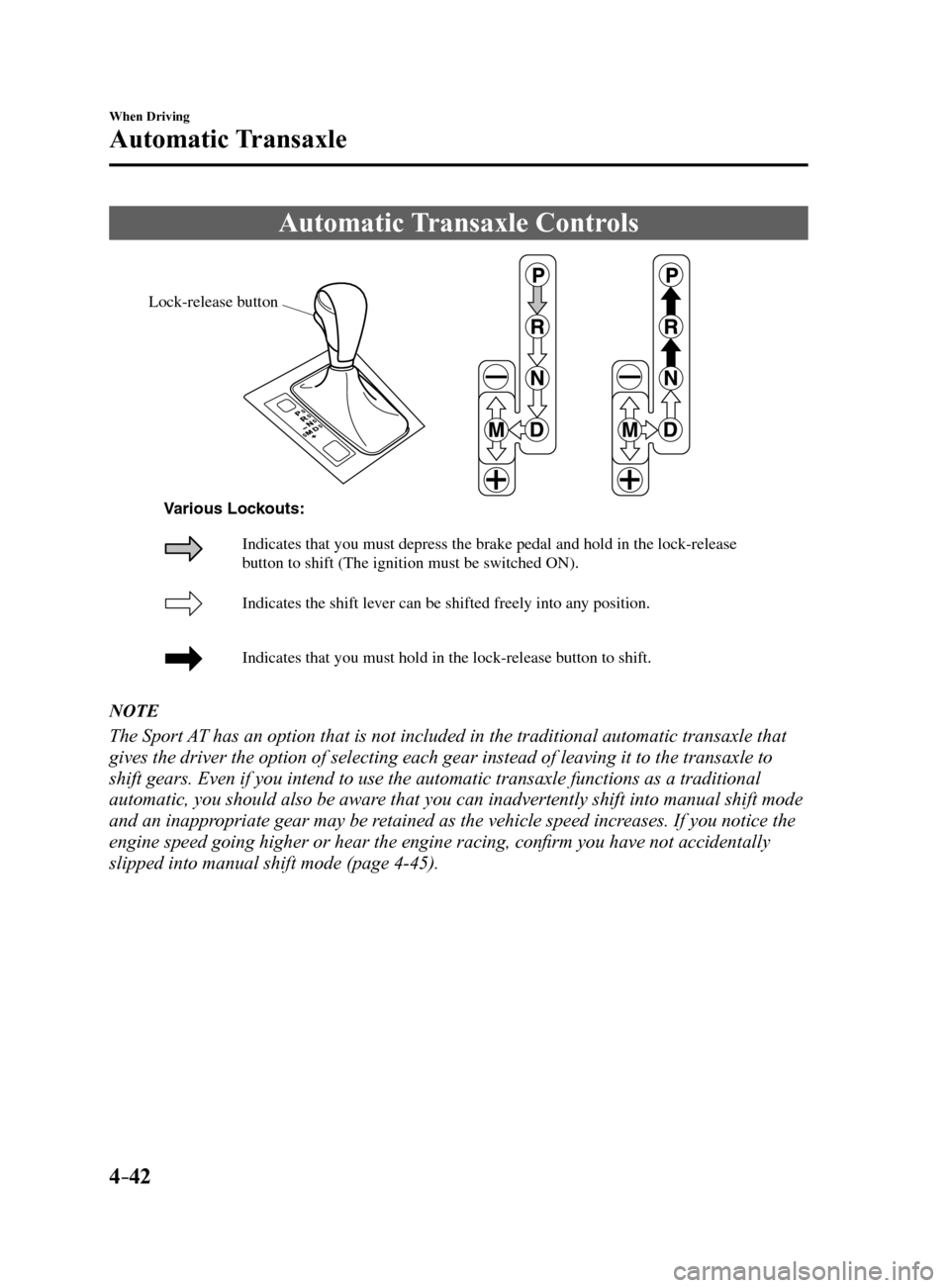
Automatic Transaxle Controls
Lock-release button
Indicates the shift lever can be shifted freely into an y position.
Indicates that you must hold in the lock-release b utton to shift.
Indicates that you must depress the brake pedal and hold in the lock-rel\
ease
b
utton to shift (The ignition must be switched ON).
V
arious Loc kouts:
NOTE
The Sport AT has an option that is not included in the traditional automatic transax\
le that
gives the driver the option of selecting each gear instead of leaving it\
to the transaxle to
shift gears. Even if you intend to use the automatic transaxle functions\
as a traditional
automatic, you should also be aware that you can inadvertently shift into manual shift mode
and an inappropriate gear may be retained as the vehicle speed increases. If you notice the
engine speed going higher or hear the engine racing, confirm you have not accidentally
slipped into manual shift mode (page 4-45).
Mazda6_8FH2-EA-16F_Edition2.indb 422016/07/07 13:44:50
Page 167 of 578
4–43
When Driving
Automatic Transaxle
Shift-Lock System
The shift-lock system prevents shifting out
of P unless the brake pedal is depressed.
To shift from P:
1. Depress and hold the brake pedal.
2. Start the engine.
3. Press and hold the lock-release button.
4. Move the selector lever.
NOTE
When the ignition is switched to ACC or
the ignition is switched off, the selector
lever cannot be shifted from P.
The ignition cannot be switched to OFF
if the selector lever is not in P.
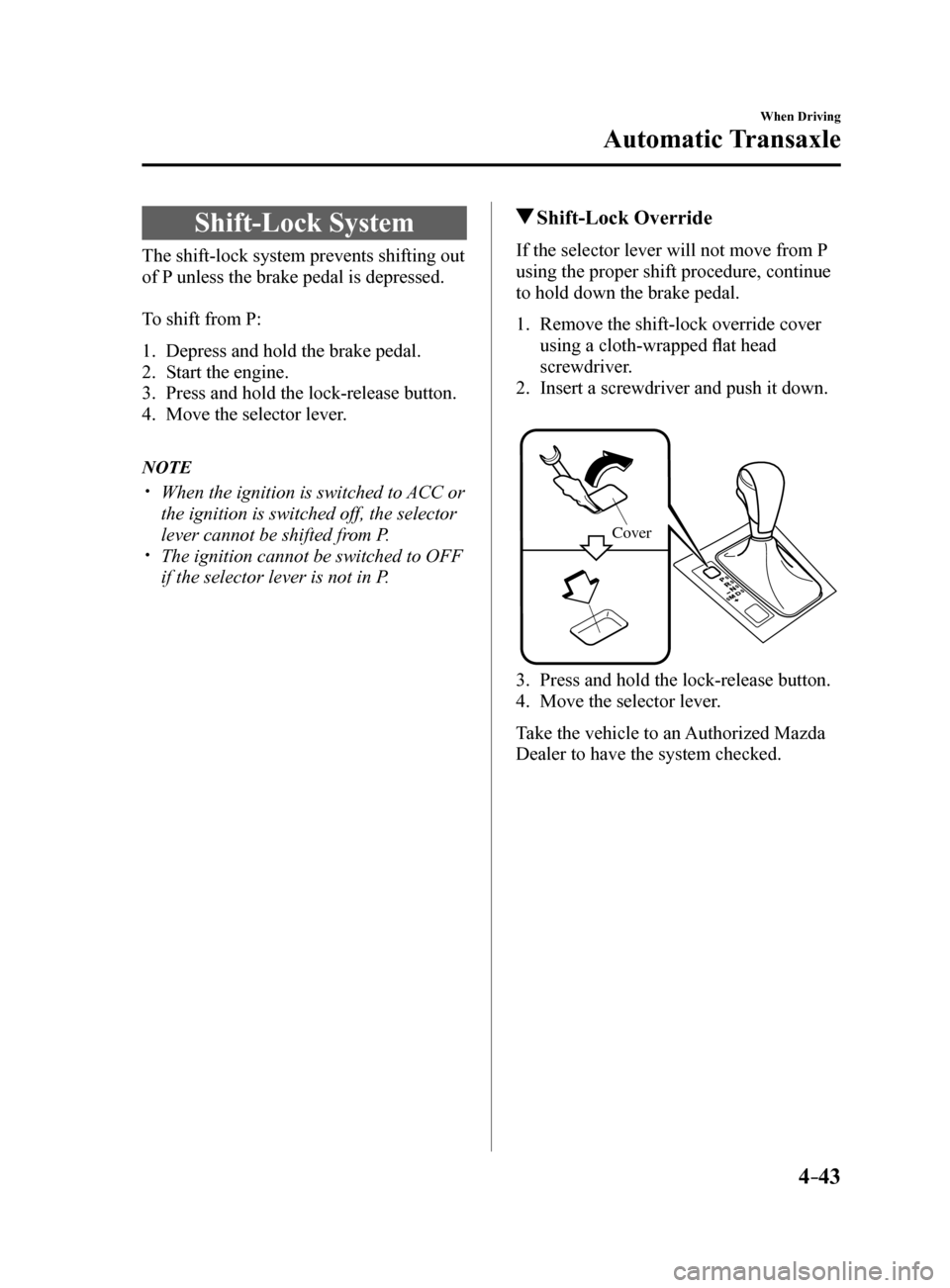
Shift-Lock Override
If the selector lever will not move from P
using the proper shift procedure, continue
to hold down the brake pedal.
1. Remove the shift-lock override cover
using a cloth-wrapped flat head
screwdriver.
2. Insert a screwdriver and push it down.
Cove r
3. Press and hold the lock-release button.
4. Move the selector lever.
Take the vehicle to an Authorized Mazda
Dealer to have the system checked.
Mazda6_8FH2-EA-16F_Edition2.indb 432016/07/07 13:44:51
Page 169 of 578
4–45
When Driving
Automatic Transaxle
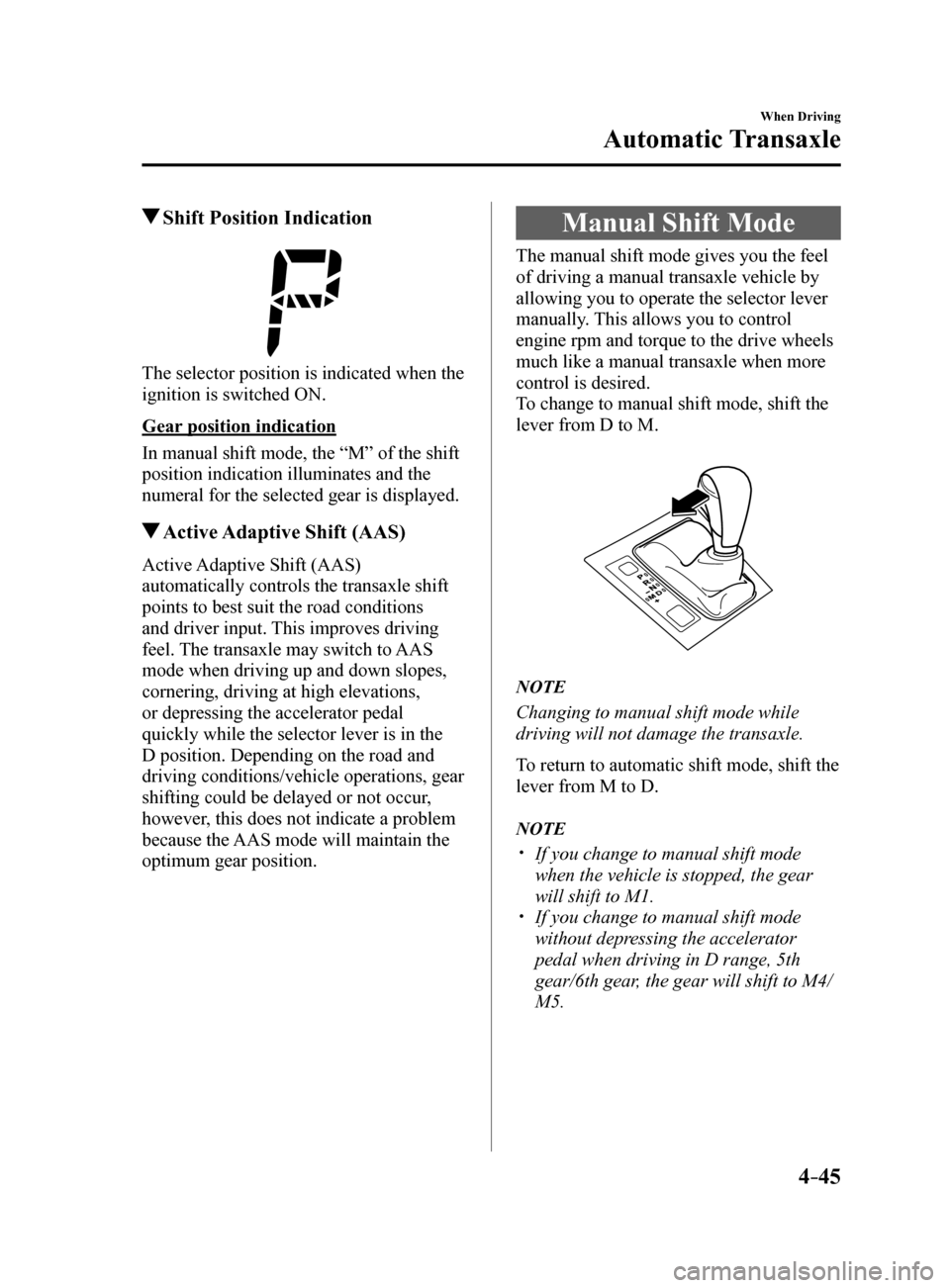
Shift Position Indication
The selector position is indicated when the
ignition is switched ON.
Gear position indication
In manual shift mode, the “M” of the shift
position indication illuminates and the
numeral for the selected gear is displayed.
Active Adaptive Shift (AAS)
Active Adaptive Shift (AAS)
automatically controls the transaxle shift
points to best suit the road conditions
and driver input. This improves driving
feel. The transaxle may switch to AAS
mode when driving up and down slopes,
cornering, driving at high elevations,
or depressing the accelerator pedal
quickly while the selector lever is in the
D position. Depending on the road and
driving conditions/vehicle operations, gear
shifting could be delayed or not occur,
however, this does not indicate a problem
because the AAS mode will maintain the
optimum gear position.
Manual Shift Mode
The manual shift mode gives you the feel
of driving a manual transaxle vehicle by
allowing you to operate the selector lever
manually. This allows you to control
engine rpm and torque to the drive wheels
much like a manual transaxle when more
control is desired.
To change to manual shift mode, shift the
lever from D to M.
NOTE
Changing to manual shift mode while
driving will not damage the transaxle.
To return to automatic shift mode, shift the
lever from M to D.
NOTE
If you change to manual shift mode
when the vehicle is stopped, the gear
will shift to M1.
If you change to manual shift mode
without depressing the accelerator
pedal when driving in D range, 5th
gear/6th gear, the gear will shift to M4/
M5.
Mazda6_8FH2-EA-16F_Edition2.indb 452016/07/07 13:44:51
Page 177 of 578
 Workshop Manual 4–53
When Driving
Switches and Controls
Lighting Control
Headlights
Turn the headlight switch to turn the headlights and other exterior light\
s on or off.
When the lights are turned on, the lights")
4–53
When Driving
Switches and Controls
Lighting Control
Headlights
Turn the headlight switch to turn the headlights and other exterior light\
s on or off.
When the lights are turned on, the lights-on indicator light in the inst\
rument cluster turns on.
NOTE
If the light switch is left on, the lights will automatically switch off\
approximately 30
seconds after switching the ignition off.
The time setting can be changed.
Refer to Personalization Features on page 9-10.
To prevent discharging the battery, do not leave the lights on while the engine is off unless
safety requires them.
Without auto-light control
Switch Position
Ignition Position ONACC or
OFF ONACC or
OFF ONACC or
OFF
Headlights OffOffOffOff OnOn
*2
Daytime running lights On*1OffOn*1Off OffOff
Taillights
Parking lights
License lights
Side-marker lights Off
Off OnOn
*2OnOn*2
*1 The lights are turned on while the vehicle is driven.
*2 The lights are turned on for the specified period by the auto headlight off function.
Mazda6_8FH2-EA-16F_Edition2.indb 532016/07/07 13:44:54
Page 178 of 578
4–54
When Driving
Switches and Controls
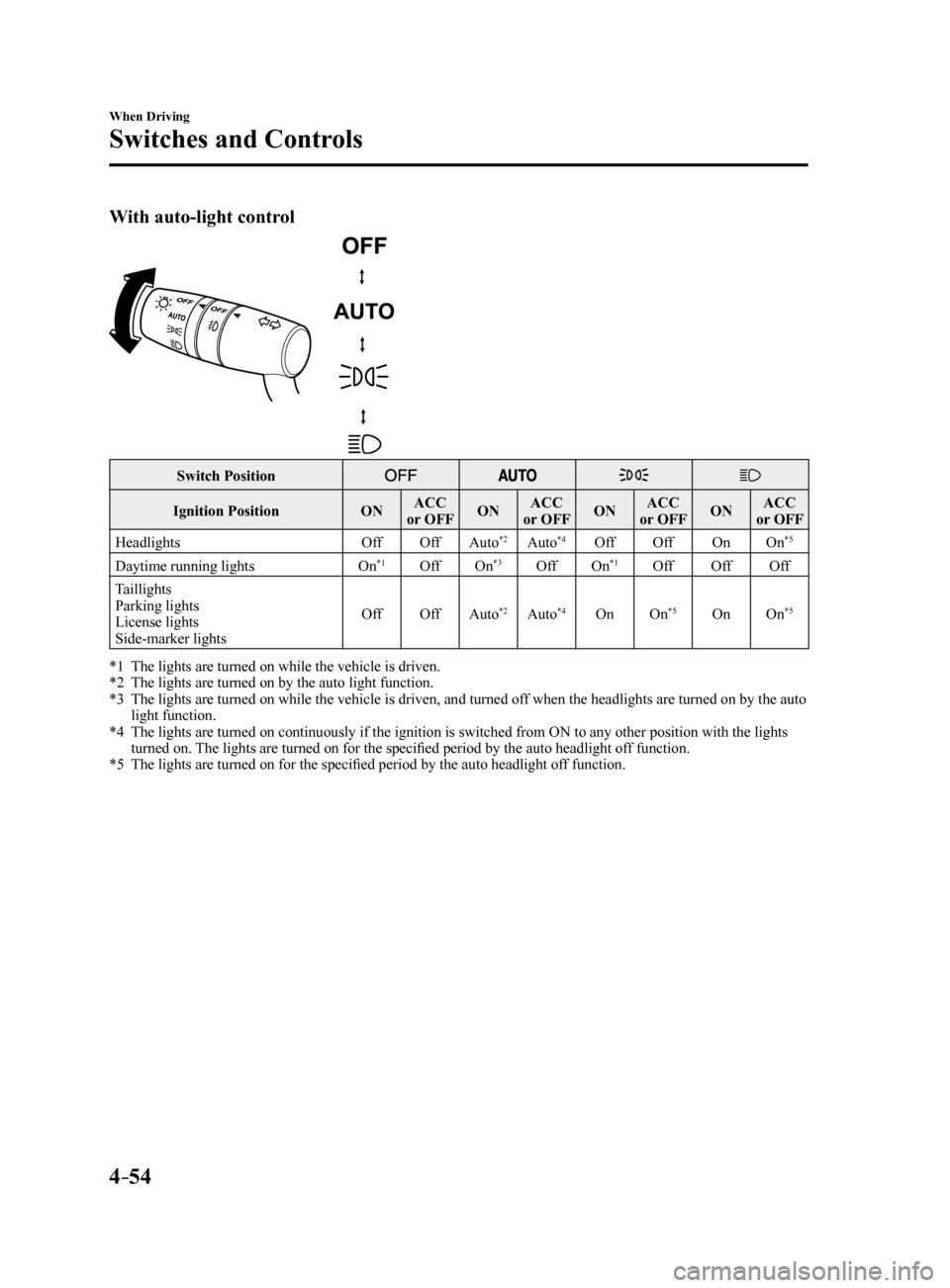
With auto-light control
Switch Position
Ignition PositionONACC
or OFF ONACC
or OFF ONACC
or OFF ONACC
or OFF
Headlights OffOffAuto
*2Auto*4Off Off OnOn*5
Daytime running lights On*1OffOn*3OffOn*1Off OffOff
Taillights
Parking lights
License lights
Side-marker lights Off
OffAuto
*2Auto*4On On*5OnOn*5
*1 The lights are turned on while the vehicle is driven.
*2 The lights are turned on by the auto light function.
*3 The lights are turned on while the vehicle is driven, and turned off when the headlights are turned on by the auto
light function.
*4 The lights are turned on continuously if the ignition is switched from ON to any other position with the lights
turned on. The lights are turned on for the specified period by the auto headlight off function.
*5 The lights are turned on for the specified period by the auto headlight off function.
Mazda6_8FH2-EA-16F_Edition2.indb 542016/07/07 13:44:54
Page 179 of 578
4–55
When Driving
Switches and Controls
*Some models.
Auto-light control*
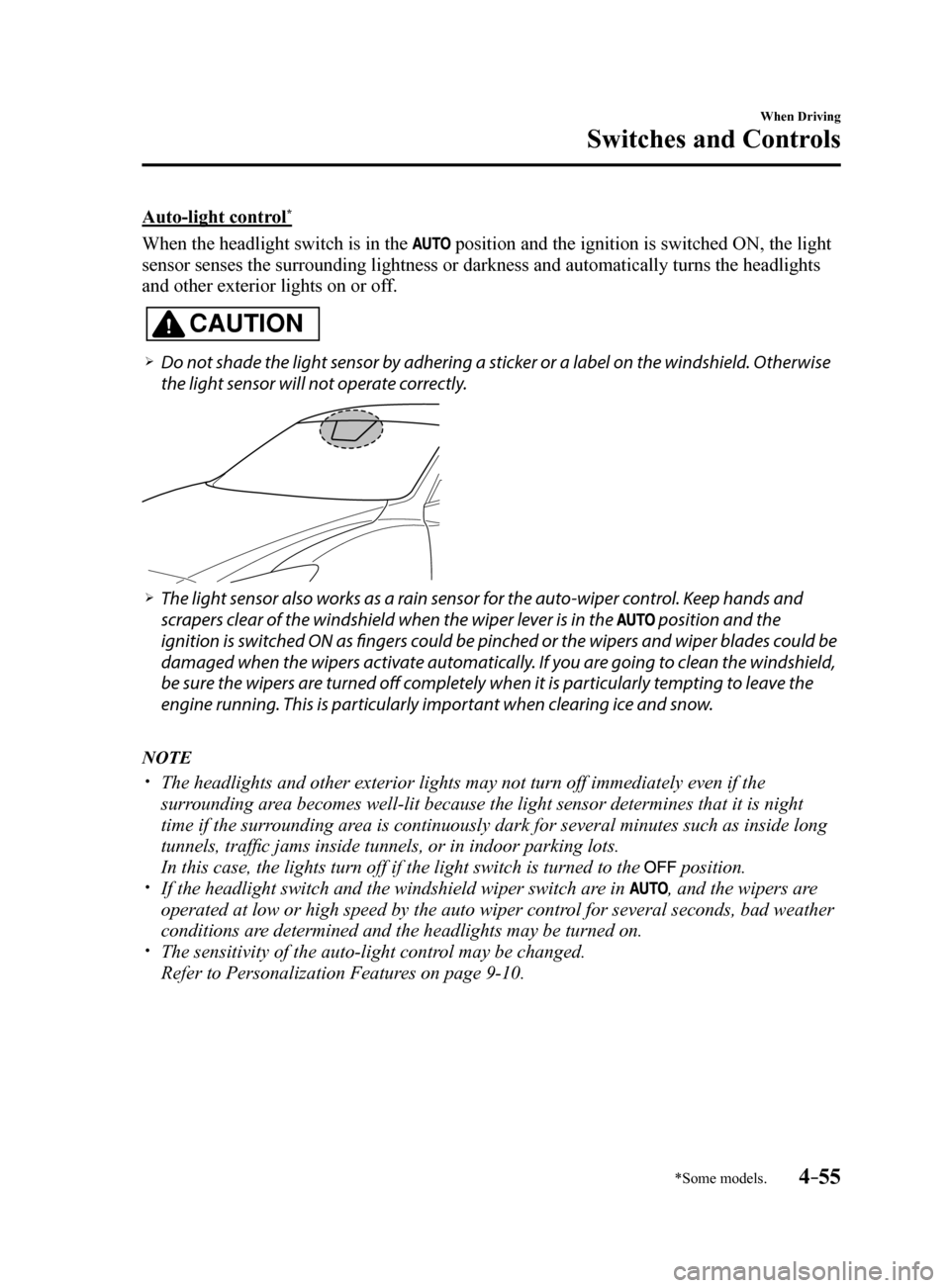
When the headlight switch is in the position and the ignition is switched ON, the light
sensor senses the surrounding lightness or darkness and automatically tu\
rns the headlights
and other exterior lights on or off.
CAUTION
Do not shade the light sensor by adhering a sticker or a label on the windshield. Otherwise
the light sensor will not operate correctly.
The light sensor also works as a rain sensor for the auto-wiper control. Keep hands and
scrapers clear of the windshield when the wiper lever is in the
position and the
ignition is switched ON as fingers could be pinched or the wipers and wiper blades could be
damaged when the wipers activate automatically. If you are going to clean the windshield,
be sure the wipers are turned off completely when it is particularly tempting to leave the
engine running. This is particularly important when clearing ice and snow.
NOTE
The headlights and other exterior lights may not turn off immediately ev\
en if the
surrounding area becomes well-lit because the light sensor determines that it is night\
time if the surrounding area is continuously dark for several minutes such as inside long
tunnels, traffic jams inside tunnels, or in indoor parking lots.
In this case, the lights turn off if the light switch is turned to the
position. If the headlight switch and the windshield wiper switch are in , and the wipers are
operated at low or high speed by the auto wiper control for several seconds, bad weather
conditions are determined and the headlights may be turned on.
The sensitivity of the auto-light control may be changed.
Refer to Personalization Features on page 9-10.
Mazda6_8FH2-EA-16F_Edition2.indb 552016/07/07 13:44:54
Page 180 of 578
4–56
When Driving
Switches and Controls
Headlight High-Low Beam
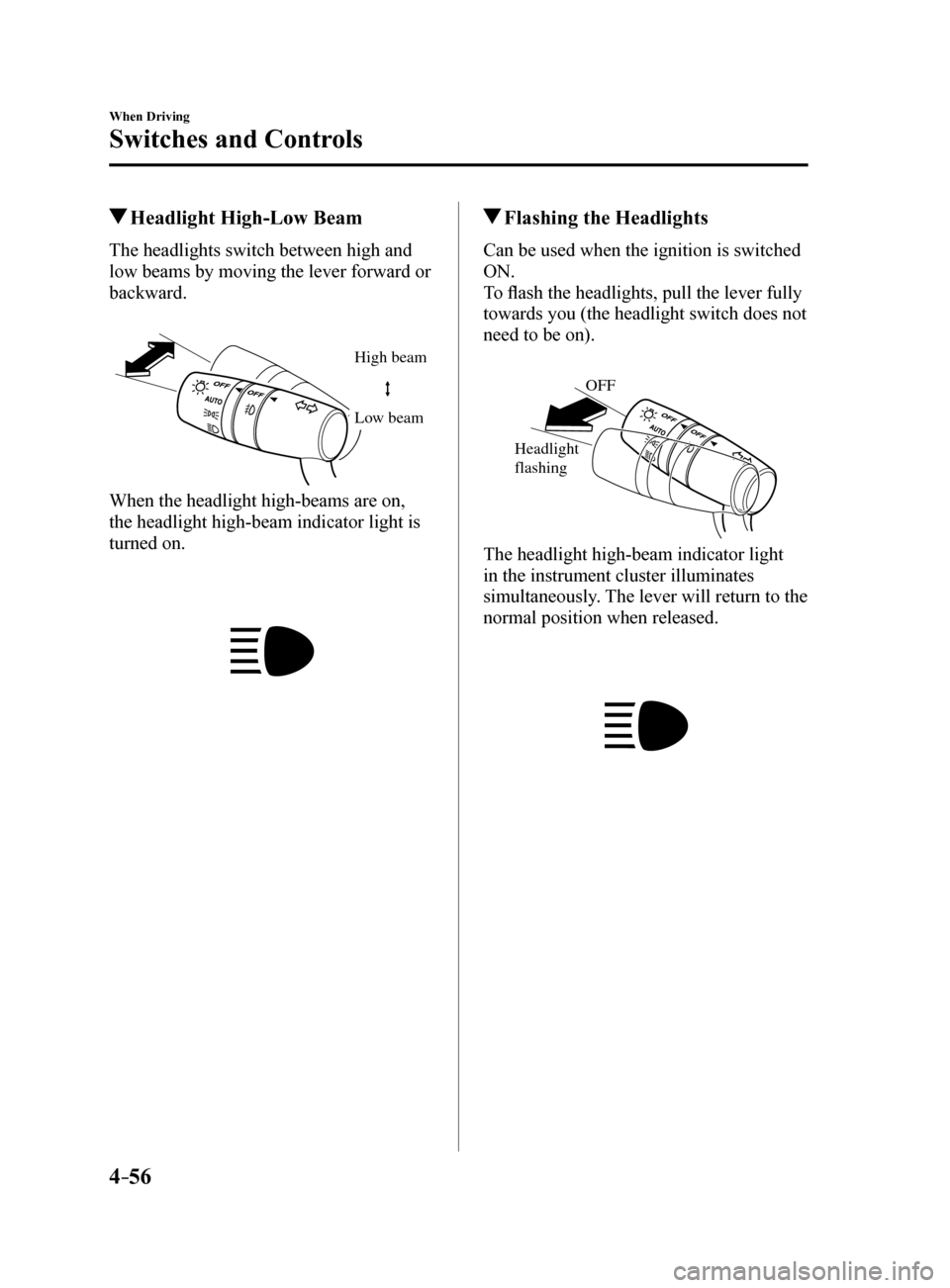
The headlights switch between high and
low beams by moving the lever forward or
backward.
High beam
Lo w beam
When the headlight high-beams are on,
the headlight high-beam indicator light is
turned on.
Flashing the Headlights
Can be used when the ignition is switched
ON.
To flash the headlights, pull the lever fully
towards you (the headlight switch does not
need to be on).
OFF
Headlight
flashing
The headlight high-beam indicator light
in the instrument cluster illuminates
simultaneously. The lever will return to the
normal position when released.
Mazda6_8FH2-EA-16F_Edition2.indb 562016/07/07 13:44:55
Page 181 of 578
4–57
When Driving
Switches and Controls
Coming Home Light
The coming home light turns on the
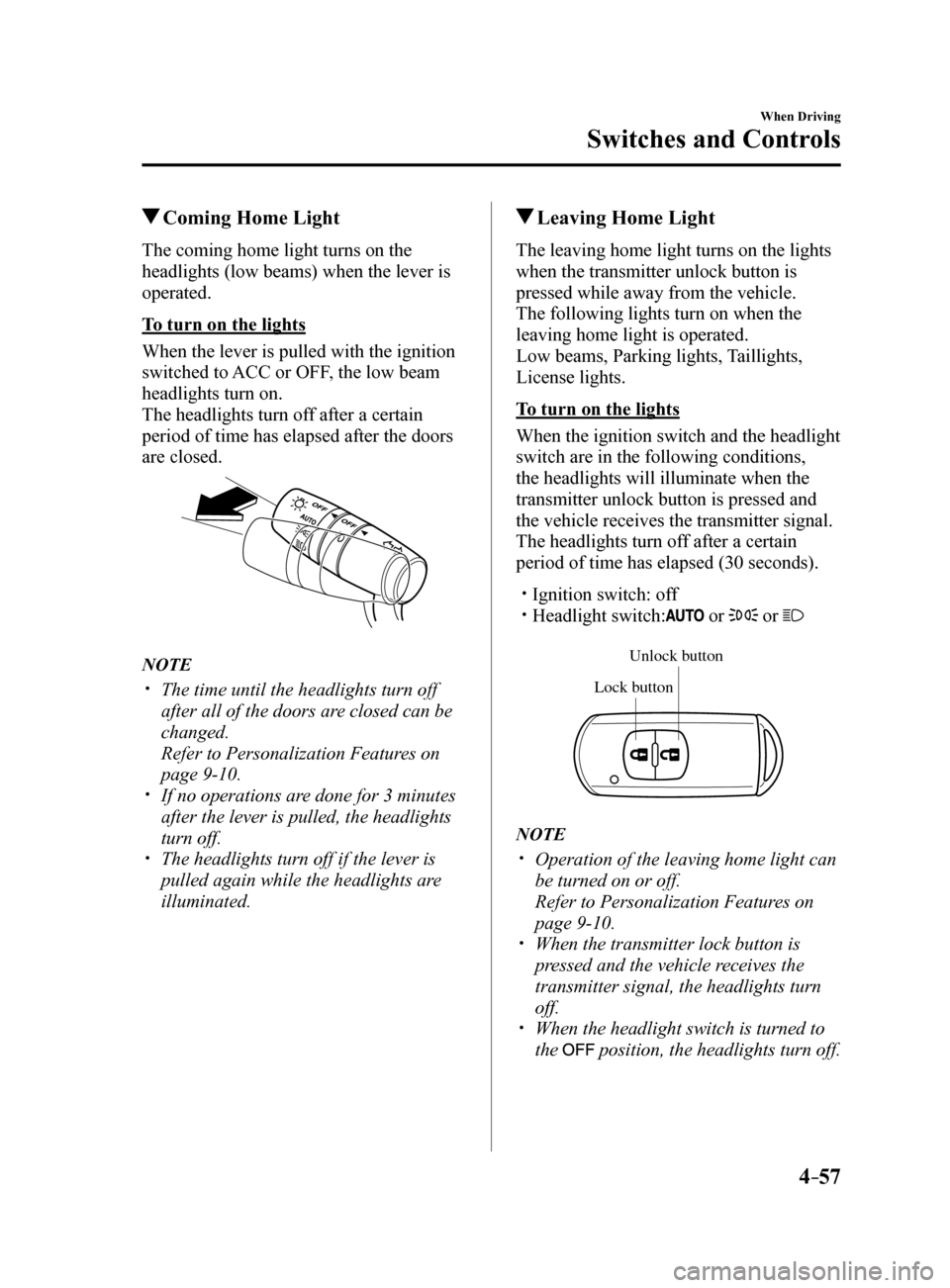
headlights (low beams) when the lever is
operated.
To turn on the lights
When the lever is pulled with the ignition
switched to ACC or OFF, the low beam
headlights turn on.
The headlights turn off after a certain
period of time has elapsed after the doors
are closed.
NOTE
The time until the headlights turn off
after all of the doors are closed can be
changed.
Refer to Personalization Features on
page 9-10.
If no operations are done for 3 minutes
after the lever is pulled, the headlights
turn off.
The headlights turn off if the lever is
pulled again while the headlights are
illuminated.
Leaving Home Light
The leaving home light turns on the lights
when the transmitter unlock button is
pressed while away from the vehicle.
The following lights turn on when the
leaving home light is operated.
Low beams, Parking lights, Taillights,
License lights.
To turn on the lights
When the ignition switch and the headlight
switch are in the following conditions,
the headlights will illuminate when the
transmitter unlock button is pressed and
the vehicle receives the transmitter signal.
The headlights turn off after a certain
period of time has elapsed (30 seconds).
Ignition switch: off Headlight switch: or or
Unlock b utton
Lock button
NOTE
Operation of the leaving home light can
be turned on or off.
Refer to Personalization Features on
page 9-10.
When the transmitter lock button is
pressed and the vehicle receives the
transmitter signal, the headlights turn
off.
When the headlight switch is turned to
the
position, the headlights turn off.
Mazda6_8FH2-EA-16F_Edition2.indb 572016/07/07 13:44:55
Page 182 of 578
4–58
When Driving
Switches and Controls
*Some models.
Headlight Leveling*
The number of passengers and weight of
cargo in the luggage compartment change
the angle of the headlights.
The angle of the headlights will be
automatically adjusted when turning on
the headlights.
Daytime Running Lights
Some countries require moving vehicles
to have their lights on (daytime running
lights) during the daytime.
The daytime running lights turn on when
the vehicle is driven and turn off when the
parking brake is operated or the selector
lever is shifted to the P position (automatic
vehicle).
NOTE
(Except Canada)
The daytime running lights can be
deactivated.
Refer to Personalization Features on page
9-10.
Fog Lights*
The fog lights can be turned on with the
ignition switched ON and the headlights
turned on.
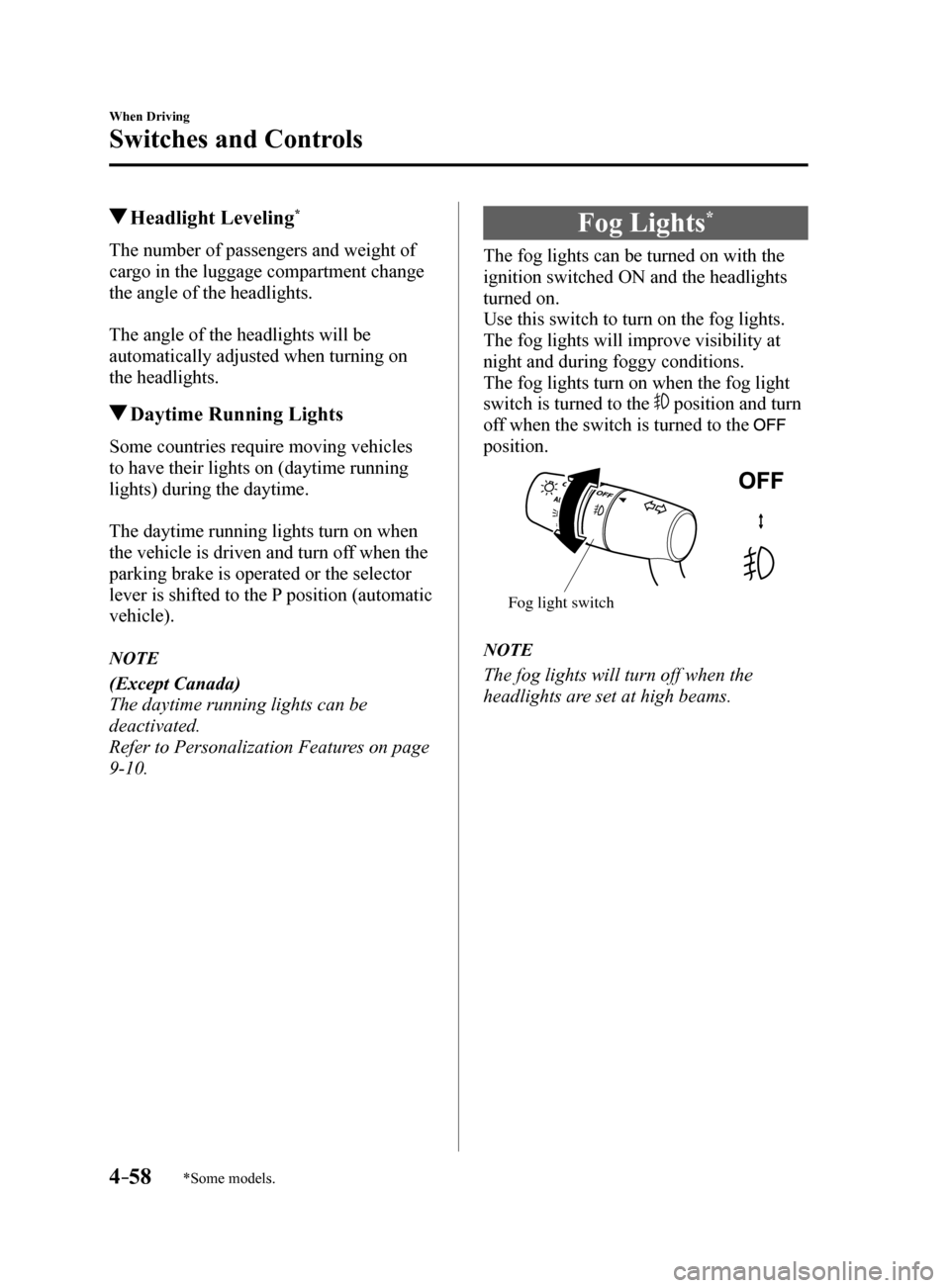
Use this switch to turn on the fog lights.
The fog lights will improve visibility at
night and during foggy conditions.
The fog lights turn on when the fog light
switch is turned to the
position and turn
off when the switch is turned to the
position.
Fog light switch
NOTE
The fog lights will turn off when the
headlights are set at high beams.
Mazda6_8FH2-EA-16F_Edition2.indb 582016/07/07 13:44:55
Page 183 of 578
4–59
When Driving
Switches and Controls
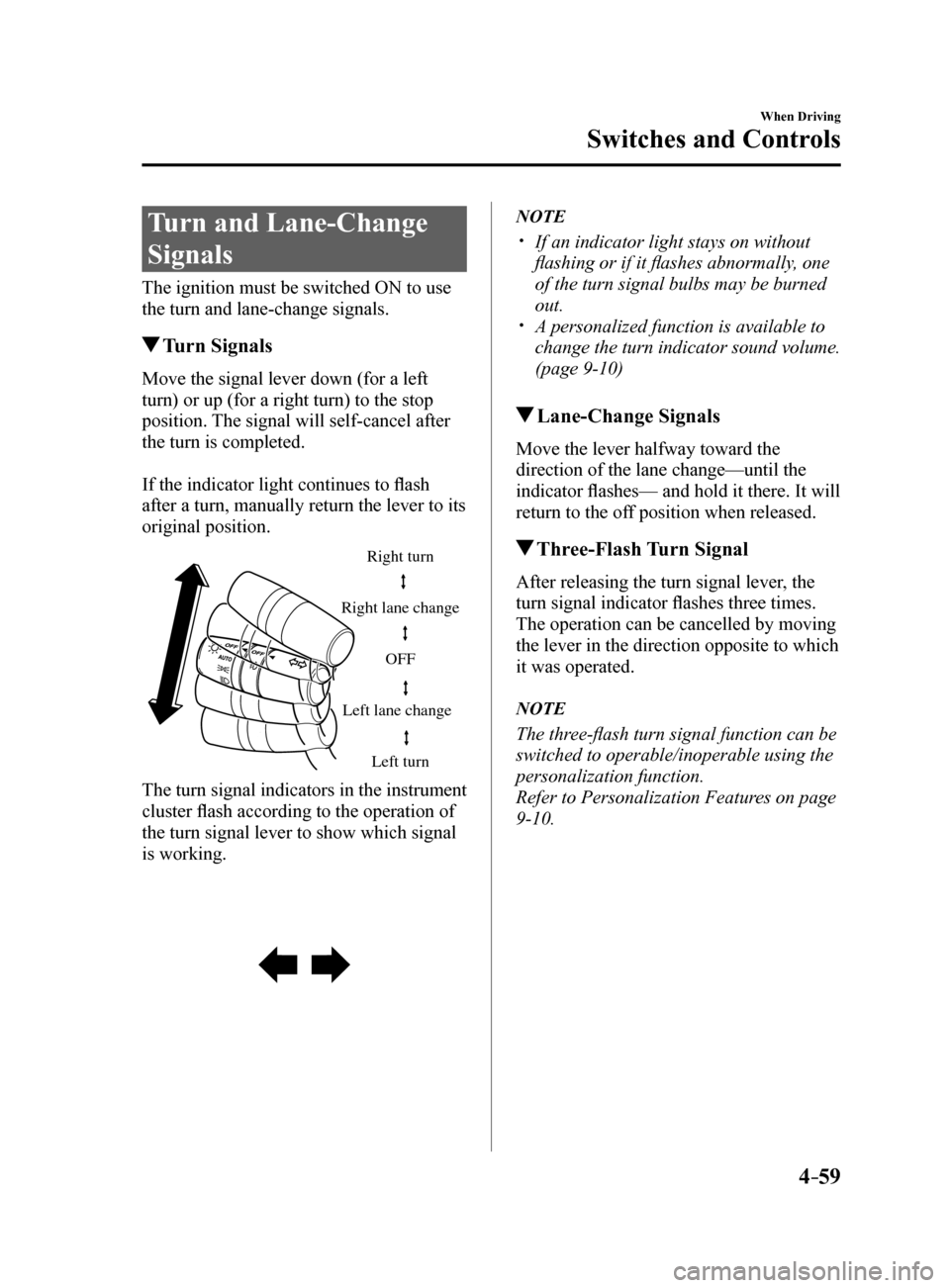
Turn and Lane-Change
Signals
The ignition must be switched ON to use
the turn and lane-change signals.
Turn Signals
Move the signal lever down (for a left
turn) or up (for a right turn) to the stop
position. The signal will self-cancel after
the turn is completed.
If the indicator light continues to flash
after a turn, manually return the lever to its
original position.
Right turn
Left turn
Right lane change
Left lane change OFF
The turn signal indicators in the instrument
cluster flash according to the operation of
the turn signal lever to show which signal
is working.
NOTE
If an indicator light stays on without
flashing or if it flashes abnormally, one
of the turn signal bulbs may be burned
out.
A personalized function is available to
change the turn indicator sound volume.
(page 9-10)
Lane-Change Signals
Move the lever halfway toward the
direction of the lane change—until the
indicator flashes— and hold it there. It will
return to the off position when released.
Three-Flash Turn Signal
After releasing the turn signal lever, the
turn signal indicator flashes three times.
The operation can be cancelled by moving
the lever in the direction opposite to which
it was operated.
NOTE
The three-flash turn signal function can be
switched to operable/inoperable using the
personalization function.
Refer to Personalization Features on page
9-10.
Mazda6_8FH2-EA-16F_Edition2.indb 592016/07/07 13:44:56