battery MAZDA MODEL 6 2019 (in English) Service Manual
[x] Cancel search | Manufacturer: MAZDA, Model Year: 2019, Model line: MODEL 6, Model: MAZDA MODEL 6 2019Pages: 668, PDF Size: 9.4 MB
Page 448 of 668

Things You Need to Know
WA R N I N G
Always adjust the audio while the vehicle is
stopped:
Do not adjust the audio control switches
while driving the vehicle. Adjusting the
audio while driving the vehicle is
dangerous as it could distract your
attention from the vehicle operation which
could lead to a serious accident.
Even if the audio control switches are
equipped on the steering wheel, learn to
use the switches without looking down at
them so that you can keep your maximum
attention on the road while driving the
vehicle.
CAUTION
For the purposes of safe driving, adjust the
audio volume to a level that allows you to
hear sounds outside of the vehicle
including car horns and particularly
emergency vehicle sirens.
NOTE
To prevent the battery from being
discharged, do not leave the audio
system on for a long period of time when
the engine is not running.
If a cellular phone or CB radio is used
in or near the vehicle, it could cause
noise to occur from the audio system,
however, this does not indicate that the
system has been damaged.
Do not spill any liquid on the audio
system.
▼ Radio Reception
AM characteristics
AM signals bend around such things as
buildings or mountains and bounce off the
ionosphere.
Therefore, they can reach longer distances
than FM signals.
Because of this, 2 st
ations may sometimes
be picked up on the same frequency at the
same time.
Station 2
Station 1 Ionosphere
Interior Features
Appendix
5-76
Mazda6_8HK6-EA-19A_Edition1
2018-11-15 9:36:06
Page 453 of 668

If a device exceeds the maximum
electric current value of 1,000 mA, it
may not operate or recharge when
connected.
(Vehicles with USB port indicated with
)
If the current consumption of the
connected device exceeds the following
current value, it may not operate or
recharge.
Apple device is connected : 2,100 mA
Device compatible with BC1.2 is
connected : 1,500 mA
Device other than the above is
connected : 500 mA
Do not pull out the USB device while in
the USB mode (only pull it out while in
FM/AM radio mode).
The device will not operate if the data is
password protected.
MP3/WMA/AAC/OGG files written under
specifications other than the indicated
specification may not play normally or
files/folder names may not display
correctly.
▼ Agreements and disclaimers related
to Apple CarPlay™
This unit is compa
tible with Apple
CarPlay™ which can operate an iPhone
®
using the vehicle's audio device.
iPhone, Siri and Apple Music are
registered trademarks of Apple Inc.
Apple CarPlay is trademarks of Apple
Inc.
iOS is a trademark or registered
trademark of Cisco in the U.S. and other
countries and is used under license.
May not be compatible depending on the
model or OS version.
CAUTION
For the purposes of safety, do not
operate your iPhone
® while driving.
Disconnect the iPhone
® when it is not in
use. If the device is left in the cabin, it
could be damaged or the battery may
deteriorate due to the excessive
temperature or humidity inside the
cabin.
If the iPhone
® battery has deteriorated, it
may not recharge or play audio even if it
is connected to this unit.
Before use, carefully read the user
instructions for the iPhone
®.
NOTE
To prevent loss or damage of stored data,
we recommend that you always back up
your data.
▼ Operating Tips for Android™
Requires the Android Auto app on Google
Play and an Android compatible
smartphone running Android™ 5.0
Lollipop or higher.
CAUTION
For the purposes of safety, do not
operate your Android™ Smartphone
while driving.
Disconnect the Android™ Smartphone
when it is not in use. If the device is left in
the cabin, it could be damaged or the
battery may weaken due to the excessive
temperature or humidity inside the
cabin.
Interior Features
Appendix
5-81
Mazda6_8HK6-EA-19A_Edition1 2018-11-15 9:36:06
Page 454 of 668

If the Android™ Smartphone battery has
deteriorated, it may not recharge or play
audio even if it is connected to this unit.
Before use, carefully read the user
instructions for the Android™
Smartphone.
NOTE
To prevent loss or damage of stored data,
we recommend that you always back up
your data.
Google, Android, Android Auto and
other related marks are trademarks of
Google LLC.
Interior Features
Appendix
5-82
Mazda6_8HK6-EA-19A_Edition1
2018-11-15 9:36:06
Page 455 of 668
Sunvisors
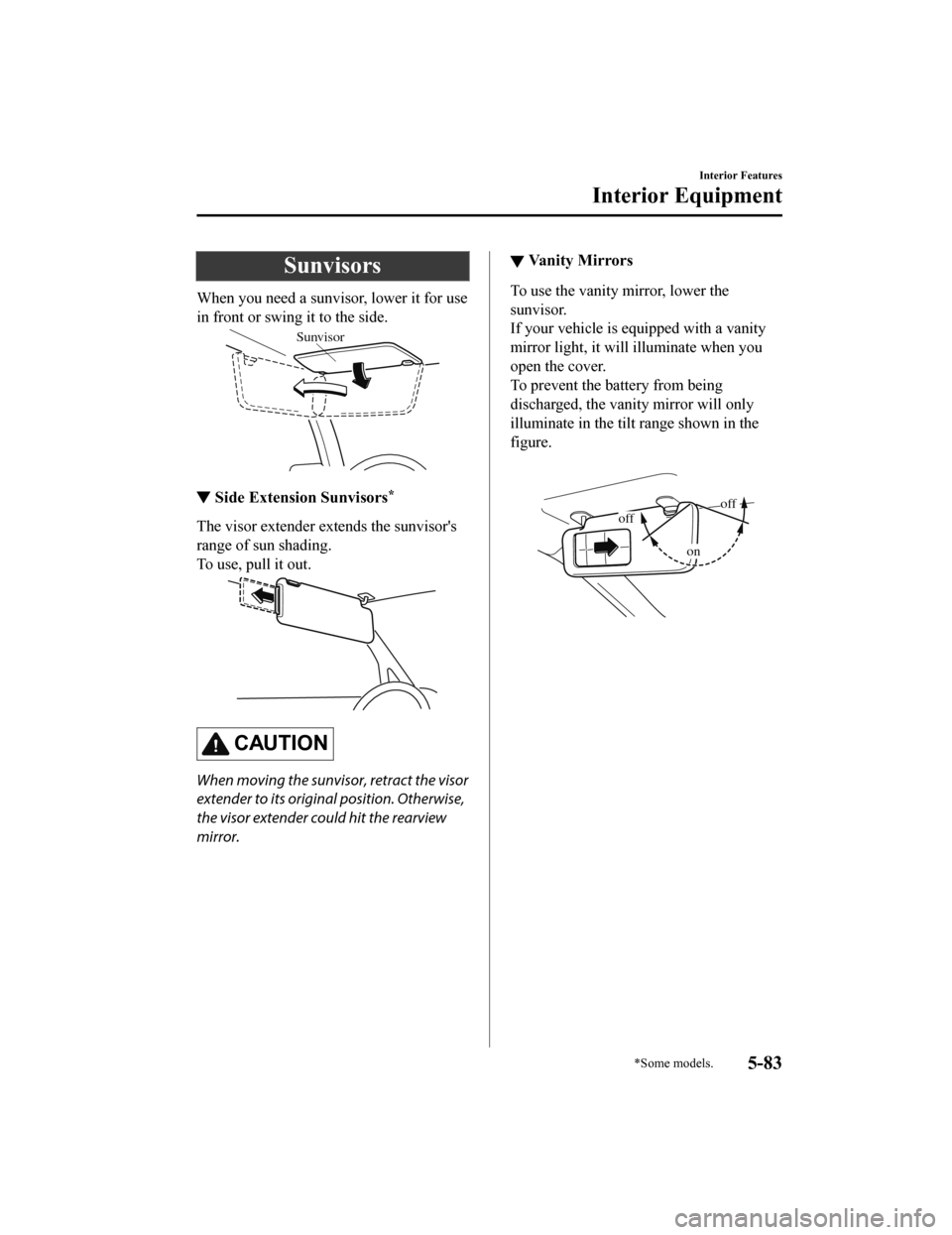
When you need a sunvisor, lower it for use
in front or swing it to the side.
Sunvisor
▼Side Extension Sunvisors*
The visor extender extends the sunvisor's
range of sun shading.
To use, pull it out.
CAUTION
When moving the sunvisor, retract the visor
extender to its original position. Otherwise,
the visor extender could hit the rearview
mirror.
▼Va n i t y M i r r o r s
To use the vanity mirror, lower the
sunvisor.
If your vehicle is equipped with a vanity
mirror light, it will illuminate when you
open the cover.
To prevent the battery from being
discharged, the vanity mirror will only
illuminate in the tilt range shown in the
figure.
offoff
on
Interior Features
Interior Equipment
*Some models.5-83
Mazda6_8HK6-EA-19A_Edition1
2018-11-15 9:36:06
Page 456 of 668
Interior Lights
NOTE
Do not leave the lights on for long periods
while the engine is turned off. Otherwise
the battery power could be depleted.
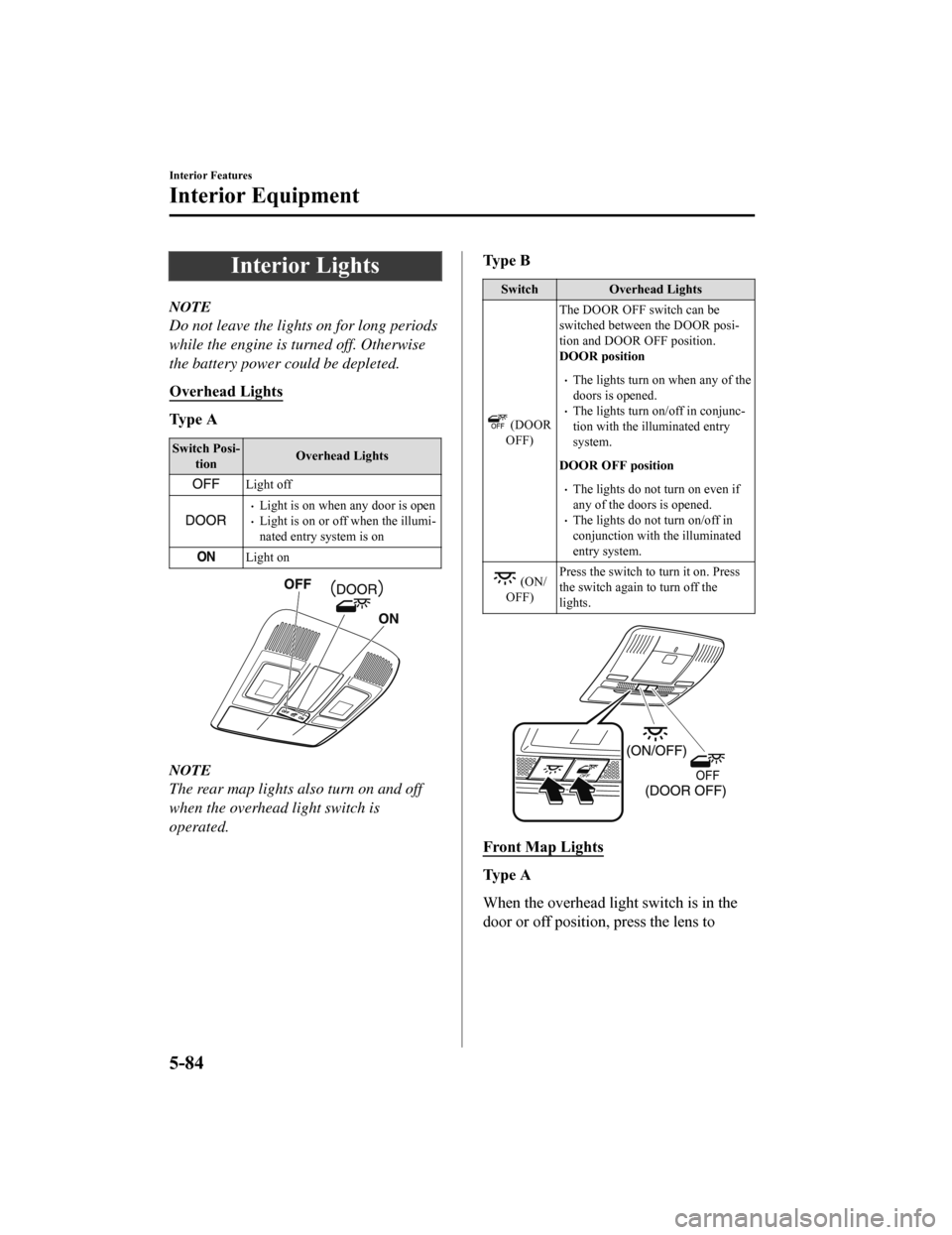
Overhead Lights
Ty p e A
Switch Posi‐tion Overhead Lights
Light off
Light is on when any door is openLight is on or off when the illumi‐
nated entry system is on
Light on
NOTE
The rear map lights also turn on and off
when the overhead light switch is
operated.
Ty p e B
Switch
Overhead Lights
(DOOR
OFF) The DOOR OFF switch can be
switched between the DOOR posi‐
tion and DOOR OFF position.
DOOR position
The lights turn on when any of the
doors is opened.
The lights turn on/off in conjunc‐
tion with the illuminated entry
system.
DOOR OFF position
The lights do not turn on even if
any of the doors is opened.
The lights do not turn on/off in
conjunction with the illuminated
entry system.
(ON/
OFF) Press the switch to turn it on. Press
the switch again to turn off the
lights.
Front Map Lights
Ty p e A
When the overhead light switch is in the
door or off position, press the lens to
Interior Features
Interior Equipment
5-84
Mazda6_8HK6-EA-19A_Edition1
2018-11-15 9:36:06
Page 458 of 668
NOTE
Once the rear map lights have been
turned off, they will turn on and off in
conjunction with the overhead light
operation.
The rear map lights will not turn off
even if the switch is pressed in the
following cases:
The overhead lights turn on by
operating the overhead ON/OFF
switch (
).
The overhead lights turn on in
conjunction with a door opening/
closing.
The illuminated entry system is on.
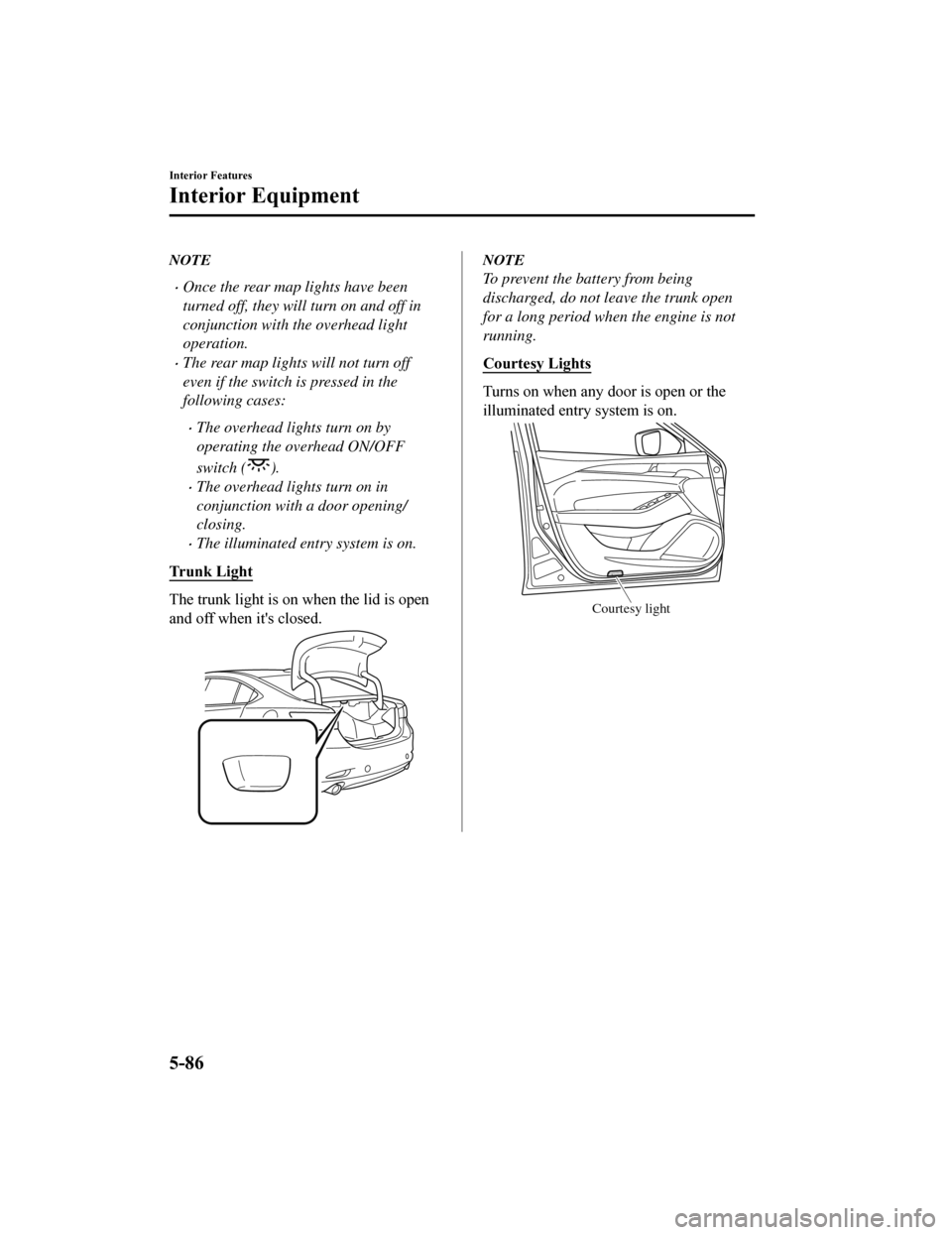
Trunk Light
The trunk light is on when the lid is open
and off when it's closed.
NOTE
To prevent the battery from being
discharged, do not leave the trunk open
for a long period when the engine is not
running.
Courtesy Lights
Turns on when any door is open or the
illuminated entry system is on.
Courtesy light
Interior Features
Interior Equipment
5-86
Mazda6_8HK6-EA-19A_Edition1 2018-11-15 9:36:06
Page 459 of 668
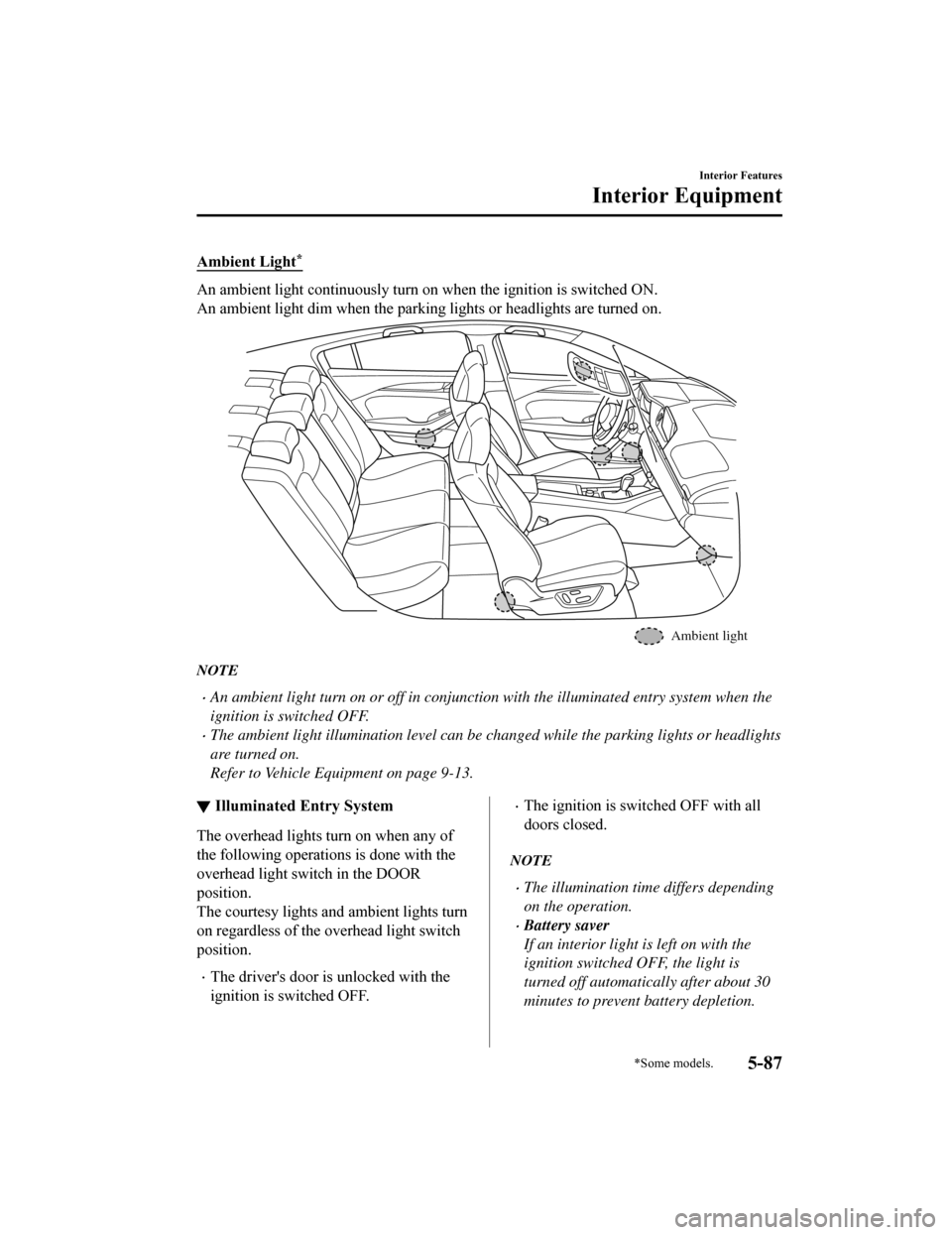
Ambient Light*
An ambient light continuously turn on when the ignition is switched ON.
An ambient light dim when the parking lights or headlights are turned on.
Ambient light
NOTE
An ambient light turn on or off in conjunction with the illuminated entry system when the
ignition is switched OFF.
The ambient light illumination level can be changed while the parking lights or headlights
are turned on.
Refer to Vehicle Equipment on page 9-13.
▼ Illuminated Entry System
The overhead lights turn on when any of
the following operations is done with the
overhead light switch in the DOOR
position.
The courtesy lights and ambient lights turn
on regardless of the overhead light switch
position.
The driver's door is unlocked with the
ignition is switched OFF.
The ignition is sw
itched OFF with all
doors closed.
NOTE
The illumination tim e differs depending
on the operation.
Battery saver
If an interior light is left on with the
ignition switched OFF, the light is
turned off automatically after about 30
minutes to prevent battery depletion.
Interior Features
Interior Equipment
*Some models.5-87
Mazda6_8HK6-EA-19A_Edition1 2018-11-15 9:36:06
Page 461 of 668
Noise may occur on the audio playback
depending on the device connected to
the accessory socket.
Depending on the device connected to
the accessory socket, the vehicle's
electrical system may be affected, which
could cause the warning light to
illuminate. Disconnect the connected
device and make sure that the problem is
resolved. If the problem is resolved,
disconnect the device from the socket
and switch the ignition off. If the problem
is not resolved, consult an Authorized
Mazda Dealer.
NOTE
To prevent discharging of the battery, do
not use the socket for long periods with the
engine off or idling.
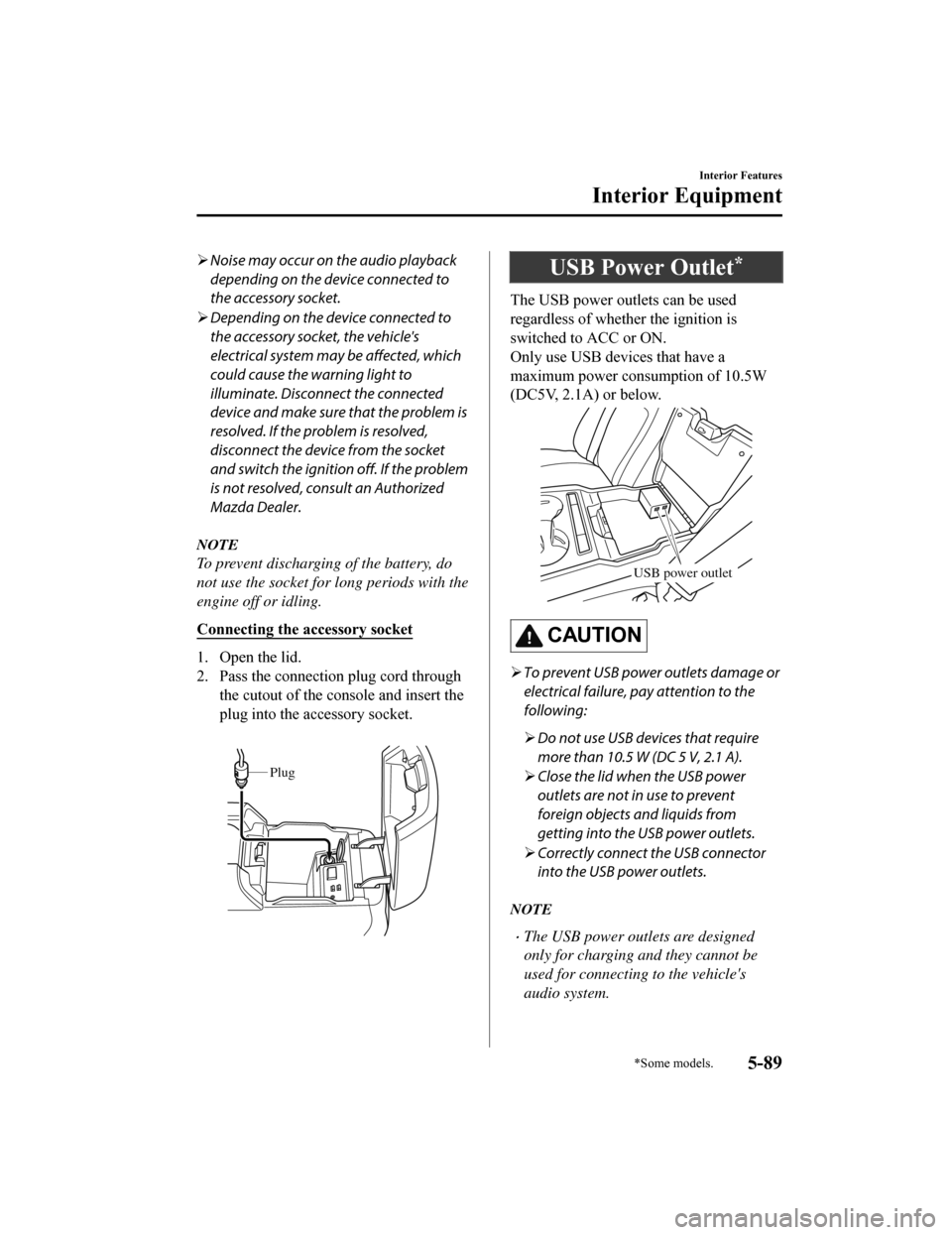
Connecting the accessory socket
1. Open the lid.
2. Pass the connection plug cord through
the cutout of the console and insert the
plug into the accessory socket.
Plug
USB Power Outlet*
The USB power outlets can be used
regardless of whether the ignition is
switched to ACC or ON.
Only use USB devices that have a
maximum power consumption of 10.5W
(DC5V, 2.1A) or below.
USB power outlet
CAUTION
To prevent USB power outlets damage or
electrical failure, pay attention to the
following:
Do not use USB devices that require
more than 10.5 W (DC 5 V, 2.1 A).
Close the lid when the USB power
outlets are not in use to prevent
foreign objects and liquids from
getting into the USB power outlets.
Correctly connect the USB connector
into the USB power outlets.
NOTE
The USB power outlets are designed
only for charging and they cannot be
used for connecting to the vehicle's
audio system.
Interior Features
Interior Equipment
*Some models.5-89
Mazda6_8HK6-EA-19A_Edition1 2018-11-15 9:36:06
Page 462 of 668
To prevent discharging of the battery, do
not use the USB power outlets for long
periods with the engine off or idling.
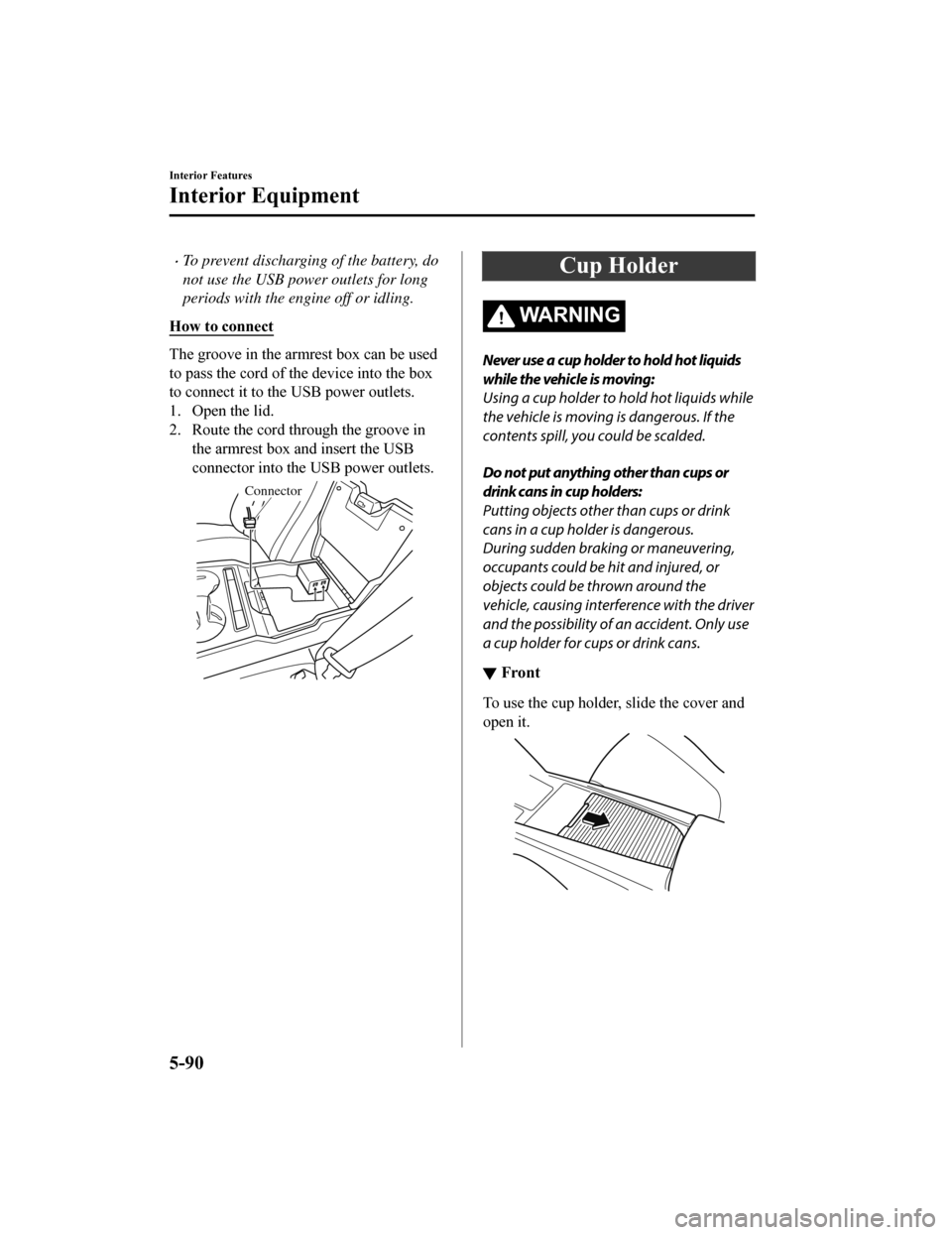
How to connect
The groove in the armrest box can be used
to pass the co rd of the device into the box
to connect it to the USB power outlets.
1. Open the lid.
2. Route the cord through the groove in the armrest box and insert the USB
connector into the USB power outlets.
Connector
Cup Holder
WA R N I N G
Never use a cup holder to hold hot liquids
while the vehicle is moving:
Using a cup holder to hold hot liquids while
the vehicle is moving is dangerous. If the
contents spill, you could be scalded.
Do not put anything other than cups or
drink cans in cup holders:
Putting objects other than cups or drink
cans in a cup holder is dangerous.
During sudden braking or maneuvering,
occupants could be hit and injured, or
objects could be thrown around the
vehicle, causing interference with the driver
and the possibility of an accident. Only use
a cup holder for cups or drink cans.
▼Front
To use the cup holder, slide the cover and
open it.
Interior Features
Interior Equipment
5-90
Mazda6_8HK6-EA-19A_Edition1
2018-11-15 9:36:06
Page 467 of 668

6Maintenance and Care
How to keep your Mazda in top condition.
Essential Information........................6-2 Introduction.................................. 6-2
Scheduled Maintenance.................... 6-4 Scheduled Maintenance (U.S.A.,
Canada, and Puerto Rico)............. 6-4
Scheduled Maintenance
(Mexico)..................................... 6-10
Maintenance Monitor................. 6-15
Owner Maintenance........................ 6-18 Owner Maintenance
Precautions................................. 6-18
Hood........................................... 6-20
Engine Compartment
Overview.................................... 6-22
Engine Oil...................................6-23
Engine Coolant........................... 6-26
Brake/Clutch Fluid ..................... 6-28
Washer Fluid............................... 6-28
Body Lubrication...... .................. 6-29
Wiper Blades.............................. 6-30
Battery........................................ 6-34
Key Battery Replacement........... 6-36
Tires............................................ 6-39
Light Bulbs................................. 6-43
Fuses........................................... 6-47
Appearance Care............................. 6-54
Exterior Care.............................. 6-54
Interior Care................................6-60
6-1
Mazda6_8HK6-EA-19A_Edition1 2018-11-15 9:36:06