parking brake MAZDA MODEL 6 2021 User Guide
[x] Cancel search | Manufacturer: MAZDA, Model Year: 2021, Model line: MODEL 6, Model: MAZDA MODEL 6 2021Pages: 634, PDF Size: 71.37 MB
Page 184 of 634

SignalWarning Page
Check Fuel Cap Warning Indication/Warning Light*17-35
Engine Oil Level Warning Light*17-35
Seat Belt Warning Light (Front seat) 7-35
(Red)Seat Belt Warning Light (Rear seat) 7-35
*Low Washer Fluid Level Warning Indication
7-35
Door-Ajar Warning Indication
7-35
Trunk lid-Ajar Warning Indication 7-35
*1 The light turns on when the ignition is switched on for an operation check, and turns off a few seconds later or
when the engine is started. If the light does not turn on or remains turned on, have the vehicle inspected at an
Authorized Mazda Dealer.
*2 The light turns on continuously when the parking brake is applied.
▼Indication/Indicator Lights
These lights turn on or flash to notify the user of the system
operation status or a system
malfunction.
Signal Indicator Page
(Green)Seat Belt Indicator Light (Rear seat) 2-68
*Front Passenger Air Bag Deactivation Indicator Light*12-68
Security Indicator Light*13-41
Wrench Indication
4-50
(Blue)Low Engine Coolant Temperature Indicator Light 4-50
When Driving
Instrument Cluster and Display
4-46*Some models.
Mazda6_8JN3-EA-20H_Edition1_old
2020-6-18 17:31:27
Page 198 of 634

SignalWarning Page
Electric Parking Brake (EPB) Warning Light*17-28
(Red)Brake Pedal Operation Demand Warning Light
*1
Flashing
4-105
Buzzer & Flash‐ ing
7-28
Check Engine Light*17-28
Automatic Transaxle Warning Light*17-28
Air Bag/Front Seat Belt Pretensioner System Warning Light*17-28
Tire Pressure Monitoring System Warning Light*1
Flashing
7-28
Turns on 7-35
(Red) KEY Warning Light
*1
Turns on
7-28
Flashing 7-35
LED Headlight Warning Light*17-28
(Amber) Smart City Brake Support (SCBS) Warning Light
*17-35
Low Fuel Warning Light
7-35
Check Fuel Cap Warning Light*17-35
Engine Oil Level Warning Light*17-35
Seat Belt Warning Light (Front seat) 7-35
(Red)Seat Belt Warning Light (Rear seat) 7-35
Low Washer Fluid Level Warning Light
7-35
Door-Ajar Warning Light7-35
When Driving
Instrument Cluster and Display
4-60
Mazda6_8JN3-EA-20H_Edition1_old 2020-6-18 17:31:27
Page 199 of 634

*1 The light turns on when the ignition is switched on for an operation check, and turns off a few seconds later or
when the engine is started. If t he light does not turn on or remains turned on, have the vehicle inspected at an
Authorized Mazda Dealer.
*2 The light turns on continuously when the parking brake is appl ied.
▼Indication/Indicator Lights
These lights turn on or flash to
notify the user of the system operation status or a system
malfunction.
Signal Indicator Page
(Green)Seat Belt Indicator Light (Rear seat) 2-68
*Front Passenger Air Bag Deactivation Indicator Light*12-68
(Green)KEY Indicator Light 4-5
Security Indicator Light*13-41
Wrench Indication/Indicator Light*14-63
Shift Position Indication
4-69
Lights-On Indication/Indicator Light 4-78
Headlight High-Beam Indicator LightHeadlight
High-Low Beam 4-82
Flashing the Headlights 4-82
Turn Signal/Hazard Warning Indicator Lights Turn and
Lane-Change Signals4-84
Hazard Warning Flasher4-91
(Green) Brake Pedal Operation demand Indicator Light 4-101
AUTOHOLD Active Indicator Light*14-107
When Driving
Instrument Cluster and Display
*Some models.4-61
Mazda6_8JN3-EA-20H_Edition1_old
2020-6-18 17:31:27
Page 206 of 634

Shift-Lock System
The shift-lock system prevents shifting out
of P unless the brake pedal is depressed.
To shift from P:
1. Depress and hold the brake pedal.
2. Start the engine.
3. Press and hold the lock-release button.
4. Move the selector lever.
NOTE
When the ignition is switched to ACC or
the ignition is switched off, the selector
lever cannot be shifted from P position.
The ignition cannot be switched to OFF
if the selector lever is not in P position.
▼ Shift-Lock Override
If the selector lever will not move from P
using the proper shift procedure, continue
to hold down the brake pedal.
1. Remove the shift-lock override cover
using a cloth-wrapped flat head
screwdriver.
2. Insert a screwdriver and push it down.
Cover
Lock-release button
3. Press and hold the lock-release button.
4. Move the selector lever.
Take the vehicle to an Authorized Mazda
Dealer to have the system checked.
Transaxle Ranges
The shift position indication in the
instrument cluster illuminates.
Refer to Indication/Indicator Lights on
page 4-29, 4-46, 4-61.
The selector lever must be in P or N
position to operate the starter.
P (Park)
P locks the transaxle and prevents the
front wheels from rotating.
WA R N I N G
Always set the selector lever to P position
and set the parking brake:
Only setting the selector lever to the P
position without using the parking brake to
hold the vehicle is dangerous. If P fails to
hold, the vehicle could move and cause an
accident.
CAUTION
Shifting into P, N or R while the vehicle is
moving can damage your transaxle.
Shifting into a driving gear or reverse
when the engine is running faster than
idle can damage the transaxle.
R (Reverse)
In position R, the vehicle moves only
backward. You must be at a complete stop
before shifting to or from R, except under
rare circumstances as explained in
Rocking the Vehicle (page 3-46).
When Driving
Automatic Transaxle
4-68
Mazda6_8JN3-EA-20H_Edition1_old 2020-6-18 17:31:27
Page 207 of 634

N (Neutral)
In N, the wheels and transaxle are not
locked. The vehicle will roll freely even
on the slightest incline unless the parking
brake or brakes are on.
WARNING
If the engine is running faster than idle, do
not shift from N or P into a driving gear:
It's dangerous to shift from N or P into a
driving gear when the engine is running
faster than idle. If this is done, the vehicle
could move suddenly, causing an accident
or serious injury.
Do not shift into N when driving the
vehicle:
Shifting into N while driving is dangerous.
Engine braking cannot be applied when
decelerating which could lead to an
accident or serious injury.
CAUTION
Do not shift into N when driving the
vehicle. Doing so can cause transaxle
damage.
NOTE
Apply the parking brake or depress the
brake pedal before moving the selector
lever from N position to prevent the
vehicle from moving unexpectedly.
D (Drive)
D is the normal driving position. From a
stop, the transaxle wil l automatically shift
through a 6-gear sequence.
M (Manual)
M is the manual shift mode position.
Gears can be shifted up or down by
operating the selector lever. Refer to
Manual Shift Mode on page 4-70.
▼ Shift Position Indication
The selector position is indicated when the
ignition is switched ON.
Gear position indication
In manual shift mode, the “M” of the shift
position indication illuminates and the
numeral for the selected gear is displayed.
▼Active Adaptive Shift (AAS)
Active Adaptive Shift (AAS)
automatically controls the transaxle shift
points to best suit the
road conditions and
driver input. This improves driving feel.
The transaxle may switch to AAS mode
when driving up and down slopes,
cornering, driving at high elevations, or
depressing the accelerator pedal quickly
while the selector lever is in the D
position. Depending on the road and
driving conditions/ve hicle operations, gear
shifting could be delayed or not occur,
however, this does not indicate a problem
because the AAS mode will maintain the
optimum gear position.
When Driving
Automatic Transaxle
4-69
Mazda6_8JN3-EA-20H_Edition1_old 2020-6-18 17:31:27
Page 221 of 634

▼Leaving Home Light
The leaving home light turns on the lights
when the transmitter unlock button is
pressed while away from the vehicle.
The following lights turn on when the
leaving home light is operated.
Low beams, Parking lights, Taillights,
License plate lights.
To turn on the lights
When the ignition swi
tch and the headlight
switch are in the following conditions, the
headlights will illuminate when the
transmitter unlock button is pressed and
the vehicle receives the transmitter signal.
The headlights turn off after a certain
period of time has elapsed (30 seconds).
Ignition switch: off
Headlight switch: AUTO, , or
Unlock
button Lock button
NOTE
Operation of the leaving home light can
be turned on or off.
Refer to the Settings section in the
Mazda Connect Owner's Manual.
When the transmitter lock button is
pressed and the vehicle receives the
transmitter signal, the headlights turn
off.
When the headlight switch is turned to
the OFF position, the headlights turn
off.
▼ Headlight Leveling
The number of passengers and weight of
cargo in the luggage compartment change
the angle of the headlights.
The angle of the headlights will be
automatically adjusted when turning on
the headlights.
▼Daytime Running Lights
Some countries require moving vehicles to
have their lights on (daytime running
lights) during the daytime.
Except Canada
The daytime running lights turn on when
the vehicle is driven and turn off when the
parking brake is operated or the selector
lever is shifted to
the P position.
NOTE
The daytime running lights can be
deactivated.
Refer to the Settings section in the Mazda
Connect Owner's Manual.
Canada
The daytime running lights continuously
turn on when the ignition is switched ON.
When the light switch is switched to the
OFF or
position while the vehicle is
stopped, the daytime running lights turns
off. When you start driving the vehicle,
they turn on again.
When Driving
Switches and Controls
4-83
Mazda6_8JN3-EA-20H_Edition1_old 2020-6-18 17:31:27
Page 239 of 634
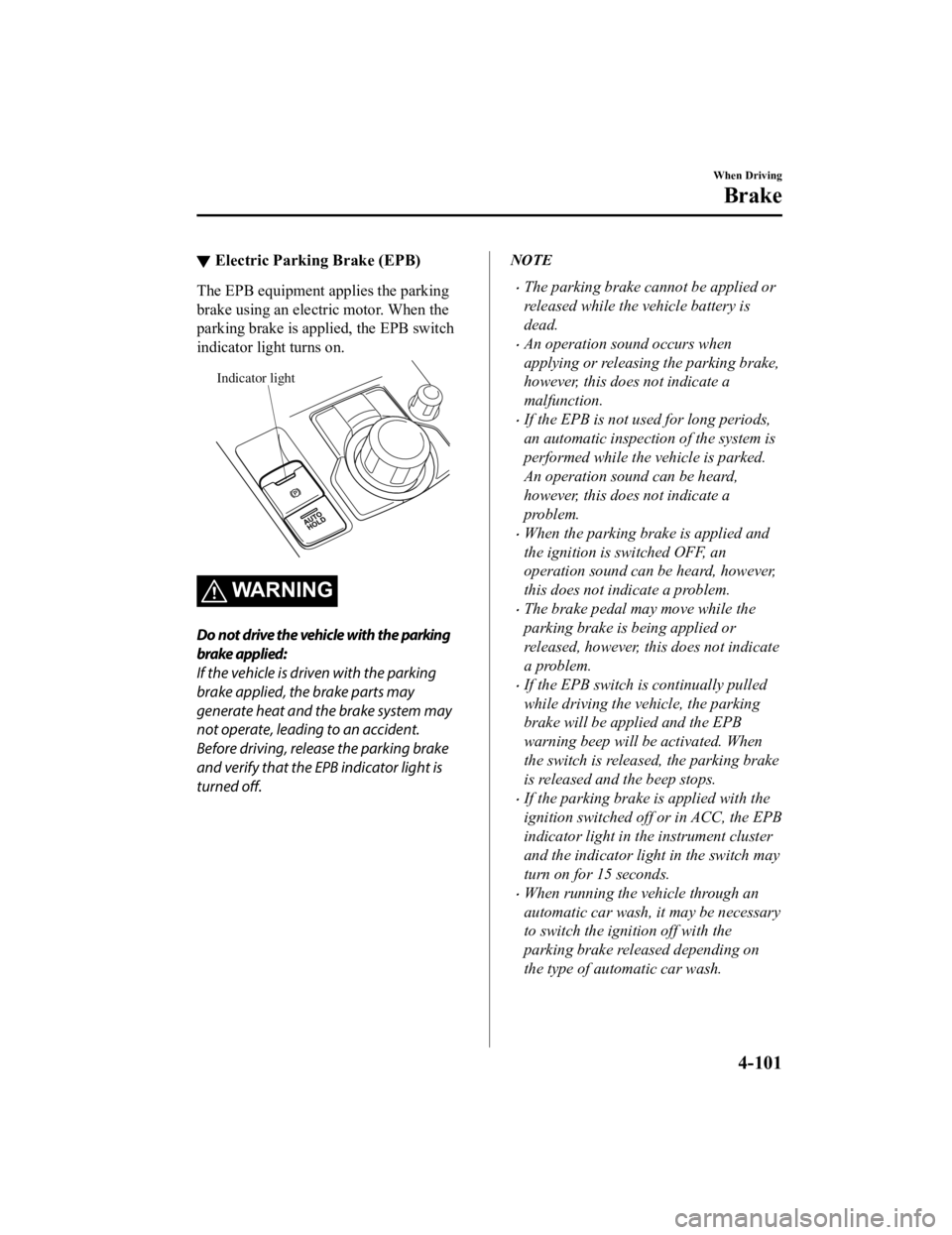
▼Electric Parking Brake (EPB)
The EPB equipment applies the parking
brake using an electric motor. When the
parking brake is applied, the EPB switch
indicator light turns on.
Indicator light
WARNING
Do not drive the vehicle with the parking
brake applied:
If the vehicle is driven with the parking
brake applied, the brake parts may
generate heat and the brake system may
not operate, leading to an accident.
Before driving, release the parking brake
and verify that the EPB indicator light is
turned off.
NOTE
The parking brake cannot be applied or
released while the vehicle battery is
dead.
An operation sound occurs when
applying or releasing the parking brake,
however, this does not indicate a
malfunction.
If the EPB is not used for long periods,
an automatic inspection of the system is
performed while the vehicle is parked.
An operation sound can be heard,
however, this does not indicate a
problem.
When the parking brake is applied and
the ignition is switched OFF, an
operation sound can be heard, however,
this does not indicate a problem.
The brake pedal may move while the
parking brake is being applied or
released, however, this does not indicate
a problem.
If the EPB switch is continually pulled
while driving the vehicle, the parking
brake will be applied and the EPB
warning beep will be activated. When
the switch is released, the parking brake
is released and the beep stops.
If the parking brake is applied with the
ignition switched off or in ACC, the EPB
indicator light in the instrument cluster
and the indicator light in the switch may
turn on for 15 seconds.
When running the vehicle through an
automatic car wash, it may be necessary
to switch the ignition off with the
parking brake released depending on
the type of automatic car wash.
When Driving
Brake
4-101
Mazda6_8JN3-EA-20H_Edition1_old
2020-6-18 17:31:27
Page 240 of 634

When applying the parking brake
The parking brake can be applied
regardless of the ignition switch position.
Securely depress the brake pedal and pull
up the EPB switch.
The parking brake is applied and the EPB
indicator light and the EPB switch
indicator light turn on.
Refer to If a Warnin g Light Turns On or
Flashes on page 7-25.
When releasing the parking brake
The parking brake can be released while
the ignition is swit ched ON or the engine
is running. When the parking brake is
released, the EPB indicator light and the
EPB switch indicato r light turn off.
Parking brake manual release
Firmly depress the brake pedal and press
the EPB switch.
If the EPB switch is pressed without
depressing the brake pedal, the display in
the instrument cluster notifies the driver
that the brake is not depressed.
(Type A/B instrument cluster)
A message is displayed on the
multi-information display in the
instrument cluster.
Refer to Message Indicated in
Multi-information Display on page 7-41.
(Type C instrument cluster)
The brake pedal operation demand
indicator light (green) in the instrument
cluster turns on.
(Green)
When Driving
Brake
4-102
Mazda6_8JN3-EA-20H_Edition1_old 2020-6-18 17:31:27
Page 241 of 634

Parking brake automatic release
If the accelerator pedal is depressed with
the parking brake applied and all of the
following conditions met, the parking
brake is released automatically.
The engine is running.
The driver's door is closed.
The driver's seat belt is fastened.
Selector lever is in the D, M, or R
position
NOTE
If something such as the driver's foot
contacts the accelerator pedal with the
engine running and the parking brake
applied, the parking brake may be
released automatically. If you do not
intend to drive immediately, shift the
selector lever to the P or N position.
▼ Warning Light
The warning light turns on when the
system has a malfunction.
Refer to Contact Authorized Mazda
Dealer and Have Vehicle Inspected on
page 7-28.
▼Brake Pad Wear Indicator
When the disc brake pads become worn,
the built-in wear indicators contact the
disc plates. This caus
es a screeching noise
to warn that the pads should be replaced.
When you hear this noise, consult an
Authorized Mazda Dealer as soon as
possible.
WA R N I N G
Do not drive with worn disc pads:
Driving with worn disc pads is dangerous.
The brakes could fail and cause a serious
accident. As soon as you hear a screeching
noise consult an Authorized Mazda Dealer.
NOTE
In high humidity weather conditions,
brake noises, such as brake squeak or
brake squeal can be heard. It does not
indicate a malfunction.
When Driving
Brake
4-103
Mazda6_8JN3-EA-20H_Edition1_old 2020-6-18 17:31:27
Page 244 of 634

Always apply the parking brake when parking the vehicle:
Not applying the parking brake when parking the vehicle is dangerous as the vehicle may
move unexpectedly and result in an accident. When parking the vehicle, shift the selector
lever to the P position and apply the parking brake.
CAUTION
If you stop operating the accelerator pedal befo re the vehicle starts moving, the force holding
the vehicle in the stopped position may weaken. Firmly depress the brake pedal or depress the
accelerator pedal to accelerate the vehicle.
NOTE
Under the following conditions, a problem wi th the AUTOHOLD is occurring. Have your
vehicle inspected at an Authorized Mazda Dealer as soon as possible.
The brake pedal operation demand warning ligh t (red) in the instrument cluster flashes
and the warning sound is activated for about 5 seconds while the AUTOHOLD is
operating or when you press the AUTOHOLD switch.
A message is indicated on the multi-information display and a warning sound is
activated for about 5 seconds while the AUTOHOLD is operating or when your press
the AUTOHOLD switch.
If you switch the ignition OFF while the AUTOHOLD is operating, the parking brake is
applied automatically to assist you with parking the vehicle.
The AUTOHOLD is canceled when the selector lever is shifted to R position while the
vehicle is on level ground, or facing up a hill or grade (as shown below).
Level ground
: Driving in reverse (selector lever in R)
Vehicle tilts forward Vehicle tilts rearward
AUTOHOLD :
Operates AUTOHOLD :
Does not operate,
canceled
AUTOHOLD :
Does not operate,
canceled
When Driving
Brake
4-106
Mazda6_8JN3-EA-20H_Edition1_old 2020-6-18 17:31:27