steering wheel MAZDA MODEL B4000 2003 Owners Manual
[x] Cancel search | Manufacturer: MAZDA, Model Year: 2003, Model line: MODEL B4000, Model: MAZDA MODEL B4000 2003Pages: 250, PDF Size: 2.85 MB
Page 1 of 250
Introduction4
Instrument Cluster 10
Warning and control lights 12
Gauges 16
Entertainment Systems19
AM/FM stereo 19
AM/FM stereo with CD 21
AM/FM stereo with in-dash six CD 24
AM/FM stereo with CD/MP3 27
Climate Controls35
Manual heating and air conditioning 35
Lights38
Headlamps 38
Turn signal control 40
Bulb replacement 40
Driver Controls47
Windshield wiper/washer control 47
Steering wheel adjustment 48
Power windows 49
Speed control 53
Locks and Security59
Keys 59
Locks 59
Anti-theft system 59
Table of Contents
1
Page 48 of 250

Changing the wiper blades1. Pull the wiper arm away from the vehicle. Turn the blade at an
angle from the wiper arm. Push
the lock pin manually to release
the blade and pull the wiper
blade down toward the
windshield to remove it from
the arm.
2. Attach the new wiper to the wiper arm and press it into
place until a click is heard.
3. Replace wiper blades every 6 months for optimum performance.
TILT STEERING WHEEL (IF EQUIPPED)
To adjust the steering wheel: 1. Pull and hold the steering wheel release control toward you.
2. Move the steering wheel up or down until you find the desired
location.
3. Release the steering wheel release control. This will lock
the steering wheel in position.
WARNING: Never adjust the steering wheel when the vehicle is
moving.
Driver Controls
48
Page 54 of 250

Setting speed control
The controls for using your speed
control are located on the steering
wheel for your convenience.1. Press the ON control and release it.
2. Accelerate to the desired speed.
3. Press the SET ACC control and release it.
4. Take your foot off the accelerator pedal.
5. The indicator light
SPEED CONTon the
instrument cluster will turn on.
Note:
• Vehicle speed may vary momentarily when driving up and down a
steep hill.
• If the vehicle speed increases above the set speed on a downhill, you
may want to apply the brakes to reduce the speed.
• If the vehicle speed decreases more than 16 km/h (10 mph) below
your set speed on an uphill, your speed control will disengage.
Resuming a set speed
Press the RSM (resume) control and
release it. This will automatically
return the vehicle to the previously
set speed. The RSM control will not
work if the vehicle speed is not
faster than 48 km/h (30 mph).
Driver Controls
54
Page 110 of 250

STARTING
Positions of the ignition1. ACCESSORY, allows the electrical accessories such as
the radio to operate while the
engine is not running.
2. LOCK, locks the steering wheel, automatic transmission gearshift
lever and allows key removal.
3. OFF, shuts off the engine and all accessories without locking
the steering wheel. This position
also allows the automatic transmission shift lever to be moved from
the P (Park) position without the brake pedal being depressed.
WARNING: When the key is in the ignition OFF position, the
automatic transmission shift lever can be moved from the P
(Park) position without the brake pedal depressed. To avoid
unwanted vehicle movement, always set the parking brake.
4. ON, all electrical circuits operational. Warning lights illuminated. Key position when driving.
5. START, cranks the engine. Release the key as soon as the engine starts.
Preparing to start your vehicle
Engine starting is controlled by the powertrain control system.
Note: This system meets all Canadian Interference-Causing Equipment
standard requirements regulating the impulse electrical field strength of
radio noise.
When starting a fuel-injected engine, don’t press the accelerator before
or during starting. Only use the accelerator when you have difficulty
starting the engine. For more information on starting the vehicle, refer to
Starting the engine in this chapter.
WARNING: Extended idling at high engine speeds can produce
very high temperatures in the engine and exhaust system,
creating the risk of fire or other damage.
1
2
34
5
Driving
110
Page 112 of 250

•Make sure the gearshift is in P
(Park).
If starting a vehicle with a manual
transmission: 1. Make sure the parking brake is set.
2. Push the clutch pedal to the floor.
3. Turn the key to 4 (ON) without turning the key to 5 (START).
If there is difficulty in turning the key, firmly rotate the steering wheel
left and right until the key turns freely. This condition may occur when:
• front wheels are turned
• front wheel is against the curb
1
2
34
5
Driving
112
Page 113 of 250

•steering wheel is turned when getting in or out of the vehicle
Make sure the corresponding lights illuminate or illuminate briefly. If a
light fails to illuminate, have the vehicle serviced.
• If the driver’s safety belt is fastened, the
light may not illuminate.
Refer to the Instrument Cluster chapter for more information.
Starting the engine
Note: Whenever you start your vehicle, release the key as soon as the
engine starts. Excessive cranking could damage the starter.
1. Turn the key to 4 (ON) without turning the key to 5 (START). If
there is difficulty in turning the
key, rotate the steering wheel
until the key turns freely. This
condition may occur when:
• the front wheels are turned
• a front wheel is against the curb
Turn the key to 5 (START), then
release the key as soon as the
engine starts. Excessive cranking could damage the starter.
Note: If the engine does not start within five seconds on the first try,
turn the key to 3 (OFF), wait 10 seconds and try again.
Cold weather starting (flexible fuel vehicles only)
In cold weather, ethanol fuel distributors should supply winter grade
(E
d85) ethanol. If summer grade (Ed85) ethanol is used in cold weather,
you may experience increased cranking times, rough idle or hesitation
C
012
3
4
5
6
RPMx1000
ABS!
BRAKE
CHECK
ENGINE
CHECK FUEL CAP
E FH
H
H
P
RN D 2 1THEFT
SPEED
CONT
4WD
HIGH 4WD
LOW
O/D
OFFL
L
10MPH
20 50
60
70
30 40
80
90
km/h
0 0 0
101
00
1
20
1
0 0 0 0 0 040 60
80
100
120
140
160180
20
DOOR
AJAR
CHECK
GAGE
3
2
1
5
4
Driving
113
Page 115 of 250

WARNING: If you smell exhaust fumes inside your vehicle,
have your dealer inspect your vehicle immediately. Do not drive
if you smell exhaust fumes.
Important ventilating information
If the engine is idling while the vehicle is stopped for a long period of
time, open the windows at least 2.5 cm (one inch) or adjust the heating
or air conditioning to bring in fresh air.
BRAKES
Occasional brake noise is normal. If a metal-to-metal, continuous grinding
or continuous squeal sound is present, the brake linings may be worn-out
and should be inspected by a qualified service technician. If the vehicle
has continuous vibration or shudder in the steering wheel while braking,
the vehicle should be inspected by a qualified service technician.
Four-wheel anti-lock brake system (ABS)
This vehicle is equipped with an anti-lock braking system (ABS), a noise
from the hydraulic pump motor and pulsation in the pedal may be
observed during ABS braking events. Pedal pulsation coupled with noise
while braking under panic conditions or on loose gravel, bumps, wet or
snowy roads is normal and indicates proper functioning of the vehicle’s
anti-lock brake system.
NOTE: The ABS performs a self-check after you start the engine and
begin to drive away.
A brief mechanical noise may be heard during this test. This is normal. If
a malfunction is found, the ABS warning light will come on. If the vehicle
has continuous vibration or shudder in the steering wheel while braking,
the vehicle should be inspected by an authorized Mazda dealership.
The ABS operates by detecting the
onset of wheel lockup during brake
applications and compensates for
this tendency. The wheels are
prevented from locking even when
the brakes are firmly applied. The
accompanying illustration depicts
the advantage of an ABS equipped
vehicle (on bottom) to a non-ABS
equipped vehicle (on top) during hard braking with loss of front braking
traction.
Driving
115
Page 117 of 250
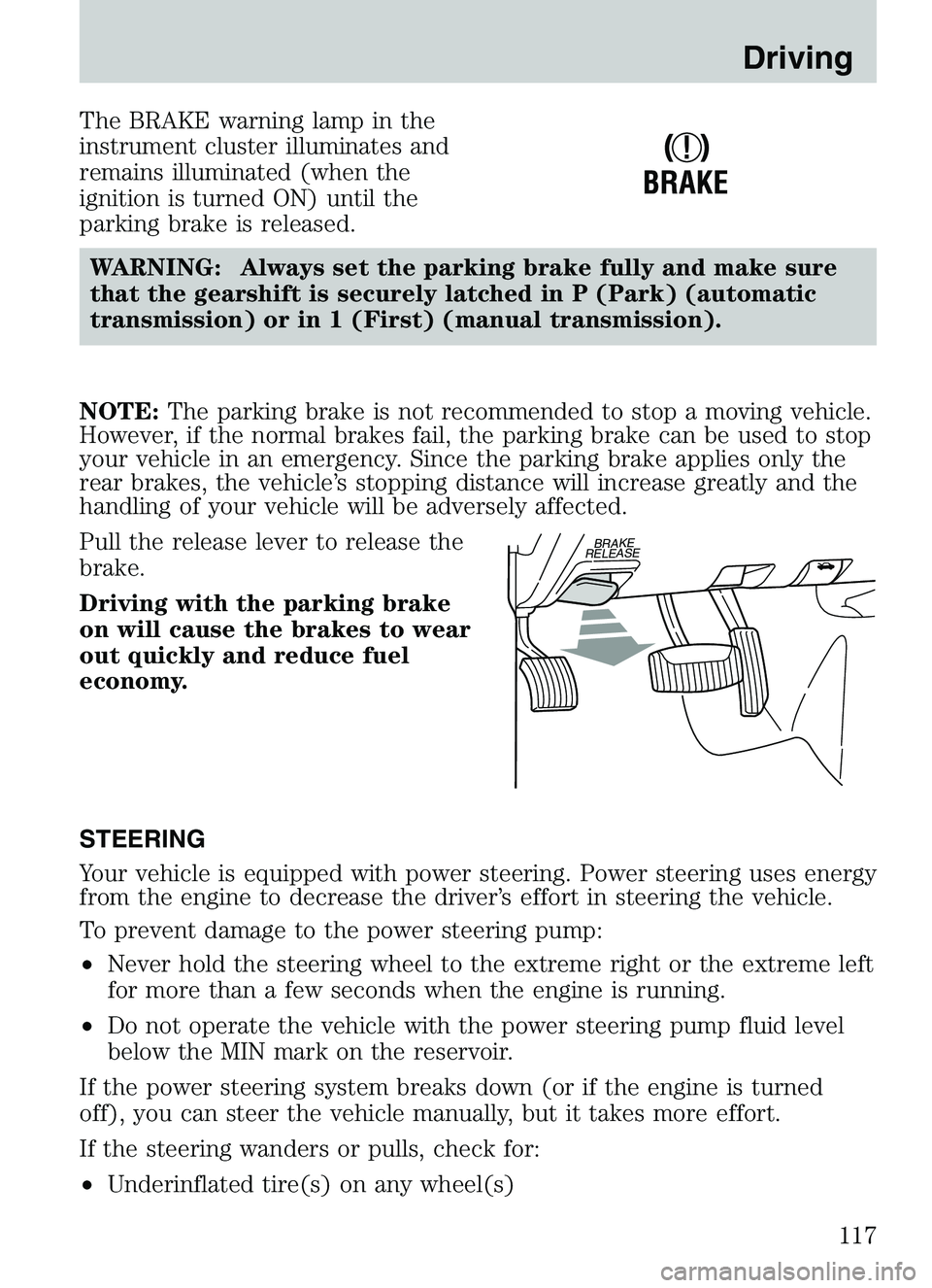
The BRAKE warning lamp in the
instrument cluster illuminates and
remains illuminated (when the
ignition is turned ON) until the
parking brake is released.WARNING: Always set the parking brake fully and make sure
that the gearshift is securely latched in P (Park) (automatic
transmission) or in 1 (First) (manual transmission).
NOTE: The parking brake is not recommended to stop a moving vehicle.
However, if the normal brakes fail, the parking brake can be used to stop
your vehicle in an emergency. Since the parking brake applies only the
rear brakes, the vehicle’s stopping distance will increase greatly and the
handling of your vehicle will be adversely affected.
Pull the release lever to release the
brake.
Driving with the parking brake
on will cause the brakes to wear
out quickly and reduce fuel
economy.
STEERING
Your vehicle is equipped with power steering. Power steering uses energy
from the engine to decrease the driver’s effort in steering the vehicle.
To prevent damage to the power steering pump:
• Never hold the steering wheel to the extreme right or the extreme left
for more than a few seconds when the engine is running.
• Do not operate the vehicle with the power steering pump fluid level
below the MIN mark on the reservoir.
If the power steering system breaks down (or if the engine is turned
off), you can steer the vehicle manually, but it takes more effort.
If the steering wanders or pulls, check for:
• Underinflated tire(s) on any wheel(s)
!
BRAKE
BRAKE
RELEASE
Driving
117
Page 126 of 250
•If shifting out of 4X4 LOW (4WD Low), wait for the LOW RANGE light
in the instrument cluster to turn offindicating the shift is complete.
Driving off-road with 4WD
Your vehicle is specially equipped for driving on sand, snow, mud and
rough terrain and has operating characteristics that are somewhat
different from conventional vehicles, both on and off the road.
Maintain steering wheel control at all times, especially in rough terrain.
Since sudden changes in terrain can result in abrupt steering wheel
motion, make sure you grip the steering wheel from the outside. Do not
grip the spokes.
Drive cautiously to avoid vehicle damage from concealed objects such as
rocks and stumps.
You should either know the terrain or examine maps of the area before
driving. Map out your route before driving in the area. For more
information on driving off-road, read the “Four Wheeling” supplement in
your owner’s portfolio.
If your vehicle gets stuck
If the vehicle is stuck it may be rocked out by shifting from forward and
reverse gears, stopping between shifts, in a steady pattern. Press lightly
on the accelerator in each gear.
Do not rock the vehicle if the engine is not at normal operating
temperature or damage to the transmission may occur.
Do not rock the vehicle for more than a few minutes or damage
to the transmission and tires may occur or the engine may
overheat.
WARNING: Do not spin the wheels at over 56 km/h (35 mph).
The tires may fail and injure a passenger or bystander.
Sand
When driving over sand, try to keep all four wheels on the most solid
area of the trail. Do not reduce the tire pressures but shift to a lower
gear and drive steadily through the terrain. Apply the accelerator slowly
and avoid spinning the wheels.
Mud and water
If you must drive through high water, drive slowly. Traction or brake
capability may be limited.
Driving
126
Page 139 of 250

HAZARD FLASHER
The hazard flasher is located on the
steering column, just behind the
steering wheel. The hazard flashers
will operate when the ignition is in
any position.
Push in the flasher control and all
front and rear direction signals will
flash. Press the flasher control again
to turn them off. Use it when your
vehicle is disabled and is creating a
safety hazard for other motorists.
Note:With extended use, the flasher may run down your battery.
FUEL PUMP SHUT-OFF SWITCH
FUEL
RESET
This device stops the electric fuel pump from sending fuel to the engine
when your vehicle has had a substantial jolt.
After an accident, if the engine cranks but does not start, this switch
may have been activated.
Roadside Emergencies
139