radio MAZDA MODEL B4000 CAB PLUS 4 TRUCK 2008 User Guide
[x] Cancel search | Manufacturer: MAZDA, Model Year: 2008, Model line: MODEL B4000 CAB PLUS 4 TRUCK, Model: MAZDA MODEL B4000 CAB PLUS 4 TRUCK 2008Pages: 312, PDF Size: 3.68 MB
Page 36 of 312

3. Attach one end of the audio extension cable to the headphoneoutput of your player and the other end of the audio extension cable
to the AIJ in your vehicle.
4. Turn the radio on, using either a tuned FM station or a CD loaded into the system. Adjust the volume to a comfortable listening level.
5. Turn the portable music player on and adjust the volume to 1/2 the volume.
6. Press AUX on the vehicle radio repeatedly until LINE IN appears in the display.
You should hear audio from your portable music player although it
may be low.
If your vehicle is equipped with a navigation system, refer to
Auxiliary input jack section in the Audio features chapter of your
Navigation supplement.
7. Adjust the sound on your portable music player until it reaches the level of the FM station or CD by switching back and forth between
the AUX and FM or CD controls.
Troubleshooting: 1. Do not connect the audio input jack to a line level output. Line level outputs are intended for connection to a home stereo and are not
compatible with the AIJ. The AIJ will only work correctly with
devices that have a headphone output with a volume control.
2. Do not set the portable music player’s volume level higher than is necessary to match the volume of the CD or FM radio in your audio
system as this will cause distortion and will reduce sound quality.
Many portable music players have different output levels, so not all
players should be set at the same levels. Some players will sound
best at full volume and others will need to be set at a lower volume.
3. If the music sounds distorted at lower listening levels, turn the portable music player volume down. If the problems persists, replace
or recharge the batteries in the portable music player.
4. The portable music player must be controlled in the same way manner when it is used with headphones as the AIJ does not provide
control (play, pause, etc.) over the attached portable music player.
5. For safety reasons, connecting or adjusting the settings on your portable music player should not be attempted while the vehicle is
moving. Also, the portable music player should be stored in a secure
location, such as the center console or the glove box, when the
vehicle is in motion. The audio extension cable must be long enough
to allow the portable music player to be safely stored while the
vehicle is in motion.
2008 Tribute Hybrid (thv)
Owners Guide (post-2002-fmt)
USA (fus)
Entertainment Systems
36
Page 37 of 312

GENERAL AUDIO INFORMATION
Radio frequencies:
AM and FM frequencies are established by the Federal Communications
Commission (FCC) and the Canadian Radio and Telecommunications
Commission (CRTC). Those frequencies are:
AM: 530, 540–1700, 1710 kHz
FM: 87.7, 87.9–107.7, 107.9 MHz
Radio reception factors:
There are three factors that can affect radio reception:
•Distance/strength: The further you travel from an FM station, the
weaker the signal and the weaker the reception.
• Terrain: Hills, mountains, tall buildings, power lines, electric fences,
traffic lights and thunderstorms can interfere with your reception.
• Station overload: When you pass a broadcast tower, a stronger signal
may overtake a weaker one and play while the weak station frequency
is displayed.
CD/CD player care
Do:
• Handle discs by their edges only.
(Never touch the playing
surface).
• Inspect discs before playing.
• Clean only with an approved CD
cleaner.
• Wipe discs from the center out.
Don’t:
• Expose discs to direct sunlight or heat sources for extended periods
of time.
• Clean using a circular motion.
2008 Tribute Hybrid (thv)
Owners Guide (post-2002-fmt)
USA (fus)
Entertainment Systems
37
Page 38 of 312

CD units are designed to play commercially pressed 4.75 in
(12 cm) audio compact discs only. Due to technical
incompatibility, certain recordable and re-recordable compact
discs may not function correctly when used in Mazda CD players.
Do not use any irregular shaped
CDs or discs with a scratch
protection film attached.
CDs with homemade paper
(adhesive) labels should not be
inserted into the CD player as
the label may peel and cause the
CD to become jammed. It is
recommended that homemade
CDs be identified with
permanent felt tip marker rather
than adhesive labels. Ballpoint pens may damage CDs. Please
contact your authorized dealer for further information.
Audio system warranty and service
Refer to theWarranty Information Booklet for audio system warranty
information. If service is necessary, see your authorized Mazda
dealership.
Satellite radio information (if equipped)
Satellite radio channels: SIRIUS broadcasts a variety of music, news,
sports, weather, traffic and entertainment satellite radio channels. For
more information and a complete list of SIRIUS satellite radio channels,
visit www.sirius.com in the United States, www.sirius-canada.ca in
Canada, or call SIRIUS at 1–888–539–7474.
Satellite radio reception factors: To receive the satellite signal, your
vehicle has been equipped with a satellite radio antenna located on the
roof of your vehicle. The vehicle roof provides the best location for an
unobstructed, open view of the sky, a requirement of a satellite radio
system. Like AM/FM, there are several factors that can affect satellite
radio reception performance:
2008 Tribute Hybrid (thv)
Owners Guide (post-2002-fmt)
USA (fus)
Entertainment Systems
38
Page 39 of 312

•Antenna obstructions: For optimal reception performance, keep the
antenna clear of snow and ice build-up and keep luggage and other
material as far away from the antenna as possible.
• Terrain: Hills, mountains, tall buildings, bridges, tunnels, freeway
overpasses, parking garages, dense tree foliage and thunderstorms can
interfere with your reception.
• Station overload: When you pass a ground based broadcast repeating
tower, a stronger signal may overtake a weaker one and result in an
audio mute.
Unlike AM/FM audible static, you will hear an audio mute when there is
a satellite radio signal interference. Your radio display may display NO
SIGNAL to indicate the interference.
SIRIUS satellite radio service: SIRIUS Satellite Radio is a subscription
based satellite radio service that broadcasts music, sports, news and
entertainment programming. A service fee is required in order to receive
SIRIUS service. Vehicles that are equipped with a factory installed
SIRIUS Satellite Radio system include:
• Hardware and limited subscription term, which begins on the date of
sale or lease of the vehicle.
• Online media player providing access to all 65 SIRIUS music channels
over the internet (U.S. customers only).
For information on extended subscription terms, contact SIRIUS at
1–888–539–7474.
Note: SIRIUS reserves the unrestricted right to change, rearrange, add
or delete programming including canceling, moving or adding particular
channels, and its prices, at any time, with or without notice to you.
Mazda Motor Corporation shall not be responsible for any such
programming changes.
Satellite Radio Electronic Serial Number (ESN): This 12–digit
Satellite Serial Number is needed to activate, modify or track your
satellite radio account. You will need this number when communicating
with SIRIUS. While in Satellite Radio mode, you can view this number on
the radio display by pressing AUX and Preset 1 control simultaneously.
2008 Tribute Hybrid (thv)
Owners Guide (post-2002-fmt)
USA (fus)
Entertainment Systems
39
Page 40 of 312

Radio Display Condition Action Required
ACQUIRING Radio requires more than two seconds to
produce audio for the selected channel. No action required.
This message should disappear shortly.
SAT FAULT Internal module or system failurepresent. If this message does
not clear within a short period of time, or with an ignition key cycle,
your receiver may have a fault. See your
authorized dealer for service.
INVALID CHNL Channel no longer available.This previously
available channel is no longer available. Tuneto another channel. If
the channel was one of your presets, you may
choose another channel for that preset button.
UNSUBSCRIBED Subscription not available for thischannel. Contact SIRIUS at
1–888–539–7474 to subscribe to the
channel or tune to another channel.
NO TEXT Artist information not available.Artist information not
available at this time on this channel. The
system is working properly.
2008 Tribute Hybrid (thv)
Owners Guide (post-2002-fmt)
USA (fus)
Entertainment Systems
40
Page 41 of 312

Radio Display Condition Action Required
NO TEXT Song title information not available.Song title information
not available at this
time on this channel.
The system is working properly.
NO TEXT Category information not available.Category information
not available at this
time on this channel.
The system is working properly.
NO SIGNAL Loss of signal from the SIRIUS satellite orSIRIUS tower to the vehicle antenna. You are in a location
that is blocking theSIRIUS signal (i.e., tunnel, under an
overpass, dense foliage, etc). The system is
working properly. When you move into an openarea, the signal should return.
UPDATING Update of channel programming inprogress. No action required. The
process may take up to three minutes.
CALL SIRIUS
1–888–539–7474 Satellite service has
been deactivated by SIRIUS Satellite Radio. Call SIRIUS at
1–888–539–7474 to
re-activate or resolve subscription issues.
NAVIGATION SYSTEM (IF EQUIPPED)
Your vehicle may be equipped with a Navigation System. Refer to the
Navigation supplement for further information.
2008 Tribute Hybrid(thv)
Owners Guide (post-2002-fmt)
USA (fus)
Entertainment Systems
41
Page 72 of 312
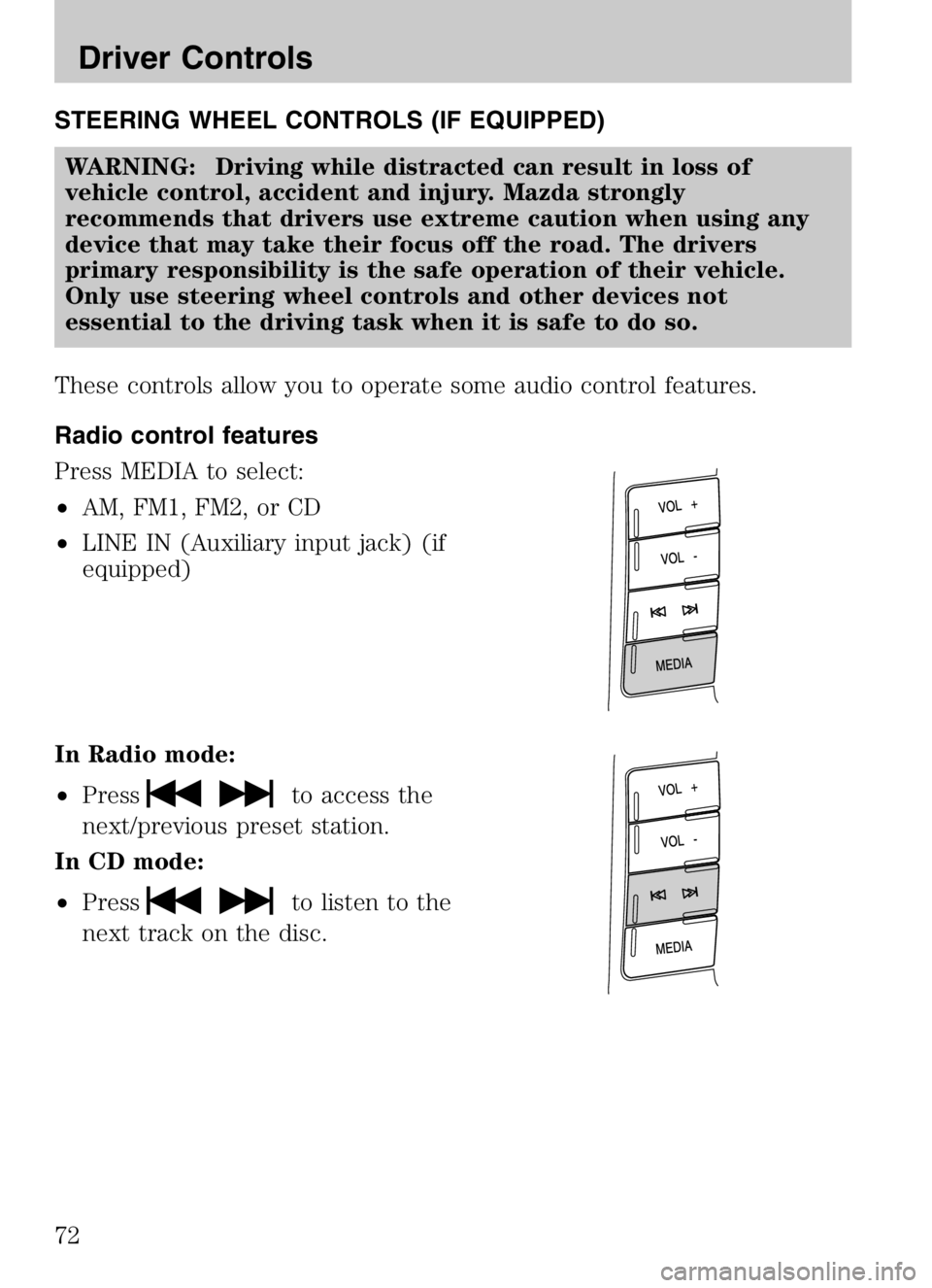
STEERING WHEEL CONTROLS (IF EQUIPPED)WARNING: Driving while distracted can result in loss of
vehicle control, accident and injury. Mazda strongly
recommends that drivers use extreme caution when using any
device that may take their focus off the road. The drivers
primary responsibility is the safe operation of their vehicle.
Only use steering wheel controls and other devices not
essential to the driving task when it is safe to do so.
These controls allow you to operate some audio control features.
Radio control features
Press MEDIA to select:
• AM, FM1, FM2, or CD
• LINE IN (Auxiliary input jack) (if
equipped)
In Radio mode:
• Press
to access the
next/previous preset station.
In CD mode:
• Press
to listen to the
next track on the disc.
2008 Tribute Hybrid (thv)
Owners Guide (post-2002-fmt)
USA (fus)
Driver Controls
72
Page 88 of 312

REMOTE ENTRY SYSTEM (IF EQUIPPED)
The Integrated Keyhead Transmitter (IKT) complies with part 15 of the
FCC rules and with RSS-210 of Industry Canada. Operation is subject to
the following two conditions: (1) This device may not cause harmful
interference, and (2) This device must accept any interference received,
including interference that may cause undesired operation.
Changes or modifications not expressly approved by the party
responsible for compliance could void the user’s authority to
operate the equipment.
The typical operating range for your
IKT is approximately 33 feet (10
meters). A decrease in operating
range could be caused by:
•weather conditions,
• nearby radio towers,
• structures around the vehicle, or
• other vehicles parked next to
your vehicle.
The IKT allows you to:
• remotely unlock the vehicle
doors.
• remotely lock all the vehicle
doors.
• remotely open the power liftgate glass.
• activate the personal alarm.
• operate the illuminated entry feature.
The remote entry lock/unlock feature operates in any ignition position
except while the key is held in the 4 (START) position. The panic
feature operates with the key in the 1 (LOCK) position.
If there are problems with the remote entry system, make sure to take
ALL Integrated Keyhead Transmitters with you to the authorized
dealer in order to aid in troubleshooting the problem.
Two step door unlocking
1. Pressand release to unlock the driver’s door. Note:The interior
lamps will illuminate if the lamp is in the DOOR position.
2008 Tribute Hybrid (thv)
Owners Guide (post-2002-fmt)
USA (fus)
Locks and Security
88
Page 182 of 312

STARTING
Positions of the ignition1. LOCK, locks the gearshift lever and allows key removal.
2. ACCESSORY, allows the electrical accessories such as
the radio to operate while the
vehicle is not running.
3. RUN, all electrical circuits operational and warning lights
will illuminate. This is the
position the key is in when
you’re driving.
4. START, starts the engine, vehicle and electrical power systems.
Preparing to start your vehicle
Engine starting is controlled by the electronically-controlled
Continuously Variable Transaxle (eCVT). For more information on
starting the vehicle, refer to Starting the vehiclein this chapter.
WARNING: Extended idling at high engine speeds can produce
very high temperatures in the engine and exhaust system,
creating the risk of fire or other damage.
WARNING: Do not park, idle, or drive your vehicle in dry grass
or other dry ground cover. The emission system heats up the
engine compartment and exhaust system, which can start a fire.
WARNING: Do not start your vehicle in a closed garage or in
other enclosed areas. Exhaust fumes can be toxic. Always open
the garage door before you start the engine. See Guarding
against exhaust fumes in this chapter for more instructions.
WARNING: If you smell exhaust fumes inside your vehicle,
have your dealer inspect your vehicle immediately. Do not drive
if you smell exhaust fumes.
2008 Tribute Hybrid (thv)
Owners Guide (post-2002-fmt)
USA (fus)
Driving
182
Page 206 of 312

The fuses are coded as follows:
Fuse/RelayLocation Fuse Amp
Rating Passenger Compartment Fuse
Panel Description
1 30A Not used (spare)
2 15A Brake On/Off switch
3 15A Not used (spare)
4 30A 110V inverter
5 10A Brake Shift Interlock (BSI), SPDJB, Keypad illumination
6 20A Turn signals, Stop lamps
7 10A Low beam headlamps (left)
8 10A Low beam headlamps (right)
9 15A Interior lights
10 15A Backlighting
11 10A Four wheel drive
12 7.5A Power mirror switch
13 7.5A Canister vent
14 10A FCIM (radio buttons), Satellite radio, Front display module
15 10A Climate control
16 15A Not used (spare)
17 20A All lock motor feeds, Liftgate release, Liftglass release
18 20A Heated seat
19 25A Rear wiper
20 15A Datalink
21 15A Fog lamps
22 15A Park lamps
23 15A High beam headlamps
24 20A Horn relay
25 10A Demand lamps
26 10A Instrument panel cluster
27 20A Ignition switch
2008 Tribute Hybrid (thv)
Owners Guide (post-2002-fmt)
USA (fus)
Roadside Emergencies
206