ABS MAZDA MODEL CX-3 2021 User Guide
[x] Cancel search | Manufacturer: MAZDA, Model Year: 2021, Model line: MODEL CX-3, Model: MAZDA MODEL CX-3 2021Pages: 618, PDF Size: 64.58 MB
Page 201 of 618

Drive Selection*
Drive selection is a system to switch the vehicle's drive mode. When the sport mode is
selected, the vehicle's response against accelerator operation is enhanced. This provides
additional quick acceleration which may be needed to safely make maneuvers such as lane
changes, merging onto freeways, or passing other vehicles.
CAUTION
Do not use the sport mode when driving on slippery roads such as wet or snow-covered roads.
It may cause tire slipping.
NOTE
When sport mode is selected, driving at higher engine speeds may increase fuel
consumption. Mazda recommends that you cancel sport mode for normal driving.
Drive mode cannot be switched in the following conditions:
ABS/TCS/DSC is operating
The Mazda Radar Cruise Control with St op & Go function (MRCC with Stop & Go
function) System/cruise control is operating.
Steering wheel is being operated abruptly
▼ Drive Selection Switch
Press the drive selection switch forward
(“
”) to select the sport mode.
Pull the drive selection switch back
(“
”) to cancel the sport mode.
NOTE
In the following cases, the drive
selection is canceled.
The ignition is switched OFF.
Mazda Radar Cruise Control with
Stop & Go function (MRCC with Stop
& Go function) System/cruise control
is set.
Depending on the driving conditions
when sport mode is selected, the vehicle
may perform shift-down or slightly
accelerate.
When Driving
Drive Selection
*Some models.4-71
CX-3_8JL1-EA-20G_Edition1_old 2020-5-22 15:31:00
Page 281 of 618

Picture quality adjustment must be done while the shift lever/selector lever is in reverse (R).
There are four settings which can be adjusted including, brightness, contrast, tint, and color.
When adjusting, pay sufficient attention to the vehicle surroundings.
1. Select the
icon on the screen to display the tabs.
2. Select the desired tab item.
3. Adjust the brightness, contrast, tint, and color using the slider.
If you need to reset, press the reset button.
4. Select the
icon on the screen to close the tab.
When Driving
Rear View Monitor
4-151
CX-3_8JL1-EA-20G_Edition1_old 2020-5-22 15:31:00
Page 468 of 618

7. Insert a new battery into the transmitter
so that the positive pole is facing up.
8. Install the cap.
9. Install the upper cover.
10. Insert the tabs of the lower cover into
the slots of the transmitter and install
the lower cover.
Tires
For reasons of proper performance, safety,
and better fuel economy, always maintain
recommended tire inflation pressures and
stay within the recommended load limits
and weight distribution.
WA R N I N G
Using Different Tire Types:
Driving your vehicle with different types of
tires is dangerous. It could cause poor
handling and poor braking; leading to loss
of control.
Except for the limited use of the temporary
spare tire, use only the same type tires
(radial, bias-belted, bias-type) on all four
wheels.
Using Wrong-Sized Tires:
Using any other tire size than what is
specified for the vehicle (page 9-7) is
dangerous. It could seriously affect ride,
handling, ground clearance, tire clearance,
and speedometer calibration. This could
cause you to have an accident. Use only
tires that are the correct size specified for
the vehicle.
▼ Tire Inflation Pressure
WA R N I N G
Always inflate the tires to the correct
pressure:
Overinflation or underinflation of tires is
dangerous. Adverse handling or
unexpected tire failure could result in a
serious accident.
Refer to Tires on page 9-7.
Maintenance and Care
Owner Maintenance
6-36
CX-3_8JL1-EA-20G_Edition1_old
2020-5-22 15:31:00
Page 482 of 618

DESCRIPTIONFUSE
RATING PROTECTED COMPONENT
15 A/C MAG 7.5 A Air conditioner
16 AT PUMP 15 A ―
17 AT 15 A Transaxle control system
18 D.LOCK 25 A Power door locks
19 H/L RH 20 A Headlight (RH)
20
7.5 A Engine control system
21 TAIL 20 A Taillights, License plate lights, Parking lights
22 ST.HEATER 15 A / 20 A Heated steering wheel
*, Headlight*
23ROOM 25 A Overhead light
24 FOG 15 A
Fog lights
*
25 H/CLEAN 20 A ―
26 STOP 10 A Brake lights
27 HORN 15 A Horn
28 H/L LH 20 A Headlight (LH)
29 ABS/DSC S 30 A ABS, Dynamic stability control system
30 HAZARD 15 A Hazard warning flashers, Turn signal lights
31 FUEL PUMP
SCR 15 A Fuel system
32 FUEL WARM 25 A ―
33 WIPER 20 A Front window wiper
34
50 A For protection of various circuits
35 FAN2
EPB L 30 A Electric parking brake (LH)
36 FUEL PUMP 30 A ―
37 ABS/DSC M 50 A ABS, Dynamic stability control system
38 EVVT 20 A Engine control system
39 ―― ―
40 FAN1
EPB R 30 A Electric parking brake (RH)
41 FAN3 40 A Cooling fan
42 ENG.MAIN 40 A Engine control system
43 EPS 60 A ―
44 DEFOG 40 A Rear window defogger
45 IG2 30 A For protection of various circuits
46 INJECTOR
ENG.SUB 30 A Engine control system
Maintenance and Care
Owner Maintenance
6-50*Some models.
CX-3_8JL1-EA-20G_Edition1_old
2020-5-22 15:31:00
Page 499 of 618

▼Jack
To remove the jack
1.
(With luggage board)
Lift up the luggage board.
2. (With luggage board)
Pull the luggage board outward a little
and insert the opposite end into the
holders so that the luggage board
stands.
Lugg age board
Holders
3. Lift the luggage mat.
Lugg age mat
4. Remove the cargo sub compartment.
5. Remove the cover.
Tabs
6. Turn the wing bolt and jack screw
counterclockwise.
Win g bolt
Jack screw
To secure the jack
1. Insert the wing bolt into the jack with the jack screw pointing down and turn
If Trouble Arises
Flat Tire
7-5
CX-3_8JL1-EA-20G_Edition1_old 2020-5-22 15:31:00
Page 500 of 618

the wing bolt clockwise to temporarily
tighten it.
2. Turn the jack screw in the direction
shown in the figure.
Win g bolt
Jack screw
3. Turn the wing bolt completely to secure the jack.
NOTE
If the jack is not completely secured, it
could rattle while driving. Make sure
the jack screw is sufficiently tightened.
4. Insert the cover tabs and install the cover.
NOTE
Verify that the cover is securely
installed.
Maintenance
Always keep the jack clean.
Make sure the moving parts are kept
free from dirt or rust.
Make sure the screw thread is
adequately lubricated.
▼ Spare Tire
Your Mazda has a temporary spare tire.
The temporary spare tire is lighter and
smaller than a conventional tire, and is
designed only for emergency use and
should be used only for VERY short
periods. Temporary spare tires should
NEVER be used fo
r long drives or
extended periods.
WA R N I N G
Do not install the temporary spare tire on
the front wheels (driving wheels):
Driving with the temporary spare tire on
one of the front driving wheels is
dangerous. Handling will be affected. You
could lose control of the vehicle, especially
on ice or snow bound roads, and have an
accident. Move a regular tire to the front
wheel and install the temporary spare tire
to the rear.
CAUTION
When using the temporary spare tire,
driving stability may decrease compared
to when using only the conventional tire.
Drive carefully.
To avoid damage to the temporary spare
tire or to the vehicle, observe the
following precautions:
Do not exceed 80 km/h (50 mph).
Avoid driving over obstacles. Also, do
not drive through an automatic car
wash. This tire's diameter is smaller
than a conventional tire, so the ground
clearance is reduced.
Do not use a tire chain on this tire
because it will not fit properly.
Do not use your temporary spare tire
on any other vehicle, it has been
designed only for your Mazda.
Use only one temporary spare tire on
your vehicle at the same time.
If Trouble Arises
Flat Tire
7-6
CX-3_8JL1-EA-20G_Edition1_old 2020-5-22 15:31:00
Page 517 of 618

Towing Description
We recommend that towing be done only
by an Authorized Mazda Dealer or a
commercial tow-truck service.
Proper lifting and towing are necessary to
prevent damage to the vehicle. Particularly
when towing an AWD vehicle, where all
the wheels are connected to the drive train,
proper transporting of the vehicle is
absolutely essential to avoid damaging the
drive system. Government and local laws
must be followed.
Wheel dollies
A towed FWD vehicle should have its
drive wheels (front wheels) off the ground.
If excessive damage or other conditions
prevent this, use wheel dollies.
When towing a FWD vehicle with the rear
wheels on the ground, release the parking
brake.
Refer to Electric Parking Brake (EPB) on
page 4-55.
A towed AWD vehicle must have all its
wheels off the ground.
WARNING
Always tow an AWD vehicle with all four
wheels off the ground:
Towing an AWD vehicle with either the
front or rear wheels on the ground is
dangerous as the drive train could be
damaged, or the vehicle could trail away
from the tow truck and cause an accident.
If the drive train has been damaged,
transport the vehicle on a flatbed truck.
CAUTION
Do not tow the vehicle pointed backward
with driving wheels on the ground. This
may cause internal damage to the
transaxle.
Do not tow with sling-type equipment.
This could damage your vehicle. Use
wheel-lift or flatbed equipment.
If Trouble Arises
Emergency Towing
7-23
CX-3_8JL1-EA-20G_Edition1_old 2020-5-22 15:31:00
Page 521 of 618
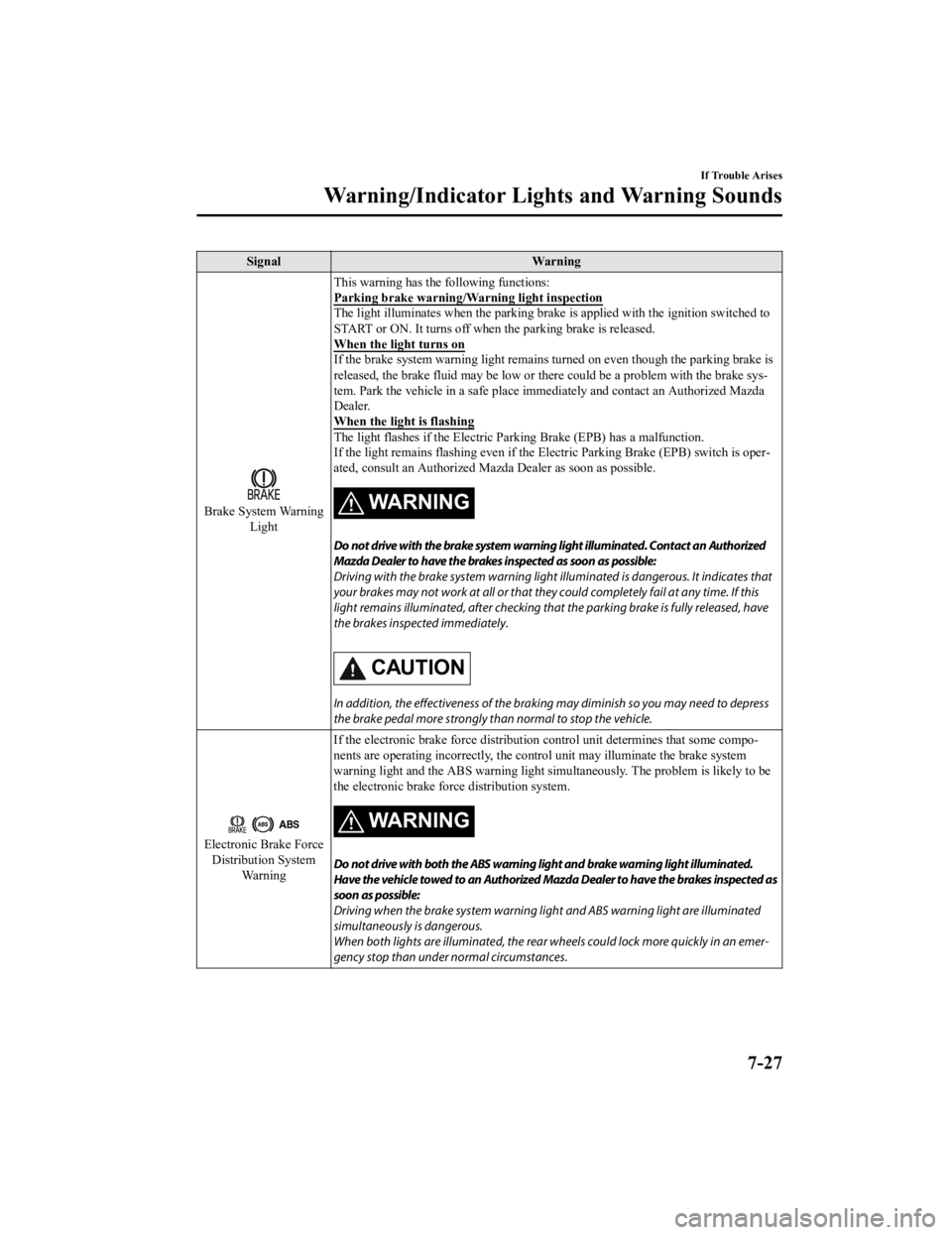
SignalWarning
Brake System Warning
Light This warning has the
following functions:
Parking brake warning/Warning light inspection
The light illuminates when the parking brake is applied w ith the ignition switched to
START or ON. It turns off when the parking brake is released.
When the light turns on
If the brake system warning light remains turned on even though the parking brake is
released, the brake fluid may be low or th ere could be a problem with the brake sys ‐
tem. Park the vehicle in a safe place i mmediately and contact an Authorized Mazda
Dealer.
When the light is flashing
The light flashes if the Electric Pa rking Brake (EPB) has a malfunction.
If the light remains flashing even if th e Electric Parking Brake (EPB) switch is oper ‐
ated, consult an Authorized Mazd a Dealer as soon as possible.
WA R N I N G
Do not drive with the brake system warning light illuminated. Contact an Authorized
Mazda Dealer to have the brakes inspected as soon as possible:
Driving with the brake system warning light illuminated is dangerous. It indicates that
your brakes may not work at all or that they could completely fail at any time. If this
light remains illuminated, after checking that the parking brake is fully released, have
the brakes inspected immediately.
CAUTION
In addition, the effectiveness of the braking may diminish so you may need to depress
the brake pedal more st rongly than normal to stop the vehicle.
Electronic Brake Force
Distribution System Wa r n i n g If the electronic brake force distribution
control unit determines that some compo ‐
nents are operating incorrectly, the control unit may illuminate the brake system
warning light and the ABS warning light si multaneously. The problem is likely to be
the electronic brake forc e distribution system.
WA R N I N G
Do not drive with both the ABS warning light and brake warning light illuminated.
Have the vehicle towed to an Authorized Mazda Dealer to have the brakes inspected as
soon as possible:
Driving when the brake system warning lig ht and ABS warning light are illuminated
simultaneously is dangerous.
When both lights are illuminated, the rear wheels could lock more quickly in an emer‐
gency stop than under normal circumstances.
If Trouble Arises
Warning/Indicator Lights and Warning Sounds
7-27
CX-3_8JL1-EA-20G_Edition1_old 2020-5-22 15:31:00
Page 523 of 618

SignalWarning
Power Steering Mal‐
function Indicator Light The light illuminates/flashes if the electric power steering has a malfunction.
If the light illuminates/flashes, stop the vehicle in a safe place and do not operate the
steering wheel. There is no problem if the
light turns off after a while. Contact an Au ‐
thorized Mazda Dealer if the light illuminates/flashes continuously.
NOTE
If the indicator light illuminates/flashes, the power steering will not operate nor‐
mally. If this happens, the steering wheel can still be operated, however, the opera‐
tion may feel heavy compared to normal , or the steering wheel could vibrate when
turning.
Repeatedly jerking the steering wheel left and right while the vehicle is stopped or
moving extremely slowly will cause the power steering system to go into protective
mode which will make the steerin g feel heavy, but this does not indicate a problem.
If this occurs, park the vehicle safely and wait several minutes for the system to
return to normal.
▼ Contact Authorized Mazda Dealer and Have Vehicle Inspected
If any of the following warning lights or the indicator light turns on/flashes, the system may
have a malfunction. Contact an Authorized Mazda Dealer to have your vehicle inspected.
Signal
Warning
ABS Warning LightIf the ABS warning light stay
s on while you're driving, the ABS control unit has detected
a system malfunction. If this occurs, your brakes will functio n normally as if the vehicle
had no ABS.
Should this happen, consu lt an Authorized Mazda Dealer as soon as possible.
NOTE
When the engine is jump-sta rted to charge the battery, uneven rpm occurs and the ABS
warning light may illuminate. If this occurs, it is the result of the weak battery and does
not indicate an ABS malfunction.
Recharge the battery.
The brake assist system does not operate while the ABS warning light is illuminated.
Master Warning
Light (Vehicles with type B audio)
The light turns on when the system has a malfunction.
Operate the center display
and verify the content.
Refer to If a Warning Light Turns On or Flashes on page 7-26.
(Vehicles with type A audio)
The light illuminates continuously if any one of the following occu rs. Consult an Author‐
ized Mazda Dealer.
There is a malfunction in th e battery management system.There is a malfunction in the brake switch.
Electric Parking
Brake (EPB) Warn ‐
ing Light The warning light illuminates when the system
has a malfunction. Have your vehicle in‐
spected at an Authorized Mazda Dealer.
If Trouble Arises
Warning/Indicator Lights and Warning Sounds
7-29
CX-3_8JL1-EA-20G_Edition1_old 2020-5-22 15:31:00
Page 561 of 618
Add-On Non-Genuine Parts and Accessories
Non-genuine parts and accessories for Mazda vehicles can be found in stores.
These may fit your vehicle, but they are not approved by Mazda for use with Mazda
vehicles. When you install non-genuine parts or accessories, they could affect your vehicle's
performance or safety systems; the Mazda warr anty doesn't cover this. Before you install
any non-genuine parts or accessories, consult an Authorized Mazda Dealer.
WARNING
Always consult an Authorized Mazda Dealer before you install non-genuine parts or
accessories:
Improperly designed parts or accessories could seriously affect your vehicle's performance or
safety systems. This could cause you to have an accident or increase your chances of injuries
in an accident.
Be very careful in choosing and installing add-on electrical equipment, such as mobile
telephones, two-way radios, stereo systems, and car alarm systems:
Incorrectly choosing or installing improper add-on equipment or choosing an improper
installer is dangerous. Essential systems could be damaged, causing engine stalling, air-bag
(SRS) activation, ABS/TCS/DSC inacti vation, or a fire in the vehicle.
Mazda assumes no responsibility for death, injury, or expenses that may result from the
installation of add-on non-genuine parts or accessories.
Customer Information and Reporting Safety Defects
Wa r r an t y
8-19
CX-3_8JL1-EA-20G_Edition1_old 2020-5-22 15:31:00