park MAZDA MODEL CX-3 2021 User Guide
[x] Cancel search | Manufacturer: MAZDA, Model Year: 2021, Model line: MODEL CX-3, Model: MAZDA MODEL CX-3 2021Pages: 618, PDF Size: 64.58 MB
Page 136 of 618

This is for improved exhaust gas
purification and does not indicate any
parts defect.
Engine-starting is controlled by the
spark ignition system.
This system meets all Canadian
Interference-Causing Equipment
Standard requirements regulating the
impulse electrical field strength of radio
noise.
1. Make sure you are carrying the key.
2. Occupants should fasten their seat belts.
3. Make sure the parking brake is on.
4. Continue to press the brake pedal firmly until the engine has completely
started.
5. (Manual transaxle)
Continue to press the clutch pedal
firmly until the engine has completely
started.
(Automatic transaxle)
Put the vehicle in park (P). If you must
restart the engine while the vehicle is
moving, shift into neutral (N).
NOTE
(Manual transaxle)
The starter will not operate if the
clutch pedal is not depressed
sufficiently.
(Automatic transaxle)
The starter will not operate if the
selector lever is not in P or N and the
brake pedal is not depressed
sufficiently.
6. Verify that the KEY indicator light (green) in the inst rument cluster and
the push button start indicator light
(green) illuminate.
Indicator light
Push button start
NOTE
If the push button start indicator
light (green) flashes, make sure that
the key is being carried.
If the push button start indicator
light (green) flashes with the key
being carried, touch the key to the
push button start and start the
engine. Refer to Engine Start
Function When Key Battery is Dead
on page 4-8.
When Driving
Start/Stop Engine
4-6
CX-3_8JL1-EA-20G_Edition1_old 2020-5-22 15:31:00
Page 140 of 618

Turning the Engine Off
WA R N I N G
Do not stop the engine while the vehicle is
moving:
Stopping the engine while the vehicle is
moving for any reason other than in an
emergency is dangerous. Stopping the
engine while the vehicle is moving will
result in reduced braking ability due to the
loss of power braking, which could cause
an accident and serious injury.
1. Stop the vehicle completely.
2.(Manual transaxle)
Shift into neutral and set the parking
brake.
(Automatic transaxle)
Shift the selector lever to the P
position and set the parking brake.
3. Press the push button start to turn off
the engine. The ignition position is off.
CAUTION
When leaving the vehicle, make sure the
push button start is off.
NOTE
The cooling fan in the engine
compartment could turn on for a few
minutes after the i gnition is switched
from ON to OFF, whether or not the A/C
is on or off, to cool the engine
compartment quickly.
When the push button start is pressed
from ON to ACC or OFF, the KEY
indicator light (green) may flash for
approximately 30 seconds indicating
that the remaining battery power of the
key is low.
Replace with a new battery before the
key becomes unusable.
Refer to Key Battery Replacement on
page 6-34.
(Automatic transaxle)
If the engine is turned off while the
selector lever is in a position other than
P, the ignition switches to ACC.
▼ Emergency Engine Stop
Continuously pressing the push button
start or quickly pressing it any number of
times while the engine is running or the
vehicle is being driven will turn the engine
off immediately. The ignition switches to
ACC.
When Driving
Start/Stop Engine
4-10
CX-3_8JL1-EA-20G_Edition1_old
2020-5-22 15:31:00
Page 145 of 618

The brightness increases by rotating the
knob to the right.
DimBright
Function for cancelling illumination
dimmer
The illumination dimmer can be canceled
by rotating the dashboard illumination
knob to the right until a beep sound is
heard while the instrument cluster is
dimmed with the ign ition switched ON. If
the instrument cluster's visibility is
reduced due to glare from surrounding
brightness, cancel the illumination
dimmer.
NOTE
When the illumina tion dimmer is
canceled, the instrument cluster cannot
be dimmed even if the position lights are
turned on.
When the illumina tion dimmer is
canceled, the screen in the center
display switches to constant display of
the daytime screen.
▼ Outside Temperature Display
When the ignition is
switched ON, the
outside temperature is displayed.
NOTE
Under the following conditions, the
outside temperature display may differ
from the actual outside temperature
depending on the surroundings and
vehicle conditions:
Significantly cold or hot temperatures.
Sudden changes in outside
temperature.
The vehicle is parked.
The vehicle is driven at low speeds.
Changing the Temperature Unit of the
Outside Temperature Display (Vehicles
with Type B audio)
The outside temperature unit can be
switched between Celsius and Fahrenheit.
Settings can be changed by operating the
center display screen.
Refer to Personalization Features on page
9-9.
NOTE
When the temperature unit indicated in the
outside temperature display is changed,
the temperature unit indicated in the
engine coolant gauge display changes in
conjunction with it.
When Driving
Instrument Cluster and Display
4-15
CX-3_8JL1-EA-20G_Edition1_old 2020-5-22 15:31:00
Page 152 of 618

SignalWarning Lights Page
Engine Oil Warning Light*17-26
(Red)High Engine Coolant Temperature Warning Light
*17-26
Power Steering Malfunction Indicator Light*17-26
Master Warning Light*17-29
Electric Parking Brake (EPB) Warning Light*17-29
(Red)Brake Pedal Operation Demand Warning Light
*1
Flashing
4-59
Buzzer & Flashing 7-29
Check Engine Light*17-29
*Automatic Transaxle Warning Light*17-29
Air Bag/Front Seat Belt Preten sioner System Warning Light*17-29
*AWD Warning Light*17-29
*Tire Pressure Monitoring System Warning Light*1
Flashing
7-29
Turns on 7-33
(Red) KEY Warning Light
*1
Turns on
7-29
Flashing 7-33
(Amber)
*High Beam Control System (HBC) Warning Light*17-29
*Lane Departure Warning System (LDWS) Warning Light*1
Flashing4-85
Turns on 7-29
(Amber)
*Mazda Radar Cruise Control with Stop & Go function
(MRCC with Stop & Go function) Warning Indication 7-29
*LED Headlight Warning Light*17-29
When Driving
Instrument Cluster and Display
4-22*Some models.
CX-3_8JL1-EA-20G_Edition1_old
2020-5-22 15:31:00
Page 153 of 618
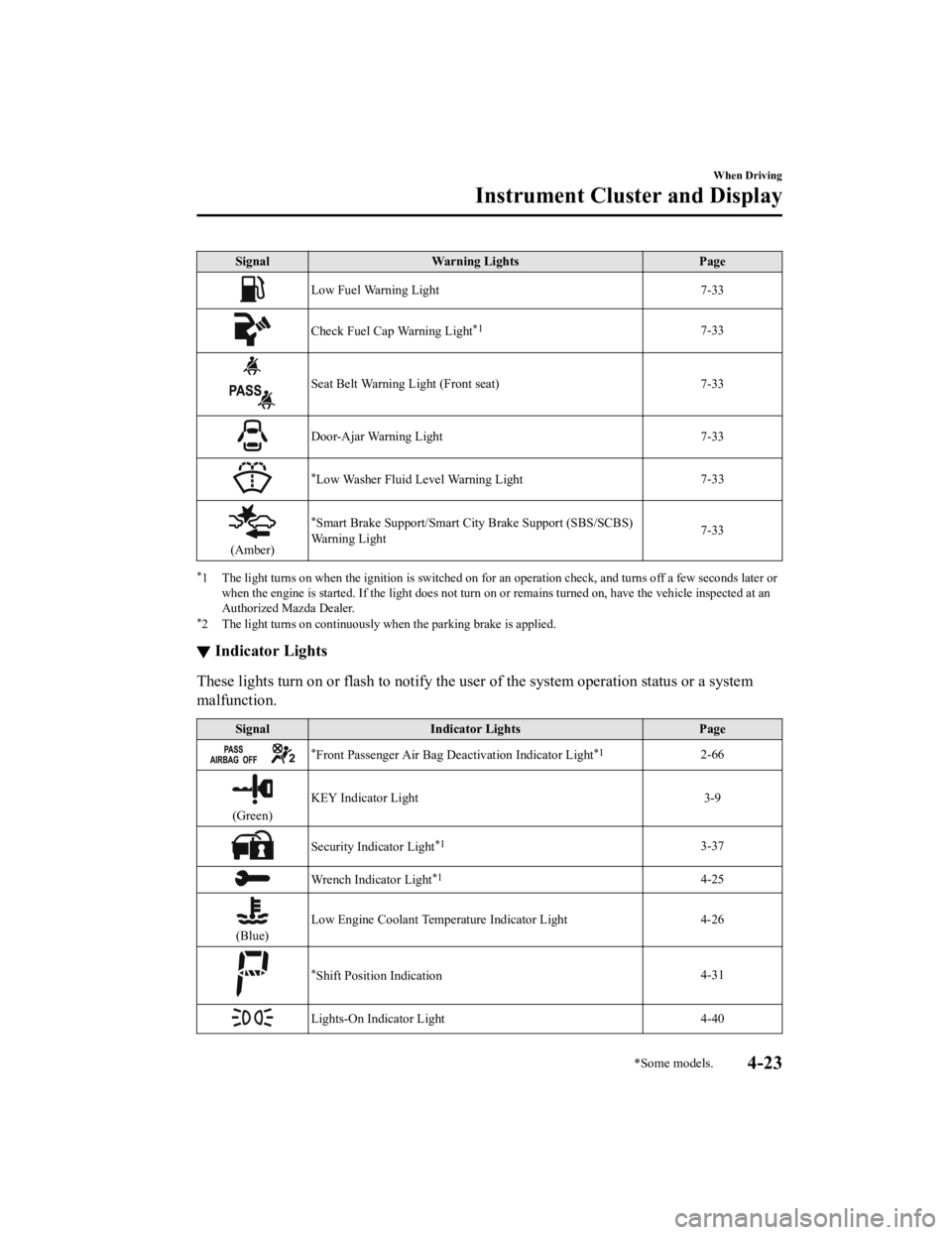
SignalWarning Lights Page
Low Fuel Warning Light 7-33
Check Fuel Cap Warning Light*17-33
Seat Belt Warning Light (Front seat) 7-33
Door-Ajar Warning Light7-33
*Low Washer Fluid Level Warning Light7-33
(Amber)
*Smart Brake Support/Smart C
ity Brake Support (SBS/SCBS)
Wa r n i n g L i g h t 7-33
*1 The light turns on when the ignition is switched on for an operation check, and turns off a few seconds later or
when the engine is started. If the light does not turn on or remains turned on, have the vehicle inspected at an
Authorized Mazda Dealer.
*2 The light turns on continuously when the parking brake is applied.
▼ Indicator Lights
These lights turn on or flash to notify the us
er of the system operation status or a system
malfunction.
Signal Indicator Lights Page
*Front Passenger Air Bag Deactivation Indicator Light*12-66
(Green)KEY Indicator Light 3-9
Security Indicator Light*13-37
Wrench Indicator Light*14-25
(Blue)
Low Engine Coolant Temperature Indicator Light 4-26
*Shift Position Indication
4-31
Lights-On Indicator Light
4-40
When Driving
Instrument Cluster and Display
*Some models.4-23
CX-3_8JL1-EA-20G_Edition1_old 2020-5-22 15:31:00
Page 157 of 618
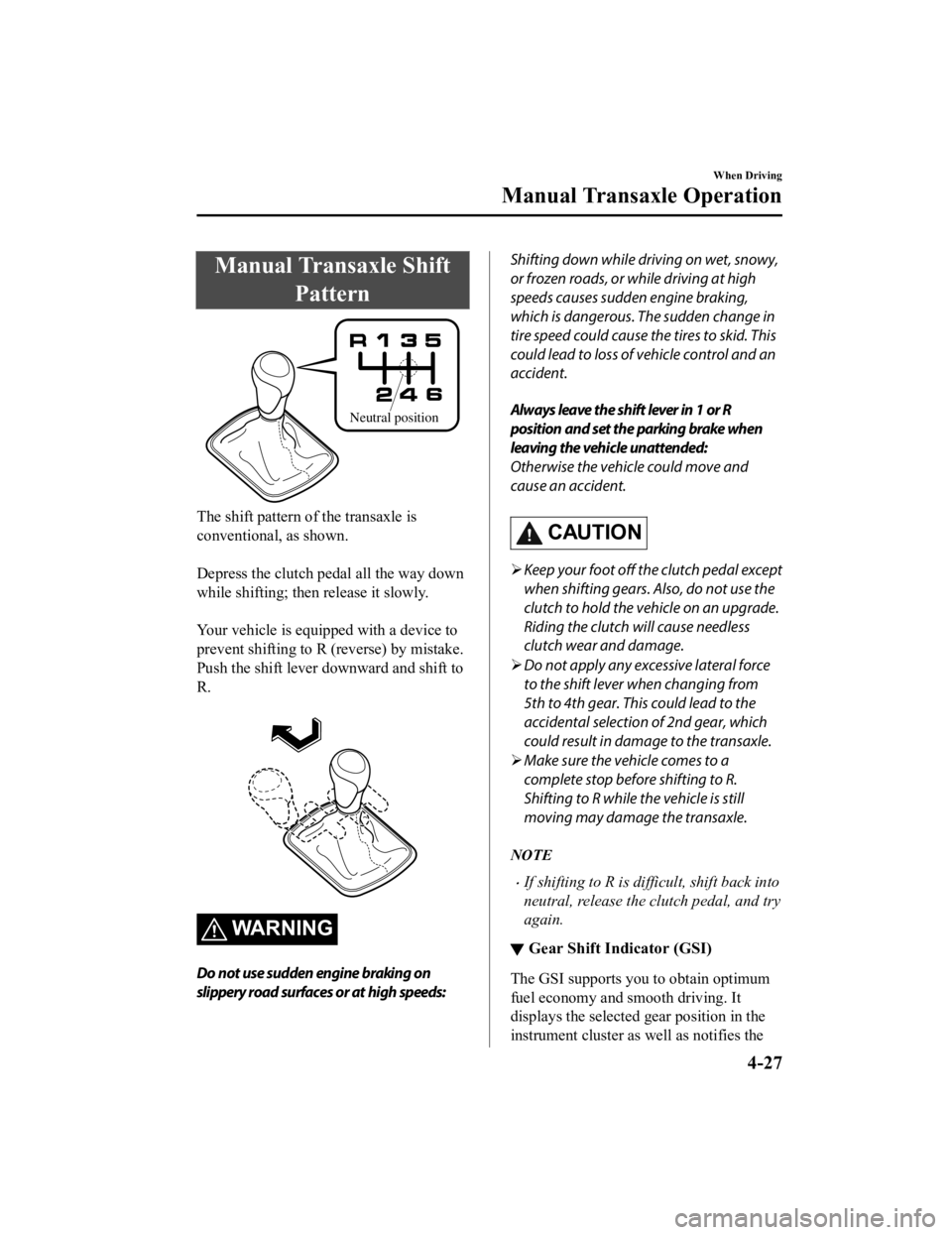
Manual Transaxle ShiftPattern
Neutral position
The shift pattern of the transaxle is
conventional, as shown.
Depress the clutch pedal all the way down
while shifting ; then release it slowly.
Your vehicle is equipped with a device to
prevent shifting to R (reverse) by mistake.
Push the shift lever downward and shift to
R.
WARNING
Do not use sudden engine braking on
slippery road surfaces or at high speeds:
Shifting down while driving on wet, snowy,
or frozen roads, or while driving at high
speeds causes sudden engine braking,
which is dangerous. The sudden change in
tire speed could cause the tires to skid. This
could lead to loss of vehicle control and an
accident.
Always leave the shift lever in 1 or R
position and set the parking brake when
leaving the vehicle unattended:
Otherwise the vehicle could move and
cause an accident.
CAUTION
Keep your foot off the clutch pedal except
when shifting gears. Also, do not use the
clutch to hold the vehicle on an upgrade.
Riding the clutch will cause needless
clutch wear and damage.
Do not apply any excessive lateral force
to the shift lever when changing from
5th to 4th gear. This could lead to the
accidental selection of 2nd gear, which
could result in damage to the transaxle.
Make sure the vehicle comes to a
complete stop before shifting to R.
Shifting to R while the vehicle is still
moving may damage the transaxle.
NOTE
If shifting to R is di fficult, shift back into
neutral, release the clutch pedal, and try
again.
▼ Gear Shift Indicator (GSI)
The GSI supports you to obtain optimum
fuel economy and smooth driving. It
displays the selected gear position in the
instrument cluster as well as notifies the
When Driving
Manual Transaxle Operation
4-27
CX-3_8JL1-EA-20G_Edition1_old
2020-5-22 15:31:00
Page 160 of 618
Shift-Lock System
The shift-lock system prevents shifting out
of P unless the brake pedal is depressed.
To shift from P:
1. Depress and hold the brake pedal.
2. Start the engine.
3. Press and hold the lock-release button.
4. Move the selector lever.
NOTE
When the ignition is switched to ACC or
the ignition is switched off, the selector
lever cannot be shifted from P position.
The ignition cannot be switched to OFF
if the selector lever is not in P position.
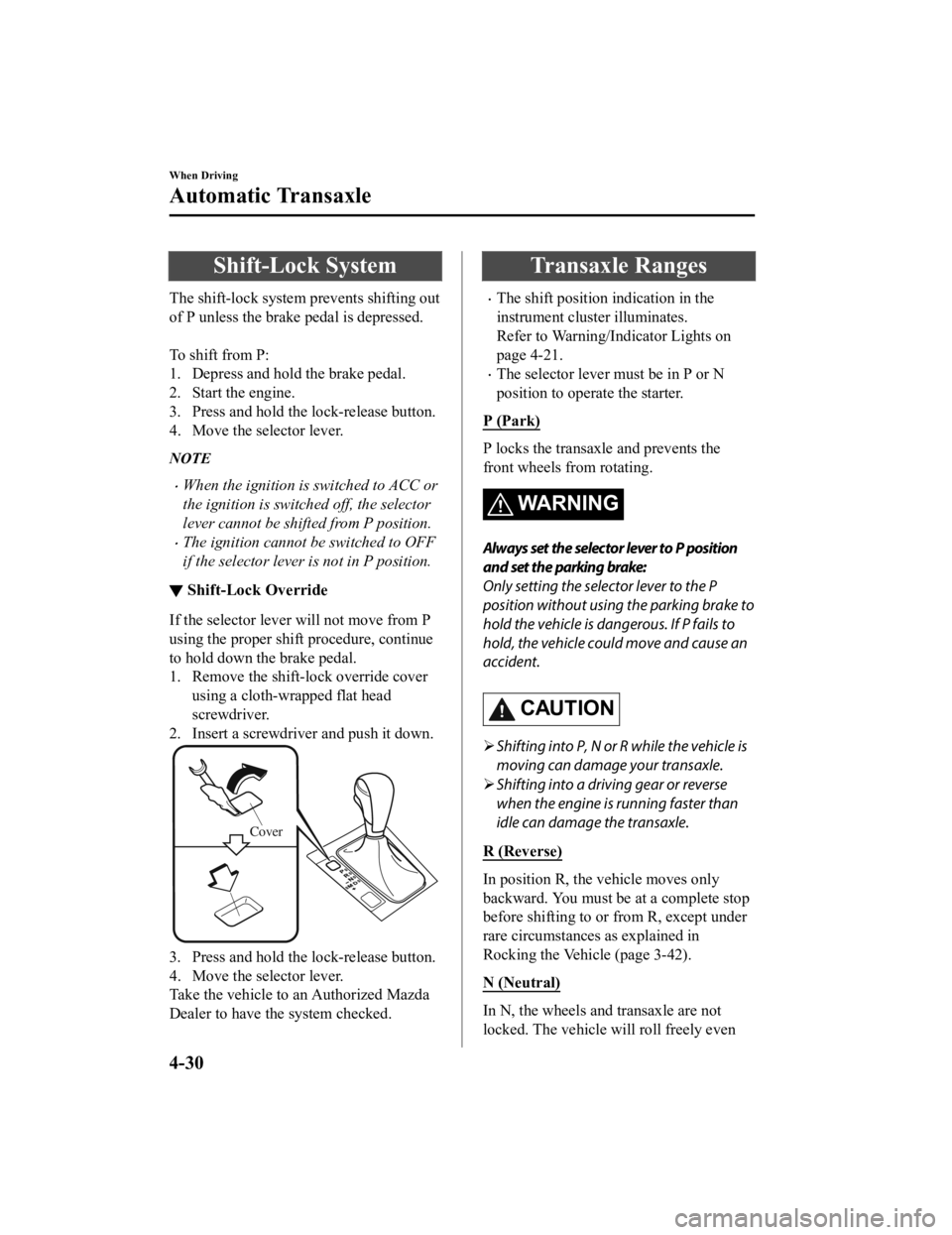
▼ Shift-Lock Override
If the selector lever will not move from P
using the proper shift procedure, continue
to hold down the brake pedal.
1. Remove the shift-lock override cover
using a cloth-wr apped flat head
screwdriver.
2. Insert a screwdriver and push it down.
Cover
3. Press and hold the lock-release button.
4. Move the selector lever.
Take the vehicle to an Authorized Mazda
Dealer to have the system checked.
Transaxle Ranges
The shift position indication in the
instrument cluster illuminates.
Refer to Warning/Indicator Lights on
page 4-21.
The selector lever must be in P or N
position to operate the starter.
P (Park)
P locks the transaxle and prevents the
front wheels from rotating.
WA R N I N G
Always set the selector lever to P position
and set the parking brake:
Only setting the selector lever to the P
position without using the parking brake to
hold the vehicle is dangerous. If P fails to
hold, the vehicle could move and cause an
accident.
CAUTION
Shifting into P, N or R while the vehicle is
moving can damage your transaxle.
Shifting into a driving gear or reverse
when the engine is running faster than
idle can damage the transaxle.
R (Reverse)
In position R, the vehicle moves only
backward. You must be at a complete stop
before shifting to or from R, except under
rare circumstances as explained in
Rocking the Vehicle (page 3-42).
N (Neutral)
In N, the wheels and transaxle are not
locked. The vehicle will roll freely even
When Driving
Automatic Transaxle
4-30
CX-3_8JL1-EA-20G_Edition1_old 2020-5-22 15:31:00
Page 161 of 618

on the slightest incline unless the parking
brake or brakes are on.
WARNING
If the engine is running faster than idle, do
not shift from N or P into a driving gear:
It's dangerous to shift from N or P into a
driving gear when the engine is running
faster than idle. If this is done, the vehicle
could move suddenly, causing an accident
or serious injury.
Do not shift into N when driving the
vehicle:
Shifting into N while driving is dangerous.
Engine braking cannot be applied when
decelerating which could lead to an
accident or serious injury.
CAUTION
Do not shift into N when driving the
vehicle. Doing so can cause transaxle
damage.
NOTE
Apply the parking brake or depress the
brake pedal before moving the selector
lever from N position to prevent the
vehicle from moving unexpectedly.
D (Drive)
D is the normal driving position. From a
stop, the transaxle wi ll automatically shift
through a 6-gear sequence.
M (Manual)
M is the manual shift mode position.
Gears can be shifted up or down by
operating the selector lever. Refer to
Manual Shift Mode on page 4-32.
▼ Shift Position Indication
The selector position is indicated when the
ignition is switched ON.
Gear position indication
In manual shift mode, the “M” of the shift
position indication illuminates and the
numeral for the selected gear is displayed.
▼Active Adaptive Shift (AAS)
Active Adaptive
Shift (AAS)
automatically controls the transaxle shift
points to best suit the road conditions and
driver input. This improves driving feel.
The transaxle may switch to AAS mode
when driving up and down slopes,
cornering, driving at high elevations, or
depressing the accelerator pedal quickly
while the selector lever is in the D
position. Depending on the road and
driving conditions/ve hicle operations, gear
shifting could be delayed or not occur,
however, this does not indicate a problem
because the AAS mode will maintain the
optimum gear position.
When Driving
Automatic Transaxle
4-31
CX-3_8JL1-EA-20G_Edition1_old 2020-5-22 15:31:00
Page 170 of 618
Lighting Control
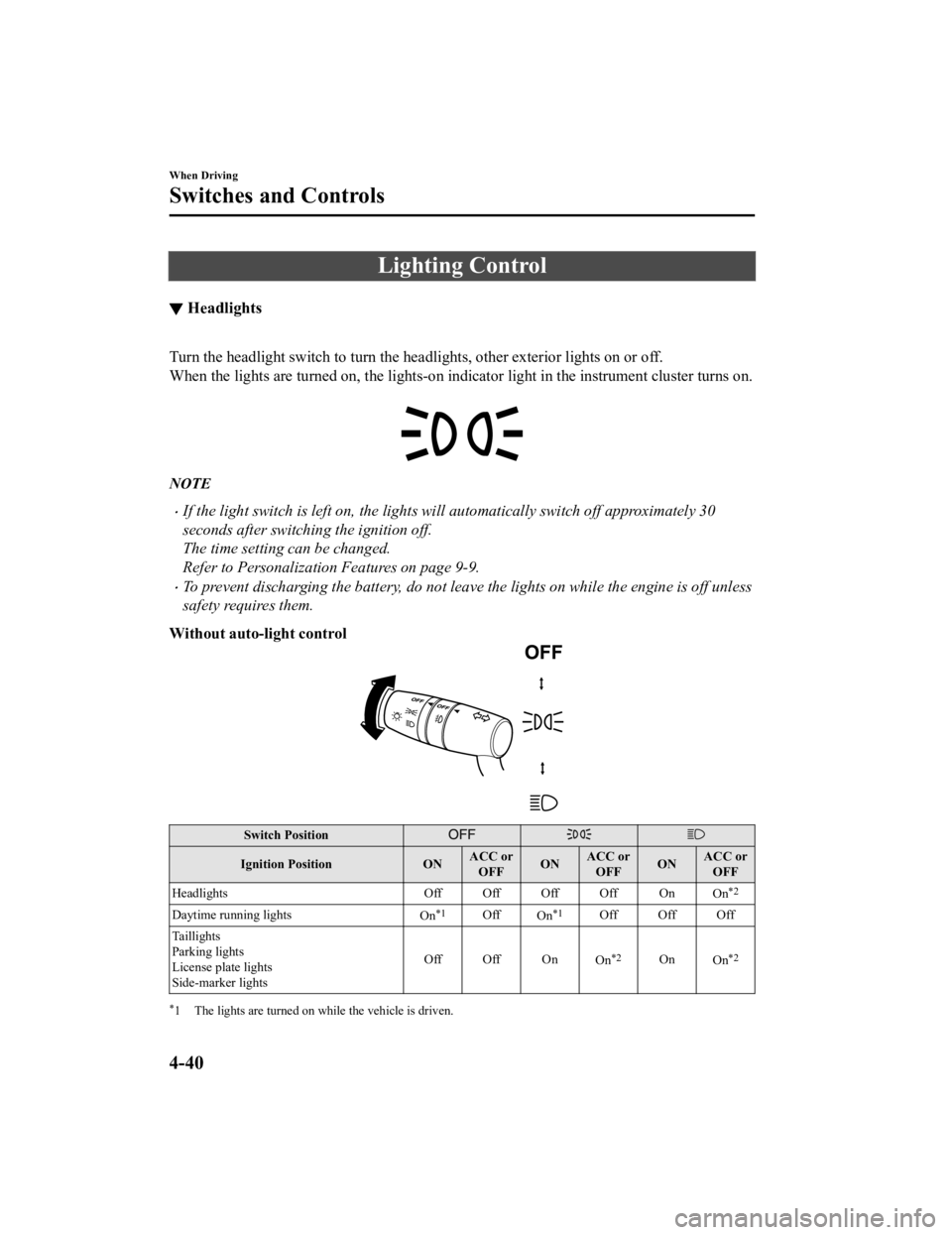
▼Headlights
Turn the headlight switch to
turn the headlights, other exterior lights on or off.
When the lights are turned on, the lights-on indi cator light in the instrument cluster turns on.
NOTE
If the light switch is left on, the lights will automatically switch off approximately 30
seconds after switching the ignition off.
The time setting can be changed.
Refer to Personalization Features on page 9-9.
To prevent discharging the battery, do not leave the lights on while th e engine is off unless
safety requires them.
Without auto-light control
Switch Position
Ignition Position ONACC or
OFF ONACC or
OFF ONACC or
OFF
Headlights Off Off Off Off On
On
*2
Daytime running lights
On*1OffOn*1Off Off Off
Taillights
Parking lights
License plate lights
Side-marker lights Off Off On
On
*2OnOn*2
*1 The lights are turned on while the vehicle is driven.
When Driving
Switches and Controls
4-40
CX-3_8JL1-EA-20G_Edition1_old 2020-5-22 15:31:00
Page 171 of 618
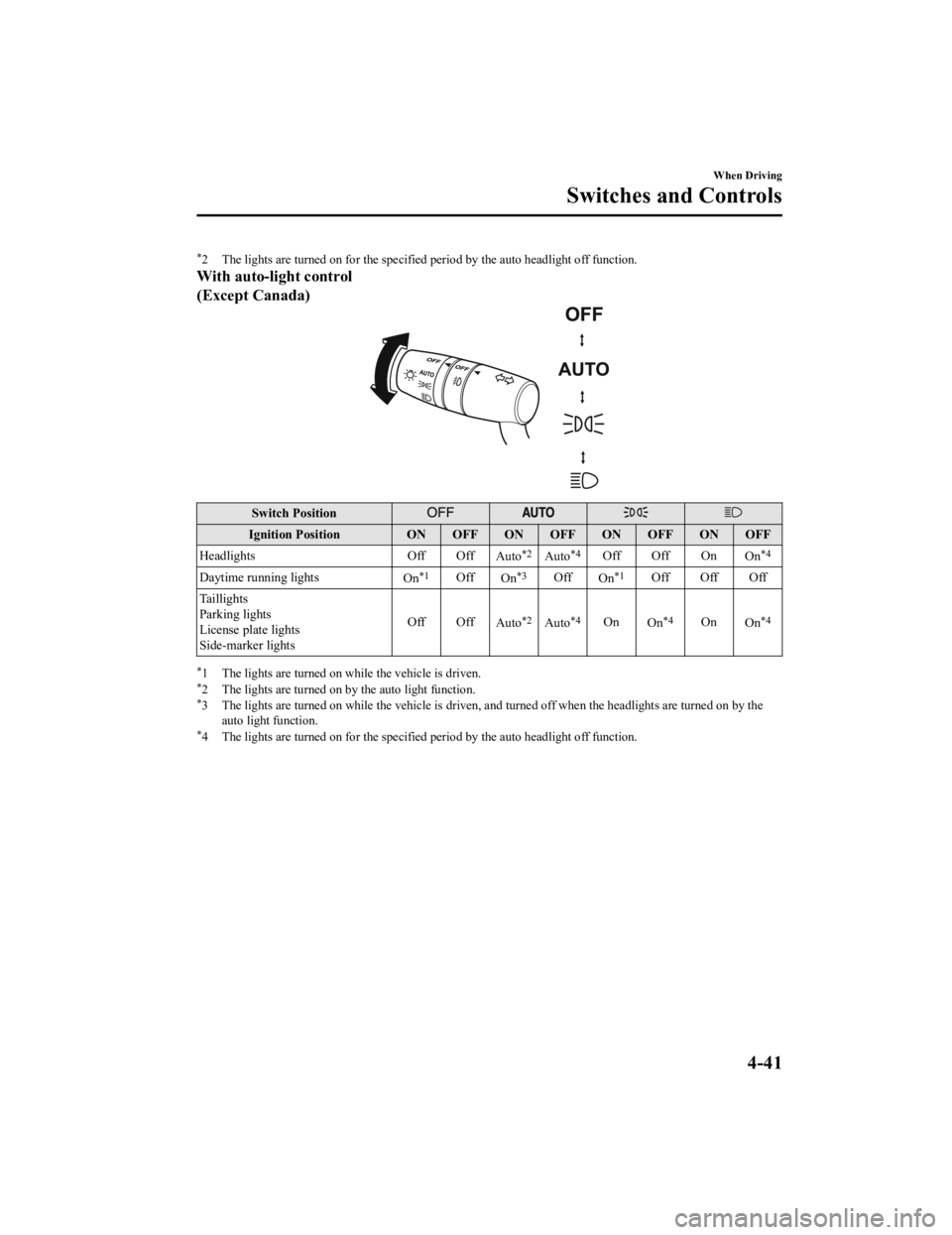
*2 The lights are turned on for the specified period by the auto headlight off function.
With auto-light control
(Except Canada)
Switch Position
Ignition PositionON OFF ON OFF ON OFF ON OFF
Headlights Off Off
Auto
*2Auto*4Off Off On On*4
Daytime running lights
On*1OffOn*3OffOn*1Off Off Off
Taillights
Parking lights
License plate lights
Side-marker lights Off Off
Auto
*2Auto*4OnOn*4OnOn*4
*1 The lights are turned on while the vehicle is driven.*2 The lights are turned on by the auto light function.*3 The lights are turned on while the vehicle is driven, a nd turned off when the headlights are turned on by the
auto light function.
*4 The lights are turned on for the specified period by the auto headlight off function.
When Driving
Switches and Controls
4-41
CX-3_8JL1-EA-20G_Edition1_old 2020-5-22 15:31:00