ad blue MAZDA MODEL CX-3 2021 Owner's Manual
[x] Cancel search | Manufacturer: MAZDA, Model Year: 2021, Model line: MODEL CX-3, Model: MAZDA MODEL CX-3 2021Pages: 618, PDF Size: 64.58 MB
Page 331 of 618
![MAZDA MODEL CX-3 2021 Owners Manual 2.Say: [Beep] “Phonebook”
3. Prompt: “Select one of the following:
New entry, edit, list names, delete,
erase all or import contact.”
4. Say: [Beep] “New entry”
5. Prompt: “Name plea](/img/28/40981/w960_40981-330.png "MAZDA MODEL CX-3 2021 Owners Manual 2.Say: [Beep] “Phonebook”
3. Prompt: “Select one of the following:
New entry, edit, list names, delete,
erase all or import contact.”
4. Say: [Beep] “New entry”
5. Prompt: “Name plea")
2.Say: [Beep] “Phonebook”
3. Prompt: “Select one of the following:
New entry, edit, list names, delete,
erase all or import contact.”
4. Say: [Beep] “New entry”
5. Prompt: “Name please.”
6. Say: [Beep] “XXXXX... (Ex. “Mary's
phone”)” (Say a voice tag for the name
registered.)
7. Prompt: “Adding XXXXX... (Ex.
“Mary's phone”) (Registered voice
tag). Is this correct?”
8. Say: [Beep] “Yes”
9. Prompt: “Home, Work, Mobile, or
Other?”
10. Say: [Beep] “Mobile” (Say “Home” ,
“Work”, “Mobile”, or “Other”, for the
desired location to be registered.)
11. Prompt: “Mobile (Location to be
registered). Is this correct?”
12. Say: [Beep] “Yes”
13. Prompt: “Number, please.”
14. Say: [Beep] “XXXXXXXXXXX”
(Say the phone number to be
registered.)
15. Prompt: “XXXXXXXXXXX (Phone
number registration). After the beep,
continue to add numbers, or say
Go-Back to re-enter the last entered
numbers, or press the Pick-Up button
to save the number.”
16. (Registration)
Press the pick-up button or say
“Enter”, then go to Step 17.
(Adding/inputting telephone
number)
Say, “XXXX” (desired telephone
number), then go to Step 15.
(Telephone number correction)
Say, “Go Back”. The prompt replies,
“Go Back. The last entered numbershave been removed.”. Then go back to
Step 13.
17. Prompt: “Number saved. Would you
like to add another number for this
entry?”
18. Say: [Beep] “Yes” or “No”.
19. If “Yes”, an additional phone number registration can be made for the same
entry.
If “No”, the system returns to standby
status.
(Import contact)
Phonebook data from your device (Mobile
phone) can be sent and registered to your
Bluetooth
® Hands-Free phonebook using
Bluetooth
®.
1. Press the pick-up button or talk button
with a short press.
2. Say: [Beep] “Phonebook”
3. Prompt: “Select one of the following:
New entry, edit, list names, delete,
erase all or import contact.”
4. Say: [Beep] “Import contact”
5. Prompt: “The hands free System is
ready to receive a contact from a
phone. Only a home, a work, and a
mobile number can be imported, This
process requires operation of a mobile
phone. refer to the phone's manual for
more information”
6. Device (Mobile phone) operation: Select one entry from the phonebook
and send it using Bluetooth
®.
7. Prompt: “X (Number of locations
which include data) numbers have
been imported. What name would you
like to use for these numbers?”
8. Say: [Beep] “XXXXX... (Ex. “Mary's
phone”)” (Say a voice tag for the name
registered.)
Interior Features
Audio Set [Type A (non-touchscreen)]
5-49
CX-3_8JL1-EA-20G_Edition1_old 2020-5-22 15:31:00
Page 332 of 618
![MAZDA MODEL CX-3 2021 Owners Manual 9.Prompt: “Adding XXXXX... (Ex.
“Marys phone”) (Voice tag). Is this
correct?”
10. Say: [Beep] “Yes”
11. Prompt: “Number saved. Would you
like to import another contact?”
12. Say:](/img/28/40981/w960_40981-331.png "MAZDA MODEL CX-3 2021 Owners Manual 9.Prompt: “Adding XXXXX... (Ex.
“Marys phone”) (Voice tag). Is this
correct?”
10. Say: [Beep] “Yes”
11. Prompt: “Number saved. Would you
like to import another contact?”
12. Say:")
9.Prompt: “Adding XXXXX... (Ex.
“Mary's phone”) (Voice tag). Is this
correct?”
10. Say: [Beep] “Yes”
11. Prompt: “Number saved. Would you
like to import another contact?”
12. Say: [Beep] “Yes” or “No”
13. If “Yes”, the procedure proceeds to Step 5.
If “No”, the system returns to standby
status.
Editing phonebook
The data registered to the Bluetooth
®
Hands-Free phonebook can be edited.
NOTE
Do this function only when parked. It is
too distracting to attempt while driving
and you may make too many errors to be
effective.
1. Press the pick-up but ton or talk button
with a short press.
2. Say: [Beep] “Phonebook”
3. Prompt: “Select one of the following:
New entry, edit, list names, delete,
erase all or import contact.”
4. Say: [Beep] “Edit”
5. Prompt: “Please say the name of the
entry you would like to edit or say,
“List names”.”
6. Say: [Beep] “XXXXX... (Ex. “Mary's
phone”)” (Say the voice tag for the
registered name to be edited in the
phonebook.)
7. Prompt: “Home, Work, Mobile, or
Other?”
8. Say: [Beep] “Home” (Say the
registered location to be edited:
“Home”, “Work”, “Mobile”, or
“Other”.)
9. Prompt: “XXXXX... (Ex. “Mary's
phone”) (Registered voice tag) XXXX
(Ex. “Home”) (Registered location). Is
this correct?”
10. Say: [Beep] “Yes”
11. Prompt: “The current number is
XXXXXXXXXXX (Ex. “555-1234”)
(Currently register ed number). New
number, please.”
NOTE
If there was no previous phone number
registered to a location (Ex. “Work”),
the prompt will only read out
“Number, please”
12. Say: [Beep] “XXXXXXXXXXX (Ex.
“555-5678”)” (Say the new phone
number to be registered.)
13. Prompt: “XXXXXXXX (Telephone
number) After the beep, continue to
add numbers, or say Go-Back to
re-enter the last entered numbers, or
press the Pick-Up bu tton to save the
number.”
14. (Number Change)
Press the pick-up button, then go to
Step 15.
(Adding/inputting telephone
number)
Say, “XXXX” (desired telephone
number), then go to Step 13.
(Telephone number correction)
Say, “Go Back”. The prompt replies,
“Go Back. The last entered numbers
have been removed. Number, please.”.
Then go back to Step 12.
15. Prompt: “Number changed.”
Interior Features
Audio Set [Type A (non-touchscreen)]
5-50
CX-3_8JL1-EA-20G_Edition1_old 2020-5-22 15:31:00
Page 333 of 618

Phonebook data deletion
(Erasing individual phonebook data)
Individual data registered to the
Bluetooth
® Hands-Free phonebook can be
cleared.
NOTE
Do this function only when parked. It is
too distracting to attempt while driving
and you may make too many errors to be
effective.
1. Press the pick-up button or talk button with a short press.
2. Say: [Beep] “Phonebook”
3. Prompt: “Select one of the following:
New entry, edit, list names, delete,
erase all or import contact.”
4. Say: [Beep] “Delete”
5. Prompt: “Please say the name of the
entry you would like to delete or say,
“List names”. ”
6. Say: [Beep] “XXXXX... (Ex. “John's
phone”) ” (Say the registered voice tag
to be deleted from the phonebook.)
7. Prompt: “Deleting XXXXX... (Ex.
“John's phone”) (Registered voice tag)
Home (Registered location). Is this
correct?”
8. Say: [Beep] “Yes”
9. Prompt: “XXXXX... (Ex. “John's
phone”) (Registered voice tag) Home
(Registered location) deleted.”
(Complete deletion of the phonebook
data)
All data registered to the Bluetooth
®
Hands-Free phonebook can be erased.
NOTE
Do this function only when parked. It is
too distracting to attempt while driving
and you may make too many errors to be
effective.
1. Press the pick-up button or talk button with a short press.
2. Say: [Beep] “Phonebook”
3. Prompt: “Select one of the following:
New entry, edit, list names, delete,
erase all or import contact.”
4. Say: [Beep] “Erase all”
5. Prompt: “Are you sure you want to
erase everything from your Hands Free
system phonebook?”
6. Say: [Beep] “Yes”
7. Prompt: “You are about to delete
everything from your Hands Free
system phonebook. Do you want to
continue?”
8. Say: [Beep] “Yes”
9. Prompt: “Please wait, erasing the
Hands Free system phonebook.”
10. Prompt: “Hands-Free system
phonebook erased.”
Read-out of names registered to the
Bluetooth
® Hands-Free phonebook
Bluetooth
® Hands-Free can read out the
list of names registered to its phonebook.
1. Press the pick-up button or talk button with a short press.
2. Say: [Beep] “Phonebook”
3. Prompt: “Select one of the following:
New entry, edit, list names, delete,
erase all or import contact.”
4. Say: [Beep] “List names”
5. Prompt: “XXXXX..., XXXXX...,
XXXXX... (Ex. “John's phone”,
Mary's phone, Bill's phone)” (Voice
Interior Features
Audio Set [Type A (non-touchscreen)]
5-51
CX-3_8JL1-EA-20G_Edition1_old 2020-5-22 15:31:00
Page 335 of 618

Emergency calls
A call can be made to the emergency
phone number (911: U.S.A./Canada, 066:
Mexico) using the voice input command.
It may not function properly in some areas
in Mexico.
1. Press the pick-up button or talk buttonwith a short press.
2. Say: [Beep] “Emergency”
3. - U.S.A./Canada vehicles - Prompt:
“Dialing “911”, is this correct?”
- Mexico vehicles - Prompt: “Dialing
“066”, is this correct?”
4. Say: [Beep] “Yes”
5. Prompt: “Dialing”
▼Receiving an Incoming Call
1.
Prompt: “Incoming call, press the
pick-up button to answer”
2. To accept the call, press the pick-up button.
To reject the call, press the hang-up
button.
▼Hanging Up a Call
Press the hang-up button during the call. A
beep sound will confirm that call is ended.
▼Mute
The microphone can be muted during a
call.
1. Press the talk button with a short press.
2.
Say: [Beep] “Mute”
3. Prompt: “Microphone muted”
Canceling mute
1. Press the talk button with a short press.
2. Say: [Beep] “Mute off”
3. Prompt: “Microphone unmuted”
▼Transferring a Call from
Hands-Free to a Device (Mobile
Phone)
Communication betw
een the hands-free
unit and a device (Mobile phone) is
canceled, and the line can be switched to a
standard call using a device (Mobile
phone).
1. Press the talk button with a short press.
2. Say: [Beep] “Transfer call”
3. Prompt: “Transferred call to phone”
▼Transferring a Call from a Device
(Mobile Phone) to Hands-Free
Communication between devices (Mobile
phone) can be switched to Bluetooth
®
Hands-Free.
1. Press the talk button with a short press.
2.
Say: [Beep] “Transfer call”
3. Prompt: “Transferred call to Hands
Free system”
▼ Call interrupt
A call can be interrupted to receive an
incoming call from a third party.
Switch to a new incoming call using the
following methods.
(Method 1)
1. Press the pick-up button.
2.
Prompt: “Swapping calls.”
(Method 2)
1. Press the talk button with a short press.
2. Say: [Beep] “Swap calls”
3. Prompt: “Swapping calls.”
NOTE
To refuse an incoming call, press the
hang-up button.
Interior Features
Audio Set [Type A (non-touchscreen)]
5-53
CX-3_8JL1-EA-20G_Edition1_old 2020-5-22 15:31:00
Page 337 of 618

3.Prompt: “Sending XXXX... (DTMF
code)”Voice Recognition
In this section, the basic operation of the
voice recognition is explained.
Activating Voice Recognition
To Activate the Main Menu: Press the
pick-up button or talk button with a short
press.
Ending Voice Recognition
Use one of the following methods:
Press and hold the talk-button.
Press the hang-up button.
Skipping Voice Guidance (for faster
operation)
Press and release the talk-button.
NOTE
The Bluetooth® Hands-Free system is
operable several seconds after the
ignition is switched to ACC or ON
(requires less than 15 seconds).
When operating the audio unit or the
A/C while using Bluetooth
®
Hands-Free, the beep sounds or voice
guidance (audio unit)/cannot be heard.
Tu t o r i a l
The tutorial explains how to use
Bluetooth
® Hands-Free.
To activate the tuto rial, do the following:
1. Press the pick-up button or talk button
with a short press.
2. Say: [Beep] “Tutorial”
3. Follow the prompts to receive the
appropriate voice guidance
instructions.
Interior Features
Audio Set [Type A (non-touchscreen)]
5-55
CX-3_8JL1-EA-20G_Edition1_old 2020-5-22 15:31:00
Page 338 of 618

Commands useable anytime during
voice recognition
“Help” or “Go Back” are commands
which can be used at anytime during voice
recognition.
Help function use
The help function informs the user of all
the available voice commands under the
current conditions.
1.Say: [Beep] “Help”
2. Follow the prompts to receive the
appropriate voice guidance
instructions.
Returning to pr evious operation
This command is for returning to the
previous operation while in the voice
recognition mode.
Say: [Beep] “Go Back”
To prevent a deterioration in the voice
recognition rate and voice quality, the
following points should be observed:
The voice recognition cannot be
performed while voice guidance or the
beep sound is operating. Wait until
the voice guidance or the beep sound
is finished before saying your
commands.
Dialects or different wording other than
hands-free prompts cannot be
recognized by voice recognition. Speak
in the wording specified by the voice
commands.
It is not necessary to face the
microphone or approach it. Speak the
voice commands while maintaining a
safe driving position.
Do not speak too slow or too loud.
Speak clearly, without pausing between
words or numbers.
Close the windows and/or the moonroof
to reduce loud noises from outside the
vehicle, or turn down the airflow of the
climate control system while Bluetooth
®
Hands-Free is being used.
Make sure the vents are not directing air
up towards the microphone.
NOTE
If the voice recognition performance is not
satisfactory.
Refer to Voice Recognition Learning
Function (Speaker Enrollment) (Type A)
on page 5-57.
Refer to Troubleshooting on page 5-59.
Interior Features
Audio Set [Type A (non-touchscreen)]
5-56
CX-3_8JL1-EA-20G_Edition1_old 2020-5-22 15:31:00
Page 341 of 618
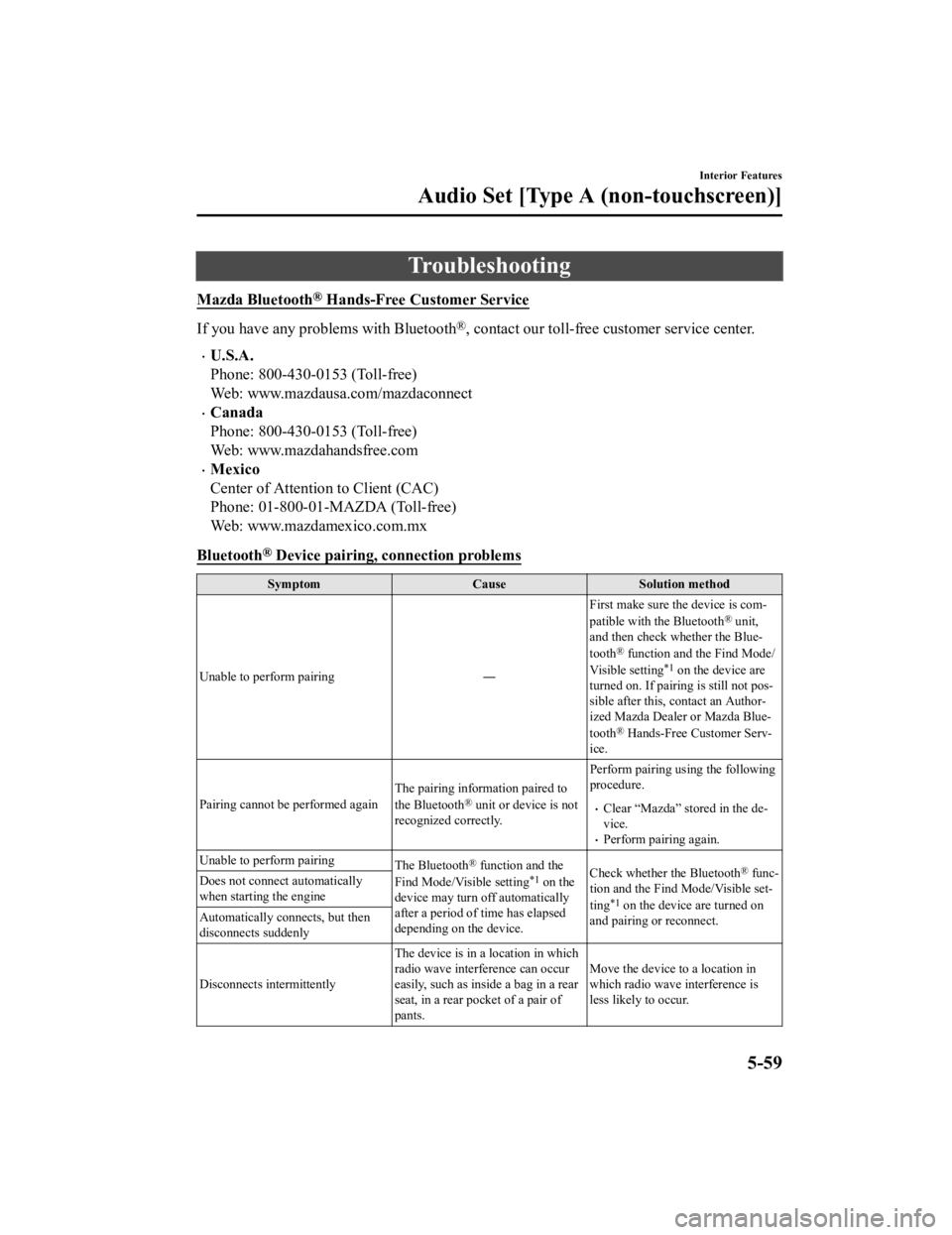
Troubleshooting
Mazda Bluetooth® Hands-Free Customer Service
If you have any problems with Bluetooth®, contact our toll-free customer service center.
U.S.A.
Phone: 800-430-0153 (Toll-free)
Web: www.mazdausa.com/mazdaconnect
Canada
Phone: 800-430-0153 (Toll-free)
Web: www.mazdahandsfree.com
Mexico
Center of Attention to Client (CAC)
Phone: 01-800-01-MAZDA (Toll-free)
Web: www.mazdamexico.com.mx
Bluetooth
® Device pairing, connection problems
Symptom CauseSolution method
Unable to perform pairing ―First make sure the device is com
‐
patible with the Bluetooth
® unit,
and then check whether the Blue‐
tooth
® function and the Find Mode/
Visible setting*1 on the device are
turned on. If pair ing is still not pos ‐
sible after this, contact an Author ‐
ized Mazda Dealer or Mazda Blue‐
tooth
® Hands-Free Customer Serv ‐
ice.
Pairing cannot be performed again The pairing inform
ation paired to
the Bluetooth
® unit or device is not
recognized correctly. Perform pairing us
ing the following
procedure.Clear “Mazda” stored in the de‐
vice.
Perform pairing again.
Unable to perform pairing The Bluetooth
® function and the
Find Mode/Visible setting*1 on the
device may turn off automatically
after a period of time has elapsed
depending on the device. Check whether the Bluetooth® func
‐
tion and the Find Mode/Visible set ‐
ting
*1 on the device are turned on
and pairing or reconnect.
Does not connect automatically
when starting the engine
Automatically connects, but then
disconnects suddenly
Disconnects intermittently
The device is in a location in which
radio wave interference can occur
easily, such as inside a bag in a rear
seat, in a rear pocket of a pair of
pants.Move the device to a location in
which radio wave interference is
less likely to occur.
Interior Features
Audio Set [Type A (non-touchscreen)]
5-59
CX-3_8JL1-EA-20G_Edition1_old
2020-5-22 15:31:00
Page 342 of 618
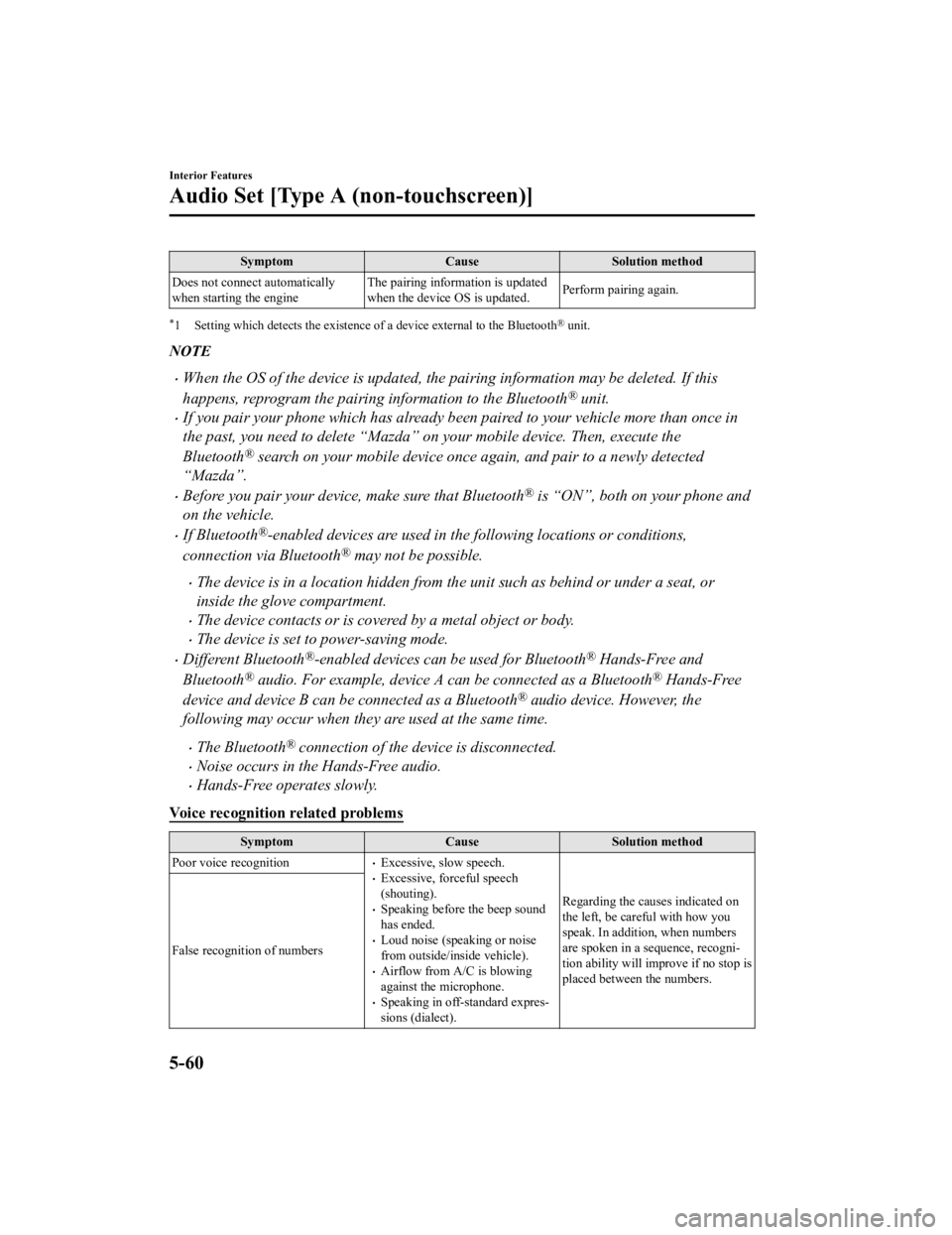
SymptomCauseSolution method
Does not connect automatically
when starting the engine The pairing information is updated
when the device OS is updated.
Perform pairing again.
*1 Setting which detects the existence of a device external to the Bluetooth® unit.
NOTE
When the OS of the device is updated, the pairing information may be deleted. If this
happens, reprogram the pairing information to the Bluetooth
® unit.
If you pair your phone which has already been paired to your vehicle more than once in
the past, you need to delete “Mazda” on your mobile device. Then, execute the
Bluetooth
® search on your mobile device once
again, and pair to a newly detected
“Mazda”.
Before you pair your device, make sure that Bluetooth® is “ON”, both on your phone and
on the vehicle.
If Bluetooth®-enabled devices are used in the following locations or conditions,
connection via Bluetooth
® may not be possible.
The device is in a location hidden from the unit such as behind or under a seat, or
inside the glove compartment.
The device contacts or is covered by a metal object or body.
The device is set to power-saving mode.
Different Bluetooth®-enabled devices can be used for Bluetooth® Hands-Free and
Bluetooth
® audio. For example, device A can be connected as a Bluetooth® Hands-Free
device and device B can be connected as a Bluetooth
® audio device. However, the
following may occur when they are used at the same time.
The Bluetooth® connection of the device is disconnected.
Noise occurs in the Hands-Free audio.
Hands-Free operates slowly.
Voice recognition related problems
Symptom CauseSolution method
Poor voice recognition
Excessive, slow speech.Excessive, forceful speech
(shouting).
Speaking before the beep sound
has ended.
Loud noise (speaking or noise
from outside/inside vehicle).
Airflow from A/C is blowing
against the microphone.
Speaking in off-standard expres ‐
sions (dialect). Regarding the causes indicated on
the left, be careful with how you
speak. In addition, when numbers
are spoken in a sequence, recogni
‐
tion ability will improve if no stop is
placed between the numbers.
False recognition of numbers
Interior Features
Audio Set [Type A (non-touchscreen)]
5-60
CX-3_8JL1-EA-20G_Edition1_old
2020-5-22 15:31:00
Page 343 of 618
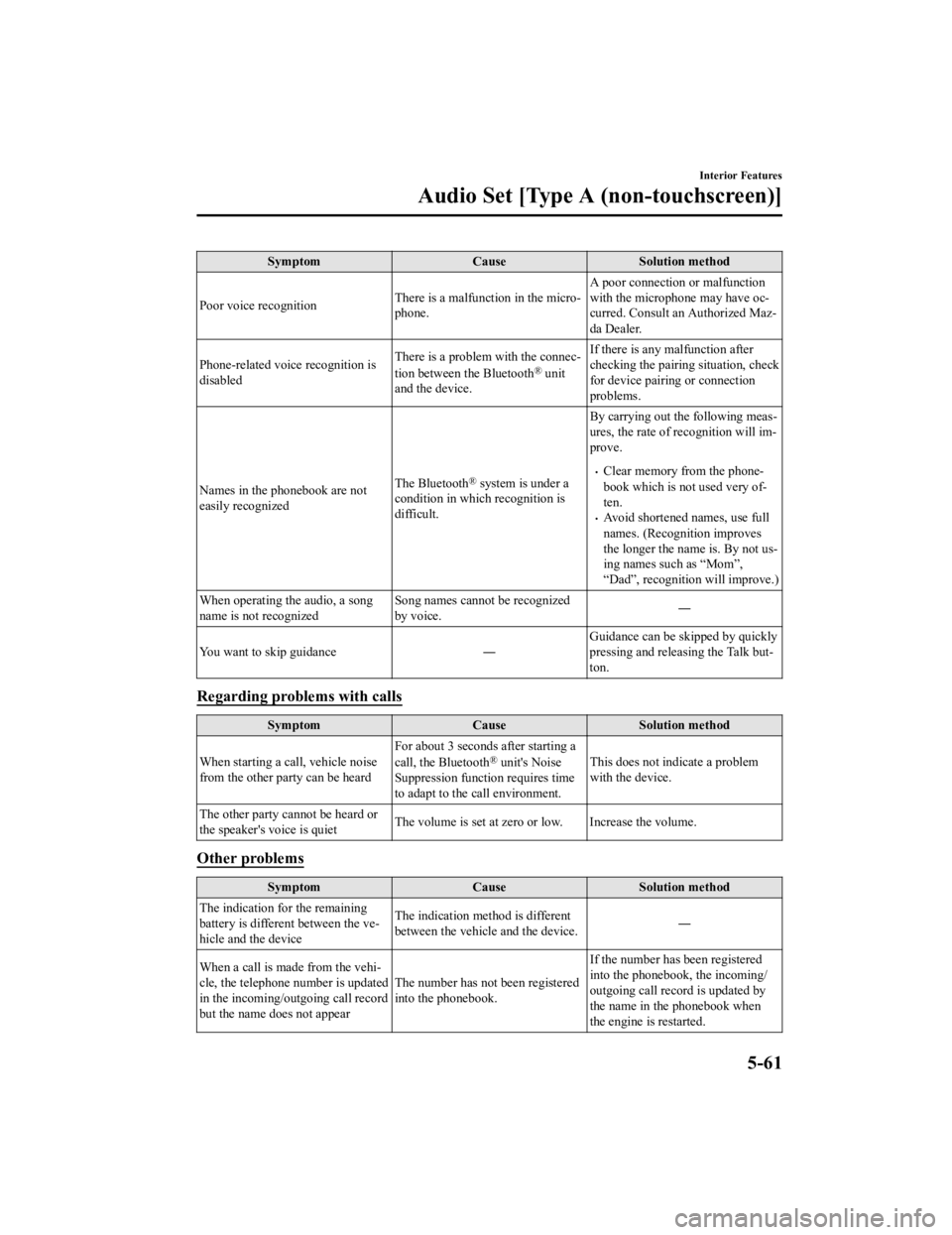
SymptomCauseSolution method
Poor voice recognition There is a malfunction in the micro‐
phone.A poor connection or malfunction
with the microphone may have oc
‐
curred. Consult an Authorized Maz ‐
da Dealer.
Phone-related voice recognition is
disabled There is a problem with the connec
‐
tion between the Bluetooth
® unit
and the device. If there is any malfunction after
checking the pairing
situation, check
for device pairing or connection
problems.
Names in the phonebook are not
easily recognized The Bluetooth
® system is under a
condition in which recognition is
difficult. By carrying out the following meas
‐
ures, the rate of recognition will im ‐
prove.Clear memory from the phone ‐
book which is not used very of ‐
ten.
Avoid shortened names, use full
names. (Recognition improves
the longer the name is. By not us ‐
ing names such as “Mom”,
“Dad”, recognition will improve.)
When operating the audio, a song
name is not recognized Song names cannot be recognized
by voice.
―
You want to skip guidance ―Guidance can be skipped by quickly
pressing and releasing the Talk but
‐
ton.
Regarding problems with calls
Symptom CauseSolution method
When starting a call, vehicle noise
from the other party can be heard For about 3 seconds after starting a
call, the Bluetooth
® unit's Noise
Suppression function requires time
to adapt to the call environment. This does not indicate a problem
with the device.
The other party cannot be heard or
the speaker's voice is quiet The volume is set at zero or low. Increase the volume.
Other problems
Symptom
CauseSolution method
The indication for the remaining
battery is different between the ve ‐
hicle and the device The indication method is different
between the vehicle and the device.
―
When a call is made from the vehi ‐
cle, the telephone number is updated
in the incoming/o utgoing call record
but the name does not appear The number has not been registered
into the phonebook.If the number has been registered
into the phonebook, the incoming/
outgoing call record is updated by
the name in the phonebook when
the engine is restarted.
Interior Features
Audio Set [Type A (non-touchscreen)]
5-61
CX-3_8JL1-EA-20G_Edition1_old
2020-5-22 15:31:00
Page 349 of 618
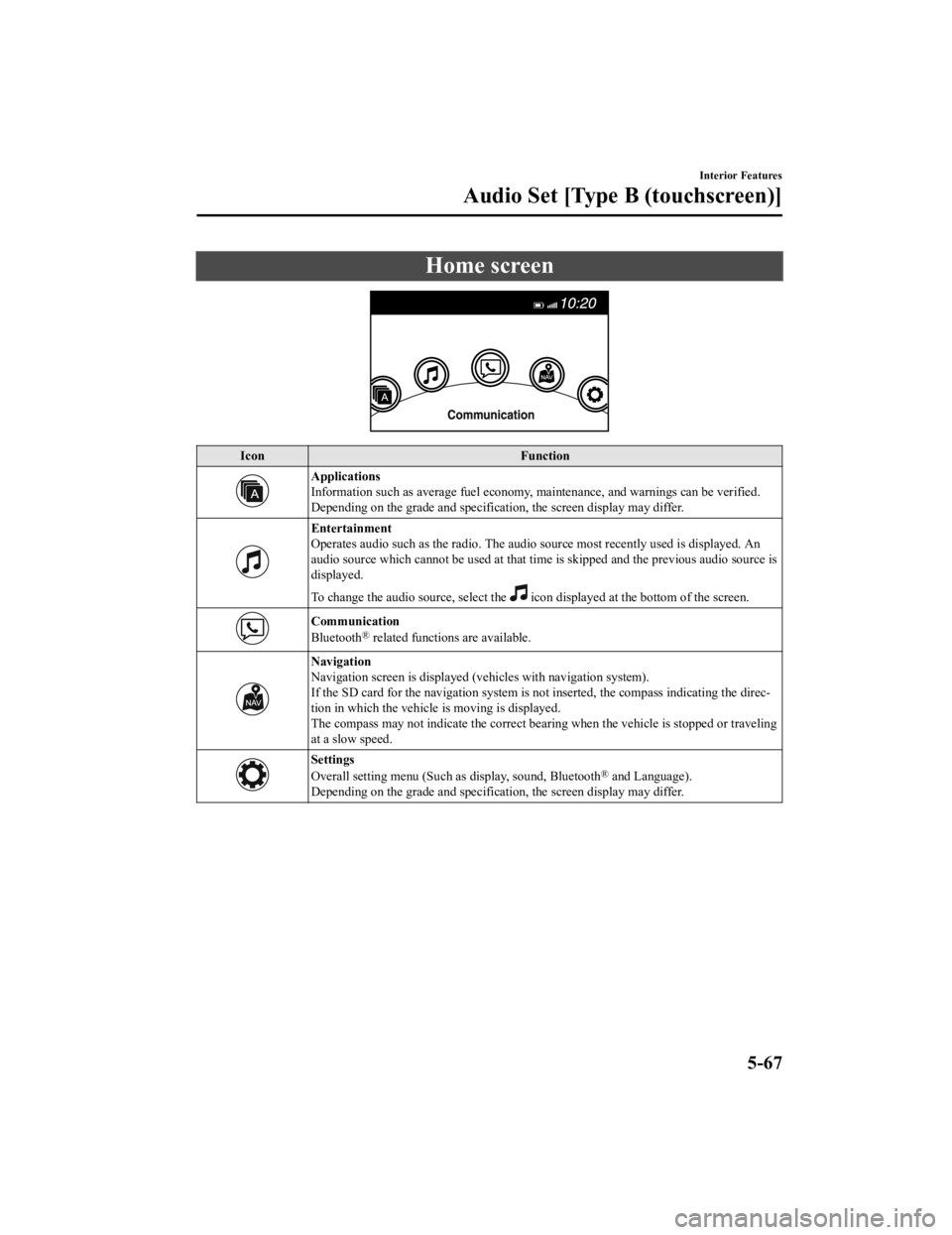
Home screen
IconFunction
Applications
Information such as average fuel economy, maintenance, and warnings can be verified.
Depending on the grade and specificatio n, the screen display may differ.
Entertainment
Operates audio such as the radio. The audio source most recently used is displayed. An
audio source which cannot be used at that tim e is skipped and the previous audio source is
displayed.
To change the audio source, select the
icon displayed at the bottom of the screen.
Communication
Bluetooth® related functions are available.
Navigation
Navigation screen is displayed (v ehicles with navigation system).
If the SD card for the navigation system is no t inserted, the compass indicating the direc‐
tion in which the vehicle is moving is displayed.
The compass may not indicate the correct bearin g when the vehicle is stopped or traveling
at a slow speed.
Settings
Overall setting menu (Such as display, sound, Bluetooth® and Language).
Depending on the grade and specificatio n, the screen display may differ.
Interior Features
Audio Set [Type B (touchscreen)]
5-67
CX-3_8JL1-EA-20G_Edition1_old 2020-5-22 15:31:00