ad blue MAZDA MODEL CX-3 2021 Workshop Manual
[x] Cancel search | Manufacturer: MAZDA, Model Year: 2021, Model line: MODEL CX-3, Model: MAZDA MODEL CX-3 2021Pages: 618, PDF Size: 64.58 MB
Page 397 of 618

▼Receiving an Incoming Call
When an incoming call is received, the inco
ming call notification screen is displayed. The
“Incoming Call Notifications” setting must be on.
Refer to Communication Settings on page 5-119.
To accept the call, press the pick-up butt on on the audio control switch or select
on
the screen.
To reject the call, press the hang-up button on the audio control switch or select
on the
screen.
The following icons are displayed on the scre en during a call. Icons which can be used
differ depending on use conditions.
Icon Function
Displays the Communication menu.
Ends the call.
Transferring a call from hands-free to a mobile phone
Communication between the Bluetooth® unit and a device (mobil e phone) is canceled,
and an incoming call will be received by the device (mobile phone) like a standard call.
Transferring a call from a device (mobile phone) to hands-free
Communication between devices (mobile ph one) can be switched to Bluetooth®
Hands-Free.
Mute
The microphone can be muted during a call.
When selected again, the mute is canceled.
To make a 3-way call, select the contacts from the following:
: Call History is displayed.
: The phonebook is displayed.
: The dial pad is displayed. Input the phone number.
The device may be unusable depending on the contractual content.
The call on hold is made to make a 3-way call.
The device may be unusable depending on the contractual content.
Switches the call on hold.
DTMF (Dual Tone Multi-Fre quency Signal) Transmission
This function is used when transmitting DTMF via the dial pad. The receiver of a DTMF
transmission is generally a home telephone answering mach ine or a company's automated
guidance call center.
Input the number using a dial pad.
Interior Features
Audio Set [Type B (touchscreen)]
5-115
CX-3_8JL1-EA-20G_Edition1_old 2020-5-22 15:31:00
Page 398 of 618

NOTE
If the ignition is switched off during a
hands-free call, the line is transferred to
the device (Mobile phone)
automatically.
If the DTMF code has two or more
digits or symbols, each one must be
transmitted individually.
▼Call Interrupt
A call can be interrupted to receive an
incoming call from a third party.
When
is selected or the
pick-up button on the steering wheel is
pressed, the current call is held and the
system switches to the new incoming call.
When
is selected, the current
call is ended and the system switches to
the new incoming call (GSM network
only).
When
is selected or the hang-up
button on the steering wheel is pressed, an
incoming call is refused.
NOTE
The function may not be available
depending on the contractual content of
the mobile device.
The function may not be operable
depending on the type of the telephone
network and the mobile device.
▼ Receiving and Replying to Messages
(available only with E-mail/SMS
compatible phones)
SMS (Short Message Service) messages,
and E-mail received by connected devices
can be downloaded, displayed, and played
(read by the system).
Additionally, replies can also be made to
calls and messages in the received
messages.
Downloading messages
Up to 20 new messages can be
downloaded and displayed from a
connected device.
NOTE
For E-mail, 20 messages for each account
can be downloaded.
(Automatic downloading)
The “Auto Download Email” (E-mail) or
“Auto Download Text Message” (SMS)
setting must be on. A message is
downloaded automa
tically when the
Bluetooth
® unit is connected to the device.
Refer to Communication Settings on page
5-119.
(Manually downloading)
When the “Auto Download Email”
(E-mail) or “Auto Download Text
Message” (SMS) setting is off, the
message is downloaded using the
following procedure.
1. Select the
icon on the home screen
to display the Communication screen.
2. Select
or to display
the Inbox.
3. Select
.
4. Download will be started from the mobile phone.
NOTE
Attached data is not downloaded.
Messages up to 1 kilobyte (E-mail)/
140-bytes (SMS) can be downloaded.
A message list is created for each
device.
Interior Features
Audio Set [Type B (touchscreen)]
5-116
CX-3_8JL1-EA-20G_Edition1_old 2020-5-22 15:31:00
Page 401 of 618

▼Communication Settings
Select the icon on the home screen to display the Communication screen.
Select
to change the setting.
Item Setting Function
Bluetooth
®— Go to Bluetooth® setting menu.
Refer to Bluetooth® Preparation on page 5-98.
Incoming Call Notifi ‐
cations On/Off Notifies when an incoming call is received.
Auto Download Text
Message On/Off
Downloads SMS automatically when the Bluetooth
® unit is connected
to the device.
Text Notifications On/Off Notifie s when a new SMS is received.
Auto Download
Email
*1On/Off Downloads E-mail automatically when the Bluetooth® unit is connect
‐
ed to the device.
Email Notifications On/Off Notifies when a new Email is received.
Auto Download Call
History On/Off
Downloads Call History automa
tically when the Bluetooth
® unit is
connected to the device.
Auto Download Con ‐
tacts
*1On/Off Downloads the phonebook automa
tically when the Bluetooth® unit is
connected to the device.
Ringtone Car/Phone/Off The type of ring tone can be chan
ged. Three selections are available
including the standard ring tone set on the vehicle, the ring tone regis‐
tered to your Bluetooth
® device, or no ring tone.
Phone Volume Adjusts using
the slider. Adjusts the conversation volume.
VR and Ringtone Adjusts using
the slider. Adjusts the voice guidan
ce and ringtone volume.
Contacts Display Or ‐
der First Name, Last
Name Displays the contact in
formation in alphabetical order of the first
name.
Last Name, First Name Displays the contact in
formation in alphabetical order of the last
name.
Edit Preset Messages — Edits the preset message.
Refer to Receiving and Replying to Messages (available only with
E-mail/SMS compatible phones) on page 5-116.
Emergency Assistance
Call On/Off Mobile Utilizes the Automatic 911 dialing function.
Restore Factory set ‐
tings — Initializes all Communication Settings.
*1 Depending on the device, it may be necessary to acquire download permission on the device side.
Interior Features
Audio Set [Type B (touchscreen)]
5-119
CX-3_8JL1-EA-20G_Edition1_old
2020-5-22 15:31:00
Page 402 of 618

Voice Recognition
▼Basic Operation Method
Activating Voice Recognition
Press the talk button.
Ending Voice Recognition
Use one of the following methods:
Press the hang-up button.
Say, “Cancel”.
Operate the commander switch or the
center display (only when vehicle is
stopped).
Skipping Voice Guidance (for faster
operation)
Press and release the talk button.
Troubleshooting for Voice Recognition
If you do not understand an operation
method while in the voice recognition
mode, say “Tutorial” or “Help”.
Commands useable anytime during
voice recognition
“Go Back” and “Cancel” are commands
which can be used at anytime during voice
recognition.
Returning to pr evious operation
To return to the prev ious operation, say,
“Go Back” while in voice recognition
mode.
Cancel
To put the Bluetooth
® Hands-Free system
in standby mode, say, “Cancel” while in
voice recognition mode.
To prevent a deterioration in the voice
recognition rate and voice quality, the
following points sh ould be observed:
The voice recognition cannot be
performed while voice guidance or the
beep sound is operating. Wait until
the voice guidance or the beep sound
is finished before saying your
commands.
Phone related commands are available
only when your phone is connected via
Bluetooth
®. Make sure your phone is
connected via Bluetooth
® before you
operate phone related voice commands.
Music play commands, such as Play
Artist and Play Album can be used only
in USB audio mode.
Do not speak too slowly or loudly (no
loud voice).
Speak clearly, without pausing between
words or numbers.
Dialects or different wording other than
hands-free prompts cannot be
recognized by voic e recognition. Speak
in the wording speci fied by the voice
commands.
It is not necessary to face the
microphone or approach it. Speak the
voice commands while maintaining a
safe driving position.
Close the windows and/or the moonroof
to reduce loud noises from outside the
vehicle, or turn down the airflow of the
climate control system while Bluetooth
®
Hands-Free is being used.
Make sure the vents are not directing air
up towards the microphone.
NOTE
If the voice recognition performance is not
satisfactory.
Interior Features
Audio Set [Type B (touchscreen)]
5-120
CX-3_8JL1-EA-20G_Edition1_old 2020-5-22 15:31:00
Page 404 of 618
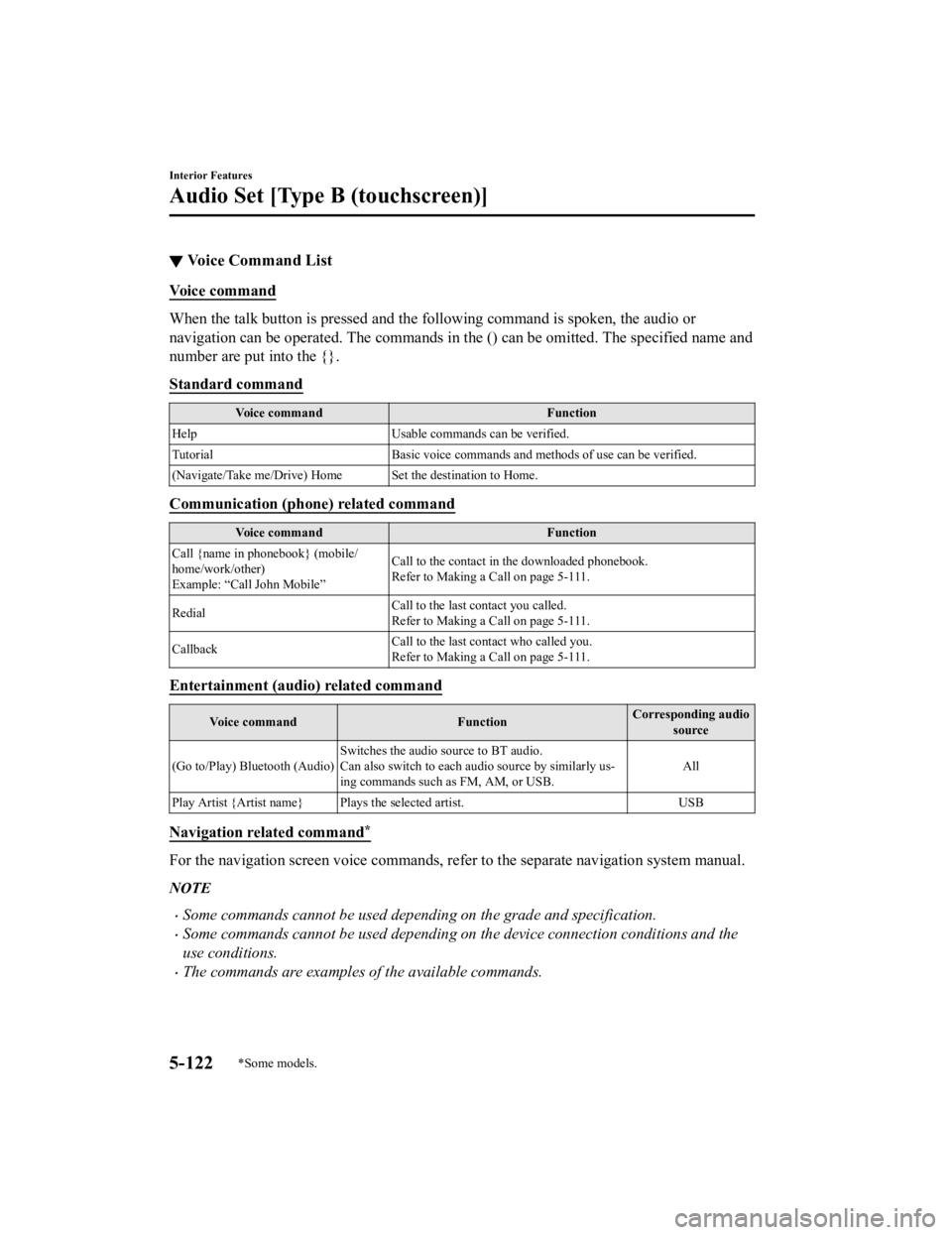
▼Voice Command List
Voice command
When the talk button is pressed and the following command is spoken, the audio or
navigation can be operated. The commands in the () can be omitted. The specified name and
number are put into the {}.
Standard command
Voice command
Function
Help Usable commands can be verified.
Tutorial Basic voice commands and methods of use can be verified.
(Navigate/Take me/Drive) Home Set the destination to Home.
Communication (phone) related command
Voice command Function
Call {name in phonebook} (mobile/
home/work/other)
Example: “Call John Mobile” Call to the contact in the downloaded phonebook.
Refer to Making a Call on page 5-111.
Redial Call to the last contact you called.
Refer to Making a Call on page 5-111.
Callback Call to the last contact who called you.
Refer to Making a Call on page 5-111.
Entertainment (audio) related command
Voice command
FunctionCorresponding audio
source
(Go to/Play) Bluetooth (Audio) Switches the audio source to BT audio.
Can also switch to each audio source by similarly us
‐
ing commands such as FM, AM, or USB. All
Play Artist {Artist name} Plays the selected artist. USB
Navigation related command*
For the navigation screen voice commands, refer to the separate navigation system manual.
NOTE
Some commands cannot be used depending on the grade and specification.
Some commands cannot be used depending on the device connection conditions and the
use conditions.
The commands are examples of the available commands.
Interior Features
Audio Set [Type B (touchscreen)]
5-122*Some models.
CX-3_8JL1-EA-20G_Edition1_old 2020-5-22 15:31:00
Page 406 of 618

TabItem Function
Devices Bluetooth
Refer to Bluetooth
® Preparation on page 5-98.
Apple CarPlay (If Apple CarPlay™ does not support wire
‐
less connection)
*
An Apple CarPlay™ connection can be set on
or off when connecting an iPhone®.
For the setting to take effect, it is necessary to
connect the iPhone
® again.
Displays in gray and cannot be selected if an
iPhone
® is not connected.
(If Apple CarPlay™ supports wireless con ‐
nection)
*
Displays a list of the devices registered to Ap ‐
ple CarPlay™. Devices can be registered and
edited.
Android Auto An Android Auto™ mode connection can be
set on or off when connecting an Android™
Smartphone.
The setting takes effect directly after switching
on/off.
Displays in gray and cannot be selected if an
Android™ Smartphone is not connected.
Wi-Fi Wi-Fi™ is used to make a wireless connection
with Apple CarPlay™.
(If Apple CarPlay™ supports wireless con
‐
nection)
*
If Apple CarPlay™ is used using the USB
connection only, turn off the Wi-Fi™.
Interior Features
Audio Set [Type B (touchscreen)]
5-124*Some models.
CX-3_8JL1-EA-20G_Edition1_old 2020-5-22 15:31:00
Page 407 of 618

Ta bI t e m F u n c t i o n
System Tool Tips
Turns button explanations ON/OFF.
Language Changes the language.
Temperature Changes the setting between Fahrenheit and
Celsius.
Distance Changes the setting between miles and kilome
‐
ters.
Music Database Update Used to update Gracenote
®. Gracenote® is
used with USB Audio and Bluetooth® Audio,
and provides:
1. Supplemental music information (Such as song name, artist name)
2. Voice recognition assistance for Play Ar‐ tist and Play Album
Gracenote
® can be downloaded from the Maz ‐
da Handsfree Website.
Refer to Gracenote
® Database on page 5-83.
Restore All Factory Settings Memory and settings are initialized to the fac
‐
tory settings.
The initialization launches by selecting the
button.
About Agreements and
Disclaimers
Verify the disclaimer and agree.
Version Information Can verify the current audio unit OS version
and Gracenote
® Database version.
Interior Features
Audio Set [Type B (touchscreen)]
5-125
CX-3_8JL1-EA-20G_Edition1_old
2020-5-22 15:31:00
Page 409 of 618
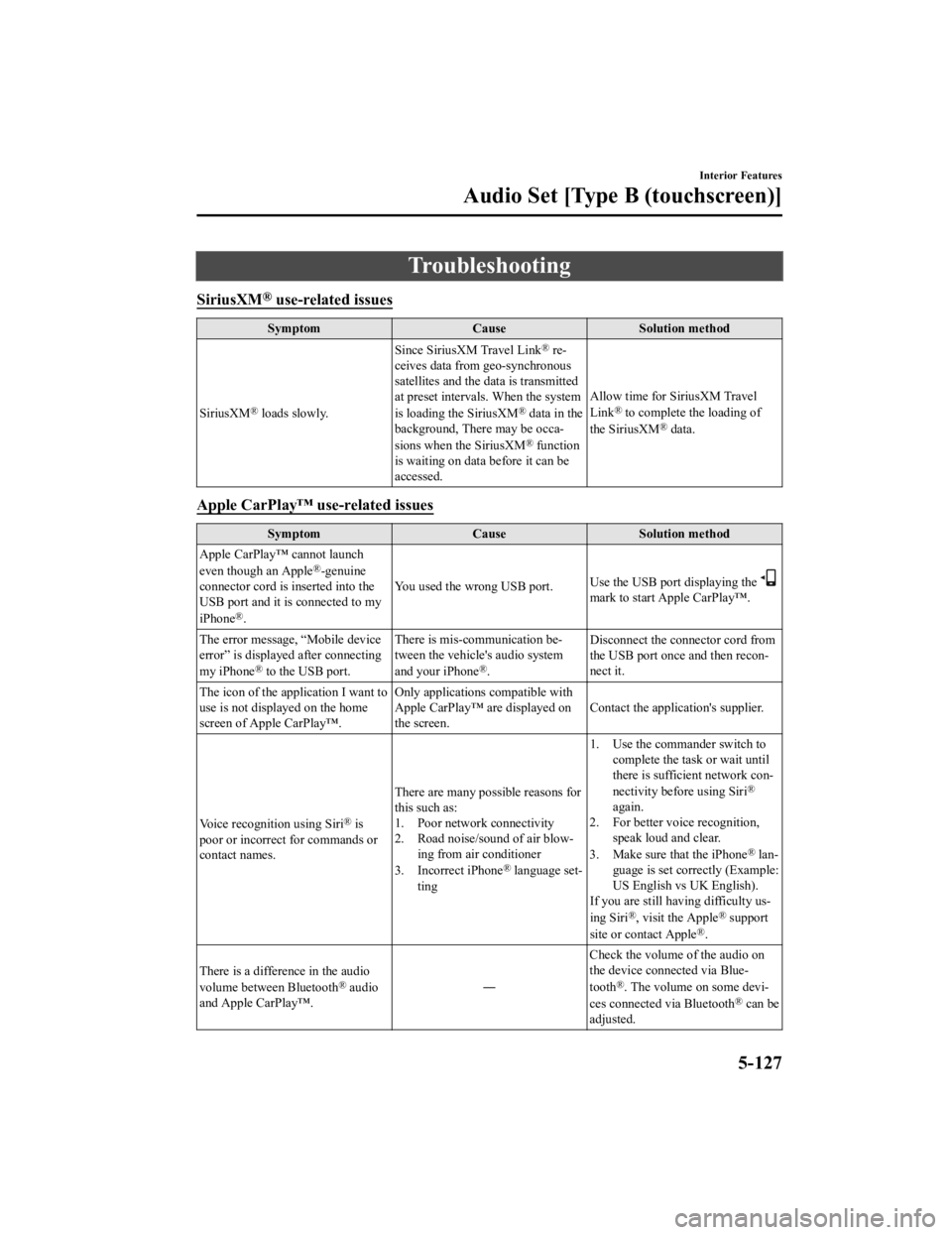
Troubleshooting
SiriusXM® use-related issues
SymptomCauseSolution method
SiriusXM
® loads slowly. Since SiriusXM Travel Link
® re
‐
ceives data from geo-synchronous
satellites and the data is transmitted
at preset intervals. When the system
is loading the SiriusXM
® data in the
background, There may be occa ‐
sions when the SiriusXM
® function
is waiting on data before it can be
accessed. Allow time for SiriusXM Travel
Link
® to complete the loading of
the SiriusXM® data.
Apple CarPlay™ use-related issues
Symptom CauseSolution method
Apple CarPlay™ cannot launch
even though an Apple
®-genuine
connector cord is inserted into the
USB port and it is connected to my
iPhone
®. You used the wrong USB port.
Use the USB port displaying the
mark to start Apple CarPlay™.
The error message, “Mobile device
error” is displaye d after connecting
my iPhone
® to the USB port. There is mis-communication be
‐
tween the vehicle's audio system
and your iPhone®. Disconnect the connector cord from
the USB port once and then recon
‐
nect it.
The icon of the application I want to
use is not displayed on the home
screen of Apple CarPlay™. Only applications compatible with
Apple CarPlay™ are displayed on
the screen.
Contact the application's supplier.
Voice recognition using Siri
® is
poor or incorrect for commands or
contact names. There are many possible reasons for
this such as:
1. Poor network connectivity
2. Road noise/sound of air blow
‐
ing from air conditioner
3. Incorrect iPhone
® language set‐
ting 1. Use the commander switch to
complete the task or wait until
there is sufficient network con ‐
nectivity before using Siri
®
again.
2. For better voice recognition, speak loud and clear.
3. Make sure that the iPhone
® lan ‐
guage is set correctly (Example:
US English vs UK English).
If you are still having difficulty us ‐
ing Siri
®, visit the Apple® support
site or contact Apple®.
There is a difference in the audio
volume between Bluetooth
® audio
and Apple CarPlay™. ―Check the volume of the audio on
the device connected via Blue
‐
tooth®. The volume on some devi ‐
ces connected via Bluetooth® can be
adjusted.
Interior Features
Audio Set [Type B (touchscreen)]
5-127
CX-3_8JL1-EA-20G_Edition1_old 2020-5-22 15:31:00
Page 410 of 618

SymptomCauseSolution method
Apple CarPlay™ cannot be ac‐
cessed using the wireless connec ‐
tion. There are many possible reasons for
this such as:
The iPhone® setting has been
canceled.
The iPhone® is connected to the
USB port and playing music. Set up the wireless connection using
the following procedure.
1. Check the iPhone
® settings
(Wi-Fi™/Apple CarPlay™/
Bluetooth
® settings).
2. Select the iPhone® and connect
it manually. If it cannot be con ‐
nected, register the device
again. Refer to Switching to
Apple CarPlay™ on page 5-86.
Only theBluetooth
® device registra ‐
tion has been done, and the Apple
CarPlay™ wireless connection reg‐
istration has not been completed. Delete the device from the audio
unit and the iPhone®, and register
the device again. Refer to Switching
to Apple CarPlay™ on page 5-86.
The entertainment source has been
switched to Apple CarPlay™. If you operate the iPhone
® connect
‐
ed to Apple CarPlay™, the audio
may switch to Apple CarPlay™. If you want to use an entertainment
source other than Apple CarPlay™
when operating your iPhone®, dis
‐
connect Apple CarPlay™. Refer to
Switching to Apple CarPlay™ on
page 5-86.
The iPhone
®Wi-Fi™ function can‐
not be used. The iPhone® is using the wireless
connection to Apple CarPlay™. Cancel the Apple CarPlay™ wire
‐
less connection using the audio unit
setting or iPhone® setting. Refer to
Switching to Apple CarPlay™ on
page 5-86.
Apple CarPlay™ is not disconnect ‐
ed even if the USB cable is discon ‐
nected. Depending on the iPhone
® connec
‐
tion status, the wireless connection
may be made even if the USB cable
is connected. Cancel the Apple CarPlay™ wire
‐
less connection using the audio unit
setting or iPhone
® setting. Refer to
Switching to Apple CarPlay™ on
page 5-86.
There is no sound. If the connection is disconnected
during music playback using Apple
CarPlay™, the audio source selec
‐
tion will be unselected and the vehi‐
cle's audio device will be muted. Select the audio source from the en
‐
tertainment menu.
When an iPhone
® is not used for
Apple CarPlay™ and is used as a
Bluetooth
® audio device, playback
cannot be performed smoothly. The iPhone
® is trying to connect to
Apple CarPlay™. If Apple CarPlay™ is not used, can‐
cel the Apple CarPlay™ wireless
connection using the audio unit set
‐
ting or iPhone® setting. Refer to
Switching to Apple CarPlay™ on
page 5-86.
Interior Features
Audio Set [Type B (touchscreen)]
5-128
CX-3_8JL1-EA-20G_Edition1_old 2020-5-22 15:31:00
Page 411 of 618
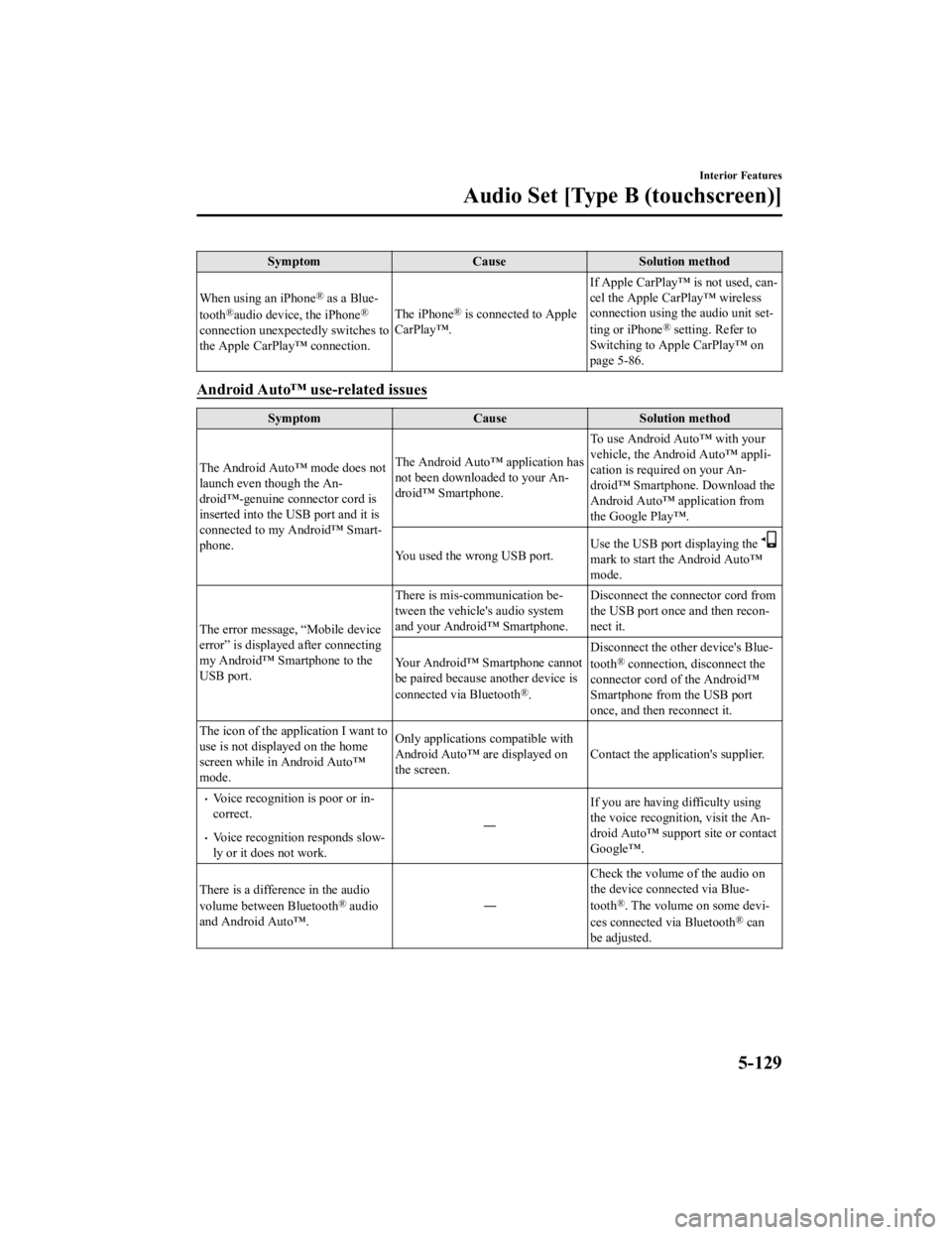
SymptomCauseSolution method
When using an iPhone
® as a Blue‐
tooth®audio device, the iPhone®
connection unexpectedly switches to
the Apple CarPlay™ connection. The iPhone
® is connected to Apple
CarPlay™. If Apple CarPlay™ is not used, can
‐
cel the Apple CarPlay™ wireless
connection using the audio unit set ‐
ting or iPhone® setting. Refer to
Switching to Apple CarPlay™ on
page 5-86.
Android Auto™ use-related issues
Symptom CauseSolution method
The Android Auto™ mode does not
launch even though the An ‐
droid™-genuine connector cord is
inserted into the USB port and it is
connected to my Android™ Smart ‐
phone. The Android Auto™ application has
not been downloaded to your An
‐
droid™ Smartphone. To use Android Auto™ with your
vehicle, the Android Auto™ appli
‐
cation is required on your An ‐
droid™ Smartphone. Download the
Android Auto™ application from
the Google Play™.
You used the wrong USB port. Use the USB port displaying the
mark to start the Android Auto™
mode.
The error message, “Mobile device
error” is displaye d after connecting
my Android™ Smartphone to the
USB port. There is mis-communication be
‐
tween the vehicle's audio system
and your Android™ Smartphone. Disconnect the connector cord from
the USB port once and then recon‐
nect it.
Your Android™ Smartphone cannot
be paired because another device is
connected via Bluetooth
®. Disconnect the other device's Blue
‐
tooth
® connection, disconnect the
connector cord of the Android™
Smartphone from the USB port
once, and then reconnect it.
The icon of the application I want to
use is not displayed on the home
screen while in Android Auto™
mode. Only applications compatible with
Android Auto™ are displayed on
the screen.
Contact the application's supplier.
Voice recognition is poor or in
‐
correct.
Voice recognition responds slow ‐
ly or it does not work. ―
If you are having difficulty using
the voice recognition, visit the An
‐
droid Auto™ support site or contact
Google™.
There is a difference in the audio
volume between Bluetooth
® audio
and Android Auto™. ―Check the volume of the audio on
the device connected via Blue
‐
tooth®. The volume on some devi ‐
ces connected via Bluetooth® can
be adjusted.
Interior Features
Audio Set [Type B (touchscreen)]
5-129
CX-3_8JL1-EA-20G_Edition1_old 2020-5-22 15:31:00